audio Peugeot Partner Tepee 2015 User Guide
[x] Cancel search | Manufacturer: PEUGEOT, Model Year: 2015, Model line: Partner Tepee, Model: Peugeot Partner Tepee 2015Pages: 276, PDF Size: 12.76 MB
Page 195 of 276
01
10.5
Partner_2_VP_en_Chap10b_RT6-2-8_ed02-2014
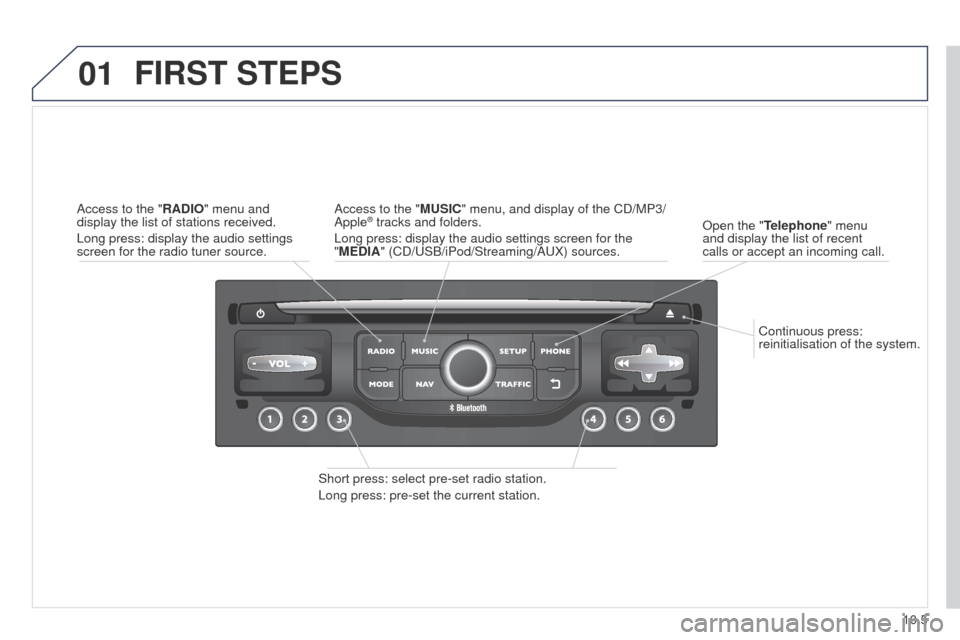
Continuous press:
reinitialisation of the system.
Open the "Telephone" menu
and display the list of recent
calls or accept an incoming call.
FIRST STEPS
Short press: select pre-set radio station.
Long press: pre-set the current station. Access to the "MUSIC" menu, and display of the CD/MP3/
Apple
® tracks and folders.
Long press: display the audio settings screen for the
"MEDIA" (CD/
u SB/iPod/Streaming/A u X) sources.
Access to the "RADIO" menu and
display the list of stations received.
Long press: display the audio settings
screen for the radio tuner source.
Page 196 of 276
02
10.6
Partner_2_VP_en_Chap10b_RT6-2-8_ed02-2014
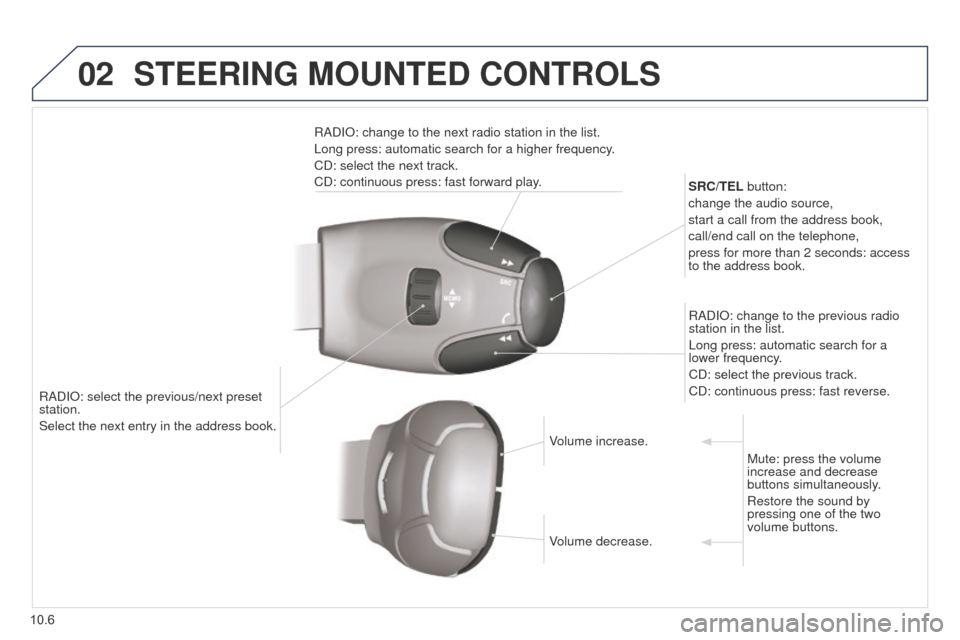
RADIO: select the previous/next preset
station.
Select the next entry in the address book.SRC/TEL button:
change the audio source,
start a call from the address book,
call/end call on the telephone,
press for more than 2 seconds: access
to the address book.
RADIO: change to the previous radio
station in the list.
Long press: automatic search for a
lower frequency.
CD: select the previous track.
CD: continuous press: fast reverse.
RADIO: change to the next radio station in the list.
Long press: automatic search for a higher frequency.
CD: select the next track.
CD: continuous press: fast forward play.
Volume increase.
Volume decrease.Mute: press the volume
increase and decrease
buttons simultaneously.
Restore the sound by
pressing one of the two
volume buttons.
STEERING MOUNTED CONTROLS
Page 197 of 276
03
10.7
Partner_2_VP_en_Chap10b_RT6-2-8_ed02-2014
For the details of the menus, refer to the "Screen menu map"
section.
For cleaning the screen, the use of a soft, non-abrasive cloth
(spectacles cloth) is recommended, with no additional product.
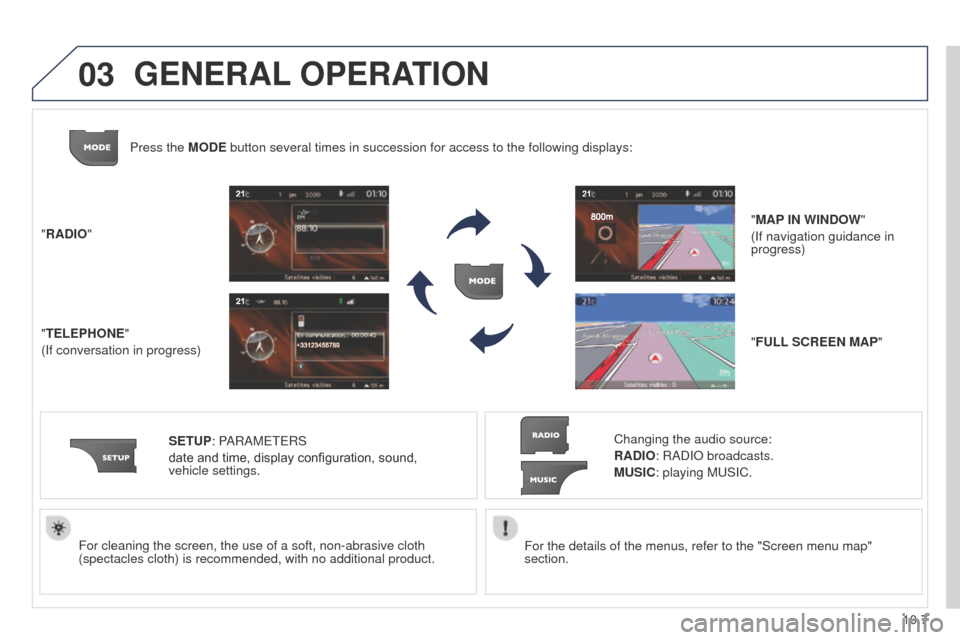
"RADIO"
"TELEPHONE"
(If conversation in progress)
SETUP: PARAM
ete
RS
date and time, display configuration, sound,
vehicle
settings.
Changing the audio source:
RADIO: RADIO broadcasts.
MUSIC: playing Mu SIC.
Press the MODE button several times in succession for access to the following displays\
:
"FULL SCREEN MAP" "MAP IN WINDOW"
(If navigation guidance in
progress)
GENERAL OPERATION
Page 201 of 276
04
10.11
Partner_2_VP_en_Chap10b_RT6-2-8_ed02-2014
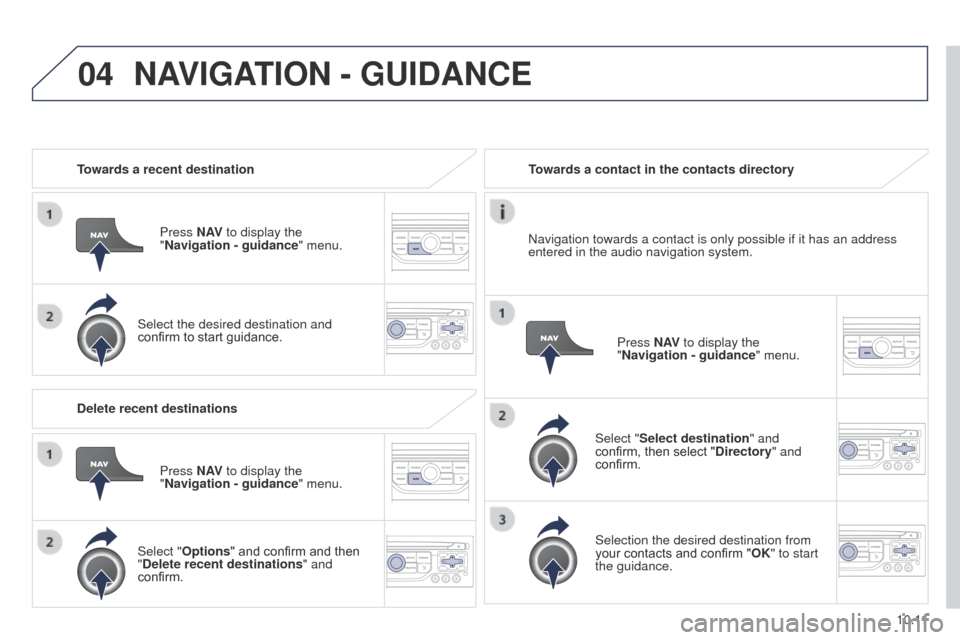
Towards a recent destinationPress N AV to display the
"Navigation - guidance " menu.
Select the desired destination and
confirm to start guidance. Towards a contact in the contacts directory
Select "Select destination" and
confirm, then select "Directory " and
confirm.
Selection the desired destination from
your contacts and confirm "OK" to start
the guidance. Press N AV
to display the
"Navigation - guidance " menu.
Navigation towards a contact is only possible if it has an address
entered in the audio navigation system.
Delete recent destinations Press N AV to display the
"Navigation - guidance " menu.
Select "Options " and confirm and then
"Delete recent destinations" and
confirm.
NAVIGATION - GUIDANCE
Page 214 of 276

05
10.24
Partner_2_VP_en_Chap10b_RT6-2-8_ed02-2014
Principal TMC symbols
Red and yellow triangle: traffic information, for example:
Black and blue triangle: general information, for example:
Weather reports
Modified signage
Risk of explosion Traffic reports
Narrow carriageway
Road closed
Wind
Slippery surface
Demonstration Fog
Accident
Danger
Parking
Delay
No entry Snow / ice
Roadworks
Traffic jam
Receiving TA messages
The TA (Traffic Announcement) function gives priority to TA alert
messages. to operate, this function needs good reception of a
radio station transmitting this type of message. When a traffic report
is transmitted, the current audio source (Radio, CD,
u SB, ...) is
interrupted automatically to play the
tA
message. Normal playback
of the audio source resumes at the end of the transmission of the
message.
Press RADIO to display the menu.
Select "Service announcements" then
confirm.
Activate or deactivate "TA " then confirm.
t
he volume setting for
tA
messages can be adjusted only during the
transmission of this type of alert.
Activate or deactivate the function at any time by pressing
the button.
During a message, press the button to interrupt it.
TRAFFIC INFORMATION
Page 216 of 276
06
10.26
Partner_2_VP_en_Chap10b_RT6-2-8_ed02-2014
USING THE TELEPHONE
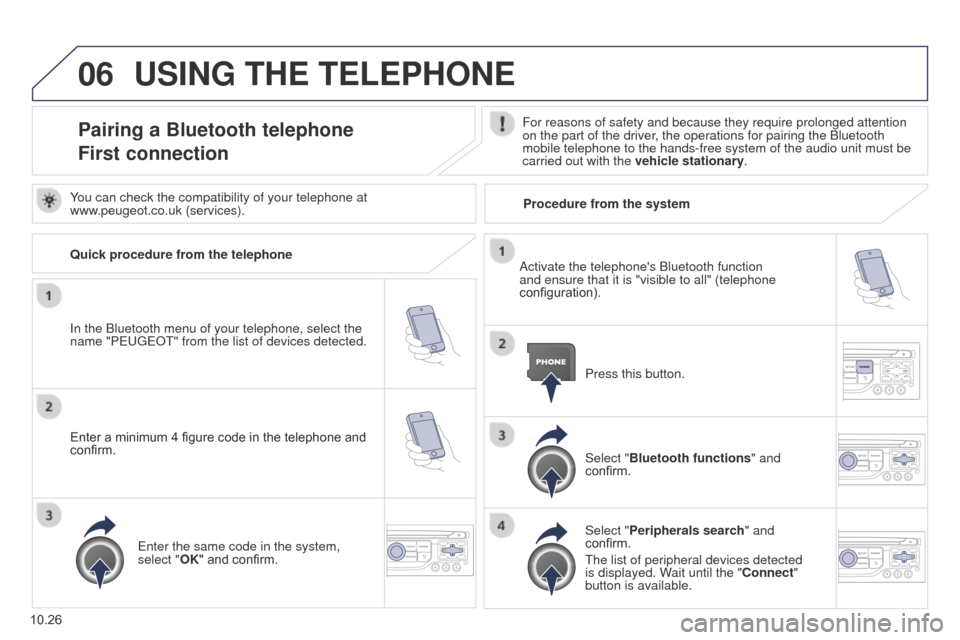
Pairing a Bluetooth telephone
First connectionFor reasons of safety and because they require prolonged attention
on the part of the driver, the operations for pairing the Bluetooth
mobile telephone to the hands-free system of the audio unit must be
carried out with the vehicle stationary.
In the Bluetooth menu of your telephone, select the
name "Peuge
O
t" from the list of devices detected. Press this button.
Select "Bluetooth functions" and
confirm.
Select "Peripherals search " and
confirm.
t
he list of peripheral devices detected
is displayed. Wait until the "Connect"
button is available.
You can check the compatibility of your telephone at
www.peugeot.co.uk (services).
Activate the telephone's Bluetooth function
and ensure that it is "visible to all" (telephone
configuration).
Quick procedure from the telephone
Enter a minimum 4 figure code in the telephone and
confirm.
e
nter the same code in the system,
select "OK" and confirm. Procedure from the system
Page 217 of 276
06
10.27
Partner_2_VP_en_Chap10b_RT6-2-8_ed02-2014
USING THE TELEPHONE
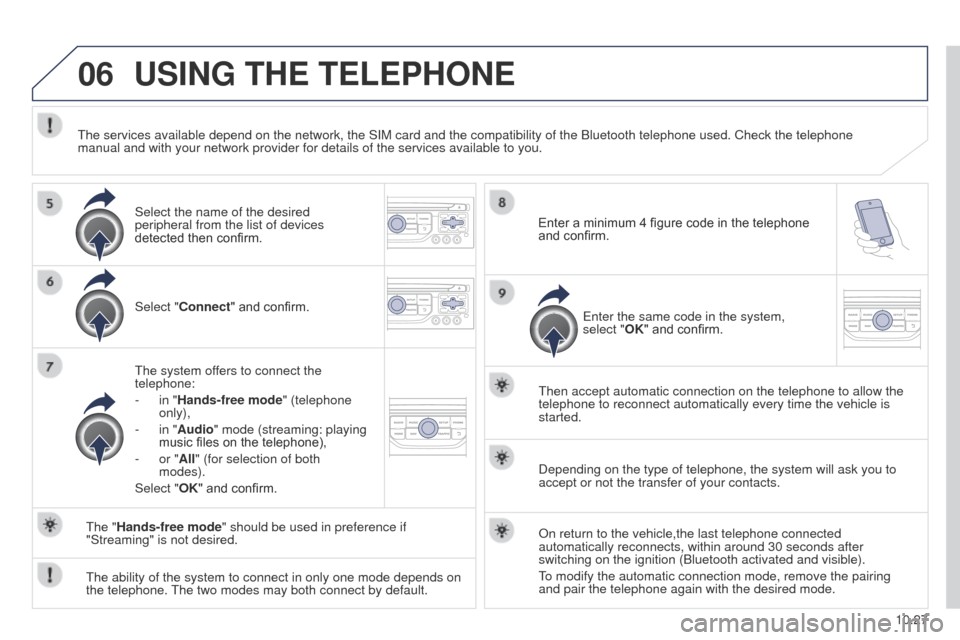
Select "Connect" and confirm.
t
he system offers to connect the
telephone:
-
in "
Hands-free mode" (telephone
only),
-
in "
Audio" mode (streaming: playing
music files on the telephone),
-
or "
All" (for selection of both
modes).
Select "OK" and confirm.
t
hen accept automatic connection on the telephone to allow the
telephone to reconnect automatically every time the vehicle is
started.
t
he ability of the system to connect in only one mode depends on
the telephone.
t
he two modes may both connect by default.
t
he "Hands-free mode" should be used in preference if
"Streaming" is not desired.
t
he services available depend on the network, the SIM card and the compat\
ibility of the Bluetooth telephone used. Check the telephone
manual and with your network provider for details of the services availa\
ble to you.
Depending on the type of telephone, the system will ask you to
accept or not the transfer of your contacts.
On return to the vehicle,the last telephone connected
automatically reconnects, within around 30 seconds after
switching on the ignition (Bluetooth activated and visible).
to modify the automatic connection mode, remove the pairing
and pair the telephone again with the desired mode.
Enter a minimum 4 figure code in the telephone
and confirm.
e
nter the same code in the system,
select "OK" and confirm.
Select the name of the desired
peripheral from the list of devices
detected then confirm.
Page 225 of 276
07
10.35
Partner_2_VP_en_Chap10b_RT6-2-8_ed02-2014
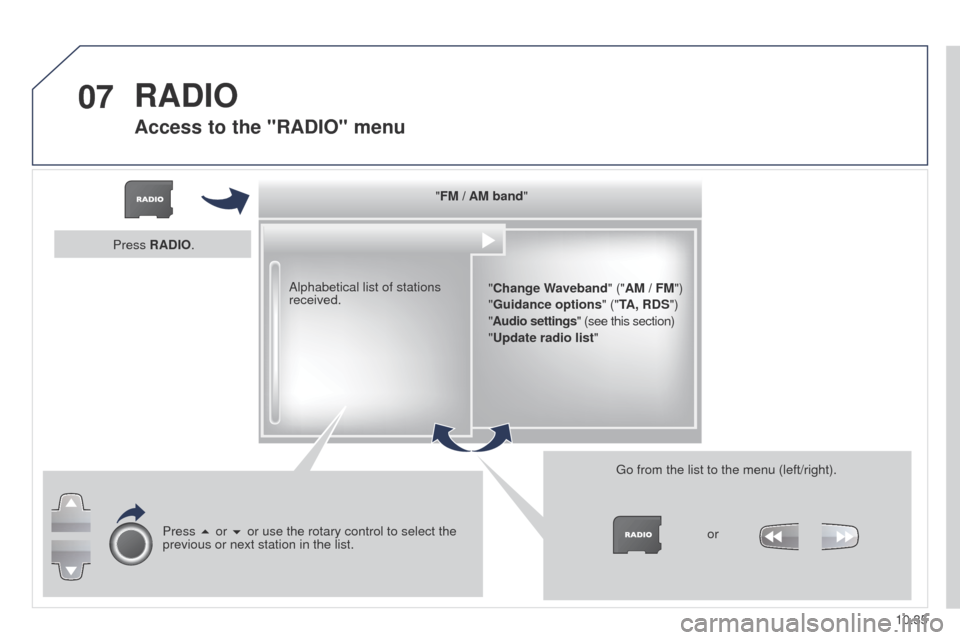
"FM / AM band""Change Waveband" ("AM / FM")
"Guidance options " ("TA, RDS")
" Audio settings" (see this section)
"Update radio list "
Alphabetical list of stations
received.
Press 5 or 6 or use the rotary control to select the
previous or next station in the list.
g
o from the list to the menu (left/right).or
Press RADIO.
RADIO
Access to the "RADIO" menu
Page 226 of 276
07
10.36
Partner_2_VP_en_Chap10b_RT6-2-8_ed02-2014
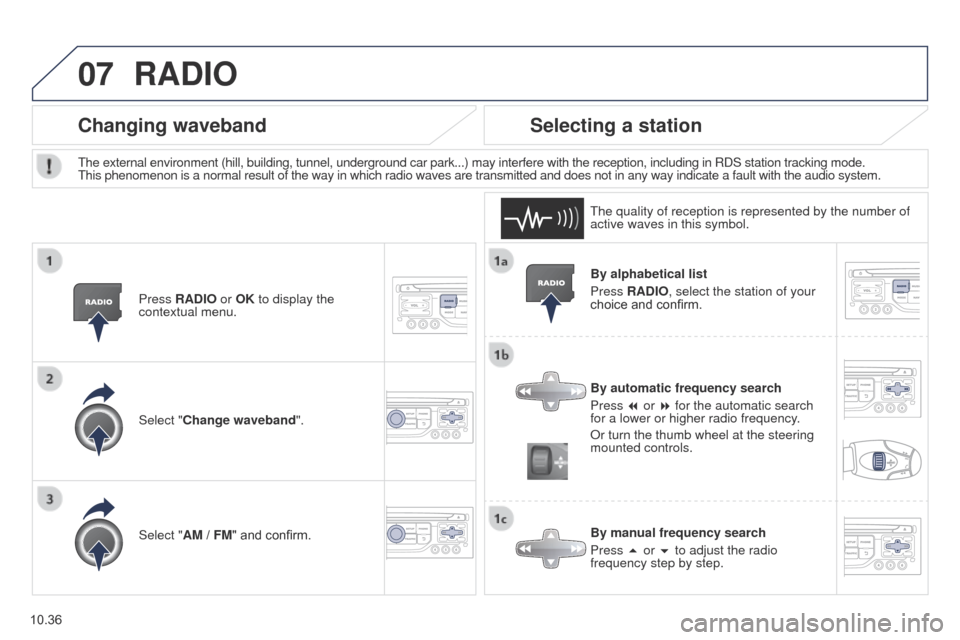
By alphabetical list
Press RADIO, select the station of your
choice and confirm.
By automatic frequency search
Press 7 or 8 for the automatic search
for a lower or higher radio frequency.
Or turn the thumb wheel at the steering
mounted controls.
By manual frequency search
Press 5 or 6 to adjust the radio
frequency step by step.
Selecting a station
the external environment (hill, building, tunnel, underground car park..\
.) may interfere with the reception, including in RDS station tracking mode. this phenomenon is a normal result of the way in which radio waves are transm\
itted and does not in any way indicate a fault with the audio system.
t
he quality of reception is represented by the number of
active waves in this symbol.
Press RADIO or OK to display the
contextual menu.
Changing waveband
Select "Change waveband".
Select "AM / FM" and confirm.
RADIO
Page 228 of 276
08
10.38
Partner_2_VP_en_Chap10b_RT6-2-8_ed02-2014
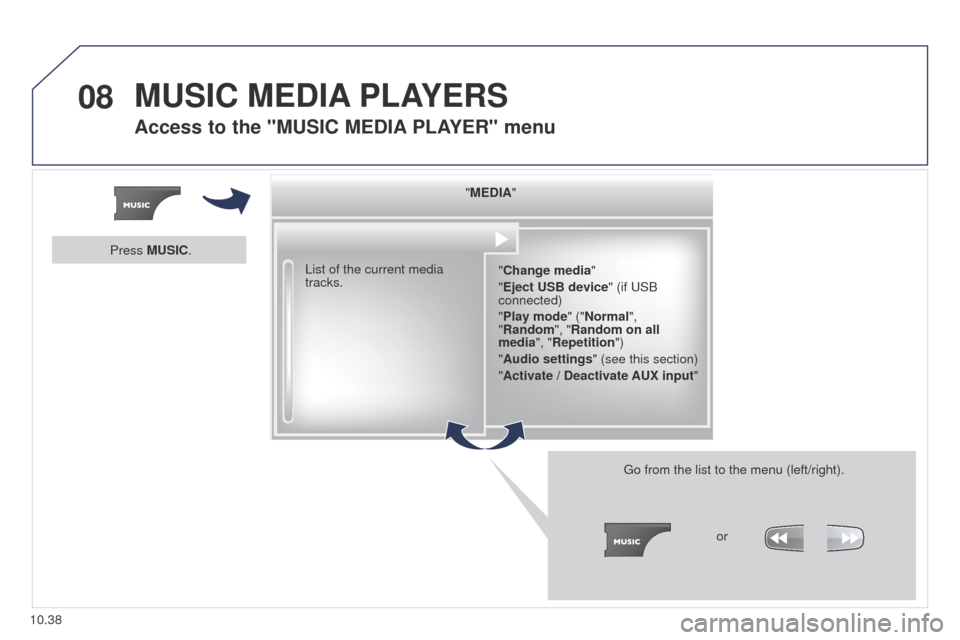
"MEDIA""Change media"
"Eject USB device" (if
u SB
connected)
"Play mode" ("Normal",
"Random", "Random on all
media", "Repetition")
"Audio settings " (see this section)
"Activate / Deactivate AUX input "
List of the current media
tracks.
g
o from the list to the menu (left/right).or
Press MUSIC.
MUSIC MEDIA
PLAYERS
Access to the "MUSIC MEDIA PLAYER " menu