display Peugeot Partner Tepee 2015 Workshop Manual
[x] Cancel search | Manufacturer: PEUGEOT, Model Year: 2015, Model line: Partner Tepee, Model: Peugeot Partner Tepee 2015Pages: 276, PDF Size: 12.76 MB
Page 236 of 276
10
10.46
Partner_2_VP_en_Chap10b_RT6-2-8_ed02-2014
CONFIGURATION
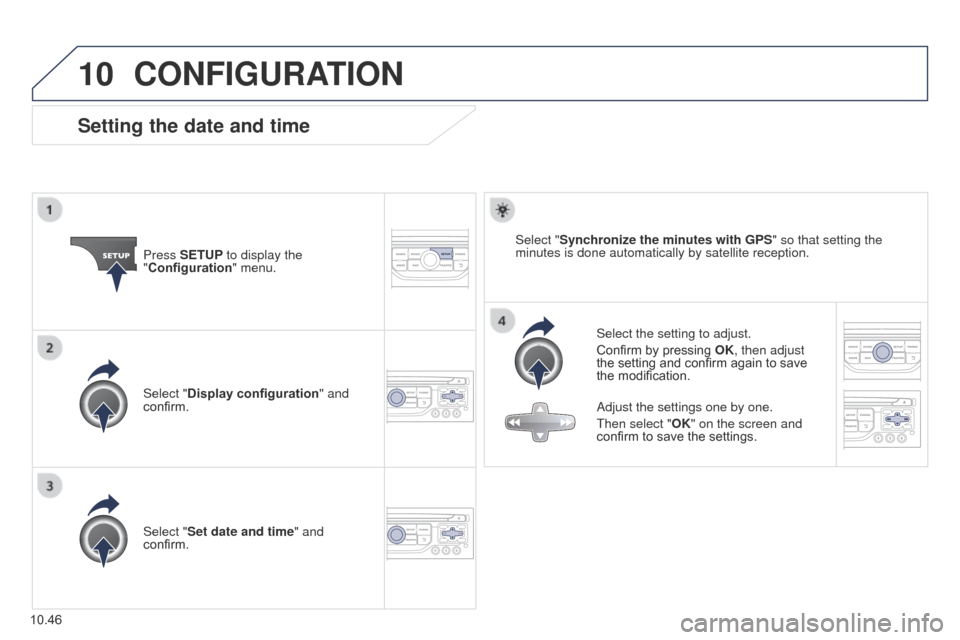
Setting the date and time
Select the setting to adjust.
Confirm by pressing OK, then adjust
the setting and confirm again to save
the modification.
Press SETUP to display the
"Configuration
" menu.
Adjust the settings one by one.
t
hen select "OK" on the screen and
confirm to save the settings.
Select "Synchronize the minutes with GPS
" so that setting the
minutes is done automatically by satellite reception.
Select "Display configuration " and
confirm.
Select "Set date and time" and
confirm.
Page 237 of 276
11
10.47
Partner_2_VP_en_Chap10b_RT6-2-8_ed02-2014
TRIP COMPUTER
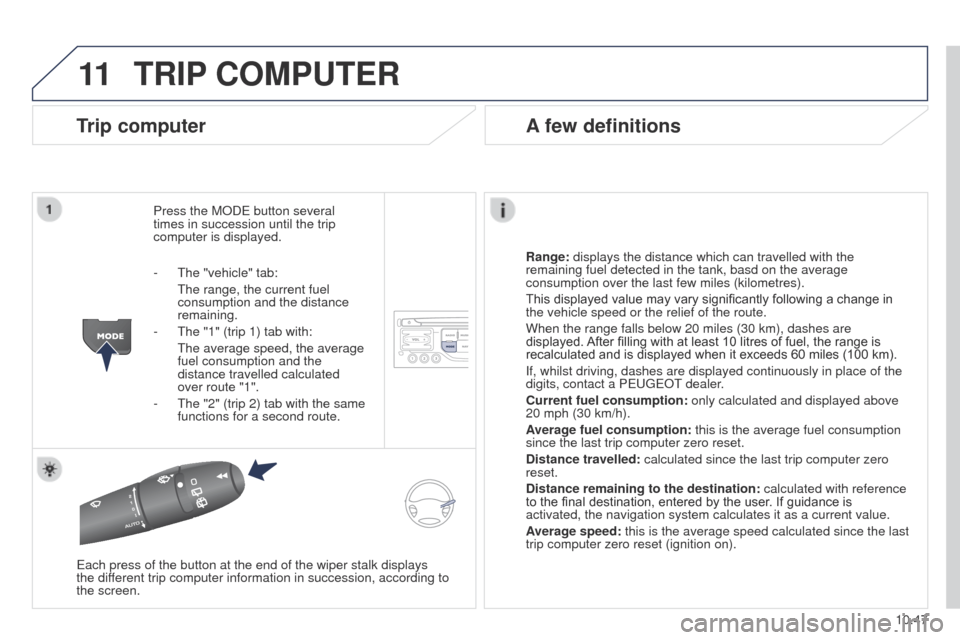
Trip computer
Press the MODe button several
times in succession until the trip
computer is displayed.
Range:
displays the distance which can travelled with the
remaining fuel detected in the tank, basd on the average
consumption over the last few miles (kilometres).
This displayed value may vary significantly following a change in
the vehicle speed or the relief of the route.
When the range falls below 20 miles (30 km), dashes are
displayed. After filling with at least 10 litres of fuel, the range is
recalculated and is displayed when it exceeds 60 miles (100 km).
If, whilst driving, dashes are displayed continuously in place of the
digits, contact a P
euge O t
dealer
.
Current fuel consumption:
only calculated and displayed above
20 mph (30 km/h).
Average fuel consumption: this is the average fuel consumption
since the last trip computer zero reset.
Distance travelled: calculated since the last trip computer zero
reset.
Distance remaining to the destination:
calculated with reference
to the final destination, entered by the user. If guidance is
activated, the navigation system calculates it as a current value.
Average speed: this is the average speed calculated since the last
trip computer zero reset (ignition on).
e
ach press of the button at the end of the wiper stalk displays
the
different trip computer information in succession, according to
the screen.
A few definitions
- the "vehicle" tab:
t he range, the current fuel
consumption and the distance
remaining.
-
t he "1" (trip 1) tab with:
t he average speed, the average
fuel consumption and the
distance travelled calculated
over route "1".
-
t he "2" (trip 2) tab with the same
functions for a second route.
Page 239 of 276
12
10.49
Partner_2_VP_en_Chap10b_RT6-2-8_ed02-2014
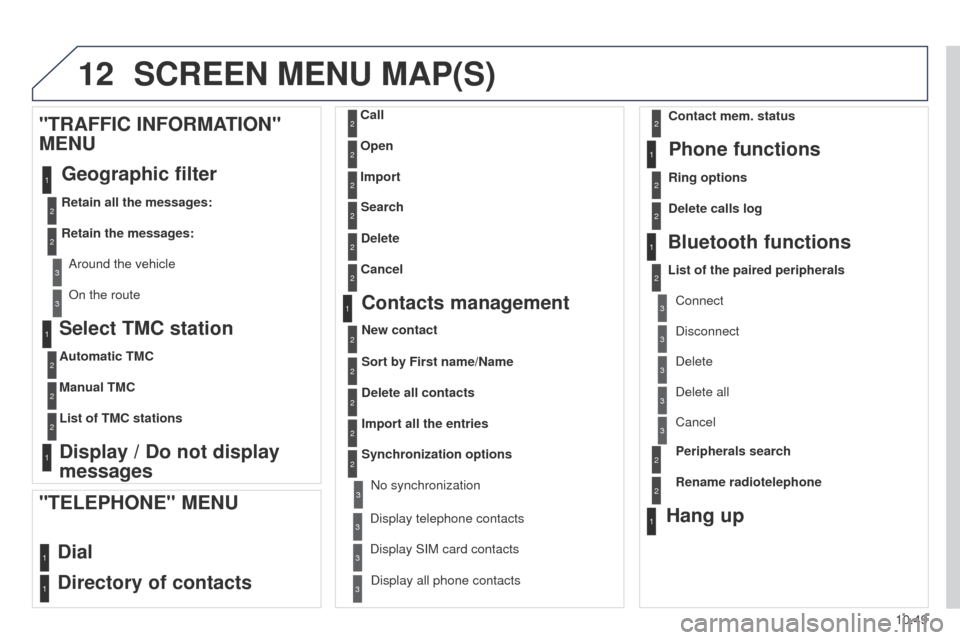
Select TMC station
Automatic TMC
Manual TMC
List of TMC stations
Display / Do not display
messages
"TRAFFIC INFORMATION"
MENU
Geographic filter
Retain all the messages:
Retain the messages:
Around the vehicle
On the route
1
2
2
2
1
2
2
3
3
1
SCREEN MENU MAP(S)
Dial
Directory of contacts
Call
Open
Import
"TELEPHONE" MENU
1
2
2
2
1
2
2
2
2
2
1
2
3
3
3
2
2
2
1
1
1
3
3
3
2
3
2
2
3
List of the paired peripherals Connect
Disconnect
Delete
Delete all
Phone functions
Ring options Contact mem. status
Delete calls log
Bluetooth functions
Peripherals search
Rename radiotelephone
Hang up
Display all phone contacts
Delete Search
Contacts management
New contact
Delete all contacts
Import all the entries
Synchronization options
Display telephone contactsNo synchronization
Display SIM card contacts
2Cancel
2Sort by First name/Name
3Cancel
Page 241 of 276
12
10.51
Partner_2_VP_en_Chap10b_RT6-2-8_ed02-2014
2
3
3
1
4
2
2
1
4
4
2
2
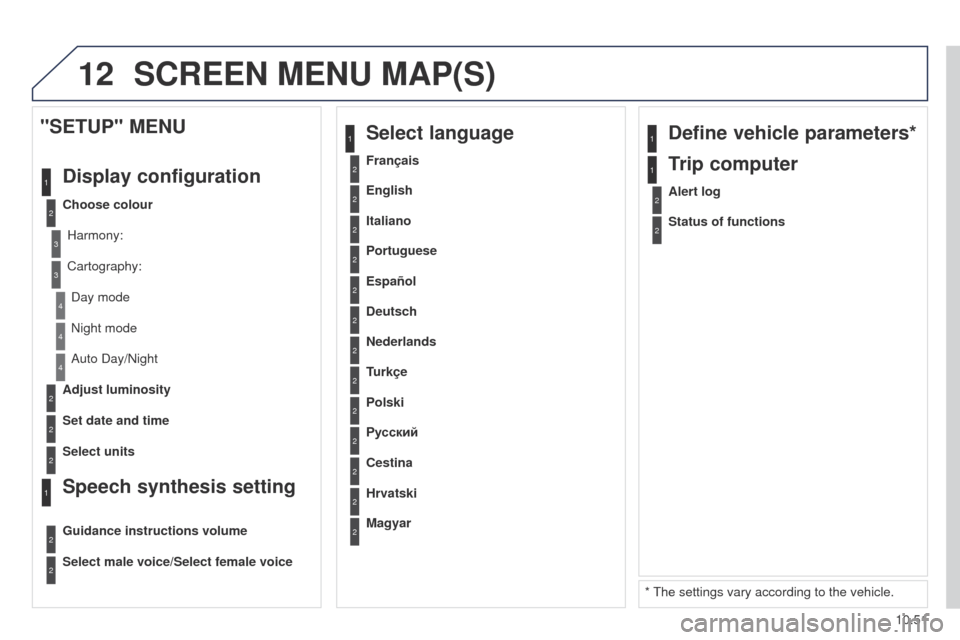
Night mode
Auto Day/Night
Adjust luminosity
Set date and time
"SETUP" MENU
Display configuration
Choose colourHarmony:
Cartography:Day mode
Speech synthesis setting
Guidance instructions volume
Select male voice/Select female voice
2Select units
1Define vehicle parameters*
* t he settings vary according to the vehicle.
2Alert log
1Trip computer
2Status of functions
2Français
1Select language
2English
2Italiano
2Portuguese
2Español
2Deutsch
2Nederlands
2
2
Turkçe
Cestina
2
2
Polski
Hrvatski
2
2
Русский
Magyar
SCREEN MENU MAP(S)
Page 243 of 276
10.53
Partner_2_VP_en_Chap10b_RT6-2-8_ed02-2014
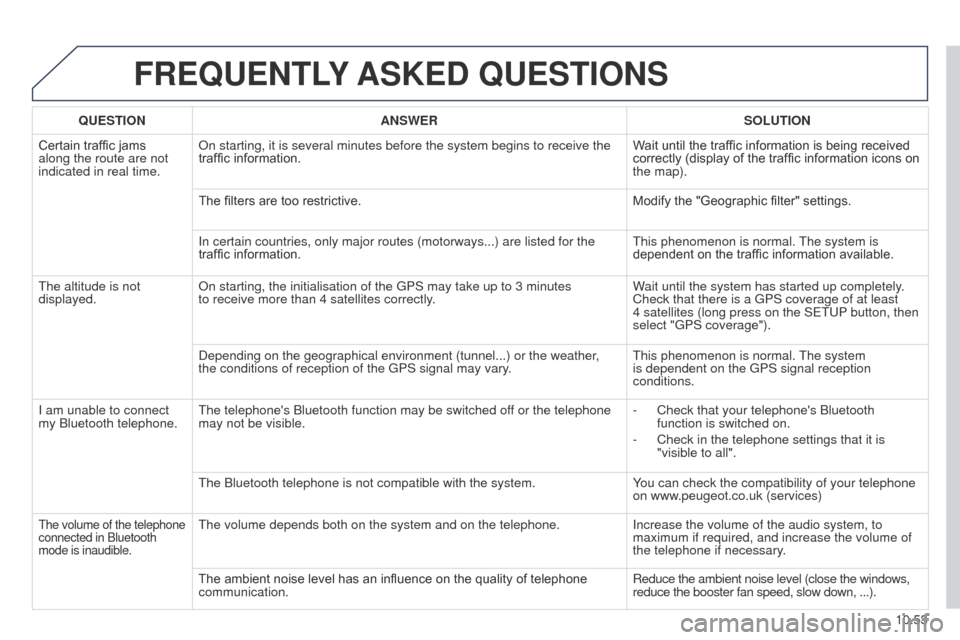
FREQUENTLY ASKED QUESTIONS
QUESTION ANSWER SOLUTION
Certain traffic jams
along the route are not
indicated in real time. On starting, it is several minutes before the system begins to receive t\
he
traffic information.
Wait until the traffic information is being received
correctly (display of the traffic information icons on
the map).
The filters are too restrictive. Modify the "Geographic filter" settings.
In certain countries, only major routes (motorways...) are listed for \
the
traffic information.
t
his phenomenon is normal.
t
he system is
dependent on the traffic information available.
t
he altitude is not
displayed. On starting, the initialisation of the
g PS may take up to 3 minutes
to
receive more than 4 satellites correctly. Wait until the system has started up completely.
Check that there is a
g PS coverage of at least
4
satellites (long press on the S etu P button, then
select "
g PS coverage").
Depending on the geographical environment (tunnel...) or the weather,
the conditions of reception of the
g PS signal may vary.
t
his phenomenon is normal.
t
he system
is dependent on the
g PS signal reception
conditions.
I am unable to connect
my Bluetooth telephone.
t
he telephone's Bluetooth function may be switched off or the telephone
may not be visible. -
Check that your telephone's Bluetooth
function is switched on.
-
Check in the telephone settings that it is
"visible to all".
t
he Bluetooth telephone is not compatible with the system. You can check the compatibility of your telephone
on www.peugeot.co.uk (services)
the volume of the telephone
connected in Bluetooth
mode is inaudible.the volume depends both on the system and on the telephone. Increase the volume of the audio system, to
maximum if required, and increase the volume of
the telephone if necessary
.
The ambient noise level has an influence on the quality of telephone
communication. Reduce the ambient noise level (close the windows,
reduce the booster fan speed, slow down, ...).
Page 244 of 276
10.54
Partner_2_VP_en_Chap10b_RT6-2-8_ed02-2014
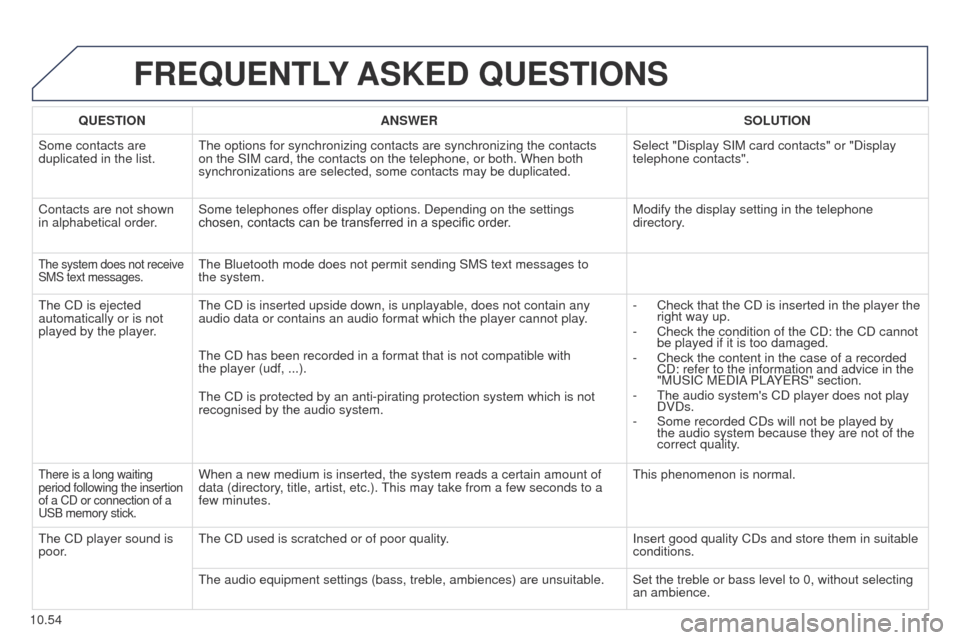
FREQUENTLY ASKED QUESTIONS
QUESTION ANSWER SOLUTION
Some contacts are
duplicated in the list.
t
he options for synchronizing contacts are synchronizing the contacts
on the SIM card, the contacts on the telephone, or both. When both
synchronizations are selected, some contacts may be duplicated. Select "Display SIM card contacts" or "Display
telephone contacts".
Contacts are not shown
in alphabetical order. Some telephones offer display options. Depending on the settings
chosen, contacts can be transferred in a specific order. Modify the display setting in the telephone
directory.
the system does not receive
SMS text messages.the Bluetooth mode does not permit sending SMS text messages to
the system.
t
he CD is ejected
automatically or is not
played by the player.
t
he CD is inserted upside down, is unplayable, does not contain any
audio data or contains an audio format which the player cannot play. -
Check that the CD is inserted in the player the
right way up.
-
Check the condition of the CD: the CD cannot
be played if it is too damaged.
-
Check the content in the case of a recorded
CD: refer to the information and advice in the
"M
u SIC M e DIA PLAY e RS" section.
-
t he audio system's CD player does not play
DVDs.
-
Some recorded CDs will not be played by
the audio system because they are not of the
correct quality
.
t
he CD has been recorded in a format that is not compatible with
the
player (udf, ...).
t
he CD is protected by an anti-pirating protection system which is not
recognised by the audio system.
there is a long waiting
period following the insertion
of a CD or connection of a
u
SB memory stick.When a new medium is inserted, the system reads a certain amount of
data (directory, title, artist, etc.). t his may take from a few seconds to a
few minutes.t his phenomenon is normal.
t
he CD player sound is
poor.
t
he CD used is scratched or of poor quality. Insert good quality CDs and store them in suitable
conditions.
t
he audio equipment settings (bass, treble, ambiences) are unsuitable. Set the treble or bass level to 0, without selecting an ambience.
Page 245 of 276
10.55
Partner_2_VP_en_Chap10b_RT6-2-8_ed02-2014
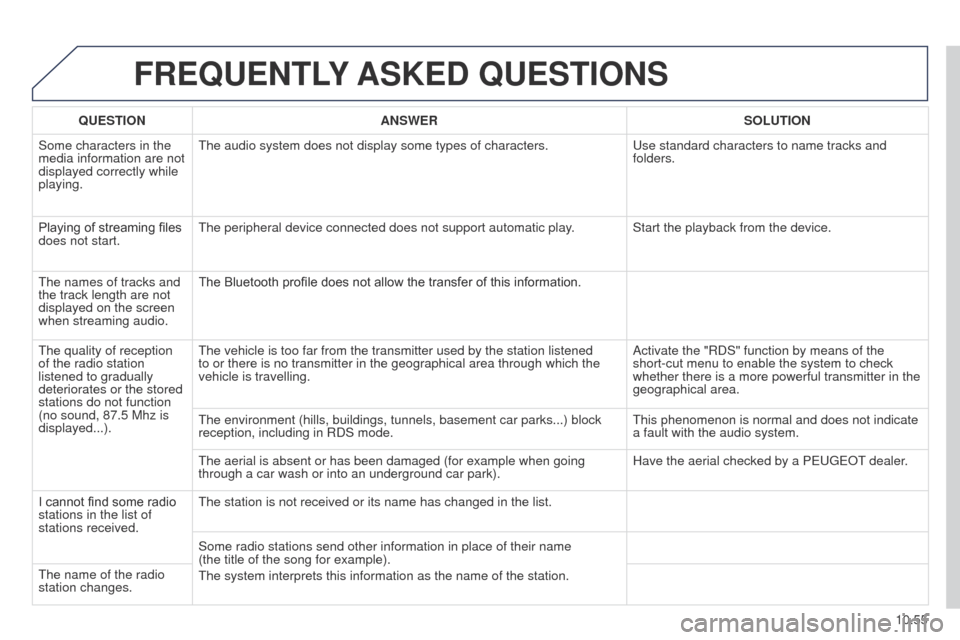
FREQUENTLY ASKED QUESTIONS
QUESTION ANSWER SOLUTION
Some characters in the
media information are not
displayed correctly while
playing.
t
he audio system does not display some types of characters.
u
se standard characters to name tracks and
folders.
Playing of streaming files
does not start.
t
he peripheral device connected does not support automatic play. Start the playback from the device.
t
he names of tracks and
the track length are not
displayed on the screen
when streaming audio. The Bluetooth profile does not allow the transfer of this information.
t
he quality of reception
of the radio station
listened to gradually
deteriorates or the stored
stations do not function
(no sound, 87.5
Mhz is
displayed...).
t
he vehicle is too far from the transmitter used by the station listened \
to or there is no transmitter in the geographical area through which the\
vehicle is travelling. Activate the "RDS" function by means of the
short-cut menu to enable the system to check
whether there is a more powerful transmitter in the
geographical area.
t
he environment (hills, buildings, tunnels, basement car parks...) bloc\
k
reception, including in RDS mode.
t
his phenomenon is normal and does not indicate
a fault with the audio system.
t
he aerial is absent or has been damaged (for example when going
through a car wash or into an underground car park). Have the aerial checked by a P
euge O t
dealer
.
I cannot find some radio
stations in the list of
stations received.
t
he station is not received or its name has changed in the list.
Some radio stations send other information in place of their name
(the
title of the song for example).
t
he system interprets this information as the name of the station.
t
he name of the radio
station changes.
Page 250 of 276
01
10.60
Partner_2_VP_en_Chap10c_RD45_ed02_2014
FIRST STEPS
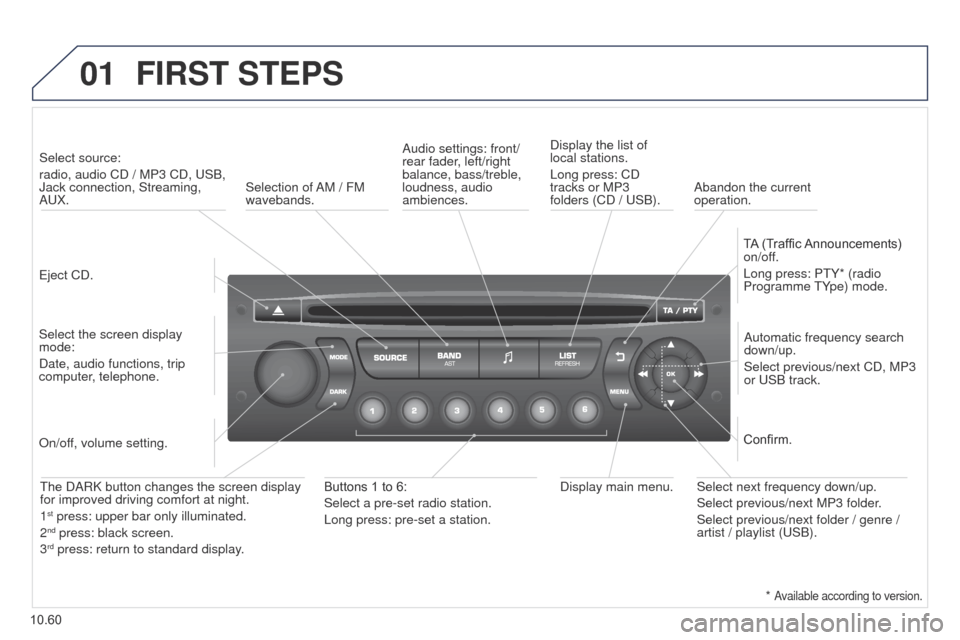
eject CD.
Select source:
radio, audio CD / MP3 CD,
u SB,
Jack connection, Streaming,
A u X.
Select the screen display
mode:
Date, audio functions, trip
computer, telephone. Automatic frequency search
down/up.
Select previous/next CD, MP3
or
u SB track.
Audio settings: front/
rear fader, left/right
balance, bass/treble,
loudness, audio
ambiences.
Display the list of
local stations.
Long press: CD
tracks or MP3
folders (CD / u SB).
TA (Traffic Announcements)
on/off.
Long press: P t Y* (radio
Programme t Ype) mode.
Display main menu.
t
he DARK button changes the screen display
for improved driving comfort at night.
1
st press: upper bar only illuminated.
2nd press: black screen.
3rd press: return to standard display.
On/off, volume setting.
Buttons 1 to 6:
Select a pre-set radio station.
Long press: pre-set a station. Select next frequency down/up.
Select previous/next MP3 folder.
Select previous/next folder / genre /
artist / playlist (
u SB).
Confirm.
Selection of AM / FM
wavebands.
Abandon the current
operation.
*
Available according to version.
Page 252 of 276
03
10.62
Partner_2_VP_en_Chap10c_RD45_ed02_2014
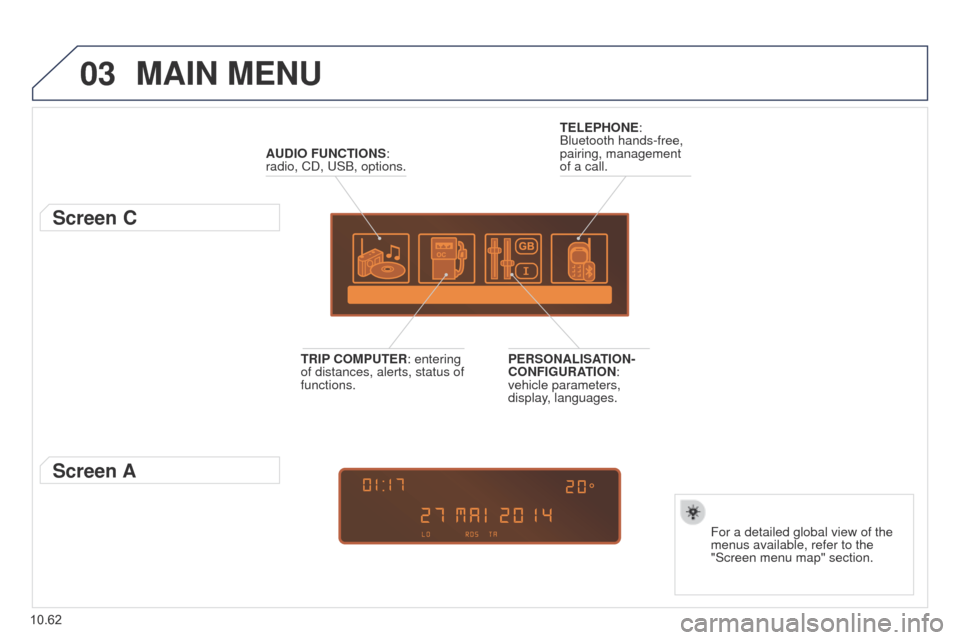
MAIN MENU
AUDIO FUNCTIONS:
radio, CD, u SB, options.
Screen C
For a detailed global view of the
menus available, refer to the
"Screen menu map" section.
TELEPHONE:
Bluetooth hands-free,
pairing, management
of a call.
PERSONALISATION-
CONFIGURATION:
vehicle parameters,
display, languages.
TRIP COMPUTER: entering
of distances, alerts, status of
functions.
Screen A
Page 253 of 276
04
10.63
Partner_2_VP_en_Chap10c_RD45_ed02_2014
AUDIO
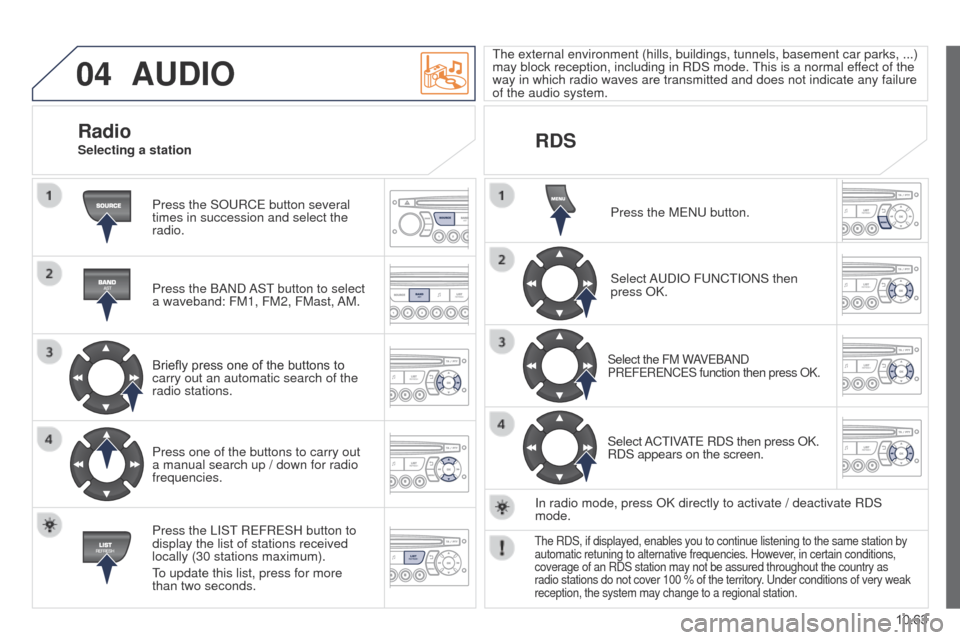
Press the SOuRCe button several
times in succession and select the
radio.
Press the BAND
AS t
button to select
a waveband: FM1, FM2, FMast,
AM.
Briefly press one of the buttons to
carry out an automatic search of the
radio stations.
Press one of the buttons to carry out
a manual search up / down for radio
frequencies.
Press the LIS
t
R
e FR e SH button to
display the list of stations received
locally (30 stations maximum).
to update this list, press for more
than two seconds.
t
he external environment (hills, buildings, tunnels, basement car parks, ...)
may block reception, including in RDS mode.
t
his is a normal effect of the
way in which radio waves are transmitted and does not indicate any failu\
re
of the audio system.
RDS
RadioSelecting a station
Press the M e N u button.
Select A
u DIO F u NC t IONS then
press OK.
Select the FM WAVeBAND
PR e F e R e NC e S function then press OK.
Select ACtIVAte RDS then press OK.
RDS appears on the screen.
In radio mode, press OK directly to activate / deactivate RDS
mode.
the RDS, if displayed, enables you to continue listening to the same stat\
ion by
automatic retuning to alternative frequencies. However , in certain conditions,
coverage of an RDS station may not be assured throughout the country as
radio stations do not cover 100 % of the territory.
u nder conditions of very weak
reception, the system may change to a regional station.