ESP Peugeot Partner Tepee 2017 Owner's Guide
[x] Cancel search | Manufacturer: PEUGEOT, Model Year: 2017, Model line: Partner Tepee, Model: Peugeot Partner Tepee 2017Pages: 292, PDF Size: 10.49 MB
Page 192 of 292
190
Partner2VP_en_Chap08_Aide-rapide_ed02-2016Partner2VP_en_Chap08_Aide-rapide_ed02-2016
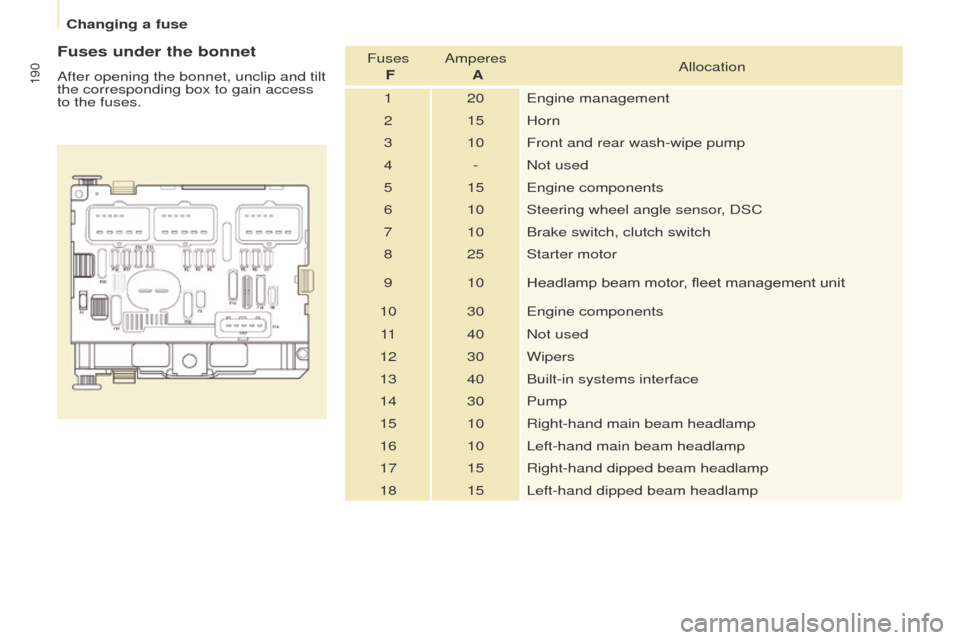
Fuses under the bonnet
After opening the bonnet, unclip and tilt
the corresponding box to gain access
to the fuses.Fuses
F Amperes
A Allocation
1 20 Engine management
2 15 Horn
3 10 Front and rear wash-wipe pump
4 - Not used
5 15 Engine components
6 10 Steering wheel angle sensor, DSC
7 10 Brake switch, clutch switch
8 25 Starter motor
9 10 Headlamp beam motor, fleet management unit
10 30 Engine components 11 40 Not used
12 30 Wipers
13 40 Built-in systems interface
14 30 Pump
15 10 Right-hand main beam headlamp
16 10 Left-hand main beam headlamp
17 15 Right-hand dipped beam headlamp
18 15 Left-hand dipped beam headlamp
Changing a fuse
Page 199 of 292
197
Partner2VP_en_Chap09_Caract-technique_ed02-2016Partner2VP_en_Chap09_Caract-technique_ed02-2016
ENGINE CHARACTERISTICS
The engine characteristics (capacity,
maximum power, maximum power
speed, fuel, CO
2 emissions...) for your
vehicle are given in the registration
certificate.
These characteristics correspond
to the values type-approved
on a test bed, under conditions
defined in European legislation
(Directive
1999/99/EC).
For more information, refer to the
manufacturer's website or sales
brochure for the model. Contact
a PEUGEOT dealer or a qualified
workshop.
WEIGHTS AND TOWED LOADS
These values, expressed in kg, can be
found on the manufacturer's VIN plate
or label.
The maximum weights and towed
loads for your vehicle can be found on
the vehicle's registration certificate.
The kerb weight is equal to the weight
without load + driver (75 kg) + fuel tank
filled to 90%.
The GTW and towed load values
indicated are valid up to a maximum
altitude of 1000 metres. The value of
the towed load mentioned must be
reduced by 10 % for each additional
1000 metres.
With load transfer, the braked trailer
weight can be increased, on condition
that the equivalent of this load is
removed from the vehicle so that the
GTW is not exceeded. High ambient temperatures
may result in a reduction in the
performance of the vehicle in
order to protect the engine. When the
ambient temperature is higher than
37
°C, limit the towed weight.Towing with a lightly loaded
vehicle can adversely affect road
holding.
Towing a trailer increases braking
distances.
When towing, the maximum permitted
speed is reduced (comply with the
legislation in force in the country). The recommended nose weight is
the downward force on the towball
(removable with or without tools).
GVW: gross vehicle weight, the
maximum authorised weight.
GTW: gross train weight, the maximum
weight for vehicle plus trailer.
The location of the manufacturer's
plate is given in chapter 9,
"Identification markings" section.
In each country, it is imperative that
the maximum towed loads authorised
by local legislation are complied
with. To find out your vehicle's towing
capacities and its gross train weight,
consult a PEUGEOT dealer.
TECHNICAL DATA
9
Weights
Page 231 of 292
229
Partner2VP_en_Chap10a_SMEGplus_ed02-2016
Select a radio station or frequency (refer to the
corresponding section).Press on Radio Media
to display the
primary page.
Press on the secondary page.
Select " Settings ".
Select " Radio".
Activate/deactivate " RDS
options ".
Press on Radio Media
to display the
primary page.
Press on the secondary page. Press on "
Save" (preset).
Select a number in the list to preset the
previously chosen radio station.
A long press on a number saves (presets) the
station.
Press on Frequency
.
Enter the frequency in full
(e.g.:
92.10
MHz) using the keypad
then " Confirm ".
Changing radio station
Pressing the name of the current radio station
brings up a list.
To change radio station press the name of the
desired station. Or
Press on Radio Media to display the
primary page.
Select " Save" (preset).
Presetting a station Activating / Deactivating RDS
OR
THEN
A press on this button presets all of
the stations one after the other.
Recalling preset stations
RDS, if activated, allows you to continue
listening to the same station by automatic
retuning to alternative frequencies.
However, in certain conditions, coverage
of an RDS station may not be assured
throughout the entire country as radio
stations do not cover 100 % of the
territory. This explains the loss of
reception of the station during a journey.
Audio and Telematics
TECHNOLOGY on BOARD
10
Page 233 of 292
231
Partner2VP_en_Chap10a_SMEGplus_ed02-2016
Select change of source. Press on Radio Media to display the
primary page.
Select " DAB Radio ".
Select " List" in the primary page.
Select the radio station from the list offered. Press on Radio Media
to display the
primary page.
Press on the secondary page.
Select " Settings ".
Select " Radio".
Select " Digital/FM auto
tracking " then "Confirm ".
DAB / FM auto tracking
Digital radio
"DAB" does not cover 100% of the
te r r i to r y.
When the digital radio signal is poor,
"DAB/FM station tracking" allows you to
continue listening to the same station,
by automatically switching to the
corresponding "FM" analogue station
(if there is one). If "DAB/FM station tracking" is
activated, there is a difference of a few
seconds when the system switches to
"FM" analogue radio with sometimes a
variation in volume.
When the digital signal is restored, the
system automatically changes back to
" DA B ".
Digital radio provides higher quality
reception and also the graphical display
of current information on the radio
station being listened to. Select "List" in
the primary page.
The range of multiplexes available is
displayed in alphabetical order.
If the "DAB" station being listened to
is not available on "FM" ("DAB/FM"
option greyed out), or "DAB/FM station
tracking" is not activated, the sound
will cut out while the digital signal is too
weak.
or
Select " Radio list " in the secondary
page.
Audio and Telematics
TECHNOLOGY on BOARD
10
Page 242 of 292
240
Partner2VP_en_Chap10a_SMEGplus_ed02-2016
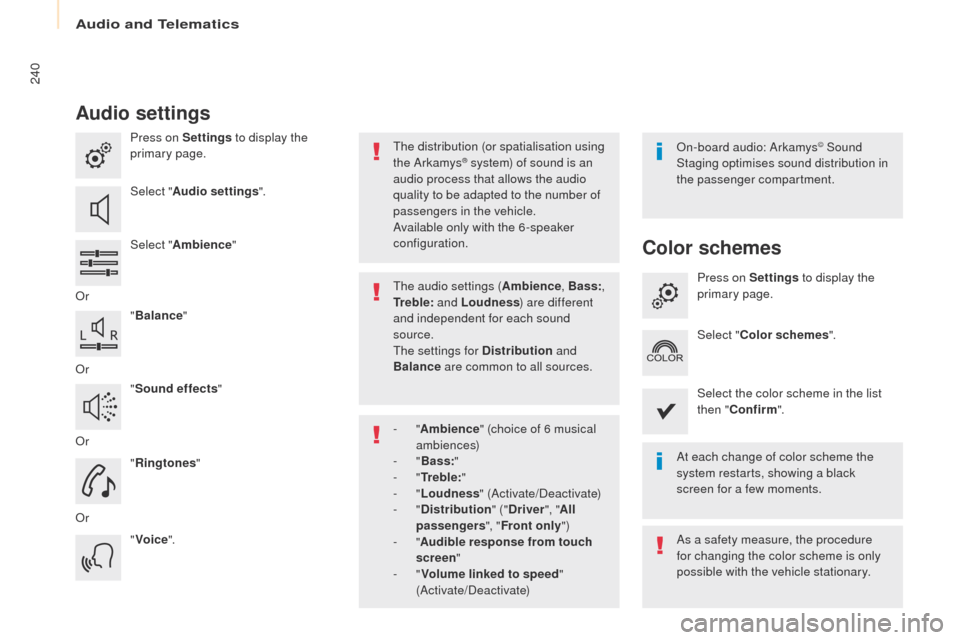
Audio settings
Press on Settings to display the
primary page.
Select " Audio settings ".
Select " Ambience "
Or "Balance "
Or "Sound effects "
Or "Ringtones "
Or "Voice ". On-board audio: Arkamys© Sound
Staging optimises sound distribution in
the passenger compartment.
At each change of color scheme the
system restarts, showing a black
screen for a few moments.
The distribution (or spatialisation using
the Arkamys® system) of sound is an
audio process that allows the audio
quality to be adapted to the number of
passengers in the vehicle.
Available only with the 6 -speaker
configuration.
As a safety measure, the procedure
for changing the color scheme is only
possible with the vehicle stationary.
The audio settings (
Ambience, Bass:,
Tr e b l e: and Loudness ) are different
and independent for each sound
source.
The settings for Distribution and
Balance are common to all sources.
-
" Ambience " (choice of 6 musical
ambiences)
-
" Bass: "
-
" Tr e b l e: "
-
" Loudness " (Activate/Deactivate)
-
" Distribution " ("Driver ", "All
passengers ", "Front only ")
-
" Audible response from touch
screen "
-
" Volume linked to speed "
(Activate/Deactivate)
Color schemes
Press on Settings to display the
primary page.
Select " Color schemes ".
Select the color scheme in the list
then " Confirm ".
Audio and Telematics
Page 278 of 292
276
Partner2VP_en_Chap10b_RD45_ed02-2016
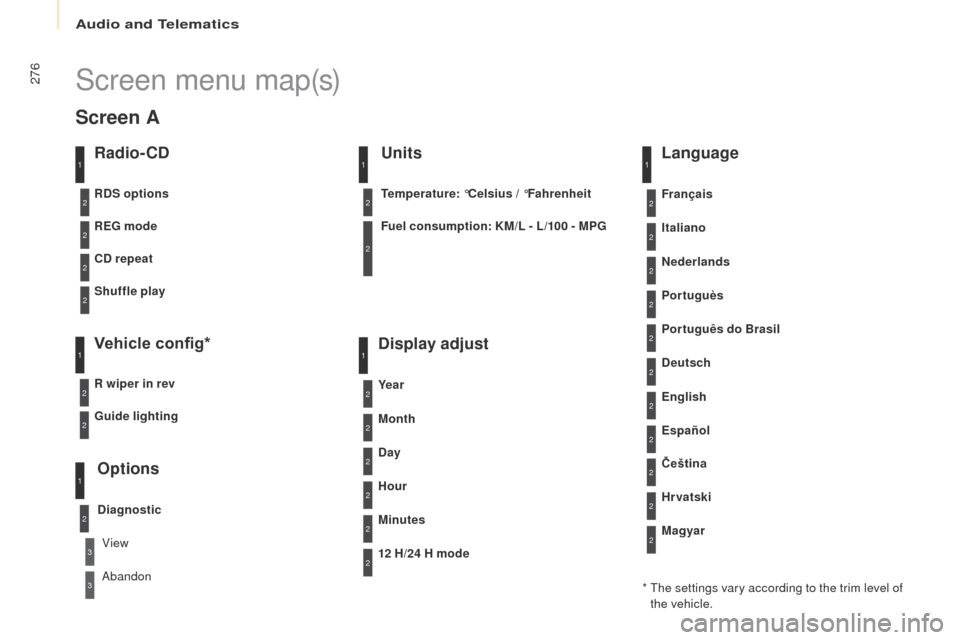
Screen menu map(s)
Radio- CD
REG mode
CD repeat
Shuffle play
Vehicle config*
R wiper in rev
Options
Diagnostic
RDS options
View
Abandon
1
2
3
3
1
2
2
2
2
1
2
Screen A
* The settings vary according to the trim level of the vehicle.
Guide lighting
2
Units
Temperature: °Celsius / °Fahrenheit
Fuel consumption: KM/L - L/100 - MPG
1
2
2
Display adjust
Month
Day
Hour
Minutes Ye a r
12 H/24 H mode
Language
Italiano
Nederlands
Portuguès
Português do Brasil Français
Deutsch
Čeština English
Hr vatski Español
Magyar
1
2
2
2
2
2
2
2
1
2
2
2
2
2
2
2
2
2
2
Audio and Telematics