USB Peugeot Partner Tepee 2017 Owner's Manual
[x] Cancel search | Manufacturer: PEUGEOT, Model Year: 2017, Model line: Partner Tepee, Model: Peugeot Partner Tepee 2017Pages: 292, PDF Size: 10.49 MB
Page 15 of 292
13
Partner2VP_en_Chap01_vue-ensemble_ed02-2016
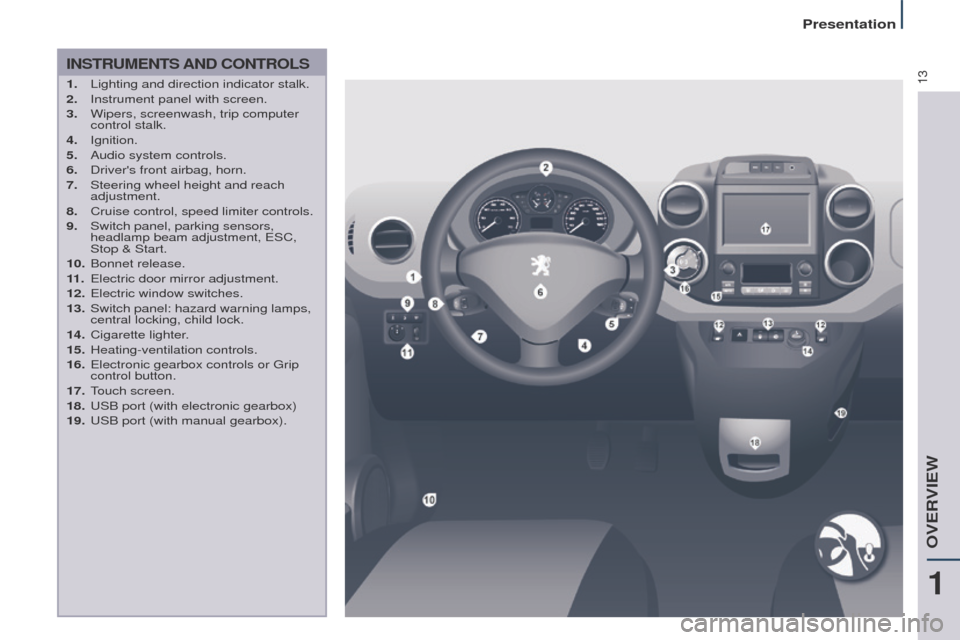
INSTRUMENTS AND CONTROLS
1. Lighting and direction indicator stalk.
2. Instrument panel with screen.
3.
Wipers, screenwash, trip computer
control stalk.
4.
Ignition.
5.
Audio system controls.
6.
Driver's front airbag, horn.
7.
Steering wheel height and reach
adjustment.
8.
Cruise control, speed limiter controls.
9.
Switch panel, parking sensors,
headlamp beam adjustment, ESC,
Stop & Start.
10.
Bonnet release.
11
.
Electric door mirror adjustment.
12.
Electric window switches.
13.
Switch panel: hazard warning lamps,
central locking, child lock.
14.
Cigarette lighter
.
15.
Heating-ventilation controls.
16.
Electronic gearbox controls or Grip
control button.
17.
T
ouch screen.
18.
USB port (with electronic gearbox)
19.
USB port (with manual gearbox).
1
OVERVIEW
Presentation
Page 16 of 292
14
Partner2VP_en_Chap01_vue-ensemble_ed02-2016
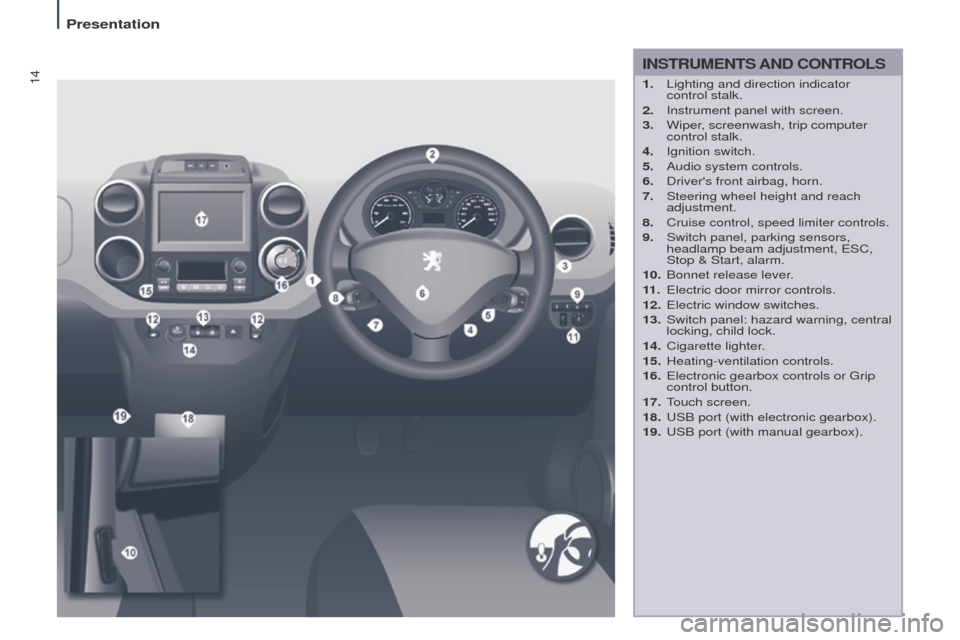
INSTRUMENTS AND CONTROLS
1. Lighting and direction indicator
control stalk.
2.
Instrument panel with screen.
3.
Wiper
, screenwash, trip computer
control stalk.
4.
Ignition switch.
5.
Audio system controls.
6.
Driver's front airbag, horn.
7.
Steering wheel height and reach
adjustment.
8.
Cruise control, speed limiter controls.
9.
Switch panel, parking sensors,
headlamp beam adjustment, ESC,
Stop & Start, alarm.
10.
Bonnet release lever
.
11 .
Electric door mirror controls.
12.
Electric window switches.
13.
Switch panel: hazard warning, central
locking, child lock.
14.
Cigarette lighter
.
15.
Heating-ventilation controls.
16.
Electronic gearbox controls or Grip
control button.
17.
T
ouch screen.
18.
USB port (with electronic gearbox).
19.
USB port (with manual gearbox).
Presentation
Page 107 of 292
105
Partner2VP_en_Chap04_Ergonomie_ed02-2016Partner2VP_en_Chap04_Ergonomie_ed02-2016
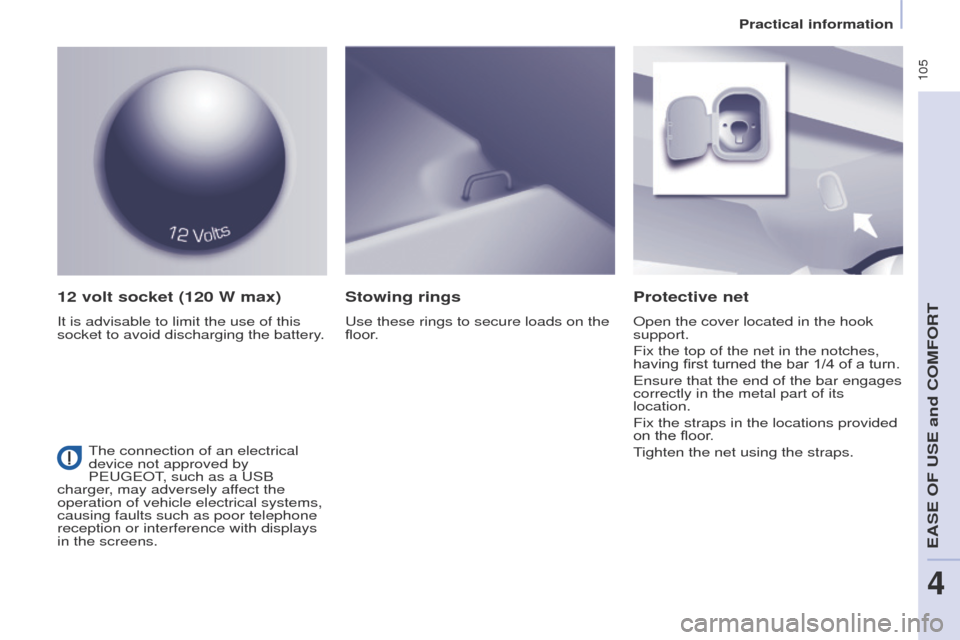
12 volt socket (120 W max)
It is advisable to limit the use of this
socket to avoid discharging the battery.
Protective net
Open the cover located in the hook
support.
Fix the top of the net in the notches,
having first turned the bar 1/4 of a turn.
Ensure that the end of the bar engages
correctly in the metal part of its
location.
Fix the straps in the locations provided
on the floor.
Tighten the net using the straps.
Stowing rings
Use these rings to secure loads on the
floor.
The connection of an electrical
device not approved by
PEUGEOT, such as a USB
charger, may adversely affect the
operation of vehicle electrical systems,
causing faults such as poor telephone
reception or interference with displays
in the screens.
EASE OF USE and COMFORT
4
Practical information
Page 154 of 292
152
Partner2VP_en_Chap06_Accessoire_ed02-2016Partner2VP_en_Chap06_Accessoire_ed02-2016
OTHER ACCESSORIES
These accessories and parts, having
been tested and approved for reliability
and safety, are all adapted to your
vehicle. A wide range of recommended
accessories and genuine parts is
available.
A further range is also available,
structured around comfort, leisure and
maintenance:
Anti-theft alarm, window etching, first
aid kit, high visibility vest, front and
rear parking sensors, warning triangle,
security bolts for alloy wheels, ...
Seat covers compatible with airbags
for the front seats, bench seat, rubber
mats, carpet mats, snow chains, blinds,
tailgate bicycle carrier, ...
To prevent the mat from becoming
caught under the pedals:
-
ensure that the mat and its fixings
are positioned correctly
,
-
never fit one mat on top of another
.Audio equipment, hands-free kit,
speakers, CD changer, satellite
navigation system, USB box, Video kit,
...
Regardless of the audio and telematic
equipment offered on the market, the
technical constraints associated with
the fitting of equipment of these product
groups mean that the special features
of the equipment and its compatibility
with the capacities of your vehicle's
standard equipment must be taken into
account. Please ask a PEUGEOT dealer
for more information before fitting such
equipment.
Maximum weights on bars
-
T
ransverse bars on longitudinal
bars: 75 Kg (these bars are not
compatible with the Zénith roof).
Installing radiocommunication
transmitters
You are advised to contact a
PEUGEOT dealer before installing
accessory radiocommunication
transmitters with external aerial on
your vehicle.
The PEUGEOT dealer network
will inform you of the specification
(frequency band, maximum output
power, aerial position, specific
conditions of installation) of the
transmitters which can be fitted, in
accordance with the Motor Vehicle
Electromagnetic Compatibility
Directive (2004/104/EC). Front mud flaps, rear mud flaps,
15/17
inch alloy wheels, wheelarch
trim, leather steering wheel, ...
Screenwash, interior and exterior
cleaning and maintenance products,
spare bulbs, ...
The fitting of electrical equipment
or accessories which are not
recommended by PEUGEOT
may result in a failure of your vehicle's
electronic system. Please note this
specific warning. You are advised
to contact a dealer to be shown the
range of recommended equipment or
accessories.
Depending on the country in which
the vehicle is sold, it is compulsory
to have a high visibility vest, warning
triangle and spare bulbs available in
the vehicle.
Equipment
Page 207 of 292
205
Partner2VP_en_Chap10a_SMEGplus_ed02-2016
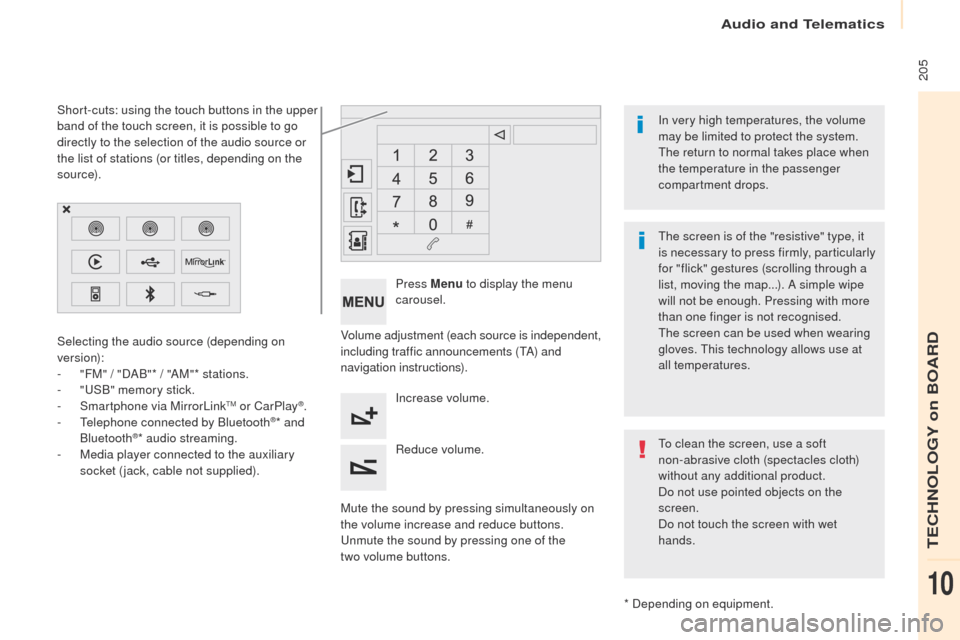
Volume adjustment (each source is independent,
including traffic announcements (TA) and
navigation instructions).
Mute the sound by pressing simultaneously on
the volume increase and reduce buttons.
Unmute the sound by pressing one of the
two
volume buttons. Press Menu
to display the menu
carousel.
Increase volume.
Reduce volume.
Selecting the audio source (depending on
version):
-
"
FM" / "DAB"* / "AM"* stations.
-
"
USB" memory stick.
-
S
martphone via MirrorLink
TM or CarPlay®.
- T
elephone connected by Bluetooth®* and
Bluetooth®* audio streaming.
-
M
edia player connected to the auxiliary
socket (jack, cable not supplied).
* Depending on equipment.
Short-cuts: using the touch buttons in the upper
band of the touch screen, it is possible to go
directly to the selection of the audio source or
the list of stations (or titles, depending on the
s o u r c e).
The screen is of the "resistive" type, it
is necessary to press firmly, particularly
for "flick" gestures (scrolling through a
list, moving the map...). A simple wipe
will not be enough. Pressing with more
than one finger is not recognised.
The screen can be used when wearing
gloves. This technology allows use at
all temperatures. In very high temperatures, the volume
may be limited to protect the system.
The return to normal takes place when
the temperature in the passenger
compartment drops.
To clean the screen, use a soft
non-abrasive cloth (spectacles cloth)
without any additional product.
Do not use pointed objects on the
screen.
Do not touch the screen with wet
hands.
Audio and Telematics
TECHNOLOGY on BOARD
10
Page 209 of 292

207
Partner2VP_en_Chap10a_SMEGplus_ed02-2016
Menus
Settings
Radio Media
Navigation
Driving
Connected services Telephone
Adjust the settings for sound (balance,
ambience,
...), colour schemes and the display
(language, units, date, time,
...).
Select an audio source, a radio station, display
photographs.
Enter navigation settings and choose a
destination.
Access to the trip computer.
Activate, deactivate or enter settings for certain
vehicle functions.
Operate certain applications on your
smartphone via MirrorLink
TM or CarPlay®.
Connect a telephone by Bluetooth
®.
Access to the CarPlay® function after
connection of your smartphone by USB cable.
(Depending on equipment)
(Depending on equipment)
Audio and Telematics
TECHNOLOGY on BOARD
10
Page 225 of 292
223
Partner2VP_en_Chap10a_SMEGplus_ed02-2016
Level 1Level 2 Comments
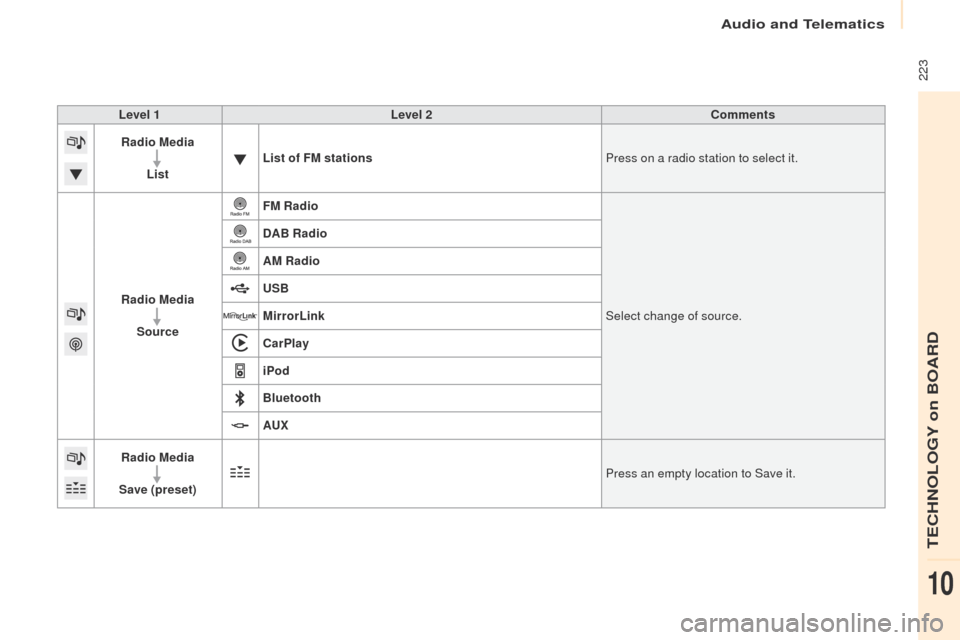
Radio Media
List List of FM stations
Press on a radio station to select it.
Radio Media Source FM Radio
Select change of source.
DAB Radio
AM Radio
USB
MirrorLink
CarPlay
iPod
Bluetooth
AU
x
R
adio Media
Save (preset) Press an empty location to Save it.
Audio and Telematics
TECHNOLOGY on BOARD
10
Page 230 of 292
228
Partner2VP_en_Chap10a_SMEGplus_ed02-2016
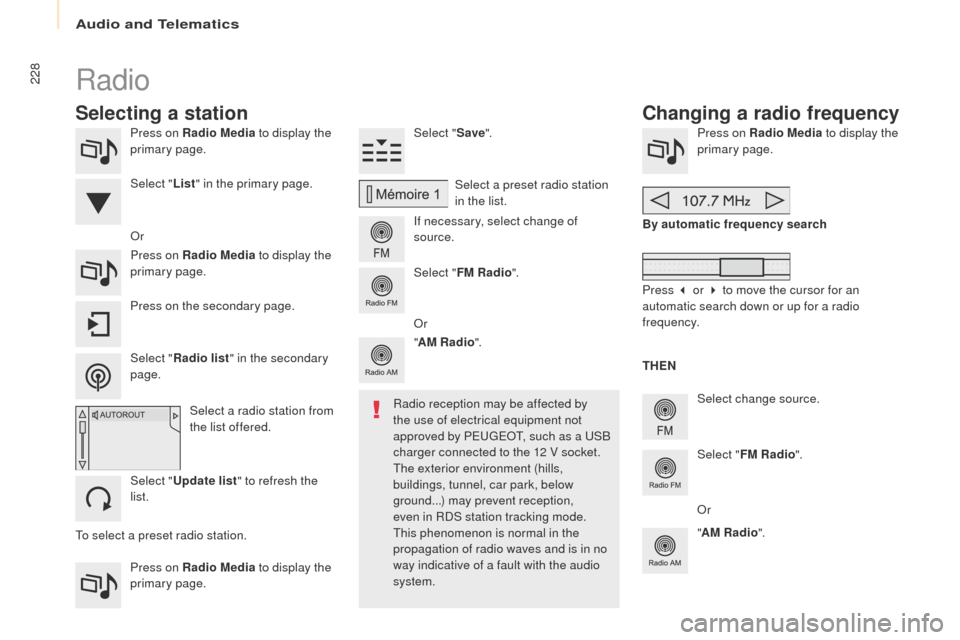
Press on Radio Media to display the
primary page.
Press on Radio Media to display the
primary page. Select "
Save".
If necessary, select change of
source. Press on Radio Media
to display the
primary page.
Select change source.
"
AM Radio ". By automatic frequency search
Select "FM Radio ".
" AM Radio ".
Press on the secondary page. Or
Select a preset radio station
in the list.
Select " FM Radio ".
Select a radio station from
the list offered.
Select " Update list " to refresh the
list. Select " List" in the primary page.
Press on Radio Media to display the
primary page.
Radio
Changing a radio frequency
Selecting a station
THEN
Radio reception may be affected by
the use of electrical equipment not
approved by PEUGEOT, such as a USB
charger connected to the 12 V socket.
The exterior environment (hills,
buildings, tunnel, car park, below
ground...) may prevent reception,
even in RDS station tracking mode.
This phenomenon is normal in the
propagation of radio waves and is in no
way indicative of a fault with the audio
system.
Select "
Radio list " in the secondary
page. Or
Press 3 or 4 to move the cursor for an
automatic search down or up for a radio
frequency.
Or
To select a preset radio station.
Audio and Telematics
Page 234 of 292
232
Partner2VP_en_Chap10a_SMEGplus_ed02-2016
The audio system will only play audio files
with ".wma, .aac, .flac, .ogg and .mp3" file
extensions and with a bit rate of between
32 Kbps and 320 Kbps.
It also supports VBR (Variable Bit Rate) mode.
No other type of file (.mp4,
...) can be played.
".wma" files must be of the standard
wma
9 type.
The sampling rates supported are 32, 44 and
48 KHz.
Information and advice
Media
USB port
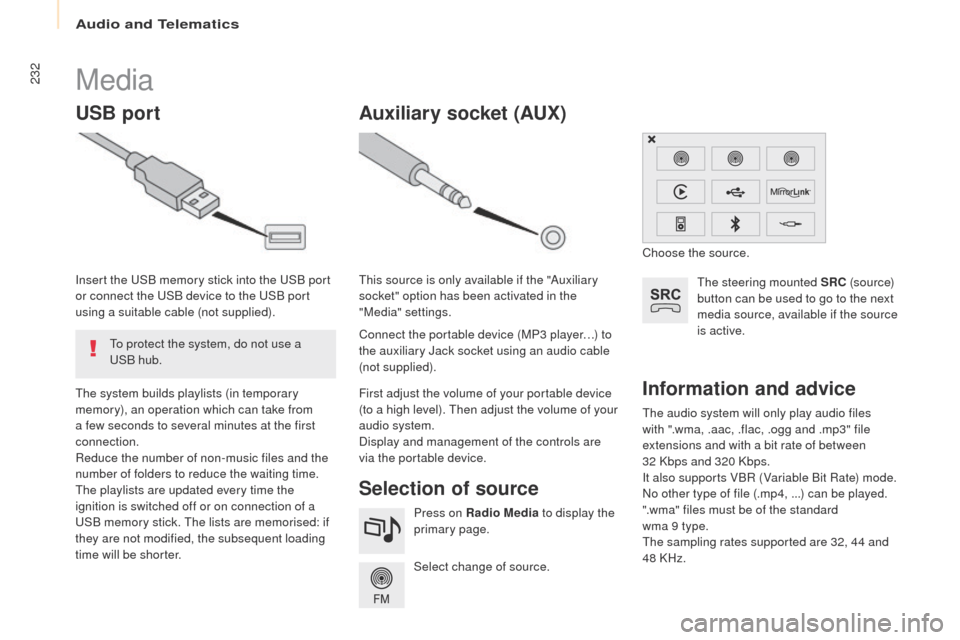
Selection of source
The steering mounted SRC (s o u r c e)
button can be used to go to the next
media source, available if the source
is active.
Select change of source. Press on Radio Media to display the
primary page.
The system builds playlists (in temporary
memory), an operation which can take from
a few seconds to several minutes at the first
connection.
Reduce the number of non-music files and the
number of folders to reduce the waiting time.
The playlists are updated every time the
ignition is switched off or on connection of a
USB memory stick. The lists are memorised: if
they are not modified, the subsequent loading
time will be shorter. Insert the USB memory stick into the USB port
or connect the USB device to the USB port
using a suitable cable (not supplied).
Auxiliary socket (AUx)
Connect the portable device (MP3 player…) to
the auxiliary Jack socket using an audio cable
(not supplied). This source is only available if the "Auxiliary
socket" option has been activated in the
"Media" settings.
First adjust the volume of your portable device
(to a high level). Then adjust the volume of your
audio system.
Display and management of the controls are
via the portable device. Choose the source.
To protect the system, do not use a
USB hub.
Audio and Telematics
Page 235 of 292
233
Partner2VP_en_Chap10a_SMEGplus_ed02-2016
It is advisable to restrict file names to
20 characters, without using special characters
(e.g. " " ?
; ù) to avoid any playing and
displaying problems.
Use only USB memory sticks formatted FAT32
(file allocation table). The system supports USB mass
storage portable players, BlackBerry
®
devices or Apple® players via USB
ports. The adaptor cable is not
supplied.
Control of the peripheral device is with
the audio system controls.
Other peripheral devices, not
recognised by the system on
connection, must be connected to the
auxiliary socket using a Jack cable (not
supplied).
It is recommended that the USB cable
for the portable device is used. To protect the system, do not use a
USB hub.
Bluetooth® audio streaming
Streaming allows audio files on your telephone
to be played through the vehicle's speakers.
Connect the telephone: see the " Telephone"
section, then " Bluetooth".
Choose the " Audio" or "All" profile.
If play does not start automatically, it may be
necessary to start the audio playback from the
telephone.
Control is from the peripheral device or by
using the audio system buttons.
Once connected in streaming mode,
the telephone is considered to be a
media source.
It is recommended that you activate
"Repeat " on the Bluetooth
® peripheral.
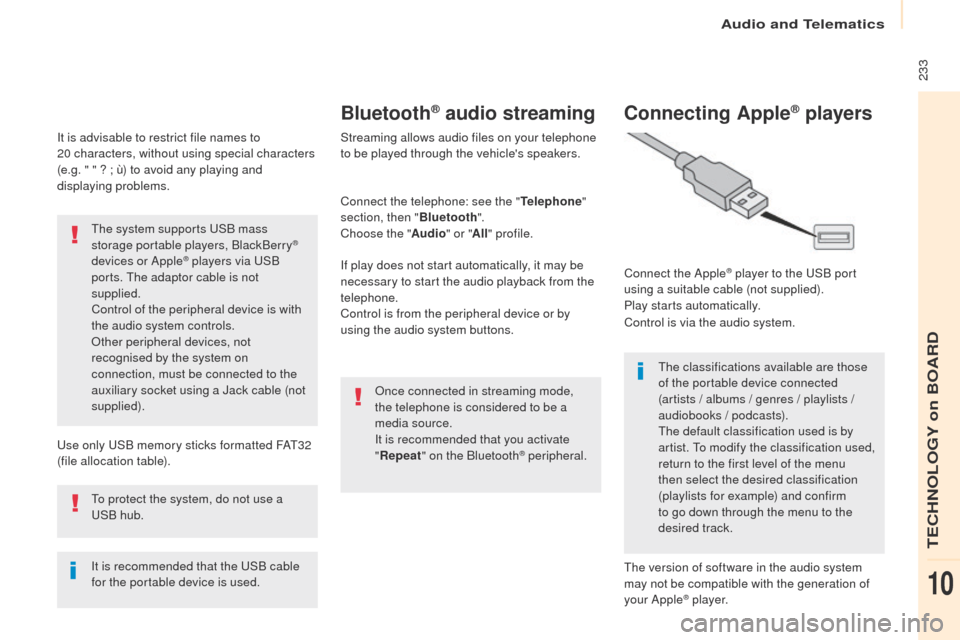
Connecting Apple® players
Connect the Apple® player to the USB port
using a suitable cable (not supplied).
Play starts automatically.
Control is via the audio system.
The classifications available are those
of the portable device connected
(artists / albums / genres / playlists /
audiobooks / podcasts).
The default classification used is by
artist. To modify the classification used,
return to the first level of the menu
then select the desired classification
(playlists for example) and confirm
to go down through the menu to the
desired track.
The version of software in the audio system
may not be compatible with the generation of
your Apple
® p l aye r.
Audio and Telematics
TECHNOLOGY on BOARD
10