mirror PEUGEOT PARTNER TEPEE 2020 User Guide
[x] Cancel search | Manufacturer: PEUGEOT, Model Year: 2020, Model line: PARTNER TEPEE, Model: PEUGEOT PARTNER TEPEE 2020Pages: 216, PDF Size: 8.46 MB
Page 175 of 216
173
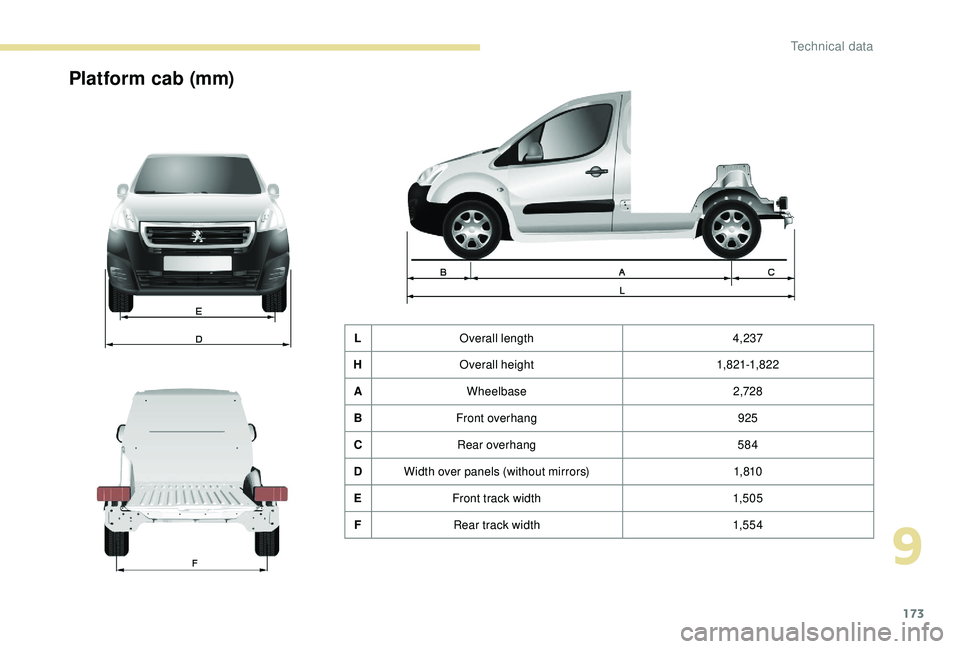
Platform cab (mm)
LOverall length 4,237
H Overall height 1,821-1,82 2
A Wheelbase 2,728
B Front overhang 925
C Rear overhang 584
D Width over panels (without mirrors) 1,810
E Front track width 1,505
F Rear track width 1,5 5 4
9
Technical data
Page 178 of 216
2
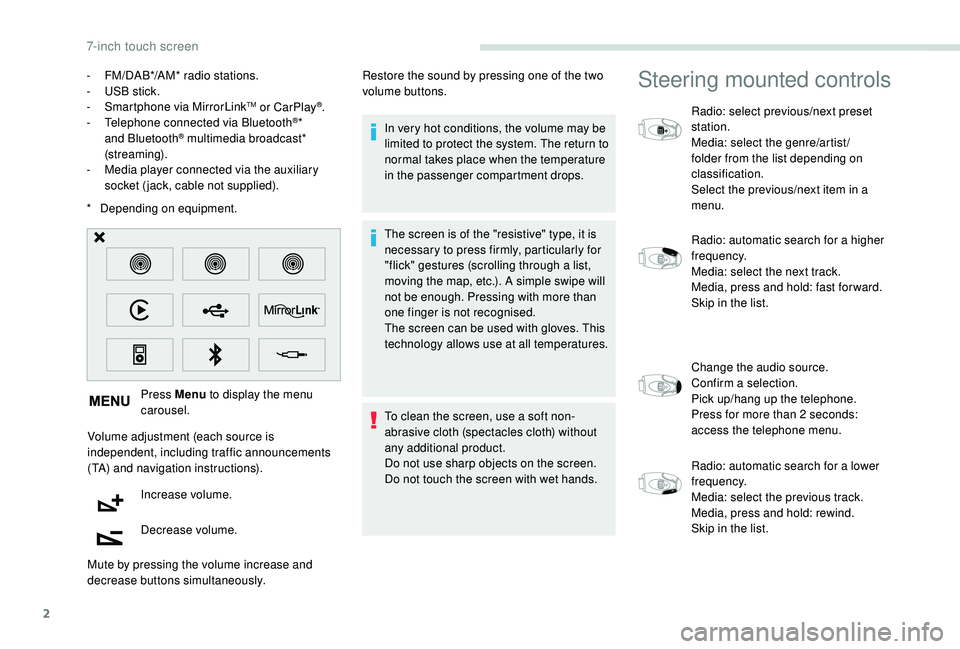
* Depending on equipment. Press Menu to display the menu
carousel.
Volume adjustment (each source is
independent, including traffic announcements
(TA) and navigation instructions). Increase volume.
Decrease volume.
Mute by pressing the volume increase and
decrease buttons simultaneously. In very hot conditions, the volume may be
limited to protect the system. The return to
normal takes place when the temperature
in the passenger compartment drops.
The screen is of the "resistive" type, it is
necessary to press firmly, particularly for
"flick" gestures (scrolling through a list,
moving the map, etc.). A simple swipe will
not be enough. Pressing with more than
one finger is not recognised.
The screen can be used with gloves. This
technology allows use at all temperatures.
To clean the screen, use a soft non-
abrasive cloth (spectacles cloth) without
any additional product.
Do not use sharp objects on the screen.
Do not touch the screen with wet hands.
-
F
M/DAB*/AM* radio stations.
-
U
SB stick.
-
S
martphone via MirrorLink
TM or CarPlay®.
- T
elephone connected via Bluetooth®*
and Bluetooth® multimedia broadcast*
(streaming).
-
M
edia player connected via the auxiliary
socket (jack, cable not supplied). Restore the sound by pressing one of the two
volume buttons.
Steering mounted controls
Radio: select previous/next preset
station.
Media: select the genre/artist/
folder from the list depending on
classification.
Select the previous/next item in a
menu.
Radio: automatic search for a higher
frequency.
Media: select the next track.
Media, press and hold: fast for ward.
Skip in the list.
Change the audio source.
Confirm a selection.
Pick up/hang up the telephone.
Press for more than 2
seconds:
access the telephone menu.
Radio: automatic search for a lower
frequency.
Media: select the previous track.
Media, press and hold: rewind.
Skip in the list.
7-inch touch screen
Page 179 of 216
3
Increase volume.
Decrease volume.
Mute on: cut the sound by
simultaneously pressing the volume
up and down buttons.
Mute off: press one of the two
volume buttons.
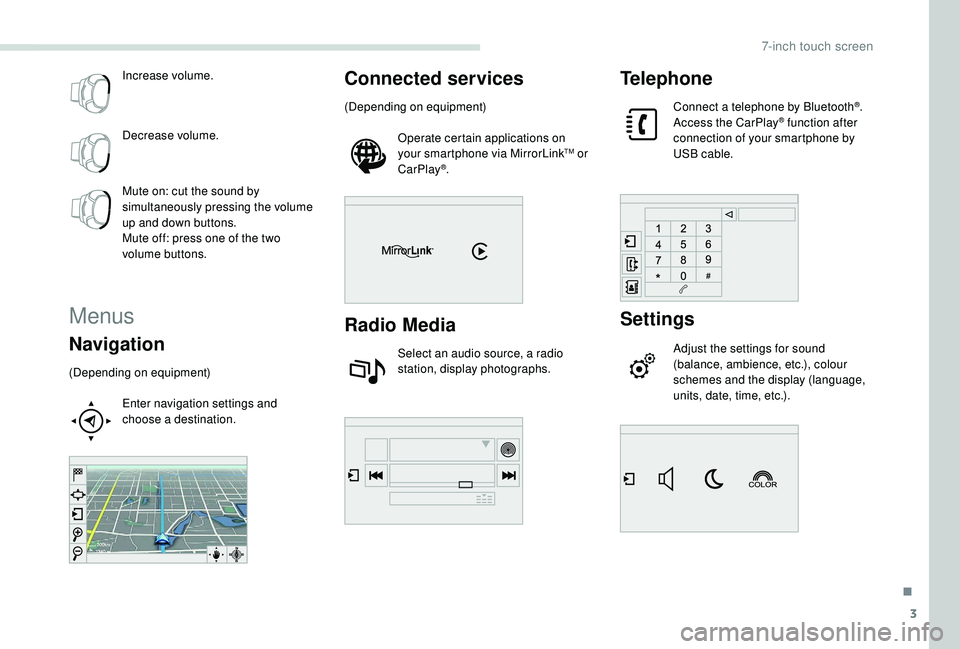
Menus
Navigation
(Depending on equipment)Enter navigation settings and
choose a destination.
Connected services
(Depending on equipment)Operate certain applications on
your smartphone via MirrorLink
TM or
CarPlay®.
Radio Media
Select an audio source, a radio
station, display photographs.
Telephone
Connect a telephone by Bluetooth®.
Access the CarPlay® function after
connection of your smartphone by
USB cable.
Settings
Adjust the settings for sound
(balance, ambience, etc.), colour
schemes and the display (language,
units, date, time, etc.).
.
7-inch touch screen
Page 188 of 216
12
Select the colour scheme in the list
then "Confirm ".
At each change of colour scheme the
system restarts, showing a black screen
for a few moments.
As a safety measure, the procedure
for changing the colour scheme is only
possible with the vehicle stationary.
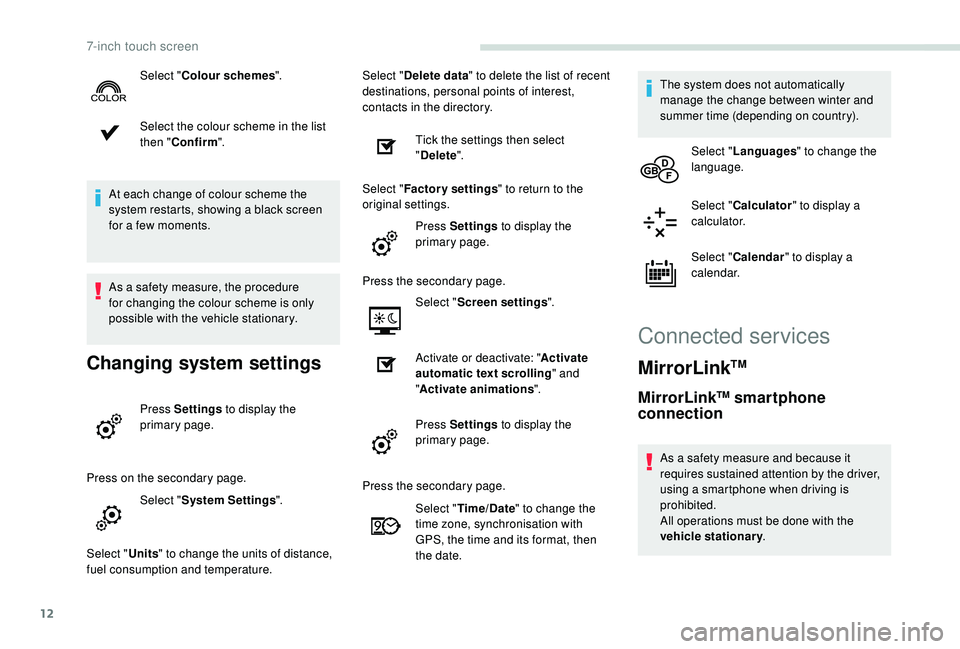
Changing system settings
Press Settings to display the
primary page.
Press on the secondary page. Select "System Settings ".
Select " Units" to change the units of distance,
fuel consumption and temperature. Select "
Delete data " to delete the list of recent
destinations, personal points of interest,
contacts in the directory.
Tick the settings then select
"Delete ".
Select " Factory settings " to return to the
original settings.
Press Settings to display the
primary page.
Press the secondary page. Select "Screen settings ".
Activate or deactivate: " Activate
automatic text scrolling " and
" Activate animations ".
Press Settings to display the
primary page.
Select "
Colour schemes ".
Press the secondary page.Select "Time/Date " to change the
time zone, synchronisation with
GPS, the time and its format, then
the date. The system does not automatically
manage the change between winter and
summer time (depending on country).
Select " Languages " to change the
language.
Select " Calculator " to display a
calculator.
Select " Calendar " to display a
calendar.
Connected services
MirrorLinkTM
MirrorLinkTM smartphone
connection
As a safety measure and because it
requires sustained attention by the driver,
using a smartphone when driving is
prohibited.
All operations must be done with the
vehicle stationary .
7-inch touch screen
Page 189 of 216
13
The synchronisation of a smartphone
allows users to display the smartphone's
applications adapted to the
MirrorLink
TM technology on the vehicle
sc
reen.
The principles and standards
are constantly changing, for the
communication process between the
smartphone and the system to operate,
it is essential that the smartphone is
unlocked; update the operating system of
the smartphone as well as the date and
time of the smartphone and the system.
For the list of supported smartphones, go
to the brand's website in your country.
As a safety measure, some applications
can only be viewed with the vehicle
stationary; display is interrupted once the
vehicle is moving.
Please note:
-
i
f your smartphone is supported, to
make it "MirrorLink
TM" compatible,
some phone manufacturers
nevertheless invite you to first
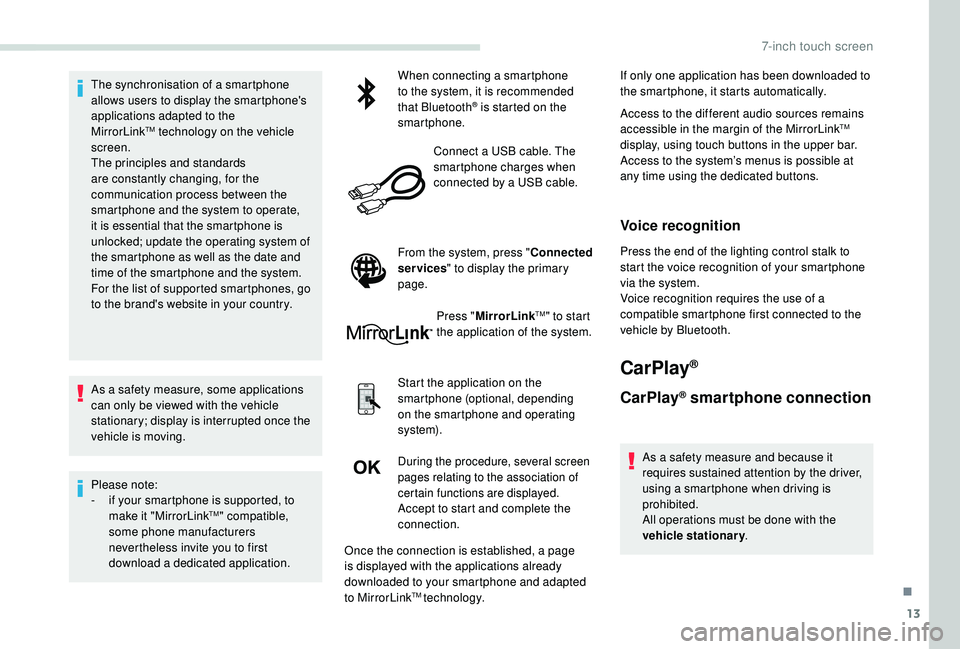
download a dedicated application. When connecting a smartphone
to the system, it is recommended
that Bluetooth
® is started on the
smartphone.
Connect a USB cable. The
smartphone charges when
connected by a USB cable.
From the system, press " Connected
services " to display the primary
page.
Press "MirrorLink
TM" to start
the application of the system.
Start the application on the
smartphone (optional, depending
on the smartphone and operating
syste m).
During the procedure, several screen
pages relating to the association of
certain functions are displayed.
Accept to start and complete the
connection. If only one application has been downloaded to
the smartphone, it starts automatically.
Access to the different audio sources remains
accessible in the margin of the MirrorLink
TM
display, using touch buttons in the upper bar.
Access to the system’s menus is possible at
any time using the dedicated buttons.
Voice recognition
Press the end of the lighting control stalk to
start the voice recognition of your smartphone
via the system.
Voice recognition requires the use of a
compatible smartphone first connected to the
vehicle by Bluetooth.
CarPlay®
CarPlay® smartphone connection
As a safety measure and because it
requires sustained attention by the driver,
using a smartphone when driving is
prohibited.
All operations must be done with the
vehicle stationary .
Once the connection is established, a page
is displayed with the applications already
downloaded to your smartphone and adapted
to MirrorLink
TM technology.
.
7-inch touch screen
Page 209 of 216
175
AAccessories ..................................... 76, 13 4 -13 5
Active City Brake ............................... .....120 -121
AdBlue
® ............................................ 13, 140 -141
Adjusting seat ................................................. 38
Adjusting the date
........................................... 24
Adjusting the time
..................................... 23 -24
Advanced Grip Control
................................... 80
Advice on driving
.................................. 103 -104
Airbags
...............................
.......................85, 90
Airbags, curtain
......................................... 87- 8 8
Airbags, front ...................................... 86, 88 , 91
Airbags, lateral
.......................................... 86, 88
Air conditioning, automatic
.............................69
Air conditioning, manual
................................. 69
A
nti-lock braking system (ABS) ......................79
Anti-pinch
........................................................ 36
A
nti-slip regulation (ASR)
............................... 12
Apple CarPlay connection
.............................. 13
Armrest
................
...................................... 38-39
Assistance call
...............................
............7 7-78
Audio streaming (Bluetooth)
.......................10, 6
BBattery ................................................... 13 8, 15 8
Battery, remote control ...................................27
Blanking screen (snow shield)
......................13 0
BlueHDi
........................................... 21, 140 , 160
Bluetooth (hands-free)
....................... 1
4 -16, 6-8
Bluetooth (telephone)
................................. 1
4 -16
Bonnet
........................................................... 13 5
Boot lid
...................................................... 29-30
Brake discs
............................................ 13 8, 140
Brakes
................................................... 13 8, 140
Bulbs (changing)
.................................... 14 9 -15 0
CCab, crew ............................... ...................50-52
Cable, audio ...................................................... 9
Cable, Jack
....................................................... 9
Cartridge, fragrance
....................................... 58
CD
..................................................................... 5
CD, MP3
........................................................ 5-6
Central locking
.......................................... 33
-34
Changing a bulb
..................................... 1
4 9 -15 0
Changing a wiper blade
......................... 13
0 -131
Changing the remote control battery
..............26
Checking the levels
....................................... 13 6
Checks
................................................... 13 6 -14 0
Checks, routine
...................................... 13 8 -14 0
Child lock
................................................. 36, 102
Child seats
..................... 84,
89-90, 94-95 , 101
Child seats, conventional
................................94
Connection, Bluetooth
............................... 1
4 -16
Connection, MirrorLink
...................................12
Control, electric windows
................................36
Control, emergency door
................................ 29
C
ontrol, heated seats
...................................... 39
Control stalk, lighting
..........................15, 71 , 73
Control stalk, wipers
.................................. 7
3 -74
Courtesy lamp, front
....................................... 55
Cover, load space
............................... 60, 62- 63
Cruise control
......................................... 117-12 0
DDAB (Digital Audio
Broadcasting) - Digital radio ....................... 8
-9
Date (setting)
................................................... 24
Daytime running lamps, LED
..........................72
Deactivating the passenger's front airbag
....................................... 86, 90 -91
Dimensions
..............................
......169, 171-173
Direction indicators
......................................... 15
Display screen, instrument panel
.................108
Doors, rear
................................................ 30-32
Doors, side ............................... .................28-29
Doors, side-hinged ................................... 3
0-32
Driving abroad ................................................. 73
EElectric windows ............................................. 35
Electronic brake force distribution (EBFD) .....79
Electronic stability control (ESC)
........12,
79-80
Emergency braking assistance (EBA)
............79
Emergency call
.......................................... 7 7-78
Emissions control system, SCR
.............14, 140
Engine
........................................................... 13 6
Engine, Diesel
............................................... 128
Engine, petrol
...............................
.................128
Engines
......................................................... 161
FFilling the fuel tank ................................12 6, 128
Filter, air ........................................................ 13 8
Filter, oil
................
.................................. 13 8 -13 9
Filter, passenger compartment
.....................13 8
Fittings, front
................................................... 55
Fittings, interior
......................................... 5
4-56
Fittings, rear
.................................................... 60
Flap, fuel filler
................................................ 126
Fluid, brake
................................................... 13 6
Fluid, engine coolant
..................................... 13 6
Fluid, power steering
.................................... 13
6
Foglamps, front
............................................... 73
Fragrance diffuser ..................................... 57- 5 9
Frequency (radio)
........................................... 7- 8
Fuel ................................................................ 128
.
Alphabetical index
Page 210 of 216
176
GGearbox, automatic ..............................108 -109
Gearbox, electronic .......................10 6 -107, 11 0
Gearbox, manual
...........105 -10 6 , 108 -110 , 140
Gearbox, manual (reverse gear) ...........105 -10 6
Gear lever, manual gearbox
.........................105
Gear shift indicator ~ Gear efficiency indicator
...............................16, 108
Glove box
........................................................ 55
Grip control
............................................... 80 - 81
HHeadlamps, dipped beam ...............................71
Headlamps, main beam ............................16, 71
Head restraints .......................................... 38-39
Hill start assist
............................................... 111
IIdentification.................................................. 174
Immobiliser, electronic ....................................27
Indicator lamps, operation
................................ 8
I
nstrument panel
............................................... 7
Instruments and controls
..................................4
JJack ............................... ....................................9
KKey .................................................................. 27
Kit, hands-free ................................... 1
4 -16, 6-8
Kit, temporary puncture repair
...................... 14
3
LLevels ............................................................ 13 6
Levels and checks .............................. ...13 6 -13 9
Lighting
............................................................ 71
Lighting, directional
......................................... 73
Locking
...............................
.............................27
Low fuel level
................................................ 12
6
MMenu, main .......................................................2
M irror, rear view .............................................. 38
Mirrors, door .................................................... 37
Mountings, ISOFIX
......................................... 98
MP3 CD
............................................................. 5
NNet ............................................................. 62- 63
OOil, engine ..................................................... 13 6
Opening the bonnet ...................................... 13 5
Overhead storage
........................................... 55
PPads, brake ........................................... 13 8, 140
Parcel shelf, rear ............................................. 60
Parking brake
.......................... 10, 105 , 13 8, 140
Plates, identification ...................................... 174
Player, Apple
® ............................................. 11, 6
Player, MP3 CD ............................... ..............5-6
Player, USB
................................................... 9, 4
Port, USB
...................................................... 9, 4
Pressures, tyres
............................................ 174
Pre-tensioning seat belts ................................84
Priming the fuel system ................................160
Protecting children
......................89-90, 99, 101
RRadio ................................................... 7- 8, 10 , 3
Radio, digital (Digital Audio Broadcasting - DAB)
...................................8
-9
Range, AdBlue
.......................................... 13, 21
RDS
................
................................................... 8
Reinitialisation of the under- inflation detection system
...........................114
Reinitialising the electric windows
.................. 36
R
emote control
.......................................... 25 -27
Replacing bulbs
..................................... 1
4 9 -15 0
Replacing the oil filter
................................... 13
9
Reversing camera
...............................
..........124
Risk areas (update)
........................................... 5
Roof bars
................................................13 3 -13 4
Running out of fuel (Diesel)
..........................160
SSafety, children ........................... 89-90, 99, 101
SCR (Selective Catalytic Reduction) ............140
Screen, monochrome
....................................... 2
Screenwash fluid
.......................................... 13 6
Seat, rear bench
....................................... 42- 43
Seat belts
............................................ 83-84, 94
Seats, front
...............................
.................3 8 - 41
Seats, front bench
..................................... 4 0 - 41
Seats, heated
.................................................. 39
Seats, rear
................................................. 43-50
Settings, system
.............................................. 12
Shield, snow
.................................................. 13
0
Sidelamps
....................................................... 71
S
now chains
.................................................. 12 9
Alphabetical index