rds PONTIAC BONNEVILLE 2003 Owners Manual
[x] Cancel search | Manufacturer: PONTIAC, Model Year: 2003, Model line: BONNEVILLE, Model: PONTIAC BONNEVILLE 2003Pages: 418, PDF Size: 20.24 MB
Page 3 of 418
GENERAL MOTORS, GM, the GM Emblem, PONTIAC,
the PONTIAC Emblem and the name BONNEVILLE
are registered trademarks of General Motors
Corporation.
This manual includes the latest information at the time it
was printed. We reserve the right
to make changes
after that time without further notice. For vehicles first
sold in Canada, substitute the name “General Motors of
Canada Limited” for Pontiac Division whenever it
appears in this manual.
Please keep this manual in your vehicle,
so it will be
there
if you ever need it when you’re on the road. If you
sell the vehicle, please leave this manual in it
so the
new owner can use it.
Litho
in USA.
Part No. 25735874 A First Edition
Canadian Owners
You can obtain a French copy of this manual from your
dealer or from:
Helm, Incorporated P.O. Box 07130
Detroit,
MI 48207
How to Use This Manual
Many people read their owner’s manual from beginning
to end when they first receive their new vehicle.
If
you do this, it will help you learn about the features and
controls for your vehicle. In this manual, you’ll find
that pictures and words work together to explain things.
Index
A good place to look for what you need is the Index in
back of the manual. It’s an alphabetical list
of what’s
in the manual, and the page number where you’ll find it.
@Copyright General Motors Corporation
06/19/02
All Rights Reserved
ii
Page 5 of 418
Vehicle Damage Warnings
Also, in this book you will find these notices:
Notice: These mean there is something that could
damage your vehicle.
A notice will tell you about something that can damage
your vehicle. Many times, this damage would not be
covered by your warranty, and it could be costly. But the
notice will tell you what to do to help avoid the
damage.
When you read other manuals, you might see CAUTION
and NOTICE warnings in different colors or in different
words.
You’ll also see warning labels on your vehicle. They use
the same words, CAUTION or NOTICE.
Vehicle Symbols
Your vehicle may be equipped with components and
labels that use symbols instead of text. Symbols, used
on your vehicle, are shown along with the text
describing the operation or information relating to a
specific component, control, message, gage
or indicator
If you need help figuring out a specific name of a
component, gage or indicator reference the following
topics in the Index:
“Engine Compartment Overview’’
“Instrument Panel Overview”
“Climate Controls”
“Audio Systems”
Also see
Warning Lights, Gages and Indicators on
page 3-34.
iv
Page 39 of 418
in a motor vehicle. If it is, the restraint will have a
label saying that it meets federal motor vehicle
safety standards.
The restraint manufacturer’s instructions that come
with the restraint state the weight and height
limitations for a particular child restraint.
In addition,
there are many kinds of restraints available for
children with special needs.
Newborn infants need complete support,
including support for the head and neck. This
is necessary because a newborn infant’s neck
is weak and its head weighs
so much
compared with the rest of
its body. In a crash,
an infant
in a rear-facing seat settles into the
restraint,
so the crash forces can be
distributed across the strongest part of an
infant’s body, the back and shoulders. Infants
always should be secured
in appropriate infant
restraints. The
body structure of
_. loung ck---J is quite
unlike that of an adult or older child, for whom
the safety belts are designed. A young child’s
hip bones are still
so small that the vehicle’s
regular safety belt may not remain
low on the
hip bones, as
it should. Instead, it may settle
up around the child’s abdomen. In a crash, the
belt would apply force on a body area that’s
unprotected by any bony structure. This alone
could cause serious or fatal injuries. Young
children always should be secured in
appropriate child restraints.
1-32
Page 42 of 418
Q: How do child restraints work?
A: A child restraint system is any device designed for
use in a motor vehicle to restrain, seat, or position
children.
A built-in child restraint system is a
permanent part of the motor vehicle. An add-on
child restraint system is a portable one, which
is purchased by the vehicle’s owner.
For many years, add-on child restraints have used
the adult belt system in the vehicle. To help
reduce the chance of injury, the child also has to be
secured within the restraint. The vehicle’s belt
system secures the add-on child restraint in the
vehicle, and the add-on child restraint’s harness
system holds the child in place within the restraint.
One system, the three-point harness, has straps
that come down over each of the infant’s shoulders
and buckle together at the crotch. The five-point
harness system has two shoulder straps, two
hip straps and a crotch strap.
A shield may take the
p!aw of hi? straps. A T-shaped shield has
shoulder straps that are attached to a flat pad
which rests low against the child’s body.
A shelf- or
armrest-type shield has straps that are attached
to a wide, shelf-like shield that swings up or to
~ ~~~ ~ the side. ~~~~~~~~~~~~~~
~~~ ~ ~
When choosing a child restraint, be sure the child
restraint is designed to be used in a vehicle.
If it is,
it will have a label saying that it meets federal motor
vehicle safety standards.
Then follow the instructions for the restraint. You may
find these instructions on the restraint itself or in a
booklet, or both. These restraints use the belt system in
your vehicle, but the child also has to be secured
within the restraint to help reduce the chance of personal
injury. When securing an add-on child restraint, refer
to the instructions that come with the restraint which may
be on the restraint itself or in a booklet, or both, and
to this manual. The child restraint instructions are
important,
so if they are not available, obtain a
replacement copy from the manufacturer.
1-35
Page 54 of 418
Air Bag Systems
This part explains the frontal and side impact air bag
systems.
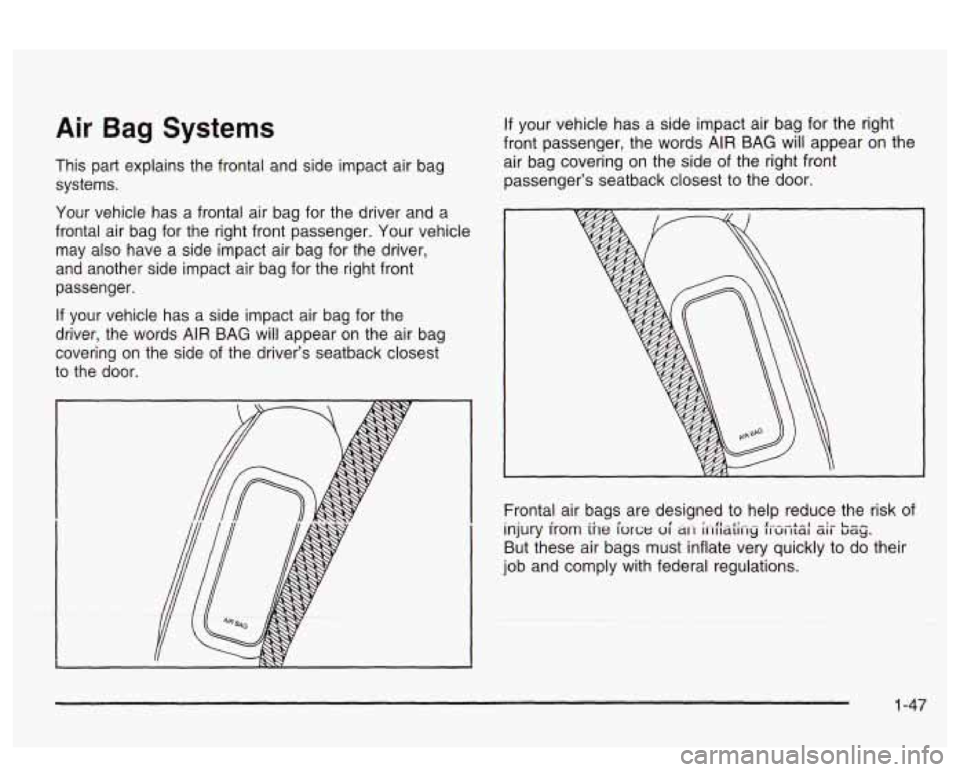
Your vehicle has a frontal air bag for the driver and a
frontal air bag for the right front passenger. Your vehicle
may also have a side impact air bag for the driver,
and another side impact air bag for the right front
passenger.
If your vehicle has a side impact air bag for the
driver, the words AIR BAG will appear on the air bag
covering on the side of the driver’s seatback closest
to the door.
If your vehicle has a side impact air bag for the right
front passenger, the words
AIR BAG will appear on the
air bag covering on the side
of the right front
passenger’s seatback closest to the door.
Frontal air bags are designed to help reduce the risk of
injury
from the force oi ai-1 hiititiiiy f~~t~l zir bag.
But these air bags must inflate very quickly to do their
job and comply with federal regulations.
1-47
Page 61 of 418
In many crashes severe enough to inflate an air bag,
windshields are broken by vehicle deformation.
Additional windshield breakage may also occur from the
right front passenger air bag.
0 Air bags are designed to inflate only once. After an
air bag inflates, you’ll need some new parts for
your air bag system.
If you don’t get them, the air
bag system won’t be there to help protect you
in another crash.
A new system will include air bag
modules and possibly other parts. The service
manual for your vehicle covers the need to replace
other parts.
Your vehicle is equipped with an electronic frontal
sensor, which helps the sensing system distinguish
between a moderate frontal impact and a more
severe frontal impact. Your vehicle is also equipped
with a crash sensing and diagnostic module,
which records information about the frontal air bag
system. The module records information about
the readiness
of the system, when the system
commands air bag inflation and driver’s safety belt
usage at deployment. The module also records
speed, engine
RPM, brake and throttle data.
0 Let only qualified technicians work on your air bag
systems. Improper service can mean that an air
bag system won’t work properly. See your dealer for
service.
Notice: If you damage the covering for the driver’s
or the right front passenger’s air bag, or the air
bag covering on the driver’s and right front
passenger’s seatback, the bag may not work
properly. You may have to replace the air bag
module in the steering wheel, both the air bag
module and the instrument panel for
the right front
passenger’s air bag, or both the air bag module
and seatback for the driver’s and right front
passenger’s side impact air bag.
Do not open or
break the air bag coverings.
1-54
Page 186 of 418
Audio System(s)
Notice: Before you add any sound equipment to
your vehicle
- like a tape player, CB radio, mobile
telephone or two-way radio
- be sure you can
add what you want. If you can, it’s very important to
do
it properly. Added sound equipment may
interfere with the operation of your vehicle’s engine,
Delphi Electronics radio or other systems, and
even damage them. Your vehicle’s systems may interfere with the operation of sound equipment that
has been added improperly.
So, before adding sound equipment, check with
your dealer and be sure to check federal rules
covering mobile radio and telephone units.
Your audio system has been designed
to operate easily
and
to give years of listening pleasure. You will get
the most enjoyment out of it
if you acquaint yourself with
it first. Find out what your audio system can do and
how to operate all of its controls to be sure you’re getting
LI It: II IUS1 vu1 VI 11 IC UUVUl IUUU ”1 ‘y“ I””. .. .
into it.
I‘- - --* -. .+ -g +h -A-r-nmmA nnninonrinn +hat
,ant 3 -..-- ..-..-
Your vehicle has a feature called Retained Accessory
Power (RAP). With RAP, you can play your audio
system even after the ignition is turned
off. See
“Retained Accessory Power (RAP)” under lgnition
Positions on page 2-25.
Setting the Time
Press and hold HR or MIN for two seconds. Then press
and hold
HR until the correct hour appears on the
display. AM will also appear. Press and hold MIN until
the correct minute appears on the display. The time may
be
set with the ignition on or off.
To synchronize the time with an FM station broadcasting
Radio Data System
(RDS) Information, press and
hold HR and MIN at the same time until UPDATED and
the clock symbol appear on the display.
If the time is
not available from the station, NO UPDATE will appear
on the display instead.
3-71
Page 187 of 418
Radio with CD
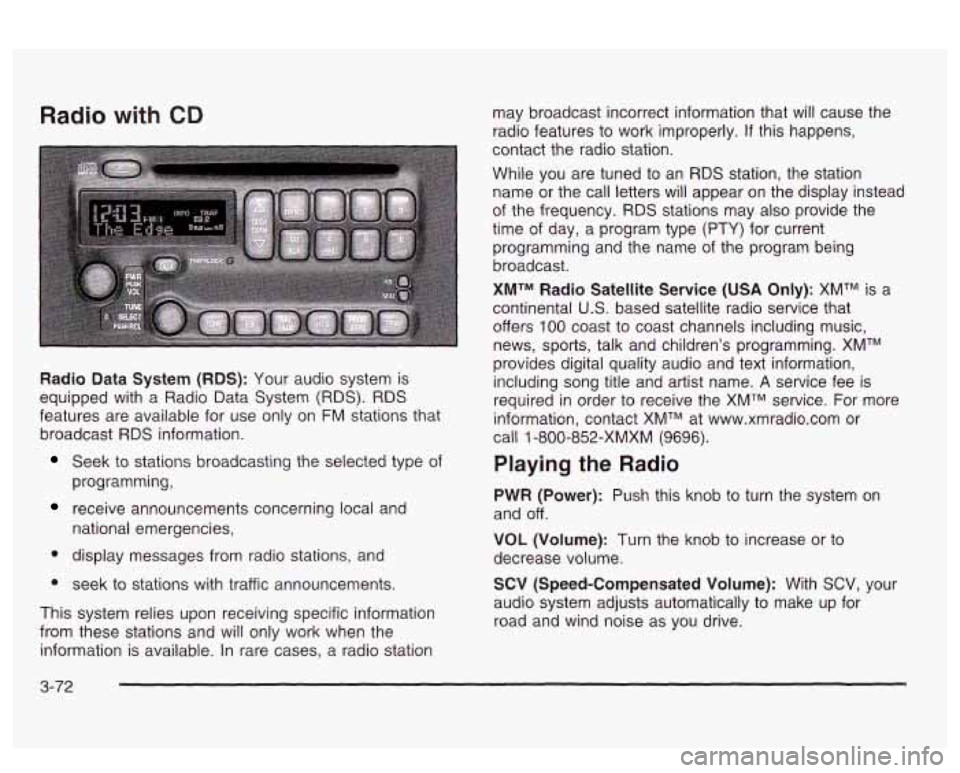
Radio Data System (RDS): Your audio system is
equipped with a Radio Data System
(RDS). RDS
features are available for use only on FM stations that
broadcast
RDS information.
Seek to stations broadcasting the selected type of
programming,
receive announcements concerning local and
national emergencies,
display messages from radio stations, and
seek to stations with traffic announcements.
This system relies upon receiving specific information
from these stations and will only work when the
information is available. In rare cases, a radio station may
broadcast incorrect information that will cause the
radio features to work improperly.
If this happens,
contact the radio station.
While you are tuned to an
RDS station, the station
name or the call letters will appear
on the display instead
of the frequency.
RDS stations may also provide the
time of day, a program type
(PTY) for current
programming and the name of the program being
broadcast.
XMTM Radio Satellite Service (USA Only): XMTM is a
continental
U.S. based satellite radio service that
offers
100 coast to coast channels including music,
news, sports, talk and children's programming. XMTM
provides digital quality audio and text information,
including song title and artist name.
A service fee is
required in order to receive the XMTM service. For more
information, contact XMTM at www.xmradio.com or
call
1 -800-852-XMXM (9696).
Playing the Radio
PWR (Power): Push this knob to turn the system on
and off.
VOL (Volume): Turn the knob to increase or to
decrease volume.
SCV (Speed-Compensated Volume): With SCV, your
audio system adjusts automatically to make up for
road and wind noise as you drive.
3-72
Page 190 of 418
Adjusting the Speakers (Balance/Fade)
BAL (Balance): Press and release this button until
BAL appears on the display. The SELECT LED indicator
will light to show that the speakers can be adjusted.
Turn the SELECT knob to move the sound toward the
left or the right speakers.
FADE: Press and release this button until FADE
appears on the display. The SELECT LED indicator will
light to show that the speakers can be adjusted.
Turn the SELECT knob to move the sound toward the
front or the speakers.
Pressing and holding the BAL FADE button for two
seconds
will return all speaker settings t~ the middle
position.
Finding a PTY Station (RDS, and XMTM)
To select and find a desired PTY perform the following:
1. Press PROG TYPE. The PTY symbol will be
2. Select a category by turning the SELECT knob.
eis;!2yed 2r! the screen.
3. Once the desired category is displayed, press either
SEEK arrow to select the category and take you to
the category’s first station.
4. If you want to go to another station within that
category and the category is displayed, press
either SEEK arrow once.
If the category is not
displayed, press either SEEK arrow twice to display
the category and then to go to another station.
5. Press PROG TYPE to exit program type mode.
SCAN: You can also scan through the channels within
a category by performing the following:
1. Press PROG TYPE. The PTY symbol will be
2. Select a category by turning the SELECT knob.
3. Once the desired category is displayed, press and
hold either SCAN arrow, and the radio will begin
scanning within your chosen category.
particular station.
displayed
on the screen.
4. Press either SCAN
arrow again to stop at a
3-75
Page 191 of 418
BAND (Alternate Frequency): Alternate frequency
allows the radio to switch to a stronger station with the
same programming. Press and hold
BAND for two
seconds to turn alternate frequency on. AF ON
will appear on the display. The radio may switch to
stronger stations. Press and hold BAND again for two
seconds to turn alternate frequency off. AF OFF
will appear on the display. The radio will not switch to
other stations.
This function does not apply for
XMTM.
Setting Preset PTYs (RDS Only)
The six numbered pushbuttons let you return to your
favorite program types (PTYs). These pushbuttons have
factory PTY presets.
You can set up to 12 PTYs
(six FMI and six
FM2) by performing the following steps:
1. Press BAND to select FM1 or FM2.
2. Press PROG TYPE, if it is not already on.
3. Turn the SELECT knob to select a PTY
4. Press and hold one of the six numbered
pushbuttons until you hear a beep. Whenever you
press that numbered pushbutton, the PTY you
set will return.
RDS Messages
ALERT!: Alert warns of national or local emergencies.
When an alert announcement comes on the current
radio station, ALERT! will appear on the display. You will
hear the announcement, even
if the volume is muted
or a compact disc is playing.
If the compact disc player
is playing, play will stop during the announcement.
You will not be able to turn off alert announcements.
ALERT! will not be affected by tests of the emergency
broadcast system. This feature is not supported by
all RDS stations.
INFO (Information): If the current station has a
message, INFO will appear on the display. Press this
button to see the message. The message may display
the artist and song title, call in phone numbers, etc.
If the whole message is not displayed, parts of it
will appear every three seconds. To scroll through the
message at your own speed, press the INFO button
repeatedly. A new group of words will appear on
the display with each press. Once the complete
message has been displayed, INFO will disappear from
the display until another new message is received.
The old message can be displayed by pressing
the INFO button until a new message is received or a
different station is tuned to.
5. Repeat the steps for each pushbutton.
3-76