transmission PONTIAC BONNEVILLE 2003 Owners Manual
[x] Cancel search | Manufacturer: PONTIAC, Model Year: 2003, Model line: BONNEVILLE, Model: PONTIAC BONNEVILLE 2003Pages: 418, PDF Size: 20.24 MB
Page 108 of 418
Programming the HomeLinkB
Transmitter
Do not use the HomeLink@ Transmitter with any garage
door opener that does not have the “stop and reverse”
feature. This includes any garage door opener model
manufactured before April
1, 1982.
Keep the original transmitter for use in other vehicles as
well as for future HomeLink@ programming. It is also
recommended that upon the sale of the vehicle,
the programmed HomeLink@ buttons should be erased
for security purposes. Refer to “Erasing HomeLink@
Buttons” or, for assistance, contact HomeLink@ on the
internet at: www.homelink.com or by calling
1 -800-355-351 5.
Be sure that people and objects are clear of the garage
door or gate operator you are programming. When
programming a garage door, it is advised to park outside
of the garage.
It is recommended that a new battery be installed in
your hand-held transmitter for quicker and more
accurate transmission of the radio frequency. Your vehicle’s engine should
be turned
off while
programming the transmitter. Follow these steps to
program up to three channels:
1. Press and hold down the two outside buttons,
releasing only when the indicator light begins to
flash, after
20 seconds. Do not hold down the
buttons for longer than
30 seconds and do not
repeat this step to program
a second and/or third
transmitter to the remaining two HomeLink@ buttons.
2. Position the end of your hand-held transmitter about
1 to 3 inches (3 to 8 cm) away from the HomeLink@
buttons while keeping the indicator light in view.
3. Simultaneously press and hold both the desired
button on HomeLink@ and the hand-held transmitter
button.
Do not release the buttons until Step 4
has been completed.
Some entry gates and garage door openers may
require you to substitute Step
3 with the procedure
noted in “Gate Operator and Canadian
Programming” later in this section.
4. The indicator light wiii tiasn siowiy at iirsi and iilerl
rapidly after HomeLink@ successfully receives the
frequency signal from the hand-held transmitter.
Release both buttons.
2-43
Page 109 of 418
5. Press and hold the newly-trained HomeLink@ button
and observe the indicator light.
If the indicator light stays on constantly,
programming is complete and your device should
activate when the HomeLink@ button is pressed and
released.
To program the remaining two HomeLink@ buttons,
begin with Step
2 under “Programming HomeLink@.”
Do not repeat Step 1 as this will erase all of the
programmed channels.
If the indicator light blinks rapidly for two seconds
and then turns to a constant light, continue with
Steps
6 through 8 following to complete the
programming
of a rolling-code equipped device
(most commonly, a garage door opener).
6. At the garage door opener receiver (motor-head
unit) in the garage, locate the “Learn” or “Smart”
button. This can usually be found where the hanging
antenna wire is attached to the motor-head unit.
7. Firmly press and release the “Learn” or “Smart”
button. The name and color
of the button may
vary by manufacturer.
You will have
30 seconds to start Step 8.
8. Return to the vehicle. Firmly press and hold the
programmed HomeLink@ button for two seconds,
then release. Repeat the press/hold/release
sequence a second time, and depending on the
2-44
brand of the garage door opener (or other rolling
code device), repeat this sequence
a third time
to complete the programming.
HomeLink@ should now activate your rolling code
equipped device.
To program the remaining two HomeLink@ buttons,
begin with Step
2 of “Programming HomeLink@.” Do not
repeat Step
1.
Gate Operator and Canadian
Programming
Canadian radio-frequency laws require transmitter
signals
to “time out” or quit after several seconds of
transmission. This may not be long enough for
HomeLink@ to pick up the signal during programming.
Similarly, some
U.S. gate operators are manufactured to
“time out” in the same manner.
If you live in Canada, or you are having difficulty
programming a gate operator by using the
“Programming HomeLink@’ procedures (regardless
of
where you live), replace Step 3 under “Programming
HomeLink@’ with the following:
Continue to press and hold the HomeLink@ button while
you press and release every two seconds (cycle)
your hand-held transmitter until the frequency signal has
been successfully accepted by HomeLink@. The
indicator light will flash slowly at first and then rapidly.
Proceed with Step
4 under “Programming HomeLink@“
to complete.
Page 306 of 418
Notice: Ignoring these steps could result in costly
damage to your vehicle that wouldn’t be covered
by your warranty.
Trying to start your vehicle by pushing or pulling
it
won’t work, and it could damage your vehicle.
1. Check the other vehicle. It must have a 12-volt
battery with a negative ground system.
Notice:
If the other system isn’t a 12-volt system
with a negative ground, both vehicles can be damaged.
2. Get the vehicles close enough so the jumper cables
can reach, but be sure the vehicles aren’t touching
each other.
If they are, it could cause a ground
connection you don’t want. You wouldn’t be able to
start your vehicle, and the bad grounding could
damage the electrical systems.
To avoid the possibility of the vehicles rolling, set
the parking brake firmly on both vehicles involved in
the jump start procedure. Put an automatic
transaxle in PARK (P) or a manual transmission in
NEUTRAL (N) before setting the parking brake. Notice:
If you
leave your radio on, it could be badly
damaged. The repairs wouldn’t be covered by
your warranty.
3. Turn off the ignition on both vehicles. Unplug
unnecessary accessories plugged into the cigarette
lighter or in the accessory power outlet. Turn
off
the radio and all lamps that aren’t needed. This will
avoid sparks and help save both batteries. And it
could save your radio!
4. Open the hood on the other vehicle and locate the
positive
(+) and the negative (-) terminal locations
on that vehicle.
Open the hood on your vehicle and find the remote
positive
(+) terminal located in the engine
compartment
on the passenger side of the vehicle.
See
Engine Compartment Overview on page 5-14
for more information on location.
5-47
Page 385 of 418
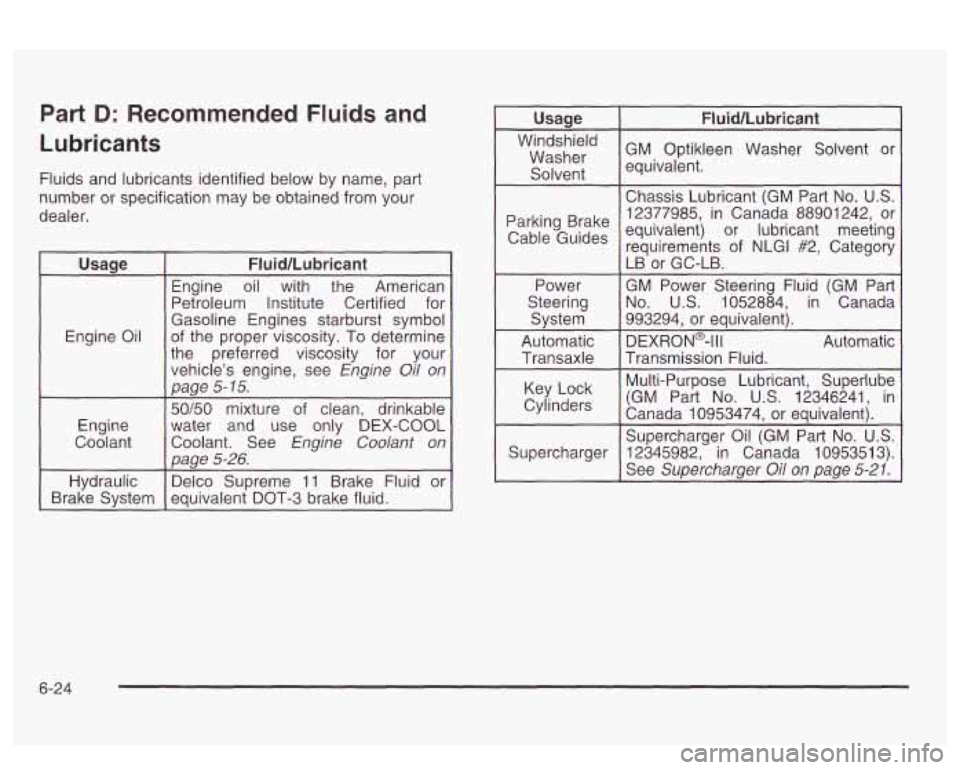
Part D: Recommended Fluids and
Lubricants
Fluids and lubricants identified below by name, part
number or specification may be obtained from your
dealer.
I Usaae I Fluid/Lubricant I
Engine Oil Engine
oil with the American
Petroleum Institute Certified for
Gasoline Engines starburst symbol
of the proper viscosity. To determine
the preferred viscosity for your
vehicle's engine, see
Engine Oil on
page
5- 75.
Engine
Coolant 50/50 mixture
of clean, drinkable
water and use only DEX-COOL
Coolant. See
Engine Coolant on
Daae
5-26. L ,"
Hydraulic Delco
Supreme 11 Brake Fluid or
Brake System equivalent DOT-3 brake fluid.
Usage I Fluid/Lubricant I
GM Optikleen Washer Solvent or Washer
Solvent equivalent.
Chassis Lubricant
(GM Part No.
US.
12377985, in Canada 88901242, or Parking Brake
Cab'e Guides equivalent) or lubricant meeting
requirements of NLGI #2, Category
Power GM Power Steering Fluid (GM Part
Steering No.
US. 1052884,
in Canada
System 993294, or
equivalent).
Automatic DEXRON@-Ill Automatic Transaxle Transmission Fluid. LB
or GC-LB.
Multi-Purpose Lubricant, Superlube
Key Lock
Canada 10953474, or equivalent). Cylinders (GM Part No. U.S. 12346241, in
Supercharger Oil (GM Part
No. U.S.
Supercharger
See Supercharger Oil on page 5-21.
12345982, in Canada 1095351 3).
6-24
Page 398 of 418
orting Safety Defects to General
Motors
In addition to notifying NHTSA (or Transport Canada) in
a situation like this, we certainly hope you’ll notify us.
Please call us at i-800-762-2737, or write:
Pontiac-GMC Customer Assistance Center
P.O. Box 33172
Detroit,
MI 48232-5172
In Canada, please call us at 1-800-263-3777 (English)
or 1-800-263-7854 (French). Or, write:
General Motors
of Canada Limited
Customer Communication Centre,
163-005
1908 Colonel Sam Drive
Oshawa, Ontario LIH
8P7
Service Publications Ordering
Information
Service Manuals
Service Manuals have the diagnosis and repair
information on engines, transmission, axle, suspension,
brakes; electrical; steering: body, etc.
Transmission, Transaxle, Transfer
Case Unit Repair Manual
This manual provides information on unit repair service
procedures, adjustments, and specifications for GM
transmissions, transaxles, and transfer cases.
RETAIL SELL PRICE:
$50.00
Service Bulletins
Service Bulletins give technical service information
needed to knowledgeably service General Motors cars
and trucks. Each bulletin contains instructions to
assist in the diagnosis and service of your vehicle.
In Canada, information pertaining to Product Service
Bulletins can be obtained by contacting your General
Motors dealer or by calling 1-800-GM-DRIVE
(1 -800-463-7483).
RETAIL SELL PRICE:
$120.00
7-9
Page 413 of 418
Tilt Wheel ................. ............ 3-6
Ti re
Pressure Light
................ .................. 3-46
Tire inflation Check
......................................... 6-18
Ti res ................................... .......... 5.62. 5-87
Buying New Tires
....... ...................... 5-67
Chains
....................................................... 5-71
Changing a Flat Tire
.................................... 5-73
Check Tire Pressure System
......................... 5-64
Compact Spare Tire
..................................... 5-81
If a Tire Goes Flat ....................................... 5-72
Inflation
-- Tire Pressure ............................... 5-62
Inspection and Rotation
................................ 5-65
Uniform Tire Quality Grading
......................... 5-68
Wheel Alignment and Tire Balance
................. 5-69
Wheel Replacement
..................................... 5-69
When It
Is Time for New Tires ...................... 5-67
To Use the Engine Coolant Heater
.................... 2-28
Top
of the Instrument Panel ............................. 5-84
Top Strap
...................................................... 1-37
Top Strap Anchor Location
............................... 1-38
Torque Lock
................................................... 2-34
Total Weight on Your Vehicle’s Tires
.................. 4-38
Towing
Recreational Vehicle
..................................... 4-32
Towing a Trailer
.......................................... 4-36
Your Vehicle
............................................... 4-32
Control System (TCS)
.................................... 4-9
Control System Warning Light
....................... 3-43
Traction Traction
(cont.)
Low Active Light
...................................... 3-44
Trailer Brakes
................................................. 4-39
Trailer Wiring Harness
..................................... 4-39
Transaxle
Fluid. Automatic
........................................... 5-23
Transaxle Operation. Automatic
......................... 2-28
Transmission. Transaxle. Transfer Case Unit
Repair Manual
.............................................. 7-9
Transportation Options
...................................... 7-7
Trip Odometer
................................................ 3-38
Trunk
........................................................ 2-16
Trunk Ajar Light
.............................. .... 3-52
Trunk Lock Release
.................................... 2-16
Trunk Security Override
............................... 2-17
Turn and Lane-Change Signals
.......................... 3-7
Turn Signal/Multifunction Lever
........................... 3-7
Turn Signals When Towing a Trailer
.................. 4-40
Twilight Sentinel@
............................................ 3-15
U
Underbody Flushing Service ............................. 6-21
Understanding Radio Reception
........................ 3-99
Uniform Tire Quality Grading
............................ 5-68
United States
................................................... 7-3
Used Replacement Wheels
.............................. 5-70
Using Cleaner on Fabric .................................. 5-83
Using HomeLink@ ........................................... 2-45
14