Air PONTIAC FIREBIRD 1998 Owner's Guide
[x] Cancel search | Manufacturer: PONTIAC, Model Year: 1998, Model line: FIREBIRD, Model: PONTIAC FIREBIRD 1998Pages: 406, PDF Size: 18.23 MB
Page 146 of 406
Section 3 Comfort Controls and Audio Systems
In this section, you’ll find out how to operate the comfort control and audio systems offered with your vehicle. Be
sure to read about the particular systems supplied with your v\
ehicle.
3-2
3-3
3-4
3-4
3-5
3-6
3-7
3-7
3-8 3-11 Comfort Controls
Air Conditioning
Heating
Defogging and Defrosting
Rear Window Defogger
Ventilation System
Setting the Clock
AM-FM Stereo with Cassette Tape Player and
Equalizer (If Equipped)
Monsoonm
AM-FM Stereo with Cassette
Tape Player and Equalizer (If Equipped)
AM-€34 Stereo with Compact Disc Player and
Equalizer (If Equipped)
3-12
3-14
3-17
3-19
3-20
3
-20
3-21
3-22
3-22
3-22
MonsoonTM AM-FM Stereo with Compact
Disc Player and Equalizer
(If Equipped)
Trunk Mounted CD Changer (If Equipped)
Theft-Deterrent Feature
Audio Steering Wheel Controls (If Equipped)
Understanding Radio Reception
Tips About Your Audio System
Care of Your Cassette Tape Player
Care of Your Compact Discs
Care of Your Compact Disc Player
Power Antenna Mast Care
3-1
Page 147 of 406

Comfort Controls
With this system, you can control the heating and
ventilation in
your vehicle. If you have the air
conditioning option, you can also control cooling.
Your vehicle also has the flow-through ventilation
system
described later in this section.
Fan Control Knob
Turn the fan knob to select the force of air
you want.
Temperature Control Knob
Turn the center knob to change the temperature of the
air flowing from the heating system. Turn it toward the
red area (clockwise) for warmer air and toward the blue
area (counterclockwise) for cooler
air.
Air Control Knob
OFF’: The system is off.
2 VENT: Air flows through the upper air vents.
12 BI-LEVEL: Air is directed through the upper air
vents and the heater ducts.
ld HEATER: This setting directs most of the air
through the heater ducts and some of the air through the
windshield defroster vents.
‘3 BLEND: Air is directed through the windshield
defroster vents and the heater ducts.
DEFROST: This setting directs most of the air
through the windshield defroster vents and some of the
air through the heater ducts.
Page 148 of 406

Air Conditioning
The air conditioning system uses the same controls as
the heating system, except that the air control knob has
two extra settings, described below.
MAX: Provides maximum cooling or quick cool-down
on very hot days. This setting recirculates most
of the air
inside your vehicle. If it is used for long periods of time,
the
air may become dry. This setting directs air through
the upper
air vents.
A/C: Use for normal cooling on hot days. This
setting cools outside air and directs it through the
upper air vents.
The
air conditioner compressor operates in MAX, NC,
bi-level, blend and defrost when the outside temperature is above
freezing. When the air conditioner is on, you may
sometimes notice slight changes in your vehicle's engine
speed and power. This is normal because the system is
designed to cycle the compressor on and off to keep the
desired cooling and help fuel economy.
Cooling
The air conditioner works best if you keep your
windows closed. On very hot days, open the windows
just long enough for the hot air to escape.
1. Turn the air control knob to A/C for normal cooling.
2. Turn the temperature control knob to a
For faster cooling move
the knob to MAX.
comfortable setting.
3. Move the fan control knob to the desired speed.
3-3
Page 149 of 406

Heating Ventilation
The heater works best if you keep your windows closed
while using it.
1. Turn the air control knob to heater.
2. Turn the fan control knob to the desired speed.
3. Turn the temperature control knob to a
comfortable setting.
During initial start-up only, if your vehicle
is equipped
with
an optional engine coolant heater, you can use it in
cold weather (around
2OoF/-8 “C or lower) to improve
heater performance
on start up. See “Engine Coolant
Heater” in the Index.
Bi-Level Heating
You may want to use bi-level heating on cool, but sunny
days. This setting directs cool air toward your body and
warmer air toward your feet.
1. Turn the air control knob to bi-level.
2. Turn the temperature control knob to a
comfortable setting.
3. Turn the fan control knob to the desired speed. For mild outside temperatures when little heating
or
cooling is needed,
you can still direct outside air through
your vehicle.
1. Turn the air control knob to vent.
2. Turn the temperature control knob to a
comfortable setting.
3. Turn the fan control knob to the desired speed.
Defogging and Defrosting
1. Turn the air control knob to defrost.
2. Turn the temperature control knob to the
desired setting.
3. Turn the fan control knob to the desired speed.
3-4
Page 150 of 406

Rear Window Defogger (If Equipped)
0
The rear window defogger
uses a warming grid to
remove fog from the
rear window.
Press the button to
turn on the defogger. An indicator
light
will come on to remind you that the defogger
is
on. The defogger will turn off automatically after
about
10 minutes of use. If you turn it on again, the
defogger will operate for about five minutes only.
You can turn the defogger off by pressing the
button again.
Do not attach anything like a temporary vehicle license
or
a decal across the defogger grid on the rear window.
NOTICE:
Don’t use a razor blade or something else sharp
on the inside
of the rear window. If you do, you
could cut
or damage the warming grid, and the
repairs wouldn’t be covered by your warranty.
3-5
Page 151 of 406

Ventilation System
Your vehicle’s flow-through ventilation system
supplies outside air into the vehicle when it is moving.
Outside air will
also enter the vehicle when the blower
fan is running.
Ventilation Tips
Keep the hood and front air inlet free of ice, snow or
any other obstruction (such as leaves). The heater
and defroster will work far better, reducing the
chance of fogging the inside of your windows.
When you enter a vehicle in cold weather, turn the
fan control
knob to the right for a few moments
before driving
off. This helps clear the intake ducts
of
snow and moisture, and reduces the chance of
fogging the inside of your windows.
objects. This helps
air to circulate throughout
your vehicle.
Keep the air path under the front seats clear of
Page 158 of 406
Setting the Tone
EQUALIZER: A seven-band equalizer is part of your
audio system. Slide the levers up to boost or down to
reduce frequency range.
Adjusting the Speakers
BAL: Press this knob lightly so it extends. Turn it to
move the sound to the left
or right speakers. The middle
position balances the sound between the speakers.
FADE: Press this knob lightly so it extends. Turn it to
move the sound to the front or rear speakers. The middle
position balances the sound between the speakers.
Push these knobs back into their stored positions when
you’re not using them.
Playing a Compact Disc
Insert a disc partway into the slot, label side up. The
player will pull it in. If the ignition and the radio are on,
the disc will begin playing.
If you want to insert a disc
when
the ignition is off, first press EJECT. If
you’re driving on a very rough road or if it’s
very hot,
the disc may not play and
E (error) and a number may
appear on the radio display.
If the disc comes out, it
could be that:
0 The disc is upside down.
0 It is dirty, scratched or wet.
0 The air is very humid. (If so, wait about an hour and
If any error occurs repeatedly or if an error can’t be
corrected, please contact your dealer. If your radio
displays an error number, write it down and provide it to
your dealer when reporting the problem. try again.)
PREV (1): Press this button or the SEEK down arrow to
go to the start
of the current track if more than eight
seconds have played.
If you hold the button or press it
more than once, the player will continue moving back
through the disc.
NEXT (2): Press this button or the SEEK up arrow to
go to the start of the next track. If you hold the button or
press it more than once, the player will continue moving
forward through the disc.
RDM (3): Press this button to hear the tracks in random,
rather than sequential, order. The display will show
RDM. Press RDM again to turn off random play.
3-13
Page 160 of 406

Close the door by sliding it all the way to the left. If the
door
is left partially open, the changer will not operate
and an error will occur. When the door
is closed, the
changer will begin checking for discs in the magazine.
This will continue for up to two minutes depending on
the number of discs loaded.
To eject the magazine from the player, slide the CD
changer door all the way open. The magazine will
automatically eject. Remember to keep the door closed
whenever possible to keep dirt and dust from getting
inside the changer.
All of the CD functions
are controlled by the radio
buttons except for ejecting the magazine. Whenever a
CD magazine with discs is loaded in the changer, the
compact
disc symbol will appear on the radio display. If
the CD changer is checking the magazine for CDs, the
compact disc symbol will flash on the display until the
changer is ready to play. When a CD begins playing, CD
will appear in the bottom left corner and a disc and track
number will be displayed. The disc numbers are listed
on the front of the magazine.
Compact Disc Errors
If E and a number appear on the display, an error has
occurred and the compact disc temporarily cannot play. The
CD changer will send
an error message to the
receiver to indicate:
0 E30: Disc Label Side Up
E34: CD Changer Door Open
E35 CD Changer Cartridge Empty
If the error occurred while trying to play a CD
in the
compact disc player or changer, the following conditions
may have caused the error:
0
0
0
0
0
The road is too rough. The disc should play when the
road is smoother.
The disc is dirty, scratched or wet.
The disc is label side up.
If so, load the disc label
side down.
The air is very humid.
If so, wait about an hour and
try again.
The CD changer door
is open. Completely close the
door to restore normal operation.
An empty magazine is inserted in the CD changer.
Try the magazine again with a disc loaded on one of
the trays.
If any error occurs repeatedly or if an error cannot be
corrected, please contact your dealer.
If your radio
displays an error number, write
it down and provide it to
your dealer when reporting the problem.
3-15
Page 173 of 406
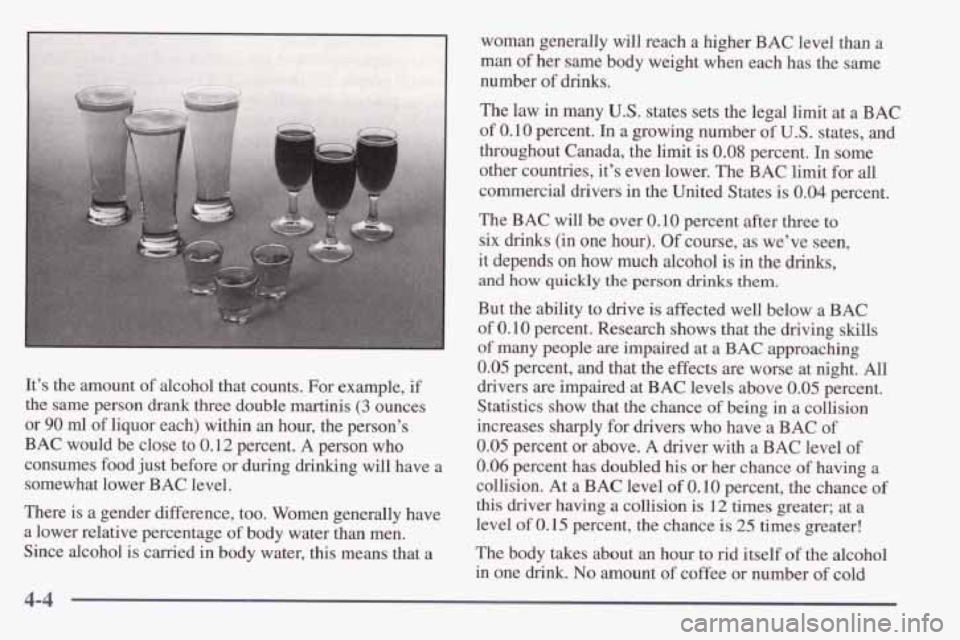
It’s the amount of alcohol that counts. For example, if
the same person drank three double martinis
(3 ounces
or
90 ml of liquor each) within an hour, the person’s
BAC would be close to
0.12 percent. A person who
consumes food just before or during drinking will have a
somewhat lower BAC level.
There is a gender difference, too. Women generally have
a lower relative percentage of body water than men.
Since alcohol is carried
in body water, this means that a The
BAC will be over 0.10 percent after three to
six
drinks (in one hour). Of course, as we’ve seen,
it depends on how much alcohol is in the drinks,
and how quickly the person drinks them.
But the ability to drive is affected well below a BAC
of 0.10 percent. Research shows that the driving skills
of many people are impaired at a BAC approaching
0.05 percent, and that the effects are worse at night. All
drivers are impaired at BAC levels above 0.05 percent.
Statistics show that the chance of being in a collision
increases sharply for drivers who have a BAC of
0.05 percent or above. A driver with a BAC level of
0.06 percent has doubled his or her chance of having a
collision. At a BAC level
of 0.10 percent, the chance of
this driver having a collision is 12 times greater; at a
level of
0.15 percent, the chance is 25 times greater!
The body takes about
an hour to rid itself of the alcohol
in one drink. No amount of coffee or number of cold
4-4
Page 181 of 406

An emergency like this requires close attention and a
quick decision.
If you are holding the steering wheel at
the recommended 9 and 3 o’clock positions, you can
turn it a full
180 degrees very quickly without removing
either hand.
But you have to act fast, steer quickly, and
just as quickly straighten the wheel once you have
avoided the object.
The fact that such emergency situations
are always
possible is a good reason
to practice defensive driving at
all times and wear safety belts properly.
Off-Road Recovery
You may find that your right wheels have dropped off the
edge
of a road onto the shoulder while you’re driving.
If the level of the shoulder is only slightly below the
pavement, recovery should be fairly easy. Ease
off the
accelerator and then,
if there is nothing in the way, steer
so that your vehicle straddles the edge of the pavement.
You can turn the steering wheel up to one-quarter turn
until the right front tire contacts the pavement edge. Then
turn your steering wheel to go straight down the roadway.
4-12