service PONTIAC G3 2010 User Guide
[x] Cancel search | Manufacturer: PONTIAC, Model Year: 2010, Model line: G3, Model: PONTIAC G3 2010Pages: 368, PDF Size: 3.94 MB
Page 101 of 368
Adding Equipment to Your
Airbag-Equipped Vehicle
Q: Is there anything I might add to or change aboutthe vehicle that could keep the airbags from
working properly?
A: Yes. If you add things that change your vehicle's
frame, bumper system, height, front end or side
sheet metal, they may keep the airbag system from
working properly. Changing or moving any parts of
the front seats, safety belts, the airbag sensing and
diagnostic module, steering wheel, instrument panel,
front sensors, or airbag wiring can affect the
operation of the airbag system.
In addition, the vehicle has a passenger sensing
system for the right front passenger position, which
includes sensors that are part of the passenger seat.
The passenger sensing system may not operate
properly if the original seat trim is replaced with
non-GM covers, upholstery or trim, or with GM
covers, upholstery or trim designed for a different
vehicle. Any object, such as an aftermarket seat
heater or a comfort enhancing pad or device,
installed under or on top of the seat fabric, could
also interfere with the operation of the passenger sensing system. This could either prevent proper
deployment of the passenger airbag(s) or prevent
the passenger sensing system from properly turning
off the passenger airbag(s). See
Passenger Sensing
System on page 2‑65.
If you have any questions about this, you should
contact Customer Assistance before you modify
your vehicle. The phone numbers and addresses
for Customer Assistance are in Step Two of the
Customer Satisfaction Procedure in this manual.
See Customer Satisfaction Procedure on page 8‑2.
Q: Because I have a disability, I have to get my vehicle modified. How can I find out whether this
will affect my airbag system?
A: If you have questions, call Customer Assistance.
The phone numbers and addresses for Customer
Assistance are in Step Two of the Customer
Satisfaction Procedure in this manual. See
Customer Satisfaction Procedure on page 8‑2.
In addition, your dealer/retailer and the service manual
have information about the location of the airbag
sensors, sensing and diagnostic module and airbag
wiring.
2-71
Page 102 of 368
Restraint System Check
Checking the Restraint Systems
Safety Belts
Now and then, check that the safety belt reminder light,
safety belts, buckles, latch plates, retractors, and
anchorages are all working properly.
Look for any other loose or damaged safety belt system
parts that might keep a safety belt system from doing its
job. See your dealer/retailer to have it repaired. Torn or
frayed safety belts may not protect you in a crash.
They can rip apart under impact forces. If a belt is torn
or frayed, get a new one right away.
Make sure the safety belt reminder light is working.
SeeSafety Belt Reminders
on page 4‑23for more
information.
Keep safety belts clean and dry. See Care of Safety
Belts
on page 6‑82.
Airbags
The airbag system does not need regularly scheduled
maintenance or replacement. Make sure the airbag
readiness light is working. See Airbag Readiness Light
on page 4‑23for more information.
Notice: If an airbag covering is damaged, opened,
or broken, the airbag may not work properly. Do not
open or break the airbag coverings. If there are any
opened or broken airbag covers, have the airbag
covering and/or airbag module replaced. For the
location of the airbag modules, see What Makes an
Airbag Inflate?
on page 2‑63. See your dealer/
retailer for service.
2-72
Page 107 of 368

Your vehicle may have an electronic immobilizer
designed to protect your car against theft. If so, only
keys with the correct electronic code can be used to
start the vehicle. SeeImmobilizer Operation
on
page 3‑14for additional information. If a replacement
key or an additional key is needed, it must be
purchased from your dealer/retailer or certified
locksmith.
Notice: If you ever lock your keys in the vehicle,
you may have to damage the vehicle to get in.
Be sure you have spare keys.
In an emergency, contact Roadside Assistance.
See Roadside Assistance Program
on page 8‑6for more information.
Remote Keyless Entry (RKE) System
SeeRadio Frequency Statementon page 8‑17for
information regarding Part 15 of the Federal
Communications Commission (FCC) Rules and
RSS-210/211 of Industry and Science Canada.
Changes or modifications to this system by other than
an authorized service facility could void authorization to
use this equipment.
If there is a decrease in the RKE operating range,
try this:
.Check the distance. The transmitter may be too far
from the vehicle. Stand closer during rainy or
snowy weather.
.Check the location. Other vehicles or objects may
be blocking the signal. Take a few steps to the left
or right, hold the transmitter higher, and try again.
.Check the transmitter's battery. See “Battery
Replacement” later in this section.
.If the transmitter is still not working correctly,
see your dealer/retailer or a qualified technician
for service.
3-3
Page 119 of 368
When trying to start the vehicle, if the engine does not
start and the security light flashes or comes on, there
may be a problem with the theft-deterrent system.
Turn the ignition off and try again.
If the engine still does not start, and the key appears to
be undamaged, try another key. At this time, you may
also want to check the fuse. SeeFuses and Circuit
Breakers
on page 6‑87. If the engine still does not start
with the other key, your vehicle needs service. If your
vehicle does start, the first key may be faulty. See your
dealer/retailer who can have a new key made.
Up to 10 keys may be programmed for the vehicle.
If you lose or damage your keys, only a dealer/retailer
can have new keys made.
If you are ever driving and the security light comes on
and stays on, you will be able to restart the engine if
you turn it off. The theft-deterrent system, however, is
not working properly and must be serviced by your
dealer/retailer. Your vehicle is not protected by the
theft-deterrent system at this time.
In an emergency, contact Roadside Assistance.
See Roadside Assistance Program on page 8‑6.
Content Theft-Deterrent
Your vehicle may have a content theft-deterrent system.
The theft-deterrent system will not arm when you lock
the doors using the key or the manual door lock. It arms
only when you use the remote keyless entry transmitter.
Arming the System
To arm the system, do the following:
1. Close the doors, the windows, the hood, and the trunk or liftgate.
Make sure that the windows are closed, as the
system can be armed even if the windows
are open.
2. Turn the key to LOCK/OFF and remove the key from the ignition.
If the key is inserted in the ignition, the transmitter
will not arm the theft-deterrent system.
3-15
Page 122 of 368
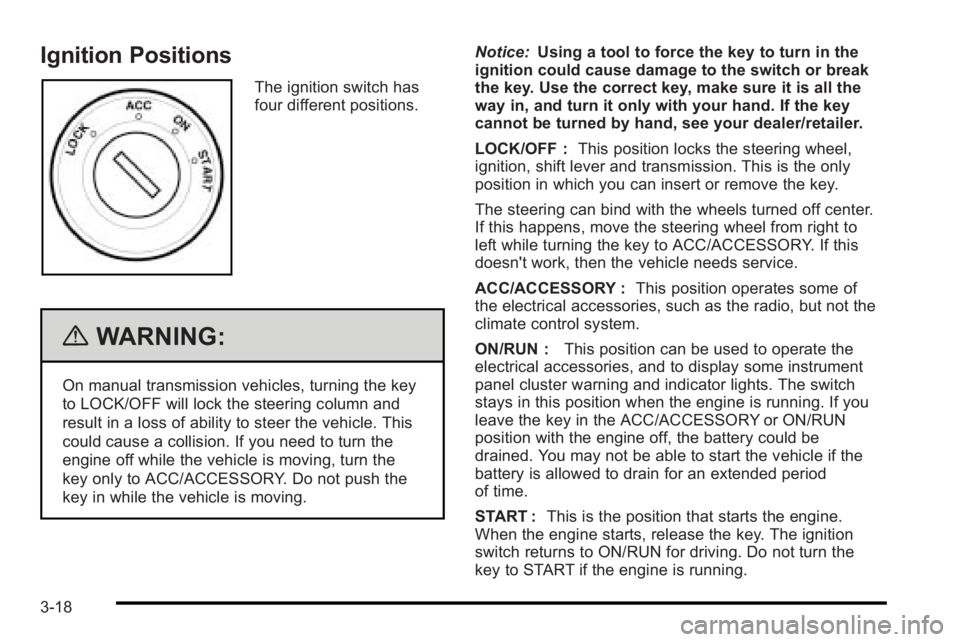
Ignition Positions
The ignition switch has
four different positions.
{WARNING:
On manual transmission vehicles, turning the key
to LOCK/OFF will lock the steering column and
result in a loss of ability to steer the vehicle. This
could cause a collision. If you need to turn the
engine off while the vehicle is moving, turn the
key only to ACC/ACCESSORY. Do not push the
key in while the vehicle is moving.Notice:
Using a tool to force the key to turn in the
ignition could cause damage to the switch or break
the key. Use the correct key, make sure it is all the
way in, and turn it only with your hand. If the key
cannot be turned by hand, see your dealer/retailer.
LOCK/OFF : This position locks the steering wheel,
ignition, shift lever and transmission. This is the only
position in which you can insert or remove the key.
The steering can bind with the wheels turned off center.
If this happens, move the steering wheel from right to
left while turning the key to ACC/ACCESSORY. If this
doesn't work, then the vehicle needs service.
ACC/ACCESSORY : This position operates some of
the electrical accessories, such as the radio, but not the
climate control system.
ON/RUN : This position can be used to operate the
electrical accessories, and to display some instrument
panel cluster warning and indicator lights. The switch
stays in this position when the engine is running. If you
leave the key in the ACC/ACCESSORY or ON/RUN
position with the engine off, the battery could be
drained. You may not be able to start the vehicle if the
battery is allowed to drain for an extended period
of time.
START : This is the position that starts the engine.
When the engine starts, release the key. The ignition
switch returns to ON/RUN for driving. Do not turn the
key to START if the engine is running.
3-18
Page 128 of 368

Notice:Shifting out of P (Park) or N (Neutral) with
the engine running at high speed may damage the
transmission. The repairs would not be covered by
the vehicle warranty. Be sure the engine is not
running at high speed when shifting the vehicle.
D4 (Automatic Overdrive) : This position is for normal
driving.
When operating the vehicle in severe cold conditions,
the transmission may be prevented from shifting into
D4 gear until the transmission fluid has warmed up to
it's operational temperature.
Notice: If the vehicle seems to start up rather
slowly or not shift gears when you go faster, and
you continue to drive the vehicle that way, you
could damage the transmission. Have the vehicle
serviced right away. You can drive in 2 (Second)
when you are driving less than 35 mph (55 km/h)
and D4 (Automatic Overdrive) for higher speeds
until then.
2 (Second) : This position gives you more power but
lower fuel economy. You can use 2 (Second) on hills.
It can help control vehicle speed as you go down steep
mountain roads, while using the brakes off and on. Notice:
Do not drive in 2 (Second) at speeds over
65 mph (105 km/h), or you can damage the
transmission. Use D4 (Automatic Overdrive) as
much as possible. Do not shift into 2 (Second)
unless you are going slower than 65 mph (105 km/h)
or you can damage the engine.
1 (First) : This position gives you even more power but
lower fuel economy than 2 (Second). You can use it on
very steep hills, or in deep snow or mud. If the shift
lever is put in 1 (First), the transmission will not shift into
first gear until the vehicle is going slowly enough.
Notice: Spinning the tires or holding the vehicle in
one place on a hill using only the accelerator pedal
may damage the transmission. The repair will not be
covered by the vehicle warranty. If you are stuck, do
not spin the tires. When stopping on a hill, use the
brakes to hold the vehicle in place.
If there is a malfunction with the automatic transmission,
the malfunction indicator lamp (MIL) or the HOLD
indicator light will turn on or flash. See Malfunction
Indicator Lamp on page 4‑29.
Have the vehicle fixed as soon as possible.
3-24
Page 166 of 368

This light comes on
when the vehicle is
started, and it will flash
for a few seconds. When
the light goes out this
indicates the system is
functioning properly.
If the airbag readiness light stays on or comes on while
driving, the airbag system may not work properly. Have
the vehicle serviced right away.
{WARNING:
If the airbag readiness light stays on after the
vehicle is started or comes on while driving, it
means the airbag system might not be working
properly. The airbags in the vehicle might not
inflate in a crash, or they could even inflate
without a crash. To help avoid injury, have the
vehicle serviced right away.
Passenger Airbag Status Indicator
The vehicle has the passenger sensing system. See
Passenger Sensing Systemon page 2‑65for important
safety information. The vehicle has a passenger airbag
status indicator near the clock, located in the center of
the instrument panel.
United StatesCanada
When the vehicle is started, the passenger airbag
status indicator will light PASSENGER AIRBAG ON and
PASSENGER AIRBAG OFF or the symbol for on and
off, for several seconds as a system check. Then, after
several more seconds, the status indicator will light
either PASSENGER AIRBAG ON or PASSENGER
AIRBAG OFF, or either the on or off symbol, to let you
know the status of the right front passenger frontal and
seat-mounted side impact airbag (if equipped).
4-24
Page 167 of 368

If the words PASSENGER AIRBAG ON or the on
symbol is lit on the passenger airbag status indicator, it
means that the right front passenger frontal airbag and
seat-mounted side impact airbag (if equipped) is
enabled (may inflate).
If the words PASSENGER AIRBAG OFF or the off
symbol is lit on the passenger airbag status indicator, it
means that the passenger sensing system has turned
off the right front passenger frontal airbag and
seat-mounted side impact airbag (if equipped).
If, after several seconds, both status indicator lights
remain on, or if there are no lights at all, there may be a
problem with the lights or the passenger sensing
system. See your dealer/retailer for service.
{WARNING:
If the airbag readiness light ever comes on and
stays on, it means that something may be wrong
with the airbag system. To help avoid injury to
yourself or others, have the vehicle serviced right
away. SeeAirbag Readiness Light
on page 4‑23
for more information, including important safety
information.
Charging System Light
This light will come on briefly when the ignition is turned
on, and the engine is not running, as a check to show it
is working.
It should go out when the engine is started. If it stays
on, or comes on while driving, there may have a
problem with the electrical charging system. Have it
checked by your dealer/retailer. Driving while this light is
on could drain the battery. If a short distance must be
driven with the light on, turn off all accessories, such as
the radio and air conditioner to help reduce the drain on
the battery.
4-25
Page 168 of 368
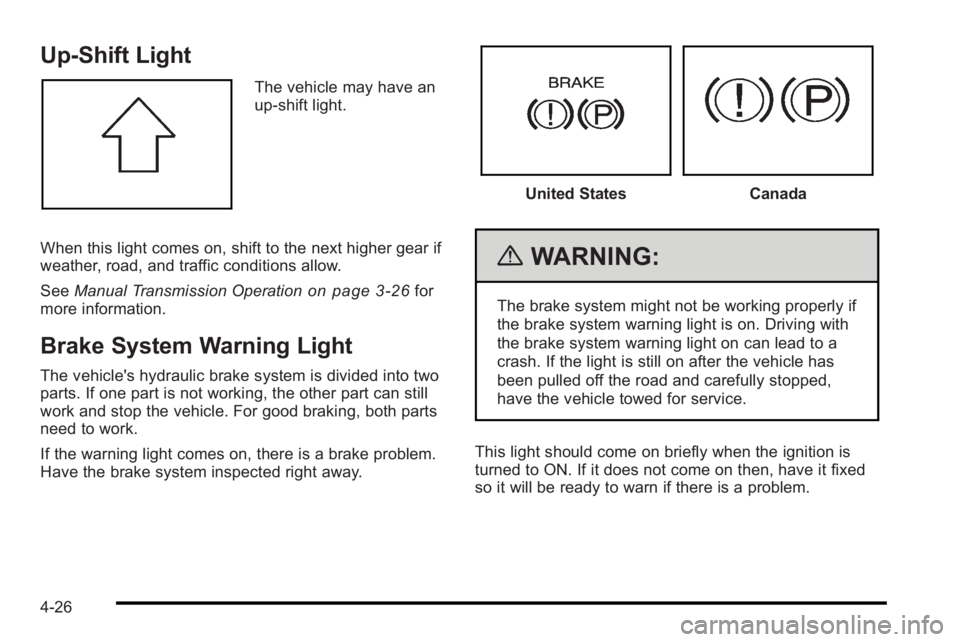
Up-Shift Light
The vehicle may have an
up-shift light.
When this light comes on, shift to the next higher gear if
weather, road, and traffic conditions allow.
See Manual Transmission Operation
on page 3‑26for
more information.
Brake System Warning Light
The vehicle's hydraulic brake system is divided into two
parts. If one part is not working, the other part can still
work and stop the vehicle. For good braking, both parts
need to work.
If the warning light comes on, there is a brake problem.
Have the brake system inspected right away.
United StatesCanada
{WARNING:
The brake system might not be working properly if
the brake system warning light is on. Driving with
the brake system warning light on can lead to a
crash. If the light is still on after the vehicle has
been pulled off the road and carefully stopped,
have the vehicle towed for service.
This light should come on briefly when the ignition is
turned to ON. If it does not come on then, have it fixed
so it will be ready to warn if there is a problem.
4-26
Page 169 of 368

When the ignition is on, the brake system warning light
will also come on when the parking brake is set. The
light will stay on if the parking brake does not fully
release. If it stays on after the parking brake is fully
released, it means there is a brake problem.
If the light comes on while driving, carefully pull off the
road and stop. The pedal may be harder to push or may
go closer to the floor. It may take longer to stop. If the
light is still on, have the vehicle towed for service.
SeeTowing Your Vehicle on page 5‑25.
Antilock Brake System (ABS)
Warning Light
For vehicles with the
Antilock Brake System
(ABS), this light comes on
briefly when the engine is
started.
If the light stays on, turn the ignition to LOCK/OFF or if
the light comes on, stop as soon as possible and turn
the ignition off. Then start the engine again to reset the
system. If the light still stays on, or comes on again while driving, the vehicle needs service. See your
dealer/retailer. If the regular brake system warning light
is not on, the brakes will still work, but the antilock
brakes will not work. If the regular brake system
warning light is also on, the antilock brakes will not
work and there is a problem with the regular brakes.
See
Brake System Warning Light on page 4‑26.
The ABS warning light will come on briefly when the
ignition is turned to ON/RUN. This is normal. If the light
does not come on then, have it fixed so it will be ready
to warn if there is a problem.
Hold Mode Light
If the vehicle has this
feature, this light comes
on when the hold mode
is active.
If the HOLD mode light flashes, have the vehicle
checked. See “Hold Mode”underAutomatic
Transmission Operation
on page 3‑22for more
information.
4-27