air condition PONTIAC G3 2010 Owners Manual
[x] Cancel search | Manufacturer: PONTIAC, Model Year: 2010, Model line: G3, Model: PONTIAC G3 2010Pages: 368, PDF Size: 3.94 MB
Page 4 of 368
Safety Warnings and Symbols
Warning messages found on vehicle labels and in this
manual describe hazards and what to do to avoid or
reduce them.
Dangerindicates a hazard with a high level of risk
which will result in serious injury or death.
Warning orCaution indicates a hazard that could result
in injury or death.
{WARNING:
These mean there is something that could hurt
you or other people.
Notice: This means there is something that could
result in property or vehicle damage. This would not
be covered by the vehicle's warranty.
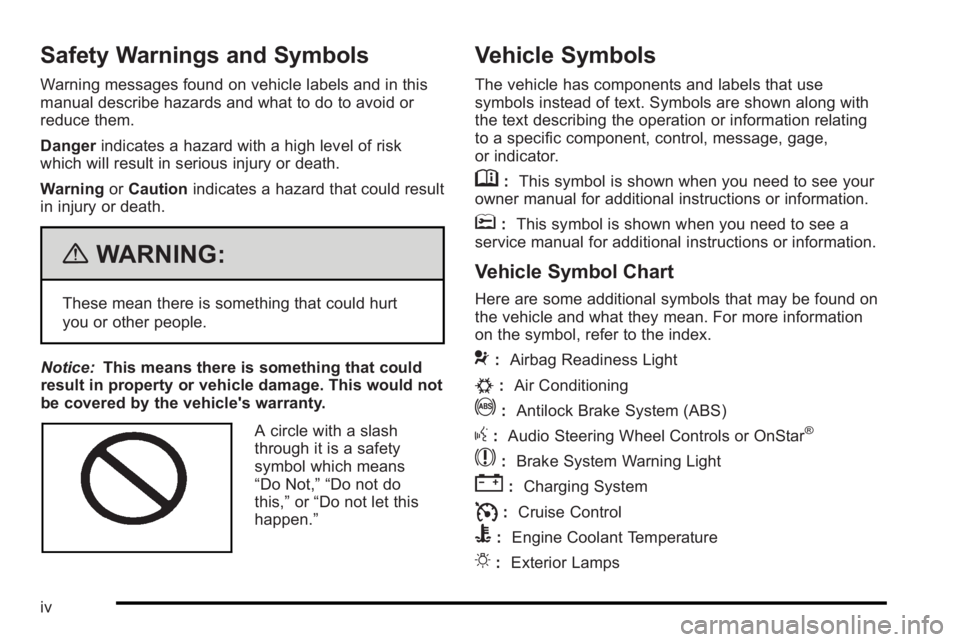
A circle with a slash
through it is a safety
symbol which means
“Do Not,” “Do not do
this,” or“Do not let this
happen.”
Vehicle Symbols
The vehicle has components and labels that use
symbols instead of text. Symbols are shown along with
the text describing the operation or information relating
to a specific component, control, message, gage,
or indicator.
M: This symbol is shown when you need to see your
owner manual for additional instructions or information.
*: This symbol is shown when you need to see a
service manual for additional instructions or information.
Vehicle Symbol Chart
Here are some additional symbols that may be found on
the vehicle and what they mean. For more information
on the symbol, refer to the index.
9: Airbag Readiness Light
#:Air Conditioning
!:Antilock Brake System (ABS)
g:Audio Steering Wheel Controls or OnStar®
$: Brake System Warning Light
":Charging System
I:Cruise Control
B: Engine Coolant Temperature
O:Exterior Lamps
iv
Page 15 of 368

Safety Belt
Refer to the following sections for important information
on how to use safety belts properly.
.Safety Belts: They Are for Everyone on page 2‑15.
.How to Wear Safety Belts Properly on page 2‑20.
.Lap-Shoulder Belt on page 2‑29.
.Lower Anchors and Tethers for Children (LATCH)on page 2‑43.
Sensing System for Passenger
Airbag
The passenger sensing system will turn off the right
front passenger frontal airbag and seat‐mounted side
impact airbag (if equipped) under certain conditions.
The driver airbags are not affected by this.
The passenger airbag status indicator will be visible,
near the clock, located in the center of the instrument
panel when the vehicle is started.
United StatesCanada
See Passenger Sensing System
on page 2‑65for
important information.
1-9
Page 20 of 368
Climate Controls
For vehicles with these climate control systems, the
heating, cooling, and ventilation can be controlled for
the vehicle.
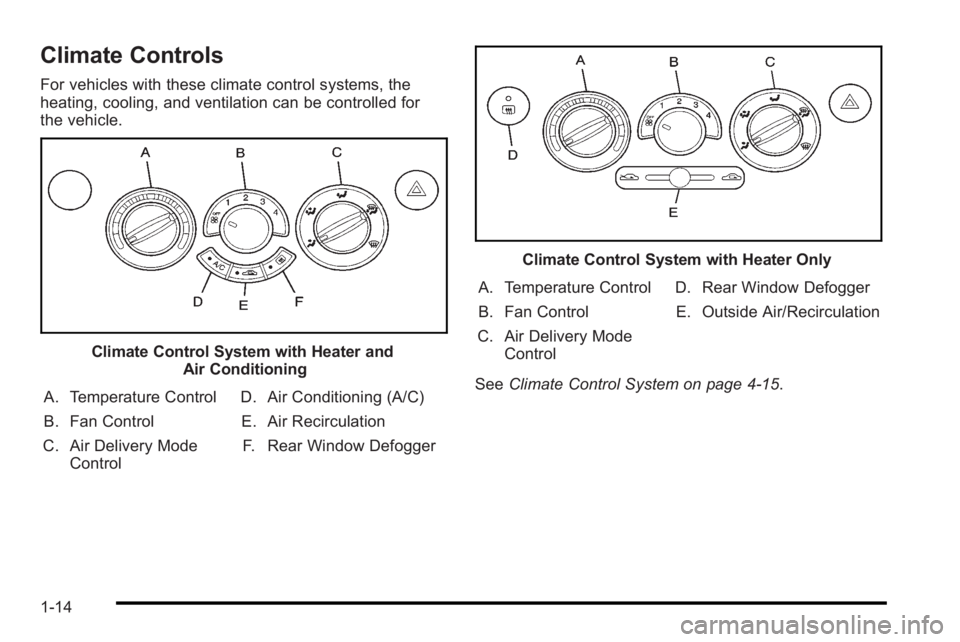
Climate Control System with Heater andAir Conditioning
A. Temperature Control
B. Fan Control
C. Air Delivery Mode Control D. Air Conditioning (A/C)
E. Air Recirculation
F. Rear Window Defogger
Climate Control System with Heater Only
A. Temperature Control
B. Fan Control
C. Air Delivery Mode Control D. Rear Window Defogger
E. Outside Air/Recirculation
See Climate Control System on page 4‑15.
1-14
Page 28 of 368
Driving for Better Fuel Economy
Driving habits can affect fuel mileage. Here are some
driving tips to get the best fuel economy possible.
.Avoid fast starts and accelerate smoothly.
.Brake gradually and avoid abrupt stops.
.Avoid idling the engine for long periods of time.
.When road and weather conditions are
appropriate, use cruise control, if equipped.
.Always follow posted speed limits or drive more
slowly when conditions require.
.Keep vehicle tires properly inflated.
.Combine several trips into a single trip.
.Replace the vehicle's tires with the same TPC
Spec number molded into the tire's sidewall near
the size.
.Follow recommended scheduled maintenance.
Roadside Assistance Program
U.S.:1-800-ROADSIDE (762-3743)
TTY Users: 1-888-889-2438
Canada: 1-800-268-6800
As the owner of a new Pontiac, you are automatically
enrolled in the Roadside Assistance program. This
program provides technically trained advisors who are
available 24 hours a day, 365 days a year, minor repair
information or towing arrangements.
Roadside Assistance and OnStar
If you have a current OnStar subscription, press the
OnStar button and the current GPS location will be sent
to an OnStar Advisor who will assess your problem,
contact Roadside Assistance, and relay exact location
to get you the help you need.
Online Owner Center
The Online Owner Center is a complimentary service
that includes online service reminders, vehicle
maintenance tips, online owner manual, special
privileges and more.
Sign up today at: www.gmownercenter.com/pontiac
(U.S.) or www.gm.ca (Canada).
1-22
Page 84 of 368
Securing a Child Restraint in the
Right Front Seat Position
This vehicle has airbags. A rear seat is a safer place to
secure a forward-facing child restraint. SeeWhere to
Put the Restraint on page 2‑42.
In addition, the vehicle has a passenger sensing system
which is designed to turn off the right front passenger
frontal airbag and seat-mounted side impact airbag
(if equipped) under certain conditions. See Passenger
Sensing System
on page 2‑65and Passenger Airbag
Status Indicatoron page 4‑24for more information on
this, including important safety information.
A label on the sun visor says, “Never put a rear-facing
child seat in the front.” This is because the risk to the
rear-facing child is so great, if the airbag deploys.
{WARNING:
A child in a rear-facing child restraint can be
seriously injured or killed if the right front
passenger airbag inflates. This is because the
back of the rear-facing child restraint would be
very close to the inflating airbag. A child in a
forward-facing child restraint can be seriously
(Continued)
WARNING: (Continued)
injured or killed if the right front passenger airbag
inflates and the passenger seat is in a forward
position.
Even if the passenger sensing system has turned
off the right front passenger frontal airbag, no
system is fail-safe. No one can guarantee that an
airbag will not deploy under some unusual
circumstance, even though it is turned off.
Secure rear-facing child restraints in a rear seat,
even if the airbag is off. If you secure a
forward-facing child restraint in the right front seat,
always move the front passenger seat as far back
as it will go. It is better to secure the child restraint
in a rear seat.
SeePassenger Sensing System
on page 2‑65
for additional information.
If the child restraint has the LATCH system, see Lower
Anchors and Tethers for Children (LATCH)
on
page 2‑43for how to install your child restraint using
LATCH. If a child restraint is secured using a safety belt
2-54
Page 96 of 368
The passenger sensing system will turn off the right
front passenger frontal airbag and seat-mounted side
impact airbag (if equipped) under certain conditions.
The driver airbags are not affected by the passenger
sensing system.
The passenger sensing system works with sensors
that are part of the right front passenger seat. The
sensors are designed to detect the presence of a
properly-seated occupant and determine if the right
front passenger frontal airbag and seat-mounted side
impact airbag (if equipped) should be enabled
(may inflate) or not.
According to accident statistics, children are safer when
properly secured in a rear seat in the correct child
restrain for their weight and size.
We recommend that children be secured in a rear seat,
including: an infant or a child riding in a rear-facing child
restraint; a child riding in a forward-facing child seat; an
older child riding in a booster seat; and children, who
are large enough, using safety belts.
A label on the sun visor says,“Never put a rear-facing
child seat in the front.” This is because the risk to the
rear-facing child is so great, if the airbag deploys.
{WARNING:
A child in a rear-facing child restraint can be
seriously injured or killed if the right front
passenger airbag inflates. This is because the
back of the rear-facing child restraint would be
very close to the inflating airbag. A child in a
forward-facing child restraint can be seriously
injured or killed if the right front passenger airbag
inflates and the passenger seat is in a forward
position.
Even if the passenger sensing system has turned
off the right front passenger frontal airbag and
seat-mounted side impact airbag (if equipped),
no system is fail-safe. No one can guarantee that
an airbag will not deploy under some unusual
circumstance, even though the airbag(s) are off.
Secure rear-facing child restraints in a rear seat,
even if the airbag(s) are off. If you secure a
forward-facing child restraint in the right front seat,
always move the front passenger seat as far back
as it will go. It is better to secure the child restraint
in a rear seat.
2-66
Page 128 of 368

Notice:Shifting out of P (Park) or N (Neutral) with
the engine running at high speed may damage the
transmission. The repairs would not be covered by
the vehicle warranty. Be sure the engine is not
running at high speed when shifting the vehicle.
D4 (Automatic Overdrive) : This position is for normal
driving.
When operating the vehicle in severe cold conditions,
the transmission may be prevented from shifting into
D4 gear until the transmission fluid has warmed up to
it's operational temperature.
Notice: If the vehicle seems to start up rather
slowly or not shift gears when you go faster, and
you continue to drive the vehicle that way, you
could damage the transmission. Have the vehicle
serviced right away. You can drive in 2 (Second)
when you are driving less than 35 mph (55 km/h)
and D4 (Automatic Overdrive) for higher speeds
until then.
2 (Second) : This position gives you more power but
lower fuel economy. You can use 2 (Second) on hills.
It can help control vehicle speed as you go down steep
mountain roads, while using the brakes off and on. Notice:
Do not drive in 2 (Second) at speeds over
65 mph (105 km/h), or you can damage the
transmission. Use D4 (Automatic Overdrive) as
much as possible. Do not shift into 2 (Second)
unless you are going slower than 65 mph (105 km/h)
or you can damage the engine.
1 (First) : This position gives you even more power but
lower fuel economy than 2 (Second). You can use it on
very steep hills, or in deep snow or mud. If the shift
lever is put in 1 (First), the transmission will not shift into
first gear until the vehicle is going slowly enough.
Notice: Spinning the tires or holding the vehicle in
one place on a hill using only the accelerator pedal
may damage the transmission. The repair will not be
covered by the vehicle warranty. If you are stuck, do
not spin the tires. When stopping on a hill, use the
brakes to hold the vehicle in place.
If there is a malfunction with the automatic transmission,
the malfunction indicator lamp (MIL) or the HOLD
indicator light will turn on or flash. See Malfunction
Indicator Lamp on page 4‑29.
Have the vehicle fixed as soon as possible.
3-24
Page 131 of 368
R (Reverse) :To back up, press down the clutch
pedal, lift up the ring on the shift lever and shift into
R (Reverse). Let up on the clutch pedal slowly while
pressing the accelerator pedal.
Notice: Shifting to R (Reverse) while the vehicle is
moving forward could damage the transmission.
The repairs would not be covered by the vehicle
warranty. Shift to R (Reverse) only after the vehicle
is stopped.
Also, use R (Reverse), along with the parking brake, for
parking the vehicle.
Shift Speeds
{WARNING:
If you skip a gear when you downshift, you could
lose control of the vehicle. You could injure
yourself or others. Do not shift down more than
one gear at a time when you downshift.
Up‐Shift Light
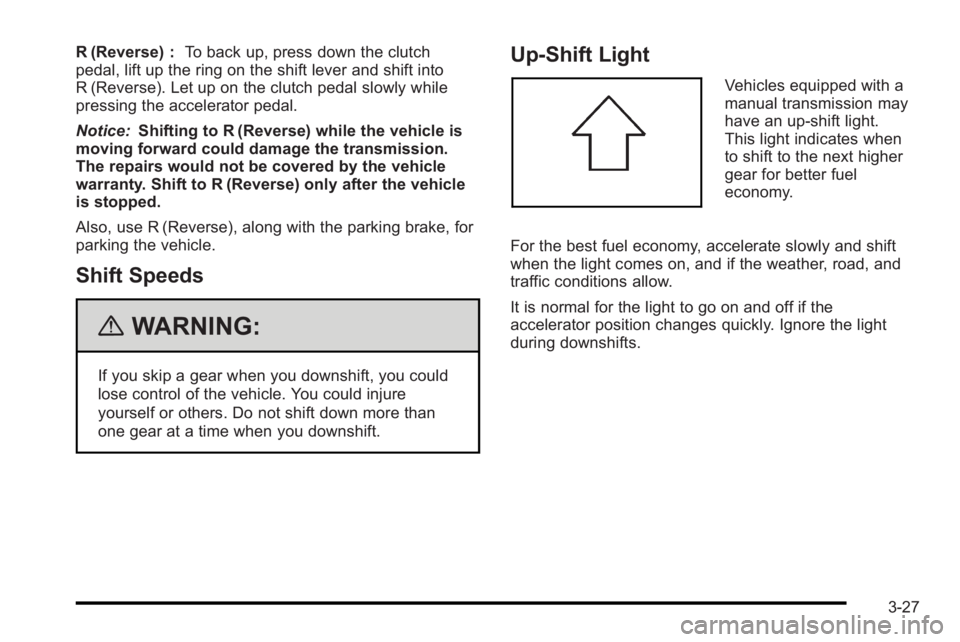
Vehicles equipped with a
manual transmission may
have an up-shift light.
This light indicates when
to shift to the next higher
gear for better fuel
economy.
For the best fuel economy, accelerate slowly and shift
when the light comes on, and if the weather, road, and
traffic conditions allow.
It is normal for the light to go on and off if the
accelerator position changes quickly. Ignore the light
during downshifts.
3-27
Page 157 of 368
Clock
There is a digital clock located in the center of the
instrument panel, above the center air outlets. When the
ignition is turned to ACC/ACCESSORY or ON/RUN,
the time is displayed in the digital clock. There are
three buttons for adjusting the digital clock:
H (Hour):Press once to go forward one hour. To go
forward more than one hour, press and hold the button
until the correct hour is reached.
M (Minute): Press once to go forward one minute. To go
forward more than one minute, press and hold the
button until the correct minute is reached.
S (Set): Press to reset the time to the nearest hour.
For example, if the set button is pressed while the time
is between 8:00 and 8:29, the display is set to 8:00.
If this button is pressed while the time is between
8:30 and 8:59, the display is set to 9:00.
After disconnecting the battery or replacing the fuse,
reset the clock.
Climate Controls
Climate Control System
For vehicles with these climate control systems, the
heating, cooling, and ventilation can be controlled for
the vehicle.
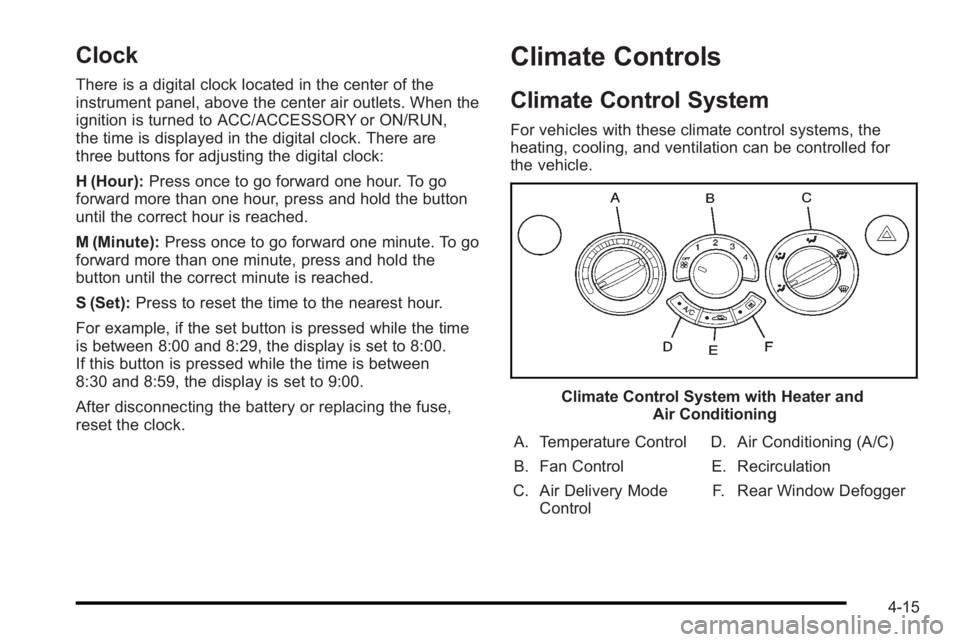
Climate Control System with Heater and Air Conditioning
A. Temperature Control
B. Fan Control
C. Air Delivery Mode Control D. Air Conditioning (A/C)
E. Recirculation F. Rear Window Defogger
4-15
Page 158 of 368

Climate Control System with Heater Only
A. Temperature Control
B. Fan Control
C. Air Delivery Mode Control D. Rear Window Defogger
E. Outside Air/Recirculation
OFF : Turns the fan off.
Temperature Control : Turn clockwise or
counterclockwise to increase or decrease the
temperature of the air flowing from the system.
9 (Fan Control) : Turn clockwise or counterclockwise
to increase or decrease the fan speed. The fan must be
turned on to run the air conditioning compressor. Air Delivery Mode Control :
Turn clockwise or
counterclockwise to change the current airflow mode.
Select from the following air delivery modes:
Y (Vent) : Air is directed to the instrument panel
outlets.
\ (Bi-Level) : Air is divided between the instrument
panel and floor outlets.
[ (Floor) : Air is directed to the floor outlets, with
some air directed to the rear outlets. Keep the area
under the front seats clear to allow the flow of air to the
rear compartment.
É(Defog) : This mode clears the windows of fog or
moisture. Air is directed to the windshield, floor, and
side window outlets. When this mode is selected, the
system automatically runs the air-conditioning. To defog
the windows faster, turn the temperature control to the
warmest setting.
1 (Defrost) : This mode quickly clears the windshield
of fog or frost. Air is directed to the windshield and side
window outlets. When this mode is selected, the system
automatically runs the air-conditioning. To defrost the
windows faster, turn the temperature control to the
warmest setting.
Do not drive the vehicle until all the windows are clear.
4-16