instrument panel PONTIAC G5 2010 Owner's Manual
[x] Cancel search | Manufacturer: PONTIAC, Model Year: 2010, Model line: G5, Model: PONTIAC G5 2010Pages: 422, PDF Size: 2.22 MB
Page 118 of 422

If you press the lock button on the transmitter a
second time while all the doors are closed, the system
will arm immediately. The system will still arm in
60 seconds if a door is open. When the open door is
closed, it will also become armed.
The security light, located on the instrument panel
cluster, will turn on to indicate that arming has been
initiated. Once the system is armed, the security light will
flash once every three seconds.
If the security light is flashing twice per second, this
means that a door is open.
If you do not want to arm the system, you may lock the
car with the manual lock knobs, or the power door
lock switch, if equipped, on the doors.
Disarming the System
You can disarm the system by doing any one of the
following:
•Press the remote keyless entry transmitter unlock
button.
•Turn the ignition on.If the system is armed and the trunk is opened using
the trunk release button on the transmitter, the system
will temporarily disarm itself and re-arm when the
trunk has been closed. This allows you to exit the
vehicle, lock the doors using the transmitter, and open
the trunk using the transmitter without having to
disarm and re-arm the system.
Once the system is disarmed, the security light will stop
flashing.
How the System Alarm is Activated
If the system is armed, it can be activated by either:
•Opening the driver’s door or trunk. This will
cause a ten second pre-alarm chirp followed by a
thirty second full alarm of horn and lights.
•Opening any other door. This will immediately cause
a full alarm of horn and lights for
thirty seconds.
When an alarm event has finished, the system will
re-arm itself automatically.
3-16
Page 122 of 422
On vehicles with an automatic transmission, the shift
lever must be in P (Park) to turn the ignition switch
to LOCK/OFF.
On vehicles with a manual transmission, the ignition
switch can be turned to LOCK/OFF in any shift
lever position.
The steering can bind with the wheel turned off center.
If this happens, move it from right to left while turning
the key to ACC/ACCESSORY. If this does not
work, then the vehicle needs service.
{WARNING:
If you have a manual transmission removing the
key from the ignition switch will lock the steering
column and result in a loss of ability to steer the
vehicle. This could cause a collision. If you need
to turn the engine off while the vehicle is moving,
turn the key to ACC/ACCESSORY.ACC (ACC/ACCESSORY):
This position operates
some of the electrical accessories. It unlocks the
steering wheel and ignition.
R(ON/RUN): This is the position in which you can
operate the electrical accessories and to display some
instrument panel cluster warning and indicator lights.
The switch stays in this position when the engine
is running.
If you leave the key in the ACC/ACCESSORY or
ON/RUN position with the engine off, the battery could
be drained. You may not be able to start the vehicle
if the battery is allowed to drain for an extended period
of time.
/(START): This position starts the engine. When the
engine starts, release the key. The ignition switch will
return to ON/RUN for driving.
A warning tone will sound when the driver door is
opened, the ignition is in LOCK/OFF or
ACC/ACCESSORY and the key is in the ignition.
3-20
Page 138 of 422

Outside Convex Mirror
{WARNING:
A convex mirror can make things, like other
vehicles, look farther away than they really are. If
you cut too sharply into the right lane, you could
hit a vehicle on the right. Check the inside mirror
or glance over your shoulder before changing
lanes.
The passenger side mirror is convex shaped. A convex
mirror’s surface is curved so more can be seen from
the driver seat.
Storage Areas
Glove Box
Lift up on the glove box lever to open it.
Cupholders
There are two cupholders located at the front of the
center console, in front of the shift lever. There are also
cupholders for the rear seat passengers located at
the rear of the center console.
Center Console Storage
For vehicles with a center console storage area, open
with the lever on the front of the console.
Driver Storage Compartment
The driver’s storage compartment is located near the
left side of the steering column on the bottom of
the instrument panel. Pull the cover down to open.
Convenience Net
For vehicles with a convenience net, it is located in the
rear. Use it to store small loads as far forward as
possible. The net should not be used to store heavy
loads.
3-36
Page 141 of 422
Instrument Panel Overview...............................4-3
Hazard Warning Flashers ................................4-3
Horn ............................................................ .4-3
Tilt Wheel .................................................... .4-3
Turn Signal/Multifunction Lever .........................4-4
Turn and Lane-Change Signals ........................4-4
Headlamp High/Low-Beam Changer ..................4-5
Flash-to-Pass ................................................ .4-5
Windshield Wipers ......................................... .4-5
Windshield Washer ........................................ .4-6
Cruise Control ............................................... .4-7
Headlamps ................................................... .4-9
Wiper Activated Headlamps ............................4-10
Headlamps on Reminder ................................4-10
Daytime Running Lamps (DRL) .......................4-10
Fog Lamps ................................................. .4-11
Instrument Panel Brightness ...........................4-11
Dome Lamp ................................................ .4-11
Entry/Exit Lighting ........................................ .4-12
Mirror Reading Lamps .................................. .4-12
Electric Power Management ...........................4-12Battery Run-Down Protection
..........................4-13
Accessory Power Outlet(s) .............................4-13
Ashtray(s) and Cigarette Lighter ......................4-14
Climate Controls ........................................... .4-14
Climate Control System .................................4-14
Outlet Adjustment ........................................ .4-17
Passenger Compartment Air Filter ...................4-18
Warning Lights, Gages, and Indicators ............4-19
Instrument Panel Cluster ................................4-20
Speedometer and Odometer ...........................4-21
Tachometer ................................................ .4-21
Safety Belt Reminders .................................. .4-22
Airbag Readiness Light ................................. .4-23
Passenger Airbag Status Indicator ...................4-24
Charging
System Light ................................. .4-25
Up-Shift Light .............................................. .4-25
Brake System Warning Light ..........................4-26
Antilock Brake System (ABS) Warning Light .....4-27
Enhanced Traction System (ETS) Indicator/ Warning Light .......................................... .4-27
Section 4 Instrument Panel
4-1
Page 142 of 422
Electronic Stability Control (ESC)/TractionControl System (TCS) Indicator/Warning
Light ....................................................... .4-28
Engine Coolant Temperature Warning Light ......4-29
Tire Pressure Light ...................................... .4-29
Malfunction Indicator Lamp .............................4-30
Oil Pressure Light ........................................ .4-33
Security Light .............................................. .4-33
Fog Lamp Light ........................................... .4-34
Highbeam On Light ...................................... .4-34
Fuel Gage .................................................. .4-34
Driver Information Center (DIC) .......................4-35
DIC Operation and Displays ...........................4-36
DIC Warnings and Messages .........................4-38
DIC Vehicle Personalization ............................4-43Audio System(s)
............................................ .4-49
Setting the Clock ......................................... .4-50
Radio(s) ..................................................... .4-51
Using an MP3 ............................................. .4-63
XM Radio Messages .................................... .4-70
Bluetooth
®.................................................. .4-71
Theft-Deterrent Feature ................................. .4-81
Audio Steering Wheel Controls .......................4-82
Radio Reception .......................................... .4-83
Fixed Mast Antenna ..................................... .4-84
XM™ Satellite Radio Antenna System .............4-84
Section 4 Instrument Panel
4-2
Page 143 of 422
Instrument Panel Overview
Hazard Warning Flashers
|(Hazard Warning Flasher):Press this button
located on the instrument panel, to make the front and
rear turn signal lamps flash on and off. This warns
others that you are having trouble.
Press
|again to turn the flashers off.
Horn
To sound the horn, press the center pad on the steering
wheel.
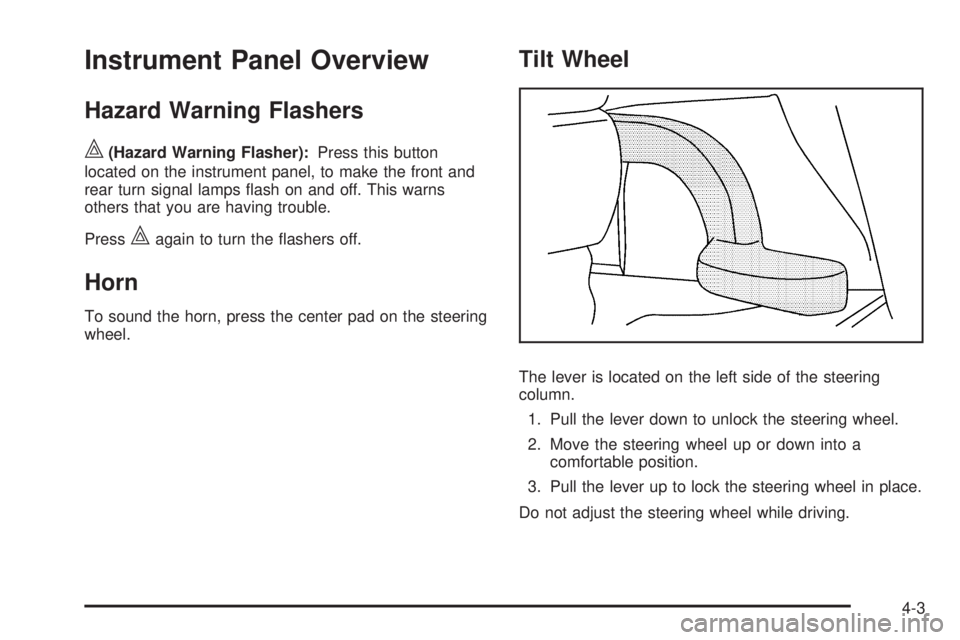
Tilt Wheel
The lever is located on the left side of the steering
column.
1. Pull the lever down to unlock the steering wheel.
2. Move the steering wheel up or down into a comfortable position.
3. Pull the lever up to lock the steering wheel in place.
Do not adjust the steering wheel while driving.
4-3
Page 144 of 422

Turn Signal/Multifunction Lever
The lever on the left side of the steering column
operates the following:
G:Turn and Lane-Change Signals
53:Headlamp High/Low-Beam Changer
O:Exterior Lamp Control
Flash-to-Pass.
Information for these features is on the pages following.
Turn and Lane-Change Signals
An arrow on the instrument
panel cluster flashes in the
direction of the turn or lane
change.
Move the lever all the way up or down to signal a turn.
Raise or lower the lever until the arrow starts to flash
to signal a lane change. Hold it there until the lane
change is complete.
The lever returns to its starting position when it is
released.
If after signaling a turn or a lane change the arrows
flash rapidly or do not come on, a signal bulb could be
burned out.
Have the bulbs replaced. If the bulb is not burned out,
check the fuse. See Fuses and Circuit Breakers on
page 6-103.
4-4
Page 145 of 422
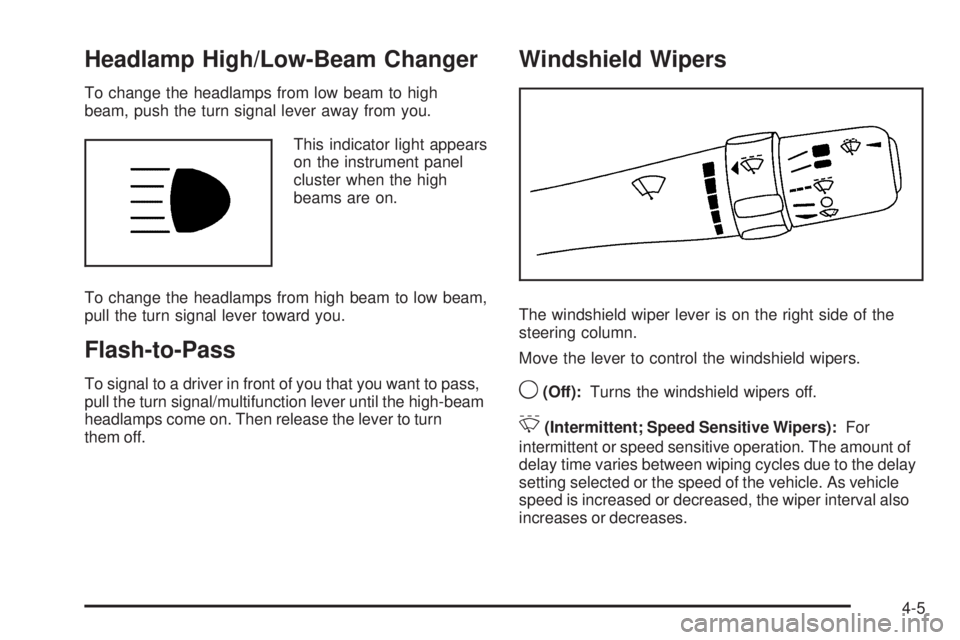
Headlamp High/Low-Beam Changer
To change the headlamps from low beam to high
beam, push the turn signal lever away from you.This indicator light appears
on the instrument panel
cluster when the high
beams are on.
To change the headlamps from high beam to low beam,
pull the turn signal lever toward you.
Flash-to-Pass
To signal to a driver in front of you that you want to pass,
pull the turn signal/multifunction lever until the high-beam
headlamps come on. Then release the lever to turn
them off.
Windshield Wipers
The windshield wiper lever is on the right side of the
steering column.
Move the lever to control the windshield wipers.
9(Off): Turns the windshield wipers off.
&(Intermittent; Speed Sensitive Wipers): For
intermittent or speed sensitive operation. The amount of
delay time varies between wiping cycles due to the delay
setting selected or the speed of the vehicle. As vehicle
speed is increased or decreased, the wiper interval also
increases or decreases.
4-5
Page 150 of 422

P(Off/On):When operating in AUTO, a momentary
turn of the switch to Off/On will turn the Automatic
Headlamp System off or back on. For vehicles first
sold in Canada, the automatic transmission must be
in P (Park) or the manual transmission must have the
park brake set, before the Automatic Headlamp System
can be turned off.
Wiper Activated Headlamps
The headlamps and parking lamps are activated
15 seconds after the windshield wipers are turned on.
For this feature to work, automatic lighting must be
enabled. See Headlamps on page 4-9 for additional
information.
When the ignition is turned off, the wiper-activated
headlamps will immediately turn off. They also turn
off 15 seconds after the windshield wiper control
is turned off.
Headlamps on Reminder
If the drivers door is opened with the ignition off and the
lamps on, a warning chime will sound. This indicates
that the headlamps are still on.
Daytime Running Lamps (DRL)
Daytime Running Lamps (DRL) can make it easier for
others to see the front of your vehicle during the day.
DRL can be helpful in many different driving conditions,
but they can be especially helpful in the short periods
after dawn and before sunset. Fully functional daytime
running lamps are required on all vehicles first sold in
Canada.
The vehicle has a light sensor on top of the instrument
panel. Make sure it is not covered or the headlamps
will come on when you do not need them.
The DRL system will make the headlamps come on at
reduced intensity when the following conditions are met:
•The ignition is on.
•The exterior lamp control is turned to AUTO.
•The light sensor detects daytime light.
•The shift lever is not in P (Park).
While the DRL system is on, the taillamps, sidemarker
lamps, and instrument panel lights will not be illuminated.
The DRL system will be off any time the vehicle is in
P (Park). The DRL system on U.S. vehicles can also be
turned off by using the off/on switch for one ignition cycle.
The regular headlamp system should be used when
needed.
4-10
Page 151 of 422

Fog Lamps
For vehicles with fog lamps, the button is located on the
instrument panel, to the left of the steering wheel.
The ignition must be on to use the fog lamps.
#:Press to turn the fog lamps on off. An indicator
light on the button comes on when the fog lamps are on.
The parking lamps automatically turn on and off when
the fog lamps are turned on and off.
The fog lamps will turn off while the high-beam
headlamps are turned on.
Some localities have laws that require the headlamps to
be on along with the fog lamps.
Instrument Panel Brightness
The control for this feature
is located on the instrument
panel to the left of the
steering wheel.
Turn the knob clockwise to brighten the lights or
counterclockwise to dim them.
Dome Lamp
The vehicle may have a dome lamp.
Move the lever to the following positions:
9(Off): Turns the lamp off, even when a door is
opened.
1(Door): Turns the lamp on whenever a door is
opened.
+(On): Turns the dome lamp on.
4-11