transmission PONTIAC G5 2010 Owner's Manual
[x] Cancel search | Manufacturer: PONTIAC, Model Year: 2010, Model line: G5, Model: PONTIAC G5 2010Pages: 422, PDF Size: 2.22 MB
Page 150 of 422

P(Off/On):When operating in AUTO, a momentary
turn of the switch to Off/On will turn the Automatic
Headlamp System off or back on. For vehicles first
sold in Canada, the automatic transmission must be
in P (Park) or the manual transmission must have the
park brake set, before the Automatic Headlamp System
can be turned off.
Wiper Activated Headlamps
The headlamps and parking lamps are activated
15 seconds after the windshield wipers are turned on.
For this feature to work, automatic lighting must be
enabled. See Headlamps on page 4-9 for additional
information.
When the ignition is turned off, the wiper-activated
headlamps will immediately turn off. They also turn
off 15 seconds after the windshield wiper control
is turned off.
Headlamps on Reminder
If the drivers door is opened with the ignition off and the
lamps on, a warning chime will sound. This indicates
that the headlamps are still on.
Daytime Running Lamps (DRL)
Daytime Running Lamps (DRL) can make it easier for
others to see the front of your vehicle during the day.
DRL can be helpful in many different driving conditions,
but they can be especially helpful in the short periods
after dawn and before sunset. Fully functional daytime
running lamps are required on all vehicles first sold in
Canada.
The vehicle has a light sensor on top of the instrument
panel. Make sure it is not covered or the headlamps
will come on when you do not need them.
The DRL system will make the headlamps come on at
reduced intensity when the following conditions are met:
•The ignition is on.
•The exterior lamp control is turned to AUTO.
•The light sensor detects daytime light.
•The shift lever is not in P (Park).
While the DRL system is on, the taillamps, sidemarker
lamps, and instrument panel lights will not be illuminated.
The DRL system will be off any time the vehicle is in
P (Park). The DRL system on U.S. vehicles can also be
turned off by using the off/on switch for one ignition cycle.
The regular headlamp system should be used when
needed.
4-10
Page 160 of 422
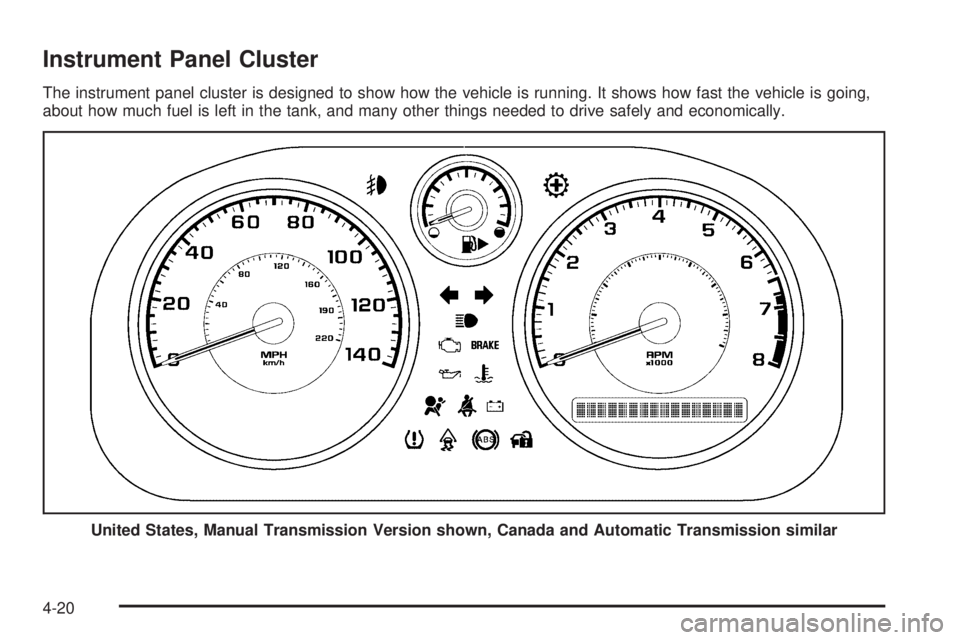
Instrument Panel Cluster
The instrument panel cluster is designed to show how the vehicle is running. It shows how fast the vehicle is going,
about how much fuel is left in the tank, and many other things needed to drive safely and economically.United States, Manual Transmission Version shown, Canada and Automatic Transmission similar
4-20
Page 165 of 422

Charging System Light
This light comes on briefly
when the ignition key is
turned to START, but
the engine is not running,
as a check to show it
is working.
If it does not, have the vehicle serviced by your
dealer/retailer.
The light should go out once the engine starts. If it stays
on, or comes on while driving, there could be a problem
with the charging system. A charging system message
in the Driver Information Center (DIC) can also appear.
See DIC Warnings and Messages on page 4-38 for more
information. This light could indicate that there are
problems with a generator drive belt, or that there is an
electrical problem. Have it checked right away. If the
vehicle must be driven a short distance with the light
on, turn off accessories, such as the radio and air
conditioner.
Up-Shift Light
The vehicle may have an
up-shift light.
When this light comes on, shift to the next higher gear if
weather, road, and traffic conditions allow.
See Manual Transmission Operation on page 3-27 for
more information.
4-25
Page 170 of 422
When the Light Flashes First and Then is
On Steady
This indicates that there may be a problem with the Tire
Pressure Monitor System. The light flashes for about
a minute and stays on steady for the remainder of
the ignition cycle. This sequence repeats with every
ignition cycle. SeeTire Pressure Monitor Operation
on page 6-58 for more information.
Malfunction Indicator Lamp
Check Engine Light
A computer system called OBD II (On-Board
Diagnostics-Second Generation) monitors operation
of the fuel, ignition, and emission control systems.
It ensures that emissions are at acceptable levels
for the life of the vehicle, helping to produce a cleaner
environment.
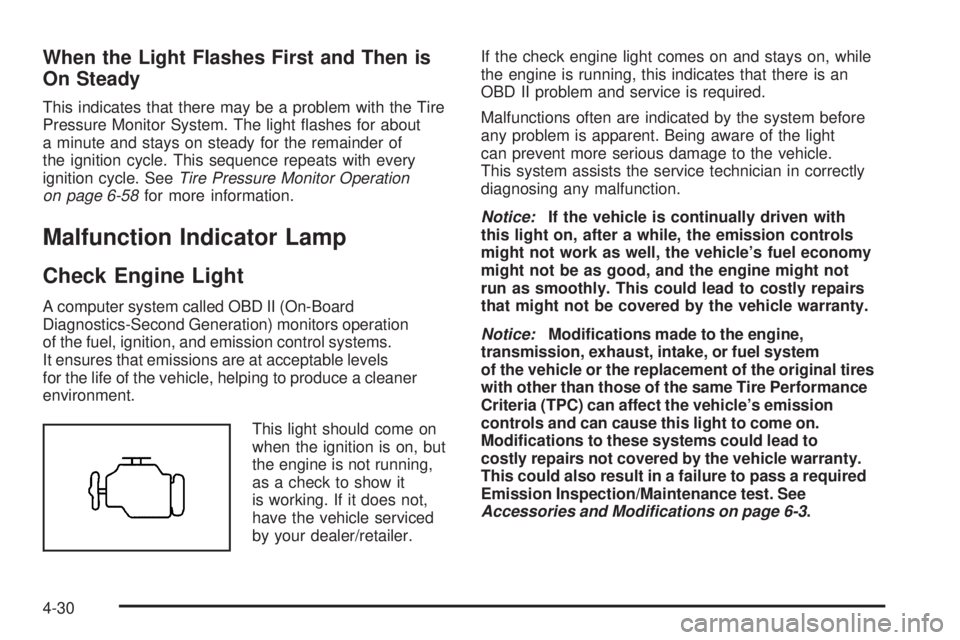
This light should come on
when the ignition is on, but
the engine is not running,
as a check to show it
is working. If it does not,
have the vehicle serviced
by your dealer/retailer. If the check engine light comes on and stays on, while
the engine is running, this indicates that there is an
OBD II problem and service is required.
Malfunctions often are indicated by the system before
any problem is apparent. Being aware of the light
can prevent more serious damage to the vehicle.
This system assists the service technician in correctly
diagnosing any malfunction.
Notice:
If the vehicle is continually driven with
this light on, after a while, the emission controls
might not work as well, the vehicle’s fuel economy
might not be as good, and the engine might not
run as smoothly. This could lead to costly repairs
that might not be covered by the vehicle warranty.
Notice: Modications made to the engine,
transmission, exhaust, intake, or fuel system
of the vehicle or the replacement of the original tires
with other than those of the same Tire Performance
Criteria (TPC) can affect the vehicle’s emission
controls and can cause this light to come on.
Modications to these systems could lead to
costly repairs not covered by the vehicle warranty.
This could also result in a failure to pass a required
Emission Inspection/Maintenance test. See
Accessories and Modifications on page 6-3 .
4-30
Page 179 of 422

COOLING MODE ON
This message may display on some vehicles. Under
severe conditions, hot ambient temperatures, steep
grades, and towing, your vehicle may experience more
transmission shifting. This is temporary and normal
under these conditions. This does not require engine
or transmission service.
CRUISE ENGAGED
This message displays when the cruise control system
is active. SeeCruise Control on page 4-7 for more
information.
DOOR AJAR
This message displays if one or more of the vehicle’s
doors are open. Make sure that the door(s) are
closed completely.
ENGINE DISABLED
This message displays if the starting of the engine
is disabled. Have your vehicle serviced by your
dealer/retailer immediately.
ENG (Engine) PWR (Power) REDUCED
This message displays to inform you that the vehicle has
reduced engine power to avoid damaging the engine.
Reduced engine power can affect the vehicle’s ability
to accelerate. If this message is on, but there is no
reduction in performance, proceed to your destination.
The performance may be reduced the next time the
vehicle is driven. The vehicle may be driven at a reduced
speed while this message is on, but acceleration and
speed may be reduced. Anytime this message stays on,
the vehicle should be taken to your dealer/retailer for
service as soon as possible.
ESC (Electronic Stability Control) ACTIVE
If your vehicle has Electronic Stability Control (ESC),
this message displays and the ESC/TCS light on the
instrument panel cluster flashes when ESC is assisting
you with directional control of the vehicle. You may feel
or hear the system working and see this message
displayed in the DIC. Slippery road conditions may exist
when this message is displayed, so adjust your driving
accordingly. This message may stay on for a few
seconds after ESC stops assisting you with directional
control of the vehicle. This is normal when the system
is operating. See Electronic Stability Control (ESC) on
page 5-6 andElectronic Stability Control (ESC)/Traction
Control System (TCS) Indicator/Warning Light on
page 4-28 for more information.
4-39
Page 187 of 422
AUTO UNLK (Unlock)
This feature, which allows the vehicle to automatically
unlock certain doors, can be enabled or disabled. When
AUTO UNLK appears on the display, press and hold
the reset button for at least one second to scroll through
the available settings:
ALL (default):All of the doors will automatically unlock.
DRIVER: The driver’s door will automatically unlock.
NONE: None of the doors will automatically unlock.
You will need to manually unlock the doors.
If you have a manual transmission vehicle, the door(s)
will automatically unlock when the ignition is turned off.
If you have an automatic transmission vehicle, you
can select when the automatic unlocking will occur.
See “UNLK (Unlock) (Automatic Transmission Only)”
following.
See Programmable Automatic Door Unlock on page 3-10
for more information.
To select a setting and move on to the next feature,
press the information button while the desired setting is
displayed on the DIC.
UNLK (Unlock) (Automatic
Transmission Only)
This screen displays only if your vehicle has an
automatic transmission and DRIVER or ALL is selected
for the AUTO UNLK feature. This feature determines
when the automatic door unlocking will occur. When
UNLK appears on the display, press and hold the reset
button for at least one second to scroll through the
available settings:
KEY OFF: The door(s) will unlock when the key is
turned off.
SHIFT TO P (Park) (default): The door(s) will unlock
when the vehicle is shifted into P (Park).
See Programmable Automatic Door Unlock on
page 3-10 for more information.
To select a setting and move on to the next feature,
press the information button while the desired setting is
displayed on the DIC.
4-47
Page 225 of 422
Your Driving, the Road, and the Vehicle............5-2
Defensive Driving .......................................... .5-2
Drunk Driving ................................................ .5-2
Control of a Vehicle ....................................... .5-3
Braking ........................................................ .5-3
Antilock Brake System (ABS) ...........................5-4
Braking in Emergencies .................................. .5-5
Electronic Stability Control (ESC) ......................5-6
Traction Control System (TCS) .........................5-8
Enhanced Traction System (ETS) ....................5-11
Steering ..................................................... .5-13
Off-Road Recovery ...................................... .5-15
Passing ...................................................... .5-15
Loss of Control ............................................ .5-15
Driving at Night ........................................... .5-17Driving in Rain and on Wet Roads
..................5-18
Before Leaving on a Long Trip .......................5-19
Highway Hypnosis ....................................... .5-19
Hill and Mountain Roads ................................5-20
Winter Driving ............................................. .5-21
If Your Vehicle is Stuck in Sand, Mud, Ice, or Snow .................................................. .5-23
Rocking Your Vehicle to Get It Out .................5-24
Loading the Vehicle ..................................... .5-24
Towing ......................................................... .5-30
Towing Your Vehicle .................................... .5-30
Recreational Vehicle Towing ...........................5-30
Towing a Trailer (Automatic Transmission) ........5-33
Towing a Trailer (Manual Transmission) ...........5-39
Section 5 Driving Your Vehicle
5-1
Page 234 of 422

Traction Control Operation
Traction control limits wheel spin by reducing engine
power to the wheels (engine speed management)
and by applying brakes to each individual wheel
(brake-traction control) as necessary.
The traction control system is enabled automatically
when the vehicle is started, and it will activate and flash
the ESC/TCS light and display the LOW TRACTION
message if it senses that either of the front wheels are
spinning or beginning to lose traction while driving.
For more information on the LOW TRACTION message,
seeDriver Information Center (DIC) on page 4-35 .
Notice: If the wheel(s) of one axle are allowed to
spin excessively while the ESC/TCS, ABS and Brake
warning lights and the SERVICE ESC and/or
SERVICE TRACTION messages are displayed, the
differential could be damaged. The repairs would not
be covered by the vehicle warranty. Reduce engine
power and do not spin the wheel(s) excessively
while these lights and this message are displayed. Notice:
When traction control is turned off, or
Competitive Driving Mode is active, it is possible to
lose traction. If you attempt to shift with the drive
wheels spinning with a loss of traction, it is possible
to cause damage to the transmission. Do not attempt
to shift when the drive wheels do not have traction.
Damage caused by misuse of the vehicle is not
covered. See the warranty book for additional
information.
The traction control system may activate on dry or
rough roads or under conditions such as heavy
acceleration while turning or abrupt upshifts/downshifts
of the transmission. When this happens, a reduction
in acceleration may be noticed or a noise or vibration
may be heard. This is normal.
If the vehicle is in cruise control while the system
activates, the ESC/TCS light flashes and the cruise
control automatically disengages. The cruise control can
be re-engaged when road conditions allow. See
Cruise Control on page 4-7 .
Adding non-dealer/non-retailer accessories can affect
the vehicle’s performance. See Accessories and
Modications on page 6-3 for more information.
5-10
Page 235 of 422

Enhanced Traction System (ETS)
The vehicle may have an Enhanced Traction System
(ETS) that limits wheel spin. This is especially useful in
slippery road conditions. The system operates only if
it senses that one or both of the front wheels are
spinning or beginning to lose traction. When this
happens, the system reduces engine power and may
also upshift the transmission to limit wheel spin.
If the vehicle has ETS, there is not an ESC/TCS button
on the instrument panel. To turn the system off, shift
to L (Low) or R (Reverse). There is more information
about how to turn the system off later in this section.
The ETS indicator/warning light flashes and LOW
TRACTION appears on the Driver Information Center
(DIC) when the traction control system is actively limiting
wheel spin. The system may be heard or felt while it
is working, but this is normal. Slippery road conditions
may exist if this message is displayed, so adjust
your driving accordingly.
If the vehicle is in cruise control when the ETS begins
to limit wheel spin, the cruise control will automatically
disengage. The cruise control can be re-engaged
when road conditions allow. SeeCruise Control on
page 4-7. The ETS indicator/warning light may come on for the
following reasons:
•The indicator/warning light flashes while the traction
control system is limiting wheel spin.
•If the system is turned off by moving the shift lever
to L (Low), the indicator/warning light comes on
and stays on. To turn the system back on, move the
shift lever back to a position other than L (Low).
The indicator/warning light should go off.
•The indicator/warning light will come on when the
parking brake is set with the engine running, and it
will stay on if the parking brake does not release fully.
If the transmission shift lever is in any position other
than L (Low) and the indicator/warning light stays on
after the parking brake is fully released, there is a
problem with the system.
•If the traction control system is affected by an engine
related problem, the system will turn off and the
indicator/warning light will come on.
5-11
Page 236 of 422
If the ETS indicator/warning light comes on and stays on
for an extended period of time when the transmission
shift lever is in any position other than L (Low), the
vehicle may need service.
When this light is on solid, the system will not limit
wheel spin. Adjust your driving accordingly.
Check the DIC messaging to determine whether it is
because of the driver turning off the system, or that the
system may not be working properly and the vehicle
requires service. When this light is turned on, either the
SERVICE TRACTION or TRACTION OFF message
will be displayed.
SeeDIC Warnings and Messages on page 4-38 for
more information on the messages associated with
this light.
To limit wheel spin, especially in slippery road
conditions, ETS should always be left on. But the
system can be turned off if needed. To turn the system off, shift to L (Low) or R (Reverse).
When the system is turned off, the ETS indicator/warning
light will come on and stay on and the TRACTION OFF
message will be displayed when the gear shift is in
L (Low). The indicator/warning light and message will not
come on when the gear shift is in R (Reverse). If the ETS
is limiting wheel spin when the transmission is shifted to
L (Low) or R (Reverse) to turn the system off, the
indicator/warning light and TRACTION OFF will come on
in L (Low). But the system will not turn off right away.
It will wait until there is no longer a current need to limit
wheel spin. See
DIC Warnings and Messages on
page 4-38 for more information on the messages
associated with this light.
The system can be turned back on at any time by
shifting to D (Automatic Overdrive) or I (Intermediate).
The ETS indicator/warning light should go off.
Adding non-dealer/non-retailer accessories can affect
the vehicle’s performance. See Accessories and
Modications on page 6-3 for more information.
5-12