lock PONTIAC G6 2006 Workshop Manual
[x] Cancel search | Manufacturer: PONTIAC, Model Year: 2006, Model line: G6, Model: PONTIAC G6 2006Pages: 416, PDF Size: 2.66 MB
Page 167 of 416
When the ignition is on, the brake system warning light
will also come on when you set your parking brake.
The light will stay on if your parking brake doesn’t
release fully. If it stays on after your parking brake is
fully released, it means you have a brake problem.
If the light comes on while you are driving, pull off the
road and stop carefully. You may notice that the pedal is
harder to push. Or, the pedal may go closer to the
oor. It may take longer to stop. If the light is still on,
have the vehicle towed for service. SeeTowing
Your Vehicle on page 4-38.
{CAUTION:
Your brake system may not be working
properly if the brake system warning light is
on. Driving with the brake system warning light
on can lead to an accident. If the light is still
on after you have pulled off the road and
stopped carefully, have the vehicle towed
for service.
Anti-Lock Brake System
Warning Light
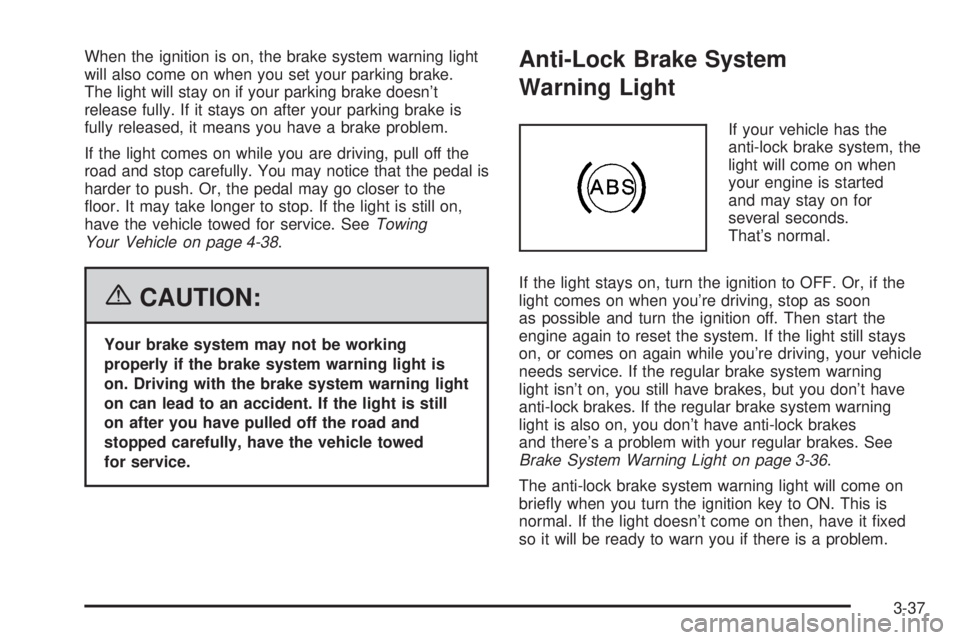
If your vehicle has the
anti-lock brake system, the
light will come on when
your engine is started
and may stay on for
several seconds.
That’s normal.
If the light stays on, turn the ignition to OFF. Or, if the
light comes on when you’re driving, stop as soon
as possible and turn the ignition off. Then start the
engine again to reset the system. If the light still stays
on, or comes on again while you’re driving, your vehicle
needs service. If the regular brake system warning
light isn’t on, you still have brakes, but you don’t have
anti-lock brakes. If the regular brake system warning
light is also on, you don’t have anti-lock brakes
and there’s a problem with your regular brakes. See
Brake System Warning Light on page 3-36.
The anti-lock brake system warning light will come on
briey when you turn the ignition key to ON. This is
normal. If the light doesn’t come on then, have it xed
so it will be ready to warn you if there is a problem.
3-37
Page 177 of 416

AV (Average) SPEED:Press the information button
until AV SPEED is displayed. This shows the vehicle’s
average speed in miles per hour or kilometers per hour.
Press and hold the enter button while AV SPEED is
displayed to reset the average vehicle speed.
OIL LIFE:Press the information button until OIL LIFE is
displayed. The engine oil life system shows an
estimate of the oil’s remaining useful life. It will show
100% when the system is reset after an oil change.
It will alert you to change your oil on a schedule
consistent with your driving conditions.
Always reset the engine oil life system after an oil
change. See “OIL LIFE RESET” underDIC Vehicle
Personalization on page 3-52andEngine Oil Life
System on page 5-20.
In addition to the engine oil life system monitoring the
oil life, additional maintenance is recommended in
the Maintenance Schedule in this manual. See
Scheduled Maintenance on page 6-4andEngine Oil on
page 5-17.Personalization
MENU:Press this button while the vehicle is in ON to
scroll through each of the personalization options in
the following order. If the vehicle is moving faster than
2 mph (3 km/h), the personalization menu options
are not available, except for the UNITS option. All of the
personalization options may not be available on your
vehicle. Only the options available will be displayed on
your DIC.
Units Selection (English/Metric)
Oil Life Reset
Remote Start Capability
Horn Chirp During Remote Keyless Entry Locking
Horn Chirp During Remote Keyless Entry Unlocking
Exterior Light Flash During Remote Keyless
Entry Locking or Unlocking
Delayed Locking
Automatic Vehicle Unlocking: Specic Doors
Automatic Vehicle Unlocking: When Key is Off or
When Shift To Park
Exterior Perimeter Lighting During Remote Keyless
Entry Unlock
Select Language: (English, French, Spanish or
German)
3-47
Page 182 of 416
DIC Vehicle Personalization
The following personalization options may appear
on your vehicle’s audio display by pressing the
MENU button:
UNITS:When UNITS appears on the display, press the
enter button to move between METRIC or ENGLISH.
When you have made your choice, press the MENU
button to record your selection. The initial setting from
the factory is English for the United States and metric
for Canada.
If you choose English, all information will be displayed
in English units. For example, distance in miles and fuel
economy in miles per gallon is displayed.
If you choose metric, all information will be displayed in
metric units. For example, distance in kilometers and
fuel economy in liters per 100 kilometers is displayed.
The unit measurement will also change the trip
odometer, temperature, and average fuel
economy displays.
OIL LIFE RESET:When this option is displayed, you
can reset the engine oil life system. To reset the system,
seeEngine Oil Life System on page 5-20.REMOTE START:The remote start option, if equipped,
can be enabled or disabled. When REMOTE START
appears on the display, press the enter button to move
between OFF and ON. When you have made your
choice, press the MENU button to record your selection.
The initial setting from the factory is ON.
LOCK HORN:If your vehicle has remote keyless entry,
this option which allows the vehicle’s horn to chirp
every time the lock button on the remote keyless entry
transmitter is pressed, can be enabled or disabled.
When LOCK HORN appears on the display, press the
enter button to move between ON and OFF. When
you have made your choice, press the MENU button to
record your selection. The initial setting from the
factory is OFF.
UNLOCK HORN:If your vehicle has remote keyless
entry, this option which allows the vehicle’s horn to chirp
every time the unlock button on the remote keyless
entry transmitter is pressed, can be enabled or disabled.
When UNLOCK HORN appears on the display, press
the enter button to move between ON and OFF.
When you have made your choice, press the MENU
button to record your selection. The initial setting from
the factory is OFF.
3-52
Page 183 of 416
LIGHT FLASH:If your vehicle has remote keyless
entry, this option which allows the vehicle’s exterior
perimeter lighting to ash every time the lock or unlock
button on the remote keyless entry transmitter is
pressed, can be enabled or disabled. When LIGHT
FLASH appears on the display, press the enter button
to move between OFF and ON. When you have
made your choice, press the MENU button to record
your selection. The initial setting from the factory is ON.
DELAY LOCK:The delayed locking option, which
delays the actual locking of the vehicle, can be enabled
or disabled. When DELAY LOCK appears on the
display, press the enter button to move between OFF
and ON. When you have made your choice, press
the MENU button to record your selection. The initial
setting from the factory is ON.
AUTO UNLK (Unlock):The automatic door unlocking
option, which allows the vehicle to automatically
unlock certain doors can be enabled or disabled. When
AUTO UNLK appears on the display, press the enter
button to move between ALL, DRIVER or NONE. When
you have made your choice, press and the MENU
button to record your selection. The initial setting from
the factory is ALL.If you have a manual transaxle vehicle, the door(s) will
automatically unlock when the ignition is turned off.
If you have an automatic transaxle vehicle, you can
select when the automatic unlocking will occur. See
“UNLK (Unlock) (Automatic Transaxle Only)” following.
SeeProgrammable Automatic Door Unlock on page 2-13
for more information.
UNLK (Unlock) (Automatic Transaxle Only):This
screen displays only if your vehicle has an automatic
transaxle and DRIVER or ALL is selected for the AUTO
UNLK option. This option determines when the
automatic door unlocking will occur, when either the key
is turned to OFF or the vehicle is shifted into PARK (P).
When UNLK appears on the display, press the enter
button to move between KEY OFF and SHIFT TO
P (Park). When you have made your choice, press the
MENU button to record your selection. The initial
setting from the factory is SHIFT TO P (Park). See
Programmable Automatic Door Unlock on page 2-13for
more information.
3-53
Page 184 of 416
EXT (Exterior) LIGHTS:If your vehicle has remote
keyless entry, this option which allows the vehicle’s
exterior perimeter lighting to turn on each time
the unlock button on the remote keyless entry
transmitter is pressed, can be enabled or disabled.
When EXT LIGHTS appears on the display, press the
enter button to move between ON and OFF. When
you have made your choice, press the MENU button to
record your selection. The initial setting from the
factory is ON.
LANGUAGE:To select your choice of language, press
the enter button to move between the optional
languages.
The languages are ENGLISH, FRENCH, SPANISH,
and GERMAN.
Choosing a language will display all of the information
on the DIC in the desired language.
When you have made your choice, press the MENU
button for at least one second to record your selection.
The initial setting from the factory is ENGLISH.Audio System(s)
Driving without distraction is a necessity for a safer
driving experience. SeeDefensive Driving on page 4-2.
By taking a few moments to read this manual and
get familiar with your vehicle’s audio system, you can
use it with less effort, as well as take advantage of
its features. While your vehicle is parked, program your
favorite radio stations and XM™ channels (if equipped).
Set the tone and balance the way you like them.
Then when driving conditions permit, you can tune to
your favorite stations using the presets and steering
wheel controls (if equipped).
Notice:Before adding any sound equipment to
your vehicle, such as an audio system, CD player,
CB radio, mobile telephone, or two-way radio, make
sure that it can be added by checking with your
dealer. Also, check federal rules covering mobile
radio and telephone units. If sound equipment can
be added, it is very important to do it properly.
Added sound equipment may interfere with
the operation of your vehicle’s engine, radio, or
other systems, and even damage them. Your
vehicle’s systems may interfere with the operation
of sound equipment that has been added.
3-54
Page 185 of 416
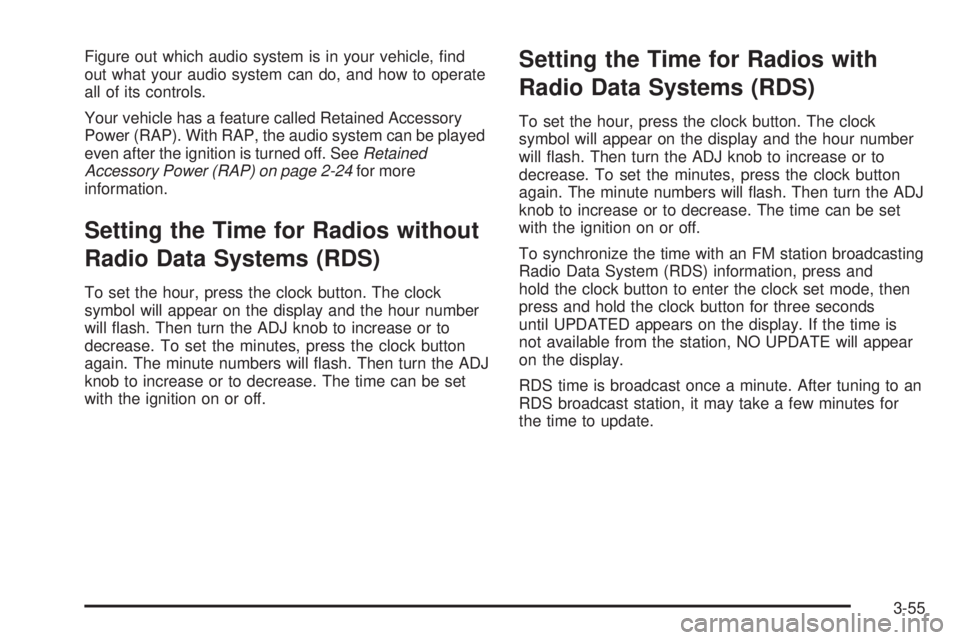
Figure out which audio system is in your vehicle, nd
out what your audio system can do, and how to operate
all of its controls.
Your vehicle has a feature called Retained Accessory
Power (RAP). With RAP, the audio system can be played
even after the ignition is turned off. SeeRetained
Accessory Power (RAP) on page 2-24for more
information.
Setting the Time for Radios without
Radio Data Systems (RDS)
To set the hour, press the clock button. The clock
symbol will appear on the display and the hour number
will ash. Then turn the ADJ knob to increase or to
decrease. To set the minutes, press the clock button
again. The minute numbers will ash. Then turn the ADJ
knob to increase or to decrease. The time can be set
with the ignition on or off.
Setting the Time for Radios with
Radio Data Systems (RDS)
To set the hour, press the clock button. The clock
symbol will appear on the display and the hour number
will ash. Then turn the ADJ knob to increase or to
decrease. To set the minutes, press the clock button
again. The minute numbers will ash. Then turn the ADJ
knob to increase or to decrease. The time can be set
with the ignition on or off.
To synchronize the time with an FM station broadcasting
Radio Data System (RDS) information, press and
hold the clock button to enter the clock set mode, then
press and hold the clock button for three seconds
until UPDATED appears on the display. If the time is
not available from the station, NO UPDATE will appear
on the display.
RDS time is broadcast once a minute. After tuning to an
RDS broadcast station, it may take a few minutes for
the time to update.
3-55
Page 188 of 416

Adjusting the Speakers (Balance/Fade)
BAL/FADE /S(Balance/Fade):To adjust the
balance between the right and the left speakers, press
and release the balance and fade button until BAL
appears on the display. Turn the ADJ knob to move the
sound toward the right or the left speakers.
To adjust the fade between the front and the rear
speakers, press and release the balance and fade
button until FADE appears on the display. Then turn the
ADJ knob to move the sound toward the front or the
rear speakers.
To adjust the balance or the fade to the middle position,
select BAL or FADE. Then press and hold the balance
and fade button for more than two seconds. You
will hear a beep and the level will be adjusted to the
middle position.
To adjust the speaker controls to the middle position,
rst end out of balance and fade by pressing another
button, causing the radio to perform that function, or by
waiting ve seconds for the display to return to the
default display. Then press and hold the balance and
fade button for more than two seconds until you hear a
beep. ALL CENTERED will appear on the display.
Radio Messages
CALIBRATE:The audio system has been calibrated for
your vehicle from the factory. If CALIBRATE appears
on the display it means that the radio has not been
congured properly for your vehicle and must be
returned to your GM dealer for service.
LOCKED:This message is displayed when the
THEFTLOCK
®system has locked up. Take the vehicle
to your GM dealer for service.
If any error occurs repeatedly or if an error cannot be
corrected, contact your GM dealer.
Playing a CD
Insert a CD partway into the slot, label side up. The
player will pull it in and the CD should begin playing. If
you want to insert a CD with the ignition off, rst
press the eject button or the DISP knob.
As each new track starts to play, the track number will
appear on the display.
If the ignition or radio is turned off with a CD in the
player, it will stay in the player. When the ignition
or radio is turned on, the CD will start playing, where it
stopped, if it was the last selected audio source.
3-58
Page 196 of 416
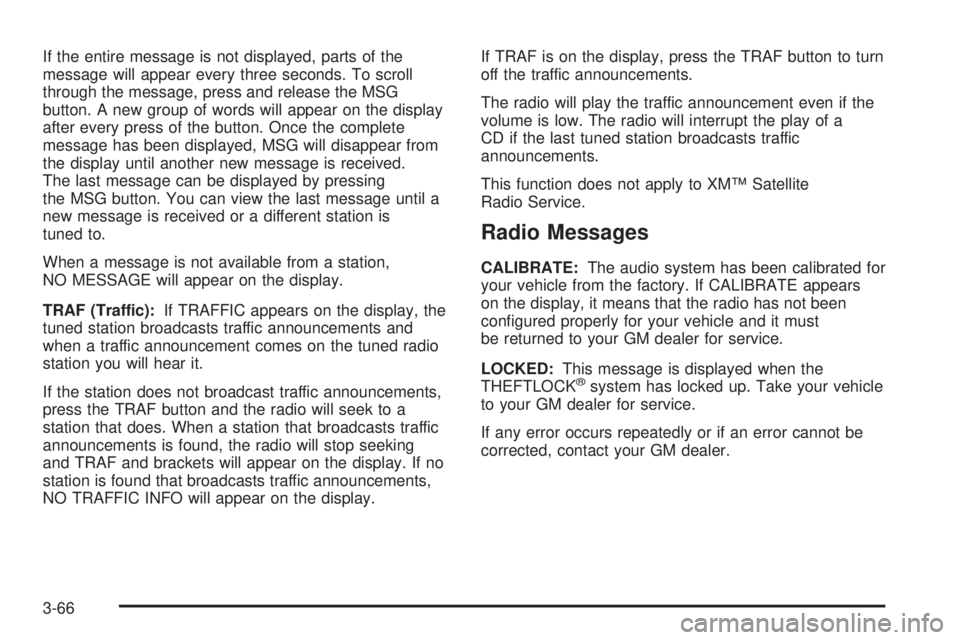
If the entire message is not displayed, parts of the
message will appear every three seconds. To scroll
through the message, press and release the MSG
button. A new group of words will appear on the display
after every press of the button. Once the complete
message has been displayed, MSG will disappear from
the display until another new message is received.
The last message can be displayed by pressing
the MSG button. You can view the last message until a
new message is received or a different station is
tuned to.
When a message is not available from a station,
NO MESSAGE will appear on the display.
TRAF (Traffic):If TRAFFIC appears on the display, the
tuned station broadcasts traffic announcements and
when a traffic announcement comes on the tuned radio
station you will hear it.
If the station does not broadcast traffic announcements,
press the TRAF button and the radio will seek to a
station that does. When a station that broadcasts traffic
announcements is found, the radio will stop seeking
and TRAF and brackets will appear on the display. If no
station is found that broadcasts traffic announcements,
NO TRAFFIC INFO will appear on the display.If TRAF is on the display, press the TRAF button to turn
off the traffic announcements.
The radio will play the traffic announcement even if the
volume is low. The radio will interrupt the play of a
CD if the last tuned station broadcasts traffic
announcements.
This function does not apply to XM™ Satellite
Radio Service.
Radio Messages
CALIBRATE:The audio system has been calibrated for
your vehicle from the factory. If CALIBRATE appears
on the display, it means that the radio has not been
congured properly for your vehicle and it must
be returned to your GM dealer for service.
LOCKED:This message is displayed when the
THEFTLOCK
®system has locked up. Take your vehicle
to your GM dealer for service.
If any error occurs repeatedly or if an error cannot be
corrected, contact your GM dealer.
3-66
Page 197 of 416
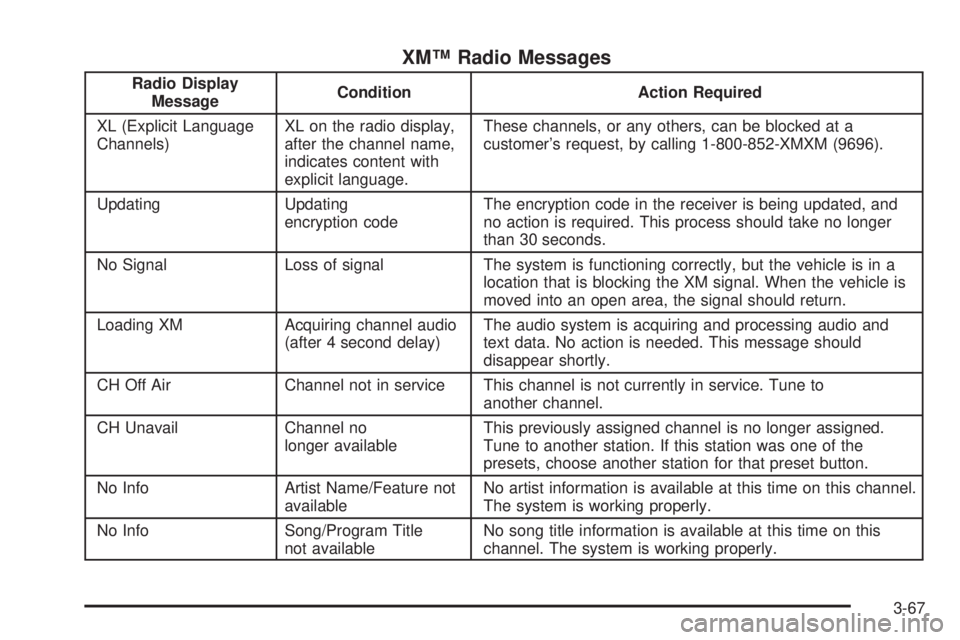
XM™ Radio Messages
Radio Display
MessageCondition Action Required
XL (Explicit Language
Channels)XL on the radio display,
after the channel name,
indicates content with
explicit language.These channels, or any others, can be blocked at a
customer’s request, by calling 1-800-852-XMXM (9696).
Updating Updating
encryption codeThe encryption code in the receiver is being updated, and
no action is required. This process should take no longer
than 30 seconds.
No Signal Loss of signal The system is functioning correctly, but the vehicle is in a
location that is blocking the XM signal. When the vehicle is
moved into an open area, the signal should return.
Loading XM Acquiring channel audio
(after 4 second delay)The audio system is acquiring and processing audio and
text data. No action is needed. This message should
disappear shortly.
CH Off Air Channel not in service This channel is not currently in service. Tune to
another channel.
CH Unavail Channel no
longer availableThis previously assigned channel is no longer assigned.
Tune to another station. If this station was one of the
presets, choose another station for that preset button.
No Info Artist Name/Feature not
availableNo artist information is available at this time on this channel.
The system is working properly.
No Info Song/Program Title
not availableNo song title information is available at this time on this
channel. The system is working properly.
3-67
Page 198 of 416
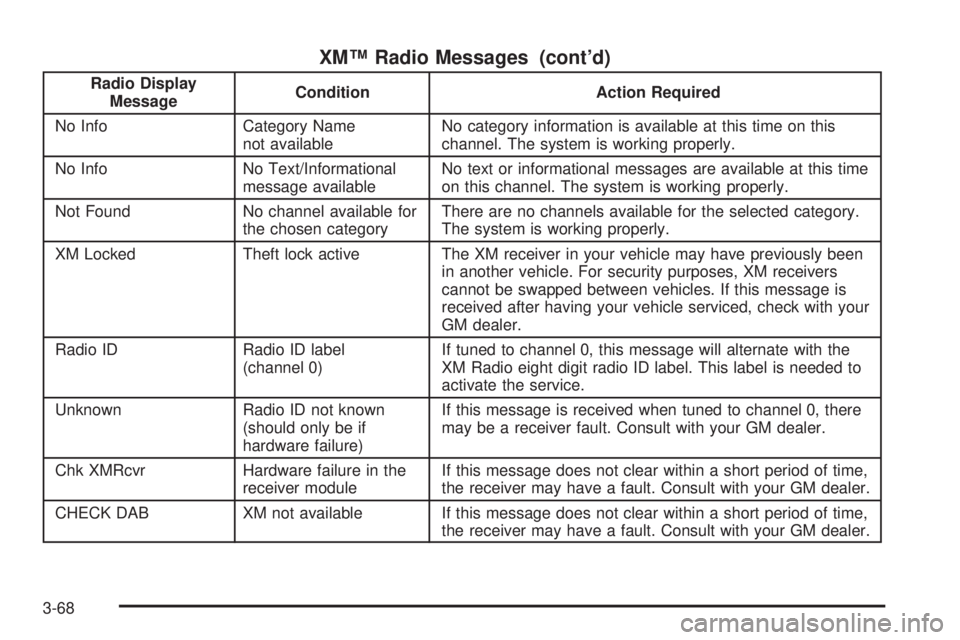
XM™ Radio Messages (cont’d)
Radio Display
MessageCondition Action Required
No Info Category Name
not availableNo category information is available at this time on this
channel. The system is working properly.
No Info No Text/Informational
message availableNo text or informational messages are available at this time
on this channel. The system is working properly.
Not Found No channel available for
the chosen categoryThere are no channels available for the selected category.
The system is working properly.
XM Locked Theft lock active The XM receiver in your vehicle may have previously been
in another vehicle. For security purposes, XM receivers
cannot be swapped between vehicles. If this message is
received after having your vehicle serviced, check with your
GM dealer.
Radio ID Radio ID label
(channel 0)If tuned to channel 0, this message will alternate with the
XM Radio eight digit radio ID label. This label is needed to
activate the service.
Unknown Radio ID not known
(should only be if
hardware failure)If this message is received when tuned to channel 0, there
may be a receiver fault. Consult with your GM dealer.
Chk XMRcvr Hardware failure in the
receiver moduleIf this message does not clear within a short period of time,
the receiver may have a fault. Consult with your GM dealer.
CHECK DAB XM not available If this message does not clear within a short period of time,
the receiver may have a fault. Consult with your GM dealer.
3-68