lock PONTIAC G6 2006 Service Manual
[x] Cancel search | Manufacturer: PONTIAC, Model Year: 2006, Model line: G6, Model: PONTIAC G6 2006Pages: 416, PDF Size: 2.66 MB
Page 125 of 416

To close the sunroof, press the front of the switch and
hold it until the sunroof is closed. The sunroof will stop if
the switch is released. Close the sunshade by hand.
The sunroof glass panel cannot be opened or closed if
the vehicle has an electrical failure.
Notice:If you force the sunshade forward of the
sliding glass panel, damage will occur and the
sunroof may not open or close properly. Always
close the glass panel before closing the sunshade.
Sunroof - Panoramic
If the vehicle has a panoramic sunroof, it has four glass
panels that tilt or stack upon each other, when the
sunroof control is turned to the vent or one of three
opened positions. There is a separate control for
the automatic sunshade.
The sunroof will only operate while the ignition is ON
or in ACC, or if Retained Accessory Power (RAP)
is active. SeeRetained Accessory Power (RAP)
on page 2-24.The panoramic sunroof control is located on the
headliner. From the closed position, turn the control
clockwise to vent the sunroof or open it to three different
positions.
0 (Closed Position):Turn the control to this position to
close the panoramic sunroof.
1 (Vent Position):Turn the control to this position to
vent the panoramic sunroof. The front glass panel of
the sunroof will tilt forward and the sunshade will
automatically retract to the vent position.
2-47
Page 131 of 416
Instrument Panel Overview...............................3-4
Hazard Warning Flashers................................3-6
Other Warning Devices...................................3-6
Horn.............................................................3-6
Tilt Wheel.....................................................3-6
Turn Signal/Multifunction Lever.........................3-7
Turn and Lane-Change Signals........................3-8
Headlamp High/Low-Beam Changer..................3-8
Flash-to-Pass.................................................3-8
Windshield Wipers..........................................3-9
Windshield Washer.......................................3-10
Cruise Control..............................................3-10
Headlamps..................................................3-14
Headlamps on Reminder................................3-14
Headlamps Off in PARK (P)...........................3-14
Delayed Headlamps......................................3-15
Daytime Running Lamps (DRL).......................3-15
Automatic Headlamp System..........................3-16
Fog Lamps..................................................3-17
Instrument Panel Brightness...........................3-17
Courtesy Lamps...........................................3-17
Dome Lamp.................................................3-18
Entry/Exit Lighting.........................................3-18
Overhead Console Reading Lamps.................3-18
Trunk Lamp.................................................3-18
Battery Run-Down Protection..........................3-18
Accessory Power Outlet(s).............................3-19Climate Controls............................................3-20
Climate Control System.................................3-20
Automatic Climate Control System...................3-23
Outlet Adjustment.........................................3-28
Warning Lights, Gages, and Indicators............3-29
Instrument Panel Cluster................................3-29
Speedometer and Odometer...........................3-31
Trip Odometer..............................................3-31
Tachometer.................................................3-31
Safety Belt Reminder Light.............................3-32
Passenger Safety Belt Reminder Light.............3-32
Airbag Readiness Light..................................3-33
Passenger Airbag Status Indicator...................3-34
Charging System Light..................................3-36
Brake System Warning Light..........................3-36
Anti-Lock Brake System Warning Light.............3-37
Traction Control System (TCS)
Warning Light...........................................3-38
Traction Control System Active Light...............3-38
Enhanced Traction System Warning Light.........3-38
Enhanced Traction System Active Light............3-39
StabiliTrak
®Not Ready Light..........................3-39
StabiliTrak®Indicator Light..............................3-39
Engine Coolant Temperature Gage..................3-40
Malfunction Indicator Lamp.............................3-40
Oil Pressure Light.........................................3-43
Section 3 Instrument Panel
3-1
Page 137 of 416
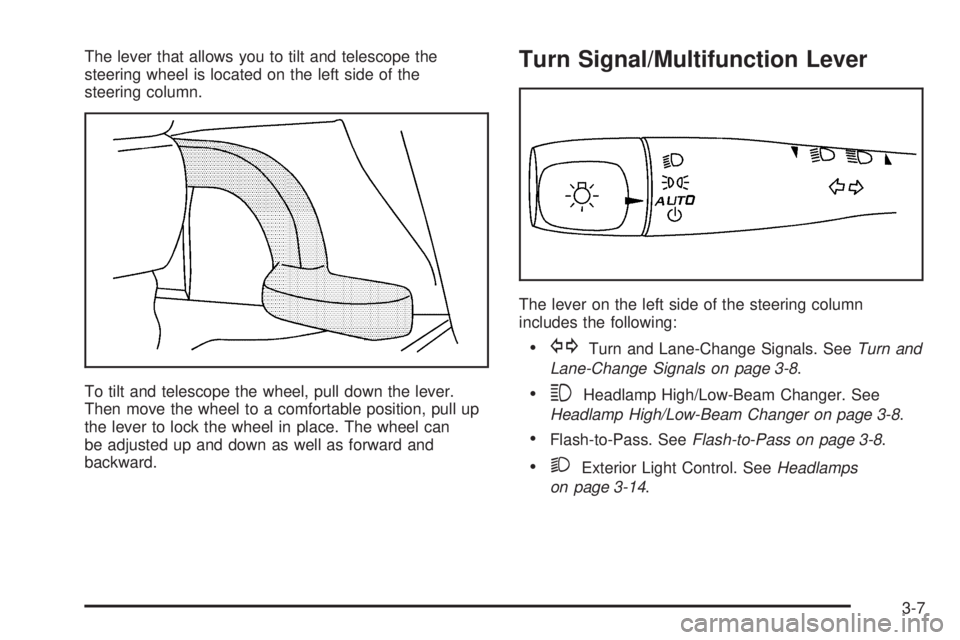
The lever that allows you to tilt and telescope the
steering wheel is located on the left side of the
steering column.
To tilt and telescope the wheel, pull down the lever.
Then move the wheel to a comfortable position, pull up
the lever to lock the wheel in place. The wheel can
be adjusted up and down as well as forward and
backward.Turn Signal/Multifunction Lever
The lever on the left side of the steering column
includes the following:
GTurn and Lane-Change Signals. SeeTurn and
Lane-Change Signals on page 3-8.
3Headlamp High/Low-Beam Changer. See
Headlamp High/Low-Beam Changer on page 3-8.
Flash-to-Pass. SeeFlash-to-Pass on page 3-8.
2Exterior Light Control. SeeHeadlamps
on page 3-14.
3-7
Page 140 of 416

Heavy snow or ice can overload your wiper motor.
A circuit breaker will stop the motor until it cools. Clear
away snow or ice to prevent an overload. If the
motor gets stuck, turn the wipers off, clear away the
snow or ice, and then turn the wipers back on.
As an added safety feature, if the wipers are on for
more than 15 seconds, the vehicle’s headlamps will turn
on automatically. They will turn off 15 seconds after
the wipers are turned off.
Windshield Washer
To wash your windshield, press the button at the end of
the lever until the washers begin.
{CAUTION:
In freezing weather, do not use your washer
until the windshield is warmed. Otherwise the
washer uid can form ice on the windshield,
blocking your vision.
When you release the button, the washers will stop, but
the wipers will continue to wipe for about three times
or will resume the speed you were using before.
Cruise Control
If your vehicle is equipped with cruise control, you can
maintain a speed of about 25 mph (40 km/h) or
more without keeping your foot on the accelerator. This
can really help on long trips. Cruise control does not
work at speeds below 25 mph (40 km/h).
{CAUTION:
Cruise control can be dangerous where you
cannot drive safely at a steady speed. So, do
not use your cruise control on winding roads
or in heavy traffic.
Cruise control can be dangerous on slippery
roads. On such roads, fast changes in tire
traction can cause needless wheel spinning,
and you could lose control. Do not use cruise
control on slippery roads.
3-10
Page 147 of 416

Fog Lamps
If equipped, the fog lamp
button is located on the
instrument panel, to the left
of the steering wheel.
The ignition must be on to turn you fog lamps on.
Push the button to turn the fog lamps on. An indicator
light in the button will glow when the fog lamps are
on. Push the button again to turn the fog lamps off.
The parking lamps will automatically turn on and
off when the fog lamps are turned on and off.
The fog lamps will turn off while the high-beam
headlamps are turned on.
Some localities have laws that require the headlamps to
be on along with the fog lamps.
Instrument Panel Brightness
The control for this feature
is located on the
instrument panel to the
right of the steering wheel.
Turn the knob clockwise to brighten the lights or
counterclockwise to dim them.
Courtesy Lamps
If your vehicle has a retractable hardtop, it will have
courtesy lamps in the rear passenger area of the
vehicle. These lamps come on to make it easier to see
while entering and exiting the vehicle. These lamps
will come on when any door is opened and will only turn
off when all doors are closed.
3-17
Page 148 of 416
Dome Lamp
Your vehicle may have a dome lamp. Your vehicle may
have a dome lamp without a switch. If your vehicle
does have a dome lamp with a switch, the following are
the settings.
9(Off):Move the lever to this position to turn the
lamp off, even when a door is opened.
1(Door):Move the lever to this position to turn the
lamp on whenever a door is opened.
+(On):Move the lever to this position to turn the
dome lamp on.
Entry/Exit Lighting
The lamps inside your vehicle will go on when you open
any door. These lamps will fade out after about
20 seconds after all of the doors have been closed or
when the ignition is turned to ON. These lamps will also
go on when you press the unlock symbol button or
the horn symbol on the keyless entry system transmitter.
The lamps inside your vehicle will stay on for about
20 seconds after your key is removed from the ignition
to provide an illuminated exit.
Overhead Console Reading Lamps
The vehicle may have reading lamps on the overhead
console. These lamps will turn on when the doors
are opened if the lamp switch is not in the OFF position.
When the doors are closed, press the side of each
lamp to turn them on and off. The reading lamps will also
turn on if the dome lamp switch is in the ON position.
Trunk Lamp
The trunk lamp comes on when you open your trunk. If
your vehicle has a retractable hardtop, you can press
the side of the trunk lamp to turn it off when the trunk
is open.
Battery Run-Down Protection
Your vehicle has a battery run-down feature designed to
protect your vehicle’s battery.
When any interior lamp (trunk, reading lamps, or dome
lamp) is left on when the ignition is turned off, the
battery run-down protection system will automatically
shut the lamp off after 20 minutes. This will avoid
draining the battery.
3-18
Page 149 of 416
To reactivate the interior lamps, do one of the following:
Open any door.
Press any remote keyless entry transmitter button.
Press the power door lock switch.
Press the remote trunk release.
Turn the lamp that was left on to off and then to
on again.
Accessory Power Outlet(s)
Accessory power outlets can be used to connect
auxiliary electrical equipment such as a cellular
telephone or CB radio. The outlet can accept electrical
equipment rated at a maximum of 20 Amps.
There are two accessory power outlets. Both are
located on the center console below the climate controls
unless the vehicle is equipped with enhanced traction
or traction control system. If the vehicle is equipped with
a traction system, one accessory power outlet is in
the center storage console and the other is located on
the center console below the climate controls.
To use an outlet, remove the protective cap. When not
in use, always cover the outlet with the protective
cap. The accessory power outlet is operational at
all times.Notice:Leaving electrical equipment on for
extended periods will drain the battery. Always turn
off electrical equipment when not in use and do
not plug in equipment that exceeds the maximum
amperage rating.
Certain electrical accessories may not be compatible
with the accessory power outlet and could result
in blown vehicle or adapter fuses. If you experience a
problem, see your dealer for additional information
on the accessory power outlet.
Notice:Adding any electrical equipment to your
vehicle may damage it or keep other components
from working as they should. The repairs would not
be covered by your warranty. Do not use equipment
exceeding maximum amperage rating. Check
with your dealer before adding electrical equipment.
When adding electrical equipment, be sure to follow
the proper installation instructions included with
the equipment.
Notice:Improper use of the power outlet can cause
damage not covered by your warranty. Do not
hang any type of accessory or accessory bracket
from the plug because the power outlets are
designed for accessory power plugs only.
3-19
Page 150 of 416
Climate Controls
Climate Control System
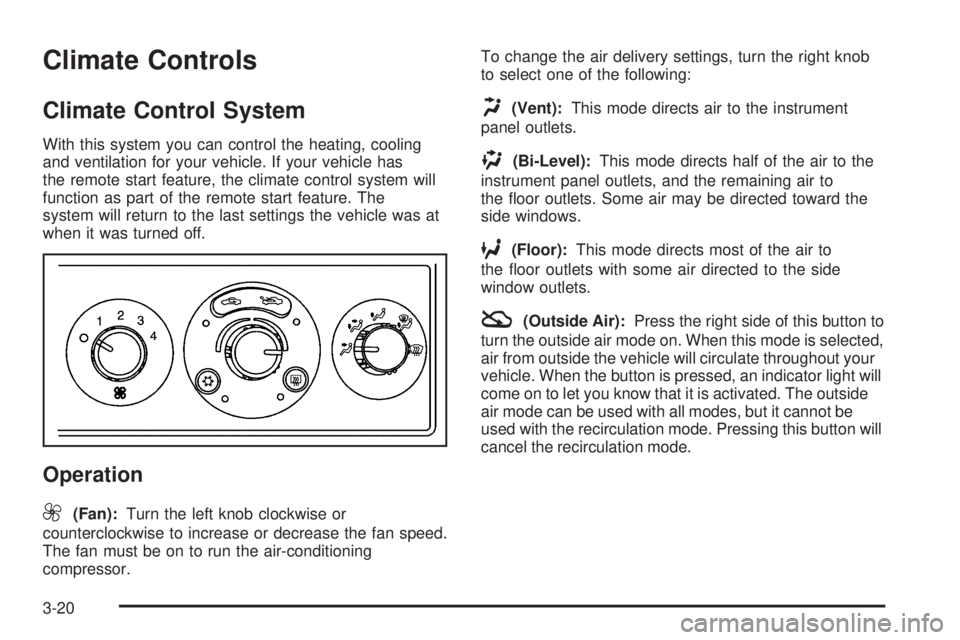
With this system you can control the heating, cooling
and ventilation for your vehicle. If your vehicle has
the remote start feature, the climate control system will
function as part of the remote start feature. The
system will return to the last settings the vehicle was at
when it was turned off.
Operation
9
(Fan):Turn the left knob clockwise or
counterclockwise to increase or decrease the fan speed.
The fan must be on to run the air-conditioning
compressor.To change the air delivery settings, turn the right knob
to select one of the following:
H(Vent):This mode directs air to the instrument
panel outlets.
)(Bi-Level):This mode directs half of the air to the
instrument panel outlets, and the remaining air to
the oor outlets. Some air may be directed toward the
side windows.
6(Floor):This mode directs most of the air to
the oor outlets with some air directed to the side
window outlets.
:(Outside Air):Press the right side of this button to
turn the outside air mode on. When this mode is selected,
air from outside the vehicle will circulate throughout your
vehicle. When the button is pressed, an indicator light will
come on to let you know that it is activated. The outside
air mode can be used with all modes, but it cannot be
used with the recirculation mode. Pressing this button will
cancel the recirculation mode.
3-20
Page 151 of 416
?(Recirculation):Press the left side of the button
to turn the recirculation mode on. When recirculation
mode is selected, the air inside the vehicle will be
recirculated through the climate control system and the
vehicle, not from outside your vehicle. This mode is
helpful when you are trying to limit odors from entering
your vehicle and for maximum air conditioning
performance in hot weather. When the button is pressed,
an indicator light above the button will come on to let you
know that it is activated. The recirculation indicator light
will blink three times if you try to use recirculation in a
mode that it can not be used in. Only use this mode when
it is needed for comfort, since window fogging will rapidly
occur if the air conditioning compressor is not engaged.
Pressing this button will cancel the outside air mode.
When you switch to the defog or defrost modes the
system will automatically move from recirculation to
outside air. When you move the mode knob back to
another air delivery mode, the system will move back into
recirculation. When the vehicle or fan is turned off and
back on, the system will default to outside air
automatically. Only use recirculation mode when it is
needed for comfort, since window fogging may occur.
Temperature Control:Turn the center knob clockwise
or counterclockwise to increase or decrease the
temperature inside your vehicle.
When it’s cold outside 0°F (−18°C) or lower, use the
engine coolant heater, if equipped, to provide warmer air
faster to your vehicle. An engine coolant heater warmsthe coolant that the engine uses to provide heat to
warm the inside of your vehicle. For more information,
seeEngine Coolant Heater on page 2-27.
#(Air Conditioning):Press this button to turn the air
conditioning system on or off. When the air conditioning
button is pressed, an indicator light will come on to let you
know that air conditioning is activated.
On hot days, open the windows to let hot inside air
escape; then close them. This helps to reduce the time
it takes for your vehicle to cool down. It also helps
the system to operate more efficiently.
For quick cool down on hot days, do the following:
1. Select the vent mode.
2. Select the highest fan speed.
3. Select air conditioning.
4. Select the recirculation mode.
5. Select the coolest temperature.
Using these settings together for long periods of time
may cause the air inside of your vehicle to become too
dry. To prevent this from happening, after the air in
your vehicle has cooled, turn the recirculation mode off.
The air-conditioning system removes moisture from
the air, so you may sometimes notice a small amount of
water dripping underneath your vehicle while idling or
after turning off the engine. This is normal.
3-21
Page 158 of 416
Rear Window Defogger
The rear window defogger uses a warming grid to
remove fog from the rear window.
<(Rear):Press this button to turn the rear window
defogger on or off. An indicator light above the
button will come on to let you know that the rear window
defogger is activated.
If driving below 50 mph (80 km/h), the rear window
defogger will turn off about 15 minutes after the button
is pressed. If you need additional warming time,
press the button again.
If your vehicle’s speed is maintained above 50 mph
(80 km/h), the rear window defogger will remain on once
the button is pressed.
If your vehicle has the remote start feature, the rear
defogger will automatically be turned on if it is cold
outside. The indicator light will not be on. When
the vehicle transitions out of remote start mode the rear
defogger will turn off.
Notice:Using a razor blade or sharp object to clear
the inside rear window may damage the rear
window defogger. Repairs would not be covered by
your warranty. Do not clear the inside of the rear
window with sharp objects.
Outlet Adjustment
Rotate the instrument panel outlets and move the
louvers on the outlets to change the direction and
amount of airow in your vehicle.
Operation Tips
Clear away any ice, snow or leaves from the air
inlets at the base of the windshield that may
block the ow of air into your vehicle.
Use of non-GM approved hood deectors may
adversely affect the performance of the system.
Keep the path under the front seats clear of objects
to help circulate the air inside of your vehicle more
effectively.
When an objectionable odor outside the vehicle is
encountered, use the recirculation mode, with the
temperature knob at a comfortable setting to prevent
the odor from entering the vehicle through the
ventilation system. This can be helpful when driving
through a long tunnel with poor ventilation.
However, extended usage of this mode in cold or
cool weather can cause window fogging.
3-28