light PONTIAC G6 2009 Workshop Manual
[x] Cancel search | Manufacturer: PONTIAC, Model Year: 2009, Model line: G6, Model: PONTIAC G6 2009Pages: 410, PDF Size: 2.33 MB
Page 178 of 410
DIC Warnings and Messages
These messages appear if there is a problem detected
in one of your vehicle’s systems.
A message clears when the vehicle’s condition is no
longer present. To acknowledge a message and clear it
from the display, press and hold any of the DIC buttons.
If the condition is still present, the warning message
comes back on the next time the vehicle is turned
off and back on. With most messages, a warning chime
sounds when the message displays. Your vehicle
may have other warning messages.
AUTO (Automatic) LIGHTS OFF
This message displays if the automatic headlamp
system is disabled with the headlamp switch.
AUTO (Automatic) LIGHTS ON
This message displays if the automatic headlamp
system is enabled with the headlamp switch.
BRAKE FLUID
This message displays, while the ignition is on, when
the brake uid level is low. The brake system warning
light on the instrument panel cluster also comes on.
SeeBrake System Warning Light on page 3-34for more
information. Have the brake system serviced by your
dealer/retailer as soon as possible.
CHANGE OIL SOON
This message displays when the life of the engine oil
has expired and it should be changed.
When this message is acknowledged and cleared from
the display, the engine oil life system must still be
reset separately. SeeEngine Oil Life System on
page 5-24,Engine Oil on page 5-21, andScheduled
Maintenance on page 6-4for more information.
CHECK CARGO TOP
If your vehicle has a retractable hardtop, this message
displays if the cargo cover is not in place when operating
the retractable hardtop. Open the trunk and make sure
the cargo cover is secure and no objects are in contact
with the cover. SeeTrunk on page 2-12,Lowering the
Retractable Hardtop on page 2-44, andRaising the
Retractable Hardtop on page 2-47for more information.
CHECK GAS CAP
This message displays if the fuel cap has not been fully
tightened. Recheck the fuel cap to make sure that it
is on properly. A few driving trips with the cap properly
installed should turn the message off.
3-46
Page 179 of 410

CHECK TIRE PRESS (Pressure)
On vehicles with the Tire Pressure Monitor System
(TPMS), this message displays when the pressure in
one or more of the vehicle’s tires needs to be checked.
If a tire pressure message appears on the DIC, stop
as soon as you can. Have the tire pressures checked
and set to those shown on the Tire Loading Information
label. SeeTires on page 5-59,Loading the Vehicle
on page 4-20, andInflation - Tire Pressure on
page 5-67. The DIC also shows the tire pressure
values. SeeDIC Operation and Displays on page 3-43.
If the tire pressure is low, the low tire pressure
warning light comes on. SeeTire Pressure Light on
page 3-37.
DOOR AJAR
This message displays if one or more of the vehicle’s
doors are not closed properly. Make sure that the
door(s) are closed completely.
ENGINE DISABLED
This message displays if the starting of the engine is
disabled. Have your vehicle serviced by your
dealer/retailer immediately.
ENG (Engine) PWR (Power) REDUCED
This message displays to inform you that the vehicle
has reduced engine power to avoid damaging the
engine. Reduced engine power can affect the vehicle’s
ability to accelerate. If this message is on, but there
is no reduction in performance, proceed to your
destination. The performance may be reduced the next
time the vehicle is driven. The vehicle may be driven
at a reduced speed while this message is on, but
acceleration and speed may be reduced. Anytime this
message stays on, the vehicle should be taken to
your dealer/retailer for service as soon as possible.
ICE POSSIBLE
This message displays when the outside air temperature
is cold enough to create icy road conditions. Adjust
your driving accordingly.
KEY FOB BATT (Battery) LOW
This message displays if the Remote Keyless Entry
(RKE) transmitter battery is low. Replace the battery in
the transmitter. See “Battery Replacement” under
Remote Keyless Entry (RKE) System Operation on
page 2-4.
3-47
Page 180 of 410
LEARN COMPLETE
On vehicles without the Remote Keyless Entry (RKE)
system, this message displays when the Tire Pressure
Monitor System (TPMS) has completed the tire
learning process. SeeTire Pressure Monitor System
on page 5-69for more information.
LOW FUEL
This message displays along with a low fuel warning
light on the instrument panel cluster when your vehicle is
low on fuel. Rell the fuel tank as soon as possible.
SeeLow Fuel Warning Light on page 3-42,Fuel
on page 5-6, andFilling the Tank on page 5-10.
LOW WASHER FLUID
This message displays when the vehicle’s windshield
washer uid is low. Fill the windshield washer uid
reservoir to the proper level as soon as possible.
SeeWindshield Washer Fluid on page 5-40.
PARKING BRAKE
This message displays if the parking brake is left
engaged and you try to drive away. SeeParking Brake
on page 2-31for more information.
POWER STEERING
This message displays if a problem has been detected
with the electric power steering, if your vehicle has
this feature. Have your vehicle serviced immediately by
your dealer/retailer.
SERVICE AIR BAG
This message displays when there is a problem with the
airbag system. Have your vehicle serviced by your
dealer/retailer immediately.
SVC (Service) TIRE MONITOR
On vehicles with the Tire Pressure Monitor System
(TPMS), this message displays if a part on the TPMS is
not working properly. The tire pressure light also ashes
and then remains on during the same ignition cycle. See
Tire Pressure Light on page 3-37. Several conditions may
cause this message to appear. SeeTire Pressure Monitor
Operation on page 5-71for more information. If the
warning comes on and stays on, there may be a problem
with the TPMS. See your dealer/retailer.
3-48
Page 183 of 410
LOCK HORN:If your vehicle has Remote Keyless
Entry (RKE), this option which allows the vehicle’s horn
to chirp every time the lock button on the RKE
transmitter is pressed, can be enabled or disabled.
When LOCK HORN appears on the display, press the
enter button to move between ON and OFF (default).
When you have made your choice, press the MENU
button to record your selection.
UNLOCK HORN:If your vehicle has Remote Keyless
Entry (RKE), this option which allows the vehicle’s
horn to chirp every time the unlock button on the
RKE transmitter is pressed, can be enabled or disabled.
When UNLOCK HORN appears on the display, press
the enter button to move between ON and OFF (default).
When you have made your choice, press the MENU
button to record your selection.
LIGHT FLASH:If your vehicle has Remote Keyless
Entry (RKE), this option which allows the vehicle’s
exterior perimeter lighting to ash every time the lock,
unlock, or trunk release buttons on the RKE transmitter
are pressed, can be enabled or disabled. When
LIGHT FLASH appears on the display, press the enter
button to move between OFF and ON (default).
When you have made your choice, press the MENU
button to record your selection.DELAY LOCK:The delayed locking option, which
delays the actual locking of the vehicle, can be enabled
or disabled. When DELAY LOCK appears on the
display, press the enter button to move between OFF
and ON (default). When you have made your choice,
press the MENU button to record your selection.
AUTO UNLK (Unlock):The automatic door unlocking
option, which allows the vehicle to automatically
unlock certain doors can be enabled or disabled.
When AUTO UNLK appears on the display, press the
enter button to move between ALL (default), DRIVER,
or NONE. When you have made your choice, press
the MENU button to record your selection. See
Programmable Automatic Door Unlock on page 2-10
for more information.
UNLK (Unlock):This screen displays only if DRIVER
or ALL is selected for the AUTO UNLK option.
This option determines when the automatic door
unlocking will occur, when either the key is turned to
OFF or the vehicle is shifted into P (Park). When UNLK
appears on the display, press the enter button to
move between KEY OFF and SHIFT TO P (Park)
(default). When you have made your choice,
press the MENU button to record your selection.
SeeProgrammable Automatic Door Unlock on
page 2-10for more information.
3-51
Page 184 of 410
EXT (Exterior) LIGHTS:If your vehicle has Remote
Keyless Entry (RKE), this option, which allows the
vehicle’s exterior perimeter lighting to turn on each time
the unlock button on the RKE transmitter is pressed,
can be enabled or disabled. When EXT LIGHTS appears
on the display, press the enter button to move between
ON (default) and OFF. When you have made your
choice, press the MENU button to record your selection.
LANGUAGE:To select your choice of language,
press the enter button to move between the optional
languages.
The languages are ENGLISH (default), FRENCH,
SPANISH, and GERMAN.
Choosing a language will display all of the information
on the DIC in the desired language.
When you have made your choice, press the MENU
button for at least one second to record your selection.Audio System(s)
Determine which radio the vehicle has and read the
following pages to become familiar with its features.
{CAUTION:
Taking your eyes off the road for extended periods
could cause a crash resulting in injury or death to
you or others. Do not give extended attention to
entertainment tasks while driving.
This system provides access to many audio and non
audio listings.
3-52
Page 192 of 410

Playing a CD
Insert a CD partway into the slot, label side up.
The player pulls it in and the CD should begin playing.
Press the eject button or the DISP knob to insert
a CD while the ignition is off.
If the ignition or radio is turned off while a CD is in the
player, it stays in the player. When the ignition or
radio is turned on, the CD starts playing, where it
stopped, if it was the last selected audio source.
As each new track starts to play, the track number
displays.
The CD player can play the smaller 3 inch (8 cm) single
CDs with an adapter ring. Full-size CDs and the
smaller CDs are loaded in the same manner.
Care of CDs
If playing a CD-R, the sound quality can be reduced
due to CD-R quality, the method of recording, the quality
of the music that has been recorded, and the way the
CD-R has been handled. Handle them carefully.
Store CD-R(s) in their original cases or other protective
cases and away from direct sunlight and dust. The
CD player scans the bottom surface of the disc. If the
surface of a CD is damaged, such as cracked, broken,
or scratched, the CD does not play properly or not
at all. Do not touch the bottom side of a CD whilehandling it; this could damage the surface. Pick up CDs
by grasping the outer edges or the edge of the hole
and the outer edge.
If the surface of a CD is soiled, take a soft, lint free
cloth or dampen a clean, soft cloth in a mild, neutral
detergent solution mixed with water, and clean it.
Make sure the wiping process starts from the center
to the edge.
Care of The CD Player
Do not add any label to a CD, it could get caught in the
CD player. If a CD is recorded on a personal computer
and a description label is needed, try labeling the top of
the recorded CD with a marking pen.
The use of CD lens cleaners for CDs is not advised,
due to the risk of contaminating the lens of the CD optics
with lubricants internal to the CD player mechanism.
Notice:If a label is added to a CD, or more than
one CD is inserted into the slot at a time, or an
attempt is made to play scratched or damaged CDs,
the CD player could be damaged. While using the
CD player, use only CDs in good condition without
any label, load one CD at a time, and keep the
CD player and the loading slot free of foreign
materials, liquids, and debris.
If an error displays, see “CD Messages” later in this
section.
3-60
Page 201 of 410
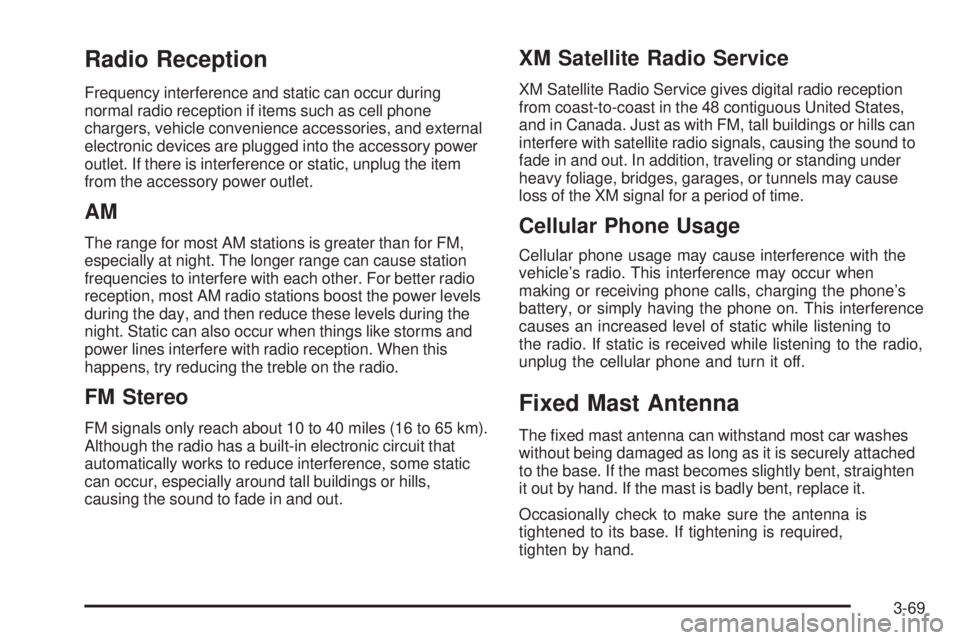
Radio Reception
Frequency interference and static can occur during
normal radio reception if items such as cell phone
chargers, vehicle convenience accessories, and external
electronic devices are plugged into the accessory power
outlet. If there is interference or static, unplug the item
from the accessory power outlet.
AM
The range for most AM stations is greater than for FM,
especially at night. The longer range can cause station
frequencies to interfere with each other. For better radio
reception, most AM radio stations boost the power levels
during the day, and then reduce these levels during the
night. Static can also occur when things like storms and
power lines interfere with radio reception. When this
happens, try reducing the treble on the radio.
FM Stereo
FM signals only reach about 10 to 40 miles (16 to 65 km).
Although the radio has a built-in electronic circuit that
automatically works to reduce interference, some static
can occur, especially around tall buildings or hills,
causing the sound to fade in and out.
XM Satellite Radio Service
XM Satellite Radio Service gives digital radio reception
from coast-to-coast in the 48 contiguous United States,
and in Canada. Just as with FM, tall buildings or hills can
interfere with satellite radio signals, causing the sound to
fade in and out. In addition, traveling or standing under
heavy foliage, bridges, garages, or tunnels may cause
loss of the XM signal for a period of time.
Cellular Phone Usage
Cellular phone usage may cause interference with the
vehicle’s radio. This interference may occur when
making or receiving phone calls, charging the phone’s
battery, or simply having the phone on. This interference
causes an increased level of static while listening to
the radio. If static is received while listening to the radio,
unplug the cellular phone and turn it off.
Fixed Mast Antenna
The xed mast antenna can withstand most car washes
without being damaged as long as it is securely attached
to the base. If the mast becomes slightly bent, straighten
it out by hand. If the mast is badly bent, replace it.
Occasionally check to make sure the antenna is
tightened to its base. If tightening is required,
tighten by hand.
3-69
Page 206 of 410
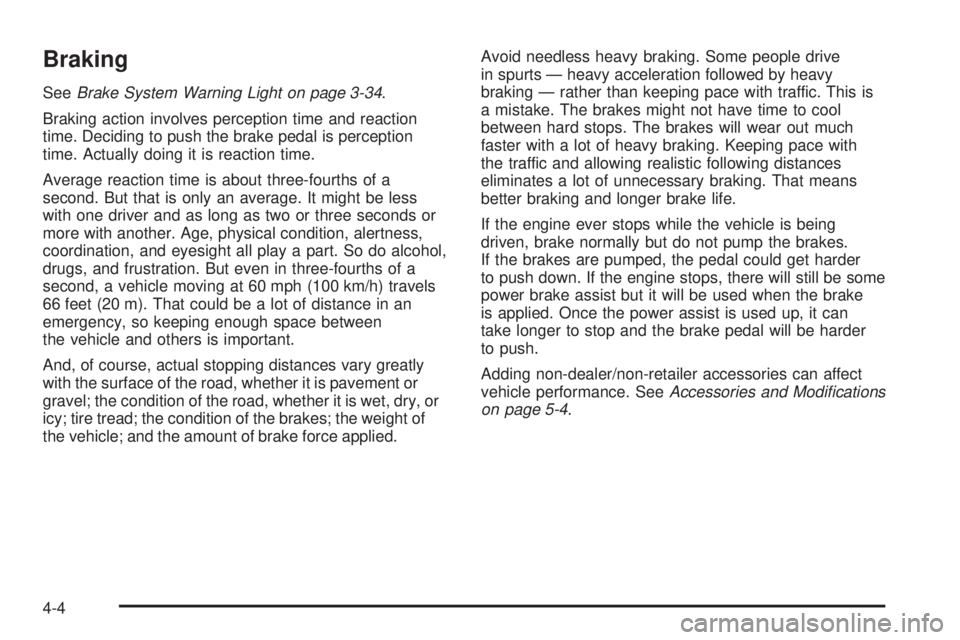
Braking
SeeBrake System Warning Light on page 3-34.
Braking action involves perception time and reaction
time. Deciding to push the brake pedal is perception
time. Actually doing it is reaction time.
Average reaction time is about three-fourths of a
second. But that is only an average. It might be less
with one driver and as long as two or three seconds or
more with another. Age, physical condition, alertness,
coordination, and eyesight all play a part. So do alcohol,
drugs, and frustration. But even in three-fourths of a
second, a vehicle moving at 60 mph (100 km/h) travels
66 feet (20 m). That could be a lot of distance in an
emergency, so keeping enough space between
the vehicle and others is important.
And, of course, actual stopping distances vary greatly
with the surface of the road, whether it is pavement or
gravel; the condition of the road, whether it is wet, dry, or
icy; tire tread; the condition of the brakes; the weight of
the vehicle; and the amount of brake force applied.Avoid needless heavy braking. Some people drive
in spurts — heavy acceleration followed by heavy
braking — rather than keeping pace with traffic. This is
a mistake. The brakes might not have time to cool
between hard stops. The brakes will wear out much
faster with a lot of heavy braking. Keeping pace with
the traffic and allowing realistic following distances
eliminates a lot of unnecessary braking. That means
better braking and longer brake life.
If the engine ever stops while the vehicle is being
driven, brake normally but do not pump the brakes.
If the brakes are pumped, the pedal could get harder
to push down. If the engine stops, there will still be some
power brake assist but it will be used when the brake
is applied. Once the power assist is used up, it can
take longer to stop and the brake pedal will be harder
to push.
Adding non-dealer/non-retailer accessories can affect
vehicle performance. SeeAccessories and Modifications
on page 5-4.
4-4
Page 207 of 410

Antilock Brake System (ABS)
This vehicle has the Antilock Brake System (ABS),
an advanced electronic braking system that will
help prevent a braking skid.
When the engine is started and the vehicle begins to
drive away, ABS checks itself. A momentary motor
or clicking noise might be heard while this test is going
on, and it might even be noticed that the brake pedal
moves a little. This is normal.
If there is a problem with
ABS, this warning light
stays on. SeeAntilock
Brake System (ABS)
Warning Light on
page 3-35.Let us say the road is wet and you are driving safely.
Suddenly, an animal jumps out in front of you. You slam
on the brakes and continue braking. Here is what
happens with ABS:
A computer senses that the wheels are slowing down.
If one of the wheels is about to stop rolling, the computer
will separately work the brakes at each wheel.
ABS can change the brake pressure to each wheel, as
required, faster than any driver could. This can help
the driver steer around the obstacle while braking hard.
As the brakes are applied, the computer keeps
receiving updates on wheel speed and controls braking
pressure accordingly.
Remember: ABS does not change the time needed to get
a foot up to the brake pedal or always decrease stopping
distance. If you get too close to the vehicle in front of you,
there will not be enough time to apply the brakes if that
vehicle suddenly slows or stops. Always leave enough
room up ahead to stop, even with ABS.
4-5
Page 208 of 410
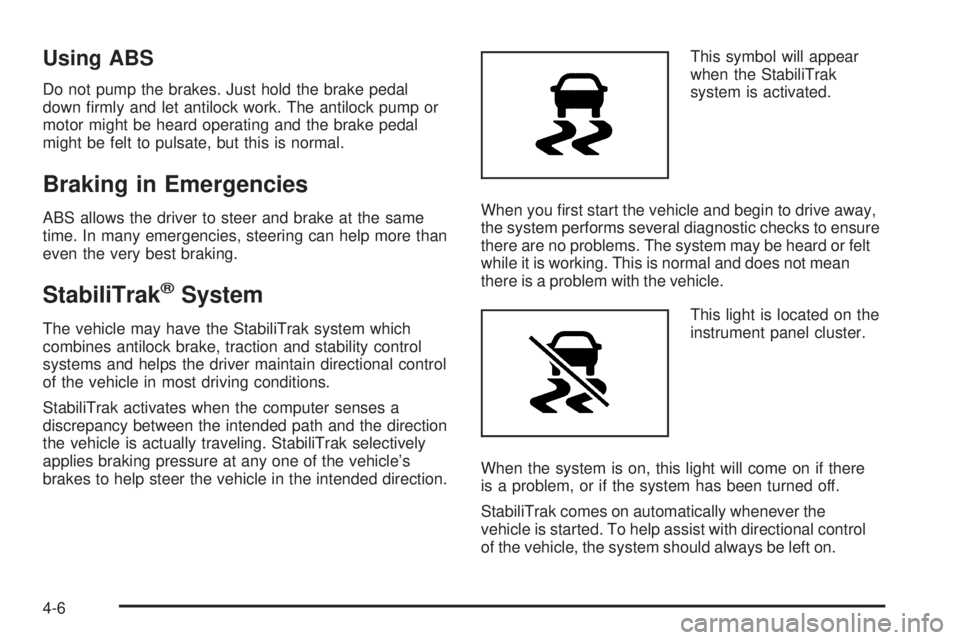
Using ABS
Do not pump the brakes. Just hold the brake pedal
down rmly and let antilock work. The antilock pump or
motor might be heard operating and the brake pedal
might be felt to pulsate, but this is normal.
Braking in Emergencies
ABS allows the driver to steer and brake at the same
time. In many emergencies, steering can help more than
even the very best braking.
StabiliTrak®System
The vehicle may have the StabiliTrak system which
combines antilock brake, traction and stability control
systems and helps the driver maintain directional control
of the vehicle in most driving conditions.
StabiliTrak activates when the computer senses a
discrepancy between the intended path and the direction
the vehicle is actually traveling. StabiliTrak selectively
applies braking pressure at any one of the vehicle’s
brakes to help steer the vehicle in the intended direction.This symbol will appear
when the StabiliTrak
system is activated.
When you rst start the vehicle and begin to drive away,
the system performs several diagnostic checks to ensure
there are no problems. The system may be heard or felt
while it is working. This is normal and does not mean
there is a problem with the vehicle.
This light is located on the
instrument panel cluster.
When the system is on, this light will come on if there
is a problem, or if the system has been turned off.
StabiliTrak comes on automatically whenever the
vehicle is started. To help assist with directional control
of the vehicle, the system should always be left on.
4-6