light PONTIAC G6 2009 Repair Manual
[x] Cancel search | Manufacturer: PONTIAC, Model Year: 2009, Model line: G6, Model: PONTIAC G6 2009Pages: 410, PDF Size: 2.33 MB
Page 209 of 410
The Traction Control System (TCS) and StabiliTrak can
be turned off if needed by pressing and holding the
StabiliTrak/TCS button. Press the button again to turn
StabiliTrak and Traction Control back on. SeeTraction
Control System (TCS) on page 4-7for more information.
If cruise control is being used when the system
activates, the StabiliTrak light will ash and cruise
control will automatically disengage. Cruise control may
be reengaged when road conditions allow. See
Cruise Control on page 3-10.
Traction Control System (TCS)
The vehicle has a Traction Control System (TCS) that
limits wheel spin. This is especially useful in slippery road
conditions. The system operates only if it senses that one
or both of the front wheels are spinning or beginning to
lose traction. When this happens, the system reduces
engine power and may also upshift the transmission to
limit wheel spin. Also, the traction control system
activates the appropriate corner brakes to gain even
quicker control to limit wheel spin.This light, located on the
instrument panel, will come
on when the TCS is
limiting wheel spin.
The system may be heard or felt while it is working, but
this is normal.
If the vehicle is in cruise control when TCS begins to
limit wheel spin, the cruise control will automatically
disengage. The cruise control may be re-engaged when
road conditions allow. SeeCruise Control on page 3-10.
TCS operates in all transmission shift lever positions
except park or neutral. But the system can upshift the
transmission only as high as the shift lever position that is
chosen, so use the lower gears only when necessary.
SeeAutomatic Transmission Operation on page 2-26.
4-7
Page 210 of 410

This light is located on the
instrument panel cluster.
This light comes on if there is a problem, or if the
system has been turned off.
When this warning light is on, the system will not limit
wheel spin. Adjust your driving accordingly.
TCS automatically comes on whenever the vehicle is
started. To limit wheel spin, especially in slippery
road conditions, always leave the system turned on.
TCS can be turned off if needed.
To turn the system on or
off, press the TCS button
located under the
climate controls.
It is recommended to leave the system on for normal
driving conditions, but it may be necessary to turn
the system off if the vehicle is stuck in sand, mud, ice orsnow, and you want to “rock” the vehicle to attempt to
free it. SeeIf Your Vehicle is Stuck in Sand, Mud, Ice, or
Snow on page 4-19.
If the TCS button is pressed once, the traction control
system will turn off and the traction control system
warning light comes on. The StabiliTrak system will stay
on. Press the TCS button again to turn the system
back on. The traction control system warning light will
go off. Press and hold the TCS button and the
StabiliTrak system and the traction control system will
turn off. Press the TCS button again to turn StabiliTrak
and the traction control system back on. For more
information, seeStabiliTrak
®System on page 4-6.
When the system is off, the Traction Control System
warning light will come on and stay on. If the Traction
Control System is limiting wheel spin and the button
is pressed to turn the system off, the warning light will
come on and the system will stop limiting wheel
spin. The system will not provide traction assistance
until the system is turned back on.
Adding non-dealer/non-retailer accessories can affect
the vehicle’s performance. SeeAccessories and
Modifications on page 5-4for more information.
4-8
Page 213 of 410
Off-Road Recovery
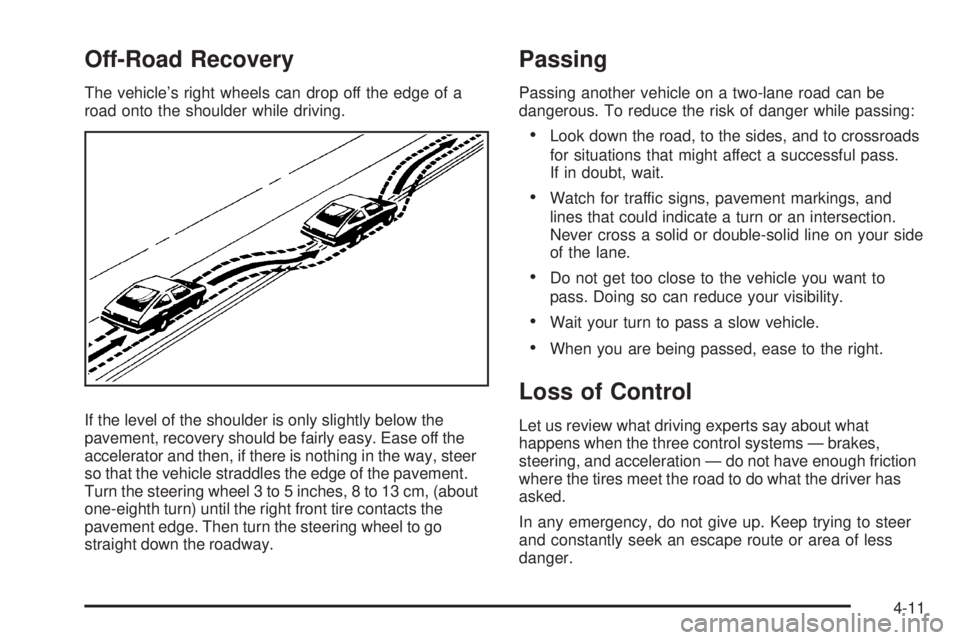
The vehicle’s right wheels can drop off the edge of a
road onto the shoulder while driving.
If the level of the shoulder is only slightly below the
pavement, recovery should be fairly easy. Ease off the
accelerator and then, if there is nothing in the way, steer
so that the vehicle straddles the edge of the pavement.
Turn the steering wheel 3 to 5 inches, 8 to 13 cm, (about
one-eighth turn) until the right front tire contacts the
pavement edge. Then turn the steering wheel to go
straight down the roadway.
Passing
Passing another vehicle on a two-lane road can be
dangerous. To reduce the risk of danger while passing:
Look down the road, to the sides, and to crossroads
for situations that might affect a successful pass.
If in doubt, wait.
Watch for traffic signs, pavement markings, and
lines that could indicate a turn or an intersection.
Never cross a solid or double-solid line on your side
of the lane.
Do not get too close to the vehicle you want to
pass. Doing so can reduce your visibility.
Wait your turn to pass a slow vehicle.
When you are being passed, ease to the right.
Loss of Control
Let us review what driving experts say about what
happens when the three control systems — brakes,
steering, and acceleration — do not have enough friction
where the tires meet the road to do what the driver has
asked.
In any emergency, do not give up. Keep trying to steer
and constantly seek an escape route or area of less
danger.
4-11
Page 215 of 410

Driving at Night
Night driving is more dangerous than day driving
because some drivers are likely to be impaired — by
alcohol or drugs, with night vision problems, or by fatigue.
Night driving tips include:
Drive defensively.
Do not drink and drive.
Reduce headlamp glare by adjusting the inside
rearview mirror.
Slow down and keep more space between you and
other vehicles because headlamps can only light up
so much road ahead.
Watch for animals.
When tired, pull off the road.
Do not wear sunglasses.
Avoid staring directly into approaching headlamps.
Keep the windshield and all glass on your vehicle
clean — inside and out.
Keep your eyes moving, especially during turns or
curves.
No one can see as well at night as in the daytime.
But, as we get older, these differences increase.
A 50-year-old driver might need at least twice as much
light to see the same thing at night as a 20-year-old.
4-13
Page 216 of 410
Driving in Rain and on Wet Roads
Rain and wet roads can reduce vehicle traction
and affect your ability to stop and accelerate. Always
drive slower in these types of driving conditions
and avoid driving through large puddles and
deep-standing or owing water.
{CAUTION:
Wet brakes can cause crashes. They might not
work as well in a quick stop and could cause pulling
to one side. You could lose control of the vehicle.
After driving through a large puddle of water or a
car/vehicle wash, lightly apply the brake pedal until
the brakes work normally.
Flowing or rushing water creates strong forces.
Driving through owing water could cause your
vehicle to be carried away. If this happens, you and
other vehicle occupants could drown. Do not ignore
police warnings and be very cautious about trying to
drive through owing water.
Hydroplaning
Hydroplaning is dangerous. Water can build up under
your vehicle’s tires so they actually ride on the water. This
can happen if the road is wet enough and you are going
fast enough. When your vehicle is hydroplaning, it has
little or no contact with the road.
There is no hard and fast rule about hydroplaning. The
best advice is to slow down when the road is wet.
Other Rainy Weather Tips
Besides slowing down, other wet weather driving tips
include:
Allow extra following distance.
Pass with caution.
Keep windshield wiping equipment in good shape.
Keep the windshield washer uid reservoir lled.
Have good tires with proper tread depth. SeeTires
on page 5-59.
Turn off cruise control.
4-14
Page 221 of 410

To save fuel, run the engine for only short periods as
needed to warm the vehicle and then shut the engine
off and close the window most of the way to save heat.
Repeat this until help arrives but only when you feel really
uncomfortable from the cold. Moving about to keep warm
also helps.
If it takes some time for help to arrive, now and then
when you run the engine, push the accelerator
pedal slightly so the engine runs faster than the idle
speed. This keeps the battery charged to restart
the vehicle and to signal for help with the headlamps.
Do this as little as possible to save fuel.
If Your Vehicle is Stuck in Sand,
Mud, Ice, or Snow
Slowly and cautiously spin the wheels to free the
vehicle when stuck in sand, mud, ice, or snow.
SeeRocking Your Vehicle to Get It Out on page 4-20.If the vehicle has a traction system, it can often help to
free a stuck vehicle. Refer to the vehicle’s traction
system in the Index. If stuck too severely for the traction
system to free the vehicle, turn the traction system off
and use the rocking method.
{CAUTION:
If you let your vehicle’s tires spin at high speed,
they can explode, and you or others could be
injured. The vehicle can overheat, causing an
engine compartment re or other damage. Spin the
wheels as little as possible and avoid going above
35 mph (55 km/h) as shown on the speedometer.
For information about using tire chains on the vehicle,
seeTire Chains on page 5-84.
4-19
Page 222 of 410
Rocking Your Vehicle to Get It Out
Turn the steering wheel left and right to clear the area
around the front wheels. Turn off any traction or stability
system. Shift back and forth between R (Reverse) and a
forward gear, spinning the wheels as little as possible.
To prevent transmission wear, wait until the wheels stop
spinning before shifting gears. Release the accelerator
pedal while shifting, and press lightly on the accelerator
pedal when the transmission is in gear. Slowly spinning
the wheels in the forward and reverse directions causes a
rocking motion that could free the vehicle. If that does not
get the vehicle out after a few tries, it might need to be
towed out. If the vehicle does need to be towed out, see
Towing Your Vehicle on page 4-26.
Loading the Vehicle
It is very important to know how much weight your
vehicle can carry. This weight is called the vehicle
capacity weight and includes the weight of all
occupants, cargo, and all nonfactory-installed
options. Two labels on the vehicle show how much
weight it may properly carry, the Tire and Loading
Information label and the Vehicle Certication label.
{CAUTION:
Do not load the vehicle any heavier than the
Gross Vehicle Weight Rating (GVWR), or
either the maximum front or rear Gross Axle
Weight Rating (GAWR). If you do, parts on the
vehicle can break, and it can change the way
your vehicle handles. These could cause you
to lose control and crash. Also, overloading
can shorten the life of the vehicle.
4-20
Page 249 of 410

{CAUTION:
Fuel can spray out on you if you open the fuel cap
too quickly. If you spill fuel and then something
ignites it, you could be badly burned. This spray
can happen if the tank is nearly full, and is more
likely in hot weather. Open the fuel cap slowly and
wait for any hiss noise to stop. Then unscrew the
cap all the way.
Be careful not to spill fuel. Do not top off or overll the
tank, and wait a few seconds after you have nished
pumping before removing the nozzle. Clean fuel
from painted surfaces as soon as possible. See
Washing Your Vehicle on page 5-105.
When replacing the fuel cap, turn it clockwise until it
clicks. Make sure the cap is fully installed. The diagnostic
system can determine if the fuel cap has been left off or
improperly installed. This would let fuel evaporate into
the atmosphere. SeeMalfunction Indicator Lamp on
page 3-38.The CHECK GAS CAP message displays on the Driver
Information Center (DIC) if the fuel cap is not properly
installed. SeeDIC Warnings and Messages on
page 3-46for more information.
{CAUTION:
If a re starts while you are refueling, do not
remove the nozzle. Shut off the ow of fuel by
shutting off the pump or by notifying the station
attendant. Leave the area immediately.
Notice:If you need a new fuel cap, be sure to get
the right type. Your dealer/retailer can get one
for you. If you get the wrong type, it may not t
properly. This may cause the malfunction indicator
lamp to light and may damage the fuel tank and
emissions system. SeeMalfunction Indicator Lamp
on page 3-38.
5-11
Page 266 of 410
When to Inspect the Engine Air
Cleaner/Filter
Inspect the air cleaner/lter at the MaintenanceII
intervals and replace it at the rst oil change after each
50,000 mile (80 000 km) interval. SeeScheduled
Maintenance on page 6-4for more information. If you
are driving in dusty/dirty conditions, inspect the lter
at each engine oil change.
How to Inspect the Engine Air
Cleaner/Filter
To inspect the air cleaner/lter, remove the lter from
the vehicle and lightly shake the lter to release
loose dust and dirt. If the lter remains caked with dirt, a
new lter is required.
To inspect or replace the engine air cleaner/lter:
1. Remove the screws that hold the cover on.
2. Disconnect the electrical connector.
3. Lift off the cover.4. Inspect or replace the engine air cleaner/lter.
5. Reverse Steps 1 through 3 to reinstall the cover and
reconnect the electrical connector.
{CAUTION:
Operating the engine with the air cleaner/lter off
can cause you or others to be burned. The air
cleaner not only cleans the air; it helps to stop
ames if the engine backres. If it is not there and
the engine backres, you could be burned. Do not
drive with it off, and be careful working on the
engine with the air cleaner/lter off.
Notice:If the air cleaner/lter is off, a backre can
cause a damaging engine re. And, dirt can
easily get into the engine, which will damage it.
Always have the air cleaner/lter in place when you
are driving.
5-28
Page 282 of 410

Brake Wear
This vehicle has disc brakes. Disc brake pads have
built-in wear indicators that make a high-pitched warning
sound when the brake pads are worn and new pads are
needed. The sound can come and go or be heard all the
time the vehicle is moving, except when applying the
brake pedal rmly.
{CAUTION:
The brake wear warning sound means that soon
the brakes will not work well. That could lead to an
accident. When the brake wear warning sound is
heard, have the vehicle serviced.Notice:Continuing to drive with worn-out brake
pads could result in costly brake repair.
Some driving conditions or climates can cause a brake
squeal when the brakes are rst applied or lightly applied.
This does not mean something is wrong with the brakes.
Properly torqued wheel nuts are necessary to help
prevent brake pulsation. When tires are rotated, inspect
brake pads for wear and evenly tighten wheel nuts in
the proper sequence to torque specications in
Capacities and Specifications on page 5-118.
Brake linings should always be replaced as complete
axle sets.
5-44