lock PONTIAC G6 2010 Owners Manual
[x] Cancel search | Manufacturer: PONTIAC, Model Year: 2010, Model line: G6, Model: PONTIAC G6 2010Pages: 448, PDF Size: 2.5 MB
Page 317 of 448

5. Remove the bulb access cover by turning it
counterclockwise.
6. Turn the bulb socket counterclockwise and pull out
the bulb assembly.
7. Disconnect the bulb socket from the wiring harness
for headlamps.
For the front turn signal/parking or sidemarker
bulbs, unclip the bulb from the socket.
8. Install a new bulb.
9. Turn the bulb access cover clockwise to reinstall it.
10. Push the headlamp assembly back into the
vehicle making sure to align the ball stud into
its retainer.
11. Push the front fascia back into its original location.
12. Reinstall the plastic push pins on the top of the
tire bar.
13. Reinstall the two screws that secure the headlamp
assembly.Center High-Mounted
Stoplamp (CHMSL) (Sedan)
To replace a center high-mounted stoplamp
(CHMSL) bulb:
1. Open the trunk. SeeTrunk on page 3-11.
2. Locate the center high-mounted stoplamp (CHMSL)
on the inside of the trunk lid.
3. Disconnect the wiring harness.
4. Remove the cover by pressing the tabs at either
end with a tool.
6-49
Page 318 of 448

5. Remove the bulb by turning it counterclockwise.
6. Turn the bulb clockwise to install it.
7. Reinstall the cover and reconnect the wiring
harness.
Center High-Mounted
Stoplamp (CHMSL) (Retractable
Hardtop and Coupe)
If your vehicle has this component and it needs
replacement, it is recommended that it be replaced
as a unit by your dealer/retailer.
Taillamps, Turn Signal, Sidemarker,
Stoplamps and Back-up Lamps
(Sedan)
A. Stoplamp/Taillamp/Turn Signal
B. Sidemarker Lamp
C. Back-up Lamp
To replace one of these bulbs:
1. Open the trunk. SeeTrunk on page 3-11.
2. Remove the convenience net.
3. Remove the wing nuts holding the trunk trim.
6-50
Page 319 of 448

4. Remove the two nuts that hold the taillamp
assembly.
5. Remove the taillamp assembly.
6. Turn the bulb socket counterclockwise to remove.
7. Pull the bulb straight out of the socket.
8. Push the new bulb straight in until it clicks.
9. Turn the bulb socket clockwise to reinstall.
10. Reinstall the taillamp assembly and the two nuts
that hold the taillamp assembly.
11. Reinstall the wing nuts holding the trunk trim.
Taillamps, Turn Signal, Sidemarker,
Stoplamps and Back-up Lamps
(Coupe)
A. Sidemarker Lamp
B. Stoplamp/Taillamp/Turn Signal Lamp
C. Back-up Lamp
6-51
Page 320 of 448

To replace one of these bulbs:
1. Open the trunk. SeeTrunk on page 3-11.
2. Remove the convenience net.
3. Remove the two wing nuts from the trunk trim and
pull back the trunk trim to expose the hex nuts.4. Remove the three hex nuts retaining the taillamp
assembly.
5. Pull the assembly off to the side to release it from
the rear of the vehicle.
6. Turn the bulb socket counterclockwise to remove
from the taillamp assembly.
7. Pull the bulb from the socket.
8. Push the new bulb into the socket until it clicks.
9. Turn the bulb socket clockwise to reinstall into the
taillamp assembly.
10. Push the taillamp assembly back into the rear of
the vehicle.
11. Reinstall the three hex nuts retaining the taillamp
assembly.
12. Reinstall the trunk trim and the two wing nuts.
6-52
Page 321 of 448

Taillamps, Turn Signal, Sidemarker,
Stoplamps and Back-up Lamps
(Retractable Hardtop)
A. Sidemarker Lamp
B. Stoplamp/Taillamp/Turn Signal Lamp
C. Back-up LampTo replace one of these bulbs:
1. Open the trunk. SeeTrunk on page 3-11.
2. Locate the three rubber covers in the trunk trim,
near the taillamp assembly and remove them.
3. Remove the two nuts and one bolt retaining the
taillamp assembly.
4. Pull off the taillamp assembly to the side to release
it from the vehicle.
5. Turn the bulb socket counterclockwise to remove.
6. Pull the bulb from the bulb socket.
7. Push the new bulb straight in until it clicks.
8. Turn the bulb socket clockwise to reinstall.
9. Push the taillamp assembly back into place.
10. Reinstall the two nuts and one bolt retaining the
taillamp assembly.
11. Reinstall the trunk trim and three rubber covers.
6-53
Page 322 of 448

License Plate Lamp
To replace the license plate lamp bulb:
1. Remove the license plate assembly by turning the
two screws counterclockwise.
2. Turn and pull the license plate lamp forward
through the fascia opening.
3. Turn the bulb socket counterclockwise and pull the
bulb straight out of the socket.
4. Push the new bulb in and turn it clockwise to install.
5. Replace the license plate lamp by pushing it
through the fascia opening.
6. Turn the two screws that hold the license plate
lamp clockwise to reinstall.
Replacement Bulbs
Exterior Lamp Bulb Number
Coupe and Retractable
Hardtop921
Sedan 3057K
Center High-Mounted Stoplamp
(CHMSL)912***
Front Parking and Turn Signal
Lamp (Amber Lens)3157KX
Front Parking and Turn Signal
Lamp (Crystal Lens)3157AK
Front/Rear Sidemarker Lamp 194
License Plate Lamp 168
Headlamps
High-Beam Lamp H9
Low-Beam Lamp H11
Stoplamp, Taillamp and Turn
Signal Lamp3057K*
Sidemarker, Stoplamp, Taillamp
and Turn Signal Lamp3157K**
*Coupe and Sedan only
**Retractable Hardtop only
***Sedan Only
For replacement bulbs not listed here, contact your
dealer/retailer.
6-54
Page 323 of 448
Windshield Wiper Blade
Replacement
Windshield wiper blades should be inspected for wear
or cracking. SeeScheduled Maintenance on page 7-3
for more information on wiper blade inspection.
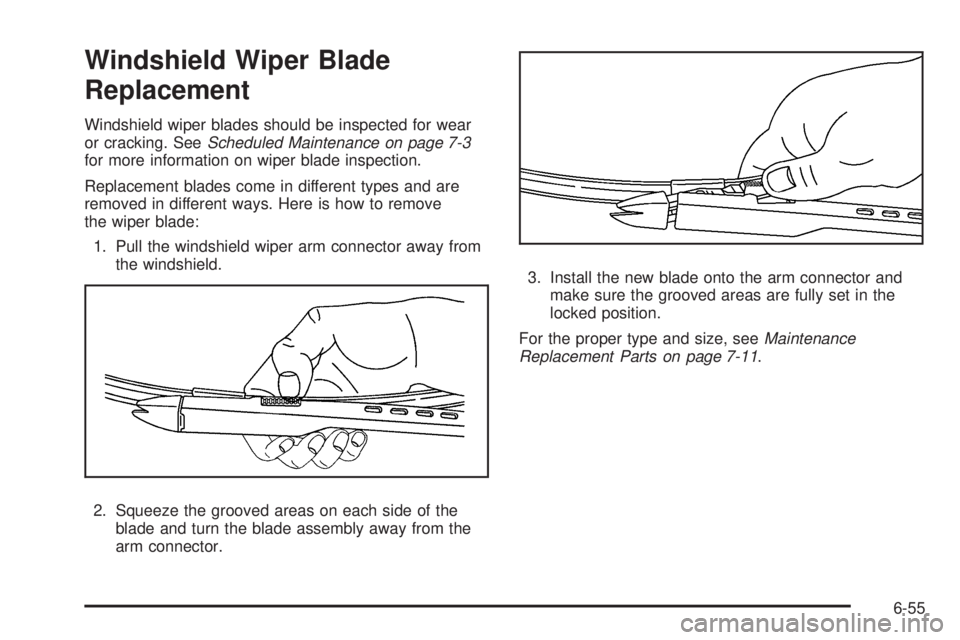
Replacement blades come in different types and are
removed in different ways. Here is how to remove
the wiper blade:
1. Pull the windshield wiper arm connector away from
the windshield.
2. Squeeze the grooved areas on each side of the
blade and turn the blade assembly away from the
arm connector.3. Install the new blade onto the arm connector and
make sure the grooved areas are fully set in the
locked position.
For the proper type and size, seeMaintenance
Replacement Parts on page 7-11.
6-55
Page 338 of 448

TPMS Sensor Matching Process
Each TPMS sensor has a unique identification code.
Any time you replace one or more of the TPMS sensors
or rotate the vehicle’s tires, the identification codes need
to be matched to the new tire/wheel location. The sensors
are matched, to the tire/wheel locations, in the following
order: driver side front tire, passenger side front tire,
passenger side rear tire, and driver side rear tire using
a TPMS diagnostic tool. See your dealer/retailer for
service.
The TPMS sensors can also be matched to each
tire/wheel position by increasing or decreasing the
tire’s air pressure. When increasing the tire’s pressure,
do not exceed the maximum inflation pressure
indicated on the tire’s sidewall. To decrease the tire’s
air-pressure use the pointed end of the valve cap,
a pencil-style air pressure gage, or a key.
You have two minutes to match each tire and wheel
position. If it takes longer than two minutes to match
any tire and wheel position, the matching process
stops and you need to start over.
TPMS Matching Process for Vehicles
with Remote Keyless Entry (RKE)
1. Set the parking brake.
2. Turn the ignition switch to ON/RUN with the
engine off.
3. Press and hold the Remote Keyless Entry (RKE)
transmitter’s lock and unlock buttons, at the same
time, for about five seconds to start the TPMS learn
mode. The horn sounds twice indicating the TPMS
receiver is ready and in learn mode.
4. Start with the driver side front tire. The driver side
front turn signal also comes on to indicate that
corner’s sensor is ready to be learned.
5. Remove the valve cap from the tire’s valve stem.
Activate the TPMS sensor by increasing or
decreasing the tire’s air pressure for about
eight seconds. The horn chirp, can take up to
30 seconds to sound. It chirps one time and then
all the turn signals flash one time to confirm the
sensor identification code has been matched to
the tire/wheel position.
6-70
Page 339 of 448

6. The passenger side front turn signal comes on to
indicate that corner sensor is ready to be learned.
Proceed to the passenger side front tire and
repeat the procedure in Step 5.
7. The passenger side rear turn signal comes on to
indicate that corner sensor is ready to be learned.
Proceed to the passenger side rear tire and
repeat the procedure in Step 5.
8. The driver side rear turn signal comes on to
indicate that corner sensor is ready to be learned.
Proceed to the driver side rear tire, and repeat
the procedure in Step 5.
9. After hearing the single horn chirp for the driver
side rear tire, two additional horn chirps sound
to indicate the tire learning process is done.
Turn the ignition switch to LOCK/OFF.
If no tires are learned after entering the TPMS learn
mode, or if communication with the receiver stops, or
if the time limit has expired, turn the ignition switch to
LOCK/OFF and start over beginning with Step 2.
10. Set all four tires to the recommended air pressure
level as indicated on the Tire and Loading
Information label.
11. Put the valve caps back on the valve stems.TPMS Matching Process for Vehicles
without Remote Keyless Entry (RKE)
1. Set the parking brake.
2. Turn the ignition switch to ON/RUN with the
engine off.
3. Using the Driver Information Center (DIC), press
the INFO and Set/Reset buttons at the same time
for about one second. Then press and release
the INFO button until the TIRE LEARN? message
displays.
4. Press and hold the Set/Reset DIC button for
approximately three seconds to start the TPMS
learn mode. The horn sounds twice to indicate the
TPMS receiver is ready and the TIRE LEARN ON
message displays. The driver side front turn signal
also comes on to indicate that corner sensor is ready
to be learned.
5. Start with the driver side front tire.
6-71
Page 340 of 448

6. Remove the valve cap from the tire’s valve stem.
Activate the TPMS sensor by increasing or
decreasing the tire’s air pressure for about
eight seconds. The horn chirp, can take up to
30 seconds to sound. It chirps one time and then
all the turn signals flash one time to confirm the
sensor identification code has been matched to
the tire/wheel position.
7. The passenger side front turn signal comes on to
indicate that corner sensor is ready to be learned.
Proceed to the passenger side front tire and
repeat the procedure in Step 6.
8. The passenger side rear turn signal comes on to
indicate that corner sensor is ready to be learned.
Proceed to the passenger side rear tire and
repeat the procedure in Step 6.
9. The driver side rear turn signal comes on to
indicate that corner sensor is ready to be learned.
Proceed to the driver side rear tire, and repeat
the procedure in Step 6.10. After hearing the single horn chirp for the driver
side rear tire, two additional horn chirps sound
to indicate the tire learning process is done.
The LEARN COMPLETE message displays if
all four tire positions are learned. Turn the ignition
switch to LOCK/OFF.
If no tires are learned after entering the TPMS learn
mode, or if communication with the receiver stops,
or if the time limit has expired, the TIRE LEARN?
message displays on the DIC. Turn the ignition
switch to LOCK/OFF and start over beginning
with Step 2.
11. Set all four tires to the recommended air pressure
level as indicated on the Tire and Loading
Information label.
12. Put the valve caps back on the valve stems.
6-72