lock PONTIAC G6 2010 Repair Manual
[x] Cancel search | Manufacturer: PONTIAC, Model Year: 2010, Model line: G6, Model: PONTIAC G6 2010Pages: 448, PDF Size: 2.5 MB
Page 199 of 448

REMOTE START
If your vehicle has remote start, this feature allows
remote start to be turned off or on. Remote start allows
you to start the engine from outside of the vehicle
using your Remote Keyless Entry (RKE) transmitter.
When REMOTE START appears on the display, press
and hold the reset button for at least one second to
scroll through the available settings:
OFF:The remote start feature will be disabled.
ON (default):The remote start feature will be enabled.
SeeRemote Vehicle Start on page 3-5for more
information.
To select a setting and move on to the next feature,
press the information button while the desired setting is
displayed on the DIC.
LOCK HORN
This feature, which allows the vehicle’s horn to chirp
every time the lock button on the Remote Keyless Entry
(RKE) transmitter is pressed, can be enabled or
disabled. When LOCK HORN appears on the display,
press and hold the reset button for at least one
second to scroll through the available settings:
OFF (default):The horn will not chirp on the first press
of the lock button on the RKE transmitter. The horn
will still chirp on the second press.ON:The horn will chirp on the first press of the lock
button on the RKE transmitter.
SeeRemote Keyless Entry (RKE) System Operation on
page 3-3for more information.
To select a setting and move on to the next feature,
press the information button while the desired setting is
displayed on the DIC.
UNLOCK HORN
This feature, which allows the vehicle’s horn to chirp on
the first press of the unlock button on the Remote
Keyless Entry (RKE) transmitter, can be enabled or
disabled. When UNLOCK HORN appears on the display,
press and hold the reset button for at least one
second to scroll through the available settings:
OFF (default):The horn will not chirp when the unlock
button on the RKE transmitter is pressed.
ON:The horn will chirp on the first press of the unlock
button on the RKE transmitter.
SeeRemote Keyless Entry (RKE) System Operation on
page 3-3for more information.
To select a setting and move on to the next feature,
press the information button while the desired setting is
displayed on the DIC.
4-49
Page 200 of 448

LIGHT FLASH
This feature, which allows the vehicle’s exterior
hazard/turn signal lighting to flash every time the lock,
unlock, or trunk release buttons on the Remote Keyless
Entry (RKE) transmitter are pressed, can be enabled
or disabled. When LIGHT FLASH appears on the
display, press and hold the reset button for at least
one second to scroll through the available settings:
OFF:The exterior hazard/turn signal lighting will
not flash when the lock, unlock, or trunk release buttons
on the RKE transmitter are pressed.
ON (default):The exterior hazard/turn signal lighting
will flash when the lock, unlock, or trunk release buttons
on the RKE transmitter are pressed.
SeeRemote Keyless Entry (RKE) System Operation on
page 3-3for more information.
To select a setting and move on to the next feature,
press the information button while the desired setting is
displayed on the DIC.
DELAY LOCK
This feature, which delays the actual locking of the
vehicle, can be enabled or disabled. When DELAY
LOCK appears on the display, press and hold the reset
button for at least one second to scroll through the
available settings:
ON (default):The doors will not lock until five seconds
after the last door is closed. You can temporarily
override delayed locking by pressing the power lock
switch or the lock button on the Remote Keyless Entry
(RKE) transmitter a second time.
OFF:The doors will lock immediately when pressing
the power lock switch or the lock button on the
RKE transmitter.
SeePower Door Locks on page 3-8,Delayed Locking
on page 3-9, andRemote Keyless Entry (RKE)
System Operation on page 3-3for more information.
To select a setting and move on to the next feature,
press the information button while the desired setting is
displayed on the DIC.
4-50
Page 201 of 448
AUTO UNLK (Unlock)
This feature, which allows the vehicle to automatically
unlock certain doors, can be enabled or disabled. When
AUTO UNLK appears on the display, press and hold
the reset button for at least one second to scroll through
the available settings:
ALL (default):All of the doors will automatically unlock.
DRIVER:The driver’s door will automatically unlock.
NONE:None of the doors will automatically unlock. You
will need to manually unlock the doors.
SeeProgrammable Automatic Door Unlock on
page 3-10for more information.
To select a setting and move on to the next feature,
press the information button while the desired setting is
displayed on the DIC.
UNLK (Unlock)
This screen displays only if DRIVER or ALL is selected
for the AUTO UNLK feature. This feature determines
when the automatic door unlocking will occur. When
UNLK appears on the display, press and hold the reset
button for at least one second to scroll through the
available settings:
KEY OFF:The door(s) will unlock when the key is
turned off.
SHIFT TO P (Park) (default):The door(s) will unlock
when the vehicle is shifted into P (Park).
SeeProgrammable Automatic Door Unlock on
page 3-10for more information.
To select a setting and move on to the next feature,
press the information button while the desired setting is
displayed on the DIC.
4-51
Page 202 of 448
EXT (Exterior) LIGHTS
This feature, which allows the vehicle’s exterior
perimeter lighting to turn on each time the unlock button
on the Remote Keyless Entry (RKE) transmitter is
pressed, can be enabled or disabled. When EXT
LIGHTS appears on the display, press and hold the
reset button for at least one second to scroll through the
available settings:
OFF:The exterior perimeter lighting will not turn on
when the unlock button on the RKE transmitter is
pressed.
ON (default):The exterior perimeter lighting will turn on
when the unlock button on the RKE transmitter is
pressed.
SeeRemote Keyless Entry (RKE) System Operation on
page 3-3for more information.
To select a setting and move on to the next feature,
press the information button while the desired setting is
displayed on the DIC.
LANGUAGE
This feature allows you to select the language in which
the DIC will display. When LANGUAGE appears on
the display, press and hold the reset button for at least
one second to scroll through the available settings:
ENGLISH (default):All messages will appear in
English.
FRENCH:All messages will appear in French.
SPANISH:All messages will appear in Spanish.
GERMAN:All messages will appear in German.
To select a setting and exit out of the personalization
menu mode, press the information button while the
desired setting is displayed on the DIC.
Exiting Personalization Menu
The personalization menu will be exited when any of the
following conditions occur:
•A ten second time period has elapsed.
•The ignition is turned off.
•The end of the personalization menu list is reached.
4-52
Page 203 of 448
Audio System(s)
Determine which radio the vehicle has and read the
following pages to become familiar with its features.
{WARNING:
Taking your eyes off the road for extended periods
could cause a crash resulting in injury or death to
you or others. Do not give extended attention to
entertainment tasks while driving.
This system provides access to many audio and non
audio listings.
To minimize taking your eyes off the road while driving,
do the following while the vehicle is parked:
•Become familiar with the operation and controls of
the audio system.
•Set up the tone, speaker adjustments, and preset
radio stations.
For more information, seeDefensive Driving on
page 5-2.Notice:Contact your dealer/retailer before adding
any equipment.
Adding audio or communication equipment could
interfere with the operation of the vehicle’s engine,
radio, or other systems, and could damage them.
Follow federal rules covering mobile radio and
telephone equipment.
The vehicle has Retained Accessory Power (RAP). With
RAP, the audio system can be played even after the
ignition is turned off. SeeRetained Accessory Power
(RAP) on page 3-21for more information.
Setting the Clock
To set the time and date:
1. Turn the ignition key to ACC/ACCESSORY or
ON/RUN. Press
Oto turn the radio on.
2. Press
Hand the HR, MIN, MM, DD, YYYY (hour,
minute, month, day, and year) displays.
3. Press the softkey located below any one of the tabs
that you want to change.
4-53
Page 204 of 448
4. To increase the time or date do one of the following:
•Press the softkey located below the selected tab.
•Press¨SEEK, or\FWD.
•Turnfclockwise.
5. To decrease the time or date do one of the
following:
•Press©SEEK orsREV.
•Turnfcounterclockwise.
The date does not automatically display. To see the
date press
Hwhile the radio is on. The date with display
times out after a few seconds and goes back to the
normal radio and time display.
To change the time default setting from 12 hour to 24
hour or to change the date default setting from
month/day/year to day/month/year:
1. Press
Hand then the softkey located below the
forward arrow label. Once the time 12H and 24H,
and the date MM/DD/YYYY (month, day, and
year) and DD/MM/YYYY (day, month, and year)
displays.
2. Press the softkey located below the desired option.
3. Press
Hagain to apply the selected default, or
let the screen time out.
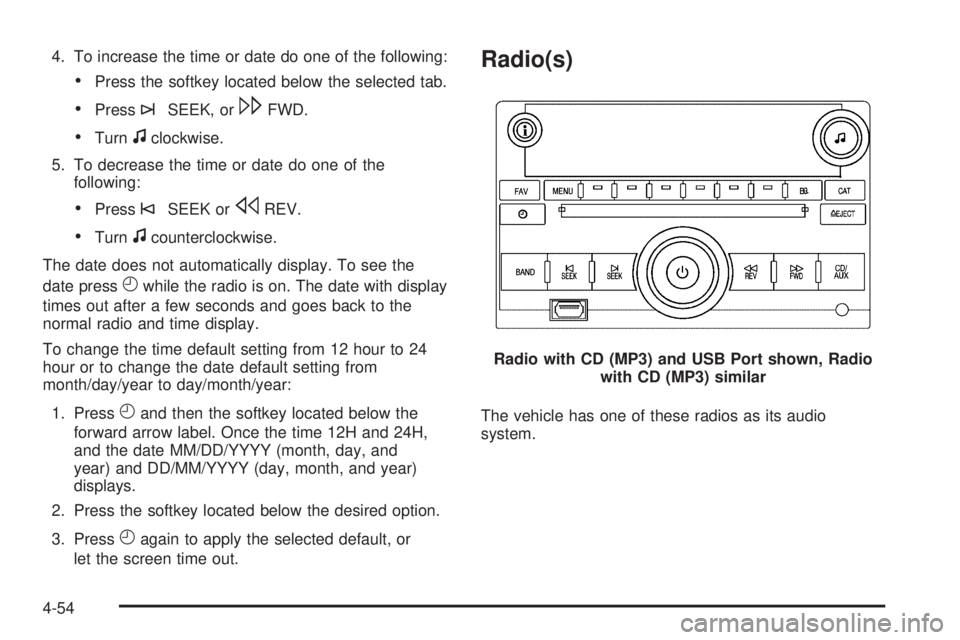
Radio(s)
The vehicle has one of these radios as its audio
system.Radio with CD (MP3) and USB Port shown, Radio
with CD (MP3) similar
4-54
Page 209 of 448
4. To go to the previous or to the next XM station
within the selected category, do one of the
following:
•Turnf.
•Press the softkeys below the right or left arrows
on the radio display.
•Press©SEEK or¨SEEK.
5. To exit the category search mode, press the FAV
button or BAND button to display the favorites
again.
Undesired XM categories can be removed through the
setup menu. To remove an undesired category:
1. Press MENU to display the radio setup menu.
2. Press the softkey below the XM CAT tab.
3. Turn
fto display the category to be removed.
4. Press the softkey below the Remove tab until the
category name along with the word Removed
displays.
5. Repeat the steps to remove additional categories.
Removed categories can be restored by pressing the
softkey under the Add tab when a removed category
displays or by pressing the softkey below the Restore
All tab.
Categories cannot be removed or added while the
vehicle is moving faster than 5 mph (8 km/h).
Radio Messages
Calibration Error:Displays if the radio is no longer
calibrated properly for the vehicle. The vehicle must be
returned to your dealer/retailer for service.
Loc or Locked:Displays when the THEFTLOCK
®
system has activated. Take the vehicle to your
dealer/retailer for service.
If any error occurs repeatedly or if an error cannot be
corrected, contact your dealer/retailer.
XM Satellite Radio Service
XM is a satellite radio service that is based in the
48 contiguous United States and 10 Canadian
provinces. XM Satellite Radio has a wide variety
of programming and commercial-free music,
coast-to-coast, and in digital-quality sound. A service
fee is required to receive the XM service. For more
information, contact XM at www.xmradio.com or
call 1-800-929-2100 in the U.S. and www.xmradio.ca
or call 1-877-438-9677 in Canada.
Radio Messages for XM Only
SeeXM Radio Messages on page 4-70later in this
section for further detail.
4-59
Page 220 of 448
Shuffle Functionality
To use Shuffle:
Press the softkey below
>,2,
Songs, Shuffle Album, or Shuffle Folder.
>(Shuffle Off):Press the softkey below2to
turn shuffle off. This is the default mode when a
USB storage device or iPod is first connected.
2(Shuffle All Songs / Shuffle Songs):Press the
softkey below
=or
<(Shuffle Album):Press the softkey below>to
shuffle all songs in the current album on an iPod.
=(Shuffle Folder):Press the softkey below>to
shuffle all songs in the current folder on a USB
storage device.
XM Radio Messages
XL (Explicit Language Channels):These channels, or
any others, can be blocked at a customer’s request,
by calling 1-800-852-XMXM (9696).
XM Updating:The encryption code in the receiver is
being updated, and no action is required. This process
should take no longer than 30 seconds.
No XM Signal:The system is functioning correctly, but
the vehicle is in a location that is blocking the XM™
signal. When the vehicle is moved into an open area, the
signal should return.
Loading XM:The audio system is acquiring and
processing audio and text data. No action is needed.
This message should disappear shortly.
Channel Off Air:This channel is not currently in
service. Tune in to another channel.
Channel Unauth:This channel is blocked or cannot be
received with your XM Subscription package.
4-70
Page 221 of 448
Channel Unavail:This previously assigned channel is
no longer assigned. Tune to another station. If this
station was one of the presets, choose another station
for that preset button.
No Artist Info:No artist information is available at this
time on this channel. The system is working properly.
No Title Info:No song title information is available
at this time on this channel. The system is working
properly.
No CAT Info:No category information is available at
this time on this channel. The system is working
properly.
No Information:No text or informational messages are
available at this time on this channel. The system is
working properly.
CAT Not Found:There are no channels available for
the selected category. The system is working properly.
XM Theftlocked:The XM receiver in the vehicle
could have previously been in another vehicle. For
security purposes, XM receivers cannot be swapped
between vehicles. If this message is received after
having the vehicle serviced, check with your
dealer/retailer.XM Radio ID:If tuned to channel 0, this message
alternates with the XM™ Radio 8 digit radio ID label.
This label is needed to activate the service.
Unknown:If this message is received when tuned to
channel 0, there could be a receiver fault. Consult
with your dealer/retailer.
Check XM Receivr:If this message does not clear
within a short period of time, the receiver could have a
fault. Consult with your dealer/retailer.
XM Not Available:If this message does not clear
within a short period of time, the receiver could have a
fault. Consult with your dealer/retailer.
Bluetooth®
Vehicles with a Bluetooth system can use a Bluetooth
capable cell phone with a Hands Free Profile to
make and receive phone calls. The system can be used
while the key is in ON/RUN or ACC/ACCESSORY
position. The range of the Bluetooth system can be up
to 9.1 m (30 ft.). Not all phones support all functions,
and not all phones are guaranteed to work with
the in-vehicle Bluetooth system. See gm.com/bluetooth
for more information on compatible phones.
4-71
Page 231 of 448

Sending a Stored Name Tag During a Call
1. Pressbg. The system responds with “Ready”
followed by a tone.
2. Say “Send name tag.” The system responds
with “Say a name tag to send tones” followed
by a tone.
3. Say the name tag to send.
•If the system clearly recognizes the name tag it
responds with “OK, Sending
the dial tones are sent and the call continues.
•If the system is not sure it recognized the name
tag properly, it responds “Dial
Please say yes or no?” followed by a tone. If the
name tag is correct, say “Yes”. The system
responds with “OK, Sending
the dial tones are sent and the call continues.
Clearing the System
Unless information is deleted out of the in-vehicle
Bluetooth system, it will be retained indefinitely. This
includes all saved name tags in the phonebook
and phone pairing information. For information on how
to delete this information, see the above sections
on Deleting a Paired Phone and Deleting Name Tags.
Other Information
The Bluetooth®word mark and logos are owned by the
Bluetooth®SIG, Inc. and any use of such marks by
General Motors is under license. Other trademarks and
trade names are those of their respective owners.
SeeRadio Frequency Statement on page 8-18for FCC
information.
Theft-Deterrent Feature
THEFTLOCK®is designed to discourage theft of the
vehicle’s radio by learning a portion of the Vehicle
Identification Number (VIN). The radio does not operate
if it is stolen or moved to a different vehicle.
4-81