audio PONTIAC G6 2010 Owner's Manual
[x] Cancel search | Manufacturer: PONTIAC, Model Year: 2010, Model line: G6, Model: PONTIAC G6 2010Pages: 448, PDF Size: 2.5 MB
Page 230 of 448
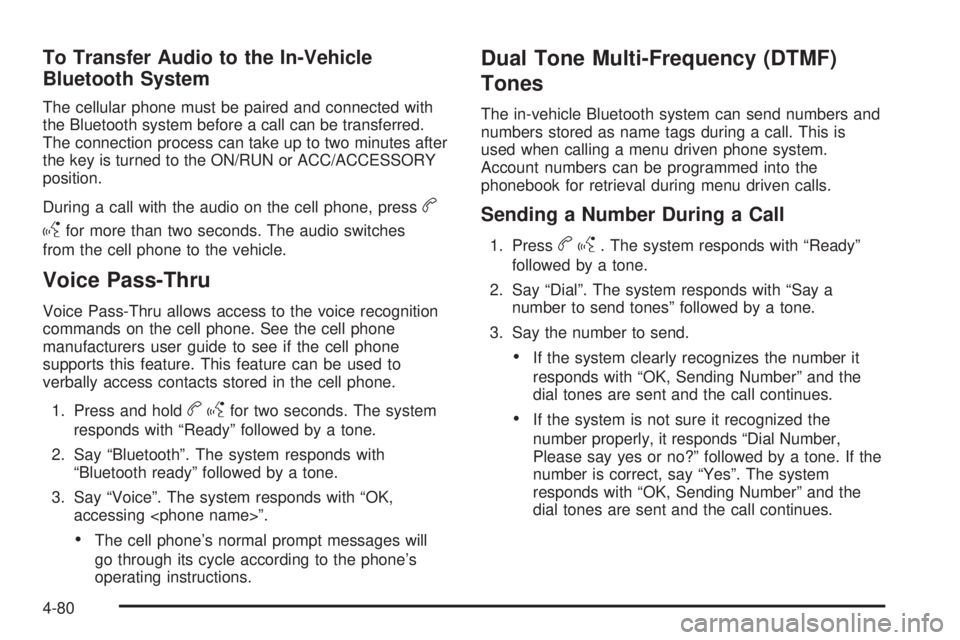
To Transfer Audio to the In-Vehicle
Bluetooth System
The cellular phone must be paired and connected with
the Bluetooth system before a call can be transferred.
The connection process can take up to two minutes after
the key is turned to the ON/RUN or ACC/ACCESSORY
position.
During a call with the audio on the cell phone, press
b
g
for more than two seconds. The audio switches
from the cell phone to the vehicle.
Voice Pass-Thru
Voice Pass-Thru allows access to the voice recognition
commands on the cell phone. See the cell phone
manufacturers user guide to see if the cell phone
supports this feature. This feature can be used to
verbally access contacts stored in the cell phone.
1. Press and hold
bgfor two seconds. The system
responds with “Ready” followed by a tone.
2. Say “Bluetooth”. The system responds with
“Bluetooth ready” followed by a tone.
3. Say “Voice”. The system responds with “OK,
accessing
•The cell phone’s normal prompt messages will
go through its cycle according to the phone’s
operating instructions.
Dual Tone Multi-Frequency (DTMF)
Tones
The in-vehicle Bluetooth system can send numbers and
numbers stored as name tags during a call. This is
used when calling a menu driven phone system.
Account numbers can be programmed into the
phonebook for retrieval during menu driven calls.
Sending a Number During a Call
1. Pressbg. The system responds with “Ready”
followed by a tone.
2. Say “Dial”. The system responds with “Say a
number to send tones” followed by a tone.
3. Say the number to send.
•If the system clearly recognizes the number it
responds with “OK, Sending Number” and the
dial tones are sent and the call continues.
•If the system is not sure it recognized the
number properly, it responds “Dial Number,
Please say yes or no?” followed by a tone. If the
number is correct, say “Yes”. The system
responds with “OK, Sending Number” and the
dial tones are sent and the call continues.
4-80
Page 232 of 448

Audio Steering Wheel Controls
Vehicles with audio
steering wheel controls
could differ depending on
the vehicle’s options.
Some audio controls can
be adjusted at the steering
wheel.
e+/e−(Volume):Press to increase or to decrease
the radio volume.
w/x(Next / Previous):Press to change radio
stations, select tracks on a CD, or to select tracks and
navigate folders on an iPod
®or USB device.
To change radio stations:
•Press and releaseworxto go to the next or
previous radio station stored as a preset.
•Press and holdworxto go to the next or
previous radio station in the selected band with a
strong signal.To select tracks on a CD:
Press and release
worxto go to the next or previous
track.
To select tracks on an iPod or USB device:
1. Press and hold
worxwhile listening to a song
until the contents of the current folder display on
the radio display.
2. Press and release
worxto scroll up or down the
list, then press and hold
wto play the highlighted
track.
To navigate folders on an iPod or USB device:
1. Press and hold
worxwhile listening to a song
until the contents of the current folder display on
the radio display.
2. Press and hold
xto go back to the previous
folder list.
3. Press and release
worxto scroll up or down
the list.
•To select a folder, press and holdwwhen the
folder is highlighted.
•To go back further in the folder list, press and
hold
x.
4-82
Page 386 of 448
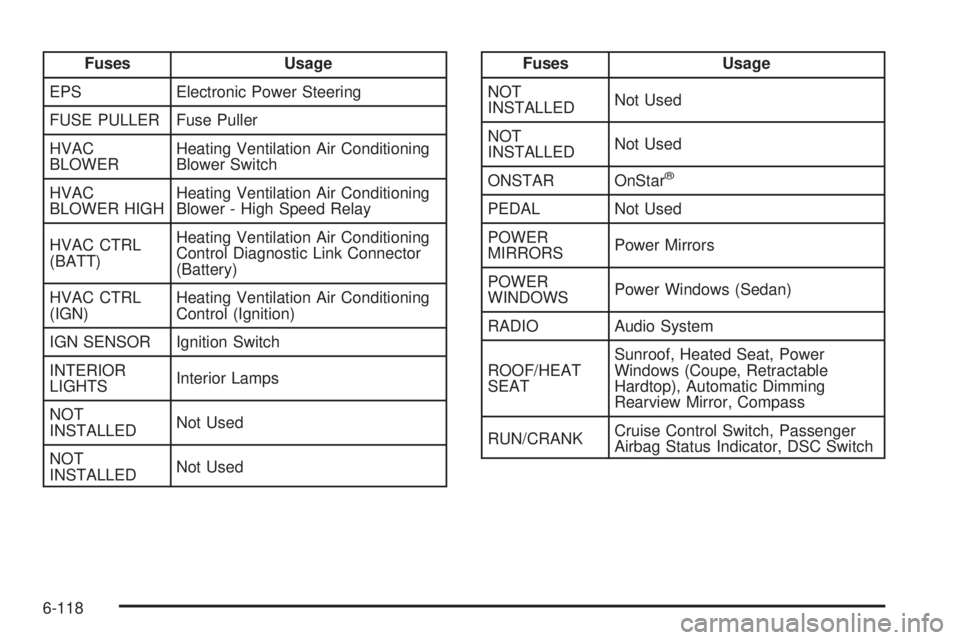
Fuses Usage
EPS Electronic Power Steering
FUSE PULLER Fuse Puller
HVAC
BLOWERHeating Ventilation Air Conditioning
Blower Switch
HVAC
BLOWER HIGHHeating Ventilation Air Conditioning
Blower - High Speed Relay
HVAC CTRL
(BATT)Heating Ventilation Air Conditioning
Control Diagnostic Link Connector
(Battery)
HVAC CTRL
(IGN)Heating Ventilation Air Conditioning
Control (Ignition)
IGN SENSOR Ignition Switch
INTERIOR
LIGHTSInterior Lamps
NOT
INSTALLEDNot Used
NOT
INSTALLEDNot UsedFuses Usage
NOT
INSTALLEDNot Used
NOT
INSTALLEDNot Used
ONSTAR OnStar
®
PEDAL Not Used
POWER
MIRRORSPower Mirrors
POWER
WINDOWSPower Windows (Sedan)
RADIO Audio System
ROOF/HEAT
SEATSunroof, Heated Seat, Power
Windows (Coupe, Retractable
Hardtop), Automatic Dimming
Rearview Mirror, Compass
RUN/CRANKCruise Control Switch, Passenger
Airbag Status Indicator, DSC Switch
6-118
Page 392 of 448

Fuses Usage
6Park Lamps, Instrument Panel
Dimming
7 Not Used
8 Not Used
9 Not Used
10 Sunroof Controls
11 Not Used
12 Retractable Hardtop Controller
13 Audio Amplifier
14 Heated Seat Controls
15 Not Used
16Remote Keyless Entry System,
XM Satellite Radio
17 Back-up Lamps
18 Not Used
19 Not Used
20Cigarette Lighter, Auxiliary Power
Outlet
21 Not Used
22 Trunk ReleaseFuses Usage
23 Rear Defog
24 Not Used
25 Fuel Pump
Relays Usage
26 Rear Window Defogger
27 Park Lamps
28 Not Used
29 Not Used
30 Not Used
31 Not Used
32 Not Used
33 Back-up Lamps
34 Not Used
35 Not Used
36 Trunk Release
37 Fuel Pump
38 (Diode) Cargo Lamp
6-124
Page 432 of 448

Audio System.........................................4-53, 4-72
Audio Steering
Wheel Controls........................................4-82
Radio Reception..........................................4-83
Setting the Clock.........................................4-53
Theft-Deterrent Feature................................4-81
XM™ Satellite Radio Antenna System............4-84
Audio System(s).............................................4-54
Automatic Climate Control System.....................4-20
Automatic Dimming Mirror Operation..................3-34
Automatic Door Lock......................................... 3-9
Automatic Headlamp System............................4-12
Automatic Transmission
Fluid..................................................6-27, 6-28
Operation...................................................3-24
Automatic Transmission Shift Lock Control
System Check.............................................. 7-8
B
Backglass Antenna..........................................4-84
Backing Up....................................................5-31
Battery..........................................................6-42
Electric Power Management..........................4-14
Run-Down Protection...................................4-15
Battery Replacement......................................... 3-5
Belt Routing, Engine.......................................7-12
Bench Seat, Split (60/40).................................2-13Blizzard Conditions..........................................5-16
Bluetooth Controls...........................................4-72
Bluetooth
®.....................................................4-71
Brake
Emergencies................................................ 5-5
Brake Adjustment............................................6-41
Brake Fluid....................................................6-39
Brake Pedal Travel.........................................6-41
Brake Wear...................................................6-41
Brakes..........................................................6-39
Antilock....................................................... 5-4
Parking......................................................3-29
System Warning Light..................................4-30
Braking........................................................... 5-3
Braking in Emergencies..................................... 5-5
Break-In, New Vehicle.....................................3-20
Bulb Replacement...........................................6-54
Center High-Mounted Stoplamp
(CHMSL) ........................................6-49, 6-50
Fog Lamps .................................................4-12
Halogen Bulbs............................................6-47
Headlamp Aiming........................................6-47
Headlamps.................................................6-47
Headlamps, Front Turn Signal, Sidemarker,
and Parking Lamps..................................6-48
License Plate Lamps....................................6-54
Taillamps, Turn Signal, Sidemarker, Stoplamps,
and Back-Up Lamps.................6-50, 6-51, 6-53
Buying New Tires...........................................6-75
2
Page 445 of 448

Spare Tire
Compact...................................................6-106
Installing....................................................6-93
Removing...................................................6-91
Storing.......................................................6-99
Specifications and Capacities..........................6-125
Speedometer..................................................4-26
Split Bench Seat (60/40)..................................2-13
StabiliTrak Control Indicator Light, Electronic.......4-32
Start Vehicle, Remote....................................... 3-5
Starter Switch Check........................................ 7-8
Starting the Engine.........................................3-21
Starting the Vehicle........................................... 1-4
Steering.......................................................... 5-8
Steering in Emergencies.................................... 5-8
Steering Tips................................................... 5-8
Steering Wheel Controls, Audio.........................4-82
Steering Wheel, Tilt and Telescopic..................... 4-3
Steps for Determining Correct Load Limit...........5-19
Storage Areas
Center Console...........................................3-37
Convenience Net.........................................3-37
Cupholders.................................................3-37
Glove Box..................................................3-37
Storing a Favorite Station.................................1-14
Storing a Flat Tire and Tools — All Models
Except GXP and Retractable Hardtop.............6-99
Storing a Flat Tire and Tools — GXP and
Retractable Hardtop Models........................6-101
Storing a Radio Station....................................4-56Storing Name Tags.........................................4-74
Storing the Spare Tire and Tools — All Models
Except Retractable Hardtop..........................6-104
Storing the Spare Tire and Tools — Retractable
Hardtop Models..........................................6-105
Storing the Tire Sealant and Compressor Kit......6-89
Stuck in Sand, Mud, Ice, or Snow.....................5-17
Sun Visors.....................................................3-16
Sunroof.........................................................3-37
Sunshade Operation........................................3-37
T
Tachometer....................................................4-26
Taillamps
Turn Signal, Sidemarker, Stoplamps,
and Back-Up Lamps.................6-50, 6-51, 6-53
Telescopic Wheel.............................................. 4-3
Temperature – A, B, C....................................6-79
Text Telephone (TTY) Users............................... 8-6
Theft-Deterrent Feature....................................4-81
Theft-Deterrent Systems...................................3-16
Content Theft-Deterrent................................3-16
PASS-Key
®III+ Electronic Immobilizer............3-18
PASS-Key®III+ Electronic Immobilizer
Operation................................................3-18
Three-Way Calling..........................................4-79
Tilt Wheel........................................................ 4-3
Time, Setting..................................................4-53
15