instrument cluster PONTIAC G6 2010 Owners Manual
[x] Cancel search | Manufacturer: PONTIAC, Model Year: 2010, Model line: G6, Model: PONTIAC G6 2010Pages: 448, PDF Size: 2.5 MB
Page 9 of 448
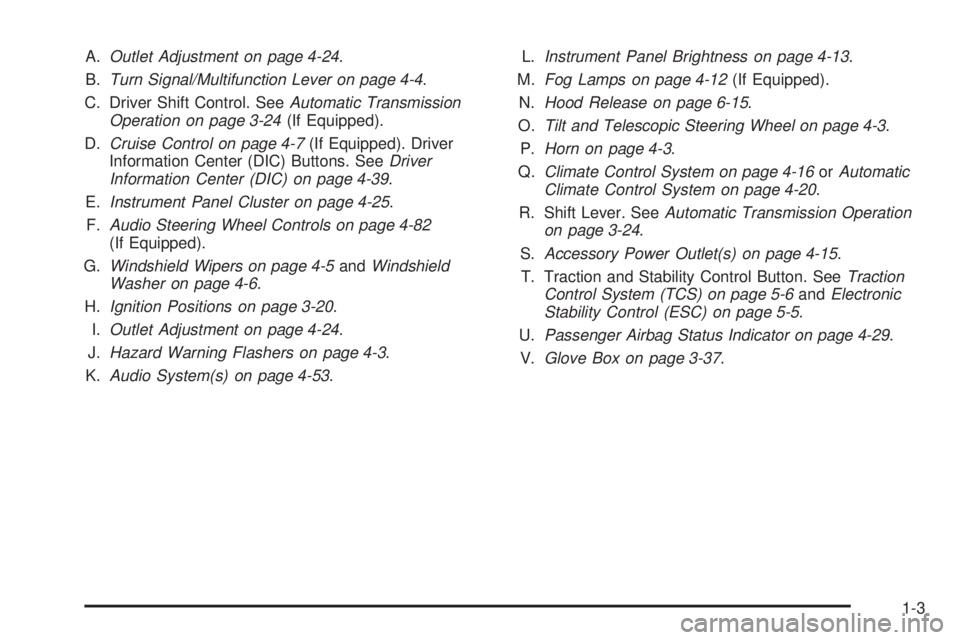
A.Outlet Adjustment on page 4-24.
B.Turn Signal/Multifunction Lever on page 4-4.
C. Driver Shift Control. SeeAutomatic Transmission
Operation on page 3-24(If Equipped).
D.Cruise Control on page 4-7(If Equipped). Driver
Information Center (DIC) Buttons. SeeDriver
Information Center (DIC) on page 4-39.
E.Instrument Panel Cluster on page 4-25.
F.Audio Steering Wheel Controls on page 4-82
(If Equipped).
G.Windshield Wipers on page 4-5andWindshield
Washer on page 4-6.
H.Ignition Positions on page 3-20.
I.Outlet Adjustment on page 4-24.
J.Hazard Warning Flashers on page 4-3.
K.Audio System(s) on page 4-53.L.Instrument Panel Brightness on page 4-13.
M.Fog Lamps on page 4-12(If Equipped).
N.Hood Release on page 6-15.
O.Tilt and Telescopic Steering Wheel on page 4-3.
P.Horn on page 4-3.
Q.Climate Control System on page 4-16orAutomatic
Climate Control System on page 4-20.
R. Shift Lever. SeeAutomatic Transmission Operation
on page 3-24.
S.Accessory Power Outlet(s) on page 4-15.
T. Traction and Stability Control Button. SeeTraction
Control System (TCS) on page 5-6andElectronic
Stability Control (ESC) on page 5-5.
U.Passenger Airbag Status Indicator on page 4-29.
V.Glove Box on page 3-37.
1-3
Page 25 of 448
Tire Pressure Monitor
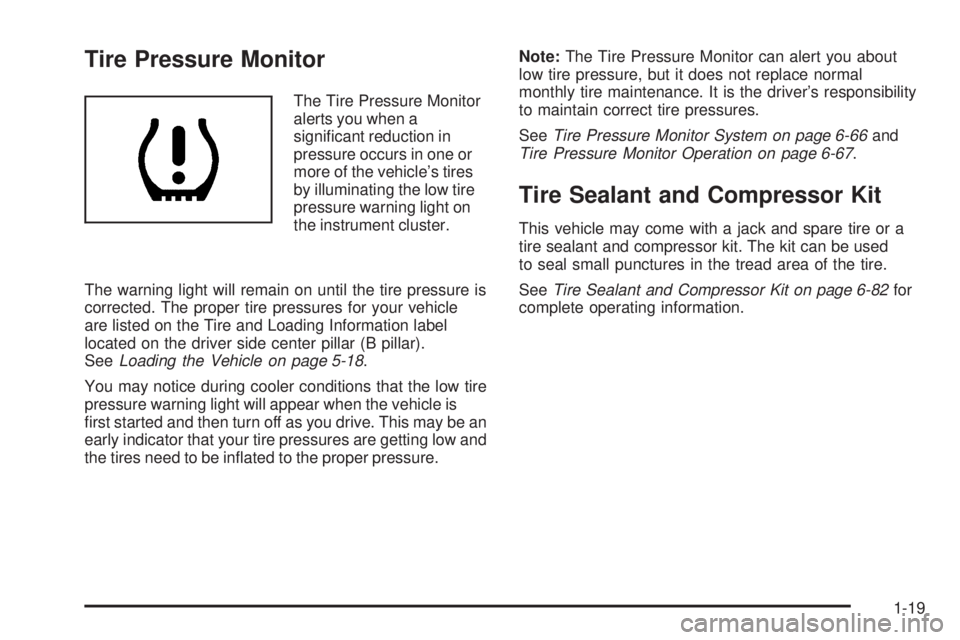
The Tire Pressure Monitor
alerts you when a
significant reduction in
pressure occurs in one or
more of the vehicle’s tires
by illuminating the low tire
pressure warning light on
the instrument cluster.
The warning light will remain on until the tire pressure is
corrected. The proper tire pressures for your vehicle
are listed on the Tire and Loading Information label
located on the driver side center pillar (B pillar).
SeeLoading the Vehicle on page 5-18.
You may notice during cooler conditions that the low tire
pressure warning light will appear when the vehicle is
first started and then turn off as you drive. This may be an
early indicator that your tire pressures are getting low and
the tires need to be inflated to the proper pressure.Note:The Tire Pressure Monitor can alert you about
low tire pressure, but it does not replace normal
monthly tire maintenance. It is the driver’s responsibility
to maintain correct tire pressures.
SeeTire Pressure Monitor System on page 6-66and
Tire Pressure Monitor Operation on page 6-67.
Tire Sealant and Compressor Kit
This vehicle may come with a jack and spare tire or a
tire sealant and compressor kit. The kit can be used
to seal small punctures in the tread area of the tire.
SeeTire Sealant and Compressor Kit on page 6-82for
complete operating information.
1-19
Page 123 of 448

The security light, located on the instrument panel
cluster, comes on to indicate that arming has been
initiated. Once the system is armed, the security light
flashes once every three seconds.
If the security light is flashing twice per second, this
means that a door is open.
If the system is armed and the key is used to unlock the
vehicle, the alarm will be activated.
If you do not want to arm the content theft system, lock
the vehicle with the manual lock knob on the doors
or with the inside power door lock switches.
The alarm will sound and the exterior lights will flash if
any door is opened while armed.
Disarming the System
To disarm the system, do one of the following:
•Press the RKE transmitter unlock button.
•Turn the ignition to ON/RUN.
Once the system is disarmed, the security light will
stop flashing.
How the System Alarm is Activated
To activate the system if it is armed:
•Open the driver’s door or trunk. A ten second
pre-alarm chirp will sound followed by a thirty
second full alarm of horn and lights.
•Open any other door. A full alarm of horn and lights
will immediately sound for thirty seconds.
•Open the hood. If the vehicle has the remote start
feature, it will activate the full alarm.
When an alarm event has finished, the system will
re-arm itself automatically.
How to Turn Off the System Alarm
To turn off the system alarm:
•Press the lock button on the RKE transmitter.
The system will then re-arm itself.
•Press the unlock button on the RKE transmitter.
This will also disarm the system.
•Insert the key in the ignition and turn it on. This will
also disarm the system.
3-17
Page 133 of 448

The odometer display on the instrument panel cluster
will change from vehicle mileage to the letter M,
for manual shift mode, and a number indicating the
requested gear range when moving the shift lever
forward or rearward. SeeSpeedometer and Odometer
on page 4-26for more information.
While using the MSM feature the vehicle will have firmer
shifting and sportier performance. You can use this
for sport driving or when climbing hills to stay in gear
longer or to downshift for more power or engine braking.
The transmission will only allow you to shift into gears
appropriate for the vehicle speed and engine revolutions
per minute (RPM):
•The transmission will not shift to the next higher
gear if the engine RPM is too low.
•The transmission will not allow shifting to the next
lower gear if the engine RPM is too high.
If the vehicle does not respond to a gear change, or
detects a problem with the transmission, the range
of gears may be reduced and the Malfunction Indicator
Lamp will come on. SeeMalfunction Indicator Lamp
on page 4-34for more information.
Driver Shift Control (DSC) (If Equipped)
To use this feature,
1. Move the shift lever from DRIVE (D) rearward to
MANUAL (M).
While driving in manual mode, the transmission will
remain in the driver selected gear. When coming
to a stop in the manual position, the vehicle
will automatically shift into FIRST (1) gear.
2. Press the + (plus) paddle located on top of the
steering wheel controls forward to upshift, or
push the backside of the shift paddle rearward to
downshift.
3-27
Page 134 of 448

The odometer display on the instrument panel cluster
will change from the vehicle’s mileage to the letter M for
Manual Shift Mode, and a number indicating the
requested gear range when moving the shift lever
forward or rearward. SeeSpeedometer and Odometer
on page 4-26for more information.
While using the DSC feature the transmission will have
firmer shifting and sportier performance. You can
use this for sport driving or when climbing hills to stay in
gear longer or to downshift for more power or engine
braking.
The transmission will only allow you to shift into gears
appropriate for the vehicle speed and engine revolutions
per minute (RPM):
•The transmission will not automatically shift to the
next higher gear if the vehicle speed or engine
RPM is too high.
•The transmission will not allow shifting to the next
lower gear if the vehicle speed or engine RPM is
too high.
2 (Second)/3 (Third) Gear Start Feature
Notice:If you attempt a third gear start while
trailering or towing a heavy load, you will notice
reduced engine power. This could overheat
and damage your transmission. Do not attempt a
third gear start while trailering or towing your
vehicle.
Vehicles with a 6-speed transmission allow 2 (Second)
and 3 (Third) gear starts. When accelerating the
vehicle from a stop in snowy and icy conditions, you
may want to shift into 2 (Second), or 3 (Third) gear. A
higher gear, and light application of the gas pedal, may
allow you to gain more traction on slippery surfaces.
With the MSM, the vehicle can accelerate from a stop in
2 (Second) or 3 (Third).
1. Move the shift lever from D (Drive) into the
M (Manual Mode) position.
2. With the vehicle stopped, move the lever forward
towards the + (plus) to select 2 (Second) or
3 (Third) gear. The vehicle will start from a stop
position in 2 (Second) or 3 (Third) gear.
3. Once the vehicle is moving select the desired
drive gear.
3-28
Page 151 of 448
Instrument Panel Overview...............................4-3
Hazard Warning Flashers................................4-3
Horn .............................................................4-3
Tilt and Telescopic Steering Wheel...................4-3
Turn Signal/Multifunction Lever.........................4-4
Turn and Lane-Change Signals........................4-4
Headlamp High/Low-Beam Changer..................4-5
Flash-to-Pass.................................................4-5
Windshield Wipers..........................................4-5
Windshield Washer.........................................4-6
Cruise Control................................................4-7
Headlamps..................................................4-10
Headlamps on Reminder................................4-10
Headlamps Off in Park..................................4-11
Delayed Headlamps......................................4-11
Daytime Running Lamps (DRL).......................4-11
Automatic Headlamp System..........................4-12
Fog Lamps ..................................................4-12
Instrument Panel Brightness...........................4-13
Courtesy Lamps...........................................4-13
Dome Lamps ...............................................4-13
Entry/Exit Lighting.........................................4-13
Parade Dimming...........................................4-14
Reading Lamps............................................4-14Trunk Lamp.................................................4-14
Electric Power Management...........................4-14
Battery Run-Down Protection..........................4-15
Accessory Power Outlet(s).............................4-15
Climate Controls............................................4-16
Climate Control System.................................4-16
Automatic Climate Control System...................4-20
Outlet Adjustment.........................................4-24
Warning Lights, Gages, and Indicators............4-24
Instrument Panel Cluster................................4-25
Speedometer and Odometer..........................
.4-26
Trip Odometer..............................................4-26
Tachometer.................................................4-26
Safety Belt Reminders...................................4-27
Airbag Readiness Light..................................4-28
Passenger Airbag Status Indicator...................4-29
Charging System Light..................................4-30
Brake System Warning Light..........................4-30
Antilock Brake System (ABS) Warning Light.....4-31
Traction Off Light..........................................4-32
Electronic Stability Control Indicator Light.........4-32
Engine Coolant Temperature Warning Light......4-33
Engine Coolant Temperature Gage..................4-33
Section 4 Instrument Panel
4-1
Page 154 of 448
Turn Signal/Multifunction Lever
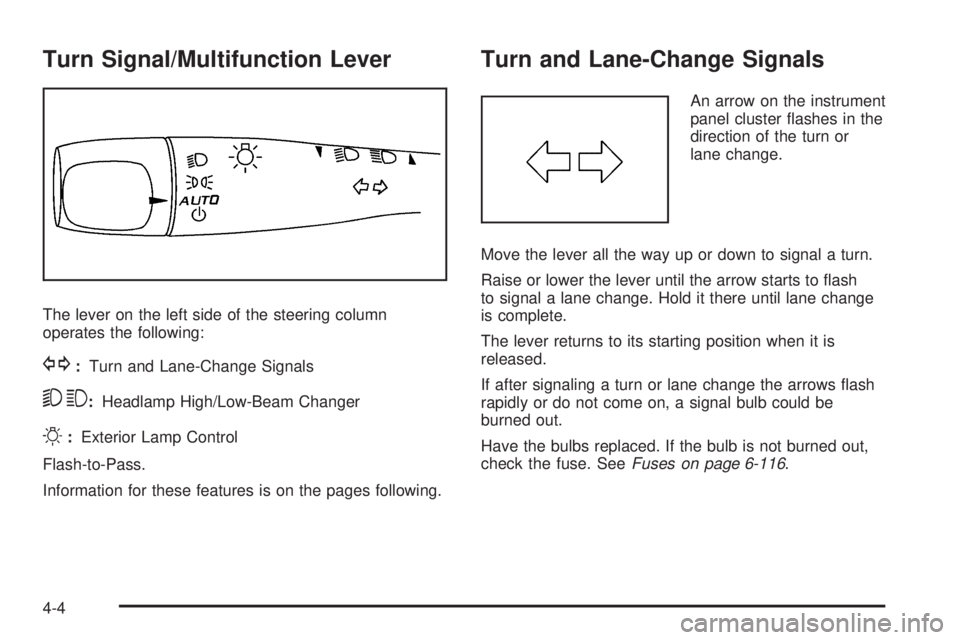
The lever on the left side of the steering column
operates the following:
G:Turn and Lane-Change Signals
53:Headlamp High/Low-Beam Changer
O:Exterior Lamp Control
Flash-to-Pass.
Information for these features is on the pages following.
Turn and Lane-Change Signals
An arrow on the instrument
panel cluster flashes in the
direction of the turn or
lane change.
Move the lever all the way up or down to signal a turn.
Raise or lower the lever until the arrow starts to flash
to signal a lane change. Hold it there until lane change
is complete.
The lever returns to its starting position when it is
released.
If after signaling a turn or lane change the arrows flash
rapidly or do not come on, a signal bulb could be
burned out.
Have the bulbs replaced. If the bulb is not burned out,
check the fuse. SeeFuses on page 6-116.
4-4
Page 155 of 448

Headlamp High/Low-Beam Changer
To change the headlamps from low beam to high
beam, push the turn signal/multifunction lever away
from you.
This instrument panel cluster light
3comes on if the
high beam lamps are turned on while the ignition is
in ON/RUN.
To change the headlamps from high beam to low beam,
pull the turn signal lever toward you.
Flash-to-Pass
This feature lets the high-beam headlamps be used to
signal a driver in front of you that you want to pass.
Pull the turn signal/multifunction lever toward you until
the high-beam headlamps come on, then release
the lever to turn them off.
Windshield Wipers
The windshield wiper lever is on the right side of the
steering wheel.
Move the lever to control the windshield wipers.
9(Off):Turns the windshield wipers off.
&(Intermittent; Speed Sensitive Wipers):For
intermittent or speed sensitive operation. The amount of
delay time varies between wiping cycles due to the
delay setting selected or the speed of the vehicle. As
vehicle speed is increased or decreased, the wiper
interval also increases or decreases.
4-5
Page 158 of 448

SET−(Set):Press this button to set a speed and to
decrease the speed.
To set a speed do the following:
1. Press the on/off symbol to turn cruise control on.
The indicator light on the button comes on.
2. Get to the speed you want.
3. Press the SET−symbol and release it. The cruise
symbol displays in the instrument panel cluster to
show the system is engaged.
4. Take your foot off the accelerator pedal.
When the brakes are applied, the cruise control
shuts off.
If the vehicle is in cruise control and the Traction
Control System (TCS) or Enhanced Traction System
(ETS) begins to limit wheel spin, the cruise control
automatically disengages. SeeTraction Control System
(TCS) on page 5-6. When road conditions allow, the
cruise control can be used again.Resuming a Set Speed
Suppose the cruise control is set at a desired speed
and the brakes are applied. This disengages the cruise
control. The cruise symbol in the instrument panel
cluster also goes out, indicating cruise is no longer
engaged. To return to the previously set speed, you do
not need to go through the set process again. Once
at a speed of about 40 km/h) (25 mph) or more, press
the RES+ symbol briefly.
This takes the vehicle back up and maintains the
previously chosen speed.
Increasing Speed While Using Cruise
Control
There are two ways to go to a higher speed.
•If the cruise control system is already engaged,
press the RES+ symbol. Hold it there until the
speed desired is reached and then release
the button.
•To increase the vehicle speed in very small
amounts, press the RES+ symbol briefly and then
release it. Each time this is done, the vehicle
goes about 1.6 km/h (1 mph) faster.
4-8
Page 159 of 448

Reducing Speed While Using Cruise
Control
If the cruise control system is already engaged,
•Push and hold the SET−symbol until the lower
speed desired is reached, then release it.
•To slow down in very small amounts, push the
SET−symbol briefly. Each time this is done,
the vehicle goes about 1.6 km/h (1 mph) slower.
Passing Another Vehicle While Using
Cruise Control
Use the accelerator pedal to increase the vehicle speed.
When you take your foot off the pedal, the vehicle will
slow down to the cruise control speed set earlier.
Using Cruise Control on Hills
How well the cruise control works on hills depends upon
the vehicle speed, load, and the steepness of the
hills. When going up steep hills, you might have to step
on the accelerator pedal to maintain your vehicle’sspeed. When going downhill, you might have to brake
or shift to a lower gear to keep your vehicle’s speed
down. Applying the brakes does turn off the cruise
control. Many drivers find this to be too much trouble
and do not use cruise control on steep hills.
Ending Cruise Control
There are two ways to disengage the cruise control:
•Step lightly on the brake pedal.
•Press the on/off button.
The cruise symbol in the instrument panel cluster turns
off when the system is disengaged.
Erasing Speed Memory
The cruise control set speed memory is erased when
the cruise control or the ignition is turned off.
4-9