warning PONTIAC G8 2008 Owner's Manual
[x] Cancel search | Manufacturer: PONTIAC, Model Year: 2008, Model line: G8, Model: PONTIAC G8 2008Pages: 334, PDF Size: 2.99 MB
Page 109 of 334
Digital speedo (speedometer)
Pressure Units
Rest reminder
Underspeed Chime
If you select Underspeed Chime you
will be able to enable or disable
the underspeed chime feature. See
DIC Operation and Displays on
page 4-23for more information.
Distance to go
If you select Distance to go you will
be able to choose if you want
the distance to go display to to be
shown on the DIC. SeeDIC
Operation and Displays on
page 4-23for more information.
Distance to go Default
If you select Distance to go Default
you will be able to change the
distance to go default setting. The
default setting is 500 km. Set
the value you want it to be.Digital speedometer
If you select Digital speedometer
you will be able to choose if
you want the digital speedometer to
be shown on the DIC display.
Pressure Units
If you select Pressure Units you can
choose how the tire pressures will
be displayed. If you select PSI
then all tire pressures will be
displayed in PSI. If you select kPa
then all tire pressures will be
displayed in kPa. If you select
Automatic and the Unit selection is
English then all tire pressures
will be displayed in PSI. If you select
Automatic and the Unit selection
is Metric then all tire pressures will
be displayed in kPa.
Rest reminder
If you select Rest reminder you will
be able to enable or disable the
rest reminder feature. SeeDIC
Warnings and Messages on
page 4-27for more information.
Language
This item will allow you to set the
language for the display to English
or French.
Remote Key programming
Choose Program if the vehicle’s
remote keys require programming.
Follow the instructions on the
DIC display to complete key
programming. All the vehicle’s keys
must be programmed at the
same time. If an existing key is not
reprogrammed during the
procedure it will no longer work.
Choose Instructions if information is
required to complete programming
procedure.
Choose Exit to return to the
customization menu.
SeeRemote Keyless Entry (RKE)
System Operation on page 2-4
for more information.
Instruments and Controls 4-35
2008 - Pontiac G8 Owner Manual
Page 114 of 334
;(Parking Lamps):Turns on the
parking lamps together with the
following:
Taillamps
License Plate Lamps
Instrument Panel Lights
Sidemarker Lamps
2(Headlamps):Turns on the
headlamps together with the
following:
Parking Lamps
Taillamps
License Plate Lamps
Instrument Panel Lights
Sidemarker Lamps
A warning chime sounds if the
driver side door is opened while
the ignition switch is off and
the headlamps are on.
Daytime Running
Lamps (DRL)
Daytime Running Lamps (DRL) can
make it easier for others to see
the front of your vehicle during the
day. Fully functional daytime
running lamps are required on all
vehicles rst sold in Canada.
The DRL system makes the
headlamps come on at a reduced
brightness when the following
conditions are met:
The ignition is on.
The exterior lamps control is
in AUTO.
The light sensor determines
it is daytime.
When the DRL are on, the taillamps,
sidemarker, instrument panel and
other lamps will not be on.
The headlamps automatically switch
from DRL to the regular headlamps
depending on the darkness of
the surroundings. See “Automatic
headlamp system” following.To turn off the DRL lamps, turn the
exterior lamps control to
9and
then release. For vehicles rst sold
in Canada, the DRL lamps cannot
be turned off.
Automatic Headlamp
System
When it is dark enough outside and
the exterior lamps control is in
the automatic position, the
headlamps and parking lamps will
turn on and off automatically.
SeeExterior Lamps Controls on
page 5-1.
If the headlamps or parking lamps
are left on and the ignition is
turned to LOCK/OFF, the lamps
automatically turn off after
10 minutes. The lamps remain off
until the ignition is switched on
or the lamps are turned on again
using the exterior lamps control.
5-2 Lighting
2008 - Pontiac G8 Owner Manual
Page 115 of 334
The vehicle has a light sensor
located on top of the instrument
panel. Do not cover the sensor or
the headlamps will come on
when they are not needed.
The system may also turn on the
headlamps when driving through a
parking garage or tunnel.
Fog Lamps
For vehicles with this feature, it
provides better visibility in foggy or
misty conditions.
The fog lamp switch is located on
the exterior lamps control on
the instrument panel to the left of
the steering column.
-(Fog Lamps):To turn on the
fog lamps, turn the exterior
lamps control to parking lamps or
headlamps and pull the fog
lamps control. Push the control to
turn the fog lamps off.The fog lamp indicator in the
instrument panel comes on when
the fog lamps are in use.
The fog lamps control can be
pulled out while the exterior lamps
control is in the AUTO position.
If left in this position, the fog lamps
come on automatically whenever
the parking lamps or low-beam
headlamps turn on.
When the high-beam headlamps are
turned on, the fog lamps turn off
automatically. When the high-beam
headlamps are turned off, the
fog lamps come on again.
Some localities have laws that
require the headlamps to be
on along with the fog lamps.
Instrument Panel
Brightness
This feature controls the brightness
of the instrument panel lights.
6:Press to brighten the
instrument panel lights.
f:Press to dim the instrument
panel lights.
Press both instrument panel
brightness buttons at the same time
to turn the night panel mode on
or off.
Night panel mode lights up the
speed, information displays and
warning reminders while the rest of
the instrument panel lights are off.
Lighting 5-3
2008 - Pontiac G8 Owner Manual
Page 151 of 334
A (LOCK/OFF):This is the only
position from which you can remove
the key. This locks the steering
wheel, ignition and automatic
transmission.
On vehicles with an automatic
transmission, the shift lever must be
in P (Park) to turn the ignition
switch to the LOCK/OFF position.
The ignition switch can bind in
the LOCK/OFF position with your
wheels turned off center. If this
happens, move the steering wheel
from right to left while turning the
key to ACC/ACCESSORY. If this
doesn’t work, then the vehicle needs
service.
B (ACC/ACCESSORY):This
position provides power to some
of the electrical accessories.
It unlocks the steering wheel and
ignition. The transmission is
also unlocked in this position
on automatic transmission
vehicles. To move the key from
ACC/ACCESSORY to LOCK/OFF,
push in the key and then turn it
to LOCK/OFF.C (ON/RUN):The ignition switch
stays in this position when the
engine is running. This position can
be used to operate the electrical
accessories, including the ventilation
fan and 12 volt power outlet, as
well as to display some warning and
indicator lights.
The battery could be drained
if you leave the key in the
ACC/ACCESSORY or ON/RUN
position with the engine off.
You may not be able to start the
vehicle if the battery is allowed
to drain for an extended period
of time.
D (START):This position starts the
engine. When the engine starts,
release the key. The ignition switch
will return to ON/RUN for normal
driving.
A warning tone will sound when the
driver door is opened when the
ignition is still in ACC/ACCESSORY
and the key is in the ignition.Retained Accessory
Power (RAP)
These vehicle accessories may be
used for up to 10 minutes after
the engine is turned off.
Audio System
Power Windows
The power windows will continue to
work for up to 10 minutes or until
any door is opened. The radio
will work when the key is in ON/RUN
or ACC/ACCESSORY. Once the
key is turned from ON/RUN to
LOCK/OFF, the radio will continue
to work for 10 minutes or until
the driver’s door is opened.
Driving and Operating 8-3
2008 - Pontiac G8 Owner Manual
Page 157 of 334
When accelerating the vehicle from
a stop in snowy and icy conditions,
1st, 2nd or 3rd gear starts can
be selected from a standing start.
This is useful for gentle acceleration
on slippery surfaces.
To return to Normal Shift mode,
slide the shift lever over from
the right quadrant to the left into
D (Drive). A Normal Shift message
will be displayed in the DIC.
Normal Shift Mode is recommended
for normal or freeway driving, as
it provides optimum fuel economy.
Powertrain Braking
For vehicles with a 6 speed
automatic transmission, there is
an additional feature known
as Powertrain Braking. When driving
on steep descents where frequent
braking is required, the vehicle
will automatically downshift to
provide engine braking assistance.
This feature also reduces brake
temperatures and wear.Downshifting will only occur when
the driver’s foot is applied to the
brake. Driver Shift Control can
be switched on to override the
feature and gain complete control
of shifts if desired.
Parking Brake
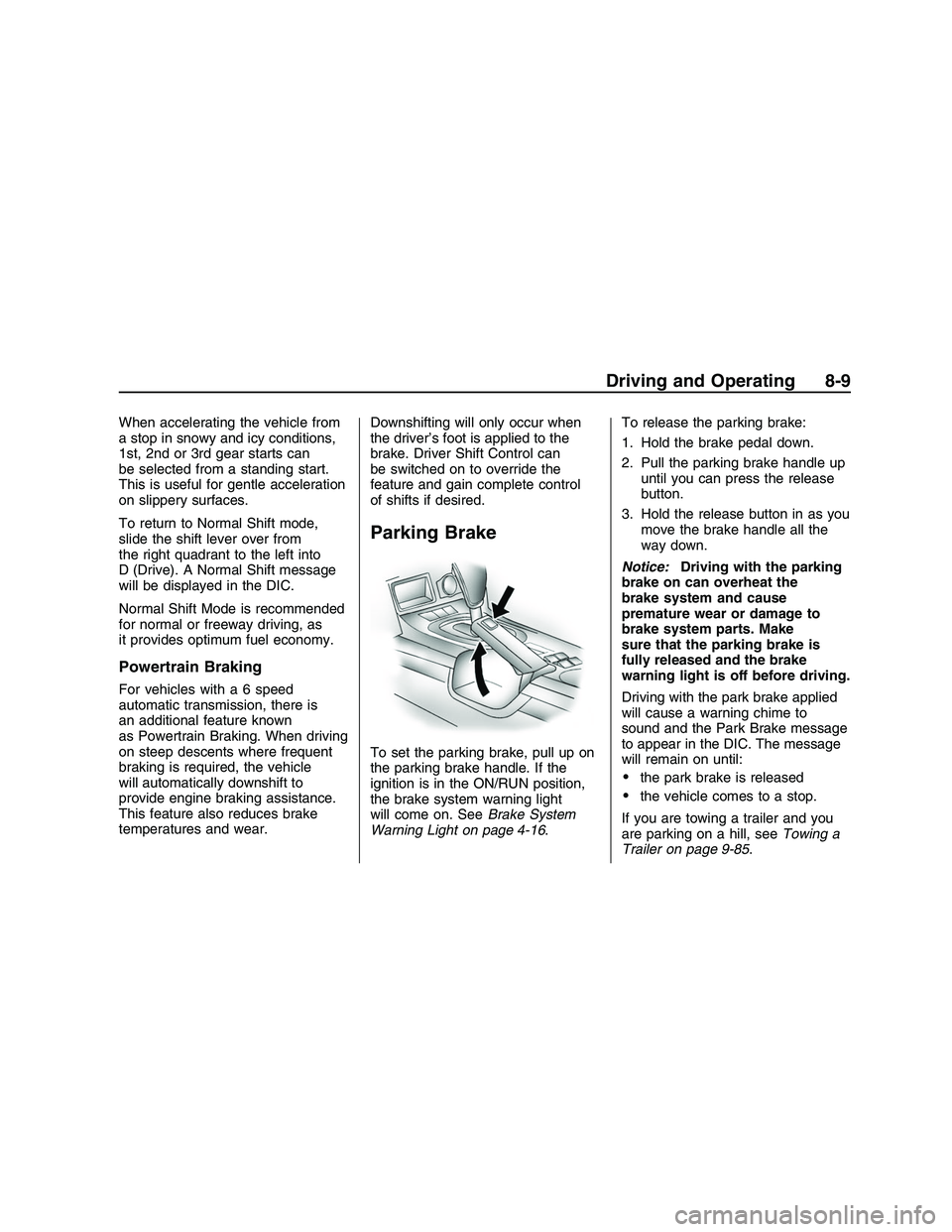
To set the parking brake, pull up on
the parking brake handle. If the
ignition is in the ON/RUN position,
the brake system warning light
will come on. SeeBrake System
Warning Light on page 4-16.To release the parking brake:
1. Hold the brake pedal down.
2. Pull the parking brake handle up
until you can press the release
button.
3. Hold the release button in as you
move the brake handle all the
way down.
Notice:Driving with the parking
brake on can overheat the
brake system and cause
premature wear or damage to
brake system parts. Make
sure that the parking brake is
fully released and the brake
warning light is off before driving.
Driving with the park brake applied
will cause a warning chime to
sound and the Park Brake message
to appear in the DIC. The message
will remain on until:
the park brake is released
the vehicle comes to a stop.
If you are towing a trailer and you
are parking on a hill, seeTowing a
Trailer on page 9-85.
Driving and Operating 8-9
2008 - Pontiac G8 Owner Manual
Page 162 of 334
Police records show that
almost 40 percent of all motor
vehicle-related deaths involve
alcohol. In most cases, these deaths
are the result of someone who
was drinking and driving. In recent
years, more than 17,000 annual
motor vehicle-related deaths have
been associated with the use of
alcohol, with about 250,000 people
injured.
For persons under 21, it is against
the law in every U.S. state to
drink alcohol. There are good
medical, psychological, and
developmental reasons for
these laws.
The obvious way to eliminate the
leading highway safety problem
is for people never to drink alcohol
and then drive.
Medical research shows that alcohol
in a person’s system can make crash
injuries worse, especially injuries
to the brain, spinal cord, or heart.This means that when anyone who
has been drinking — driver or
passenger — is in a crash, that
person’s chance of being killed or
permanently disabled is higher than
if the person had not been drinking.
Control of a Vehicle
The following three systems help
to control your vehicle while
driving — brakes, steering, and
accelerator. At times, as when
driving on snow or ice, it is easy to
ask more of those control systems
than the tires and road can provide.
Meaning, you can lose control of
your vehicle.
Adding non-dealer/non-retailer
accessories can affect your vehicle’s
performance. SeeAccessories
and Modifications on page 9-3.
Braking
SeeBrake System Warning Light on
page 4-16.
Braking action involves perception
time and reaction time. First,
you have to decide to push on the
brake pedal. That is perception time.
Then you have to bring up your
foot and do it. That is reaction time.
Average reaction time is about
three-fourths of a second. But that is
only an average. It might be less with
one driver and as long as two or
three seconds or more with another.
Age, physical condition, alertness,
coordination, and eyesight all play a
part. So do alcohol, drugs, and
frustration. But even in three-fourths
of a second, a vehicle moving at
60 mph (100 km/h) travels 66 feet
(20 m). That could be a lot of
distance in an emergency, so
keeping enough space between your
vehicle and others is important.
8-14 Driving and Operating
2008 - Pontiac G8 Owner Manual
Page 163 of 334
And, of course, actual stopping
distances vary greatly with the
surface of the road, whether it is
pavement or gravel; the condition of
the road, whether it is wet, dry, or
icy; tire tread; the condition of
the brakes; the weight of the
vehicle; and the amount of brake
force applied.
Avoid needless heavy braking.
Some people drive in
spurts — heavy acceleration
followed by heavy braking — rather
than keeping pace with traffic.
This is a mistake. The brakes might
not have time to cool between
hard stops. The brakes will wear out
much faster if you do a lot of heavy
braking. If you keep pace with
the traffic and allow realistic
following distances, you will
eliminate a lot of unnecessary
braking. That means better braking
and longer brake life.If your vehicle’s engine ever stops
while you are driving, brake normally
but do not pump the brakes.
If you do, the pedal could get harder
to push down. If the engine stops,
you will still have some power brake
assist. But you will use it when
you brake. Once the power assist is
used up, it can take longer to
stop and the brake pedal will be
harder to push.
Adding non-dealer/non-retailer
accessories can affect your vehicle’s
performance. SeeAccessories
and Modifications on page 9-3.Antilock Brake
System (ABS)
Your vehicle has the Antilock
Brake System (ABS), an advanced
electronic braking system that
will help prevent a braking skid.
When you start the engine and
begin to drive away, ABS will check
itself. You might hear a momentary
motor or clicking noise while this
test is going on, and you might even
notice that the brake pedal moves
a little. This is normal.
If there is a problem with ABS,
this warning light will stay on.
SeeAntilock Brake System (ABS)
Warning Light on page 4-17.
Let us say the road is wet and you
are driving safely. Suddenly, an
animal jumps out in front of you.
Driving and Operating 8-15
2008 - Pontiac G8 Owner Manual
Page 165 of 334
on and the ESP CTRL message
will be displayed at the bottom of
the DIC.
The STABILITY CONTROL
ASSISTANCE message will remain
on while the system is working
until the
3button is pressed to
display the trip computer. The ESP
CTRL message stays on at the
bottom of the DIC while the system
is working.
You may feel or hear the system
working, but this is normal.
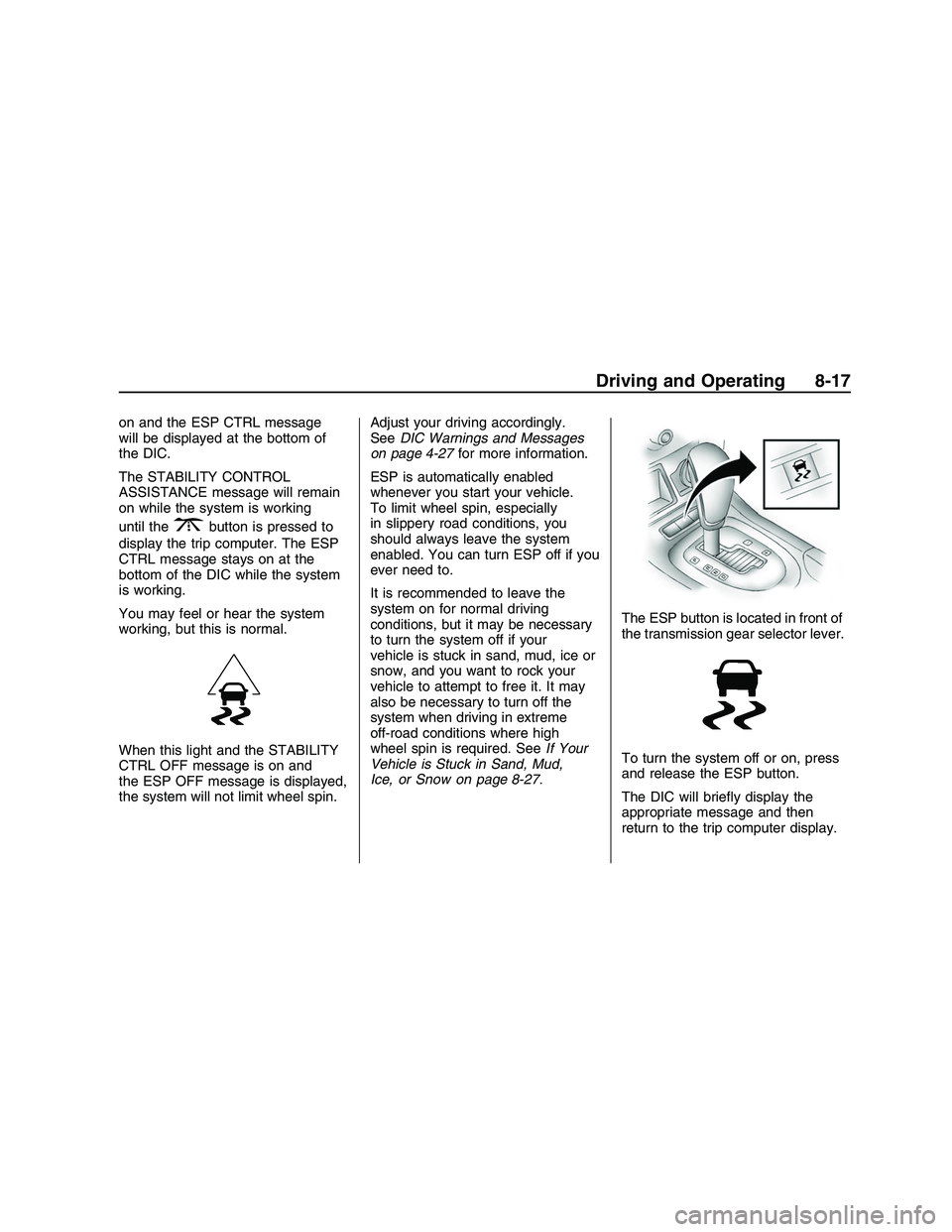
When this light and the STABILITY
CTRL OFF message is on and
the ESP OFF message is displayed,
the system will not limit wheel spin.Adjust your driving accordingly.
SeeDIC Warnings and Messages
on page 4-27for more information.
ESP is automatically enabled
whenever you start your vehicle.
To limit wheel spin, especially
in slippery road conditions, you
should always leave the system
enabled. You can turn ESP off if you
ever need to.
It is recommended to leave the
system on for normal driving
conditions, but it may be necessary
to turn the system off if your
vehicle is stuck in sand, mud, ice or
snow, and you want to rock your
vehicle to attempt to free it. It may
also be necessary to turn off the
system when driving in extreme
off-road conditions where high
wheel spin is required. SeeIf Your
Vehicle is Stuck in Sand, Mud,
Ice, or Snow on page 8-27.The ESP button is located in front of
the transmission gear selector lever.
To turn the system off or on, press
and release the ESP button.
The DIC will briey display the
appropriate message and then
return to the trip computer display.
Driving and Operating 8-17
2008 - Pontiac G8 Owner Manual
Page 166 of 334

When this light and the STABILITY
CTRL OFF message is on briey
and the ESP OFF message is
displayed at the bottom of the DIC,
the system will not limit wheel spin.
If the ESP OFF message is
always displayed at the bottom of
the DIC when the button is pressed
to turn the system on or off, the
system needs repair. Contact your
dealer/retailer.
The system is on when this light
and the STABILITY CTRL ON
message is displayed briey on
the DIC.
ESP Operation
ESP limits wheel spin by reducing
engine power to the wheels and
by applying brakes to each
individual wheel as necessary.
The ESP system is enabled
automatically when you start your
vehicle, and it will activate the
STABILITY CONTROL
ASSISTANCE light and the ESP
CTRL message on the DIC if
it senses that any of the wheels are
spinning or beginning to lose
traction while driving.
Notice:If you allow the wheel(s)
of one axle to spin excessively
while the ESC/TCS, ABS and
Brake warning lights and
the SERVICE ESC and/or
SERVICE TRACTION messages
are displayed, you could damagethe differential. The repairs would
not be covered by your warranty.
Reduce engine power and do
not spin the wheel(s) excessively
while these lights and this
message are displayed.
The traction control system may
activate on dry or rough roads
or under conditions such as heavy
acceleration while turning or
abrupt upshifts/downshifts of the
transmission. When this happens,
you may notice a reduction in
acceleration, or may hear a noise or
vibration. This is normal.
Adding non-dealer/non-retailer
accessories can affect your vehicle’s
performance. SeeAccessories
and Modifications on page 9-3for
more information.
8-18 Driving and Operating
2008 - Pontiac G8 Owner Manual
Page 170 of 334
While driving on a surface with
reduced traction, try your best to
avoid sudden steering, acceleration,
or braking, including reducing
vehicle speed by shifting to a lower
gear. Any sudden changes could
cause the tires to slide. You
might not realize the surface is
slippery until your vehicle is
skidding. Learn to recognize warning
clues — such as enough water,
ice, or packed snow on the road to
make a mirrored surface — and
slow down when you have any
doubt.
Remember: Any Antilock Brake
System (ABS) helps avoid only the
braking skid.Driving at Night
Night driving is more dangerous than
day driving because some drivers
are likely to be impaired — by alcohol
or drugs, with night vision problems,
or by fatigue.
Night driving tips include:
Drive defensively.
Do not drink and drive.
Reduce headlamp glare by
adjusting the inside rearview
mirror.
Slow down and keep more space
between you and other vehicles
because headlamps can only
light up so much road ahead.
Watch for animals.
When tired, pull off the road.
Do not wear sunglasses.
Avoid staring directly into
approaching headlamps.
Keep the windshield and all glass
on your vehicle clean — inside
and out.
Keep your eyes moving,
especially during turns or curves.
No one can see as well at night as
in the daytime. But, as we get
older, these differences increase.
A 50-year-old driver might need
at least twice as much light to see
the same thing at night as a
20-year-old.
8-22 Driving and Operating
2008 - Pontiac G8 Owner Manual