mirror PONTIAC G8 2008 Owners Manual
[x] Cancel search | Manufacturer: PONTIAC, Model Year: 2008, Model line: G8, Model: PONTIAC G8 2008Pages: 334, PDF Size: 2.99 MB
Page 1 of 334
Seats and Restraints......... 1-1
Front Seats
.................... 1-2
Rear Seats
.................... 1-5
Safety Belts
................... 1-5
Airbag System
..............1-19
Child Restraints
.............1-32
Keys, Doors and
Windows............................ 2-1
Keys
............................. 2-2
Doors and Locks
............ 2-8
Theft-Deterrent
Systems
...................2-11
Windows
......................2-14
Mirrors
.........................2-16
Sunroof
........................2-18
Storage.............................. 3-1
Storage
......................... 3-1
Instruments and
Controls............................. 4-1
Instrument Panel
Overview
.................... 4-2
Warning Lights, Gages,
and Indicators
............4-10Driver Information
Center (DIC)
.............4-23
OnStar
®System
............4-36
Lighting............................. 5-1
Lighting
......................... 5-1
Infotainment...................... 6-1
Audio System(s)
............. 6-1
Climate Controls............... 7-1
Climate Controls
............. 7-1
Driving and Operating....... 8-1
Starting and Operating Your
Vehicle
....................... 8-2
Driving Your Vehicle
......8-13
Fuel
............................8-32
Vehicle Service
and Care............................ 9-1
Service
.......................... 9-2
Owner Checks
................ 9-5
Headlamp Aiming
..........9-27
Bulb Replacement
.........9-29Electrical System
...........9-32
Tires
...........................9-39
Tire Changing
...............9-62
Jump Starting
...............9-80
Towing
........................9-84
Appearance Care
..........9-91
Technical Data.................10-1
Vehicle Identication
. . . . . . 10-1
Capacities and
Specications
............10-2
Service and
Maintenance.....................11-1
Service and
Maintenance
..............11-1
Customer Information. . . . . . 12-1
Customer Information
. . . . . 12-1
Reporting Safety
Defects
...................12-14
Vehicle Data Recording
and Privacy
.............12-16
Index................................... i-1
2008 Pontiac G8 Owner ManualM
2008 - Pontiac G8 Owner Manual
Page 30 of 334
Passenger Sensing
System
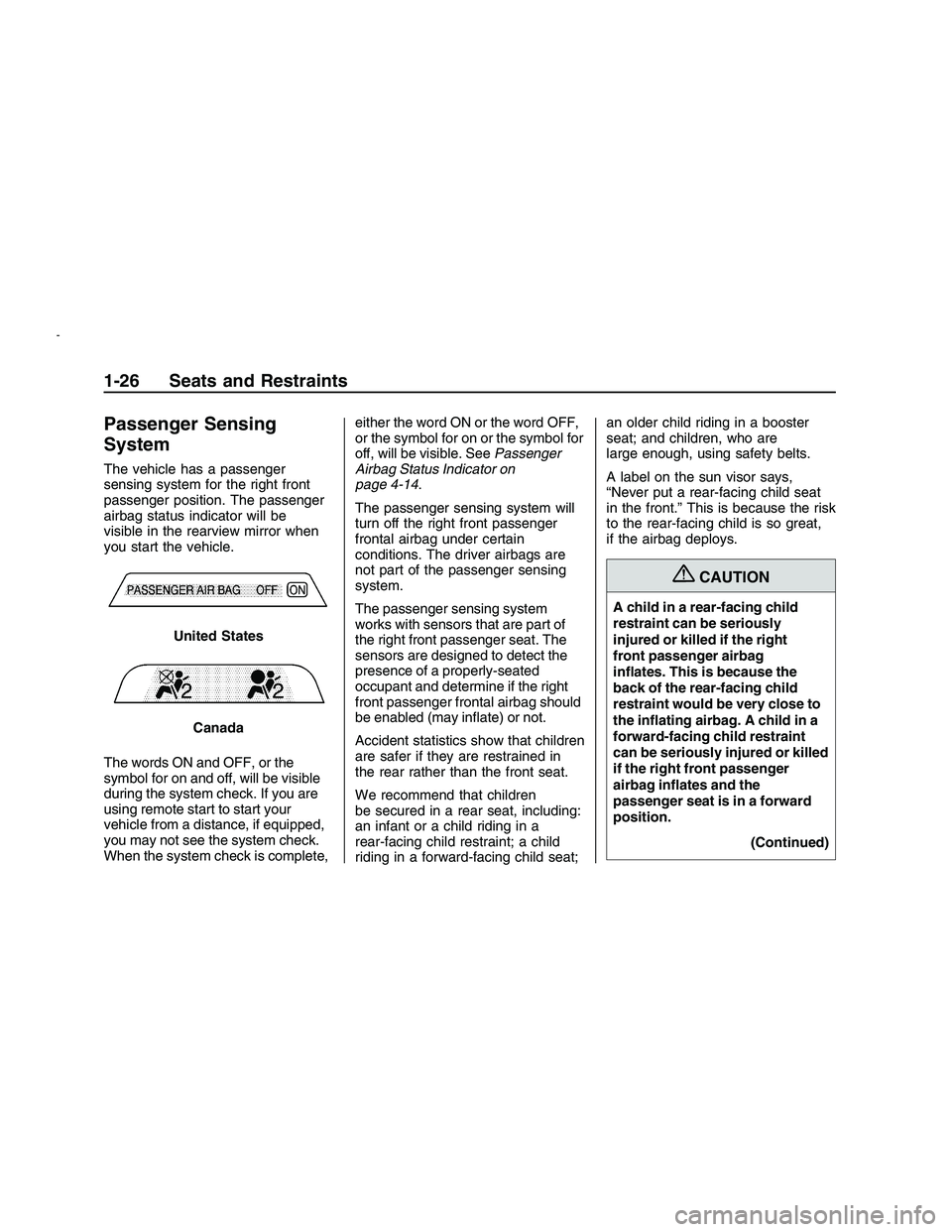
The vehicle has a passenger
sensing system for the right front
passenger position. The passenger
airbag status indicator will be
visible in the rearview mirror when
you start the vehicle.
The words ON and OFF, or the
symbol for on and off, will be visible
during the system check. If you are
using remote start to start your
vehicle from a distance, if equipped,
you may not see the system check.
When the system check is complete,either the word ON or the word OFF,
or the symbol for on or the symbol for
off, will be visible. SeePassenger
Airbag Status Indicator on
page 4-14.
The passenger sensing system will
turn off the right front passenger
frontal airbag under certain
conditions. The driver airbags are
not part of the passenger sensing
system.
The passenger sensing system
works with sensors that are part of
the right front passenger seat. The
sensors are designed to detect the
presence of a properly-seated
occupant and determine if the right
front passenger frontal airbag should
be enabled (may inate) or not.
Accident statistics show that children
are safer if they are restrained in
the rear rather than the front seat.
We recommend that children
be secured in a rear seat, including:
an infant or a child riding in a
rear-facing child restraint; a child
riding in a forward-facing child seat;an older child riding in a booster
seat; and children, who are
large enough, using safety belts.
A label on the sun visor says,
“Never put a rear-facing child seat
in the front.” This is because the risk
to the rear-facing child is so great,
if the airbag deploys.
{CAUTION
A child in a rear-facing child
restraint can be seriously
injured or killed if the right
front passenger airbag
inates. This is because the
back of the rear-facing child
restraint would be very close to
the inating airbag. A child in a
forward-facing child restraint
can be seriously injured or killed
if the right front passenger
airbag inates and the
passenger seat is in a forward
position.
(Continued) United States
Canada
1-26 Seats and Restraints
2008 - Pontiac G8 Owner Manual
Page 34 of 334
Servicing Your
Airbag-Equipped Vehicle
Airbags affect how your vehicle
should be serviced. There are parts
of the airbag system in several
places around your vehicle. Your
dealer/retailer and the service
manual have information about
servicing your vehicle and the airbag
system. To purchase a service
manual, seeService Publications
Ordering Information on page 12-15.
{CAUTION
For up to 10 seconds after the
ignition is turned off and the
battery is disconnected, an
airbag can still inate during
improper service. You can be
injured if you are close to an
airbag when it inates. Avoid
yellow connectors. They are
probably part of the airbag
system. Be sure to follow
proper service procedures, and
make sure the person
performing work for you is
qualied to do so.
Adding Equipment to
Your Airbag-Equipped
Vehicle
Q:Is there anything I might add
to or change about the
vehicle that could keep the
airbags from working
properly?
A:Yes. If you add things that
change the vehicle’s frame,
bumper system, height, front end
or side sheet metal, they may
keep the airbag system from
working properly. Changing or
moving any parts of the front
seats, safety belts, the airbag
sensing and diagnostic module,
steering wheel, instrument
panel, roof-rail airbag modules,
the inside rearview mirror, ceiling
headliner or pillar garnish trim,
front sensors, or airbag wiring can
affect the operation of the airbag
system.
1-30 Seats and Restraints
2008 - Pontiac G8 Owner Manual
Page 55 of 334
Keys, Doors and
Windows
Keys
Keys...................................2-2
Remote Keyless Entry
(RKE) System...................2-3
Remote Keyless Entry
(RKE) System Operation. . .2-4
Remote Vehicle Start..........2-6
Doors and Locks
Door Locks.........................2-8
Power Door Locks..............2-9
Rear Door Security Locks. . .2-9
Trunk................................2-10
Theft-Deterrent Systems
Theft-Deterrent Systems. . . .2-11
Immobilizer.......................2-11
Immobilizer Operation.......2-12
Content Theft-Deterrent.....2-13
Windows
Windows...........................2-14
Power Windows................2-15
Sun Visors........................2-15
Mirrors
Manual Rearview Mirror. . . .2-16
Compass..........................2-16
Outside Power Mirror(s). . . .2-17
Outside Convex Mirror......2-18
Sunroof
Sunroof.............................2-18
Keys, Doors and Windows 2-1
2008 - Pontiac G8 Owner Manual
Page 70 of 334
Mirrors
Manual Rearview Mirror
The vehicle has a manual rearview
mirror with a compass display
and OnStar
®control buttons located
at the bottom of the mirror. See
your dealer/retailer for more
information on the system and how
to subscribe to OnStar. See
OnStar
®System on page 4-36for
more information about the services
OnStar provides.
Adjust the mirror to see clearly
behind your vehicle. Hold it in the
center to move it up or down
and side to side.
Headlamp Glare
1. To reduce headlamp glare from
vehicles following from behind,
pull the lever toward you.
The rear view clarity is reduced
when the mirror is set to
reduce headlamp glare.2. Return the lever back to its
original position as soon as
the glare has disappeared to
restore the rear view.
Cleaning the Mirror
Do not spray glass cleaner directly
on the mirror. Use a paper towel
or similar material dampened
with glass cleaner.
Compass
Compass Display
Y(On/Off):Press to turn the
compass on or off. The compass
display can show a maximum of two
characters. For example, NE is
displayed for north-east.
When the ignition and the compass
feature are on, a character box
displays for about two seconds.
After two seconds, the mirror
displays the direction the vehicle is
facing.
Compass Calibration
When on, the compass automatically
calibrates as the vehicle is driven. If,
after two seconds, the display does
not show a compass direction, (N for
North, for example), there may be a
strong magnetic eld interfering with
the compass. Interference can be
caused by a magnetic antenna
mount, magnetic note pad holder, or
a similar magnetic item. If CAL
should ever display in the compass
window, the compass might need
calibration.
Press and hold
Yfor several
seconds to activate the compass
calibration mode. CAL displays
in the compass window on
the mirror.
The mirror can be calibrated by
driving the vehicle in circles
at 5 mph (8 km/h) or less until the
display shows a direction.
2-16 Keys, Doors and Windows
2008 - Pontiac G8 Owner Manual
Page 71 of 334
Compass Variance
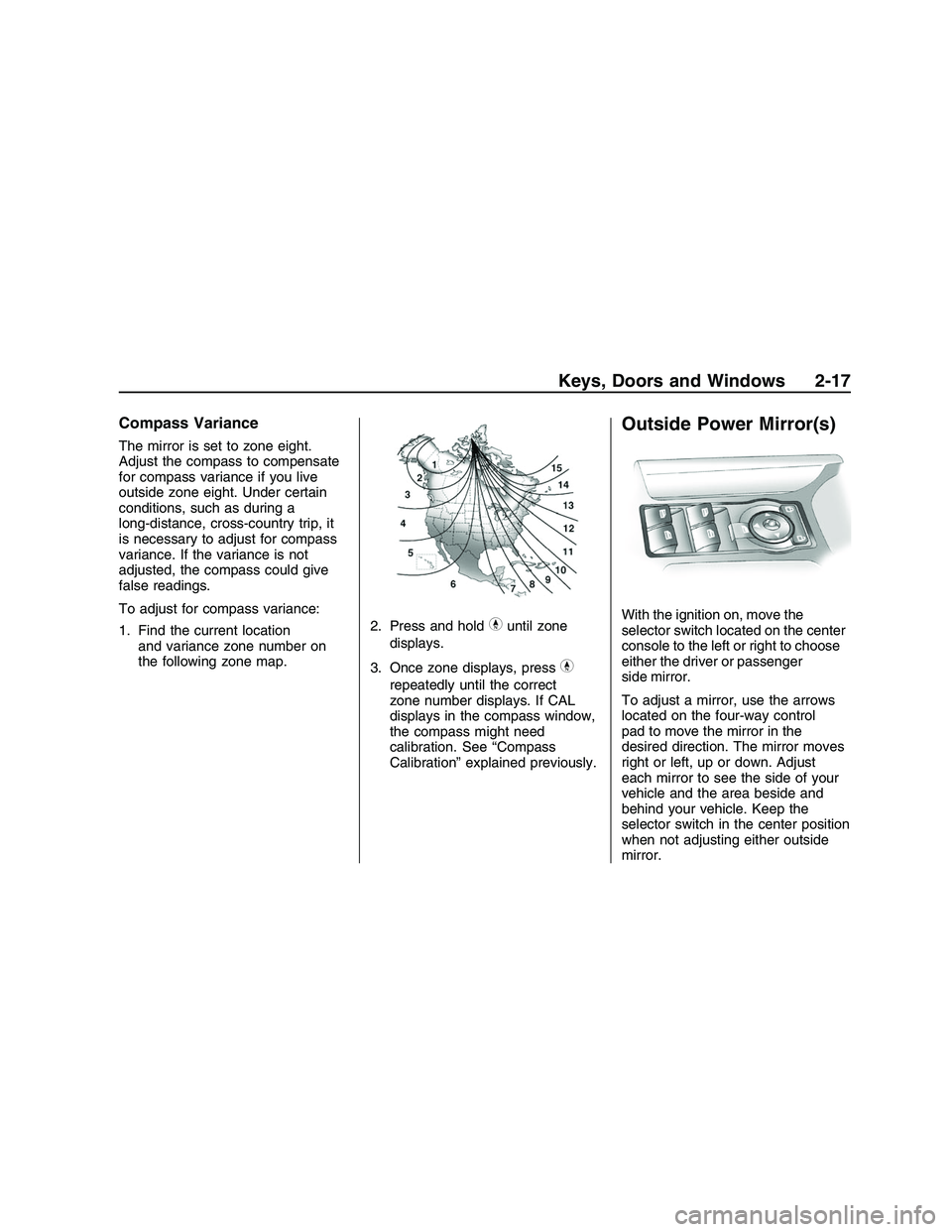
The mirror is set to zone eight.
Adjust the compass to compensate
for compass variance if you live
outside zone eight. Under certain
conditions, such as during a
long-distance, cross-country trip, it
is necessary to adjust for compass
variance. If the variance is not
adjusted, the compass could give
false readings.
To adjust for compass variance:
1. Find the current location
and variance zone number on
the following zone map.2. Press and hold
Yuntil zone
displays.
3. Once zone displays, press
Y
repeatedly until the correct
zone number displays. If CAL
displays in the compass window,
the compass might need
calibration. See “Compass
Calibration” explained previously.
Outside Power Mirror(s)
With the ignition on, move the
selector switch located on the center
console to the left or right to choose
either the driver or passenger
side mirror.
To adjust a mirror, use the arrows
located on the four-way control
pad to move the mirror in the
desired direction. The mirror moves
right or left, up or down. Adjust
each mirror to see the side of your
vehicle and the area beside and
behind your vehicle. Keep the
selector switch in the center position
when not adjusting either outside
mirror.
Keys, Doors and Windows 2-17
2008 - Pontiac G8 Owner Manual
Page 72 of 334

Manually fold the mirrors inward to
prevent damage when going
through an automatic car wash. To
fold, push the mirror toward the
vehicle. Push the mirror outward, to
return to its original position.
Outside Convex Mirror
{CAUTION
A convex mirror can make
things (like other vehicles) look
farther away than they really
are. If you cut too sharply into
the right lane, you could hit a
vehicle on your right. Check
your inside mirror or glance
over your shoulder before
changing lanes.
The passenger side mirror is convex
shaped. A convex mirror’s surface
is curved so more can be seen from
the driver seat. It also makes
things, like other vehicles, look
farther away than they really are.
Sunroof
The sunroof control is located
between the sun visors. It works
when the ignition is in ON/RUN. The
sunroof will not operate after the
engine is turned off.
From the closed position
9, turn
the control clockwise to one of
the six open positions. The
sunshade opens with the sunroof.
Tilt the sunroof by turning the control
counter-clockwise.
Obstruction Detection
When the sunroof encounters an
obstruction while closing, it
immediately returns to the fully open
or tilt position. The sunroof will
not move again until the control is
pressed upward, or a different
position is selected.
2-18 Keys, Doors and Windows
2008 - Pontiac G8 Owner Manual
Page 77 of 334
The main components of the
instrument panel are the following:
A.Turn Signal/Multifunction
Lever on page 4-4 .
B. Audio Steering Wheel Controls
on page 6-23 andDIC Operation
and Displays on page 4-23 .
C. Instrument Panel Cluster on
page 4-11 .
D. Audio Steering Wheel Controls
on page 6-23 .
E. Windshield Wipers on page 4-8 .
F. Hazard Warning Flashers on
page 4-4 .
G. Voltmeter, Oil Gage. Voltmeter
Gage on page 4-15 .
H. Outlet Adjustment on page 7-8 .I.
Exterior Lamps Controls on
page 5-1 .Instrument Panel
Brightness on page 5-3 .Fog
Lamps on page 5-3 (If Equipped).
J. Hood Release on page 9-5.
K. Tilt Wheel on page 4-4 .
L. Horn on page 4-4.
M. Ignition Positions on page 8-2 .
N. Climate Control System on
page 7-1 .Automatic Climate
Control System on page 7-4
(If Equipped).
O. Shift Lever. Automatic
Transmission Operation on
page 8-6 . P.
Power Door Locks on page 2-9 .
Q. Outside Power Mirror(s) on
page 2-17 .
R. Power Windows on page 2-15 .
S. Traction Control System (TCS) Disable Button. Electronic
Stability Program on page 8-16 .
T. Heated Seats on page 1-5
(If Equipped).
U. Accessory Power Outlet(s) on
page 4-9 .
V. Audio System(s) on page 6-1 .
W. Glove Box on page 3-1 .
Instruments and Controls 4-3
2008 - Pontiac G8 Owner Manual
Page 88 of 334
Passenger Airbag Status
Indicator
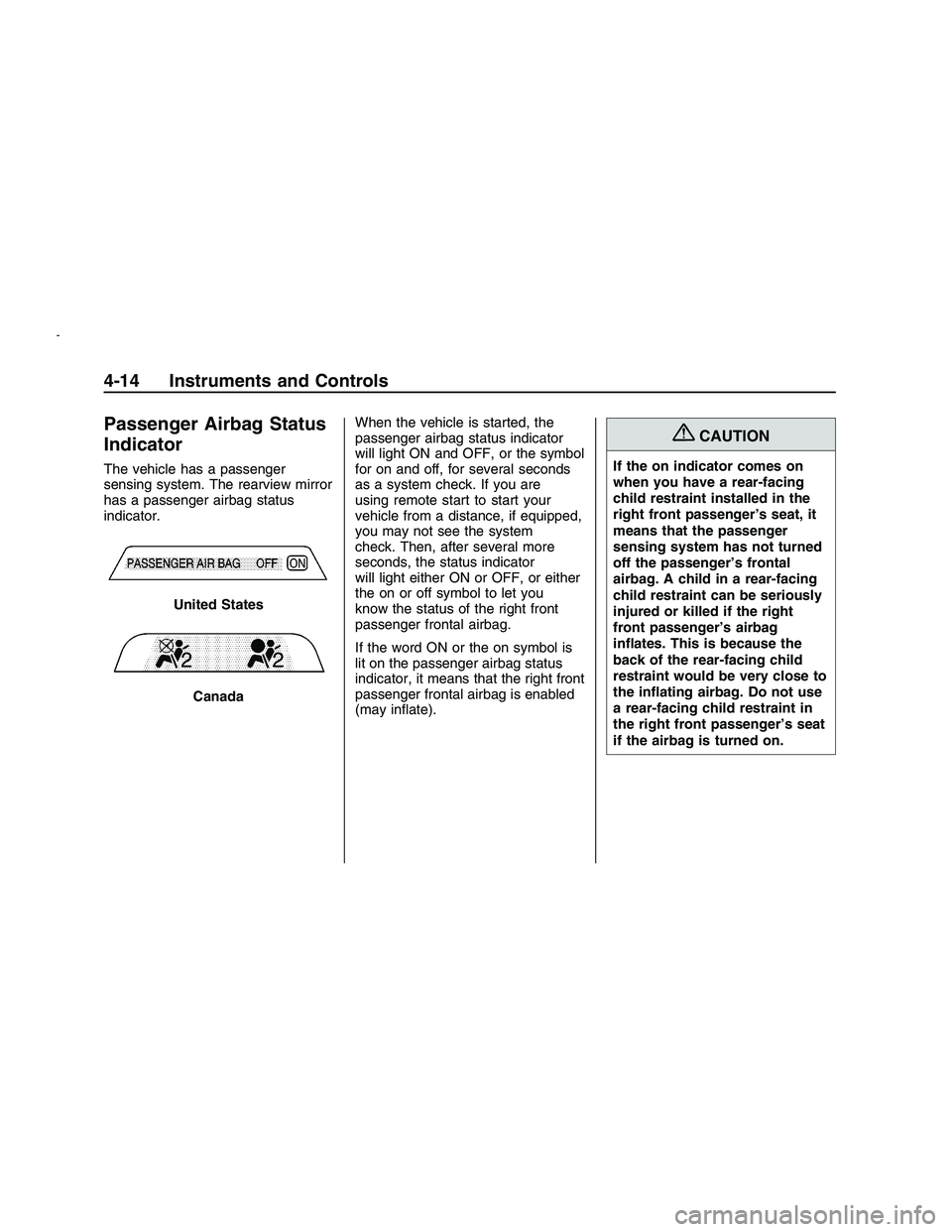
The vehicle has a passenger
sensing system. The rearview mirror
has a passenger airbag status
indicator.When the vehicle is started, the
passenger airbag status indicator
will light ON and OFF, or the symbol
for on and off, for several seconds
as a system check. If you are
using remote start to start your
vehicle from a distance, if equipped,
you may not see the system
check. Then, after several more
seconds, the status indicator
will light either ON or OFF, or either
the on or off symbol to let you
know the status of the right front
passenger frontal airbag.
If the word ON or the on symbol is
lit on the passenger airbag status
indicator, it means that the right front
passenger frontal airbag is enabled
(may inate).
{CAUTION
If the on indicator comes on
when you have a rear-facing
child restraint installed in the
right front passenger’s seat, it
means that the passenger
sensing system has not turned
off the passenger’s frontal
airbag. A child in a rear-facing
child restraint can be seriously
injured or killed if the right
front passenger’s airbag
inates. This is because the
back of the rear-facing child
restraint would be very close to
the inating airbag. Do not use
a rear-facing child restraint in
the right front passenger’s seat
if the airbag is turned on. United States
Canada
4-14 Instruments and Controls
2008 - Pontiac G8 Owner Manual
Page 98 of 334
Speedometer
Press
3until the speedometer is
displayed.
The speedometer shows how fast
the vehicle is moving in either miles
per hour (MPH) or kilometers per
hour (km/h). To switch between
English and metric measurements,
see “UNITS” later in this section.
The digital speedometer display can
be enabled or disabled. See
“Digital Speedometer” underDIC
Vehicle Customization on page 4-32
for more information.
UNITS
Move the thumbwheel up
Qor down
Rto highlight English or Metric
when the UNITS display is active.
Press
8to conrm the setting. This
will change the displays on the
cluster, DIC, and the temperature
display in the mirror to either English
or metric measurements.Tire Pressure
Press
3until Tire Pressure is
displayed.
The display will show a vehicle and
the approximate pressures of all
four tires. Tire pressure is displayed
in either pounds per square
inch (PSI) or in kilopascal (kPa).
This display can be customized. See
DIC Vehicle Customization on
page 4-32for more information.
Customize Options
SeeDIC Vehicle Customization on
page 4-32for more information.
Odometer/Trip Odometer
Press
3until the Odometer/Trip
Odometer is displayed.
The odometer display shows the
distance the vehicle has been driven
in either miles (MI) or kilometers
(km). To switch between English
and metric measurements, see
“UNITS” earlier in this section.The Trip Odometer display shows
the current distance traveled
since the last reset for the trip
odometer. The trip odometer can be
reset to zero by pressing and
holding
8while the trip odometer
value is highlighted. If
8is only
pressed briey, the Avg Speed/Avg
Fuel will be reset as well.
Distance/Time To Go
Press
3until To Go is displayed.
If this item doesn’t display, check
that the display is turned on through
the Customize Options menu.
SeeDIC Vehicle Customization on
page 4-32for more information.
At the start of a trip, estimate
the distance to arrival (for example,
from maps, road signs). Move
the thumbwheel up or down until the
display shows the estimated trip
4-24 Instruments and Controls
2008 - Pontiac G8 Owner Manual