light PONTIAC GRAND PRIX 2006 Owner's Manual
[x] Cancel search | Manufacturer: PONTIAC, Model Year: 2006, Model line: GRAND PRIX, Model: PONTIAC GRAND PRIX 2006Pages: 472, PDF Size: 2.82 MB
Page 104 of 472
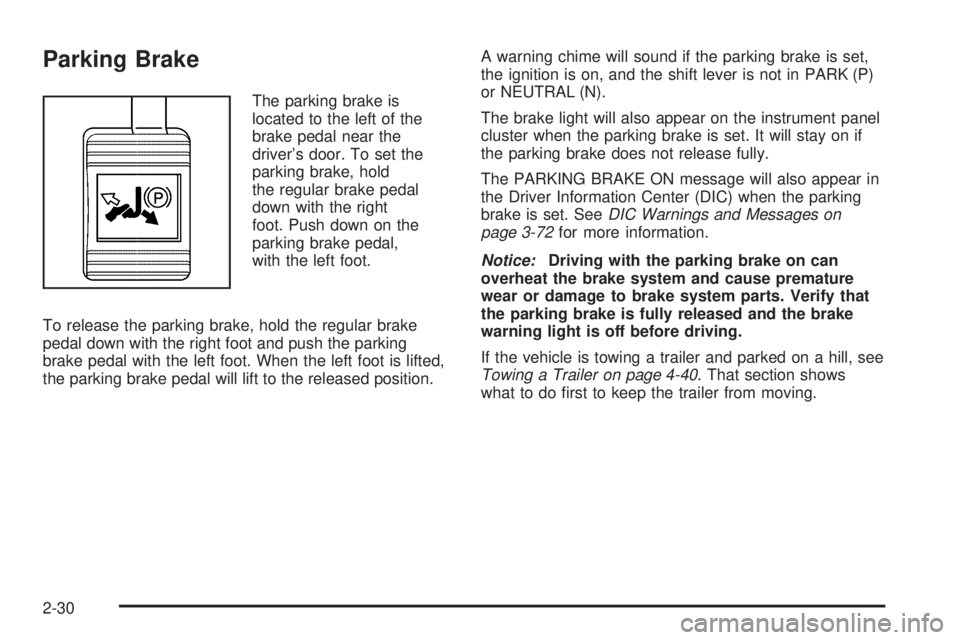
Parking Brake
The parking brake is
located to the left of the
brake pedal near the
driver’s door. To set the
parking brake, hold
the regular brake pedal
down with the right
foot. Push down on the
parking brake pedal,
with the left foot.
To release the parking brake, hold the regular brake
pedal down with the right foot and push the parking
brake pedal with the left foot. When the left foot is lifted,
the parking brake pedal will lift to the released position.A warning chime will sound if the parking brake is set,
the ignition is on, and the shift lever is not in PARK (P)
or NEUTRAL (N).
The brake light will also appear on the instrument panel
cluster when the parking brake is set. It will stay on if
the parking brake does not release fully.
The PARKING BRAKE ON message will also appear in
the Driver Information Center (DIC) when the parking
brake is set. SeeDIC Warnings and Messages on
page 3-72for more information.
Notice:Driving with the parking brake on can
overheat the brake system and cause premature
wear or damage to brake system parts. Verify that
the parking brake is fully released and the brake
warning light is off before driving.
If the vehicle is towing a trailer and parked on a hill, see
Towing a Trailer on page 4-40. That section shows
what to do rst to keep the trailer from moving.
2-30
Page 109 of 472
Mirrors
Manual Rearview Mirror
with OnStar
®
Your vehicle has this feature located at the bottom of
the mirror, to change the mirror from the day to the night
position. To reduce the glare of headlamps from
behind, turn the control counterclockwise. To return the
mirror to the day position, turn the control clockwise.
There are also three OnStar
®buttons located at
the bottom of the mirror face. See your dealer for more
information on the system and how to subscribe to
OnStar
®. SeeOnStar®System on page 2-38for more
information about the services OnStar®provides.
Automatic Dimming Rearview
Mirror with Compass and
Temperature Display
If the vehicle has this feature, the automatic dimming
mirror automatically dims to the proper level to minimize
glare at night from lights behind your vehicle.The mirror also has a dual display in the upper right
corner of the mirror that shows the compass reading and
the outside temperature.
YOn/Off:Press this button to operate the automatic
dimming, compass and temperature features.
Automatic Dimming Mirror Operation
The automatic dimming mirror function is turned on each
time the ignition is started. A light near the on/off button
will come on to indicate the automatic dimming is on.
If the automatic dimming function is off, press and hold
the on/off button for four seconds to manually turn
the system back on.
Temperature and Compass Display
Press the on/off button, located in the center, to cycle
between °F, °C and off. If the display reads CAL,
the compass needs to be calibrated. For more
information, see “Compass Calibration” later in
this section.
If an abnormal temperature reading is displayed for an
extended period of time, please consult your dealer.
Under certain circumstances, a delay in updating
the temperature is normal.
2-35
Page 116 of 472
Overhead Console
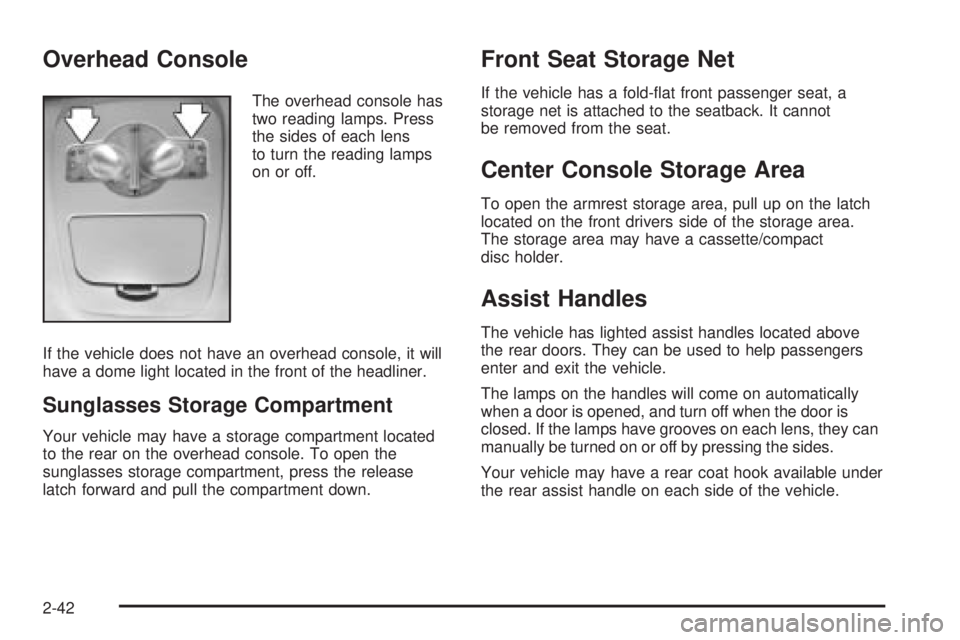
The overhead console has
two reading lamps. Press
the sides of each lens
to turn the reading lamps
on or off.
If the vehicle does not have an overhead console, it will
have a dome light located in the front of the headliner.
Sunglasses Storage Compartment
Your vehicle may have a storage compartment located
to the rear on the overhead console. To open the
sunglasses storage compartment, press the release
latch forward and pull the compartment down.
Front Seat Storage Net
If the vehicle has a fold-at front passenger seat, a
storage net is attached to the seatback. It cannot
be removed from the seat.
Center Console Storage Area
To open the armrest storage area, pull up on the latch
located on the front drivers side of the storage area.
The storage area may have a cassette/compact
disc holder.
Assist Handles
The vehicle has lighted assist handles located above
the rear doors. They can be used to help passengers
enter and exit the vehicle.
The lamps on the handles will come on automatically
when a door is opened, and turn off when the door is
closed. If the lamps have grooves on each lens, they can
manually be turned on or off by pressing the sides.
Your vehicle may have a rear coat hook available under
the rear assist handle on each side of the vehicle.
2-42
Page 119 of 472
Instrument Panel Overview...............................3-4
Hazard Warning Flashers................................3-6
Other Warning Devices...................................3-6
Horn.............................................................3-6
Tilt Wheel.....................................................3-6
Turn Signal/Multifunction Lever.........................3-7
Turn and Lane-Change Signals........................3-7
Headlamp High/Low-Beam Changer..................3-8
Flash-to-Pass.................................................3-9
Windshield Wiper Lever...................................3-9
Cruise Control..............................................3-11
Exterior Lamps.............................................3-15
Headlamps on Reminder................................3-15
Daytime Running Lamps (DRL).......................3-16
Fog Lamps..................................................3-17
Exterior Lighting Battery Saver........................3-17
Interior Lamps..............................................3-17
Instrument Panel Brightness...........................3-18
Courtesy Lamps...........................................3-18
Entry Lighting...............................................3-18
Delayed Entry Lighting...................................3-19
Delayed Exit Lighting.....................................3-19
Front Reading Lamps....................................3-20
Overhead Console Reading Lamps.................3-20Rear Assist Handle Reading Lamps................3-20
Battery Run-Down Protection..........................3-20
Head-Up Display (HUD).................................3-21
Accessory Power Outlet(s).............................3-24
Ashtray(s) and Cigarette Lighter......................3-25
Climate Controls............................................3-26
Climate Control System.................................3-26
Dual Automatic Climate Control System...........3-29
Outlet Adjustment.........................................3-33
Passenger Compartment Air Filter...................3-33
Warning Lights, Gages, and Indicators............3-35
Instrument Panel Cluster................................3-36
Speedometer and Odometer...........................3-37
Tachometer.................................................3-37
Safety Belt Reminder Light.............................3-38
Passenger Safety Belt Reminder Light.............3-38
Airbag Readiness Light..................................3-39
Passenger Airbag Status Indicator...................3-40
Up-Shift Light...............................................3-42
Brake System Warning Light..........................3-42
Anti-Lock Brake System Warning Light.............3-44
Traction Control System (TCS) Warning Light. . . .3-45
Enhanced Traction System Warning Light.........3-45
Section 3 Instrument Panel
3-1
Page 120 of 472
Engine Coolant Temperature Warning Light......3-46
Engine Coolant Temperature Gage..................3-46
Malfunction Indicator Lamp.............................3-47
Oil Pressure Light.........................................3-50
Fog Lamp Light............................................3-50
Cruise Control Light......................................3-51
Highbeam On Light.......................................3-51
Fuel Gage...................................................3-51
Driver Information Center (DIC).......................3-52
DIC Controls and Displays (Base Level DIC). . . .3-52
DIC Controls and Displays (Uplevel DIC
with Trip Computer)...................................3-60
DIC Warnings and Messages.........................3-72Audio System(s).............................................3-94
Setting the Time...........................................3-96
Radio with CD (Base Level)...........................3-96
Radio with CD (MP3)..................................3-107
Radio with Six-Disc CD................................3-123
Navigation/Radio System..............................3-139
Theft-Deterrent Feature................................3-139
Audio Steering Wheel Controls......................3-139
Radio Reception.........................................3-140
Care of Your CDs.......................................3-141
Care of the CD Player.................................3-141
Backglass Antenna......................................3-141
XM™ Satellite Radio Antenna System............3-142
Chime Level Adjustment...............................3-142
Section 3 Instrument Panel
3-2
Page 128 of 472
x(Delay Adjustment):Turn the band, located on
the left of the windshield wiper lever, to set the length of
the delay between wiper cycles when using the delay
feature. There are ve delay adjustment settings.
Turn the band up to make the delays shorter in between
wiper cycles. Turn the band down to make the delays
longer between wiper cycles. The windshield wiper lever
must be in delay for this feature to work.
6(Low Speed):Push the lever up to the second
position for steady wiping cycles at a slow speed.
1(High Speed):Push the lever up to the third
position for steady wiping cycles at a high speed.
7(Mist):For a single wiping cycle, push the
lever down once and let go. The wipers will stop after
one cycle. For additional cycles, hold the lever down.
About 30 seconds after the wipers are on, the
headlamps, taillamps, and instrument panel lighting will
come on, and the Driver Information Center (DIC)
back lighting will decrease to the night time mode. About
ten seconds after the wipers are turned off, all the
lamps will go back to the AUTO (Automatic) mode. See
Exterior Lamps on page 3-15.
Windshield Washer
{CAUTION:
In freezing weather, do not use your washer
until the windshield is warmed. Otherwise the
washer uid can form ice on the windshield,
blocking your vision.
The windshield washer button is located at the end of
the windshield wiper lever.
K(Washer Fluid):Press this button to activate the
washer uid to spray onto the windshield. The wipers
will run for a few cycles to clear the windshield. For more
wash cycles, press and hold the button.
If the vehicle is low on washer uid, the LOW WASHER
FLUID message will appear on the Driver Information
Center (DIC) display. See “LOW WASHER FLUID”
underDIC Warnings and Messages on page 3-72for
more information.
3-10
Page 131 of 472
The CRUISE SET message will also appear
briey on the Head-Up Display (HUD), if equipped,
when the cruise control lever is pushed to the minus
(set/coast/decelerate) or the plus (resume/accelerate)
positions.
A cruise control light will also appear on the instrument
panel cluster when the cruise control is on. This light
will disappear when the brakes are applied or the cruise
control is cancelled. It will reappear when the set
cruise speed is resumed. The light will go out when the
cruise control is turned off. SeeCruise Control Light
on page 3-51.
Resuming a Set Speed
Once you’re going about 25 mph (40 km/h) or more, you
can move the cruise control switch briey from on to
resume/accelerate.
Your vehicle will go right back up to your chosen speed
and stay there.
If you hold the switch at resume/accelerate the vehicle
will keep going faster until you release the switch or
apply the brake. So unless you want to go faster, don’t
hold the switch at resume/accelerate.
Increasing Speed While Using
Cruise Control
There are two ways to go to a higher speed:
Use the accelerator pedal to get to the higher
speed. Press the set button at the end of the lever,
then release the button and the accelerator
pedal. You’ll now cruise at the higher speed. If the
accelerator pedal is held longer than 60 seconds,
cruise control will turn off.
Move the cruise switch from on to
resume/accelerate. Hold it there until you get up to
the speed you want, and then release the switch.
To increase your speed in very small amounts,
move the switch briey to resume/accelerate. Each
time you do this, your vehicle will go about
1 mph (1.6 km/h) faster.
The acceleration feature will only work after the cruise
control speed has been set by pushing the cruise control
set button.
3-13
Page 132 of 472
Reducing Speed While Using Cruise
Control
There are two ways to reduce the vehicle’s speed while
using cruise control:
Press and hold the set button until you reach the
lower speed you want, then release it.
To slow down in very small amounts, briey press
the set button. Each time you do this your vehicle
will slow down approximately one mph (1.6 km/h).
Passing Another Vehicle While Using
Cruise Control
Use the accelerator pedal to increase the vehicle’s
speed. When you take your foot off the pedal, the
vehicle will slow down to the cruise control speed
set earlier.
Using Cruise Control on Hills
How well the cruise control will work on hills depends
upon the vehicle’s speed, its load, and the steepness of
the hills. When going up steep hills, the accelerator
pedal might have to be used in order to maintain
the vehicle’s speed. When going downhill, the brakes
might have to be applied, or the transaxle might have to
be shifted to a lower gear to keep the vehicle’s speed
down. Doing either of these things will take the
vehicle out of cruise. It may be better not to use the
cruise control if the brakes constantly have to be
applied, or the vehicle continuously needs to be shifted
to a lower gear.
Ending Cruise Control
There are two ways to turn off the cruise control:
Step lightly on the brake pedal
Move the cruise control switch to off
Erasing Speed Memory
When the cruise control or the ignition is turned off, the
cruise control set speed memory is erased.
3-14
Page 133 of 472
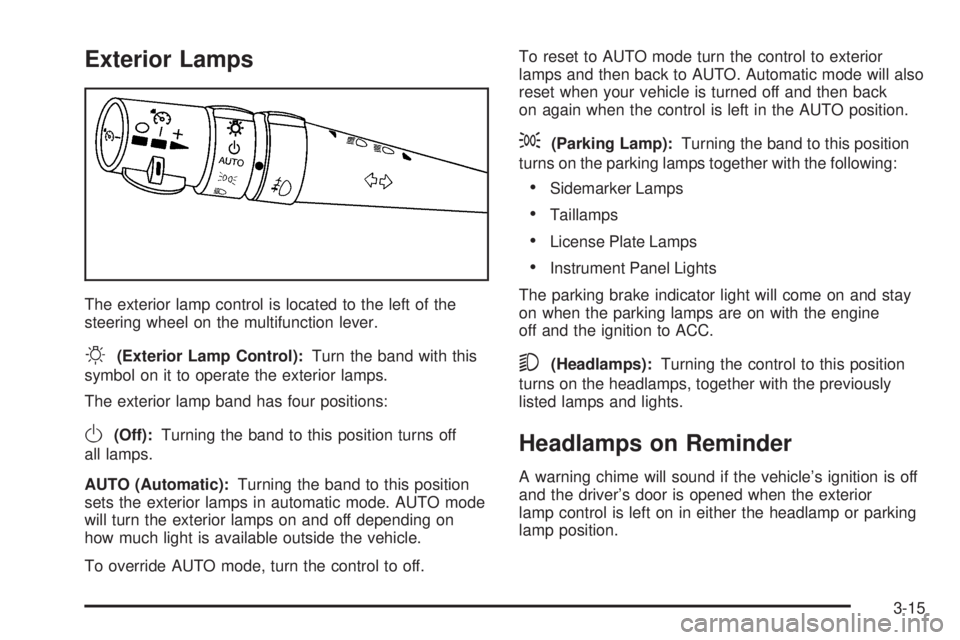
Exterior Lamps
The exterior lamp control is located to the left of the
steering wheel on the multifunction lever.
O(Exterior Lamp Control):Turn the band with this
symbol on it to operate the exterior lamps.
The exterior lamp band has four positions:
O(Off):Turning the band to this position turns off
all lamps.
AUTO (Automatic):Turning the band to this position
sets the exterior lamps in automatic mode. AUTO mode
will turn the exterior lamps on and off depending on
how much light is available outside the vehicle.
To override AUTO mode, turn the control to off.To reset to AUTO mode turn the control to exterior
lamps and then back to AUTO. Automatic mode will also
reset when your vehicle is turned off and then back
on again when the control is left in the AUTO position.
;(Parking Lamp):Turning the band to this position
turns on the parking lamps together with the following:
Sidemarker Lamps
Taillamps
License Plate Lamps
Instrument Panel Lights
The parking brake indicator light will come on and stay
on when the parking lamps are on with the engine
off and the ignition to ACC.
5(Headlamps):Turning the control to this position
turns on the headlamps, together with the previously
listed lamps and lights.
Headlamps on Reminder
A warning chime will sound if the vehicle’s ignition is off
and the driver’s door is opened when the exterior
lamp control is left on in either the headlamp or parking
lamp position.
3-15
Page 134 of 472
Daytime Running Lamps (DRL)
Daytime Running Lamps (DRL) can make it easier for
others to see the front of your vehicle during the
day. DRL can be helpful in many different driving
conditions, but they can be especially helpful in the short
periods after dawn and before sunset. Daytime running
lamps are required to function at all times on all
vehicles rst sold in Canada.
A light sensor on top of the instrument panel makes the
DRL work, so be sure it is not covered.
The DRL system will make the low-beam headlamps
come on at reduced brightness when the following
conditions are met:
The ignition is on.
The exterior lamps control is off.
The parking brake is released.
While the DRL are on, only the vehicle’s low-beam
headlamps will be on at reduced brightness. The turn
signal, taillamps, sidemarker and other lamps will not be
on. The instrument panel cluster will not be lit up either.When it is dark enough outside, the DRL will turn off
and the vehicle’s headlamps and parking lamps will turn
on. The other lamps that come on with the headlamps
will also come on.
When it is bright enough outside, the headlamps will go
off and the DRL will come on.
To idle the vehicle with the DRL off, turn the exterior
lamp control off and then do one of the following:
Turn the exterior lamp control to the parking
lamp position.
Turn the exterior lamp control to the
headlamp position.
Turn the exterior lamp control from AUTO to off and
back to AUTO.
This feature is not available for vehicles rst sold
in Canada.
To turn off the automatic headlamp feature when it is
dark outside, move the exterior lamp control to the
parking lamp position. The parking lamps will remain
illuminated and the headlamps will turn off. The
fog lamps will also go on if they were on previously.
As with any vehicle, the regular headlamp system
should be turned on when needed.
3-16