lock PONTIAC GRAND PRIX 2007 Workshop Manual
[x] Cancel search | Manufacturer: PONTIAC, Model Year: 2007, Model line: GRAND PRIX, Model: PONTIAC GRAND PRIX 2007Pages: 526, PDF Size: 2.92 MB
Page 147 of 526
Instrument Panel Brightness
This feature controls the brightness of the
instrument panel lights.
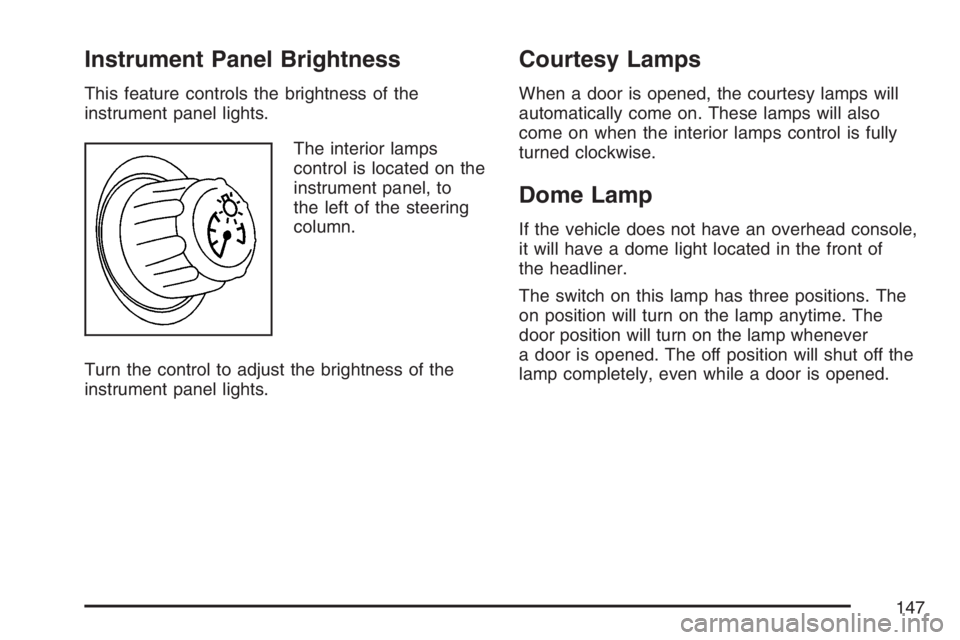
The interior lamps
control is located on the
instrument panel, to
the left of the steering
column.
Turn the control to adjust the brightness of the
instrument panel lights.
Courtesy Lamps
When a door is opened, the courtesy lamps will
automatically come on. These lamps will also
come on when the interior lamps control is fully
turned clockwise.
Dome Lamp
If the vehicle does not have an overhead console,
it will have a dome light located in the front of
the headliner.
The switch on this lamp has three positions. The
on position will turn on the lamp anytime. The
door position will turn on the lamp whenever
a door is opened. The off position will shut off the
lamp completely, even while a door is opened.
147
Page 148 of 526
Entry Lighting
The entry lighting feature turns the interior lights
on before anyone enters the vehicle. The
interior lamps will come on for 40 seconds when
the doors are unlocked using the remote
keyless entry transmitter and the ignition is in
OFF. After 40 seconds have elapsed, the interior
lamps will slowly fade out. The lamps will fade
out before 40 seconds have elapsed if one of the
following is done:
Lock all doors using the remote keyless entry
transmitter.
Lock the doors using the power door lock
switch.
When any door is opened, entry lighting is
cancelled. The interior lamps will stay on while
any door is opened and slowly fade out when all
doors are closed. The interior lamps may stay
on for up to 25 seconds after all doors have been
closed if they have not been locked.
Delayed Entry Lighting
The delayed lighting feature will continue to light
the interior of the vehicle for 25 seconds after
all the doors have been closed. Delayed lighting
will not occur while the ignition is in RUN or ACC.
After 25 seconds have elapsed, the interior
lamps will slowly fade out. The lamps will fade out
before the 25 seconds have elapsed if one of
the following is done:
The ignition is turned to RUN or ACC.
The doors are locked using the remote keyless
entry transmitter.
The doors are locked using the power door
lock switch.
To turn the delayed lighting feature off or on, see
“Personal Programming Modes” underDIC
Vehicle Customization on page 226DIC Controls
and Displays.
148
Page 149 of 526
Delayed Exit Lighting
For exiting the vehicle at night, the vehicle is
equipped with the delayed exit lighting feature. After
the key is removed from the ignition, the interior
lamps will light for up the amount of seconds set in
the Driver Information Center (DIC). See “Personal
Programming Mode Screens” underDIC Vehicle
Customization on page 226. After the set time has
elapsed, the interior lamps will slowly fade. The
lamps will fade before the set time has elapsed if
one of the following is done:
The ignition is turned to RUN or ACC.
The doors are locked using the remote keyless
entry transmitter.
The doors are locked using the power door lock
switch.
When any door is opened, delayed exit lighting is
cancelled. The interior lamps will stay on while
any door is opened and will slowly fade out when
all the doors are closed. The interior lamps will
stay on for the set time after all the doors
have been closed if they have not been locked.
To turn the delayed exit lighting feature off or on,
see “Personal Programming Mode Screens”
underDIC Vehicle Customization on page 226.
Front Reading Lamps
If the vehicle has a sunroof, there are reading
lamps in front of the sunroof switch located on the
headliner. These lamps will come on when the
doors are opened. Press the side of each reading
lamp to turn them on and off when the doors
are closed.
Overhead Console Reading Lamps
The vehicle may have reading lamps on the
overhead console. These lamps will turn on when
the doors are opened. When the doors are
closed, press the side of each lamp to turn them
on and off.
Rear Assist Handle Reading Lamps
If the vehicle has a reading lamp on each rear
assist handle, press the side of each lamp to turn
it on or off.
149
Page 154 of 526
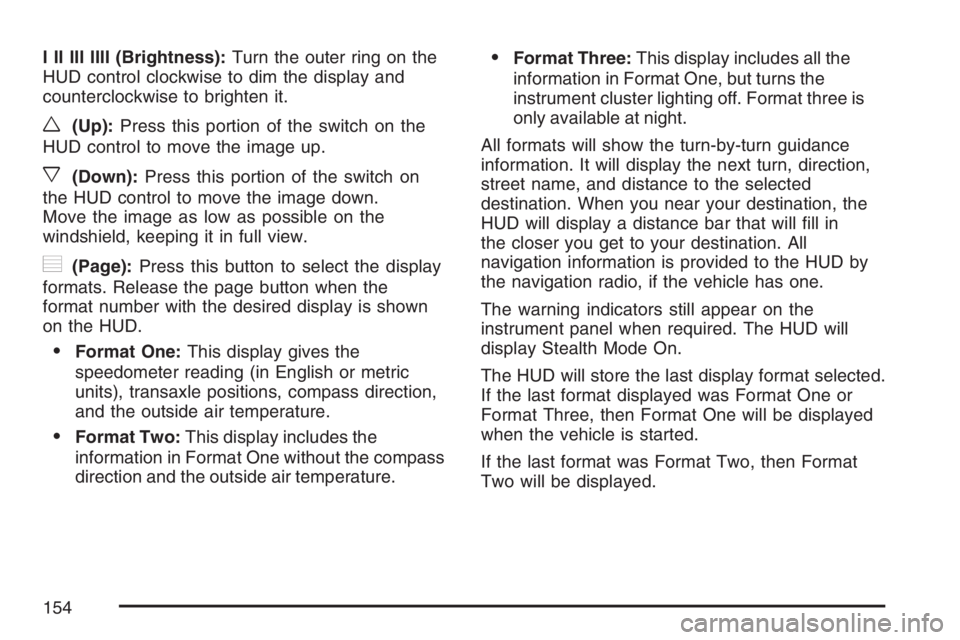
I II III IIII (Brightness):Turn the outer ring on the
HUD control clockwise to dim the display and
counterclockwise to brighten it.
w(Up):Press this portion of the switch on the
HUD control to move the image up.
x(Down):Press this portion of the switch on
the HUD control to move the image down.
Move the image as low as possible on the
windshield, keeping it in full view.
?(Page):Press this button to select the display
formats. Release the page button when the
format number with the desired display is shown
on the HUD.
Format One:This display gives the
speedometer reading (in English or metric
units), transaxle positions, compass direction,
and the outside air temperature.
Format Two:This display includes the
information in Format One without the compass
direction and the outside air temperature.
Format Three:This display includes all the
information in Format One, but turns the
instrument cluster lighting off. Format three is
only available at night.
All formats will show the turn-by-turn guidance
information. It will display the next turn, direction,
street name, and distance to the selected
destination. When you near your destination, the
HUD will display a distance bar that will ll in
the closer you get to your destination. All
navigation information is provided to the HUD by
the navigation radio, if the vehicle has one.
The warning indicators still appear on the
instrument panel when required. The HUD will
display Stealth Mode On.
The HUD will store the last display format selected.
If the last format displayed was Format One or
Format Three, then Format One will be displayed
when the vehicle is started.
If the last format was Format Two, then Format
Two will be displayed.
154
Page 155 of 526
The HUD image displayed on the windshield will
automatically dim and brighten to compensate
for outside lighting.
The HUD image can temporarily light up
depending on the angle and position of the
sunlight on the HUD display. This is normal and
will change when the angle of the sunlight on
the HUD display changes.
Polarized sunglasses could make the HUD image
harder to see.
Care of the HUD
Clean the inside of the windshield as needed to
remove any dirt or lm that could reduce the
sharpness or clarity of the HUD image.
To clean the HUD lens, use a soft, clean cloth that
has household glass cleaner sprayed on it.
Wipe the HUD lens gently, then dry it. Do not
spray cleaner directly on the lens because
the cleaner could leak into the unit.
If You Cannot See the HUD Image
When the Ignition Is On
Is anything covering the HUD lens?
Is the HUD dimmer setting bright enough?
Is the HUD image adjusted to the proper
height?
Are you wearing polarized sunglasses?
Still no HUD image? Check the fuse in the
instrument panel fuse block. SeeInstrument
Panel Fuse Block on page 460.
If the HUD Image Is Not Clear
Is the HUD image too bright?
Are the windshield and HUD lens clean?
If the HUD image is not correct, contact your
dealer.
Keep in mind that the windshield is part of the
HUD system. SeeWindshield Replacement
on page 399.
155
Page 158 of 526
Fan
9
(Fan):Turn the knob by this symbol, located on
the left side of the climate control panel, clockwise
or counterclockwise to increase or decrease the fan
speed. The fan speed will be temporarily reduced
between the transition to a new mode. The fan will
resume the original speed when the transition to the
new mode is complete.
9(Off):Turn the knob to this position to turn the
climate control system off. Only the heated seat
and/or rear defrost can be operated when the fan
is off.
Mode
Turn the middle knob to select the following modes:
H(Vent) (Outside Air):This mode directs
outside air to the instrument panel outlets. If driving
in city traffic, and the vehicle is stopped and
idling, or the weather is hot, press the recirculation
button. To prevent the air inside the vehicle
from becoming stale, be sure to turn off
recirculation periodically.
)(Bi-Level):This mode directs half of the air to
the instrument panel outlets, and the remaining
air to the oor outlets. Some air may be directed
toward the windshield. Slightly cooler air is directed
to the instrument panel outlets and warmer air is
directed to the oor outlets.
6(Floor):This mode directs most of the air to
the oor outlets with some air directed toward
the side window outlets and a little air directed to
the windshield.
In this mode, the system will automatically use
outside air. The air conditioning compressor will
be engaged unless the outside temperature
is 40°F (4°C) or below.
Recirculation cannot be selected when in this
mode even though the indicator light comes on
when the recirculation button is pressed.
The middle knob on the climate control panel can
also be used to select the defog or defrost mode.
158
Page 159 of 526
Defogging and Defrosting
Fog on the inside of the vehicle is a result of high
humidity causing moisture to condense on the cool
window glass. This can be minimized if the climate
control system is used properly. There are
two modes to clear frost or fog from the windshield.
Use the defog mode to clear the windows of
condensation and to warm the vehicle’s occupants.
Use the defrost mode to remove frost or
condensation from the windshield quickly.
See “Rear Window Defogger” later in this section
for information on clearing the rear window of
fog or ice.
.(Floor/Defog):Use the oor/defog mode to
clear the windows of fog or moisture and to
warm the passengers. This mode directs the air
equally between the windshield and the oor
outlets, along with some directed to the side
window outlets.
This mode will automatically use outside air. The
air conditioning compressor will be engaged
unless the outside temperature is 40°F (4°C) or
below. Recirculation cannot be selected when
in this mode even though the indicator light comes
on when the recirculation button is pressed.
1(Defrost):Use the defrost mode to remove
fog or frost from the windshield more quickly. This
mode directs most of the air to the windshield
and the side window outlets, with some air directed
to the oor outlets. This mode has a timer and
will shut off after ve minutes.
This mode will automatically use outside air. The
air conditioning compressor will be engaged
unless the outside temperature is 40°F (4°C) or
below. Recirculation cannot be selected when
in this mode even though the indicator light comes
on when the recirculation button is pressed.
Temperature
The knob on the right of the climate control panel
is the temperature adjustment that can be used
with any of the climate control modes.
Turn the knob clockwise for warmer settings and
counterclockwise for colder settings.
159
Page 163 of 526
Do not cover the solar sensor located in the
center of the instrument panel, near the
windshield. For more information on the solar
sensor, see “Sensors” later in this section.
Manual Operation
xw
(Temperature):To manually adjust the
temperature inside the vehicle, press the up arrow
on the temperature control to raise the temperature
and press the down arrow to lower the
temperature. The display will show your selection.
When one temperature is displayed, the driver
temperature is set. When both temperatures are
displayed, the temperature for both the driver
and passenger are set. Pressing PASS will turn
the passenger temperature setting on and
off. If only the driver temperature is set, the driver
temperature is used for the passenger and the
passenger display is off.
9(Fan):Turn the fan knob clockwise to increase
the fan speed and counterclockwise to decrease
the fan speed. Turning the fan knob cancels
the automatic fan operation and places the systemin manual. Turn the knob to AUTO to return to
automatic fan operation. If the airow seems low
when the fan is at the highest setting, the
passenger compartment air lter, if equipped, may
need to be replaced. SeePassenger Compartment
Air Filter on page 166for additional information.
9(Off):Turning the fan knob off will turn
the controller completely off.
Mode:This control has several settings to control
the direction of airow.
To change the current mode, select one of the
following:
AUTO:This mode is automatically set depending
on the temperature in the vehicle and solar
sensor information.
H(Vent):This mode directs air to the
instrument panel outlets.
%(Bi-Level):This mode directs airow to the
instrument panel outlets and to the oor outlets.
A small amount of air is also directed to the
windshield and the side window outlets.
163
Page 166 of 526
Outlet Adjustment
Turn the air outlets, located in the middle and at
each outboard side of the instrument panel,
to adjust the direction of the airow.
Operation Tips
Clear away any ice, snow, or leaves from the
air inlets at the base of the windshield that
may block the ow of air into the vehicle.
Use of non-GM approved hood deectors may
adversely affect the performance of the
system.
Keep the path under the front seats clear of
objects to help circulate the air inside of the
vehicle more effectively.
If the airow seems low when the fan is at the
highest setting, the passenger compartment
air lter may need to be replaced. See
“Passenger Compartment Air Filter” following,
for more information.
Passenger Compartment Air Filter
The passenger compartment air lter is located
near the passenger’s side windshield wiper
arm, under the inlet grille.
The lter traps most of the pollen from entering
the climate control system. Similar to the engine’s
air lter, it may need to be changed periodically
to insure system performance. SeeScheduled
Maintenance on page 473for more information.
To change the passenger compartment air
lter, do the following:
1. Turn the ignition to ACC and the windshield
wipers on.
2. Turn the ignition to OFF when the windshield
wipers are in the upright position.
3. Raise the hood.
4. Disconnect the windshield washer pump hose
from the fender rail and the air inlet grille.
5. Remove the hood weather-strip from the
passenger’s side of the vehicle, peeling it
back halfway.
166
Page 177 of 526
{CAUTION:
Your brake system may not be working
properly if the brake system warning light
is on. Driving with the brake system
warning light on can lead to an accident.
If the light is still on after you have pulled
off the road and stopped carefully, have
the vehicle towed for service.
Anti-Lock Brake System
Warning Light
If the vehicle has the
Anti-lock Brake System
(ABS), this light will
come on when the
engine is started and
may stay on for several
seconds. That is normal.If the ABS warning light comes on and stays on,
there may be a problem with the anti-lock
portion of the brake system. If the brake system
warning light is not on, the vehicle still has brakes,
but it does not have anti-lock brakes. SeeBrake
System Warning Light on page 176.
If the light stays on, the vehicle needs service.
If the light comes on while the vehicle is being
driven, stop as soon as possible and turn the
ignition off. Then start the vehicle again to reset the
system. If the light still stays on, or comes on again
while driving, the vehicle needs service. If the
regular brake system warning light is not on, the
vehicle still has brakes, but it does not have
anti-lock brakes. If the brake system warning light is
also on, the vehicle does not have anti-lock brakes
and there is a problem with the regular brakes. See
Brake System Warning Light on page 176. If both
the brake system warning light and the anti-lock
brake system light is on, pull off the road and have
the vehicle towed for service.
The anti-lock brake system warning light will come
on briey when the ignition key is turned to
RUN. This is normal. If the light does not come on
then, have it xed so it will be ready to warn
you if there is a problem.
177