wheel PONTIAC VIBE 2010 User Guide
[x] Cancel search | Manufacturer: PONTIAC, Model Year: 2010, Model line: VIBE, Model: PONTIAC VIBE 2010Pages: 318, PDF Size: 1.7 MB
Page 83 of 318

Instruments and
Controls
Instrument Panel OverviewInstrument Panel Overview.....4-2
ControlsSteering Wheel Adjustment.....4-4
Steering Wheel Controls .........4-4
Horn ...................................
.4-5
Windshield Wiper/Washer .......4-5
Rear Window Wiper/Washer . . . .4-6
Power Outlets (Accessory Power Outlets) ....................
.4-6
Power Outlets (115 Volt Alternating Current) .............
.4-7
Cigarette Lighter ..................
.4-8
Ashtrays .............................
.4-8
Warning Lights, Gages, and
Indicators
Warning Lights, Gages, and
Indicators ..........................
.4-8
Instrument Cluster ................
.4-9
Speedometer .....................
.4-10
Odometer ..........................
.4-10
Trip Odometer ....................
.4-10
Tachometer .......................
.4-10
Fuel Gage .........................
.4-10
Engine Coolant Temperature Gage .............4-11
Safety Belt Reminders ..........4-11
Airbag Readiness Light .........4-12
Passenger Airbag Status Indicator ..........................
.4-13
Charging System Light .........4-14
Malfunction Indicator Lamp .................
.4-14
Brake System Warning Light ...............................
.4-17
Antilock Brake System (ABS) Warning Light ...........4-17
Service All-Wheel Drive Light ...............................
.4-18Speed Sensitive Power
Steering (SSPS) Warning
Light ...............................
.4-18
StabiliTrak®Indicator Light . . . .4-18
Traction Control System (TCS) Warning Light ...........4-19
Tire Pressure Light .............
.4-19
Engine Oil Pressure Light .....4-19
Low Fuel Warning Light ........4-20
Security Light .....................
.4-20
High-Beam on Light .............4-20
Fog Lamp Light ..................
.4-20
Lamps on Reminder .............4-20
Taillamp Indicator Light .........4-21
Low Washer Fluid Warning Light ...............................
.4-21
Cruise Control Light .............4-21
Door Ajar Light ...................
.4-21
Vehicle PersonalizationVehicle Personalization .........4-21
OnStar SystemOnStar®System.................
.4-23
Instruments and Controls 4-1
Page 85 of 318
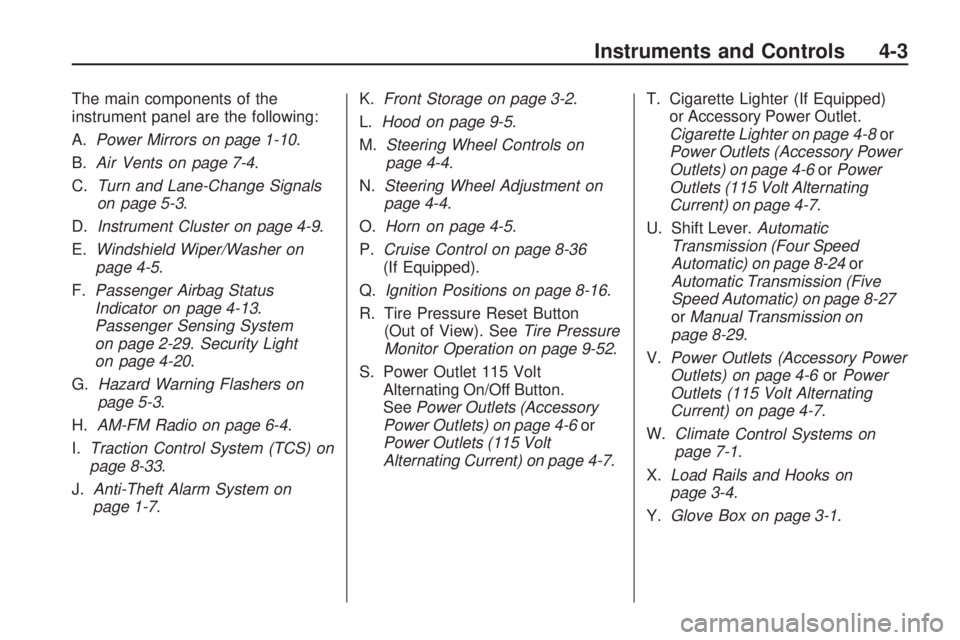
The main components of the
instrument panel are the following:
A.Power Mirrors on page 1-10 .
B. Air Vents on page 7-4.
C. Turn and Lane-Change Signals
on page 5-3.
D. Instrument Cluster on page 4-9 .
E. Windshield Wiper/Washer on
page 4-5.
F. Passenger Airbag Status
Indicator on page 4-13 .
Passenger Sensing System
on page 2-29. Security Light
on page 4-20.
G. Hazard Warning Flashers on
page 5-3.
H. AM-FM Radio on page 6-4 .
I. Traction Control System (TCS) on
page 8-33.
J. Anti-Theft Alarm System on
page 1-7. K.
Front Storage on page 3-2 .
L. Hood on page 9-5.
M. Steering Wheel Controls on
page 4-4.
N. Steering Wheel Adjustment on
page 4-4.
O. Horn on page 4-5.
P. Cruise Control on page 8-36
(If Equipped).
Q. Ignition Positions on page 8-16 .
R. Tire Pressure Reset Button (Out of View). See Tire Pressure
Monitor Operation on page 9-52 .
S. Power Outlet 115 Volt Alternating On/Off Button.
See Power Outlets (Accessory
Power Outlets) on page 4-6 or
Power Outlets (115 Volt
Alternating Current) on page 4-7 .T. Cigarette Lighter (If Equipped)
or Accessory Power Outlet.
Cigarette Lighter on page 4-8 or
Power Outlets (Accessory Power
Outlets) on page 4-6 orPower
Outlets (115 Volt Alternating
Current) on page 4-7.
U. Shift Lever. Automatic
Transmission (Four Speed
Automatic) on page 8-24 or
Automatic Transmission (Five
Speed Automatic) on page 8-27
or Manual Transmission on
page 8-29.
V. Power Outlets (Accessory Power
Outlets) on page 4-6 orPower
Outlets (115 Volt Alternating
Current) on page 4-7 .
W. Climate
Control Systems on
page 7-1.
X. Load Rails and Hooks on
page 3-4.
Y. Glove Box on page 3-1 .
Instruments and Controls 4-3
Page 86 of 318
Controls
Steering Wheel
Adjustment
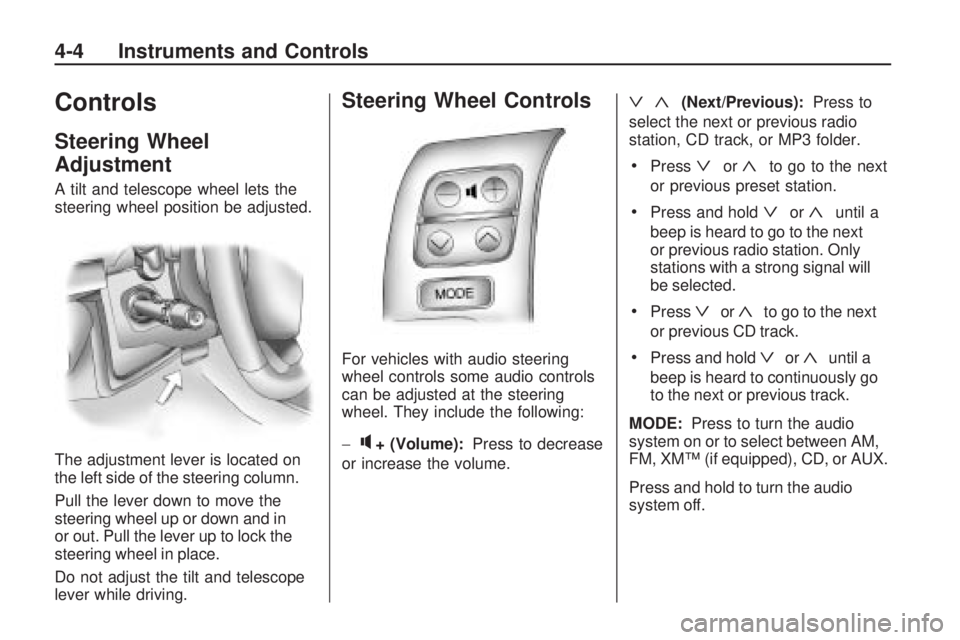
A tilt and telescope wheel lets the
steering wheel position be adjusted.
The adjustment lever is located on
the left side of the steering column.
Pull the lever down to move the
steering wheel up or down and in
or out. Pull the lever up to lock the
steering wheel in place.
Do not adjust the tilt and telescope
lever while driving.
Steering Wheel Controls
For vehicles with audio steering
wheel controls some audio controls
can be adjusted at the steering
wheel. They include the following:
−
q+ (Volume):Press to decrease
or increase the volume.
ª«(Next/Previous): Press to
select the next or previous radio
station, CD track, or MP3 folder.
•Pressªor«to go to the next
or previous preset station.
•Press and holdªor«until a
beep is heard to go to the next
or previous radio station. Only
stations with a strong signal will
be selected.
•Pressªor«to go to the next
or previous CD track.
•Press and holdªor«until a
beep is heard to continuously go
to the next or previous track.
MODE: Press to turn the audio
system on or to select between AM,
FM, XM™ (if equipped), CD, or AUX.
Press and hold to turn the audio
system off.
4-4 Instruments and Controls
Page 87 of 318
Horn
Press near or on the horn symbols
on the steering wheel pad to sound
the horn.
Windshield Wiper/Washer
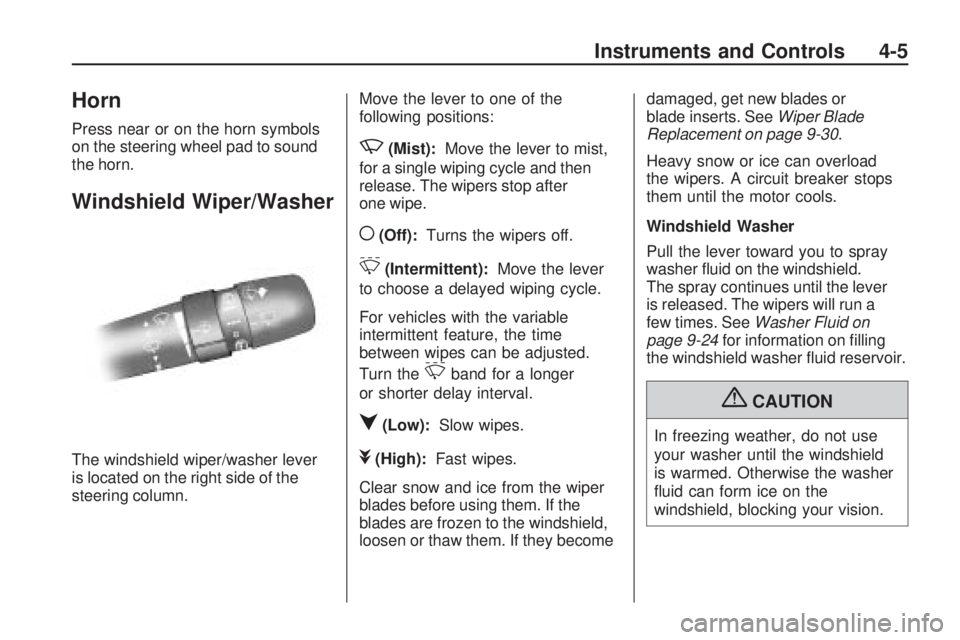
The windshield wiper/washer lever
is located on the right side of the
steering column.Move the lever to one of the
following positions:
z(Mist):
Move the lever to mist,
for a single wiping cycle and then
release. The wipers stop after
one wipe.
((Off): Turns the wipers off.
&(Intermittent): Move the lever
to choose a delayed wiping cycle.
For vehicles with the variable
intermittent feature, the time
between wipes can be adjusted.
Turn the
&band for a longer
or shorter delay interval.
q(Low): Slow wipes.
l(High): Fast wipes.
Clear snow and ice from the wiper
blades before using them. If the
blades are frozen to the windshield,
loosen or thaw them. If they become damaged, get new blades or
blade inserts. See
Wiper Blade
Replacement on page 9-30 .
Heavy snow or ice can overload
the wipers. A circuit breaker stops
them until the motor cools.
Windshield Washer
Pull the lever toward you to spray
washer fluid on the windshield.
The spray continues until the lever
is released. The wipers will run a
few times. See Washer Fluid on
page 9-24 for information on filling
the windshield washer fluid reservoir.
{CAUTION
In freezing weather, do not use
your washer until the windshield
is warmed. Otherwise the washer
fluid can form ice on the
windshield, blocking your vision.
Instruments and Controls 4-5
Page 100 of 318

If the regular brake system warning
light is also on, there are no antilock
brakes and there is a problem with
the regular brakes. SeeBrake
System Warning Light on page 4-17 .
Service All-Wheel Drive
Light
This light will come on briefly when
the ignition is turned on, and the
engine is not running, as a check
to show you it is working.
It should go out when the engine is
started. It should go out when the
engine is started. If it stays on, or
comes on while you are driving, you
may have a problem with the system.
Have it checked by your dealer/
retailer.
The four-wheel-drive indicator will
light up when the All-Wheel drive is
active.
Speed Sensitive Power
Steering (SSPS) Warning
Light
Vehicles with this feature, have a
warning light that comes on briefly
when the ignition is turned to
ON/RUN as a check to show it
is working.
If the warning light does not come
on, have it fixed so it will be able to
warn if there is a problem.
If the warning light stays on, or
comes on while driving, the Speed
Sensitive Power Steering may not be
working. See your dealer/retailer for
service.
StabiliTrak®Indicator
Light
This light warns that there is a
problem with the Traction Control
System (TCS) or the Vehicle
Stability Control (VSC) system.
The light comes on when the ignition
is turned to ON/RUN.
If the light comes on while driving,
the system is not working.
The TCS light comes on when the
VSC system warning light comes on,
even if the TRAC OFF button is not
pressed.
See StabiliTrak System on
page 8-35 for more information on
Vehicle Stability Control System.
4-18 Instruments and Controls
Page 135 of 318
Driving and
Operating
Driving InformationDriving for Better FuelEconomy ...........................
.8-2
Defensive Driving .................
.8-2
Drunk Driving ......................
.8-3
Control of a Vehicle ..............
.8-3
Braking ...............................
.8-4
Steering ..............................
.8-4
Off-Road Recovery ...............
.8-6
Loss of Control ....................
.8-6
Driving on Wet Roads ............8-7
Highway Hypnosis ................
.8-8
Hill and Mountain Roads ........8-8
Winter Driving ......................
.8-9
If the Vehicle is Stuck ..........8-11
Vehicle Load Limits .............
.8-12
Starting and OperatingNew Vehicle Break-In ...........8-16
Ignition Positions ................
.8-16
Retained Accessory Power (RAP) ....................
.8-18Starting the Engine
.............
.8-18
Engine Heater ....................
.8-19
Shifting Into Park ................
.8-20
Shifting Out of Park .............8-22
Parking .............................
.8-22
Parking Over Things That Burn ........................
.8-23
Engine ExhaustEngine Exhaust..................
.8-23
Running the Vehicle While Parked ............................
.8-24
Automatic TransmissionAutomatic Transmission
(Four Speed Automatic) ......8-24
Automatic Transmission (Five Speed Automatic) .......8-27
Manual Mode .....................
.8-28
Manual TransmissionManual Transmission ...........8-29
Drive SystemsAll-Wheel Drive..................
.8-31
BrakesAntilock Brake
System (ABS) ..................
.8-32
Parking Brake ....................
.8-33
Ride Control SystemsTraction Control
System (TCS) ..................
.8-33
StabiliTrak System ..............
.8-35
Cruise ControlCruise Control ....................
.8-36
FuelFuel..................................
.8-38
Recommended Fuel .............8-39
Gasoline Specifications .........8-39
California Fuel Requirements ...................
.8-39
Fuels in Foreign Countries . . . .8-40
Fuel Additives ....................
.8-40
Filling the Tank ..................
.8-41
Filling a Portable Fuel Container .........................
.8-43
TowingGeneral Towing Information . . .8-43
Driving Characteristics and Towing Tips .....................
.8-44
Trailer Towing ....................
.8-48
Towing Equipment ..............
.8-49
Conversions and Add-OnsAdd-On Electrical
Equipment .......................
.8-50
Driving and Operating 8-1
Page 139 of 318
If you turn the steering wheel in
either direction several times until it
stops, or hold the steering wheel in
the stopped position for an extended
amount of time, you may notice a
reduced amount of power steering
assist. The normal amount of power
steering assist should return shortly
after a few normal steering
movements.
The electric power steering
system does not require regular
maintenance. If you suspect
steering system problems, such as
abnormally high steering effort for a
prolonged period of time, contact
your dealer/retailer for service
repairs.Steering Tips
It is important to take curves at a
reasonable speed.
Traction in a curve depends on the
condition of the tires and the road
surface, the angle at which the curve
is banked, and vehicle speed. While
in a curve, speed is the one factor
that can be controlled.
If there is a need to reduce speed,
do it before entering the curve,
while the front wheels are straight.
Try to adjust the speed so you can
drive through the curve. Maintain a
reasonable, steady speed. Wait to
accelerate until out of the curve, and
then accelerate gently into the
straightaway.
Steering in Emergencies
There are times when steering
can be more effective than braking.
For example, you come over a hill
and find a truck stopped in your lane,
or a car suddenly pulls out from
nowhere, or a child darts out from
between parked cars and stops right
in front of you. These problems can
be avoided by braking — if you can
stop in time. But sometimes you
cannot stop in time because there
is no room. That is the time for
evasive action — steering around
the problem.
The vehicle can perform very well
in emergencies like these. First
apply the brakes. SeeBraking on
page 8-4. It is better to remove as
much speed as possible from a
collision. Then steer around the
problem, to the left or right
depending on the space available.
Driving and Operating 8-5
Page 140 of 318
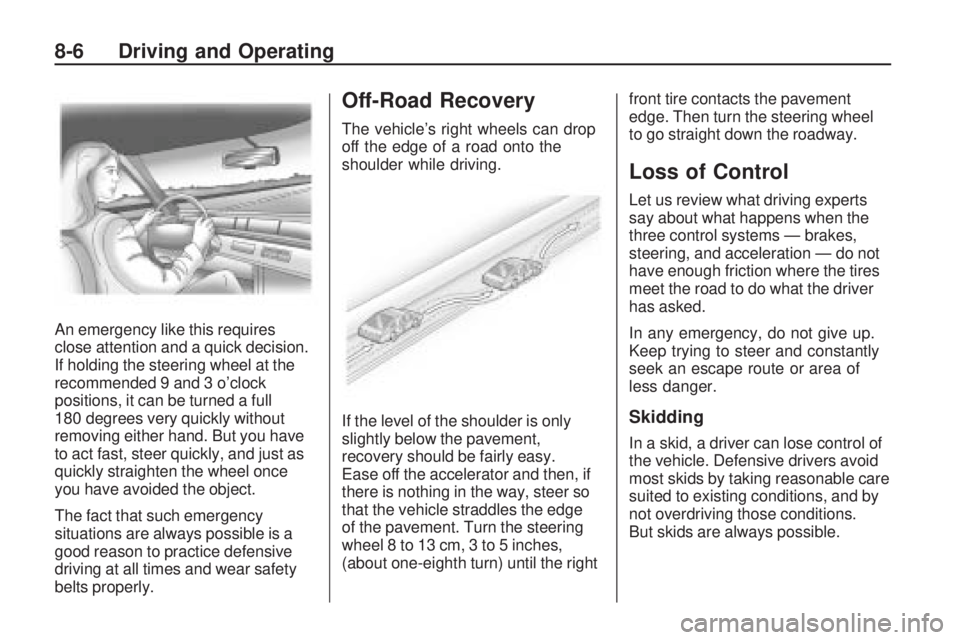
An emergency like this requires
close attention and a quick decision.
If holding the steering wheel at the
recommended 9 and 3 o’clock
positions, it can be turned a full
180 degrees very quickly without
removing either hand. But you have
to act fast, steer quickly, and just as
quickly straighten the wheel once
you have avoided the object.
The fact that such emergency
situations are always possible is a
good reason to practice defensive
driving at all times and wear safety
belts properly.
Off-Road Recovery
The vehicle’s right wheels can drop
off the edge of a road onto the
shoulder while driving.
If the level of the shoulder is only
slightly below the pavement,
recovery should be fairly easy.
Ease off the accelerator and then, if
there is nothing in the way, steer so
that the vehicle straddles the edge
of the pavement. Turn the steering
wheel 8 to 13 cm, 3 to 5 inches,
(about one-eighth turn) until the rightfront tire contacts the pavement
edge. Then turn the steering wheel
to go straight down the roadway.
Loss of Control
Let us review what driving experts
say about what happens when the
three control systems — brakes,
steering, and acceleration — do not
have enough friction where the tires
meet the road to do what the driver
has asked.
In any emergency, do not give up.
Keep trying to steer and constantly
seek an escape route or area of
less danger.
Skidding
In a skid, a driver can lose control of
the vehicle. Defensive drivers avoid
most skids by taking reasonable care
suited to existing conditions, and by
not overdriving those conditions.
But skids are always possible.
8-6 Driving and Operating
Page 141 of 318
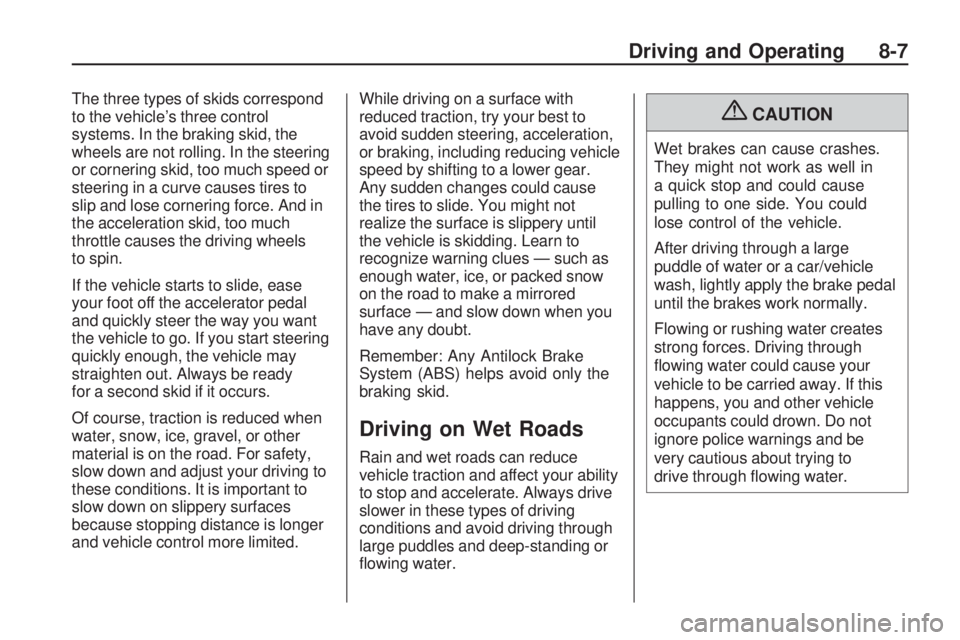
The three types of skids correspond
to the vehicle’s three control
systems. In the braking skid, the
wheels are not rolling. In the steering
or cornering skid, too much speed or
steering in a curve causes tires to
slip and lose cornering force. And in
the acceleration skid, too much
throttle causes the driving wheels
to spin.
If the vehicle starts to slide, ease
your foot off the accelerator pedal
and quickly steer the way you want
the vehicle to go. If you start steering
quickly enough, the vehicle may
straighten out. Always be ready
for a second skid if it occurs.
Of course, traction is reduced when
water, snow, ice, gravel, or other
material is on the road. For safety,
slow down and adjust your driving to
these conditions. It is important to
slow down on slippery surfaces
because stopping distance is longer
and vehicle control more limited.While driving on a surface with
reduced traction, try your best to
avoid sudden steering, acceleration,
or braking, including reducing vehicle
speed by shifting to a lower gear.
Any sudden changes could cause
the tires to slide. You might not
realize the surface is slippery until
the vehicle is skidding. Learn to
recognize warning clues — such as
enough water, ice, or packed snow
on the road to make a mirrored
surface — and slow down when you
have any doubt.
Remember: Any Antilock Brake
System (ABS) helps avoid only the
braking skid.
Driving on Wet Roads
Rain and wet roads can reduce
vehicle traction and affect your ability
to stop and accelerate. Always drive
slower in these types of driving
conditions and avoid driving through
large puddles and deep-standing or
flowing water.
{CAUTION
Wet brakes can cause crashes.
They might not work as well in
a quick stop and could cause
pulling to one side. You could
lose control of the vehicle.
After driving through a large
puddle of water or a car/vehicle
wash, lightly apply the brake pedal
until the brakes work normally.
Flowing or rushing water creates
strong forces. Driving through
flowing water could cause your
vehicle to be carried away. If this
happens, you and other vehicle
occupants could drown. Do not
ignore police warnings and be
very cautious about trying to
drive through flowing water.
Driving and Operating 8-7
Page 143 of 318
{CAUTION
Coasting downhill in N (Neutral) or
with the ignition off is dangerous.
The brakes will have to do all the
work of slowing down and they
could get so hot that they would
not work well. You would then
have poor braking or even none
going down a hill. You could crash.
Always have the engine running
and the vehicle in gear when going
downhill.
•Stay in your own lane. Do not
swing wide or cut across the
center of the road. Drive at
speeds that let you stay in your
own lane.
•Top of hills: Be alert — something
could be in your lane (stalled car,
accident).
•Pay attention to special road
signs (falling rocks area, winding
roads, long grades, passing or
no-passing zones) and take
appropriate action.
Winter Driving
Driving on Snow or Ice
Drive carefully when there is snow or
ice between the tires and the road,
creating less traction or grip. Wet ice
can occur at about 0°C (32°F) when
freezing rain begins to fall, resulting
in even less traction. Avoid driving on
wet ice or in freezing rain until roads
can be treated with salt or sand.
Drive with caution, whatever the
condition. Accelerate gently so
traction is not lost. Accelerating too
quickly causes the wheels to spin
and makes the surface under the
tires slick, so there is even less
traction.Try not to break the fragile traction.
If you accelerate too fast, the drive
wheels will spin and polish the
surface under the tires even more.
The
Antilock Brake System (ABS) on
page 8-32 improves vehicle stability
during hard stops on a slippery
roads, but apply the brakes sooner
than when on dry pavement.
Allow greater following distance on
any slippery road and watch for
slippery spots. Icy patches can occur
on otherwise clear roads in shaded
areas. The surface of a curve or an
overpass can remain icy when the
surrounding roads are clear. Avoid
sudden steering maneuvers and
braking while on ice.
Turn off cruise control, if equipped,
on slippery surfaces.
Driving and Operating 8-9