lock PONTIAC VIBE 2010 Service Manual
[x] Cancel search | Manufacturer: PONTIAC, Model Year: 2010, Model line: VIBE, Model: PONTIAC VIBE 2010Pages: 318, PDF Size: 1.7 MB
Page 110 of 318
Headlamps on Reminder
A tone sounds when the ignition is
turned to LOCK/OFF, the driver door
is opened and the key is removed
from the ignition while the lamps
are on.
Headlamp High/
Low-Beam Changer
The headlamps must be on for this
feature to work.
Push the turn signal lever away
from you to turn the high beams on.
This instrument panel cluster
light
3comes on while the high
beam headlamps are on.
Pull the lever towards you to return
to low beams.
Flash-to-Pass
This feature is used to signal to the
vehicle ahead that you want to pass.
With the lever in the low-beam
position, pull the lever toward you to
momentarily switch to high-beams.
If the headlamps are on when the
lever is released, the high-beams
will return to low-beam.
Daytime Running
Lamps (DRL)
Daytime Running Lamps (DRL) can
make it easier for others to see the
front of your vehicle during the day.
Fully functional DRL are required
on all vehicles first sold in Canada. The DRL system makes the
headlamps come on at a reduced
brightness when the following
conditions are met:
•The ignition is on with the engine
running.
•The exterior lamps switch is off.
•The parking brake is released.
When the exterior lamp switch is
turned to the headlamp position, the
DRL go off and the headlamps come
on. The other lamps that come on
with the headlamps also come on.
The headlamps automatically switch
from DRL to the regular headlamps
depending on the darkness of
the surroundings. See Automatic
Headlamp System on page 5-3 .
DRL also comes on if only the
parking lamps are being used.
5-2 Lighting
Page 112 of 318

Fog Lamps
#
(Fog Lamps):For vehicles with
fog lamps, move the band on the turn
signal/multifunction lever to
#to turn
them on. The fog lamps only come
on when the headlamps are on
low beam.
Some localities have laws that
require the headlamps to be
on along with the fog lamps.
Interior Lighting
Instrument Panel
Illumination Control
Use the trip odometer knob located
on the right side of the instrument
panel cluster to adjust the instrument
panel brightness.
Turn the knob clockwise or
counterclockwise to brighten
or dim the instrument panel.
The brightness of the instrument
panel lights decreases when
the headlamps are on.
Dome Lamps
The interior lamps control is located
on the overhead lamp. To change
the interior lamps setting, slide
the switch to one of the following
positions:
OFF: Turns the lamp off.
ON: Keeps the lamp on all the time.
Door: Turns the lamp on when
any door or the liftgate is opened.
The lamp goes off when all the side
doors and the liftgate are closed.
If the lamp switch is in the door
position and a door is left open,
the lamps will go off automatically
after 20 minutes.
5-4 Lighting
Page 113 of 318
Reading Lamps
For vehicles with a sunroof, there is
a reading lamp near the sunroof
switch.
OFF:Turns the lamp off.
ON: Keeps the lamp on all the time.
Door: Turns the lamp on when
any door or the liftgate is opened.
The lamp goes off when all the side
doors and the liftgate are closed.
Lighting Features
Entry Lighting
After all the doors and liftgate are
closed, and the key is out of the
ignition, in LOCK/OFF or ACC/
ACCESSORY, the light remains
on for about 15 seconds and then
goes out, except under the following
conditions:
•The ignition is turned to ACC/
ACCESSORY or ON/RUN after
all the doors and liftgate are
closed.
•All the doors and the liftgate are
locked and the light is still on.
When any door is unlocked with the
key or Remote Keyless Entry (RKE)
system transmitter, the light comes
on for 15 seconds, even if the door is
not opened.
Battery Power Protection
The vehicle has a battery saver
feature designed to protect
the vehicle’s battery.
This feature will only work with the
dome lamp in the Door position.
When any interior lamp is left on
and the ignition is turned off, the
battery rundown protection system
automatically turns the lamp off after
20 minutes. This prevents draining of
the battery.
Lighting 5-5
Page 116 of 318

Operation
Playing the Radio
PWR VOL (Power/Volume):Press
to turn the radio on and off. Turn
the PWR VOL knob to adjust
the volume.
CLOCK: Press to adjust the time.
Setting the Clock
The date does not automatically
display. To see the date press the
CLOCK button while the radio is on. The date display times out and goes
back to the normal radio and time
display. To adjust the time and date:
1. Turn the ignition key to
ACC/ACCESSORY or ON/RUN.
2. Press the PWR VOL (Power/ Volume) knob to turn on the radio.
3. Press the CLOCK button, and the HR, MIN, MM, DD, YYYY (hour,
minute, month, day, and year)
categories display.
4. Press the button under the category to be adjusted.
5. To increase the time or date, do one of the following: turn
the TUNE ADJ (Tune/Adjust)
knob clockwise, press SEEK/
TRACK
y, press FWD(
(Forward), or continue to press
the button under the category to
be adjusted.
Radio with CD (MP3) shown, Radio with CD (Base) similar
6-2 Infotainment System
Page 117 of 318

6. To decrease the time ordate, do one of the following:
turn the TUNE ADJ knob
counterclockwise, press
SEEK/TRACK
z, or press
REV
)(Reverse).
7. To save the settings, press the CLOCK button, or let
the display time out.
To change the time default setting
from 12 hour to 24 hour, and to
change the date default setting from
month/day/year to day/month/year:
1. Press the CLOCK button and then the button below the forward
arrow label on the display.
The 12H and 24H, and the
date MMDD (month and day)
and DDMM (day and month)
categories will display. 2. Press the button below the
12H or 24H label, and the date
MMDD (month and day) or
DDMM (day and month) label
to choose how the radio displays
the time and date.
3. To save the settings, press the CLOCK button, or let
the screen time out.
Setting the Tone
(Bass/Midrange/Treble)
To adjust the bass, midrange, and
treble:
1. Press the TUNE ADJ knob.
2. Turn the TUNE ADJ knob, orpress the button below BASS,
MID, or TREB so it is highlighted.
3. Press the TUNE ADJ knob to select BASS, MID, or TREB.
4. Turn the TUNE ADJ knob to adjust the level.
5. Press the TUNE ADJ knob to set the adjustment. EQ (Equalization):
To select
customized equalization settings:
1. Press the EQ button.
2. Press the button below the tab: POP, ROCK, COUNTRY,
TALK, JAZZ, and CLASSICAL.
Adjusting the Speakers
(Balance/Fade)
To adjust the balance or fade,
perform the following steps:
1. Press the TUNE ADJ knob.
2. Turn the TUNE ADJ knobor press the button below
BAL FADE so it is highlighted.
3. Press the TUNE ADJ knob to select the tone to adjust.
4. Turn the TUNE ADJ knob to adjust the audio balance to the
right or the left speakers and the
fade to adjust the audio volume
to the front or rear speakers.
5. Press the TUNE ADJ knob to set the adjustment.
Infotainment System 6-3
Page 121 of 318

Scanning Categories (CAT)
To scan a desired category:
1. Press the CAT button to enterthe category select mode.
2. Turn the TUNE ADJ knob to select a category.
3. Press
yorzfor two seconds
to scan the stations in the
selected category.
4. Press
yorzagain to stop
scanning.
NOT FOUND displays if the desired
category cannot be found.
XM Radio Messages
xL (Explicit Language Channels):
These channels, or any others,
can be blocked by calling
1-800-852-XMXM (9696).
Updating: The encryption code in
the receiver is being updated, and
no action is required. This process
should take no longer than
30 seconds. No Signal:
The system is
functioning correctly, but the
vehicle is in a location that is blocking
the XM signal. When the vehicle is
moved into an open area, the signal
should return.
Loading XM: The audio system is
acquiring and processing audio and
text data. No action is needed. This
message should disappear shortly.
CH Off Air: This channel is not
currently in service. Tune in
to another channel.
CH Unauth: This channel is
blocked or cannot be received with
your XM Subscription package.
CH Unavail: This previously
assigned channel is no longer
assigned. Tune to another station.
If this station was one of the presets,
choose another station for that
preset button.
No Info: No artist, song title,
category, or text information is
available at this time on this
channel. The system is working
properly. Not Found:
There are no channels
available for the selected category.
The system is working properly.
XM Locked: The XM receiver in
the vehicle may have previously
been in another vehicle. For security
purposes, XM receivers cannot be
swapped between vehicles. If this
message is received after having the
vehicle serviced, check with your
dealer/retailer.
Radio ID: If tuned to channel 0,
this message will alternate with the
XM Radio 8 digit radio ID label.
This label is needed to activate
the service. Consult with your
dealer/retailer.
Unknown: If this message is
received when tuned to channel 0,
there could be a receiver fault.
Consult with your dealer/retailer.
Chk XMRcvr: If this message does
not clear within a short period of
time, the receiver may have a fault.
Consult with your dealer/retailer.
Infotainment System 6-7
Page 130 of 318

Fan Control
9(Fan):Turn the center knob
toward 4 to turn the system on or
increase fan speed.
If the airflow seems low when the
fan is at the highest setting, the
passenger compartment air filter
may need to be replaced. For
more information, see Passenger
Compartment Air Filter on page 7-4
and Scheduled Maintenance on
page 10-3.
Temperature Control
Turn the right knob clockwise or
counterclockwise to increase or
decrease the temperature inside the
vehicle. Air Delivery Mode Control
Turn the left knob to select from the
following modes:
H(Vent):
Air is directed to the
upper instrument panel outlets.
)(Bi-Level): Air is directed to the
upper instrument panel outlets
and the floor outlets.
6(Floor): Air is directed to the
floor and side window outlets.
-(Defog): Air is directed between
the windshield, side windows,
instrument panel outlets and the floor
outlets. Use the defog mode to clear the
inside of the windshield of fog
or moisture and to warm the
passengers. The air conditioning
compressor runs automatically in this
setting without pressing A/C, unless
the outside temperature is at or
below 32°F (0°C).
1(Defrost):
Air is directed to the
windshield, instrument panel
outlets and the side windows.
Use the defrost mode to remove
fog or frost from the outside of the
windshield more quickly. The air
conditioning compressor runs
automatically in this setting without
pressing A/C, unless the outside
temperature is at or below
32°F (0°C).
Do not drive the vehicle until all the
windows are clear.
7-2 Climate Controls
Page 135 of 318
Driving and
Operating
Driving InformationDriving for Better FuelEconomy ...........................
.8-2
Defensive Driving .................
.8-2
Drunk Driving ......................
.8-3
Control of a Vehicle ..............
.8-3
Braking ...............................
.8-4
Steering ..............................
.8-4
Off-Road Recovery ...............
.8-6
Loss of Control ....................
.8-6
Driving on Wet Roads ............8-7
Highway Hypnosis ................
.8-8
Hill and Mountain Roads ........8-8
Winter Driving ......................
.8-9
If the Vehicle is Stuck ..........8-11
Vehicle Load Limits .............
.8-12
Starting and OperatingNew Vehicle Break-In ...........8-16
Ignition Positions ................
.8-16
Retained Accessory Power (RAP) ....................
.8-18Starting the Engine
.............
.8-18
Engine Heater ....................
.8-19
Shifting Into Park ................
.8-20
Shifting Out of Park .............8-22
Parking .............................
.8-22
Parking Over Things That Burn ........................
.8-23
Engine ExhaustEngine Exhaust..................
.8-23
Running the Vehicle While Parked ............................
.8-24
Automatic TransmissionAutomatic Transmission
(Four Speed Automatic) ......8-24
Automatic Transmission (Five Speed Automatic) .......8-27
Manual Mode .....................
.8-28
Manual TransmissionManual Transmission ...........8-29
Drive SystemsAll-Wheel Drive..................
.8-31
BrakesAntilock Brake
System (ABS) ..................
.8-32
Parking Brake ....................
.8-33
Ride Control SystemsTraction Control
System (TCS) ..................
.8-33
StabiliTrak System ..............
.8-35
Cruise ControlCruise Control ....................
.8-36
FuelFuel..................................
.8-38
Recommended Fuel .............8-39
Gasoline Specifications .........8-39
California Fuel Requirements ...................
.8-39
Fuels in Foreign Countries . . . .8-40
Fuel Additives ....................
.8-40
Filling the Tank ..................
.8-41
Filling a Portable Fuel Container .........................
.8-43
TowingGeneral Towing Information . . .8-43
Driving Characteristics and Towing Tips .....................
.8-44
Trailer Towing ....................
.8-48
Towing Equipment ..............
.8-49
Conversions and Add-OnsAdd-On Electrical
Equipment .......................
.8-50
Driving and Operating 8-1
Page 140 of 318
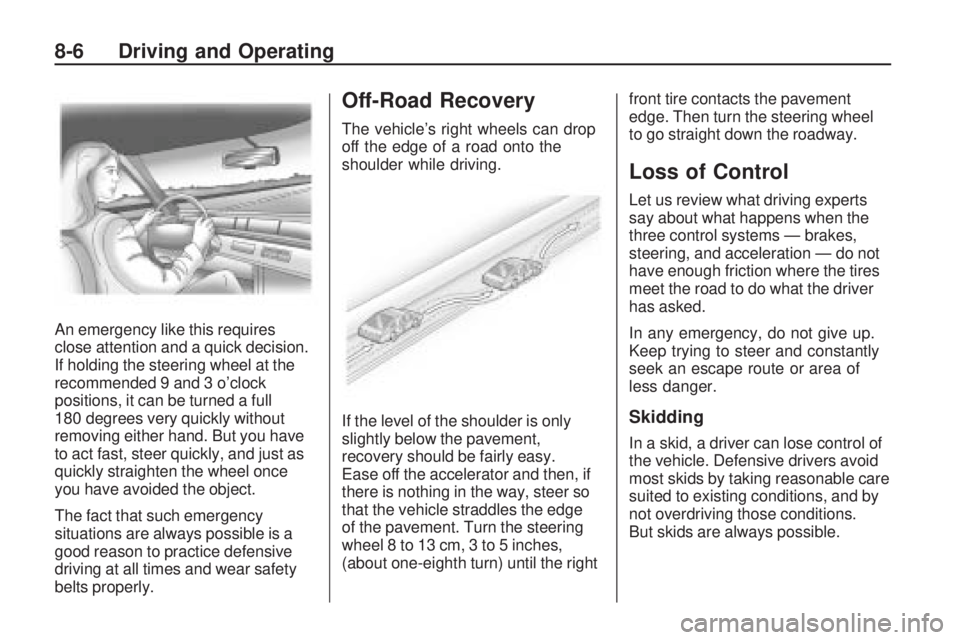
An emergency like this requires
close attention and a quick decision.
If holding the steering wheel at the
recommended 9 and 3 o’clock
positions, it can be turned a full
180 degrees very quickly without
removing either hand. But you have
to act fast, steer quickly, and just as
quickly straighten the wheel once
you have avoided the object.
The fact that such emergency
situations are always possible is a
good reason to practice defensive
driving at all times and wear safety
belts properly.
Off-Road Recovery
The vehicle’s right wheels can drop
off the edge of a road onto the
shoulder while driving.
If the level of the shoulder is only
slightly below the pavement,
recovery should be fairly easy.
Ease off the accelerator and then, if
there is nothing in the way, steer so
that the vehicle straddles the edge
of the pavement. Turn the steering
wheel 8 to 13 cm, 3 to 5 inches,
(about one-eighth turn) until the rightfront tire contacts the pavement
edge. Then turn the steering wheel
to go straight down the roadway.
Loss of Control
Let us review what driving experts
say about what happens when the
three control systems — brakes,
steering, and acceleration — do not
have enough friction where the tires
meet the road to do what the driver
has asked.
In any emergency, do not give up.
Keep trying to steer and constantly
seek an escape route or area of
less danger.
Skidding
In a skid, a driver can lose control of
the vehicle. Defensive drivers avoid
most skids by taking reasonable care
suited to existing conditions, and by
not overdriving those conditions.
But skids are always possible.
8-6 Driving and Operating
Page 141 of 318
The three types of skids correspond
to the vehicle’s three control
systems. In the braking skid, the
wheels are not rolling. In the steering
or cornering skid, too much speed or
steering in a curve causes tires to
slip and lose cornering force. And in
the acceleration skid, too much
throttle causes the driving wheels
to spin.
If the vehicle starts to slide, ease
your foot off the accelerator pedal
and quickly steer the way you want
the vehicle to go. If you start steering
quickly enough, the vehicle may
straighten out. Always be ready
for a second skid if it occurs.
Of course, traction is reduced when
water, snow, ice, gravel, or other
material is on the road. For safety,
slow down and adjust your driving to
these conditions. It is important to
slow down on slippery surfaces
because stopping distance is longer
and vehicle control more limited.While driving on a surface with
reduced traction, try your best to
avoid sudden steering, acceleration,
or braking, including reducing vehicle
speed by shifting to a lower gear.
Any sudden changes could cause
the tires to slide. You might not
realize the surface is slippery until
the vehicle is skidding. Learn to
recognize warning clues — such as
enough water, ice, or packed snow
on the road to make a mirrored
surface — and slow down when you
have any doubt.
Remember: Any Antilock Brake
System (ABS) helps avoid only the
braking skid.
Driving on Wet Roads
Rain and wet roads can reduce
vehicle traction and affect your ability
to stop and accelerate. Always drive
slower in these types of driving
conditions and avoid driving through
large puddles and deep-standing or
flowing water.
{CAUTION
Wet brakes can cause crashes.
They might not work as well in
a quick stop and could cause
pulling to one side. You could
lose control of the vehicle.
After driving through a large
puddle of water or a car/vehicle
wash, lightly apply the brake pedal
until the brakes work normally.
Flowing or rushing water creates
strong forces. Driving through
flowing water could cause your
vehicle to be carried away. If this
happens, you and other vehicle
occupants could drown. Do not
ignore police warnings and be
very cautious about trying to
drive through flowing water.
Driving and Operating 8-7