lock PONTIAC VIBE 2010 Manual PDF
[x] Cancel search | Manufacturer: PONTIAC, Model Year: 2010, Model line: VIBE, Model: PONTIAC VIBE 2010Pages: 318, PDF Size: 1.7 MB
Page 198 of 318
How to Add Automatic
Transmission Fluid
Refer to the Maintenance
Schedule to determine what
kind of transmission fluid to use.
Recommended Fluids and
Lubricants on page 10-15.
If the fluid level is low, add only
enough of the proper fluid to bring
the level into the area between
dimples on the dipstick.
1. Pull out the dipstick.
2. Using a long-neck funnel, add enough fluid at the dipstick
hole to bring it to the proper level.
It does not take much fluid,
generally less than one pint
(0.5 L). Do not overfill. Notice:
Too much or too
little uid can damage your
transmission. Too much can mean
that some of the uid could come
out and fall on hot engine parts or
exhaust system parts, starting a
re. Too little uid could cause the
transmission to overheat. Be sure
to get an accurate reading if you
check your transmission uid.
3. After adding fluid, recheck the fluid level as described under
“How to Check Automatic
Transmission Fluid,” earlier
in this section.
4. When the correct fluid level is obtained, push the dipstick
back in all the way; then press
the tab down to lock the dipstick
in place.
Manual Transmission
Fluid
When to Check
A good time to have your manual
transmission fluid level checked
is when the engine oil is changed.
However, the fluid in your manual
transmission does not require
changing.
How to Check
This operation can be difficult, you
may choose to have this done
at your dealer/retailer service
department.
If you do it yourself, be sure to
follow all the instructions here, or
you could get a false reading.
9-14 Vehicle Care
Page 206 of 318
How to Add Coolant to the
Radiator
When the coolant in the coolant
recovery tank is at the FULL mark,
start the vehicle.
If the overheat warning continues,
there is one more thing that can
be done. Add the proper coolant
mixture directly to the radiator but
be sure the cooling system is
cool before you do it.
{CAUTION
Steam and scalding liquids from a
hot cooling system can blow out
and burn you badly. They are
under pressure, and if you turn the
surge tank pressure cap — even a
little — they can come out at high
speed. Never turn the cap when
the cooling system, including the
surge tank pressure cap, is hot.
Wait for the cooling system and(Continued)
CAUTION (Continued)
surge tank pressure cap to cool
if you ever have to turn the
pressure cap.
{CAUTION
Turning the radiator pressure cap
when the engine and radiator are
hot can allow steam and scalding
liquids to blow out and burn you
badly. With the coolant recovery
tank, you will almost never have
to add coolant at the radiator.
Never turn the radiator pressure
cap — even a little — when the
engine and radiator are hot.
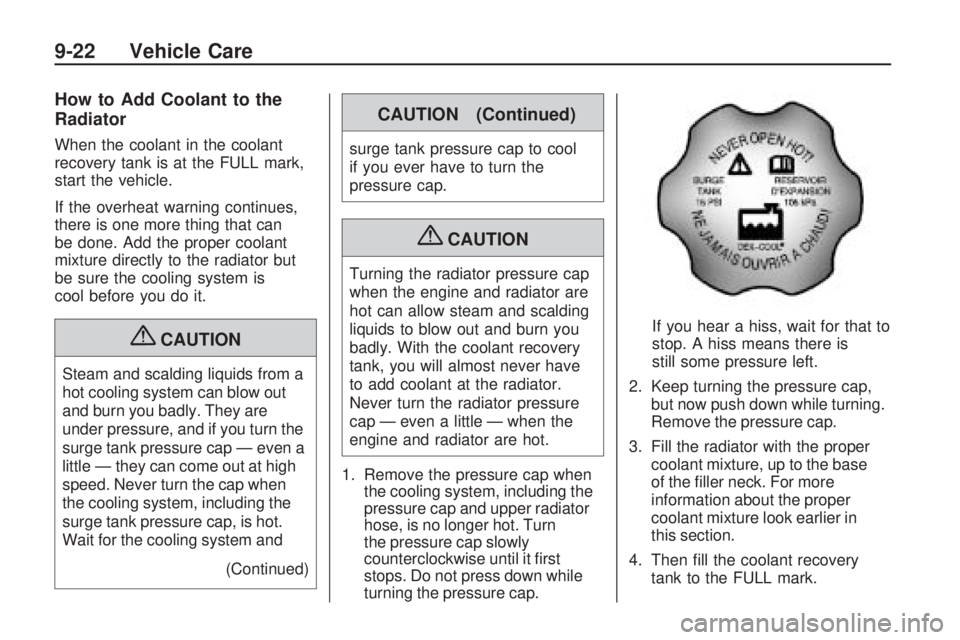
1. Remove the pressure cap when the cooling system, including the
pressure cap and upper radiator
hose, is no longer hot. Turn
the pressure cap slowly
counterclockwise until it first
stops. Do not press down while
turning the pressure cap. If you hear a hiss, wait for that to
stop. A hiss means there is
still some pressure left.
2. Keep turning the pressure cap, but now push down while turning.
Remove the pressure cap.
3. Fill the radiator with the proper coolant mixture, up to the base
of the filler neck. For more
information about the proper
coolant mixture look earlier in
this section.
4. Then fill the coolant recovery tank to the FULL mark.
9-22 Vehicle Care
Page 215 of 318
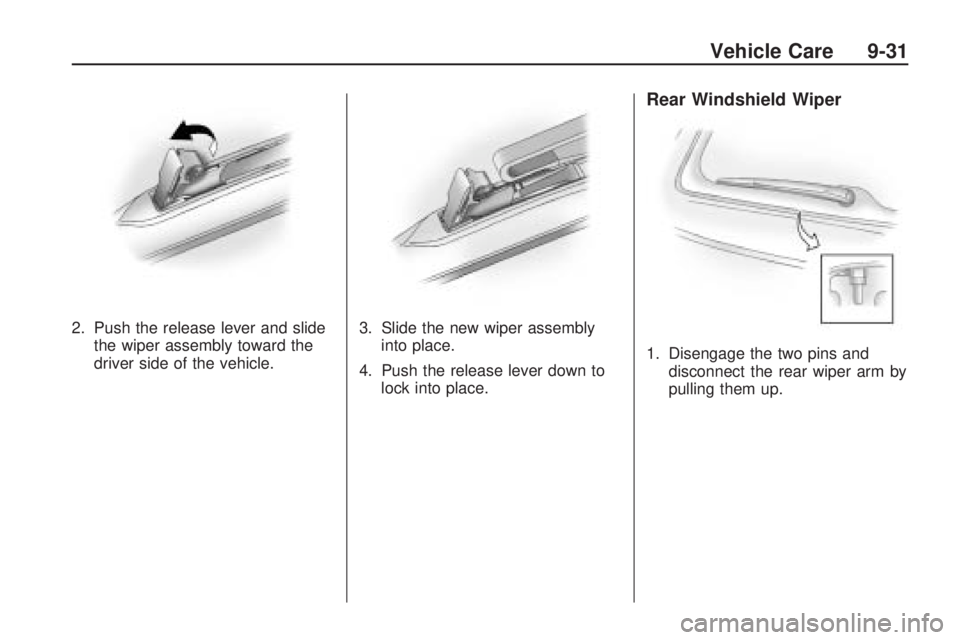
2. Push the release lever and slidethe wiper assembly toward the
driver side of the vehicle. 3. Slide the new wiper assembly
into place.
4. Push the release lever down to lock into place.
Rear Windshield Wiper
1. Disengage the two pins anddisconnect the rear wiper arm by
pulling them up.
Vehicle Care 9-31
Page 217 of 318
Bulb Replacement
For the proper type of replacement
bulbs, seeReplacement Bulbs
on page 9-37.
For any bulb changing procedure
not listed in this section, contact
your dealer/retailer.
Halogen Bulbs
{CAUTION
Halogen bulbs have pressurized
gas inside and can burst if you
drop or scratch the bulb. You or
others could be injured. Be sure
to read and follow the instructions
on the bulb package.
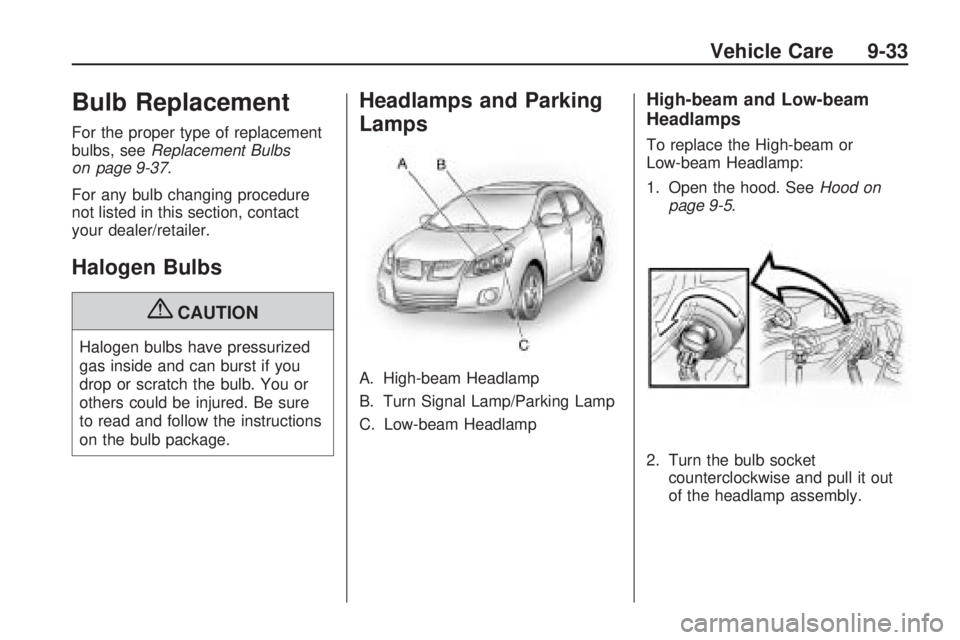
Headlamps and Parking
Lamps
A. High-beam Headlamp
B. Turn Signal Lamp/Parking Lamp
C. Low-beam Headlamp
High-beam and Low-beam
Headlamps
To replace the High-beam or
Low-beam Headlamp:
1. Open the hood. See Hood on
page 9-5.
2. Turn the bulb socket counterclockwise and pull it out
of the headlamp assembly.
Vehicle Care 9-33
Page 218 of 318
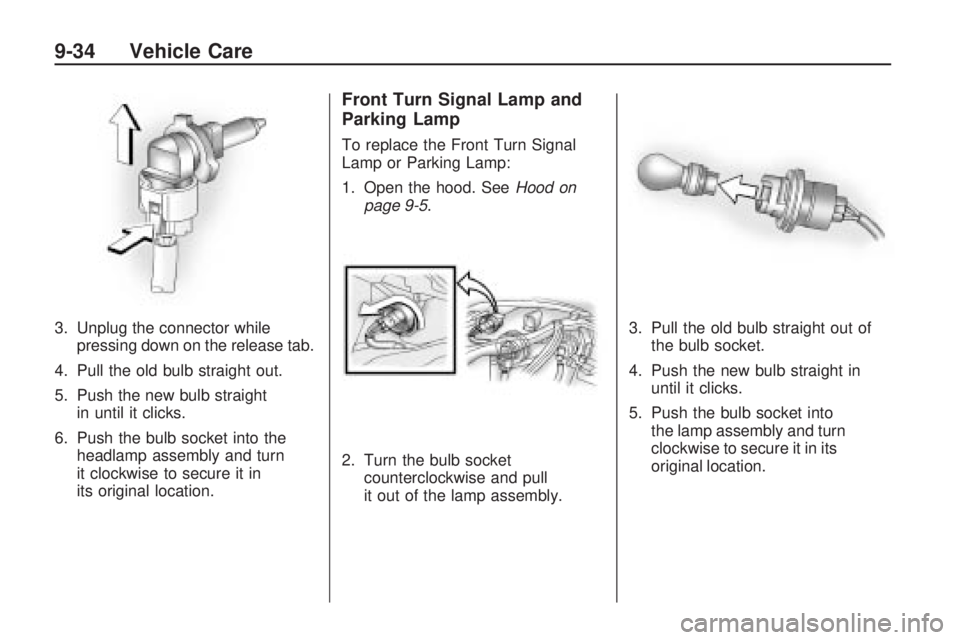
3. Unplug the connector whilepressing down on the release tab.
4. Pull the old bulb straight out.
5. Push the new bulb straight in until it clicks.
6. Push the bulb socket into the headlamp assembly and turn
it clockwise to secure it in
its original location.
Front Turn Signal Lamp and
Parking Lamp
To replace the Front Turn Signal
Lamp or Parking Lamp:
1. Open the hood. See Hood on
page 9-5.
2. Turn the bulb socket counterclockwise and pull
it out of the lamp assembly. 3. Pull the old bulb straight out of
the bulb socket.
4. Push the new bulb straight in until it clicks.
5. Push the bulb socket into the lamp assembly and turn
clockwise to secure it in its
original location.
9-34 Vehicle Care
Page 219 of 318
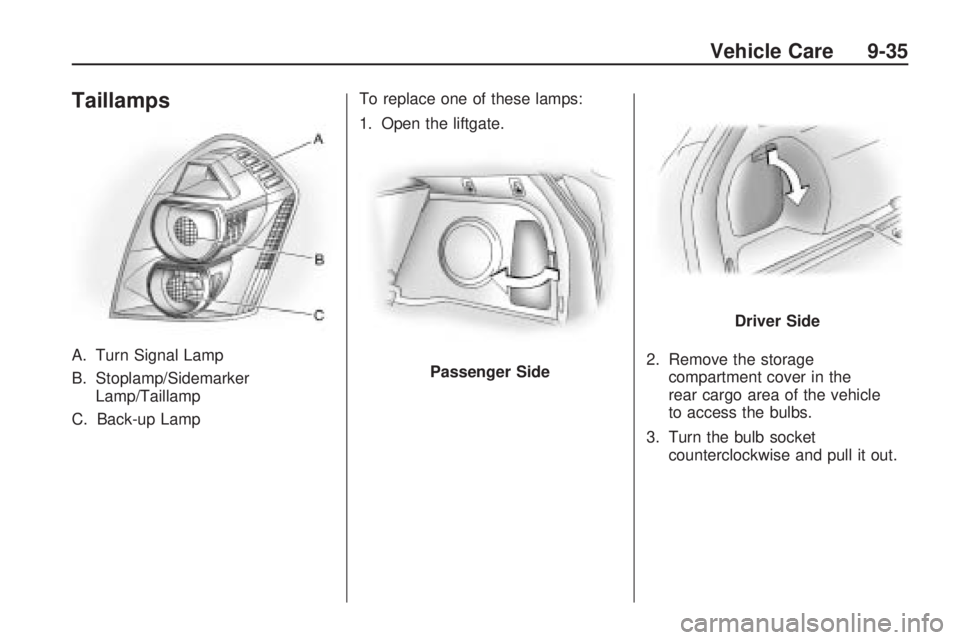
Taillamps
A. Turn Signal Lamp
B. Stoplamp/SidemarkerLamp/Taillamp
C. Back-up Lamp To replace one of these lamps:
1. Open the liftgate.
2. Remove the storagecompartment cover in the
rear cargo area of the vehicle
to access the bulbs.
3. Turn the bulb socket counterclockwise and pull it out.Passenger Side
Driver Side
Vehicle Care 9-35
Page 220 of 318

4. Pull the bulb straight out of thesocket.
5. Push the new bulb straight in until it clicks to secure.
6. Push the bulb socket in and turn it clockwise to secure.
7. Reinstall the cover.
License Plate Lamp
To replace the license plate
lamp bulb:
1. Press the tabs in to disengage them and remove the license
plate lamp assembly. 2. Turn the bulb socket
counterclockwise to remove it
from the license plate assembly.
3. Pull the bulb straight out of the bulb socket.
4. Push the new bulb straight in the bulb socket until it clicks.
5. Push the bulb socket straight into the license plate assembly and
turn it clockwise to secure it.
6. Reinstall the license plate assembly into its original location
making sure the tabs reengage.
9-36 Vehicle Care
Page 222 of 318
Windshield Wipers
If the wiper motor overheats due to
heavy snow or ice, the windshield
wipers will stop until the motor cools
and will then restart.
Although the circuit is protected from
electrical overload, overload due to
heavy snow or ice, may cause wiper
linkage damage. Always clear ice
and heavy snow from the windshield
before using the windshield wipers.
If the overload is caused by an
electrical problem and not snow
or ice, be sure to get it fixed.
Fuses and Circuit
Breakers
The wiring circuits in the vehicle are
protected from short circuits by a
combination of fuses, circuit breakers
and fusible thermal links. This greatly
reduces the chance of fires caused
by electrical problems.
Look at the silver-colored band
inside the fuse. If the band is broken
or melted, replace the fuse. Be sure
you replace a bad fuse with a new
one of the identical size and rating.
Fuses of the same amperage can be
temporarily borrowed from another
fuse location, if a fuse goes out.
Replace the fuse as soon as
you can.
Engine Compartment
Fuse Block
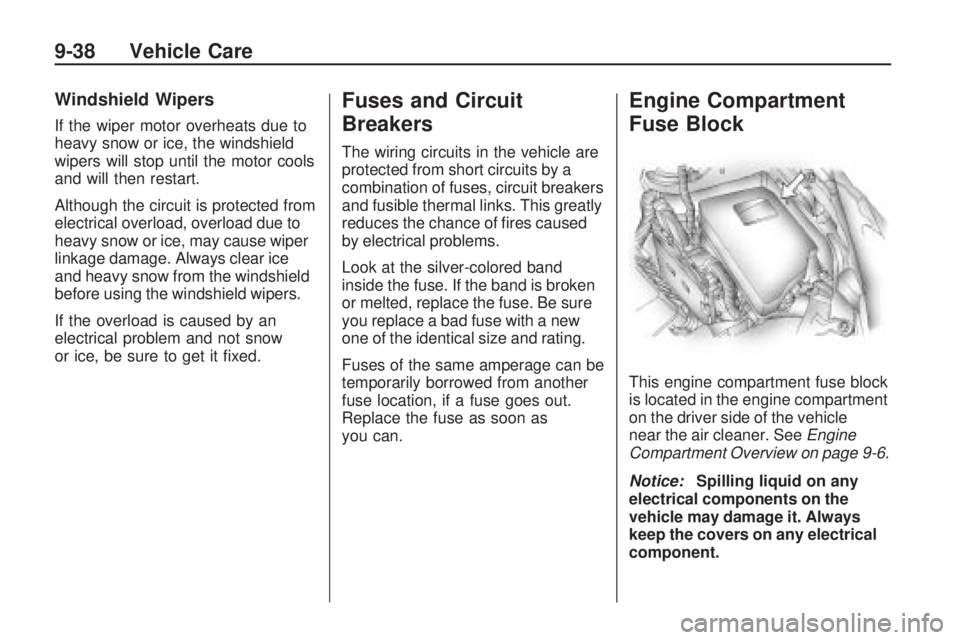
This engine compartment fuse block
is located in the engine compartment
on the driver side of the vehicle
near the air cleaner. SeeEngine
Compartment Overview on page 9-6 .
Notice: Spilling liquid on any
electrical components on the
vehicle may damage it. Always
keep the covers on any electrical
component.
9-38 Vehicle Care
Page 223 of 318
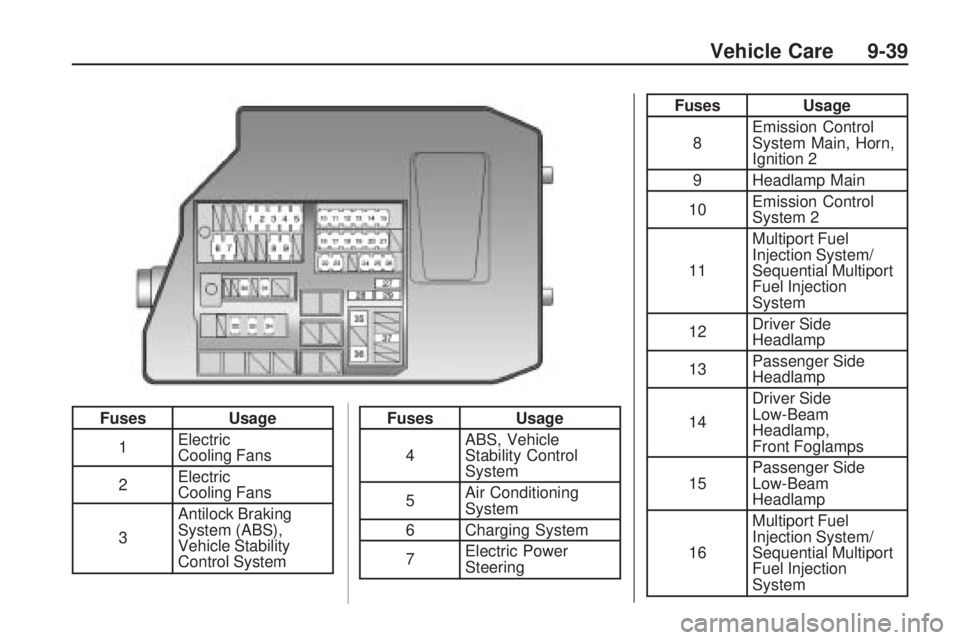
FusesUsage
1 Electric
Cooling Fans
2 Electric
Cooling Fans
3 Antilock Braking
System (ABS),
Vehicle Stability
Control SystemFuses
Usage
4 ABS, Vehicle
Stability Control
System
5 Air Conditioning
System
6 Charging System
7 Electric Power
Steering
Fuses
Usage
8 Emission Control
System Main, Horn,
Ignition 2
9 Headlamp Main
10 Emission Control
System 2
11 Multiport Fuel
Injection System/
Sequential Multiport
Fuel Injection
System
12 Driver Side
Headlamp
13 Passenger Side
Headlamp
14 Driver Side
Low-Beam
Headlamp,
Front Foglamps
15 Passenger Side
Low-Beam
Headlamp
16 Multiport Fuel
Injection System/
Sequential Multiport
Fuel Injection
System
Vehicle Care 9-39
Page 224 of 318
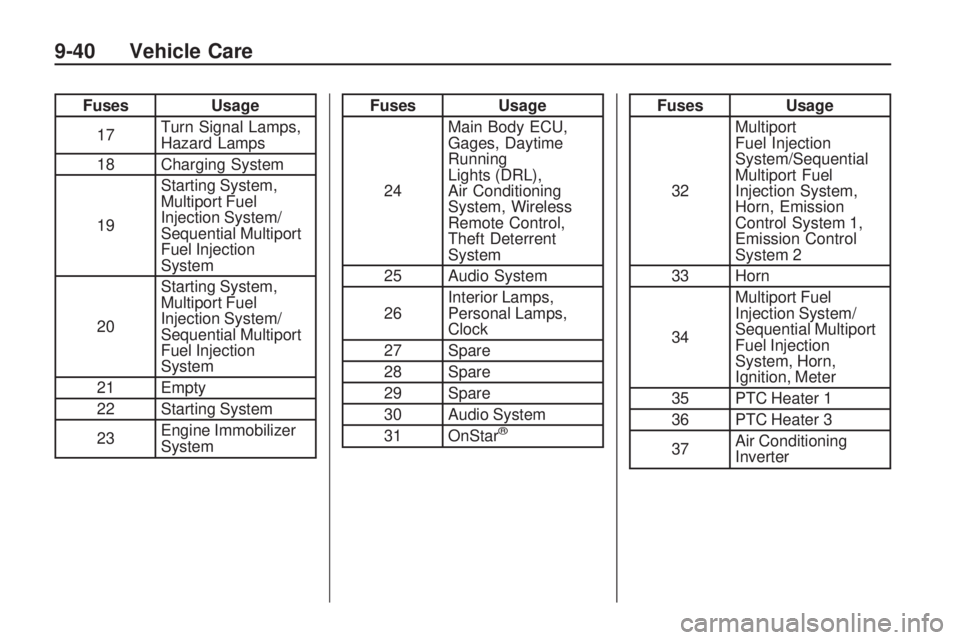
FusesUsage
17 Turn Signal Lamps,
Hazard Lamps
18 Charging System
19 Starting System,
Multiport Fuel
Injection System/
Sequential Multiport
Fuel Injection
System
20 Starting System,
Multiport Fuel
Injection System/
Sequential Multiport
Fuel Injection
System
21 Empty
22 Starting System
23 Engine Immobilizer
SystemFuses
Usage
24 Main Body ECU,
Gages, Daytime
Running
Lights (DRL),
Air Conditioning
System, Wireless
Remote Control,
Theft Deterrent
System
25 Audio System
26 Interior Lamps,
Personal Lamps,
Clock
27 Spare
28 Spare
29 Spare
30 Audio System
31 OnStar
®
Fuses Usage
32 Multiport
Fuel Injection
System/Sequential
Multiport Fuel
Injection System,
Horn, Emission
Control System 1,
Emission Control
System 2
33 Horn
34 Multiport Fuel
Injection System/
Sequential Multiport
Fuel Injection
System, Horn,
Ignition, Meter
35 PTC Heater 1
36 PTC Heater 3
37 Air Conditioning
Inverter
9-40 Vehicle Care