ESP PORSCHE 911 CARRERA 2006 5.G Owner's Manual
[x] Cancel search | Manufacturer: PORSCHE, Model Year: 2006, Model line: 911 CARRERA, Model: PORSCHE 911 CARRERA 2006 5.GPages: 308, PDF Size: 3.69 MB
Page 113 of 308
Controls, Instruments
113
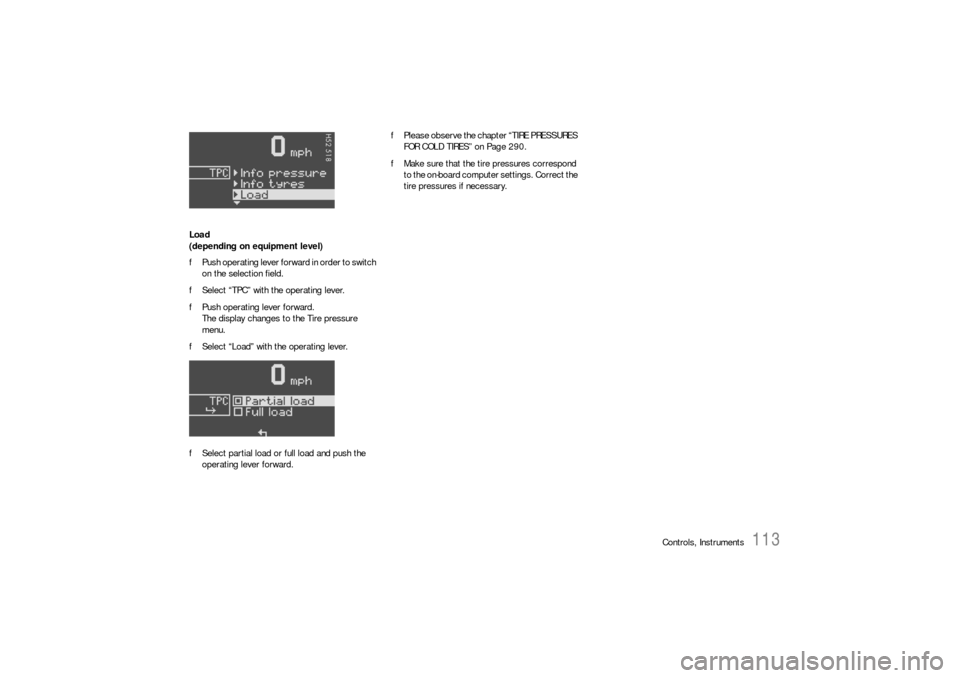
Load
(depending on equipment level)
fPush operating lever forward in order to switch
on the selection field.
fSelect “TPC” with the operating lever.
fPush operating lever forward.
The display changes to the Tire pressure
menu.
fSelect “Load” with the operating lever.
fSelect partial load or full load and push the
operating lever forward.fPlease observe the chapter “TIRE PRESSURES
FOR COLD TIRES” on Page 290.
fMake sure that the tire pressures correspond
to the on-board computer settings. Correct the
tire pressures if necessary.
Page 116 of 308
116
Controls, Instruments The warning light in the speedometer lights up:
– When a loss in pressure has been detected
– If the tire pressure monitoring is faulty
– When learning newly mounted wheels/wheel
sensors, as long as the vehicle’s own wheels
have not yet been recognized.
The tire pressure warning light in the instrument
panel goes out only when the cause of the fault
has been rectified.
No monitoringIn the event of faults the tire pressure monitoring
cannot monitor the tire pressure.
The warning light on the instrument panel lights up
and a corresponding message appears on the
on-board computer.
Monitoring is not active when:
– the tire pressure monitoring is faulty,
– wheel transmitters for the tire pressure
monitoring are missing,
– temporarily after changing a wheel (learning
phase),
– more than four wheel transmitters are
detected,
– there is external interference by other radio
sources, e.g. wireless headphones,
– tire temperatures are too high.
fPlease observe the chapter “WARNINGS ON
THE INSTRUMENT PANEL AND THE ON-
BOARD COMPUTER” on Page 122.
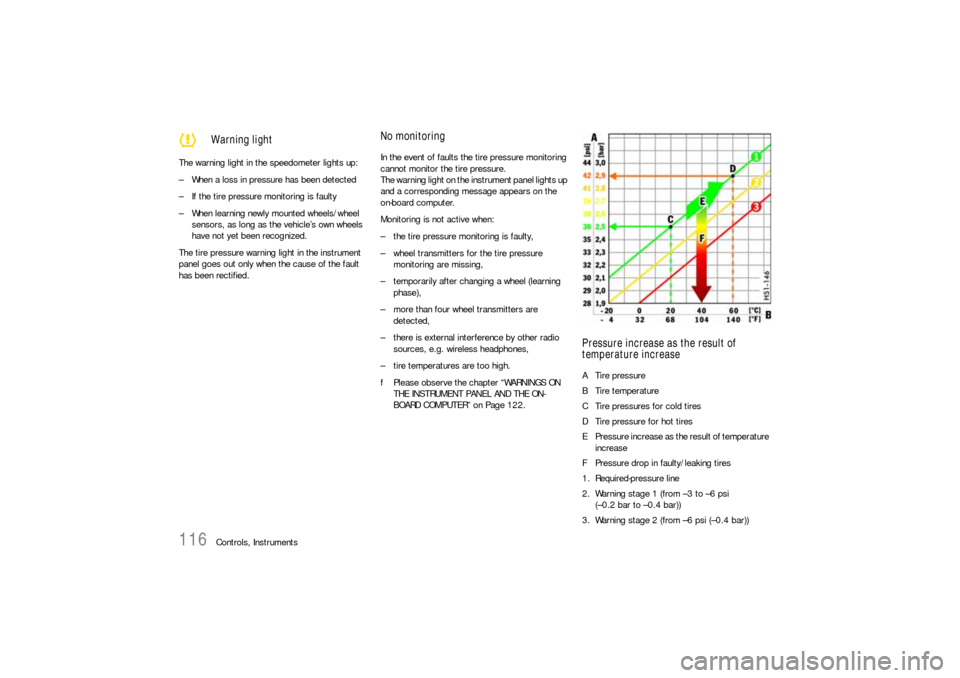
Pressure increase as the result of
temperature increaseA Tire pressure
B Tire temperature
C Tire pressures for cold tires
D Tire pressure for hot tires
E Pressure increase as the result of temperature
increase
F Pressure drop in faulty/leaking tires
1. Required-pressure line
2. Warning stage 1 (from –3 to –6 psi
(–0.2 bar to –0.4 bar))
3. Warning stage 2 (from –6 psi (–0.4 bar))
Warning light
Page 119 of 308
Controls, Instruments
119
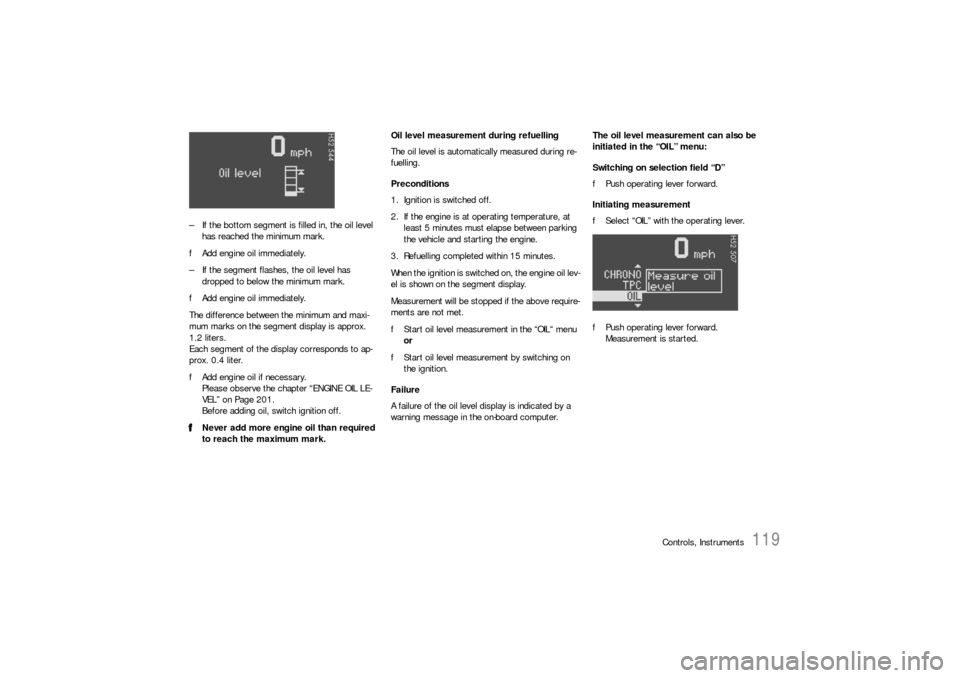
– If the bottom segment is filled in, the oil level
has reached the minimum mark.
fAdd engine oil immediately.
– If the segment flashes, the oil level has
dropped to below the minimum mark.
fAdd engine oil immediately.
The difference between the minimum and maxi-
mum marks on the segment display is approx.
1.2 liters.
Each segment of the display corresponds to ap-
prox. 0.4 liter.
fAdd engine oil if necessary.
Please observe the chapter “ENGINE OIL LE-
VEL” on Page 201.
Before adding oil, switch ignition off.
fNever add more engine oil than required
to reach the maximum mark.Oil level measurement during refuelling
The oil level is automatically measured during re-
fuelling.
Preconditions
1. Ignition is switched off.
2. If the engine is at operating temperature, at
least 5 minutes must elapse between parking
the vehicle and starting the engine.
3. Refuelling completed within 15 minutes.
When the ignition is switched on, the engine oil lev-
el is shown on the segment display.
Measurement will be stopped if the above require-
ments are not met.
fStart oil level measurement in the “OIL“ menu
or
fStart oil level measurement by switching on
the ignition.
Failure
A failure of the oil level display is indicated by a
warning message in the on-board computer.The oil level measurement can also be
initiated in the “OIL” menu:
Switching on selection field “D”
fPush operating lever forward.
Initiating measurement
fSelect “OIL” with the operating lever.
fPush operating lever forward.
Measurement is started.
Page 122 of 308

122
Controls, Instruments
Warnings on the instrument panel and the on-board computerIf a warning message appears, always refer to the corresponding chapters in the Owner’s Manual.
Warning messages are issued only if all measurement preconditions are met. Therefore, check all fluid levels regularly –
in particular, always check the engine oil level after refuelling.
Instrument
panelOn-board
computerText display on on-board
computerMeaning/measure
Seat belt Driver and passengers must fasten their seat
belts.
Handbrake Handbrake is still on.
Ignition key
not removed
Replace battery
in ignition keyReplace the remote-control battery.
Ignition lock faulty,
please go to workshopHave the fault remedied at an authorized
Porsche dealer.
Ignition lock faulty,
visit workshop nowHave the fault remedied at an authorized
Porsche dealer.
Relieve steering Relieve the steering l o c k b y m o v i n g t h e s t e e r i n g
wheel to the left or right.
Steering locked The steering wheel lock remains engaged.
Have the fault remedied at an authorized
Porsche dealer.
Lights on
Parking light on
Page 136 of 308
136
Controls, Instruments
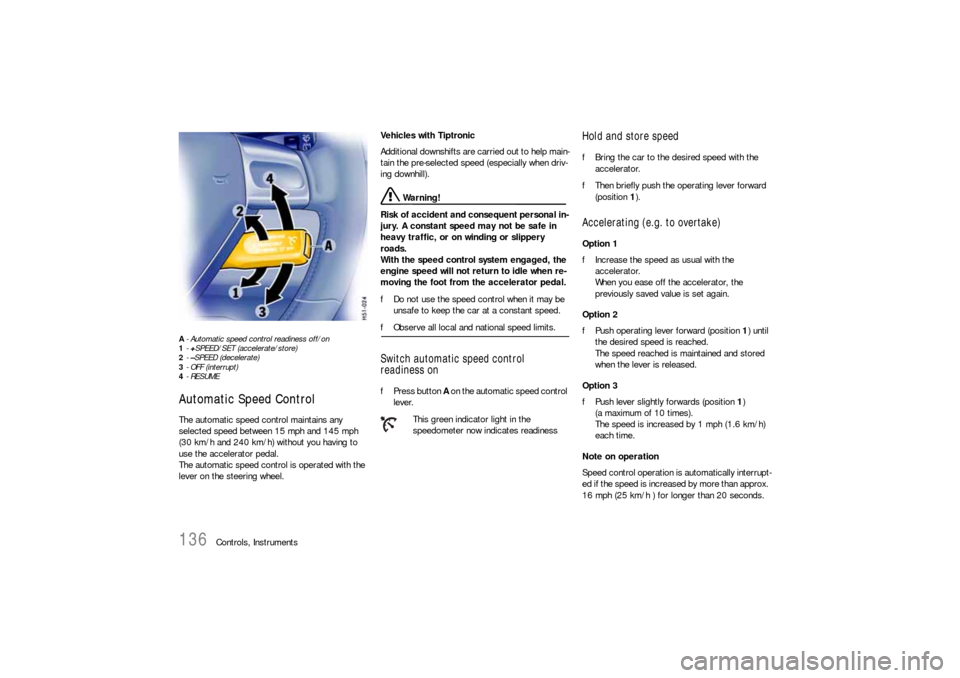
A- Automatic speed control readiness off/on
1-+SPEED/SET (accelerate/store)
2-–SPEED (decelerate)
3- OFF (interrupt)
4-RESUMEAutomatic Speed Control The automatic speed control maintains any
selected speed between 15 mph and 145 mph
(30 km/h and 240 km/h) without you having to
use the accelerator pedal.
The automatic speed control is operated with the
lever on the steering wheel. Vehicles with Tiptronic
Additional downshifts are carried out to help main-
tain the pre-selected speed (especially when driv-
ing downhill).
Warning!
Risk of accident and consequent personal in-
jury. A constant speed may not be safe in
heavy traffic, or on winding or slippery
roads.
With the speed control system engaged, the
engine speed will not return to idle when re-
moving the foot from the accelerator pedal.
fDo not use the speed control when it may be
unsafe to keep the car at a constant speed.
fObserve all local and national speed limits. Switch automatic speed control
readiness onfPress button A on the automatic speed control
lever.
Hold and store speed fBring the car to the desired speed with the
accelerator.
fThen briefly push the operating lever forward
(position 1).Accelerating (e.g. to overtake) Option 1
fIncrease the speed as usual with the
accelerator.
When you ease off the accelerator, the
previously saved value is set again.
Option 2
fPush operating lever forward (position 1) until
the desired speed is reached.
The speed reached is maintained and stored
when the lever is released.
Option 3
fPush lever slightly forwards (position 1)
(a maximum of 10 times).
The speed is increased by 1 mph (1.6 km/h)
each time.
Note on operation
Speed control operation is automatically interrupt-
ed if the speed is increased by more than approx.
16 mph (25 km/h ) for longer than 20 seconds.
This green indicator light in the
speedometer now indicates readiness
Page 137 of 308

Controls, Instruments
137
Decelerating Option 1
fPull operating lever towards the steering wheel
(position 2) until the desired speed is reached.
The speed reached is maintained and stored
when the lever is released.
Option 2
fBriefly move lever towards the steering wheel
(position 2) (a maximum of 10 times).
The speed is reduced by 1 mph (1.6 km/h)
each time.
Vehicles with Tiptronic
Additional downshifts are carried out to improve
deceleration (especially when driving downhill).
Interrupting automatic speed control
operation fPull operating lever downwards briefly
(position 3) or
fOperate brake or clutch pedal or
fSwitch Tiptronic transmission to selector lever
position N.
fPlease observe the chapter “TIPTRONIC S” on
Page 165.
The speed driven before the interruption remains
stored in the memory.
Automatic speed control operation is
interrupted automatically:
– If the set vehicle speed is exceeded by more
than approx. 16 mph (25 km/h) for longer than
20 seconds.
– If the actual vehicle speed falls to approx.
6 mph (10 km/h) below the set vehicle speed
for longer than 5 seconds (upward slopes).
– For PSM control operations.
Resuming the stored speed fBriefly push operating lever upwards
(position4).
The speed control accelerates/decelerates
the vehicle to the stored speed.
The stored speed should only be recalled when
traffic conditions and the road surface so permit.Switching automatic speed control
readiness off fPress button A on the automatic speed control
lever.
The green readiness light in the speedometer
goes off.
When the vehicle is parked and the ignition
switched off, the memory is cleared.
Important note
On upward or downward slopes, the set speed
cannot always be maintained by the automatic
speed control.
To obtain sufficient engine braking or a better en-
gine-speed range, therefore, you have to select a
lower gear.
Page 139 of 308

Controls, Instruments
139
Setting temperaturefPress button H upwards or downwards
respectively.
To suit personal comfort, the interior temperature
can be adjusted between 61°F and 85°F/16 and
29.5°C.
Recommendation: 72°F/22°C.
If “LO” or “HI” appears on the display, the system
is operating at maximum cooling or heating pow-
er.
Automatic control is no longer active.
Note
If the preselected temperature is changed, the
blower speed can increase automatically in auto-
matic mode.
The desired temperature is reached more quickly
this way.
Sensors
To avoid affecting the performance of the air-con-
ditioning system:
fDo not cover the sun sensor on the instrument
panel or the temperature sensor D.fPress button B (switch on or off).
The windshield is defogged or defrosted as
quickly as possible.
Air flows to the windshield only.
The light-emitting diode in the button lights up.
ECO – switching compressor for air-
conditioning system on and offThe air-conditioning compressor switches off
automatically at temperatures below approx.
37°F/3°C and cannot be switched on, even
manually.
Whenever outside temperatures exceed approx.
37°F/3°C, the air-conditioning compressor is
always switched on in automatic mode.
The compressor can be switched off to save fuel,
but control comfort is then limited:
fPress ECO button E.
The compressor is switched off.
The light-emitting diode in the button lights up.
fIf the interior temperature is too high, switch
compressor back on or press AUTO button.
To dry incoming air in damp weather, do not
switch off the air-conditioning compressor.
This prevents fogging of windows.
Defrosting the windshield
fPress button M upwards or downwards
respectively.
The preset blower speed is increased or
decreased.
The speed stages are indicated by a bar display.
If the button is pressed downwards at the lowest
blower stage, the blower and automatic control
are switched off. “OFF” will appear on the display
field.
Pressing the button upwards or pressing the
AUTO button switches the blower and automatic
control back on again.
Warning!
Risk of accident due to impaired vision.
In recirculating-air setting, the windows may
fog up.
fOnly select recirculating-air setting for short
periods.
fIf the windows fog up, switch recirculating-air
setting off immediately by pressing the
circulating-air button again and select the “Defrost windshield” function.
f f f
Adjusting blower speed
Recirculating-air setting
Page 144 of 308
144
Controls, Instruments
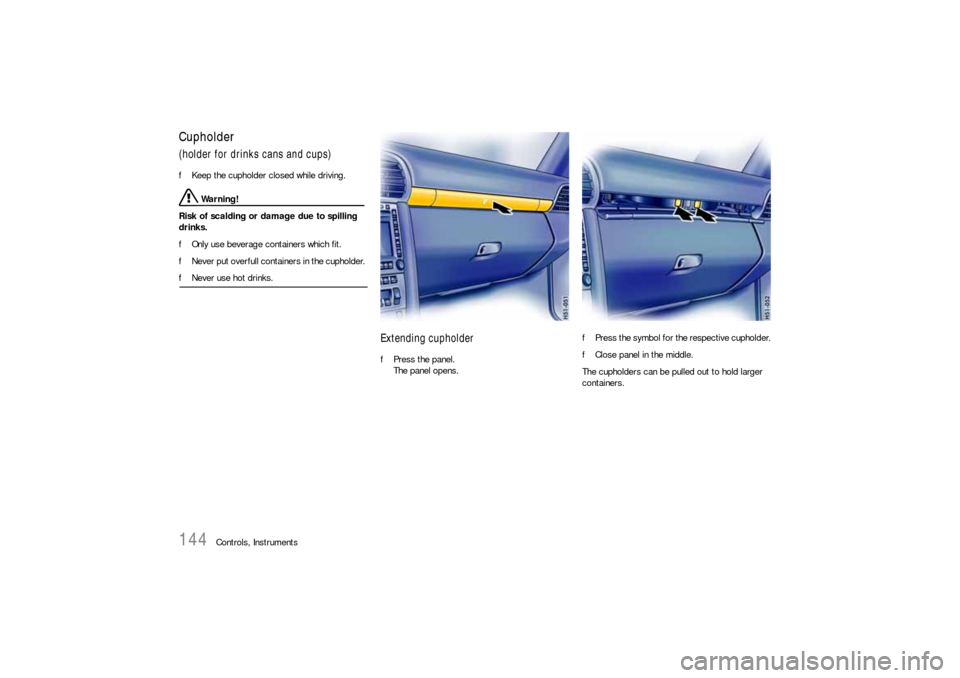
Cupholder(holder for drinks cans and cups)fKeep the cupholder closed while driving.
Warning!
Risk of scalding or damage due to spilling
drinks.
fOnly use beverage containers which fit.
fNever put overfull containers in the cupholder.
fNever use hot drinks.
Extending cupholderfPress the panel.
The panel opens.fPress the symbol for the respective cupholder.
fClose panel in the middle.
The cupholders can be pulled out to hold larger
containers.
Page 148 of 308
148
Controls, Instruments
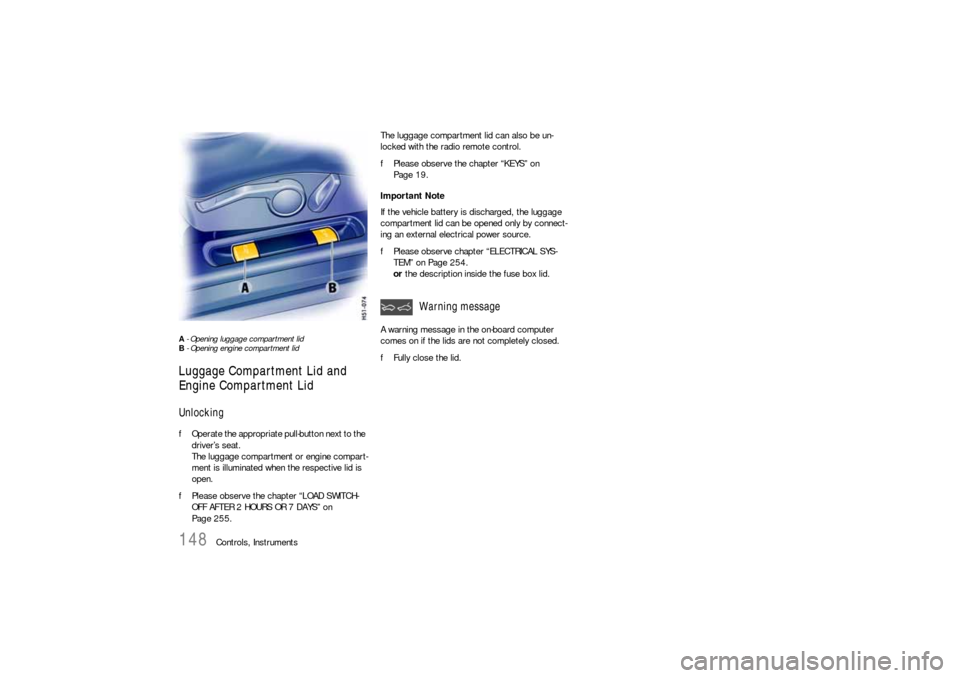
A - Opening luggage compartment lid
B - Opening engine compartment lid Luggage Compartment Lid and
Engine Compartment LidUnlocking fOperate the appropriate pull-button next to the
driver’s seat.
The luggage compartment or engine compart-
ment is illuminated when the respective lid is
open.
fPlease observe the chapter “LOAD SWITCH-
OFF AFTER 2 HOURS OR 7 DAYS” on
Page 255.The luggage compartment lid can also be un-
locked with the radio remote control.
fPlease observe the chapter “KEYS” on
Page 19.
Important Note
If the vehicle battery is discharged, the luggage
compartment lid can be opened only by connect-
ing an external electrical power source.
fPlease observe chapter “ELECTRICAL SYS-
TEM” on Page 254.
or the description inside the fuse box lid.
A warning message in the on-board computer
comes on if the lids are not completely closed.
fFully close the lid.
Warning message
Page 155 of 308
Controls, Instruments
155
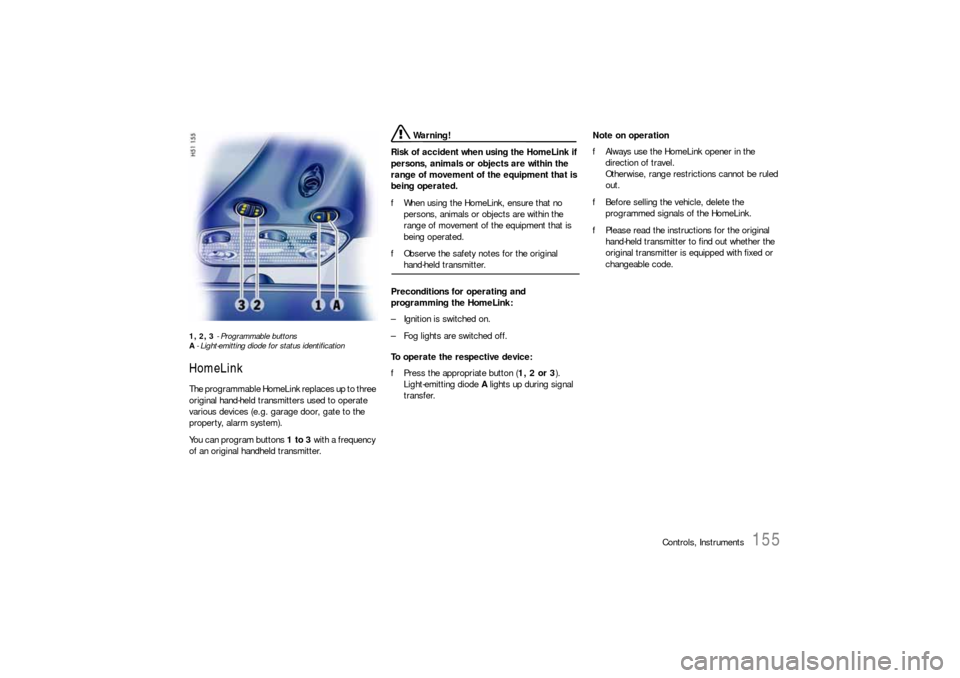
1, 2, 3 - Programmable buttons
A- Light-emitting diode for status identificationHomeLinkThe programmable HomeLink replaces up to three
original hand-held transmitters used to operate
various devices (e.g. garage door, gate to the
property, alarm system).
You can program buttons 1 to 3 with a frequency
of an original handheld transmitter.
Warning!
Risk of accident when using the HomeLink if
persons, animals or objects are within the
range of movement of the equipment that is
being operated.
fWhen using the HomeLink, ensure that no
persons, animals or objects are within the
range of movement of the equipment that is
being operated.
fObserve the safety notes for the original hand-held transmitter.
Preconditions for operating and
programming the HomeLink:
– Ignition is switched on.
– Fog lights are switched off.
To operate the respective device:
fPress the appropriate button (1, 2 or 3).
Light-emitting diode A lights up during signal
transfer.Note on operation
fAlways use the HomeLink opener in the
direction of travel.
Otherwise, range restrictions cannot be ruled
out.
fBefore selling the vehicle, delete the
programmed signals of the HomeLink.
fPlease read the instructions for the original
hand-held transmitter to find out whether the
original transmitter is equipped with fixed or
changeable code.