instrument panel PORSCHE 911 GT3 2010 5.G Owner's Manual
[x] Cancel search | Manufacturer: PORSCHE, Model Year: 2010, Model line: 911 GT3, Model: PORSCHE 911 GT3 2010 5.GPages: 251, PDF Size: 14.33 MB
Page 128 of 251
Instruments, On-Board Computer
127
CHRONO
StopwatchYou can use the stopwatch to measure time inter-
vals, e.g. on the race circuit or on work-related
journeys. Measured lap times can be stored and
evaluated if the vehicle is equipped with Porsche
Communication Management (PCM).
fPlease see the chapter “Sport display” in the
separate PCM Owner’s Manual.Stopwatch on the instrument panel
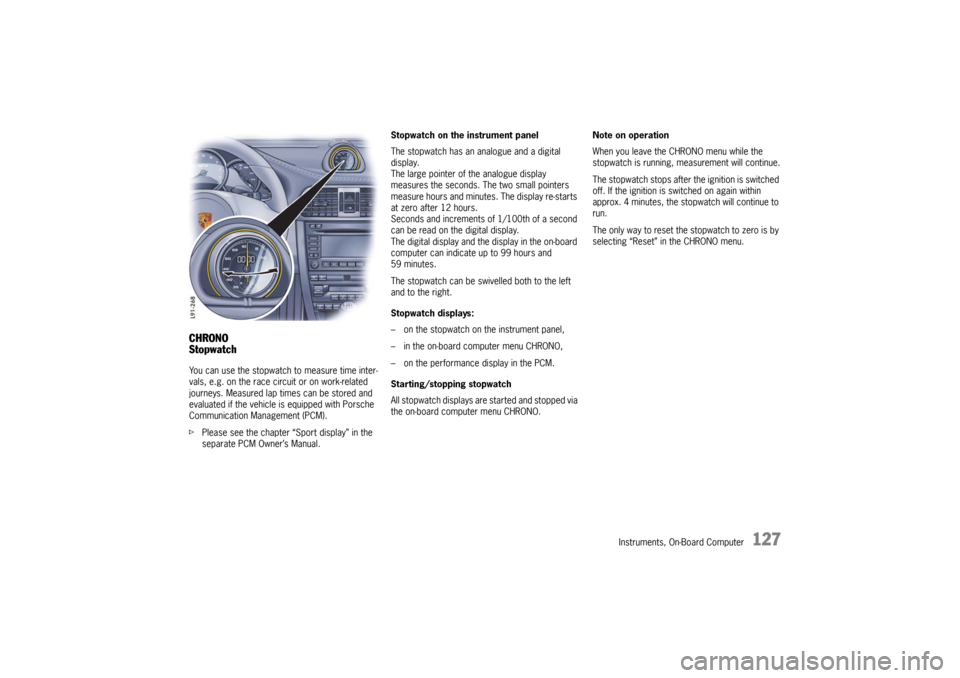
The stopwatch has an analogue and a digital
display.
The large pointer of the analogue display
measures the seconds. The two small pointers
measure hours and minutes. The display re-starts
at zero after 12 hours.
Seconds and increments of 1/100th of a second
can be read on the digital display.
The digital display and the display in the on-board
computer can indicate up to 99 hours and
59 minutes.
The stopwatch can be swivelled both to the left
and to the right.
Stopwatch displays:
– on the stopwatch on the instrument panel,
– in the on-board computer menu CHRONO,
– on the performance display in the PCM.
Starting/stopping stopwatch
All stopwatch displays are started and stopped via
the on-board computer menu CHRONO.Note on operation
When you leave the CHRONO menu while the
stopwatch is running, measurement will continue.
The stopwatch stops after the ignition is switched
off. If the ignition is switched on again within
approx. 4 minutes, the stopwatch will continue to
run.
The only way to reset the stopwatch to zero is by
selecting “Reset” in the CHRONO menu.
10_GT3_21.book Seite 127 Donnerstag, 4. Juni 2009 12:48 12
Page 131 of 251
130
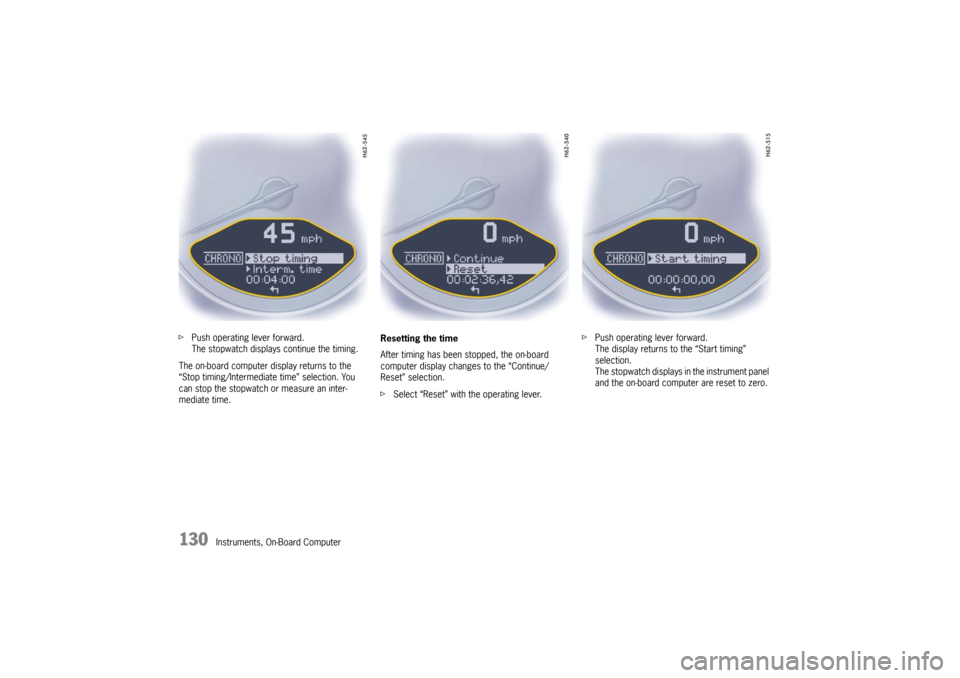
Instruments, On-Board Computer fPush operating lever forward.
The stopwatch displays continue the timing.
The on-board computer display returns to the
“Stop timing/Intermediate time” selection. You
can stop the stopwatch or measure an inter-
mediate time.Resetting the time
After timing has been stopped, the on-board
computer display changes to the “Continue/
Reset” selection.
fSelect “Reset” with the operating lever.fPush operating lever forward.
The display returns to the “Start timing”
selection.
The stopwatch displays in the instrument panel
and the on-board computer are reset to zero.
10_GT3_21.book Seite 130 Donnerstag, 4. Juni 2009 12:48 12
Page 133 of 251
132
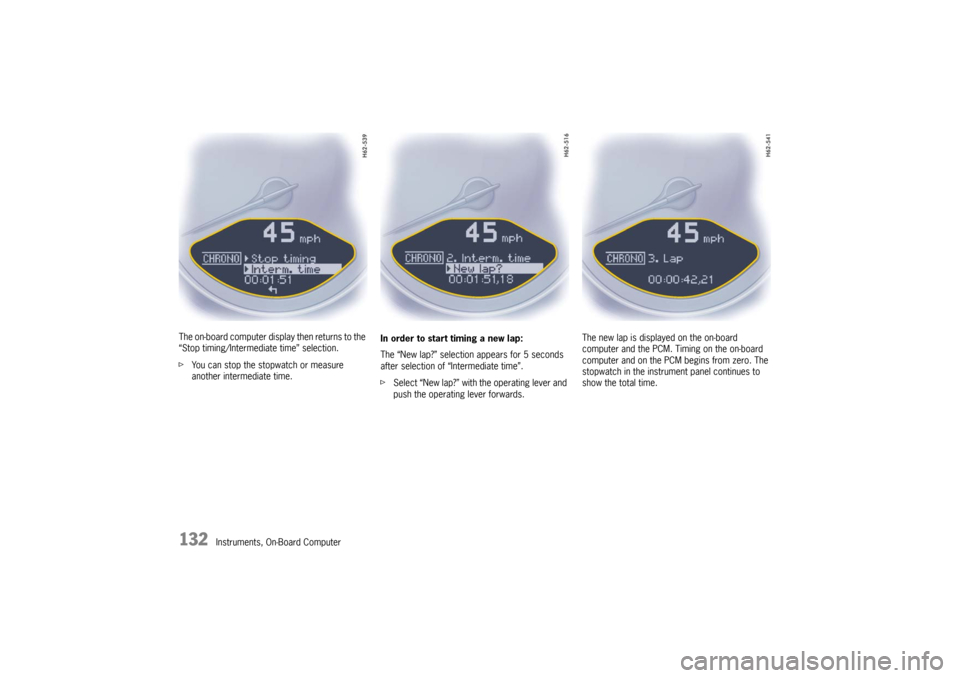
Instruments, On-Board Computer The on-board computer display then returns to the
“Stop timing/Intermediate time” selection.
fYou can stop the stopwatch or measure
another intermediate time.In order to start timing a new lap:
The “New lap?” selection appears for 5 seconds
after selection of “Intermediate time”.
fSelect “New lap?” with the operating lever and
push the operating lever forwards.The new lap is displayed on the on-board
computer and the PCM. Timing on the on-board
computer and on the PCM begins from zero. The
stopwatch in the instrument panel continues to
show the total time.
10_GT3_21.book Seite 132 Donnerstag, 4. Juni 2009 12:48 12
Page 140 of 251
Instruments, On-Board Computer
139
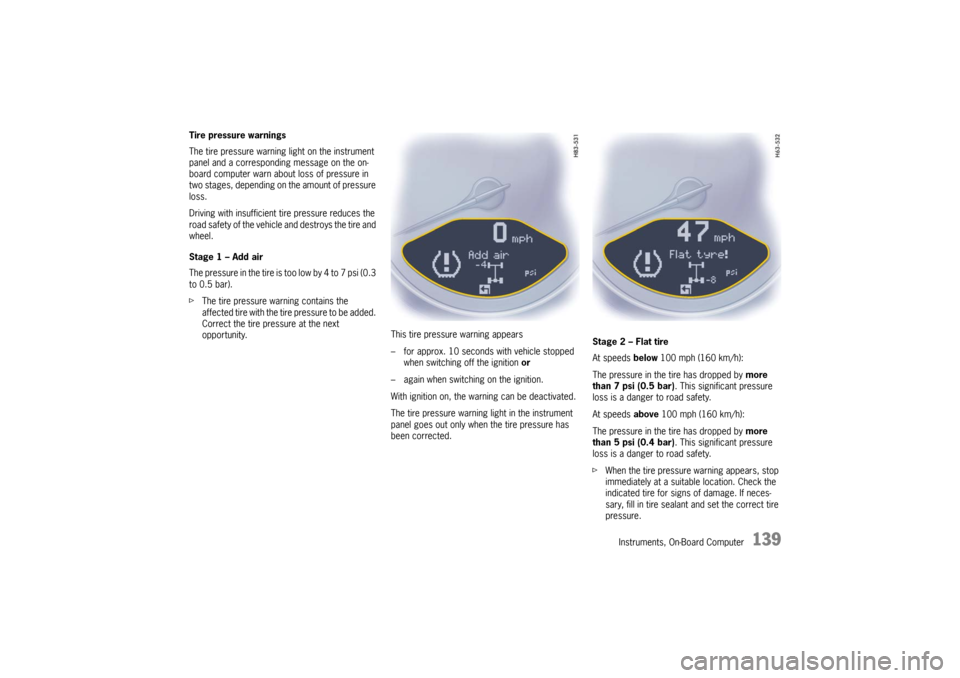
Tire pressure warnings
The tire pressure warning light on the instrument
panel and a corresponding message on the on-
board computer warn about loss of pressure in
two stages, depending on the amount of pressure
loss.
Driving with insufficient tire pressure reduces the
road safety of the vehicle and destroys the tire and
wheel.
Stage 1 – Add air
The pressure in the tire is too low by 4 to 7 psi (0.3
to 0.5 bar).
fThe tire pressure warning contains the
affected tire with the tire pressure to be added.
Correct the tire pressure at the next
opportunity. This tire pressure warning appears
– for approx. 10 seconds with vehicle stopped
when switching off the ignition or
– again when switching on the ignition.
With ignition on, the warning can be deactivated.
The tire pressure warning light in the instrument
panel goes out only when the tire pressure has
been corrected.Stage 2 – Flat tire
At speeds below 100 mph (160 km/h):
The pressure in the tire has dropped by more
than 7 psi (0.5 bar). This significant pressure
loss is a danger to road safety.
At speeds above 100 mph (160 km/h):
The pressure in the tire has dropped by more
than 5 psi (0.4 bar). This significant pressure
loss is a danger to road safety.
fWhen the tire pressure warning appears, stop
immediately at a suitable location. Check the
indicated tire for signs of damage. If neces-
sary, fill in tire sealant and set the correct tire
pressure.
10_GT3_21.book Seite 139 Donnerstag, 4. Juni 2009 12:48 12
Page 141 of 251

140
Instruments, On-Board Computer This tire pressure warning also appears when
driving and can be acknowledged.
The tire pressure warning light on the instrument
panel goes out only when the tire pressure has
been corrected.
System learningThe Tire Pressure Monitoring begins to “learn” the
wheels after a wheel change, wheel transmitter
replacement or update of the tire settings. During
this process, the Tire Pressure Monitoring recog-
nizes the tires and their locations.
The on-board computer displayes the message
“TPM is learning, monitoring not act.”.
The Tire Pressure Monitoring requires a certain
amount of time to learn the wheels. During this
time, the current tire pressures are not available
on the on-board-computer:
– The tire pressure warning light remains lit until
all wheels have been learned.
– The display of the tire pressure function of the
on-board computer shows lines.
– The required pressures for cold tires at 68 °F
(20 °C) are indicated in the Info pressure
display in the tire pressure menu.
Position and pressure information is displayed as
soon as the Tire Pressure Monitoring has
assigned the wheels identified as belonging to the
vehicle to the correct wheel positions.The wheel learning process takes place
exclusively when the vehicle is being driven
(vehicle speed above 16 mph (25 km/h)).
fCheck the tire pressure for all wheels on the
“Info pressure” display.
fCorrect the tire pressure to the required
pressure if necessary.
Changing a wheel and replacing tiresfNew wheels must be fitted with radio transmit-
ters for the Tire Pressure Monitoring.
Before tires are changed, the battery charge
state of the wheel transmitters should be
checked at an authorized Porsche dealer.
fSwitch the ignition off when changing a wheel.
The tire settings on the on-board computer must
be updated after changing a wheel.
If the tire settings are not updated, the message
“Wheel change? Input new TPM settings!” is
displayed on the on-board computer.
fUpdate the on-board computer settings when
the vehicle is stationary the next time.
10_GT3_21.book Seite 140 Donnerstag, 4. Juni 2009 12:48 12
Page 142 of 251

Instruments, On-Board Computer
141
Warning!
Your vehicle has also been equipped with a Tire
Pressure Monitoring (TPM) malfunction indicator
when the system is not operating properly.
The TPM malfunction indicator is combined with a
low tire pressure telltale.
When the system detects a malfunction, the
telltale will flash for approx. one minute and then
remain continuously illuminated. This sequence
will continue upon subsequent vehicle start-ups as
long as the malfunction exists.
When the malfunction indicator is illuminated, the
system may not be able to detect or signal low tire
pressure as intended.
TPM malfuntions may occur for a variety of
reasons, including the installation of replacement
or alternate tires or wheels on the vehicle that
prevent the TPM from functioning properly.
Always check the TPM malfunction telltale after
replacing one or more tires or wheels on your
vehicle to ensure that the replacement or alter-
nate tires and wheels allow the TPM to continue to
function properly.The warning light in the speedometer lights up:
– When a loss in pressure has been detected.
– When learning newly mounted wheels/wheel
sensors, as long as the vehicle’s own wheels
have not yet been recognized.
In the event of a defect in Tire Pressure Monitoring
or a temporary fault, the warning light in the
speedometer flashes for approx. one minute and
then remains continuously illuminated.
The tire pressure warning light in the instrument
panel goes out only when the cause of the fault
has been rectified.
Partial monitoringMonitoring of the other wheels is continued if there
is a fault in one or two wheel transmitters.
– The tire pressure warning light lights up.
– The message “TPM partial monitoring” is
displayed on the on-board computer.
– No tire pressures are displayed on the on-
board computer for wheels with faulty wheel
transmitters.
No monitoringIn the event of faults the Tire Pressure Monitoring
cannot monitor the tire pressure.
The warning light on the instrument panel flashes
for approx. one minute and then remains conti-
nuously illuminated and a corresponding message
appears on the on-board computer.
Monitoring is not active when:
– the Tire Pressure Monitoring is faulty,
– wheel transmitters for the Tire Pressure
Monitoring are missing,
– during the learning phase after the tire settings
have been updated,
– after a wheel change without updating the tire
settings,
– more than four wheel transmitters are
detected,
– there is external interference by other radio
sources, e.g. wireless headphones,
– tire temperatures are too high.
fPlease see the chapter “WARNINGS ON THE
INSTRUMENT PANEL AND THE ON-BOARD
COMPUTER” on Page 148.
Warning light
10_GT3_21.book Seite 141 Donnerstag, 4. Juni 2009 12:48 12
Page 149 of 251

148
Warnings
Warnings on the instrument panel and the on-board computerIf a warning message appears, always refer to the corresponding chapters in the Owner’s Manual.
Warning messages are issued only if all measurement preconditions are met. Therefore, check all fluid levels regularly –
in particular, always check the engine oil level before refuelling.Acknowledging warning messagesWarning messages can be deleted from the on-board computer display.
fPush the on-board computer operating lever forward.
You can recall erased warning messages in the “INFO” menu.
Instrument
panelOn-board
computerText display on on-board
computerMeaning/measure
Seat belt Driver and passenger must fasten their seat belts.
Handbrake Handbrake is still on.
Ignition key
not removed
Replace battery
in ignition keyReplace the remote-control battery.
Ignition lock faulty,
visit workshopHave the fault remedied at an authorized Porsche dealer.
Ignition lock faulty,
visit workshop nowHave the fault remedied at an authorized Porsche dealer.
Relieve steering Relieve the steering lock by moving the steering wheel to the left or right.
Steering locked The steering wheel lock remains engaged.
Have the fault remedied at an authorized Porsche dealer.
10_GT3_21.book Seite 148 Donnerstag, 4. Juni 2009 12:48 12
Page 150 of 251

Warnings
149
Lights on Low beam/side marker lamps on
Parking light on Left/right parking light on
Check left/right dipped beam (low
beam)
also applies to:
high beam, side indicator light,
reversing lightThe reported light is faulty. Check bulb.
Have the fault remedied at an authorized Porsche dealer.
Daytime
driving lights offDaytime running lights switch off when the engine is shut off. Switch on lights if necessary.
Dynamic
cornering light
failureDynamic cornering light faulty.
Have the fault remedied at an authorized Porsche dealer.
Headlight beam
adjustment faultyHave the fault remedied at an authorized Porsche dealer.
Front lid not closed Close luggage compartment lid properly.
Rear lid not closed Close engine compartment lid properly.
Rain sensor faulty Have the fault remedied at an authorized Porsche dealer.
Refill washer fluid
LIMIT
Cannot be accepted
with vehicle stoppedThe current speed can only be accepted for the acoustic warning signal when the vehicle is in motion.
LIMIT
30Selected speed limit (e.g. 30 mph) for the acoustic warning signal has been exceeded.
Adjust your speed if necessary.
Instrument
panelOn-board
computerText display on on-board
computerMeaning/measure
10_GT3_21.book Seite 149 Donnerstag, 4. Juni 2009 12:48 12
Page 151 of 251

150
Warnings
Fuel gauge warning
lightConsider remaining range Refuel at next opportunity.
Check engine oil level Start engine oil level measurement in the on-board computer.
Engine oil pressure too low Stop immediately at a suitable place, measure oil level with the on-board computer and, if necessary,
add engine oil.
Warning light
Temperature gaugeEngine temperature too high Switch engine off and let it cool.
Check coolant level and, if necessary, add coolant.
Temperature gauge
warning light flashesCheck coolant level Switch engine off and let it cool.
Check coolant level and, if necessary, add coolant.
Check engine
visit workshopStop immediately at a suitable place and check tank cap for proper fastening. If the tank cap was
fastened correctly, consult your authorized Porsche dealer.
Reduced engine power Consult your authorized Porsche dealer.
Temperature gauge
warning light flashesFailure of
engine compartment blowerConsult your authorized Porsche dealer.
Warning Battery/generator Stop at a safe place and switch the engine off. Do not continue driving.
Have the fault remedied at an authorized Porsche dealer.
Failure
oil pressure
indicatorHave the fault remedied at an authorized Porsche dealer.
Failure
oil level
indicatorHave the fault remedied at an authorized Porsche dealer.
Oil temperature
indicator faultyHave the fault remedied at an authorized Porsche dealer.Instrument
panelOn-board
computerText display on on-board
computerMeaning/measure
10_GT3_21.book Seite 150 Donnerstag, 4. Juni 2009 12:48 12
Page 152 of 251

Warnings
151
Failure indicator Coolant indicator failed.
Have the fault remedied at an authorized Porsche dealer.
Failure
outside temp.
indicatorOutside temperature indicator failed.
Have the fault remedied at an authorized Porsche dealer.
Service
wear on
brake padsHave the brake pads changed immediately at an authorized Porsche dealer.
Warning
Brake fluid levelStop immediately in a suitable place.
Do not continue driving. Have the fault remedied at an authorized Porsche dealer.
Warning
Brake distributionStop immediately in a suitable place.
Do not continue driving. Have the fault remedied at an authorized Porsche dealer.
ABS failure Have the fault remedied at an authorized Porsche dealer.
SC off
Continuous display: SC offStability Control (SC) switched off.
SC+TC off
Continuous display: SC+TC offStability Control (SC) and Traction Control (TC) switched off.
SC+TC on Stability Control (SC) and Traction Control (TC) switched on.
PSM failure Have the fault remedied at an authorized Porsche dealer.
Instrument
panelOn-board
computerText display on on-board
computerMeaning/measure
10_GT3_21.book Seite 151 Donnerstag, 4. Juni 2009 12:48 12