instrument panel PORSCHE 911 GT3 2010 5.G User Guide
[x] Cancel search | Manufacturer: PORSCHE, Model Year: 2010, Model line: 911 GT3, Model: PORSCHE 911 GT3 2010 5.GPages: 251, PDF Size: 14.33 MB
Page 61 of 251
60
Operation, Safety Readiness for operation
PSM is switched on automatically every time you
start the engine.
PSM should always be switched on during
“normal” driving.
However, it may make sense to switch off PSM
temporarily in exceptional situations, for example:
– On a loose surface or in deep snow,
– when “rocking the vehicle free” and
– when using snow chains.
Switching off PSMPSM can be switched off in 2 stages:
– Stage 1 SC OFF:
Switch off Stability Control (SC).
– Stage 2 SC+TC OFF:
Also switch off Traction Control (TC).
Danger!
There is a risk of accident due to loss of
control of the vehicle. There is no stabilizing
brake control in either switch-off stages
(even when the brakes are used).
fPSM should always be switched on during
“normal” driving. This particularly applies in wet conditions.
Switching off Stability Control (SC)Precondition:
The light-emitting diode in the SC+TC OFF button
must be off.
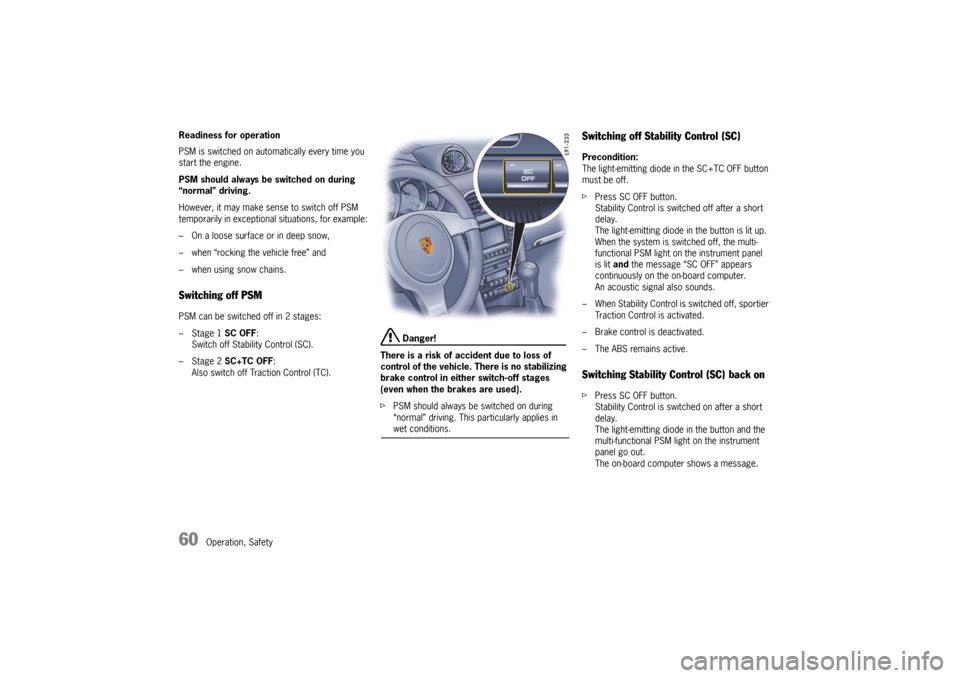
fPress SC OFF button.
Stability Control is switched off after a short
delay.
The light-emitting diode in the button is lit up.
When the system is switched off, the multi-
functional PSM light on the instrument panel
is lit and the message “SC OFF” appears
continuously on the on-board computer.
An acoustic signal also sounds.
– When Stability Control is switched off, sportier
Traction Control is activated.
– Brake control is deactivated.
– The ABS remains active.Switching Stability Control (SC) back onfPress SC OFF button.
Stability Control is switched on after a short
delay.
The light-emitting diode in the button and the
multi-functional PSM light on the instrument
panel go out.
The on-board computer shows a message.
10_GT3_21.book Seite 60 Donnerstag, 4. Juni 2009 12:48 12
Page 62 of 251
Operation, Safety
61
Switching off Stability Control (SC) and
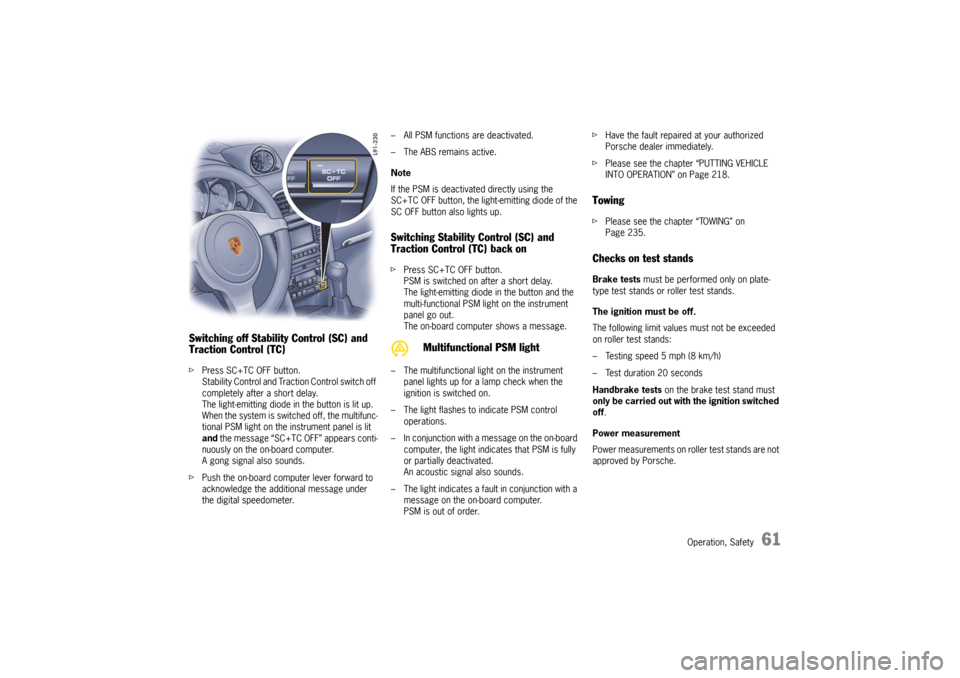
Traction Control (TC)fPress SC+TC OFF button.
Stability Control and Traction Control switch off
completely after a short delay.
The light-emitting diode in the button is lit up.
When the system is switched off, the multifunc-
tional PSM light on the instrument panel is lit
and the message “SC+TC OFF” appears conti-
nuously on the on-board computer.
A gong signal also sounds.
fPush the on-board computer lever forward to
acknowledge the additional message under
the digital speedometer.– All PSM functions are deactivated.
– The ABS remains active.
Note
If the PSM is deactivated directly using the
SC+TC OFF button, the light-emitting diode of the
SC OFF button also lights up.
Switching Stability Control (SC) and
Traction Control (TC) back onfPress SC+TC OFF button.
PSM is switched on after a short delay.
The light-emitting diode in the button and the
multi-functional PSM light on the instrument
panel go out.
The on-board computer shows a message.
– The multifunctional light on the instrument
panel lights up for a lamp check when the
ignition is switched on.
– The light flashes to indicate PSM control
operations.
– In conjunction with a message on the on-board
computer, the light indicates that PSM is fully
or partially deactivated.
An acoustic signal also sounds.
– The light indicates a fault in conjunction with a
message on the on-board computer.
PSM is out of order.fHave the fault repaired at your authorized
Porsche dealer immediately.
fPlease see the chapter “PUTTING VEHICLE
INTO OPERATION” on Page 218.
TowingfPlease see the chapter “TOWING” on
Page 235.Checks on test standsBrake tests must be performed only on plate-
type test stands or roller test stands.
The ignition must be off.
The following limit values must not be exceeded
on roller test stands:
– Testing speed 5 mph (8 km/h)
– Test duration 20 seconds
Handbrake tests on the brake test stand must
only be carried out with the ignition switched
off.
Power measurement
Power measurements on roller test stands are not
approved by Porsche.
Multifunctional PSM light
10_GT3_21.book Seite 61 Donnerstag, 4. Juni 2009 12:48 12
Page 64 of 251
Operation, Safety
63
The previously selected PASM mode is always
activated after the engine is started.
There is no automatic return to Normal mode after
the ignition is switched off.
PASM makes two running-gear setups available to
the driver: “Normal” and “Sport”.
The selection is made via a button on the center
console.
When in Normal mode the running gear is in a
basic setup for roads and circuits with “irregular”
surfaces.
Sport mode provides a shock-absorber setting
for particularly high driving dynamics (e.g. on level
circuits).
The variable suspension system selects the appro-
priate damping level for each wheel according to
the situation and conditions of driving.
Example:
If the vehicle is driven in a very sporty manner in
Normal mode, PASM automatically adapts the
shock-absorber behavior to the driving situation
accordingly.
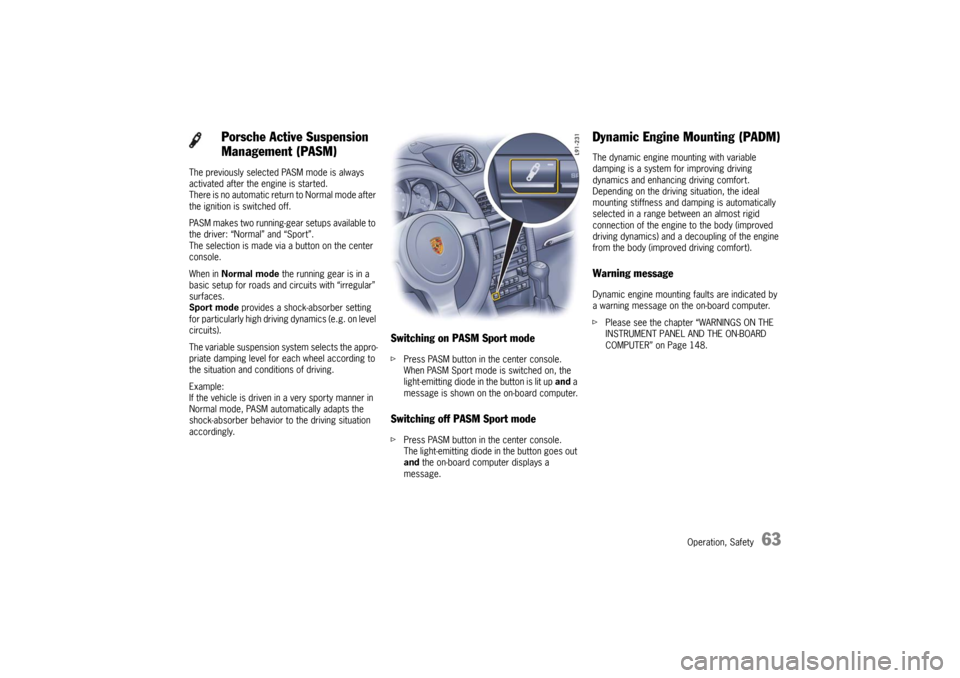
Switching on PASM Sport modefPress PASM button in the center console.
When PASM Sport mode is switched on, the
light-emitting diode in the button is lit up and a
message is shown on the on-board computer.Switching off PASM Sport modefPress PASM button in the center console.
The light-emitting diode in the button goes out
and the on-board computer displays a
message.
Dynamic Engine Mounting (PADM)The dynamic engine mounting with variable
damping is a system for improving driving
dynamics and enhancing driving comfort.
Depending on the driving situation, the ideal
mounting stiffness and damping is automatically
selected in a range between an almost rigid
connection of the engine to the body (improved
driving dynamics) and a decoupling of the engine
from the body (improved driving comfort).Warning messageDynamic engine mounting faults are indicated by
a warning message on the on-board computer.
fPlease see the chapter “WARNINGS ON THE
INSTRUMENT PANEL AND THE ON-BOARD
COMPUTER” on Page 148.
Porsche Active Suspension
Management (PASM)
10_GT3_21.book Seite 63 Donnerstag, 4. Juni 2009 12:48 12
Page 66 of 251

Operation, Safety
65
Lowering front axle fPress button in the center console.
The vehicle is lowered to the basic level.
The light-emitting diode in the button and in the
tachometer goes out.
Caution!
Risk of damage through bottoming out the
vehicle.
fDo not lower the vehicle when it is positioned above an obstacle.
Notes on operation
Warning messageFront axle lift system faults are indicated by
a warning message on the on-board computer.
fPlease see the chapter “WARNINGS ON THE
INSTRUMENT PANEL AND THE ON-BOARD
COMPUTER” on Page 148.
– When raised, the damping properties of the
front axle change and noise may be heard in
the area of the front axle coil springs during
steering movements.
– The doors must be closed when lowering the
front axle.
–The blowing-off procedure may result in
system-related hissing noise. This does not
represent a malfunction in the lift system.– During extended vehicle immobilization, the
pressure accumulator may be completely
emptied. In this case, the first time the axle is
raised, a period of up to 2 minutes may elapse
before the vehicle height is reached and “LIFT”
is displayed.
– A flashing LED in the button indicates that the
system is currently not available. Possible
causes may be:
> Automatic overload protection is active.
The system will be available again
following a brief cooling-down phase.
The cooling-down phase may be
extended when outside temperatures
are very high.
> The speed threshold of 30 mph
(50 km/h) has been exceeded. The
system will be available again once the
speed falls below the threshold.
> If automatic lowering is actuated by
exceeding a speed of approx. 30 mph
(50 km/h) in combination with hard
acceleration, the required lowering
duration may mean that “LIFT not
lowered” is displayed. The display goes
out again as soon as the front axle has
been completely lowered.
10_GT3_21.book Seite 65 Donnerstag, 4. Juni 2009 12:48 12
Page 68 of 251
Operation, Safety
67
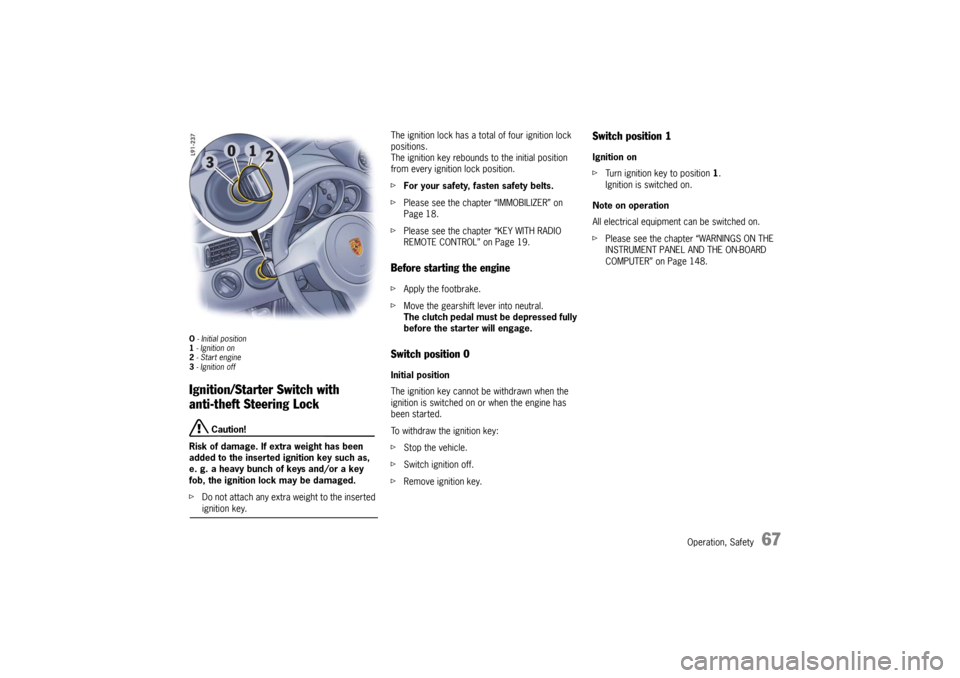
O - Initial position
1 - Ignition on
2 - Start engine
3 - Ignition offIgnition/Starter Switch with
anti-theft Steering Lock
Caution!
Risk of damage. If extra weight has been
added to the inserted ignition key such as,
e. g. a heavy bunch of keys and/or a key
fob, the ignition lock may be damaged.
fDo not attach any extra weight to the inserted ignition key.The ignition lock has a total of four ignition lock
positions.
The ignition key rebounds to the initial position
from every ignition lock position.
fFor your safety, fasten safety belts.
fPlease see the chapter “IMMOBILIZER” on
Page 18.
fPlease see the chapter “KEY WITH RADIO
REMOTE CONTROL” on Page 19.
Before starting the enginefApply the footbrake.
fMove the gearshift lever into neutral.
The clutch pedal must be depressed fully
before the starter will engage.Switch position 0 Initial position
The ignition key cannot be withdrawn when the
ignition is switched on or when the engine has
been started.
To withdraw the ignition key:
fStop the vehicle.
fSwitch ignition off.
fRemove ignition key.
Switch position 1 Ignition on
fTurn ignition key to position 1.
Ignition is switched on.
Note on operation
All electrical equipment can be switched on.
fPlease see the chapter “WARNINGS ON THE
INSTRUMENT PANEL AND THE ON-BOARD
COMPUTER” on Page 148.
10_GT3_21.book Seite 67 Donnerstag, 4. Juni 2009 12:48 12
Page 100 of 251
Automatic air conditioning system, Heated rear window/Door mirror heating
99
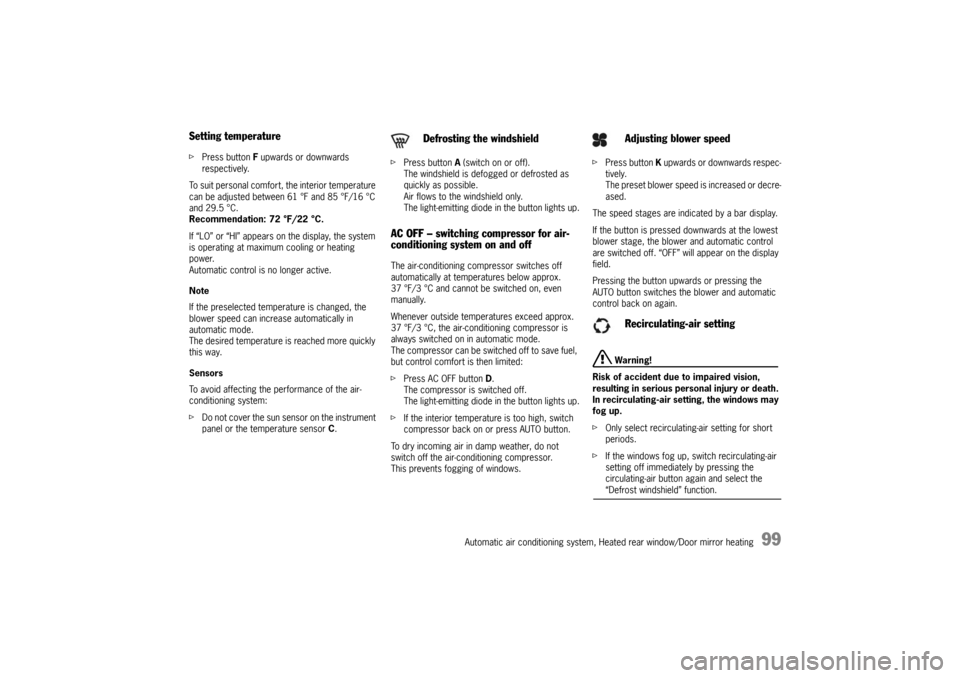
Setting temperaturefPress button F upwards or downwards
respectively.
To suit personal comfort, the interior temperature
can be adjusted between 61 °F and 85 °F/16 °C
and 29.5 °C.
Recommendation: 72 °F/22 °C.
If “LO” or “HI” appears on the display, the system
is operating at maximum cooling or heating
power.
Automatic control is no longer active.
Note
If the preselected temperature is changed, the
blower speed can increase automatically in
automatic mode.
The desired temperature is reached more quickly
this way.
Sensors
To avoid affecting the performance of the air-
conditioning system:
fDo not cover the sun sensor on the instrument
panel or the temperature sensor C.fPress button A (switch on or off).
The windshield is defogged or defrosted as
quickly as possible.
Air flows to the windshield only.
The light-emitting diode in the button lights up.
AC OFF – switching compressor for air-
conditioning system on and offThe air-conditioning compressor switches off
automatically at temperatures below approx.
37 °F/3 °C and cannot be switched on, even
manually.
Whenever outside temperatures exceed approx.
37 °F/3 °C, the air-conditioning compressor is
always switched on in automatic mode.
The compressor can be switched off to save fuel,
but control comfort is then limited:
fPress AC OFF button D.
The compressor is switched off.
The light-emitting diode in the button lights up.
fIf the interior temperature is too high, switch
compressor back on or press AUTO button.
To dry incoming air in damp weather, do not
switch off the air-conditioning compressor.
This prevents fogging of windows.fPress button K upwards or downwards respec-
tively.
The preset blower speed is increased or decre-
ased.
The speed stages are indicated by a bar display.
If the button is pressed downwards at the lowest
blower stage, the blower and automatic control
are switched off. “OFF” will appear on the display
field.
Pressing the button upwards or pressing the
AUTO button switches the blower and automatic
control back on again.
Warning!
Risk of accident due to impaired vision,
resulting in serious personal injury or death.
In recirculating-air setting, the windows may
fog up.
fOnly select recirculating-air setting for short
periods.
fIf the windows fog up, switch recirculating-air
setting off immediately by pressing the
circulating-air button again and select the “Defrost windshield” function.
Defrosting the windshield
Adjusting blower speed
Recirculating-air setting
10_GT3_21.book Seite 99 Donnerstag, 4. Juni 2009 12:48 12
Page 104 of 251
Instruments, On-Board Computer, Warnings
103 Instruments, On-Board Computer, Warnings
Instrument Panel USA Models...................... 104
Instrument Panel Canada Models ................. 106
Engine Oil Temperature .............................. 108
Automatic Speed Control Indicator light ....... 108
Instrument Illumination................................ 108
Trip Odometer ........................................... 109
Speedometer ............................................. 110
Changing over between Miles / Kilometers ... 110
Tachometer ............................................... 111
Turn Signal Indicator Light .......................... 111
High Beam Indicator Light ........................... 111
Upshift indicator ......................................... 111
Cooling System.......................................... 112
Fuel........................................................... 113
Clock ........................................................ 114
Outside Temperature.................................. 114
Engine Oil Pressure .................................... 115
Check Engine (Emission Control) ................. 116
On-Board Computer (BC)............................. 117
Warnings on the instrument panel and the
on-board computer ..................................... 148
10_GT3_21.book Seite 103 Donnerstag, 4. Juni 2009 12:48 12
Page 105 of 251

104
Instruments, On-Board Computer
Instrument Panel USA Models Also refer to the corresponding chapters in
the Owner’s Manual.
1.Engine oil temperature gauge
2.Speedometer with analogue display
3.Tire pressure warning light
4.Turn signal indicator light, left
5.Tachometer
6.High beam indicator light
7.Turn signal indicator light, right
8.Upshift indicator
9.Cooling system
Temperature gauge, warning light
10.Fuel
Level gauge, warning light
11.Engine oil pressure gauge
12.Adjustment button for instrument illumination
and trip counter
13.Odometer and daily trip mileage display
14.Automatic speed control indicator light15.Light sensor for instrument illumination
16.Airbag warning light
17.Check Engine warning light
(Emission control warning light)
18.Central warning light
19.On-board computer display
20.Porsche Stability Management
PSM Multifunctional light
21.Brake warning light
22.Safety belt warning light
23.ABS warning light
24.Clock and outside temperature display
25.Adjustment button for clockWhen the ignition is switched on, the warning
lights light up for a lamp check.
Note
Warnings that have been given are stored in the
appropriate control unit memory and can be read
out at an authorized Porsche dealer.
This information can help to warn you about situa-
tions which may be hazardous to you or your car. 10_GT3_21.book Seite 104 Donnerstag, 4. Juni 2009 12:48 12
Page 107 of 251

106
Instruments, On-Board Computer
Instrument Panel Canada Models Also refer to the corresponding chapters in
the Owner’s Manual.
1.Engine oil temperature gauge
2.Speedometer with analogue display
3.Tire pressure warning light
4.Turn signal indicator light, left
5.Tachometer
6.High beam indicator light
7.Turn signal indicator light, right
8.Upshift indicator
9.Cooling system
Temperature gauge, warning light
10.Fuel
Level gauge, warning light
11.Engine oil pressure gauge
12.Adjustment button for instrument illumination
and trip counter
13.Odometer and daily trip mileage display
14.Automatic speed control indicator light15.Light sensor for instrument illumination
16.Airbag warning light
17.Check Engine warning light
(Emission control warning light)
18.Central warning light
19.On-board computer display
20.Porsche Stability Management
PSM Multifunctional light
21.Brake warning light
22.Safety belt warning light
23.ABS warning light
24.Clock and outside temperature display
25.Adjustment button for clockWhen the ignition is switched on, the warning
lights light up for a lamp check.
Note
Warnings that have been given are stored in the
appropriate control unit memory and can be read
out at an authorized Porsche dealer.
This information can help to warn you about situa-
tions which may be hazardous to you or your car. 10_GT3_21.book Seite 106 Donnerstag, 4. Juni 2009 12:48 12
Page 117 of 251
116
Instruments, On-Board Computer
Check Engine
(Emission Control)The emission control system detects malfunctions
early that could, for example, cause increased
pollutant emissions or consequential damage.
Faults are indicated by a continuously lit or
flashing instrument panel warning light.
The faults are recorded in the control unit's fault
memory.
The warning light in the instrument panel lights up
when the ignition is switched on as a bulb check
and goes out approx. 4 seconds after the engine
starts. If the warning light does not light up, have
the bulb replaced promptly.
The warning light in the instrument panel flashes to
indicate operating states (e.g. engine misfiring)
which might cause damage to certain parts of the
emission control system.
fIn this case, immediately reduce the engine
load by easing off the accelerator.
fIn order to avoid consequential damage to the
engine or emission control system (e.g.
catalytic converter), have the fault diagnosed
and rectified immediately at the nearest autho-
rized Porsche dealer.If the warning light in the instrument panel lights up
permanently without flashing before and remains
on while driving, it suggests:
– a potential engine control problem and the
need for system service or
– an improperly fastened tank cap or
– the vehicle was refueled while the engine was
running.
fStop immediately at a suitable and secure
place and check tank cap for proper fastening.
If tank cap was fastened correctly, see your
authorized Porsche dealer for service as soon
as possible.
Caution!
If the check engine warning light in the
instrument panel is flashing, serious
catalytic converter damage and power loss
will soon occur.
Prolonged driving with the check engine
warning light on could cause damage to the
emission control system. It also could affect
fuel economy and driveability.
fHave the fault remedied at the nearest authorized Porsche dealer immediately.The central warning light on the instrument panel
lights up if there are warning messages in the
INFO menu.
The messages can be called in the on-board
computer INFO menu:
fPlease see the chapter “INFO WARNING
MESSAGES” on Page 123.
The warning light on the instrument panel lights
up:
– if the handbrake is on,
– if the brake fluid level is low,
– if the brake pads have reached the wear limit,
– if the brake circuit division is defective.
Additionally, a warning is displayed by the on-
board computer.
fPlease see the chapter “WARNINGS ON THE
INSTRUMENT PANEL AND THE ON-BOARD
COMPUTER” on Page 148.
Warning Light
Central Warning Light
Brake Warning Light USA
Brake Warning Light Canada
10_GT3_21.book Seite 116 Donnerstag, 4. Juni 2009 12:48 12