ignition PORSCHE 911 GT3 2010 5.G Workshop Manual
[x] Cancel search | Manufacturer: PORSCHE, Model Year: 2010, Model line: 911 GT3, Model: PORSCHE 911 GT3 2010 5.GPages: 251, PDF Size: 14.33 MB
Page 124 of 251
Instruments, On-Board Computer
123
INFO
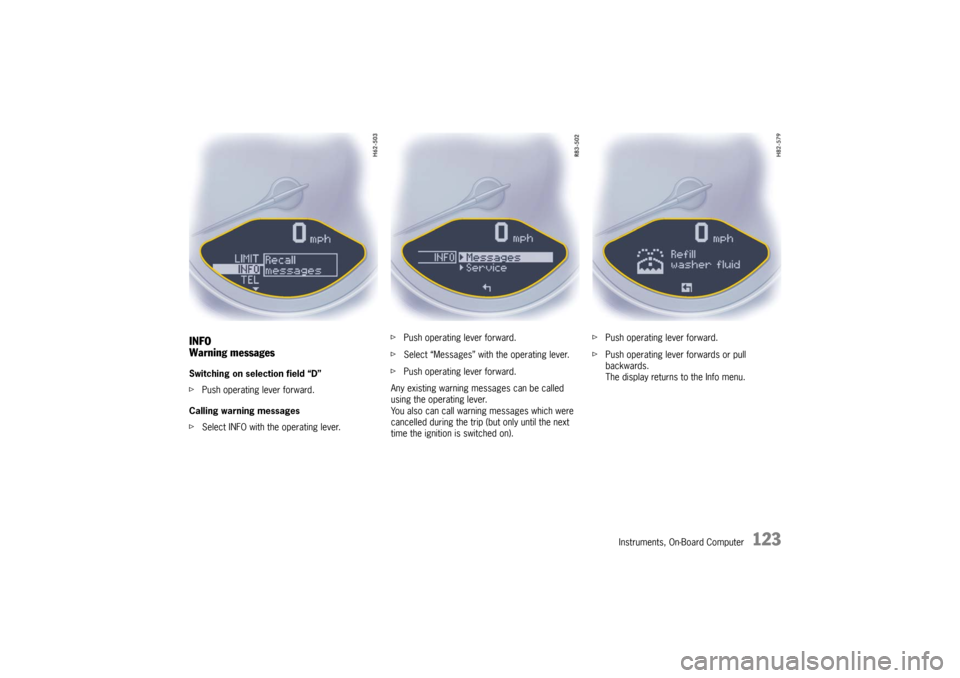
Warning messagesSwitching on selection field “D”
fPush operating lever forward.
Calling warning messages
fSelect INFO with the operating lever.fPush operating lever forward.
fSelect “Messages” with the operating lever.
fPush operating lever forward.
Any existing warning messages can be called
using the operating lever.
You also can call warning messages which were
cancelled during the trip (but only until the next
time the ignition is switched on).fPush operating lever forward.
fPush operating lever forwards or pull
backwards.
The display returns to the Info menu.
10_GT3_21.book Seite 123 Donnerstag, 4. Juni 2009 12:48 12
Page 128 of 251
Instruments, On-Board Computer
127
CHRONO
StopwatchYou can use the stopwatch to measure time inter-
vals, e.g. on the race circuit or on work-related
journeys. Measured lap times can be stored and
evaluated if the vehicle is equipped with Porsche
Communication Management (PCM).
fPlease see the chapter “Sport display” in the
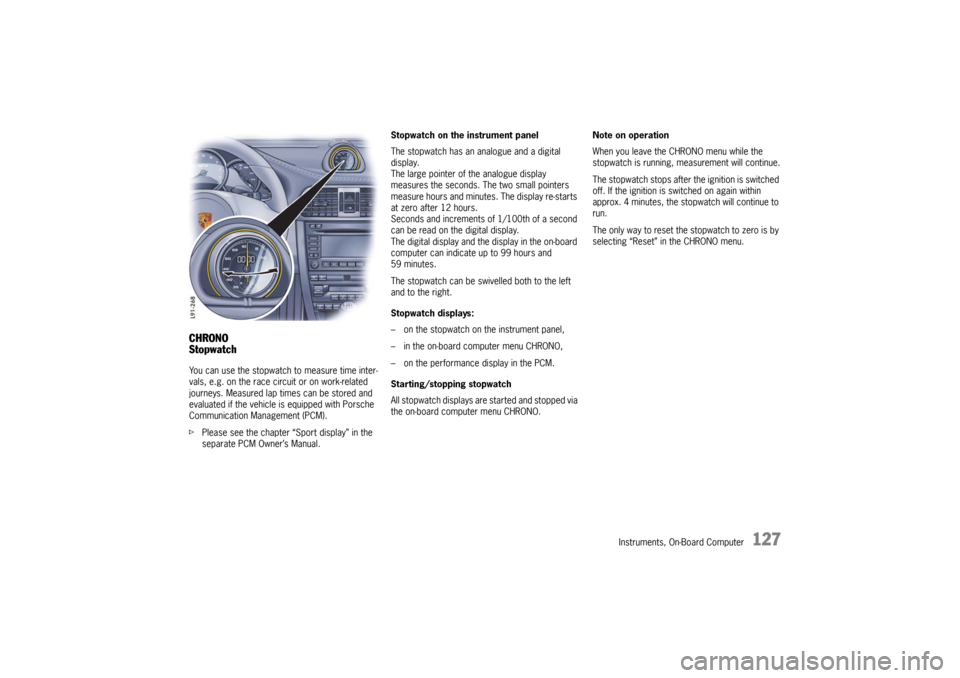
separate PCM Owner’s Manual.Stopwatch on the instrument panel
The stopwatch has an analogue and a digital
display.
The large pointer of the analogue display
measures the seconds. The two small pointers
measure hours and minutes. The display re-starts
at zero after 12 hours.
Seconds and increments of 1/100th of a second
can be read on the digital display.
The digital display and the display in the on-board
computer can indicate up to 99 hours and
59 minutes.
The stopwatch can be swivelled both to the left
and to the right.
Stopwatch displays:
– on the stopwatch on the instrument panel,
– in the on-board computer menu CHRONO,
– on the performance display in the PCM.
Starting/stopping stopwatch
All stopwatch displays are started and stopped via
the on-board computer menu CHRONO.Note on operation
When you leave the CHRONO menu while the
stopwatch is running, measurement will continue.
The stopwatch stops after the ignition is switched
off. If the ignition is switched on again within
approx. 4 minutes, the stopwatch will continue to
run.
The only way to reset the stopwatch to zero is by
selecting “Reset” in the CHRONO menu.
10_GT3_21.book Seite 127 Donnerstag, 4. Juni 2009 12:48 12
Page 137 of 251
136
Instruments, On-Board Computer The tire pressure to be corrected (refill pressure)
is indicated on the displayed wheel.
Example: If “ –1.5 psi (–0.1 bar)” is displayed,
1.5 psi (0.1 bar) must be added to this tire.
Note
The tire pressure menu can only be called up when
the vehicle is stationary.
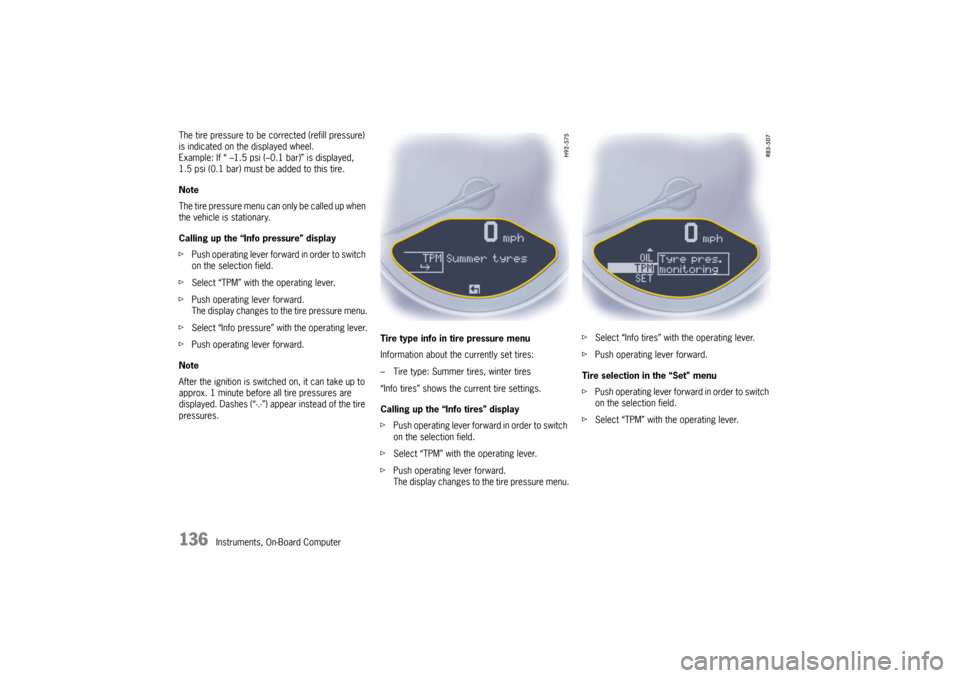
Calling up the “Info pressure” display
fPush operating lever forward in order to switch
on the selection field.
fSelect “TPM” with the operating lever.
fPush operating lever forward.
The display changes to the tire pressure menu.
fSelect “Info pressure” with the operating lever.
fPush operating lever forward.
Note
After the ignition is switched on, it can take up to
approx. 1 minute before all tire pressures are
displayed. Dashes (“-.-”) appear instead of the tire
pressures. Tire type info in tire pressure menu
Information about the currently set tires:
– Tire type: Summer tires, winter tires
“Info tires” shows the current tire settings.
Calling up the “Info tires” display
fPush operating lever forward in order to switch
on the selection field.
fSelect “TPM” with the operating lever.
fPush operating lever forward.
The display changes to the tire pressure menu.fSelect “Info tires” with the operating lever.
fPush operating lever forward.
Tire selection in the “Set” menu
fPush operating lever forward in order to switch
on the selection field.
fSelect “TPM” with the operating lever.
10_GT3_21.book Seite 136 Donnerstag, 4. Juni 2009 12:48 12
Page 140 of 251
Instruments, On-Board Computer
139
Tire pressure warnings
The tire pressure warning light on the instrument
panel and a corresponding message on the on-
board computer warn about loss of pressure in
two stages, depending on the amount of pressure
loss.
Driving with insufficient tire pressure reduces the
road safety of the vehicle and destroys the tire and
wheel.
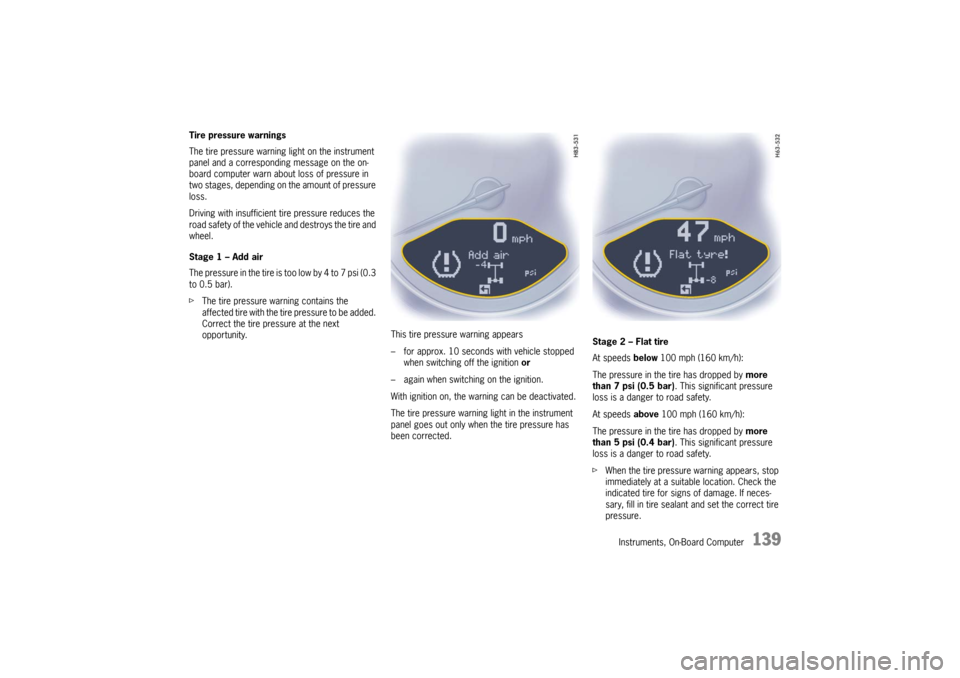
Stage 1 – Add air
The pressure in the tire is too low by 4 to 7 psi (0.3
to 0.5 bar).
fThe tire pressure warning contains the
affected tire with the tire pressure to be added.
Correct the tire pressure at the next
opportunity. This tire pressure warning appears
– for approx. 10 seconds with vehicle stopped
when switching off the ignition or
– again when switching on the ignition.
With ignition on, the warning can be deactivated.
The tire pressure warning light in the instrument
panel goes out only when the tire pressure has
been corrected.Stage 2 – Flat tire
At speeds below 100 mph (160 km/h):
The pressure in the tire has dropped by more
than 7 psi (0.5 bar). This significant pressure
loss is a danger to road safety.
At speeds above 100 mph (160 km/h):
The pressure in the tire has dropped by more
than 5 psi (0.4 bar). This significant pressure
loss is a danger to road safety.
fWhen the tire pressure warning appears, stop
immediately at a suitable location. Check the
indicated tire for signs of damage. If neces-
sary, fill in tire sealant and set the correct tire
pressure.
10_GT3_21.book Seite 139 Donnerstag, 4. Juni 2009 12:48 12
Page 141 of 251

140
Instruments, On-Board Computer This tire pressure warning also appears when
driving and can be acknowledged.
The tire pressure warning light on the instrument
panel goes out only when the tire pressure has
been corrected.
System learningThe Tire Pressure Monitoring begins to “learn” the
wheels after a wheel change, wheel transmitter
replacement or update of the tire settings. During
this process, the Tire Pressure Monitoring recog-
nizes the tires and their locations.
The on-board computer displayes the message
“TPM is learning, monitoring not act.”.
The Tire Pressure Monitoring requires a certain
amount of time to learn the wheels. During this
time, the current tire pressures are not available
on the on-board-computer:
– The tire pressure warning light remains lit until
all wheels have been learned.
– The display of the tire pressure function of the
on-board computer shows lines.
– The required pressures for cold tires at 68 °F
(20 °C) are indicated in the Info pressure
display in the tire pressure menu.
Position and pressure information is displayed as
soon as the Tire Pressure Monitoring has
assigned the wheels identified as belonging to the
vehicle to the correct wheel positions.The wheel learning process takes place
exclusively when the vehicle is being driven
(vehicle speed above 16 mph (25 km/h)).
fCheck the tire pressure for all wheels on the
“Info pressure” display.
fCorrect the tire pressure to the required
pressure if necessary.
Changing a wheel and replacing tiresfNew wheels must be fitted with radio transmit-
ters for the Tire Pressure Monitoring.
Before tires are changed, the battery charge
state of the wheel transmitters should be
checked at an authorized Porsche dealer.
fSwitch the ignition off when changing a wheel.
The tire settings on the on-board computer must
be updated after changing a wheel.
If the tire settings are not updated, the message
“Wheel change? Input new TPM settings!” is
displayed on the on-board computer.
fUpdate the on-board computer settings when
the vehicle is stationary the next time.
10_GT3_21.book Seite 140 Donnerstag, 4. Juni 2009 12:48 12
Page 145 of 251
144
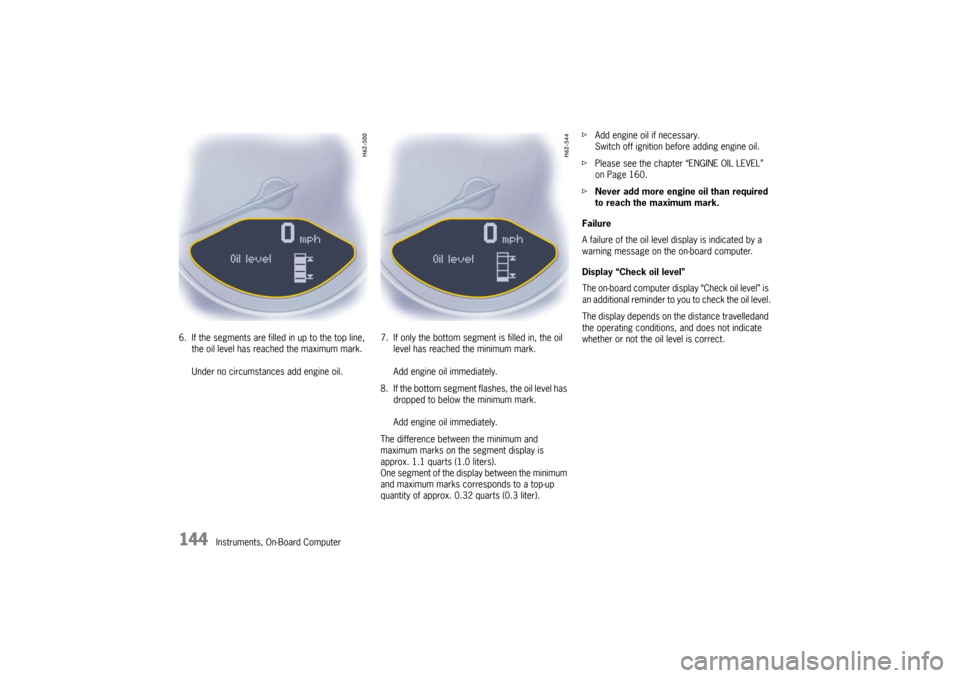
Instruments, On-Board Computer 6. If the segments are filled in up to the top line,
the oil level has reached the maximum mark.
Under no circumstances add engine oil.7. If only the bottom segment is filled in, the oil
level has reached the minimum mark.
Add engine oil immediately.
8. If the bottom segment flashes, the oil level has
dropped to below the minimum mark.
Add engine oil immediately.
The difference between the minimum and
maximum marks on the segment display is
approx. 1.1 quarts (1.0 liters).
One segment of the display between the minimum
and maximum marks corresponds to a top-up
quantity of approx. 0.32 quarts (0.3 liter).fAdd engine oil if necessary.
Switch off ignition before adding engine oil.
fPlease see the chapter “ENGINE OIL LEVEL”
on Page 160.
fNever add more engine oil than required
to reach the maximum mark.
Failure
A failure of the oil level display is indicated by a
warning message on the on-board computer.
Display “Check oil level”
The on-board computer display “Check oil level” is
an additional reminder to you to check the oil level.
The display depends on the distance travelledand
the operating conditions, and does not indicate
whether or not the oil level is correct.
10_GT3_21.book Seite 144 Donnerstag, 4. Juni 2009 12:48 12
Page 148 of 251

Instruments, On-Board Computer
147
General information regarding the
on-board computer functionsRange on remaining fuel
The range on remaining fuel is continuously recal-
culated during the journey based on the fuel level,
current consumption and average consumption.
The more the fuel level falls, the more spontan-
eously the display reacts. For this reason, the
range on remaining fuel is not displayed if less
than 9 miles (15 kilometers).
If the vehicle's inclination changes while driving or
refueling, incorrect range information may
temporarily be given.
Note
If the tank is nearly empty and you top up with only
a small quantity of fuel, an accurate range on
remaining fuel is impossible.Average consumption and average speed
The values displayed are based on the distance
travelled since the last reset to “zero”.
You can set the starting time for a measurement
before or during the trip.
Switching the ignition off does not reset the
measurements. It is therefore possible to collect
values over long periods.
Disconnecting the car battery will cause these
memories to be erased.
Tire pressure
The Tire pressure function of the on-board
computer displays the tire pressures dependent
on temperature in the four wheels. You can watch
the tire pressure rise and fall while driving.
The display is only for information.
fTo correct the tire pressures, always use the
displayed values from the “Info pressure”
display in the tire pressure menu.
10_GT3_21.book Seite 147 Donnerstag, 4. Juni 2009 12:48 12
Page 149 of 251

148
Warnings
Warnings on the instrument panel and the on-board computerIf a warning message appears, always refer to the corresponding chapters in the Owner’s Manual.
Warning messages are issued only if all measurement preconditions are met. Therefore, check all fluid levels regularly –
in particular, always check the engine oil level before refuelling.Acknowledging warning messagesWarning messages can be deleted from the on-board computer display.
fPush the on-board computer operating lever forward.
You can recall erased warning messages in the “INFO” menu.
Instrument
panelOn-board
computerText display on on-board
computerMeaning/measure
Seat belt Driver and passenger must fasten their seat belts.
Handbrake Handbrake is still on.
Ignition key
not removed
Replace battery
in ignition keyReplace the remote-control battery.
Ignition lock faulty,
visit workshopHave the fault remedied at an authorized Porsche dealer.
Ignition lock faulty,
visit workshop nowHave the fault remedied at an authorized Porsche dealer.
Relieve steering Relieve the steering lock by moving the steering wheel to the left or right.
Steering locked The steering wheel lock remains engaged.
Have the fault remedied at an authorized Porsche dealer.
10_GT3_21.book Seite 148 Donnerstag, 4. Juni 2009 12:48 12
Page 156 of 251
Shifting Gears
155
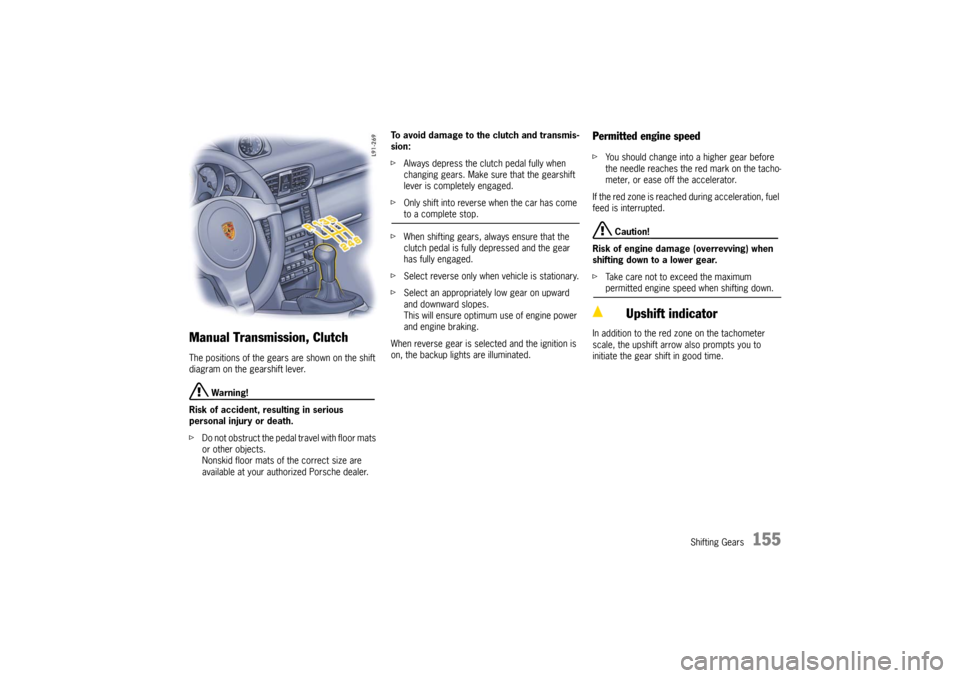
Manual Transmission, ClutchThe positions of the gears are shown on the shift
diagram on the gearshift lever.
Warning!
Risk of accident, resulting in serious
personal injury or death.
fDo not obstruct the pedal travel with floor mats
or other objects.
Nonskid floor mats of the correct size are
available at your authorized Porsche dealer.To avoid damage to the clutch and transmis-
sion:
fAlways depress the clutch pedal fully when
changing gears. Make sure that the gearshift
lever is completely engaged.
fOnly shift into reverse when the car has come
to a complete stop.
fWhen shifting gears, always ensure that the
clutch pedal is fully depressed and the gear
has fully engaged.
fSelect reverse only when vehicle is stationary.
fSelect an appropriately low gear on upward
and downward slopes.
This will ensure optimum use of engine power
and engine braking.
When reverse gear is selected and the ignition is
on, the backup lights are illuminated.
Permitted engine speedfYou should change into a higher gear before
the needle reaches the red mark on the tacho-
meter, or ease off the accelerator.
If the red zone is reached during acceleration, fuel
feed is interrupted.
Caution!
Risk of engine damage (overrevving) when
shifting down to a lower gear.
fTake care not to exceed the maximum permitted engine speed when shifting down.
In addition to the red zone on the tachometer
scale, the upshift arrow also prompts you to
initiate the gear shift in good time.
Upshift indicator
10_GT3_21.book Seite 155 Donnerstag, 4. Juni 2009 12:48 12
Page 158 of 251

Maintenance, Car Care
157
Exercise Extreme Caution when
Working on your Vehicle
Danger!
Ignoring the following instructions may
cause serious personal injury or death.
fThe engine compartment of any motor vehicle
is a potentially hazardous area. If you are not
fully familiar with proper repair procedures, do
not attempt the adjustments described on the
following pages.
This caution also applies to the entire vehicle.
fO n l y w o r k o n y o u r v e h i c l e o u t d o o r s o r i n a w e l l
ventilated area.
fEnsure that there are no open flames in the
area of your vehicle at any time when fuel
fumes might be present. Be especially
cautious of such devices such as hot water
heaters which ignite a flame intermittently.
fBefore working on any part in the engine
compartment, turn the engine off and let it cool
down sufficiently. Hot engine compartment
components can burn skin on contact.
fBe alert and cautious around engine at all
times while the engine is running.
If work has to be performed with the engine
running, always set the parking brake, and
make sure the shift lever is in neutral position.fIn particular, be very careful to ensure that
items of clothing (ties, shirt, sleeves etc.),
jewelry, long hair, hand or fingers cannot get
caught in the engine-compartment blower, fan,
belts or other moving parts.
The radiator and radiator fans are in the front
of the car.
The engine-compartment blower is mounted
on the engine-compartment lid.
The engine-compartment blower can start or
continue running as a function of temperature,
even with the engine switched off.
Carry out work in these areas only with the
engine off, the ignition switched off, and
exercise extreme caution.
fYour Porsche is equipped with an electronic
ignition system. When the ignition is on, high
voltage is present in all wires connected with
the ignition system; therefore, exercise
extreme caution when working on any part of
the engine while the ignition is on or the engine
is running.
fAlways support your car with safety stands if it
is necessary to work under the car.
fWhen working under the car without safety
stands but with the wheels on the ground,
make sure the car is on level ground, the
wheels are blocked, and that the engine
cannot be started.
Remove the ignition key. fDo not smoke or allow an open flame around
the battery or fuel.
Keep a fire extinguisher close at hand.
fIncomplete or improper servicing may cause
problems in the operation o f t h e c a r. I f i n d o u b t
about any servicing, have it done by your
authorized Porsche dealer.
Improper maintenance during the warranty
period may affect your Porsche warranty
coverage.
fSupplies of fluids, e.g. engine oil, brake fluid or
coolant, are hazardous to your health.
Keep these fluids out of children’s reach and
dispose of them in accordance with the appro-
priate regulations.
fSome countries require additional tools and
special spare parts to be carried in your
vehicle.
Please make enquiries before driving abroad.
Power measurementsPower measurements on dynamometers are not
approved by Porsche.
10_GT3_21.book Seite 157 Donnerstag, 4. Juni 2009 12:48 12