ignition PORSCHE 911 GT3 2010 5.G Service Manual
[x] Cancel search | Manufacturer: PORSCHE, Model Year: 2010, Model line: 911 GT3, Model: PORSCHE 911 GT3 2010 5.GPages: 251, PDF Size: 14.33 MB
Page 83 of 251
82
Operation, Safety
Emptying fOpen ashtray and carefully pull out ash insert.
fLeave ashtray lid open.
Push in ash insert.
Warning!
Danger of fire.
fNever use ashtray for waste paper disposal, as it could pose a fire hazard.
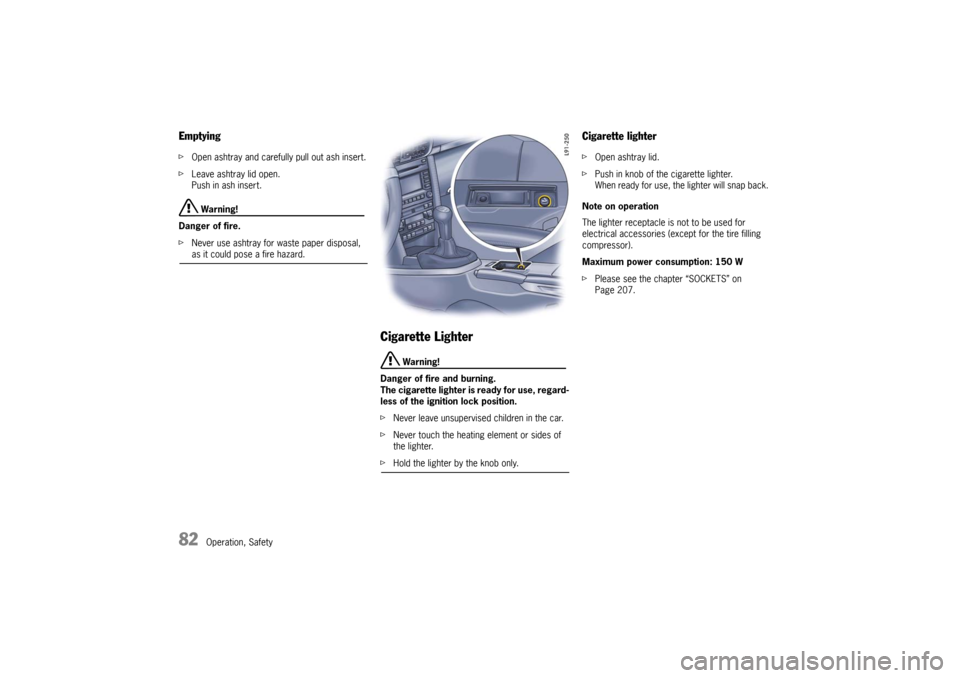
Cigarette Lighter
Warning!
Danger of fire and burning.
The cigarette lighter is ready for use, regard-
less of the ignition lock position.
fNever leave unsupervised children in the car.
fNever touch the heating element or sides of
the lighter.
fHold the lighter by the knob only.
Cigarette lighter fOpen ashtray lid.
fPush in knob of the cigarette lighter.
When ready for use, the lighter will snap back.
Note on operation
The lighter receptacle is not to be used for
electrical accessories (except for the tire filling
compressor).
Maximum power consumption: 150 W
fPlease see the chapter “SOCKETS” on
Page 207.
10_GT3_21.book Seite 82 Donnerstag, 4. Juni 2009 12:48 12
Page 96 of 251
Operation, Safety
95
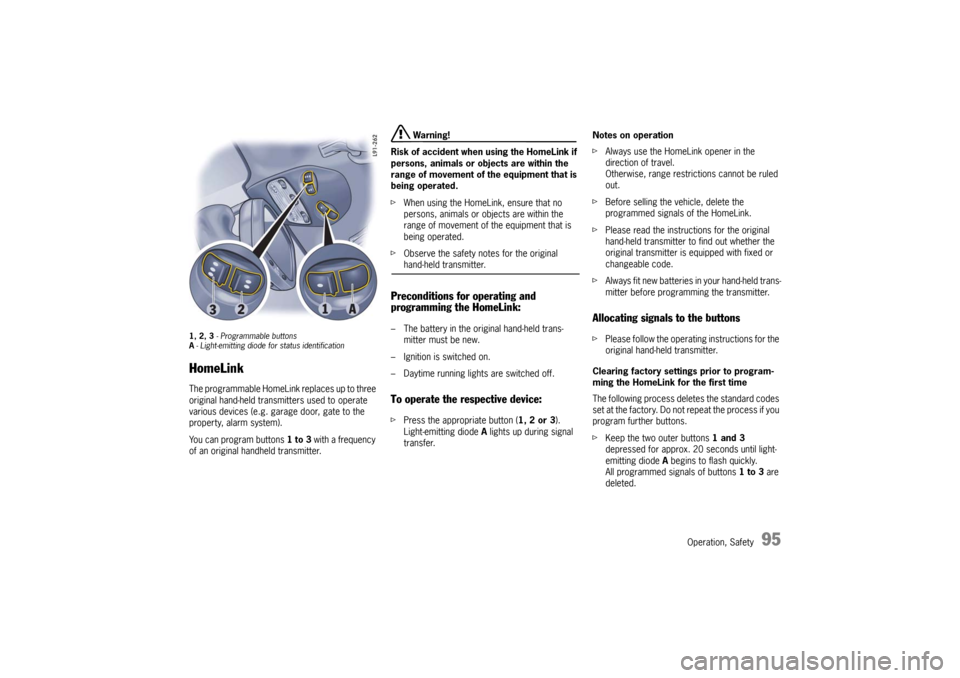
1, 2, 3 - Programmable buttons
A- Light-emitting diode for status identificationHomeLinkThe programmable HomeLink replaces up to three
original hand-held transmitters used to operate
various devices (e.g. garage door, gate to the
property, alarm system).
You can program buttons 1 to 3 with a frequency
of an original handheld transmitter.
Warning!
Risk of accident when using the HomeLink if
persons, animals or objects are within the
range of movement of the equipment that is
being operated.
fWhen using the HomeLink, ensure that no
persons, animals or objects are within the
range of movement of the equipment that is
being operated.
fObserve the safety notes for the original hand-held transmitter.
Preconditions for operating and
programming the HomeLink:– The battery in the original hand-held trans-
mitter must be new.
– Ignition is switched on.
– Daytime running lights are switched off.To operate the respective device:fPress the appropriate button (1, 2 or 3).
Light-emitting diode A lights up during signal
transfer.Notes on operation
fAlways use the HomeLink opener in the
direction of travel.
Otherwise, range restrictions cannot be ruled
out.
fBefore selling the vehicle, delete the
programmed signals of the HomeLink.
fPlease read the instructions for the original
hand-held transmitter to find out whether the
original transmitter is equipped with fixed or
changeable code.
fAlways fit new batteries in your hand-held trans-
mitter before programming the transmitter.
Allocating signals to the buttonsfPlease follow the operating instructions for the
original hand-held transmitter.
Clearing factory settings prior to program-
ming the HomeLink for the first time
The following process deletes the standard codes
set at the factory. Do not repeat the process if you
program further buttons.
fKeep the two outer buttons 1 and 3
depressed for approx. 20 seconds until light-
emitting diode A begins to flash quickly.
All programmed signals of buttons 1 to 3 are
deleted.
10_GT3_21.book Seite 95 Donnerstag, 4. Juni 2009 12:48 12
Page 103 of 251
102
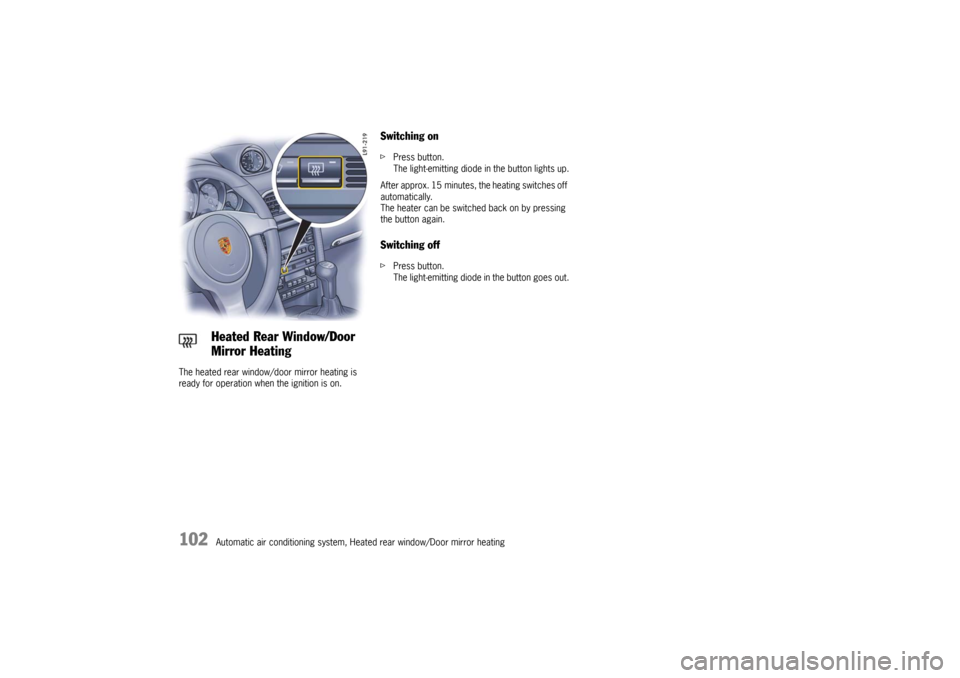
Automatic air conditioning system, Heated rear window/Door mirror heating The heated rear window/door mirror heating is
ready for operation when the ignition is on.
Switching onfPress button.
The light-emitting diode in the button lights up.
After approx. 15 minutes, the heating switches off
automatically.
The heater can be switched back on by pressing
the button again.Switching offfPress button.
The light-emitting diode in the button goes out.
Heated Rear Window/Door
Mirror Heating
10_GT3_21.book Seite 102 Donnerstag, 4. Juni 2009 12:48 12
Page 105 of 251

104
Instruments, On-Board Computer
Instrument Panel USA Models Also refer to the corresponding chapters in
the Owner’s Manual.
1.Engine oil temperature gauge
2.Speedometer with analogue display
3.Tire pressure warning light
4.Turn signal indicator light, left
5.Tachometer
6.High beam indicator light
7.Turn signal indicator light, right
8.Upshift indicator
9.Cooling system
Temperature gauge, warning light
10.Fuel
Level gauge, warning light
11.Engine oil pressure gauge
12.Adjustment button for instrument illumination
and trip counter
13.Odometer and daily trip mileage display
14.Automatic speed control indicator light15.Light sensor for instrument illumination
16.Airbag warning light
17.Check Engine warning light
(Emission control warning light)
18.Central warning light
19.On-board computer display
20.Porsche Stability Management
PSM Multifunctional light
21.Brake warning light
22.Safety belt warning light
23.ABS warning light
24.Clock and outside temperature display
25.Adjustment button for clockWhen the ignition is switched on, the warning
lights light up for a lamp check.
Note
Warnings that have been given are stored in the
appropriate control unit memory and can be read
out at an authorized Porsche dealer.
This information can help to warn you about situa-
tions which may be hazardous to you or your car. 10_GT3_21.book Seite 104 Donnerstag, 4. Juni 2009 12:48 12
Page 107 of 251

106
Instruments, On-Board Computer
Instrument Panel Canada Models Also refer to the corresponding chapters in
the Owner’s Manual.
1.Engine oil temperature gauge
2.Speedometer with analogue display
3.Tire pressure warning light
4.Turn signal indicator light, left
5.Tachometer
6.High beam indicator light
7.Turn signal indicator light, right
8.Upshift indicator
9.Cooling system
Temperature gauge, warning light
10.Fuel
Level gauge, warning light
11.Engine oil pressure gauge
12.Adjustment button for instrument illumination
and trip counter
13.Odometer and daily trip mileage display
14.Automatic speed control indicator light15.Light sensor for instrument illumination
16.Airbag warning light
17.Check Engine warning light
(Emission control warning light)
18.Central warning light
19.On-board computer display
20.Porsche Stability Management
PSM Multifunctional light
21.Brake warning light
22.Safety belt warning light
23.ABS warning light
24.Clock and outside temperature display
25.Adjustment button for clockWhen the ignition is switched on, the warning
lights light up for a lamp check.
Note
Warnings that have been given are stored in the
appropriate control unit memory and can be read
out at an authorized Porsche dealer.
This information can help to warn you about situa-
tions which may be hazardous to you or your car. 10_GT3_21.book Seite 106 Donnerstag, 4. Juni 2009 12:48 12
Page 113 of 251
112
Instruments, On-Board Computer
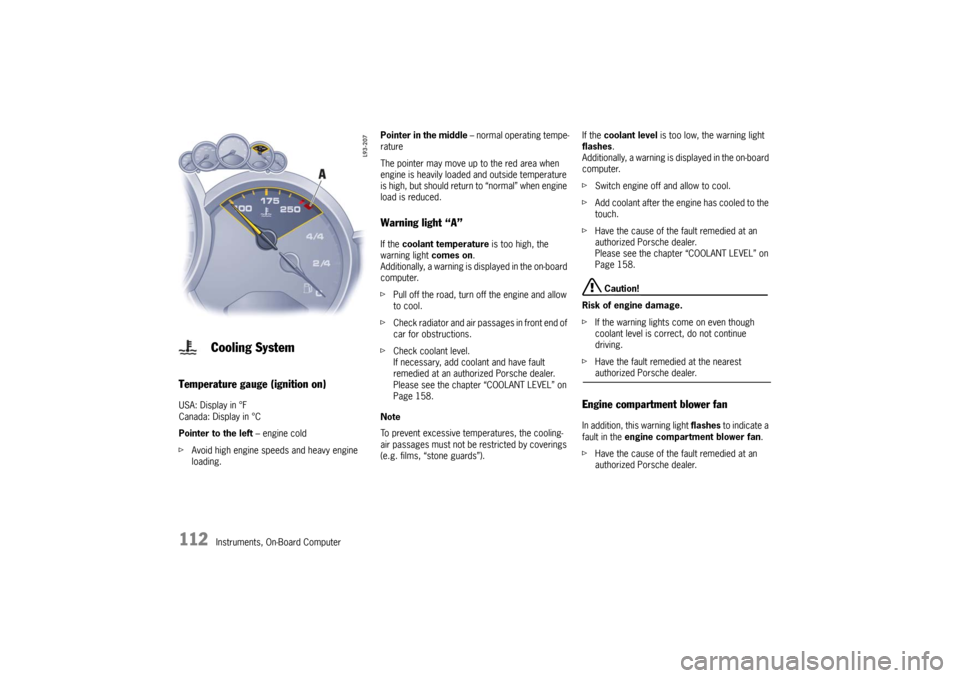
Temperature gauge (ignition on) USA: Display in °F
Canada: Display in °C
Pointer to the left – engine cold
fAvoid high engine speeds and heavy engine
loading. Pointer in the middle – normal operating tempe-
rature
The pointer may move up to the red area when
engine is heavily loaded and outside temperature
is high, but should return to “normal” when engine
load is reduced.
Warning light “A” If the coolant temperature is too high, the
warning light comes on.
Additionally, a warning is displayed in the on-board
computer.
fPull off the road, turn off the engine and allow
to cool.
fCheck radiator and air passages in front end of
car for obstructions.
fCheck coolant level.
If necessary, add coolant and have fault
remedied at an authorized Porsche dealer.
Please see the chapter “COOLANT LEVEL” on
Page 158.
Note
To prevent excessive temperatures, the cooling-
air passages must not be restricted by coverings
(e.g. films, “stone guards”). If the coolant level is too low, the warning light
flashes.
Additionally, a warning is displayed in the on-board
computer.
fSwitch engine off and allow to cool.
fAdd coolant after the engine has cooled to the
touch.
fHave the cause of the fault remedied at an
authorized Porsche dealer.
Please see the chapter “COOLANT LEVEL” on
Page 158.
Caution!
Risk of engine damage.
fIf the warning lights come on even though
coolant level is correct, do not continue
driving.
fHave the fault remedied at the nearest authorized Porsche dealer.
Engine compartment blower fan In addition, this warning light flashes to indicate a
fault in the engine compartment blower fan.
fHave the cause of the fault remedied at an
authorized Porsche dealer.
Cooling System
10_GT3_21.book Seite 112 Donnerstag, 4. Juni 2009 12:48 12
Page 114 of 251
Instruments, On-Board Computer
113
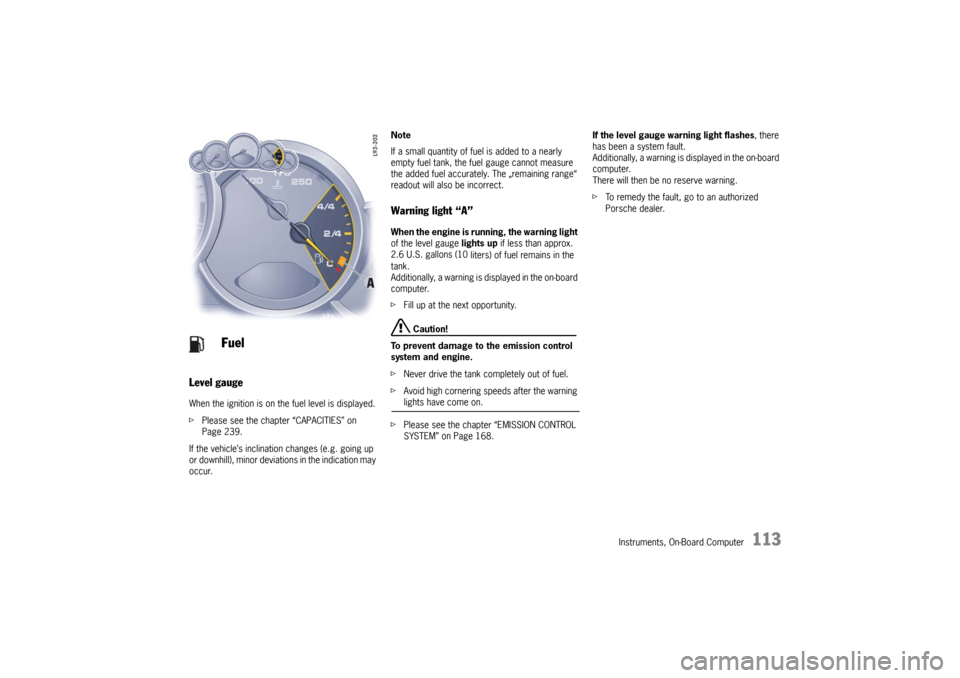
Level gauge
When the ignition is on the fuel level is displayed.
fPlease see the chapter “CAPACITIES” on
Page 239.
If the vehicle’s inclination changes (e.g. going up
or downhill), minor deviations in the indication may
occur. Note
If a small quantity of fuel is added to a nearly
empty fuel tank, the fuel gauge cannot measure
the added fuel accurately. The „remaining range“
readout will also be incorrect.
Warning light “A” When the engine is running, the warning light
of the level gauge lights up if less than approx.
2.6 U.S. gallons (10
liters) of fuel remains in the
tank.
Additionally, a warning is displayed in the on-board
computer.
fFill up at the next opportunity.
Caution!
To prevent damage to the emission control
system and engine.
fNever drive the tank completely out of fuel.
fAvoid high cornering speeds after the warning lights have come on.
fPlease see the chapter “EMISSION CONTROL
SYSTEM” on Page 168.If the level gauge warning light flashes, there
has been a system fault.
Additionally, a warning is displayed in the on-board
computer.
There will then be no reserve warning.
fTo remedy the fault, go to an authorized
Porsche dealer.
Fuel
10_GT3_21.book Seite 113 Donnerstag, 4. Juni 2009 12:48 12
Page 115 of 251
114
Instruments, On-Board Computer
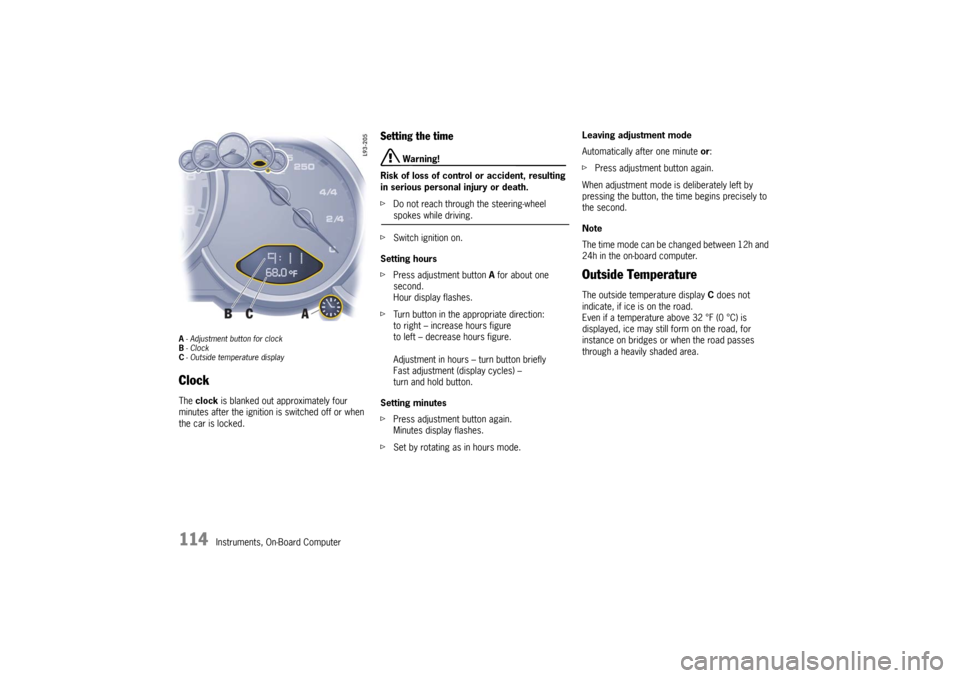
A- Adjustment button for clock
B-Clock
C- Outside temperature displayClock The clock is blanked out approximately four
minutes after the ignition is switched off or when
the car is locked.
Setting the time
Warning!
Risk of loss of control or accident, resulting
in serious personal injury or death.
fDo not reach through the steering-wheel spokes while driving.
fSwitch ignition on.
Setting hours
fPress adjustment button A for about one
second.
Hour display flashes.
fTurn button in the appropriate direction:
to right – increase hours figure
to left – decrease hours figure.
Adjustment in hours – turn button briefly
Fast adjustment (display cycles) –
turn and hold button.
Setting minutes
fPress adjustment button again.
Minutes display flashes.
fSet by rotating as in hours mode. Leaving adjustment mode
Automatically after one minute or:
fPress adjustment button again.
When adjustment mode is deliberately left by
pressing the button, the time begins precisely to
the second.
Note
The time mode can be changed between 12h and
24h in the on-board computer.
Outside Temperature The outside temperature display C does not
indicate, if ice is on the road.
Even if a temperature above 32 °F (0 °C) is
displayed, ice may still form on the road, for
instance on bridges or when the road passes
through a heavily shaded area.
10_GT3_21.book Seite 114 Donnerstag, 4. Juni 2009 12:48 12
Page 117 of 251
116
Instruments, On-Board Computer
Check Engine
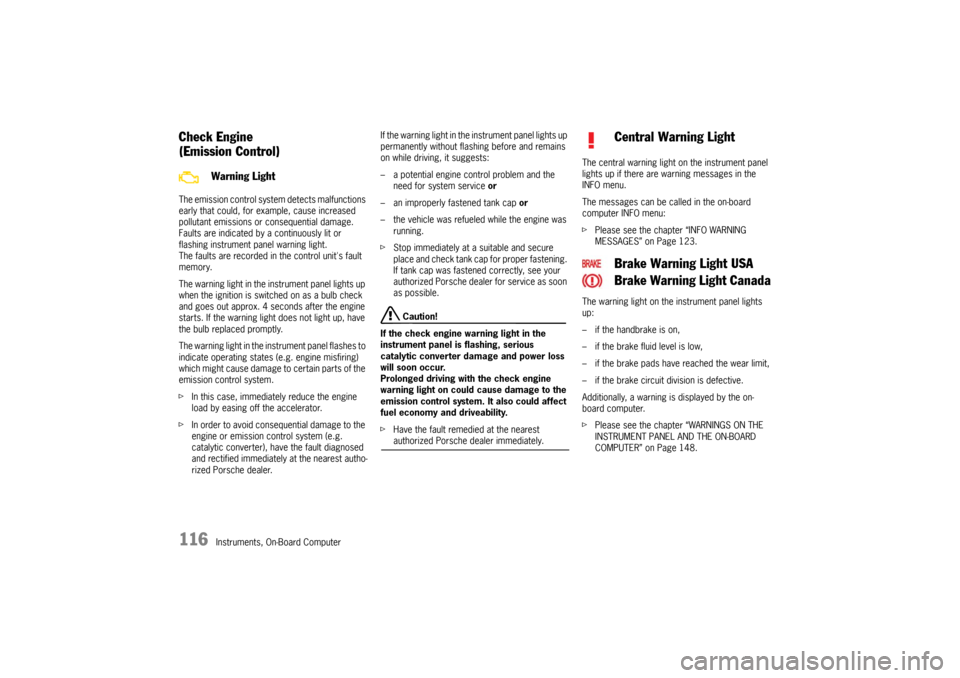
(Emission Control)The emission control system detects malfunctions
early that could, for example, cause increased
pollutant emissions or consequential damage.
Faults are indicated by a continuously lit or
flashing instrument panel warning light.
The faults are recorded in the control unit's fault
memory.
The warning light in the instrument panel lights up
when the ignition is switched on as a bulb check
and goes out approx. 4 seconds after the engine
starts. If the warning light does not light up, have
the bulb replaced promptly.
The warning light in the instrument panel flashes to
indicate operating states (e.g. engine misfiring)
which might cause damage to certain parts of the
emission control system.
fIn this case, immediately reduce the engine
load by easing off the accelerator.
fIn order to avoid consequential damage to the
engine or emission control system (e.g.
catalytic converter), have the fault diagnosed
and rectified immediately at the nearest autho-
rized Porsche dealer.If the warning light in the instrument panel lights up
permanently without flashing before and remains
on while driving, it suggests:
– a potential engine control problem and the
need for system service or
– an improperly fastened tank cap or
– the vehicle was refueled while the engine was
running.
fStop immediately at a suitable and secure
place and check tank cap for proper fastening.
If tank cap was fastened correctly, see your
authorized Porsche dealer for service as soon
as possible.
Caution!
If the check engine warning light in the
instrument panel is flashing, serious
catalytic converter damage and power loss
will soon occur.
Prolonged driving with the check engine
warning light on could cause damage to the
emission control system. It also could affect
fuel economy and driveability.
fHave the fault remedied at the nearest authorized Porsche dealer immediately.The central warning light on the instrument panel
lights up if there are warning messages in the
INFO menu.
The messages can be called in the on-board
computer INFO menu:
fPlease see the chapter “INFO WARNING
MESSAGES” on Page 123.
The warning light on the instrument panel lights
up:
– if the handbrake is on,
– if the brake fluid level is low,
– if the brake pads have reached the wear limit,
– if the brake circuit division is defective.
Additionally, a warning is displayed by the on-
board computer.
fPlease see the chapter “WARNINGS ON THE
INSTRUMENT PANEL AND THE ON-BOARD
COMPUTER” on Page 148.
Warning Light
Central Warning Light
Brake Warning Light USA
Brake Warning Light Canada
10_GT3_21.book Seite 116 Donnerstag, 4. Juni 2009 12:48 12
Page 118 of 251
Instruments, On-Board Computer
117
On-Board Computer (BC)Display fieldThe display field is beneath the tachometer.Readiness for operation– With ignition switched on,
– with engine running.
Operation, controlsIt is not possible to describe all details of the on-
board computer functions in this Owner’s Manual.
However, the examples will quickly familiarize you
with the operational principle and help you to
navigate through the menu structure.
You can restore the factory default settings at any
time by using the “SET” menu.
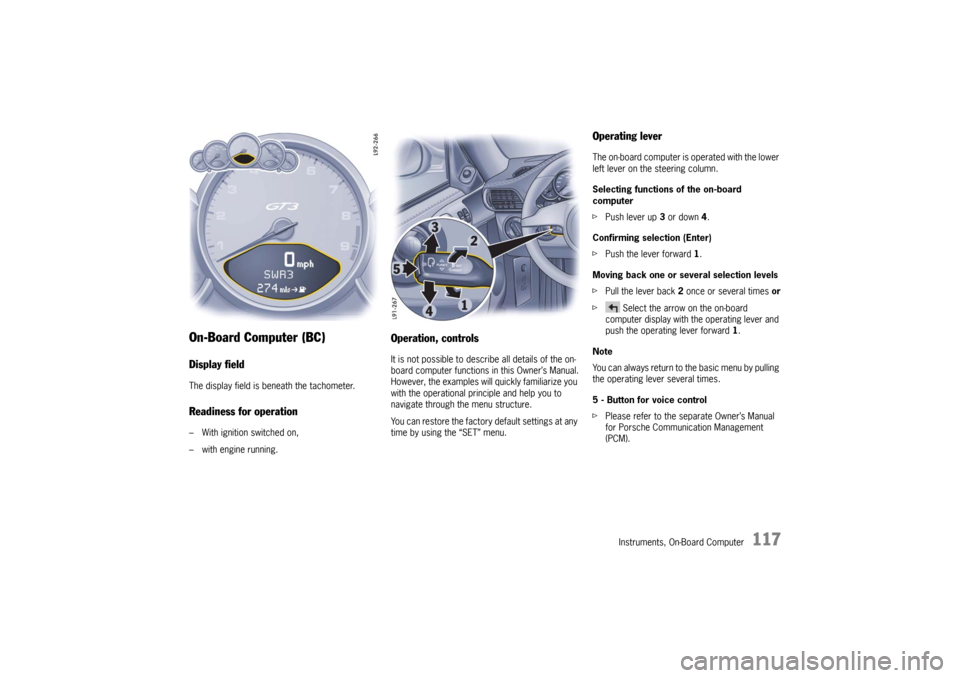
Operating leverThe on-board computer is operated with the lower
left lever on the steering column.
Selecting functions of the on-board
computer
fPush lever up 3 or down 4.
Confirming selection (Enter)
fPush the lever forward 1.
Moving back one or several selection levels
fPull the lever back 2 once or several times or
f Select the arrow on the on-board
computer display with the operating lever and
push the operating lever forward 1.
Note
You can always return to the basic menu by pulling
the operating lever several times.
5 - Button for voice control
fPlease refer to the separate Owner’s Manual
for Porsche Communication Management
(PCM).
10_GT3_21.book Seite 117 Donnerstag, 4. Juni 2009 12:48 12