turn signal PORSCHE 911 TURBO 2014 6.G User Guide
[x] Cancel search | Manufacturer: PORSCHE, Model Year: 2014, Model line: 911 TURBO, Model: PORSCHE 911 TURBO 2014 6.GPages: 300, PDF Size: 10.61 MB
Page 87 of 300
Lights, Turn Signals and Windshield Wipers 85
Brief Overview – Windshield wipers
This brief overview does not replace the information provided under “WINDSHIELD WIPER/WASHER STALK”.
Warnings, in particular, are not replaced by this brief overview.
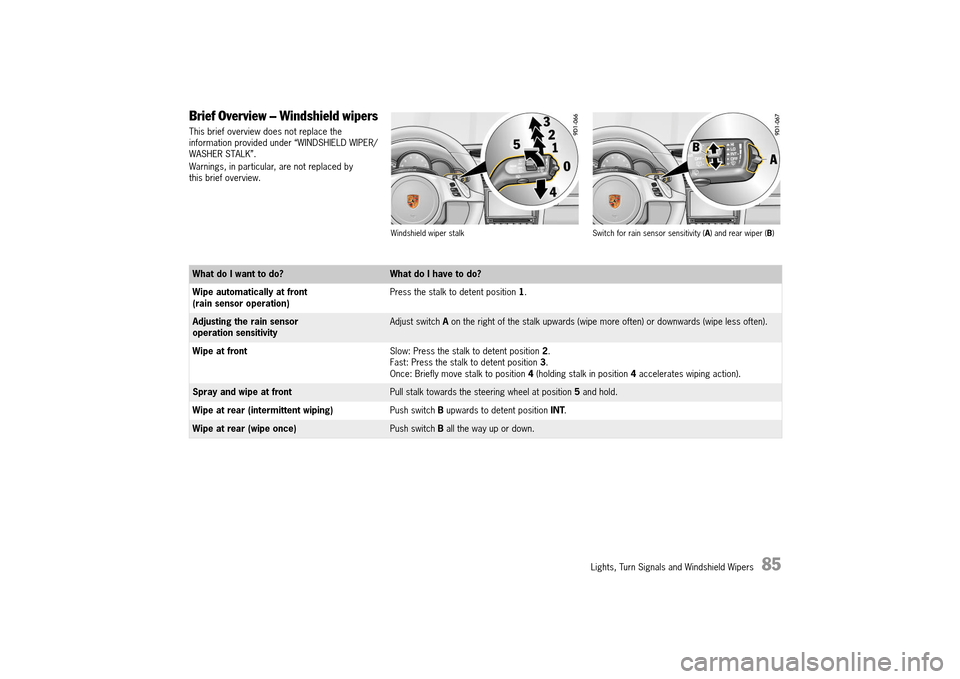
Windshield wiper stalk Switch for rain sensor sensitivity ( A) and rear wiper (B)
What do I want to do?What do I have to do?
Wipe automatically at front (rain sensor operation) Press the stalk to detent position 1.
Adjusting the rain sensor operation sensitivityAdjust switch A on the right of the stalk upwards (wipe more often) or downwards (wipe less often).
Wipe at front Slow: Press the stalk to detent position 2. Fast: Press the stalk to detent position 3. Once: Briefly move stalk to position 4 (holding stalk in position 4 accelerates wiping action).
Spray and wipe at frontPull stalk towards the steering wheel at position 5 and hold.
Wipe at rear (intermittent wiping) Push switch B upwards to detent position INT.
Wipe at rear (wipe once)Push switch B all the way up or down.
14_991_Turbo_21.book Seite 85 Mittwoch, 9. April 2014 2:19 14
Page 88 of 300
86 Lights, Turn Signals and Windshield Wipers
Windshield Wiper/Washer Stalk
In rain sensor operation, the windshield wipers wipe automatically if moisture is detected on the windshield.fAlways switch off windshield wipers before cleaning the windshield to avoid unintentional operation (rain sensor operation).
Risk of damage to the luggage compartment lid, windshield, rear window and wiper system.fOnly wipe the windshield when sufficiently wet, otherwise it could become scratched.fLoosen frozen wiper blades before starting to drive.fDo not operate a frozen headlight washer system. fAlways switch off windshield wipers in car washes to prevent them wiping unintentionally (rain sensor operation).fDo not operate headlight washer system in car washes.fAlways switch off windshield wipers before cleaning the windshield to avoid unintentional operation (rain sensor operation).fAlways hold the wiper arm securely when replacing the wiper blade.fAlways switch off windshield wipers before opening the luggage compartment lid (wiper switch in position 0).fWhen replacing wiper blades, observe different lengths of the wiper blades.
Windshield wiper and headlight washer system
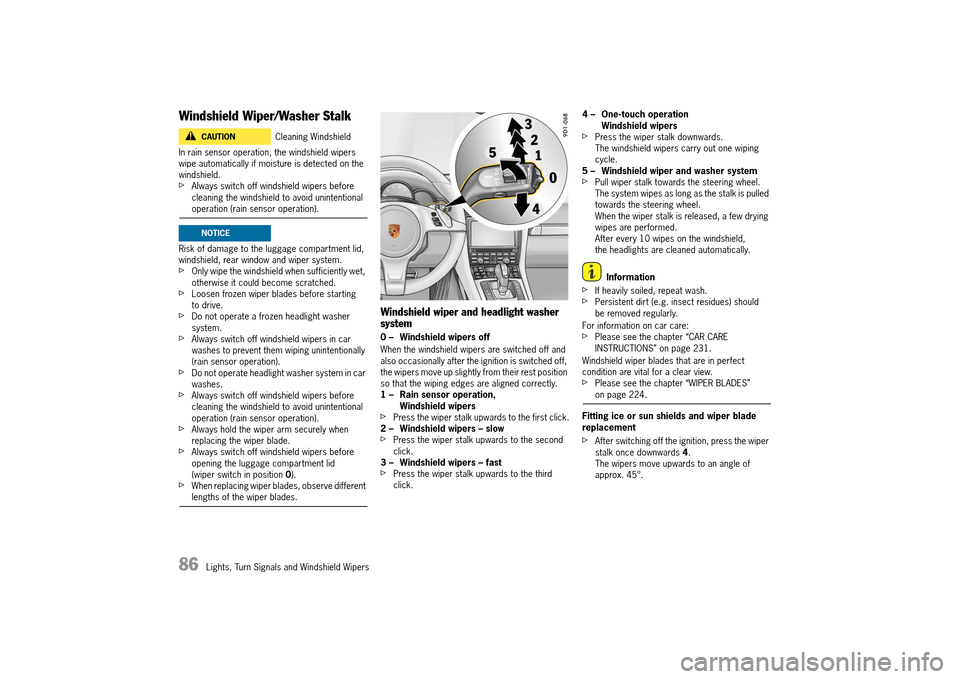
0 – Windshield wipers off
When the windshield wipers are switched off and also occasionally after the ignition is switched off, the wipers move up slightly from their rest position so that the wiping edges are aligned correctly.1 – Rain sensor operation, Windshield wipersfPress the wiper stalk upwards to the first click.2 – Windshield wipers – slowfPress the wiper stalk upwards to the second click.3 – Windshield wipers – fastfPress the wiper stalk upwards to the third click.
4 – One-touch operation Windshield wipersfPress the wiper stalk downwards.The windshield wipers carry out one wiping cycle.5 – Windshield wiper and washer systemfPull wiper stalk towards the steering wheel.The system wipes as long as the stalk is pulled towards the steering wheel.When the wiper stalk is released, a few drying wipes are performed.After every 10 wipes on the windshield, the headlights are cleaned automatically.
Information
fIf heavily soiled, repeat wash. fPersistent dirt (e.g. insect residues) should be removed regularly.
For information on car care:fPlease see the chapter “CAR CARE INSTRUCTIONS” on page 231.
Windshield wiper blades that are in perfect condition are vital for a clear view.fPlease see the chapter “WIPER BLADES” on page 224.
Fitting ice or sun shields and wiper blade replacement
fAfter switching off the ignition, press the wiper stalk once downwards 4. The wipers move upwards to an angle of approx. 45°.
Cleaning WindshieldCAUTIONh
NOTICE
14_991_Turbo_21.book Seite 86 Mittwoch, 9. April 2014 2:19 14
Page 89 of 300
Lights, Turn Signals and Windshield Wipers 87
Rain sensor operation, windshield wipers
In rain sensor mode, the amount of rain on the windshield is measured. The wipe interval is automatically controlled accordingly.
Rain sensor operation is activated automatically at speeds of less than approx. 2.5 mph (4 km/h) when the windshield wipers are switched on.
If a speed of approx. 5 mph (8 km/h) is exceeded, the system switches to the preselected wiper speed.
Information
fIf the wiper stalk is in position 1 when the ignition is switched on, the rain sensor is activated as soon as the vehicle speed exceeds approx. 2.5 mph (4 km/h).fIf the wiper stalk is in position 2 or 3 when the ignition is switched on, the windshield wipers remain switched off until the wiper stalk is actuated.
Information
The wiper is stopped when the luggage compartment lid is opened.
After closing the luggage compartment lid, the wiper stalk must be operated in order to switch the wiper back on.
Adjusting the rain sensor sensitivity
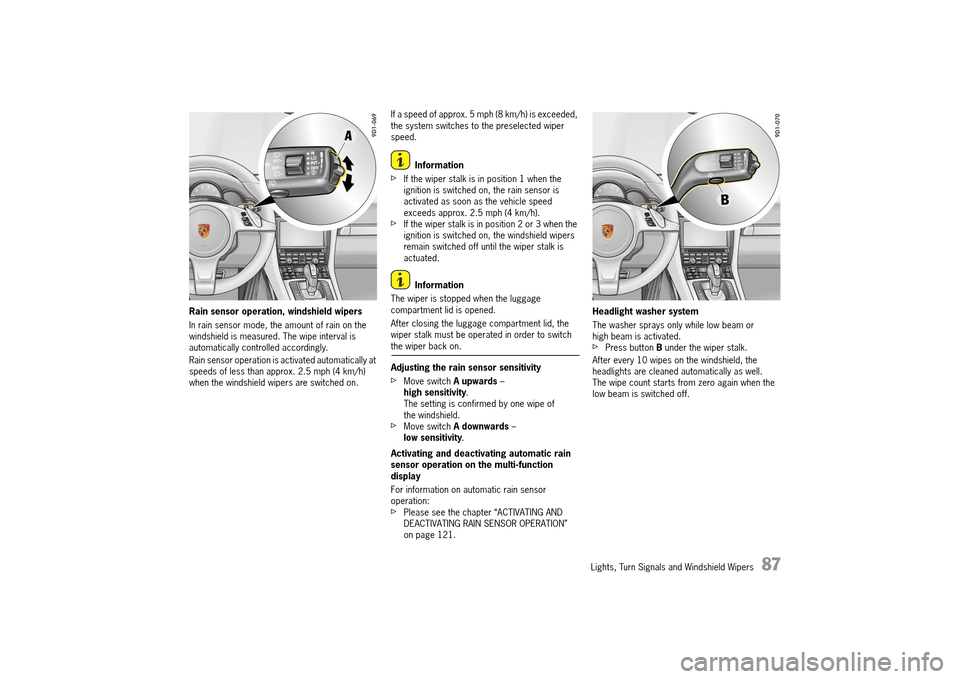
fMove switch A upwards – high sensitivity . The setting is confirmed by one wipe of the windshield.fMove switch A downwards – low sensitivity .
Activating and deactivating automatic rain sensor operation on the multi-function display
For information on automatic rain sensor operation:fPlease see the chapter “ACTIVATING AND DEACTIVATING RAIN SENSOR OPERATION” on page 121.
Headlight washer system
The washer sprays only while low beam or high beam is activated. fPress button B under the wiper stalk.
After every 10 wipes on the windshield, the headlights are cleaned automatically as well. The wipe count starts from zero again when the low beam is switched off.
14_991_Turbo_21.book Seite 87 Mittwoch, 9. April 2014 2:19 14
Page 90 of 300
88 Lights, Turn Signals and Windshield Wipers
Rear window wiper
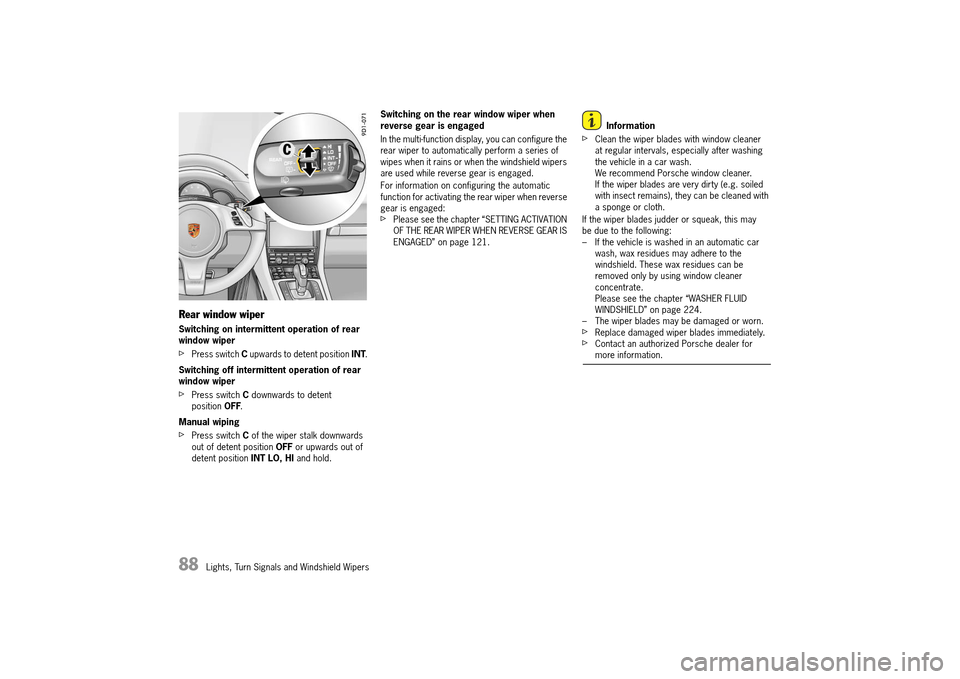
Switching on intermittent operation of rear window wiper
fPress switch C upwards to detent position INT.
Switching off intermittent operation of rear window wiper
fPress switch C downwards to detent position OFF.
Manual wiping
fPress switch C of the wiper stalk downwards out of detent position OFF or upwards out of detent position INT LO, HI and hold.
Switching on the rear window wiper when reverse gear is engaged
In the multi-function display, you can configure the rear wiper to automatically perform a series of wipes when it rains or when the windshield wipers are used while reverse gear is engaged.
For information on configuring the automatic function for activating the rear wiper when reverse gear is engaged:fPlease see the chapter “SETTING ACTIVATION OF THE REAR WIPER WHEN REVERSE GEAR IS ENGAGED” on page 121.
Information
fClean the wiper blades with window cleaner at regular intervals, especially after washing the vehicle in a car wash.We recommend Porsche window cleaner. If the wiper blades are very dirty (e.g. soiled with insect remains), they can be cleaned with a sponge or cloth.
If the wiper blades judder or squeak, this may be due to the following:– If the vehicle is washed in an automatic car wash, wax residues may adhere to the windshield. These wax residues can be removed only by using window cleaner concentrate.Please see the chapter “WASHER FLUID WINDSHIELD” on page 224.– The wiper blades may be damaged or worn.fReplace damaged wiper blades immediately.fContact an authorized Porsche dealer for more information.
14_991_Turbo_21.book Seite 88 Mittwoch, 9. April 2014 2:19 14
Page 92 of 300
90 Instrument Panel and Multi-Function Display
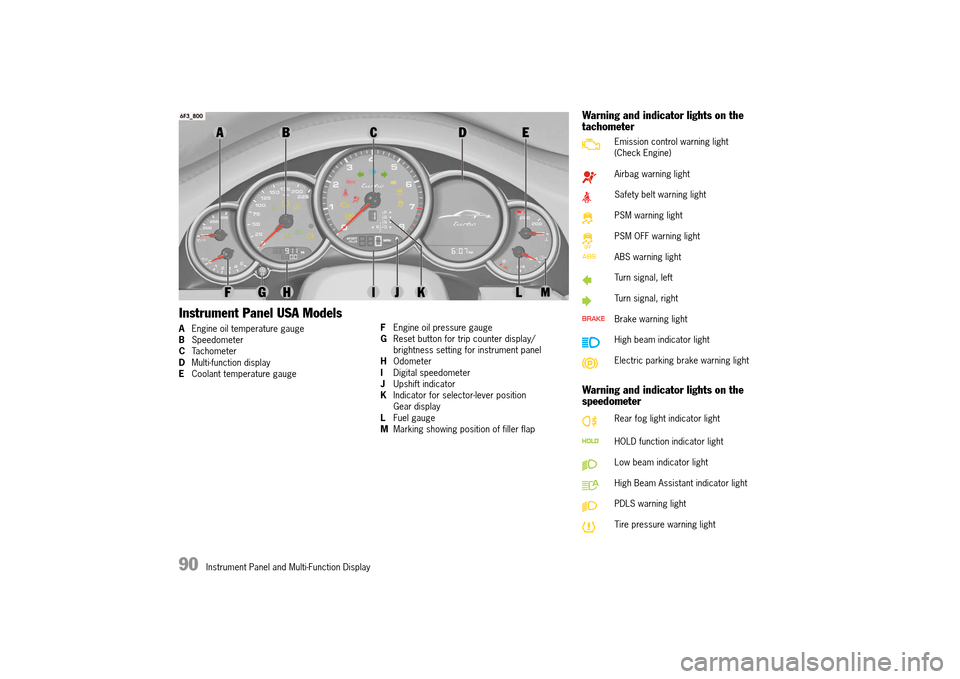
Instrument Panel USA Models
AEngine oil temperature gauge B Speedometer C Tachometer D Multi-function display E Coolant temperature gauge
F Engine oil pressure gauge G Reset button for trip counter display/ brightness setting for instrument panelH Odometer I Digital speedometer J Upshift indicator K Indicator for selector-lever position Gear displayL Fuel gauge M Marking showing position of filler flap
Warning and indicator lights on the tachometer
Warning and indicator lights on the speedometer
Emission control warning light (Check Engine)
Airbag warning light
Safety belt warning light
PSM warning light
PSM OFF warning light
ABS warning light
Turn signal, left
Turn signal, right
Brake warning light
High beam indicator light
Electric parking brake warning light
Rear fog light indicator light
HOLD function indicator light
Low beam indicator light
High Beam Assistant indicator light
PDLS warning light
Tire pressure warning light
14_991_Turbo_21.book Seite 90 Mittwoch, 9. April 2014 2:19 14
Page 93 of 300
Instrument Panel and Multi-Function Display 91
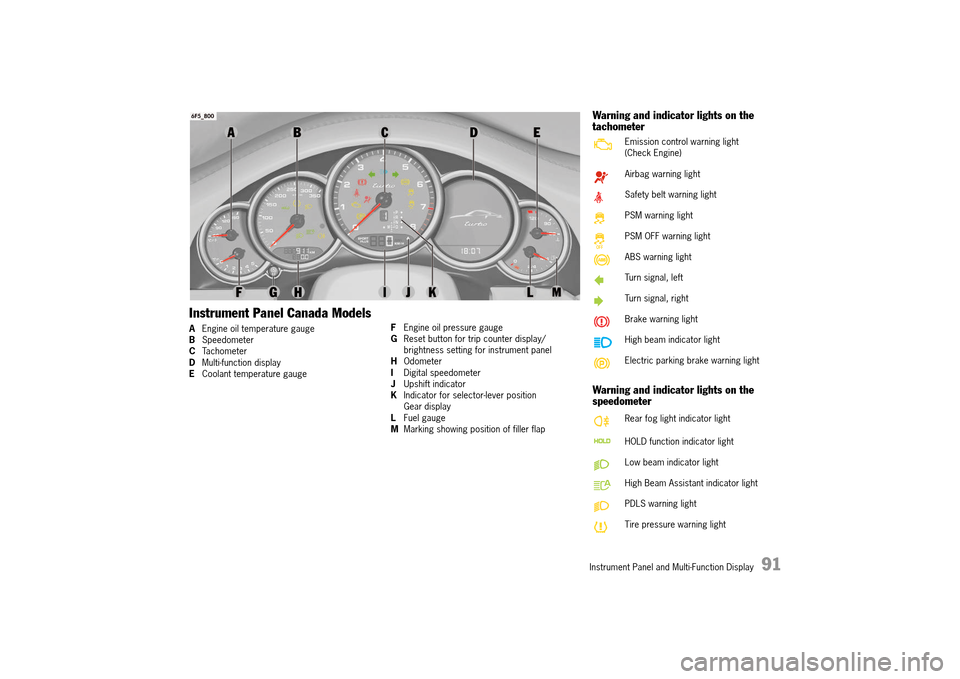
Instrument Panel Canada Models
AEngine oil temperature gauge B Speedometer C Tachometer D Multi-function display E Coolant temperature gauge
F Engine oil pressure gauge G Reset button for trip counter display/ brightness setting for instrument panelH Odometer I Digital speedometer J Upshift indicator K Indicator for selector-lever position Gear displayL Fuel gauge M Marking showing position of filler flap
Warning and indicator lights on the tachometer
Warning and indicator lights on the speedometer
Emission control warning light (Check Engine)
Airbag warning light
Safety belt warning light
PSM warning light
PSM OFF warning light
ABS warning light
Turn signal, left
Turn signal, right
Brake warning light
High beam indicator light
Electric parking brake warning light
Rear fog light indicator light
HOLD function indicator light
Low beam indicator light
High Beam Assistant indicator light
PDLS warning light
Tire pressure warning light
14_991_Turbo_21.book Seite 91 Mittwoch, 9. April 2014 2:19 14
Page 140 of 300
138 Instrument Panel and Multi-Function Display
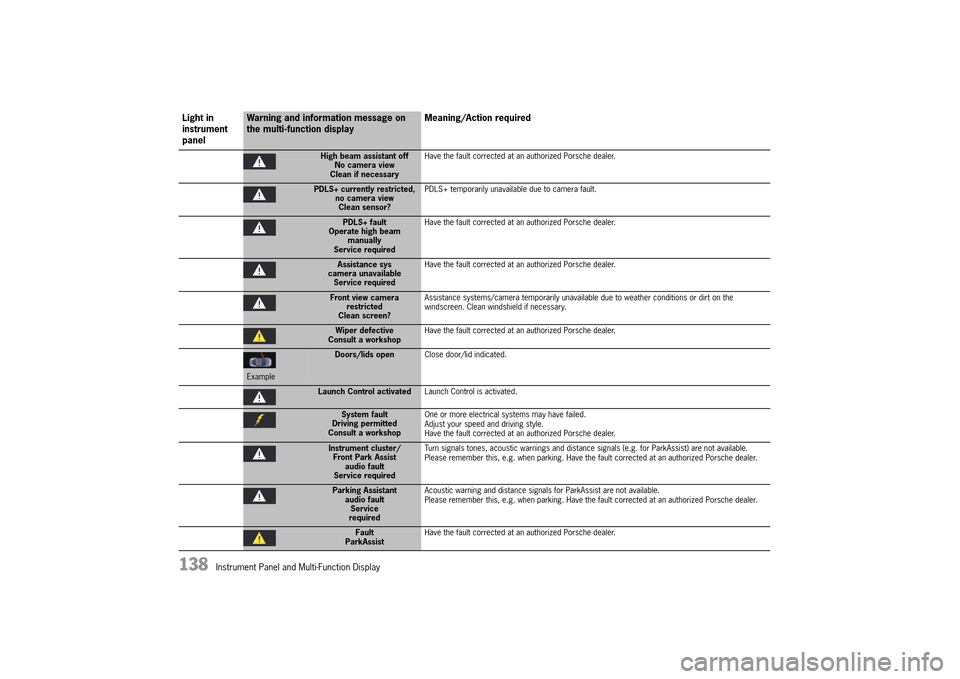
High beam assistant off No camera viewClean if necessary
Have the fault corrected at an authorized Porsche dealer.
PDLS+ currently restricted, no camera viewClean sensor?
PDLS+ temporarily unavailable due to camera fault.
PDLS+ fault Operate high beammanuallyService required
Have the fault corrected at an authorized Porsche dealer.
Assistance sys camera unavailableService required
Have the fault corrected at an authorized Porsche dealer.
Front view camera restrictedClean screen?
Assistance systems/camera temporarily unavailable due to weather conditions or dirt on the windscreen. Clean windshield if necessary.
Wiper defective Consult a workshop Have the fault corrected at an authorized Porsche dealer.
Example
Doors/lids open Close door/lid indicated.
Launch Control activatedLaunch Control is activated.
System fault Driving permittedConsult a workshop
One or more electrical systems may have failed. Adjust your speed and driving style.Have the fault corrected at an authorized Porsche dealer.
Instrument cluster/ Front Park Assistaudio faultService required
Turn signals tones, acoustic warnings and distance signals (e.g. for ParkAssist) are not available. Please remember this, e.g. when parking. Have the fault corrected at an authorized Porsche dealer.
Parking Assistant audio faultServicerequired
Acoustic warning and distance signals for ParkAssist are not available. Please remember this, e.g. when parking. Have the fault corrected at an authorized Porsche dealer.
Fault ParkAssist Have the fault corrected at an authorized Porsche dealer.
Light in instrument panel
Warning and information message on the multi-function display Meaning/Action required
14_991_Turbo_21.book Seite 138 Mittwoch, 9. April 2014 2:19 14
Page 167 of 300
Driving and Driving Safety 165
–“ACC not possible Switch on PSM” Adaptive cruise control is not available because PSM was switched off.For information on Porsche Stability Management (PSM) :fPLEASE SEE THE CHAPTER “PORSCHE STABILITY MANAGEMENT (PSM)” on page 181.–“ ACC off” Adaptive cruise control was deactivated.– “ACC not possible Steering lock too large” The steering is turned too far.
General information
“Sport” and “Sport Plus” Mode
Adaptive cruise control regulates your driving more dynamically in “ Sport” and “Sport Plus” mode.
Exceptions for adaptive cruise control
Adaptive cruise control is not available in the following situations:– If the ignition is switched off.– When PSM is off.– If the driver’s door is opened and the driver’s safety belt is not fastened.– When parking or maneuvering in very tight spaces.– When the electric parking brake is activated.– If the PDK selector lever is in position N , R or P. – On upward or downward slopes of more than 15 %.
If one of these exception situations occurs when adaptive cruise control is switched on, adaptive cruise control will be switched off.A message to this effect appears on the multi-function display.
Warning messages
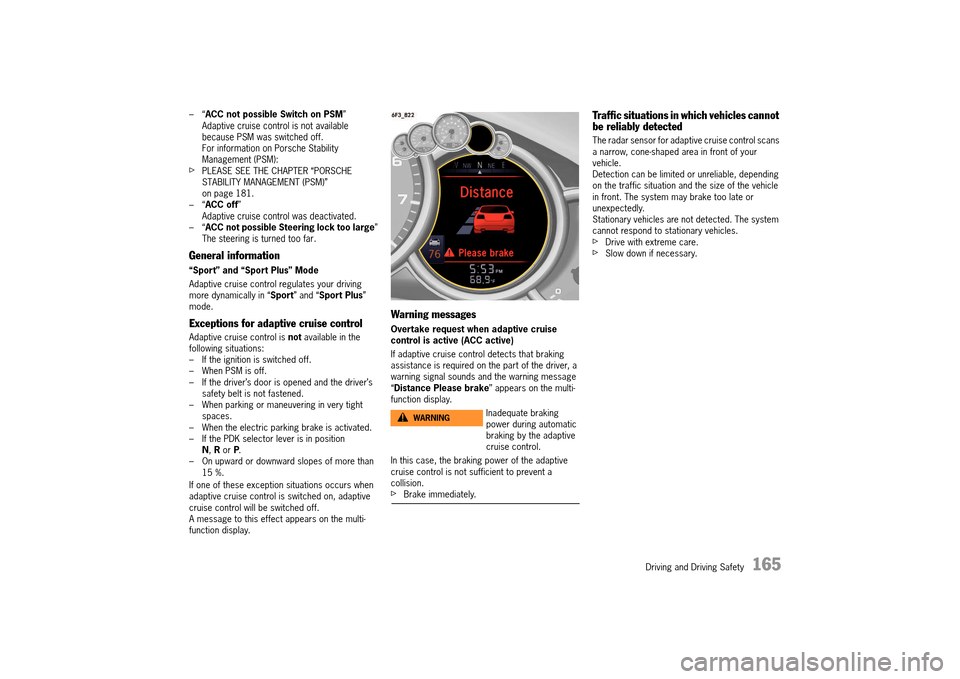
Overtake request when adaptive cruise control is active (ACC active)
If adaptive cruise control detects that braking assistance is required on the part of the driver, a warning signal sounds and the warning message “ Distance Please brake” appears on the multi- function display.
In this case, the braking power of the adaptive cruise control is not sufficient to prevent a collision.fBrake immediately.
Traffic situations in which vehicles cannot be reliably detected
The radar sensor for adaptive cruise control scans a narrow, cone-shaped area in front of your vehicle.Detection can be limited or unreliable, depending on the traffic situation and the size of the vehicle in front. The system may brake too late or unexpectedly.Stationary vehicles are not detected. The system cannot respond to stationary vehicles.fDrive with extreme care.fSlow down if necessary.
Inadequate braking power during automatic braking by the adaptive cruise control.
WARNINGh
14_991_Turbo_21.book Seite 165 Mittwoch, 9. April 2014 2:19 14
Page 171 of 300
Driving and Driving Safety 169
Static and fluttering
When the line-of-sight link between a transmitter and vehicle is blocked by large buildings or mountains, the radio sound may be accompanied with static or fluttering because of the characteristic of FM.
In a similar effect, a fluttering noise is sometimes heard when driving along a tree-lined road.
This static and fluttering can be reduced by adjusting the tone control for greater bass response until the disturbance has passed.
Multipath
Because of the reflecting characteristics of FM, direct and reflected signals may reach the antenna at the same time (multipath) and cancel each other out. As a vehicle moves through these electronic dead spots, the listener may hear a momentary flutter or loss of reception.
Station swapping
When two FM stations are close to each other, and an electronic dead spot, such as static or multipath area, interrupts the original signal, sometimes the stronger second signal will be selected automatically until the original one returns. This swapping can also occur as you drive away from the selected station and approach another station of a stronger signal.
Compact disk player
To avoid damage to compact disk player and disks.fUse only compact disks labeled as shown, having no dirt, damage or warpage.
fNever attempt to disassemble or oil any part of the player unit. Do not insert any object other than a disk into the slot. Remember there are no user-serviceable parts inside the compact disk player.fDo not allow the disk to sustain any fingerprints, scrapes or stickers on the surfaces. This may cause poor sound quality.Hold the disk only on the edge or center hole.fWhen not in use, take the disk out of the player, put the disk back into its case and store it away from dust, heat, damp and direct sunlight.Leaving the disk on the dashboard in the sun can damage the disk.fIf the disk gets dirty, clean the disk by wiping the surfaces from the center to the outside in a radial direction with a soft cloth. Do not use a conventional record cleaner or anti-static record preservative. Disk cleaners are available in audio stores.
Car Telephone and Aftermarket Alarms
Important legal and safety information regarding the use of cellular telephones
Some jurisdictions may prohibit the use of cellular telephones while driving a vehicle. Check the laws and regulations on the use of cellular telephones in the areas where you drive.
Looking away from the road or turning your attention away from your driving to operate a cell phone will sooner or later cause an accident. fDo not attempt to operate a hand-held cell phone while you are driving. Safety is more important than a phone call.
fLearn to operate the hands-free phone, if it is available, before you start driving. Then make use of the hands-free phone at all times.
It is essential to observe the telephone manufacturer’s instructions before operating the telephone.
Any portable telephone or radio transmitter which is used in a Porsche must be properly installed in accordance with the technical requirements of Porsche.
The transmission power must not exceed 10 W.
The devices must possess a type approval for your vehicle and have an “e” symbol.
If you should require equipment with transmission power values greater than 10 W, please consult your authorized Porsche dealer for this purpose. They are familiar with the technical requirements for installing devices of this kind.
The antennas for all radios and telephones with a transmitting antenna must be externally mounted.
The improper installation of radios or telephones or use of a radio or telephone with a transmitting antenna inside the car may cause the warning lights to come on.
Improper installation of such equipment can create a discharged battery or excessive current draw from added equipment.
NOTICE
Cell Phone UseDANGERh
14_991_Turbo_21.book Seite 169 Mittwoch, 9. April 2014 2:19 14
Page 214 of 300
212 Parking
Operating the garage door opener
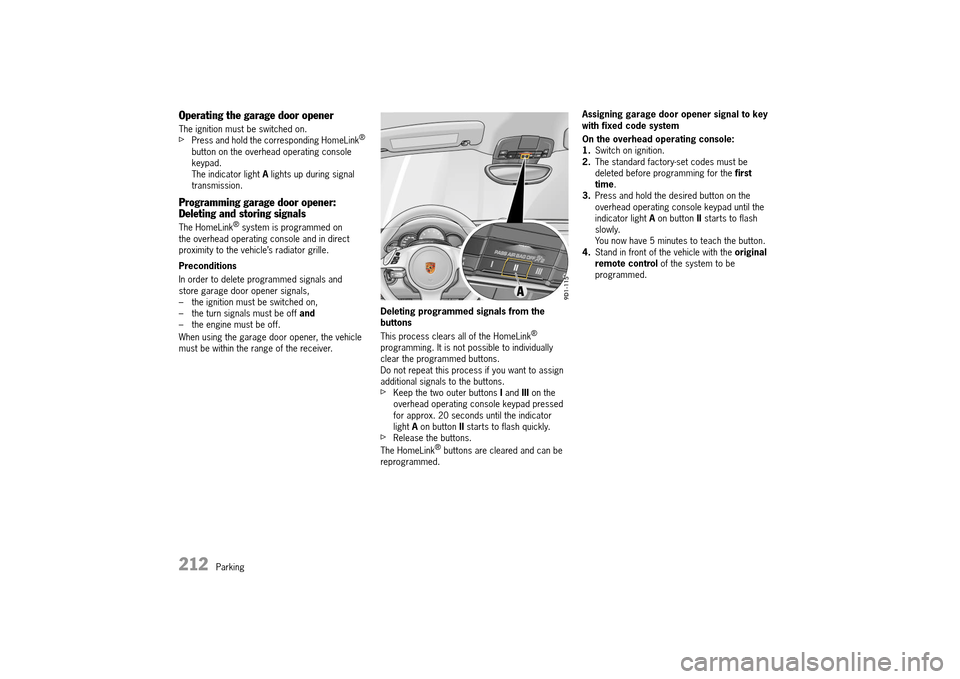
The ignition must be switched on.fPress and hold the corresponding HomeLink® button on the overhead operating console keypad.The indicator light A lights up during signal transmission.
Programming garage door opener: Deleting and storing signals
The HomeLink® system is programmed on the overhead operating console and in direct proximity to the vehicle’s radiator grille.
Preconditions
In order to delete programmed signals and store garage door opener signals,– the ignition must be switched on,– the turn signals must be off and – the engine must be off.
When using the garage door opener, the vehicle must be within the range of the receiver.
Deleting programmed signals from the buttons
This process clears all of the HomeLink® programming. It is not possible to individually clear the programmed buttons.Do not repeat this process if you want to assign additional signals to the buttons.fKeep the two outer buttons I and III on the overhead operating console keypad pressed for approx. 20 seconds until the indicator light A on button II starts to flash quickly.fRelease the buttons.
The HomeLink® buttons are cleared and can be reprogrammed.
Assigning garage door opener signal to key with fixed code system
On the overhead operating console: 1. Switch on ignition. 2. The standard factory-set codes must be deleted before programming for the first time . 3. Press and hold the desired button on the overhead operating console keypad until the indicator light A on button II starts to flash slowly.You now have 5 minutes to teach the button.4. Stand in front of the vehicle with the original remote control of the system to be programmed.
14_991_Turbo_21.book Seite 212 Mittwoch, 9. April 2014 2:19 14