ESP PORSCHE 911 TURBO 2014 6.G Owner's Manual
[x] Cancel search | Manufacturer: PORSCHE, Model Year: 2014, Model line: 911 TURBO, Model: PORSCHE 911 TURBO 2014 6.GPages: 300, PDF Size: 10.61 MB
Page 110 of 300
108 Instrument Panel and Multi-Function Display
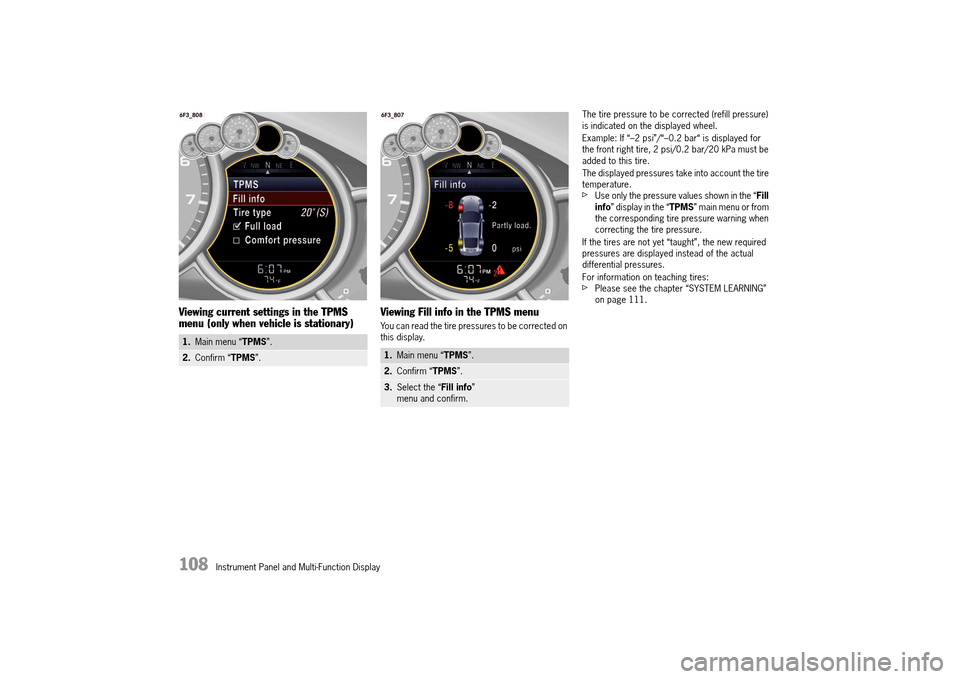
Viewing current settings in the TPMS menu (only when vehicle is stationary) Viewing Fill info in the TPMS menu
You can read the tire pressures to be corrected on this display.
The tire pressure to be corrected (refill pressure) is indicated on the displayed wheel.
Example: If “–2 psi”/“–0.2 bar“ is displayed for the front right tire, 2 psi/0.2 bar/20 kPa must be added to this tire.
The displayed pressures take into account the tire temperature.fUse only the pressure values shown in the “ Fill info ” display in the “TPMS” main menu or from the corresponding tire pressure warning when correcting the tire pressure.
If the tires are not yet “taught”, the new required pressures are displayed instead of the actual differential pressures.
For information on teaching tires:fPlease see the chapter “SYSTEM LEARNING” on page 111.
1. Main menu “TPMS”.
2.Confirm “TPMS”.1.Main menu “TPMS”.
2.Confirm “TPMS”.
3.Select the “Fill info” menu and confirm.
14_991_Turbo_21.book Seite 108 Mittwoch, 9. April 2014 2:19 14
Page 111 of 300
Instrument Panel and Multi-Function Display 109
Selecting tire type in the TPMS menu (type and size of fitted tire)
Exceeding the maximum tire speed could result in a tire burst, causing loss of control of the vehicle.fAlways observe the permissible maximum speed of the respective tire.fPorsche recommends obeying all traffic laws at all times to maintain the safety of yourself and all vehicle occupants.
Incomplete entries or selection of the wrong tires on the multi-function display affect correct indication of warnings and messages.fThe settings must be updated in the “ Tire pressure ” menu after changing a wheel, filling with tire sealant or adding air (after previous warning “ Check tires”). Please see the chapter “RED WARNING – “CHECK TIRES”” on page 112.
The new tire type and tire size must be selected even if the settings for the new set of wheels are the same as for the old wheels.
Option is selected.
Option is not selected.
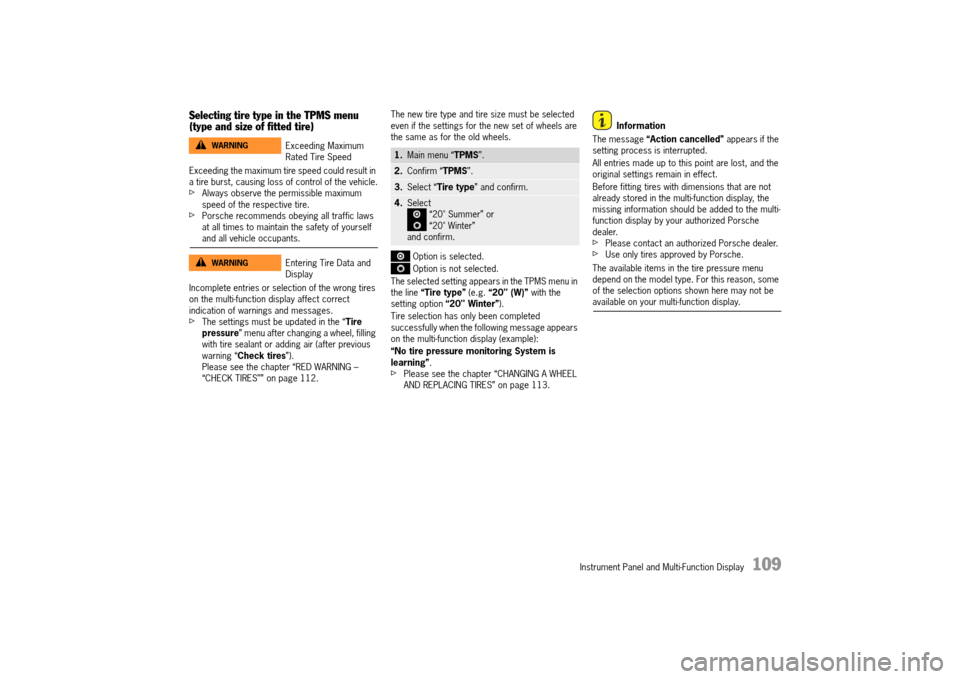
The selected setting appears in the TPMS menu in the line “Tire type” (e.g. “20" (W)” with the setting option “20" Winter”).
Tire selection has only been completed successfully when the following message appears on the multi-function display (example):
“No tire pressure monitoring System is learning” .fPlease see the chapter “CHANGING A WHEEL AND REPLACING TIRES” on page 113.
Information
The message “Action cancelled” appears if the setting process is interrupted.
All entries made up to this point are lost, and the original settings remain in effect.
Before fitting tires with dimensions that are not already stored in the multi-function display, the missing information should be added to the multi-function display by your authorized Porsche dealer.fPlease contact an authorized Porsche dealer.fUse only tires approved by Porsche.
The available items in the tire pressure menu depend on the model type. For this reason, some of the selection options shown here may not be available on your multi-function display.
Exceeding Maximum Rated Tire Speed
Entering Tire Data and Display
WARNINGh
WARNINGh
1. Main menu “TPMS”.
2.Confirm “TPMS”.
3.Select “Tire type” and confirm.
4.Select “20" Summer” or “20" Winter” and confirm.
14_991_Turbo_21.book Seite 109 Mittwoch, 9. April 2014 2:19 14
Page 113 of 300
Instrument Panel and Multi-Function Display 111
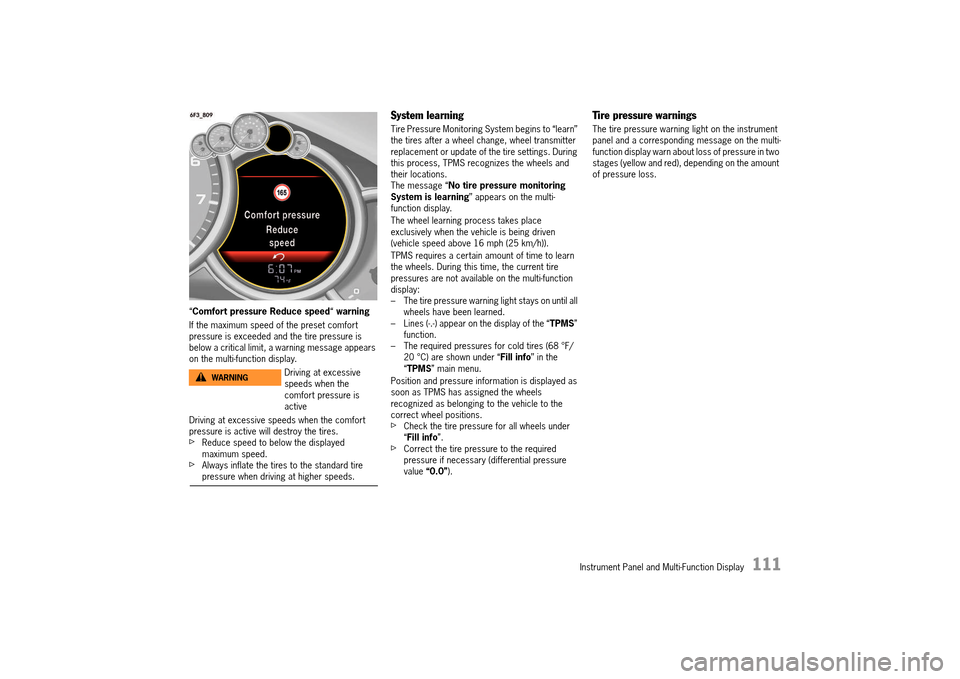
“Comfort pressure Reduce speed“ warning
If the maximum speed of the preset comfort pressure is exceeded and the tire pressure is below a critical limit, a warning message appears on the multi-function display.
Driving at excessive speeds when the comfort pressure is active will destroy the tires.fReduce speed to below the displayed maximum speed.fAlways inflate the tires to the standard tire pressure when driving at higher speeds.
System learning
Tire Pressure Monitoring System begins to “learn” the tires after a wheel change, wheel transmitter replacement or update of the tire settings. During this process, TPMS recognizes the wheels and their locations.The message “ No tire pressure monitoring System is learning ” appears on the multi- function display.
The wheel learning process takes place exclusively when the vehicle is being driven (vehicle speed above 16 mph (25 km/h)).
TPMS requires a certain amount of time to learn the wheels. During this time, the current tire pressures are not available on the multi-function display:– The tire pressure warning light stays on until all wheels have been learned.– Lines (-.-) appear on the display of the “ TPMS” function.– The required pressures for cold tires (68 °F/20 °C) are shown under “ Fill info” in the “ TPMS” main menu.
Position and pressure information is displayed as soon as TPMS has assigned the wheels recognized as belonging to the vehicle to the correct wheel positions.fCheck the tire pressure for all wheels under “ Fill info”.fCorrect the tire pressure to the required pressure if necessary (differential pressure value “0.0”).
Tire pressure warnings
The tire pressure warning light on the instrument panel and a corresponding message on the multi-function display warn about loss of pressure in two stages (yellow and red), depending on the amount of pressure loss.
Driving at excessive speeds when the comfort pressure is active
WARNINGh
14_991_Turbo_21.book Seite 111 Mittwoch, 9. April 2014 2:19 14
Page 115 of 300
Instrument Panel and Multi-Function Display 113
Warning light
The warning light in the instrument panel lights up: – When a loss in pressure has been detected (warning light: lights up continuously).– In the event of a defect in TPMS or a temporary fault (warning light: flashes for 60 seconds, then lights up continuously).– When learning new fitted wheels/wheel transmitters, as long as the vehicle’s own wheels have not yet been recognized (warning light: flashes for 60 seconds, then lights up continuously).
A warning message also appears on the multi- function display in the instrument panel.fPlease see the chapter “OVERVIEW OF WARNING AND INFORMATION MESSAGES” on page 129.
The tire pressure warning light on the instrument panel goes out only when the cause of the fault has been rectified.
Changing a wheel and replacing tires
fNew wheels must be fitted with radio transmitters for Tire Pressure Monitoring System. Before tires are changed, the battery charge condition of the wheel transmitters should be checked.fPlease contact an authorized Porsche dealer.fSwitch off the ignition when changing a wheel.
The tire settings on the multi-function display must be updated after changing a wheel.If the tire settings are not updated, the message “Tire change? Update settings” is displayed on the multi-function display.fUpdate the multi-function display settings the next time the vehicle is stationary.
Pressure increase as the result of temperature increase
In accordance with physical principles, the tire pressure changes as the temperature changes.For every 18 °F (10 °C) change in temperature, the tire pressure increases or decreases by around 1.5 psi/0.1 bar/10 kPa.
Partial monitoring
Monitoring of the other wheels is continued if there is a fault in one or two wheel transmitters.– The tire pressure warning light lights up.– The message “Restricted monitoring” appears on the multi-function display.– No tire pressures are displayed on the multi-function display for wheels with faulty wheel transmitters.
No monitoring
In the event of faults, Tire Pressure Monitoring System cannot monitor the tire pressure. The warning light on the instrument panel lights up and a corresponding message appears on the multi-function display.
Monitoring is not active: – In the event of a defect in TPMS or if more than 2 wheel transmitters are defective.– If wheel transmitters for Tire Pressure Monitoring System are missing.– During the learning phase after the tire settings have been updated.– After a wheel change without updating the tire settings.– If more than four wheel transmitters are recognized.– If there is external interference by other radio sources, e.g. wireless headphones.– If tire temperatures are too high.fPlease see the chapter “OVERVIEW OF WARNING AND INFORMATION MESSAGES” on page 129.
14_991_Turbo_21.book Seite 113 Mittwoch, 9. April 2014 2:19 14
Page 131 of 300
Instrument Panel and Multi-Function Display 129
Overview of Warning and Information Messages
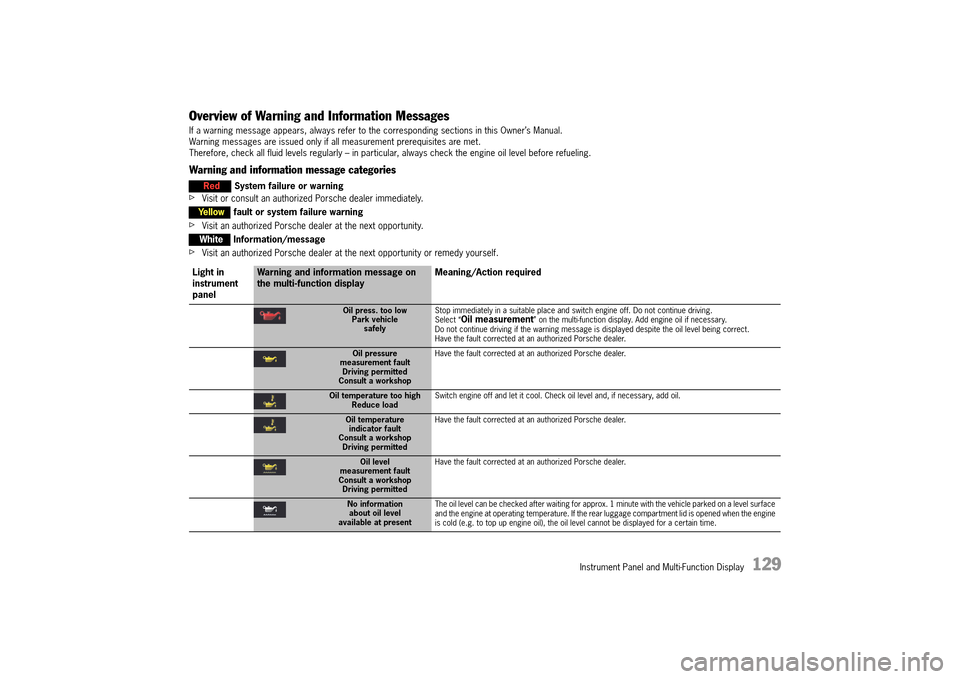
If a warning message appears, always refer to the corresponding sections in this Owner’s Manual. Warning messages are issued only if all measurement prerequisites are met. Therefore, check all fluid levels regularly – in particular, always check the engine oil level before refueling.
Warning and information message categories
fVisit or consult an authorized Porsche dealer immediately.
fVisit an authorized Porsche dealer at the next opportunity.
fVisit an authorized Porsche dealer at the next opportunity or remedy yourself.
Red System failure or warning
Yellowfault or system failure warning
WhiteInformation/message
Light in instrument panel
Warning and information message on the multi-function display Meaning/Action required
Oil press. too low Park vehiclesafely
Stop immediately in a suitable place and switch engine off. Do not continue driving. Select “Oil measurement” on the multi-function display. Add engine oil if necessary.Do not continue driving if the warning message is displayed despite the oil level being correct.Have the fault corrected at an authorized Porsche dealer.
Oil pressure measurement faultDriving permittedConsult a workshop
Have the fault corrected at an authorized Porsche dealer.
Oil temperature too high Reduce load Switch engine off and let it cool. Check oil level and, if necessary, add oil.
Oil temperature indicator faultConsult a workshopDriving permitted
Have the fault corrected at an authorized Porsche dealer.
Oil level measurement faultConsult a workshopDriving permitted
Have the fault corrected at an authorized Porsche dealer.
No information about oil levelavailable at present
The oil level can be checked after waiting for approx. 1 minute with the vehicle parked on a level surface and the engine at operating temperature. If the rear luggage compartment lid is opened when the engine is cold (e.g. to top up engine oil), the oil level cannot be displayed for a certain time.
14_991_Turbo_21.book Seite 129 Mittwoch, 9. April 2014 2:19 14
Page 135 of 300
Instrument Panel and Multi-Function Display 133
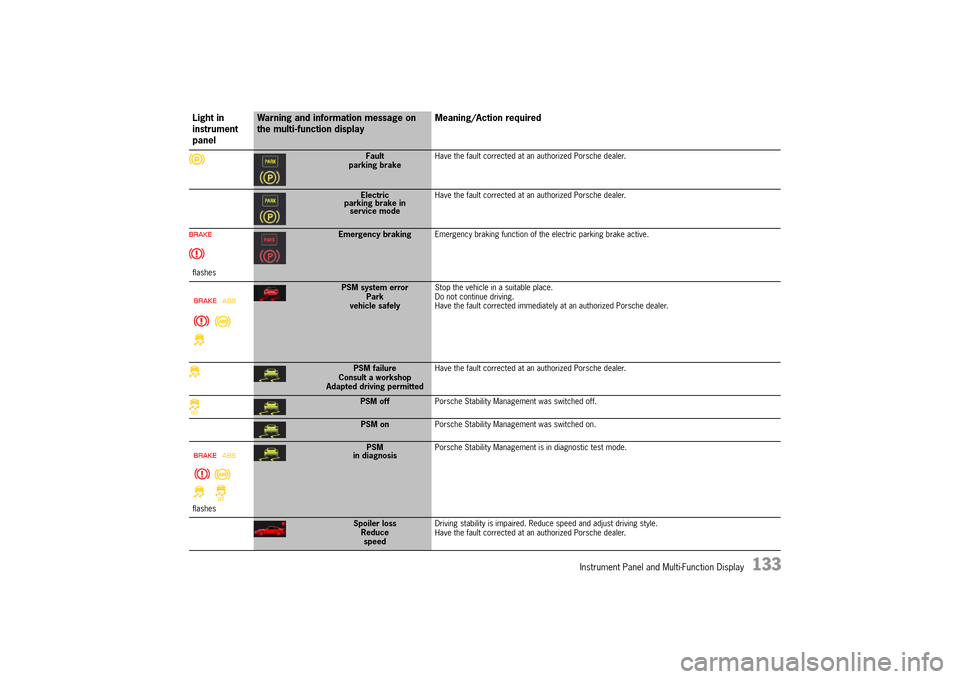
Fault parking brake Have the fault corrected at an authorized Porsche dealer.
Electric parking brake inservice mode
Have the fault corrected at an authorized Porsche dealer.
flashes
Emergency braking Emergency braking function of the electric parking brake active.
PSM system error Park vehicle safely
Stop the vehicle in a suitable place. Do not continue driving.Have the fault corrected immediately at an authorized Porsche dealer.
PSM failureConsult a workshopAdapted driving permitted
Have the fault corrected at an authorized Porsche dealer.
PSM off Porsche Stability Management was switched off.
PSM onPorsche Stability Management was switched on.
flashes
PSM in diagnosis Porsche Stability Management is in diagnostic test mode.
Spoiler loss Reducespeed
Driving stability is impaired. Reduce speed and adjust driving style. Have the fault corrected at an authorized Porsche dealer.
Light in instrument panel
Warning and information message on the multi-function display Meaning/Action required
14_991_Turbo_21.book Seite 133 Mittwoch, 9. April 2014 2:19 14
Page 145 of 300
Personal Settings 143
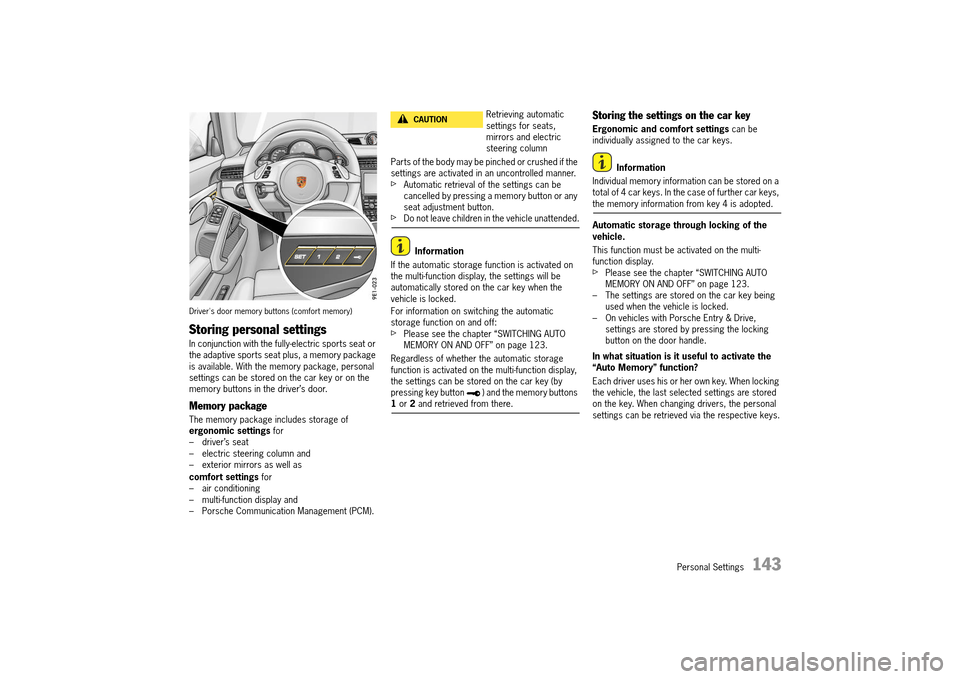
Driver's door memory buttons (comfort memory)
Storing personal settings
In conjunction with the fully-electric sports seat or the adaptive sports seat plus, a memory package is available. With the memory package, personal settings can be stored on the car key or on the memory buttons in the driver’s door.
Memory package
The memory package includes storage of ergonomic settings for – driver’s seat– electric steering column and– exterior mirrors as well as
comfort settings for – air conditioning– multi-function display and– Porsche Communication Management (PCM).
Parts of the body may be pinched or crushed if the settings are activated in an uncontrolled manner.fAutomatic retrieval of the settings can be cancelled by pressing a memory button or any seat adjustment button.fDo not leave children in the vehicle unattended.
Information
If the automatic storage function is activated on the multi-function display, the settings will be automatically stored on the car key when the vehicle is locked.
For information on switching the automatic storage function on and off: fPlease see the chapter “SWITCHING AUTO MEMORY ON AND OFF” on page 123.
Regardless of whether the automatic storage function is activated on the multi-function display, the settings can be stored on the car key (by pressing key button ) and the memory buttons 1 or 2 and retrieved from there.
Storing the settings on the car key
Ergonomic and comfort settings can be individually assigned to the car keys.
Information
Individual memory information can be stored on a total of 4 car keys. In the case of further car keys, the memory information from key 4 is adopted.
Automatic storage through locking of the vehicle.
This function must be activated on the multi- function display.fPlease see the chapter “SWITCHING AUTO MEMORY ON AND OFF” on page 123.– The settings are stored on the car key being used when the vehicle is locked.– On vehicles with Porsche Entry & Drive, settings are stored by pressing the locking button on the door handle.
In what situation is it useful to activate the “Auto Memory” function?
Each driver uses his or her own key. When locking the vehicle, the last selected settings are stored on the key. When changing drivers, the personal settings can be retrieved via the respective keys.
Retrieving automatic settings for seats, mirrors and electric steering column
CAUTIONh
14_991_Turbo_21.book Seite 143 Mittwoch, 9. April 2014 2:19 14
Page 146 of 300
144 Personal Settings
Information
If the “ Auto Memory” function is activated, the settings stored manually on the key are overwritten each time the vehicle is locked.
Storage by pressing key button in the driver’s door
fThe ignition must be switched on.1. Press the SET button. The LED in the button lights up.2. Press key button within 10 seconds. 3. The ergonomic and comfort settings (key- specific) are stored. Storage is acknowledged acoustically and the LED in the SET button goes out.
In what situation is it useful to store the settings on key button ?
You would like to store/retrieve some of the settings when stationary or during driving and not only when locking/unlocking the vehicle. Ensure that the “ Auto Memory” function is deactivated. Otherwise, the settings will be overwritten when locking the vehicle.
Retrieving the settings from the car key
Ergonomic and comfort settings can be individually retrieved from the car key.
Automatic retrieval through unlocking of the vehicle
The settings are retrieved from the car key being used when the vehicle is unlocked and the driver's door is opened.
By pressing key button in the driver’s doorfPress and hold key button until all settings are retrievedorfWith the driver’s door open and the ignition switched off, briefly press key button . The settings are automatically retrieved.
Why do the settings on key button not correspond to the ones I have stored?
If the “ Auto Memory” function is activated in the multi-function display, all the ergonomic and comfort settings are stored on the key when locking the vehicle. Settings stored on key button are overwritten in the process.
Storing settings on buttons 1 and 2
Ergonomic settings can be individually assigned to buttons 1 and 2 in the driver’s door.fThe ignition must be switched on. 1. Press the SET button. The LED in the button lights up.2. Press button 1 or 2 or within 10 seconds. 3. The ergonomic settings are stored on the relevant button. Storage is acknowledged acoustically and the LED in the SET button goes out.
Retrieving settings with buttons 1 or 2
Retrieve ergonomic settings with buttons 1 or 2 in the driver's door.
fPress and hold button 1 or 2 until all settings are retrievedorfWith the driver’s door open and the ignition switched off, briefly press button 1 or 2. The settings are automatically retrieved or
Preventing automatic storage of settings on car key when locking
This function must be deactivated on the multi- function display.
For information on switching the automatic storage function on and off:fPlease see the chapter “SWITCHING AUTO MEMORY ON AND OFF” on page 123.
14_991_Turbo_21.book Seite 144 Mittwoch, 9. April 2014 2:19 14
Page 153 of 300
Driving and Driving Safety 151
Auto Start Stop function display
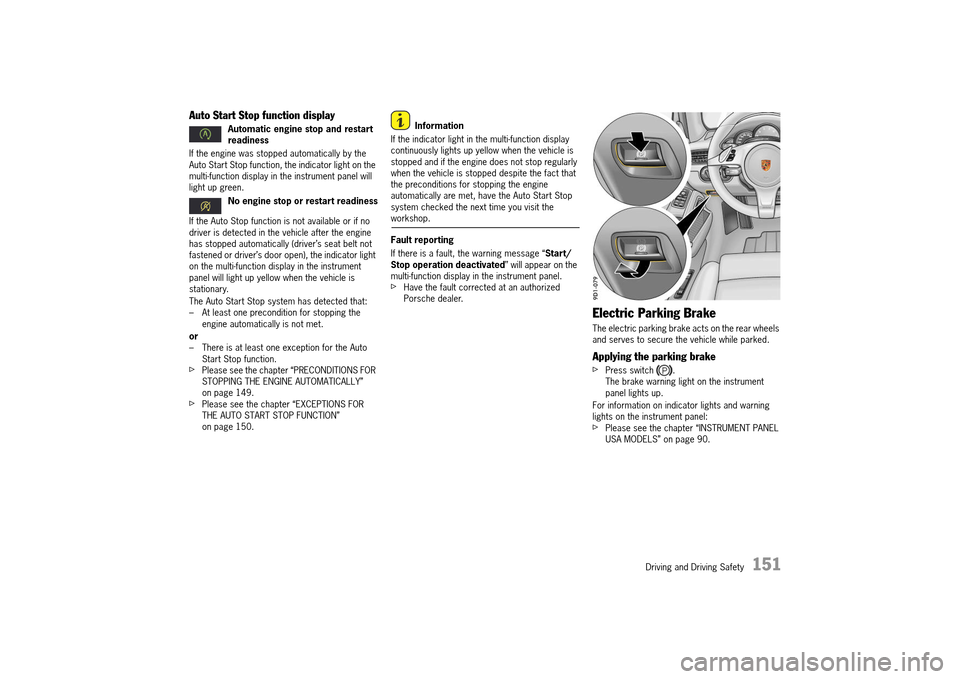
If the engine was stopped automatically by the Auto Start Stop function, the indicator light on the multi-function display in the instrument panel will light up green.
If the Auto Stop function is not available or if no driver is detected in the vehicle after the engine has stopped automatically (driver’s seat belt not fastened or driver’s door open), the indicator light on the multi-function display in the instrument panel will light up yellow when the vehicle is stationary.
The Auto Start Stop system has detected that: – At least one precondition for stopping the engine automatically is not met.
or – There is at least one exception for the Auto Start Stop function.fPlease see the chapter “PRECONDITIONS FOR STOPPING THE ENGINE AUTOMATICALLY” on page 149.fPlease see the chapter “EXCEPTIONS FOR THE AUTO START STOP FUNCTION” on page 150.
Information
If the indicator light in the multi-function display continuously lights up yellow when the vehicle is stopped and if the engine does not stop regularly when the vehicle is stopped despite the fact that the preconditions for stopping the engine automatically are met, have the Auto Start Stop system checked the next time you visit the workshop.
Fault reporting
If there is a fault, the warning message “ Start/ Stop operation deactivated ” will appear on the multi-function display in the instrument panel.fHave the fault corrected at an authorized Porsche dealer.
Electric Parking Brake
The electric parking brake acts on the rear wheels and serves to secure the vehicle while parked.
Applying the parking brake
fPress switch .The brake warning light on the instrument panel lights up.
For information on indicator lights and warning lights on the instrument panel: fPlease see the chapter “INSTRUMENT PANEL USA MODELS” on page 90.
Automatic engine stop and restart readiness
No engine stop or restart readiness
14_991_Turbo_21.book Seite 151 Mittwoch, 9. April 2014 2:19 14
Page 157 of 300
Driving and Driving Safety 155
In heavy rain, while driving through water or after leaving a car wash, the braking action may be delayed and increased pressure may be required.fFor this reason, keep further back from the vehicle in front and “dry” the brakes by applying them at intervals. Make sure that the traffic behind you is not affected.
After a long drive over salted or gritted roads, a coating may form on the brake disks and pads that significantly reduces friction and therefore also braking effect.fEven though the brake disks consist of alloyed gray cast iron, they will unavoidably start to corrode if your vehicle is parked for an extended period. The brakes will tend to “rub” as a result.The nature, extent and effects of corrosion depend on the amount of time the vehicle was parked, whether road salt or grit was spread and whether grease-dissolving agents were used in car washes (not on vehicles with Porsche Ceramic Composite Brake).To prevent corrosion of the brake disks, “brake them dry” before parking the vehicle (not on vehicles with Porsche Ceramic Composite Brake).If braking comfort is noticeably impaired, we recommend that you have the brake system checked by experts at an authorized Porsche dealer.
fTo relieve the brake system on downhill stretches, change down to a lower gear in good time (engine braking).If engine braking is insufficient on steep stretches, operate the footbrake at intervals. Avoid continuous braking as it overheats the brakes and reduces the braking effect.
For information on brake fluid and checking the brake fluid level:fPlease see the chapter “BRAKE FLUID” on page 243.
New brake pads or linings
New brake pads have to be “broken in”, and therefore only attain optimal friction when the car has covered several hundred miles or km.The slightly reduced braking ability must be compensated for by pressing the brake pedal harder. This applies whenever the brake pads and/or brake disks are replaced.
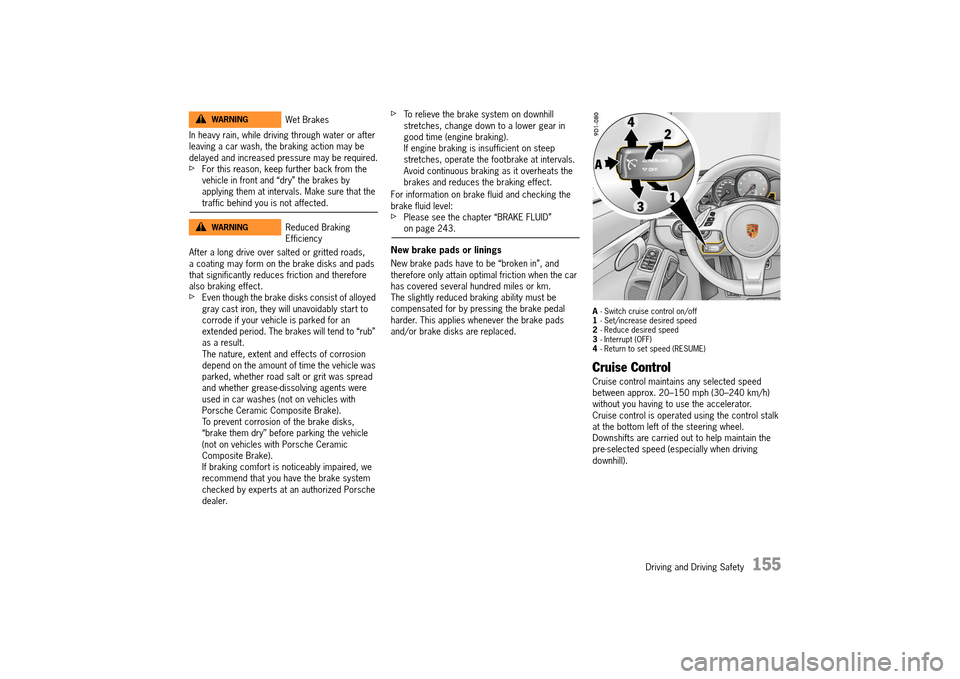
A - Switch cruise control on/off 1 - Set/increase desired speed 2 - Reduce desired speed 3 - Interrupt (OFF) 4 - Return to set speed (RESUME)
Cruise Control
Cruise control maintains any selected speed between approx. 20–150 mph (30–240 km/h) without you having to use the accelerator.Cruise control is operated using the control stalk at the bottom left of the steering wheel.Downshifts are carried out to help maintain the pre-selected speed (especially when driving downhill).
Wet Brakes
Reduced Braking Efficiency
WARNINGh
WARNINGh
14_991_Turbo_21.book Seite 155 Mittwoch, 9. April 2014 2:19 14