instrument panel PORSCHE 911 TURBO 2014 6.G Owner's Manual
[x] Cancel search | Manufacturer: PORSCHE, Model Year: 2014, Model line: 911 TURBO, Model: PORSCHE 911 TURBO 2014 6.GPages: 300, PDF Size: 10.61 MB
Page 95 of 300
Instrument Panel and Multi-Function Display 93
F – Engine oil pressure gauge
The oil pressure is controlled as required and should be at least 51 psi (3.5 bar) at an engine speed of 5000 rpm.
The engine oil pressure varies depending on the engine speed, oil temperature and engine load.
If oil pressure drops abruptly and a message is displayed on the multi-function display when the engine is running or while driving:fStop immediately in a suitable place.fSwitch off the engine.fCheck whether there is an obvious oil leak on or under the car.fSelect “ Oil measurement” on the multi- function display.fPlease see the chapter “DISPLAY AND MEASUREMENT OF THE ENGINE OIL LEVEL” on page 101.fAdd engine oil if necessary.
Risk of engine damage.fDo not continue driving if there is an obvious oil leak.fDo not continue driving if the warning message appears even when the oil level is correct.fHave the fault corrected at an authorized Porsche dealer.
G – Reset button for trip counter display/ brightness setting for instrument lighting
Resetting trip counter display
fPress rotary switch G for approx. 1 second. The trip counter display is reset to “0”.
Adjusting brightness of instrument lighting
For information on adjusting the brightness of the instrument lighting:fPlease see the chapter “INTERIOR/READING LIGHTS” on page 84.
H – Odometer
The displays for the total mileage and individual trips are integrated in the speedometer on the instrument panel.
The upper display counts the total mileage, the lower display shows individual trips.
After exceeding 6,213 miles or 9,999 kilometers, the trip counter returns to 0.
I – Digital speedometer
The digital speedometer I is integrated in the tachometer on the instrument panel.
J – Upshift prompt indicator
The consumption-oriented shift indicator to the right of the digital speed display on the tachometer helps you to develop a fuel-saving driving style. The upshift indicator lights up – prompting you to shift up to the next-higher gear – depending on the selected gear, engine speed and accelerator pedal position.fChange to the next-higher gear when the upshift indicator lights up.
NOTICE
14_991_Turbo_21.book Seite 93 Mittwoch, 9. April 2014 2:19 14
Page 96 of 300
94 Instrument Panel and Multi-Function Display
K – PDK indicator for selector-lever position
When the engine is running, the selector-lever position is indicated in gates D or M.
Warning messages
If the selector lever is between two positions
– Effects: The corresponding selector-lever position in the instrument panel flashes and the warning “ Engage gear selector properly” appears on the multi-function display.– Action required:Operate the footbrake and engage the selector lever properly.
If there is a fault in the transmission – Depending on priority, either the “ Transm. fault Poss. no R gear Drive on poss. ” warning or the warning “ Transm. failure Park vehicle safely ” will appear on the multi- function display.
Transm. fault Poss. no R gear Drive on poss.
– Effects: Restricted gearshift comfort,reverse gear may not function.fAction required:Have the fault corrected immediately at an authorized Porsche dealer.
Transm. failure Park vehicle safely
– Effect: Vehicle can be driven only until it comes to a stop. – Action required:It is not possible to continue driving. Stop the vehicle immediately in a suitable place. Have the fault corrected at an authorized Porsche dealer. If the vehicle has to be towed:Please see the chapter “TOWING” on page 278.
Warning “ Drive temperature too high Reduce load ” – Effects:“Warning jerks” can be felt when driving off and the engine power may be restricted.– Action required:Do not hold the vehicle with the accelerator on a hill, for example. Hold the vehicle with the brake. Reduce engine load. Stop the vehicle in a suitable place if possible. Allow the engine to run in selector-lever position P or N until the warning disappears.fPlease see the chapter “LIMP-HOME MODE” on page 178.
Porsche Doppelkupplung
When the engine is running, the display shows the currently engaged gear.
L – Fuel gauge
The fuel gauge displays the contents of the tank when the ignition is on.
For information on fuel quality and refill capacities:fPlease see the chapter “FILLING CAPACITIES” on page 289.
For information on fuel and refueling:fPlease see the chapter “FUEL” on page 227.
If the vehicle’s inclination changes (e.g. uphill/ downhill driving), minor deviations in the gauge may occur.
Fuel reserve warning
If less than approximately 3.2 U.S. gallons (12 liters) remains in the tank, the warning light on the multi-function display lights up when the ignition is switched on or the engine is running. fRefuel at the next opportunity.
A shortage of fuel may damage the emission control system. fNever drive the tank dry.fIf the warning lights have come on, do not take bends at high speed.
For information on the emission control system:fPlease see the chapter “EMISSION CONTROL SYSTEM” on page 225.
NOTICE
14_991_Turbo_21.book Seite 94 Mittwoch, 9. April 2014 2:19 14
Page 97 of 300
Instrument Panel and Multi-Function Display 95
Battery/Alternator
The warning message “Generator fault Park vehicle safely ” will appear on the multi-function display in the instrument panel if the vehicle electrical system voltage drops significantly.fStop at a safe place and switch the engine off.
For information on warning messages on the multi-function display:fPlease see the chapter “OVERVIEW OF WARNING AND INFORMATION MESSAGES” on page 129.
Possible causes
– Defect in the battery charging system– Broken drive belt
Risk of engine damage.
The engine cooling does not function if the drive belt is torn.fDo not continue driving.fHave the fault corrected.fPlease contact an authorized Porsche dealer.
Check Engine
(Emission Control)
Warning light
The emission control system detects malfunctions that could cause increased pollutant emissions or consequential damage etc. well in advance.Faults are indicated by the warning light on the instrument panel which then either lights up continuously or flashes.The faults are recorded in the control unit’s fault memory.
The warning light on the instrument panel lights up when the ignition is switched on as a lamp check and goes out approx. 1 second after the engine starts.
The warning light on the instrument panel flashes to indicate operating states (e.g. engine misfiring) which may cause damage to certain parts of the emission control system.fIn this case, immediately reduce the engine load by easing off the accelerator pedal.
In order to avoid consequential damage to the engine or the exhaust-gas cleaning system (e.g. catalytic converter):fPlease contact an authorized Porsche dealer.
Risk of damage to the emission control system.
If the warning light on the instrument panel continues flashing even when you have eased off the accelerator pedal, the emission control system may overheat.fStop as soon as possible in a safe place.Make sure that combustible materials, such as dry grass or leaves, cannot come into contact with the hot exhaust system.fSwitch off the engine.fHave the fault corrected at an authorized Porsche dealer.
Acoustic Signals
A speaker in the instrument panel generates acoustic signals.The warning message “ Instrument cluster/ Park Assist audio fault Service required ” will appear on the multi-function display in the instrument panel if a speaker fault occurs.The speaker cannot generate acoustic signals.fPlease see the chapter “OVERVIEW OF WARNING AND INFORMATION MESSAGES” on page 129.
Warning message
NOTICE
NOTICE
14_991_Turbo_21.book Seite 95 Mittwoch, 9. April 2014 2:19 14
Page 98 of 300
96 Instrument Panel and Multi-Function Display
Operating the Multi-Function
Display on the Instrument Panel
On the multi-function display, you can view information relating to the relevant vehicle equipment, operate the audio source (radio, CD, iPod, etc.), check the oil level, check the tire pressure, use the stopwatch or operate the navigation system.You can also modify different vehicle settings in the “ Vehicle” menu.
It is not possible to describe all details of the functions in this Owner’s Manual. The examples clearly demonstrate the functional principle and clarify the menu structure.
You may be distracted from paying attention to the road if you set or operate the multi-function display, radio, navigation system, telephone or other equipment when driving. You may lose control of the vehicle.fOperate the equipment while driving only if the traffic situation allows you to do so safely.fCarry out any complicated operating or setting procedures only when the vehicle is stationary.
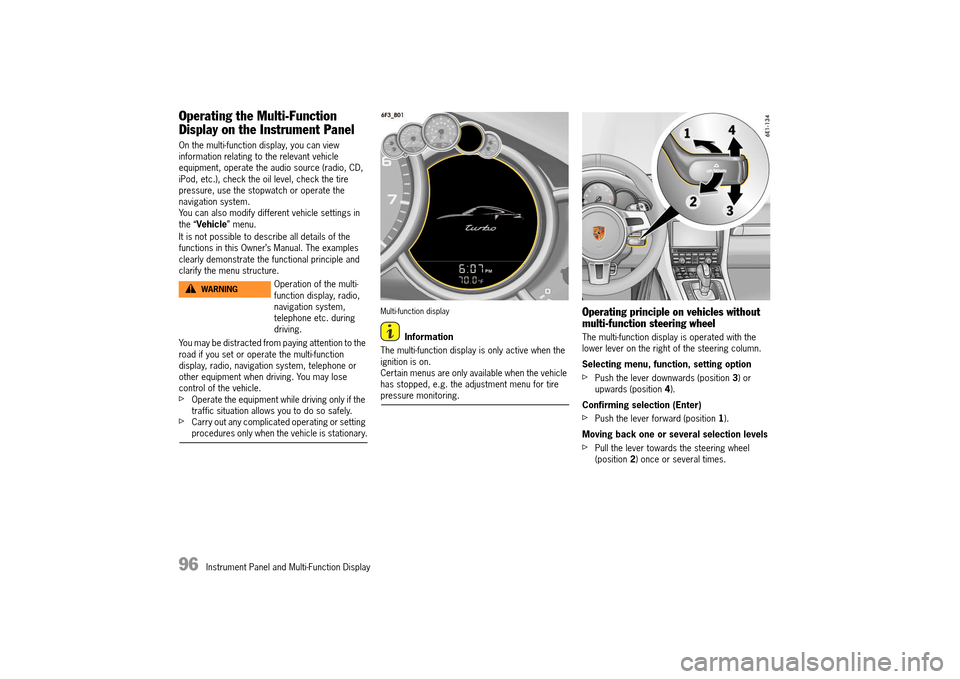
Multi-function display
Information
The multi-function display is only active when the ignition is on.Certain menus are only available when the vehicle has stopped, e.g. the adjustment menu for tire pressure monitoring.
Operating principle on vehicles without multi-function steering wheel
The multi-function display is operated with the lower lever on the right of the steering column.
Selecting menu, function, setting option
fPush the lever downwards (position 3) or upwards (position 4).
Confirming selection (Enter)
fPush the lever forward (position 1).
Moving back one or several selection levels
fPull the lever towards the steering wheel (position 2) once or several times.
Operation of the multi- function display, radio, navigation system, telephone etc. during driving.
WARNINGh
14_991_Turbo_21.book Seite 96 Mittwoch, 9. April 2014 2:19 14
Page 99 of 300
Instrument Panel and Multi-Function Display 97
Operating principle on vehicles with multi-function steering wheel
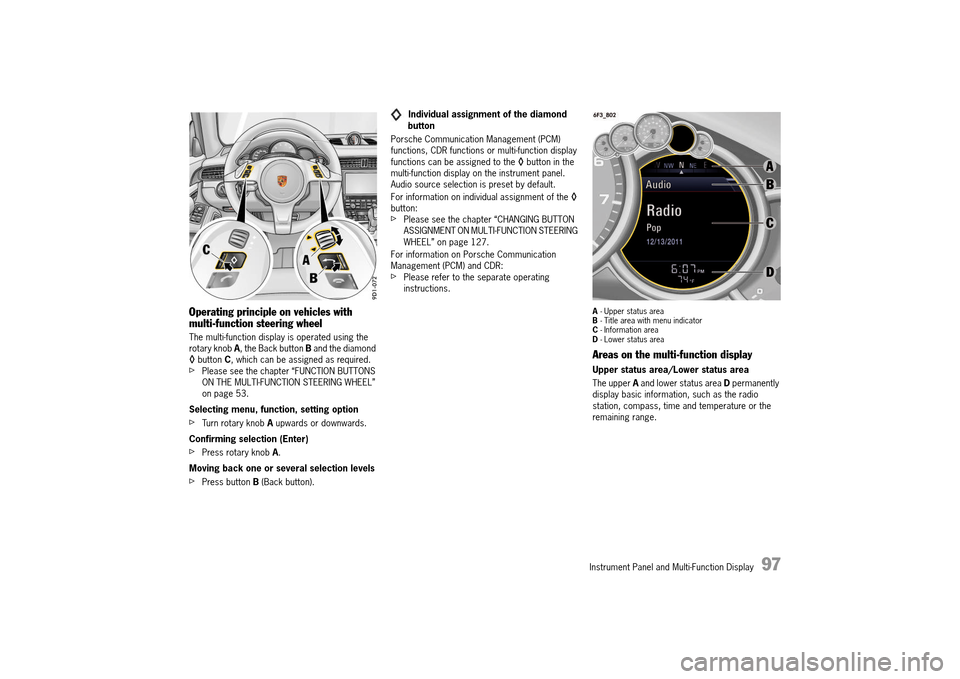
The multi-function display is operated using the rotary knob A, the Back button B and the diamond ◊ button C, which can be assigned as required. fPlease see the chapter “FUNCTION BUTTONS ON THE MULTI-FUNCTION STEERING WHEEL” on page 53.
Selecting menu, function, setting option
fTurn rotary knob A upwards or downwards.
Confirming selection (Enter)
fPress rotary knob A.
Moving back one or several selection levels
fPress button B (Back button).
Individual assignment of the diamond button
Porsche Communication Management (PCM) functions, CDR functions or multi-function display functions can be assigned to the ◊ button in the multi-function display on the instrument panel. Audio source selection is preset by default.
For information on individual assignment of the ◊ button:fPlease see the chapter “CHANGING BUTTON ASSIGNMENT ON MULTI-FUNCTION STEERING WHEEL” on page 127.
For information on Porsche Communication Management (PCM) and CDR:fPlease refer to the separate operating instructions.
A - Upper status area B - Title area with menu indicator C - Information area D - Lower status area
Areas on the multi-function display
Upper status area/Lower status area
The upper A and lower status area D permanently display basic information, such as the radio station, compass, time and temperature or the remaining range.
14_991_Turbo_21.book Seite 97 Mittwoch, 9. April 2014 2:19 14
Page 100 of 300
98 Instrument Panel and Multi-Function Display
The display contents of the upper and lower status area can be individually adapted.
For information on adapting the multi-function display:fPlease see the chapter “ADAPTING APPEARANCE OF MULTI-FUNCTION DISPLAY” on page 118.
Title area with menu indicator
The menu item currently selected is displayed in the title area B.
The menu indicator on the right shows the position of the current menu item in the overall menu and displays the number of other menu items on this menu level.The wider the menu indicator, the fewer menu items the current menu contains.
Information area
The information area C displays the menu items currently available for selection or after a menu item is selected, information relating to this menu item or other selection options.
Activating functions, opening submenus and accessing setting options from the main menu areas
Press the rotary knob A or push the right lower lever on the steering wheel forwards (position 1) to access menus, other functions and setting options regardless of the main menu area.
Browsing through long lists
When searching for an entry in long telephone and audio lists on vehicles with PCM, you can skip directly to other entries with the same first letter.fBriefly press the rotary knob A or hold the control stalk in position 3 or 4. A letter selection screen appears.fSelect the desired first letter and confirm.The marking skips to the first list entry beginning with the letter selected.
1. Select main menu and confirm.
2. Select function, submenu or setting option and confirm.
14_991_Turbo_21.book Seite 98 Mittwoch, 9. April 2014 2:19 14
Page 101 of 300
Instrument Panel and Multi-Function Display 99
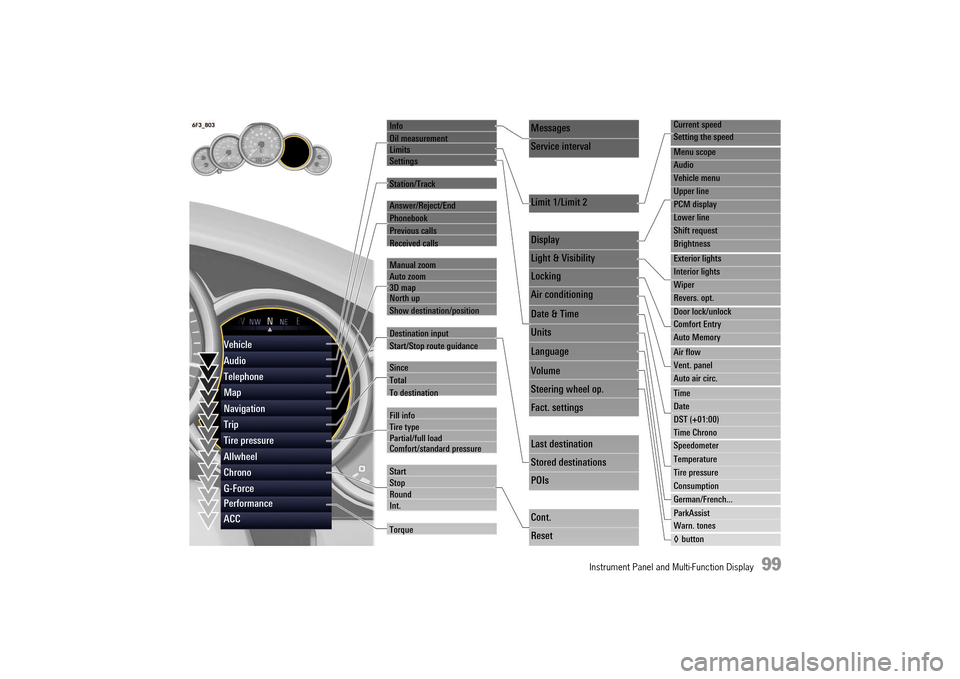
Info
Oil measurement LimitsSettings
Station/Track
Answer/Reject/End
Phonebook
Previous calls
Received calls
Manual zoom Auto zoom3D map North up
Show destination/position
Destination input
Start/Stop route guidance
Since
Total
To destination
Fill info Tire typePartial/full load Comfort/standard pressure
Start StopRoundInt.
Torque
Current speed
Setting the speed
Menu scope
Audio
Vehicle menu
Upper line
PCM display
Lower line
Shift request
Brightness
Exterior lights
Interior lights
Wiper
Revers. opt.
Door lock/unlock
Comfort Entry
Auto Memory
Air flow
Vent. panel
Auto air circ.
Time
Date
DST (+01:00)
Time Chrono
Speedometer
Temperature
Tire pressure
Consumption
German/French...
ParkAssist
Warn. tones
◊ button
Messages
Service interval
Limit 1/Limit 2
Display
Light & Visibility
Locking
Air conditioning
Date & Time
Units
Language
Volume
Steering wheel op.
Fact. settings
Last destination
Stored destinations
POIs
Cont.
Reset
Vehicle
Audio
Telephone
Map
Navigation
Trip
Tire pressure
Allwheel
Chrono
G-Force
Performance
ACC
14_991_Turbo_21.book Seite 99 Mittwoch, 9. April 2014 2:19 14
Page 102 of 300
100 Instrument Panel and Multi-Function Display
Vehicle Menu
A large amount of vehicle information can be displayed and vehicle settings made in the “ Vehicle” main menu.
The vehicle information display can be adapted individually.
For information on adapting the vehicle menu:fPlease see the chapter “ADAPTING DISPLAY CONTENTS IN VEHICLE INFORMATION AREA” on page 118.
Displaying vehicle information
Pending warning messages, information on forthcoming service intervals and the average fuel consumption can be viewed in the “ Info” sub-menu of the “ Vehicle” main menu area.
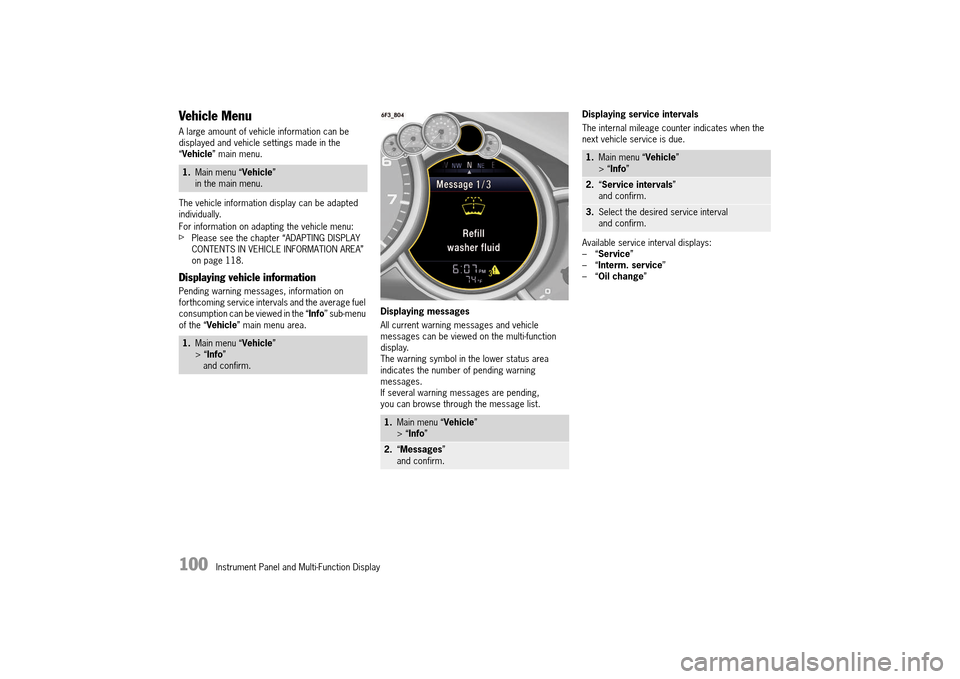
Displaying messages
All current warning messages and vehicle messages can be viewed on the multi-function display.The warning symbol in the lower status area indicates the number of pending warning messages.If several warning messages are pending, you can browse through the message list.
Displaying service intervals
The internal mileage counter indicates when the next vehicle service is due.
Available service interval displays: –“ Service” –“ Interm. service” –“ Oil change”
1.Main menu “Vehicle” in the main menu.
1. Main menu “Vehicle” > “ Info” and confirm.
1. Main menu “Vehicle” > “ Info”
2.“Messages” and confirm.
1. Main menu “Vehicle” > “ Info”
2.“Service intervals” and confirm.
3. Select the desired service interval and confirm.
14_991_Turbo_21.book Seite 100 Mittwoch, 9. April 2014 2:19 14
Page 103 of 300
Instrument Panel and Multi-Function Display 101
Display and measurement of the engine oil level
Risk of engine damage due to inadequate lubrication.fRegularly check the oil level each time before refueling.fDo not allow the oil level to fall below the minimum mark.
Prerequisites for the oil-level gauge:
1. Park the vehicle on a level surface. 2. Switch off engine, which is at operating temperature.3. Wait for approx. 1 minute. 4. Select the “Oil measurement” function on the multi-function display.
Selecting the Oil measurement function on the multi-function display
fPlease see the chapter “OVERVIEW OF WARNING AND INFORMATION MESSAGES” on page 129.
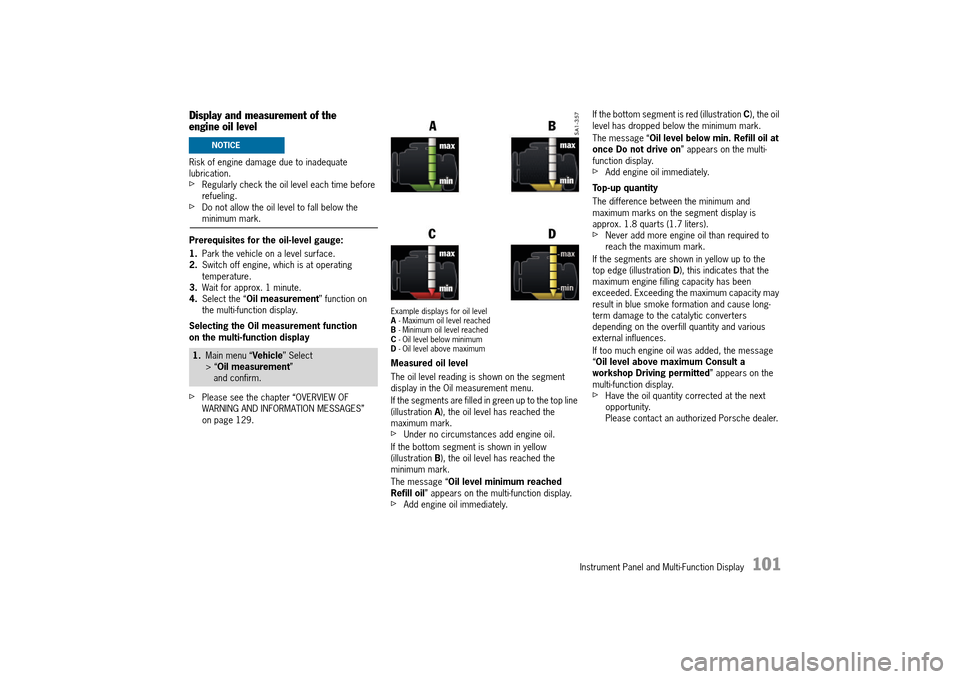
Example displays for oil level A - Maximum oil level reached B - Minimum oil level reached C - Oil level below minimum D - Oil level above maximum
Measured oil level
The oil level reading is shown on the segment display in the Oil measurement menu.
If the segments are filled in green up to the top line (illustration A), the oil level has reached the maximum mark.fUnder no circumstances add engine oil.
If the bottom segment is shown in yellow (illustration B), the oil level has reached the minimum mark.
The message “ Oil level minimum reached Refill oil ” appears on the multi-function display.fAdd engine oil immediately.
If the bottom segment is red (illustration C), the oil level has dropped below the minimum mark.
The message “ Oil level below min. Refill oil at once Do not drive on ” appears on the multi- function display.fAdd engine oil immediately.
Top-up quantity
The difference between the minimum and maximum marks on the segment display is approx. 1.8 quarts (1.7 liters).fNever add more engine oil than required to reach the maximum mark.
If the segments are shown in yellow up to the top edge (illustration D), this indicates that the maximum engine filling capacity has been exceeded. Exceeding the maximum capacity may result in blue smoke formation and cause long-term damage to the catalytic converters depending on the overfill quantity and various external influences.
If too much engine oil was added, the message “ Oil level above maximum Consult a workshop Driving permitted ” appears on the multi-function display.fHave the oil quantity corrected at the next opportunity.Please contact an authorized Porsche dealer.
1. Main menu “Vehicle” Select > “ Oil measurement” and confirm.
NOTICE
14_991_Turbo_21.book Seite 101 Mittwoch, 9. April 2014 2:19 14
Page 104 of 300
102 Instrument Panel and Multi-Function Display
Measuring the oil level after topping up engine oil or opening the engine compartment lid
The oil level can be checked after waiting for approx. 1 minute with the vehicle parked on a level surface and the engine at operating temperature.
If the engine compartment lid is opened when the engine is cold (e.g. in order to top up engine oil), the oil level cannot be displayed for a certain time.The message “ No information about oil level available at present ” appears on the multi- function display.fEngine oil should therefore only be topped up with the engine at operating temperature. This ensures short waiting times for the soonest possible oil level display.
Failure
If the oil-level indicator fails, the message “ Oil level measurement fault Consult a workshop Driving permitted ” appears on the multi-function display.
Setting speed limits
If a speed limit is preset and activated on the multi-function display, a warning message appears if the speed limit is exceeded.A speed limit can be used to remind the driver to keep to the maximum speed permitted for the tire type fitted to the vehicle, for example.
Setting a speed limit
You can either adopt the current speed of the vehicle or specify your own speed limit.
Activating and deactivating speed limits
Adjusting vehicle settings
Various vehicle settings can be modified in the “ Settings” submenu.
For information on modifying vehicle settings:fPlease see the chapter “VEHICLE SETTINGS ON THE MULTI-FUNCTION DISPLAY” on page 117.
Audio Menu
In the “ Audio” main menu, you can select a radio station either from the station list or the list of stored stations, depending on the settings, or a track from the active audio source, e.g. disk.
For information on adjusting audio menu settings:fPlease see the chapter “ADAPTING DISPLAY CONTENTS OF AUDIO MAIN MENU” on page 118.
1. Main menu “Vehicle” > “ Limits” and confirm.
1. Main menu “Vehicle” > “ Limits”
2.Select “Limit 1: ---” or “ Limit 2: ---“ and confirm.
3. Select “Current speed” or „ ---“ and confirm.
1. Main menu “Vehicle” > “ Limits”
2.Select “Limit 1: ---” or “ Limit 2: ---“ and confirm.
3. Select “Active”
4.Confirm your selection.
Limit is active.
Limit is not active.
1. Select “Audio” in the main menu and confirm.
2. Select the desired radio station or track and confirm.
14_991_Turbo_21.book Seite 102 Mittwoch, 9. April 2014 2:19 14