warning light PORSCHE 911 TURBO 2014 6.G Owner's Manual
[x] Cancel search | Manufacturer: PORSCHE, Model Year: 2014, Model line: 911 TURBO, Model: PORSCHE 911 TURBO 2014 6.GPages: 300, PDF Size: 10.61 MB
Page 84 of 300
82 Lights, Turn Signals and Windshield Wipers
Instrument Lighting
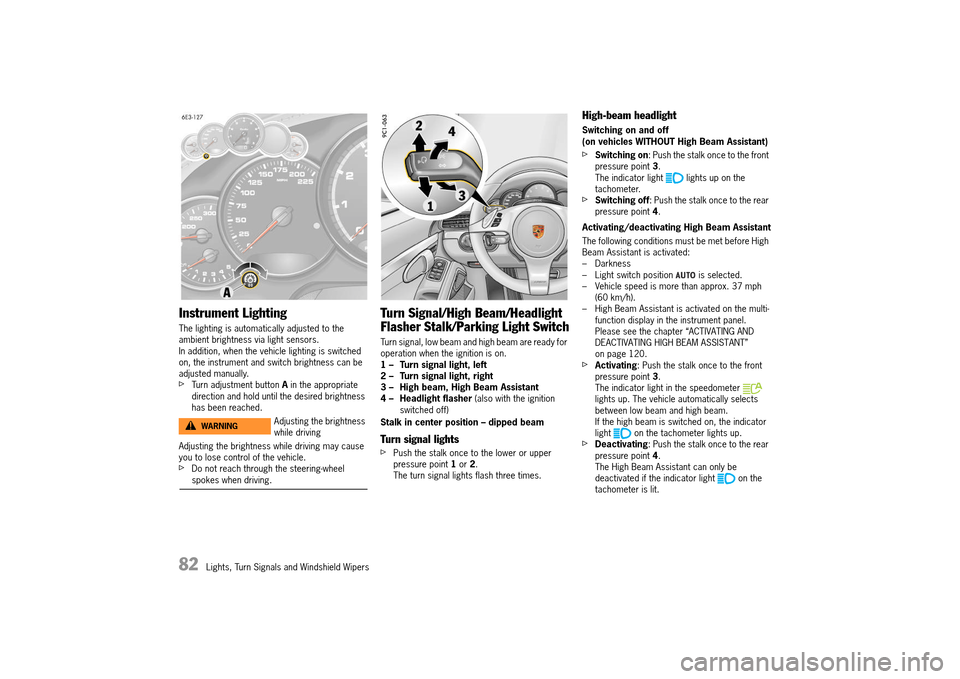
The lighting is automatically adjusted to the ambient brightness via light sensors.In addition, when the vehicle lighting is switched on, the instrument and switch brightness can be adjusted manually.fTurn adjustment button A in the appropriate direction and hold until the desired brightness has been reached.
Adjusting the brightness while driving may cause you to lose control of the vehicle.fDo not reach through the steering-wheel spokes when driving.
Turn Signal/High Beam/Headlight
Flasher Stalk/Parking Light Switch
Turn signal, low beam and high beam are ready for operation when the ignition is on.1 – Turn signal light, left2 – Turn signal light, right3 – High beam, High Beam Assistant4 – Headlight flasher (also with the ignition switched off)
Stalk in center position – dipped beam
Turn signal lights
fPush the stalk once to the lower or upper pressure point 1 or 2. The turn signal lights flash three times.
High-beam headlight
Switching on and off (on vehicles WITHOUT High Beam Assistant)
fSwitching on : Push the stalk once to the front pressure point 3. The indicator light lights up on the tachometer.fSwitching off : Push the stalk once to the rear pressure point 4.
Activating/deactivating High Beam Assistant
The following conditions must be met before High Beam Assistant is activated:– Darkness– Light switch position is selected.– Vehicle speed is more than approx. 37 mph (60 km/h).– High Beam Assistant is activated on the multi-function display in the instrument panel.Please see the chapter “ACTIVATING AND DEACTIVATING HIGH BEAM ASSISTANT” on page 120.fActivating : Push the stalk once to the front pressure point 3. The indicator light in the speedometer lights up. The vehicle automatically selects between low beam and high beam.If the high beam is switched on, the indicator light on the tachometer lights up.fDeactivating : Push the stalk once to the rear pressure point 4. The High Beam Assistant can only be deactivated if the indicator light on the tachometer is lit.
Adjusting the brightness while drivingWARNINGh
14_991_Turbo_21.book Seite 82 Mittwoch, 9. April 2014 2:19 14
Page 85 of 300
Lights, Turn Signals and Windshield Wipers 83
Switching on and off (on vehicles WITH High Beam Assistant)
If the High Beam Assistant was deactivated or if the requirements are not met, high beam can be switched on and off manually.
The following conditions must be met: – Darkness– The light switch position is selected.fSwitching on : Push the stalk twice to the front pressure point 3. The indicator light on the tachometer lights up.fSwitching off : Push the stalk once to the rear pressure point 4.
Operating the headlight flasher
fPush the stalk once to the rear pressure point 4. The indicator light on the tachometer lights up briefly.
For information on High Beam Assistant: fPlease see the chapter “HIGH BEAM ASSISTANT” on page 81.
Parking light
The parking light can only be switched on when the ignition is switched off.fMove the stalk up 2 or down 1 to switch on the right or left parking light.
If the parking light is switched on, the message “ Parking light on” will appear on the multi- function display in the instrument panel after the ignition is switched off.
For information on warning messages on the multi- function display:fPlease see the chapter “OVERVIEW OF WARNING AND INFORMATION MESSAGES” on page 129.
Emergency Flasher
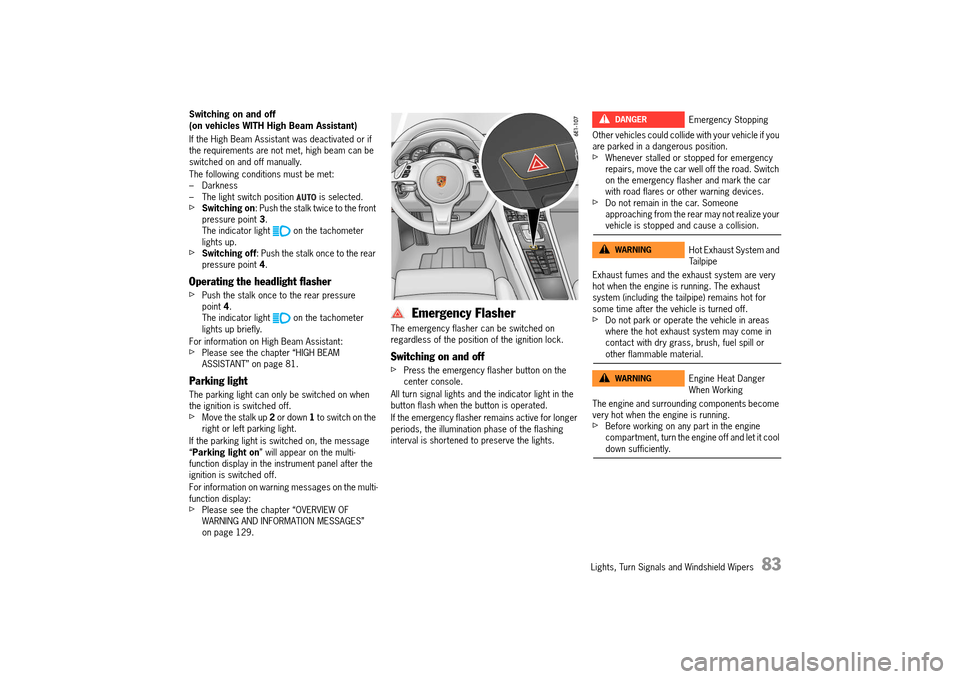
The emergency flasher can be switched on regardless of the position of the ignition lock.
Switching on and off
fPress the emergency flasher button on the center console.
All turn signal lights and the indicator light in the button flash when the button is operated.
If the emergency flasher remains active for longer periods, the illumination phase of the flashing interval is shortened to preserve the lights.
Other vehicles could collide with your vehicle if you are parked in a dangerous position.fWhenever stalled or stopped for emergency repairs, move the car well off the road. Switch on the emergency flasher and mark the car with road flares or other warning devices.fDo not remain in the car. Someone approaching from the rear may not realize your vehicle is stopped and cause a collision.
Exhaust fumes and the exhaust system are very hot when the engine is running. The exhaust system (including the tailpipe) remains hot for some time after the vehicle is turned off.fDo not park or operate the vehicle in areas where the hot exhaust system may come in contact with dry grass, brush, fuel spill or other flammable material.
The engine and surrounding components become very hot when the engine is running.fBefore working on any part in the engine compartment, turn the engine off and let it cool down sufficiently.
Emergency Stopping
Hot Exhaust System and Tailpipe
Engine Heat Danger When Working
DANGERh
WARNINGh
WARNINGh
14_991_Turbo_21.book Seite 83 Mittwoch, 9. April 2014 2:19 14
Page 87 of 300
Lights, Turn Signals and Windshield Wipers 85
Brief Overview – Windshield wipers
This brief overview does not replace the information provided under “WINDSHIELD WIPER/WASHER STALK”.
Warnings, in particular, are not replaced by this brief overview.
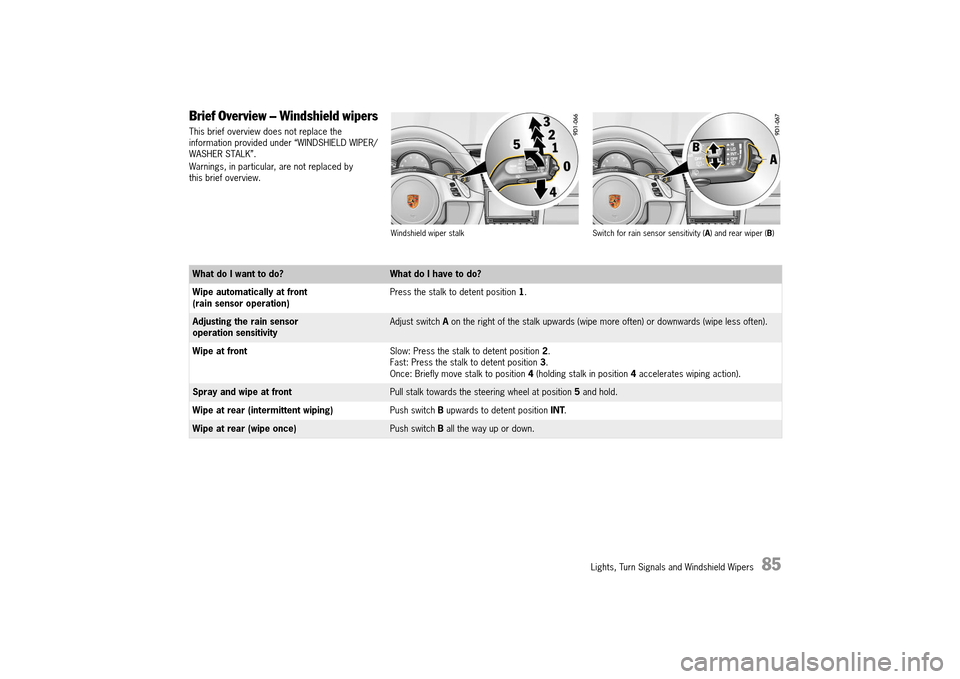
Windshield wiper stalk Switch for rain sensor sensitivity ( A) and rear wiper (B)
What do I want to do?What do I have to do?
Wipe automatically at front (rain sensor operation) Press the stalk to detent position 1.
Adjusting the rain sensor operation sensitivityAdjust switch A on the right of the stalk upwards (wipe more often) or downwards (wipe less often).
Wipe at front Slow: Press the stalk to detent position 2. Fast: Press the stalk to detent position 3. Once: Briefly move stalk to position 4 (holding stalk in position 4 accelerates wiping action).
Spray and wipe at frontPull stalk towards the steering wheel at position 5 and hold.
Wipe at rear (intermittent wiping) Push switch B upwards to detent position INT.
Wipe at rear (wipe once)Push switch B all the way up or down.
14_991_Turbo_21.book Seite 85 Mittwoch, 9. April 2014 2:19 14
Page 92 of 300
90 Instrument Panel and Multi-Function Display
Instrument Panel USA Models
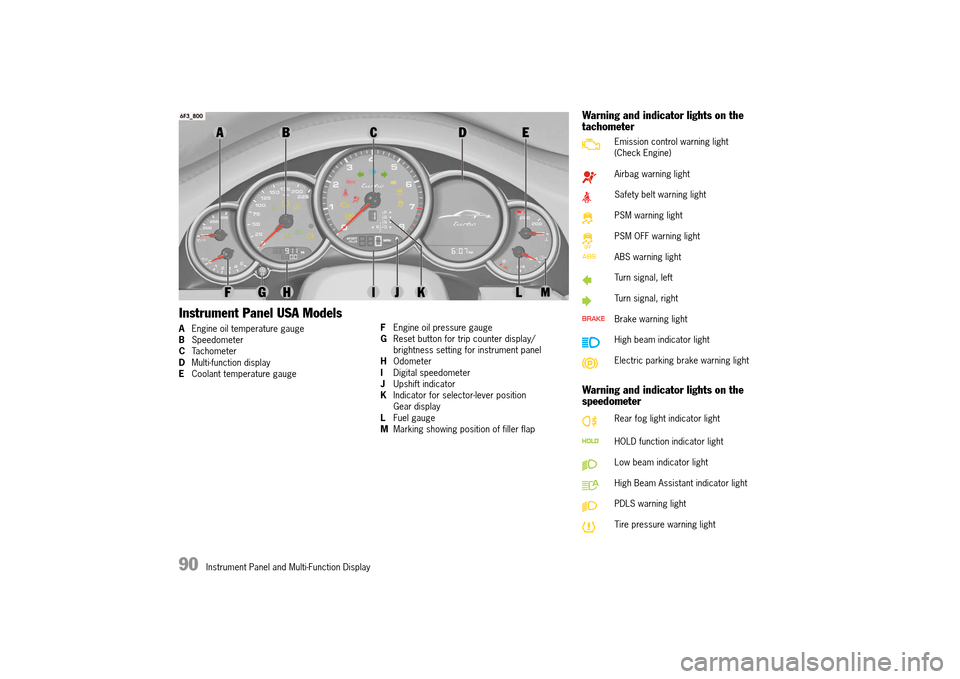
AEngine oil temperature gauge B Speedometer C Tachometer D Multi-function display E Coolant temperature gauge
F Engine oil pressure gauge G Reset button for trip counter display/ brightness setting for instrument panelH Odometer I Digital speedometer J Upshift indicator K Indicator for selector-lever position Gear displayL Fuel gauge M Marking showing position of filler flap
Warning and indicator lights on the tachometer
Warning and indicator lights on the speedometer
Emission control warning light (Check Engine)
Airbag warning light
Safety belt warning light
PSM warning light
PSM OFF warning light
ABS warning light
Turn signal, left
Turn signal, right
Brake warning light
High beam indicator light
Electric parking brake warning light
Rear fog light indicator light
HOLD function indicator light
Low beam indicator light
High Beam Assistant indicator light
PDLS warning light
Tire pressure warning light
14_991_Turbo_21.book Seite 90 Mittwoch, 9. April 2014 2:19 14
Page 93 of 300
Instrument Panel and Multi-Function Display 91
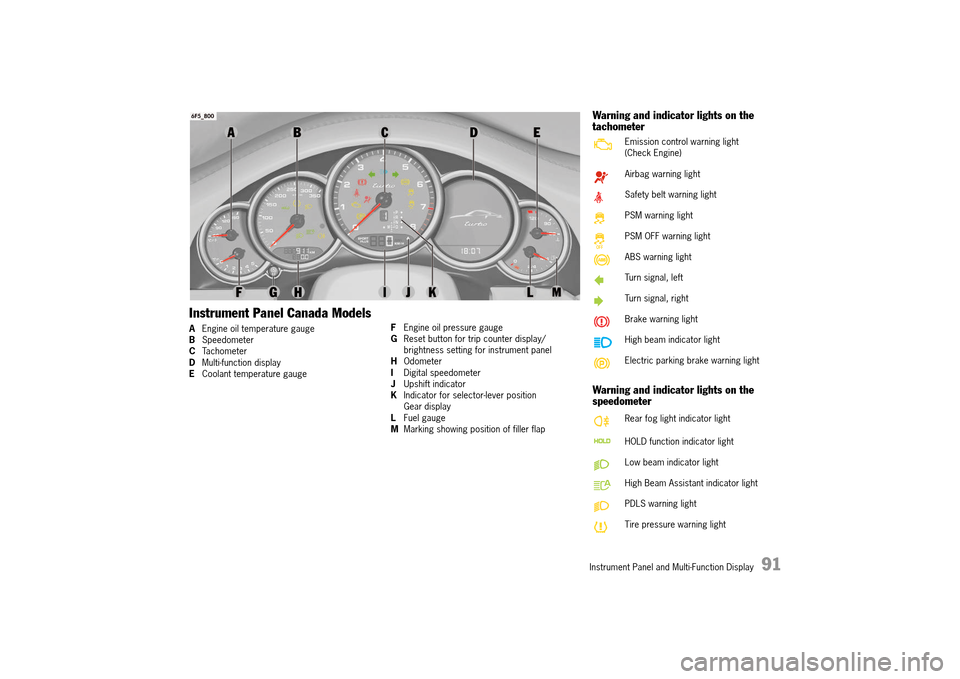
Instrument Panel Canada Models
AEngine oil temperature gauge B Speedometer C Tachometer D Multi-function display E Coolant temperature gauge
F Engine oil pressure gauge G Reset button for trip counter display/ brightness setting for instrument panelH Odometer I Digital speedometer J Upshift indicator K Indicator for selector-lever position Gear displayL Fuel gauge M Marking showing position of filler flap
Warning and indicator lights on the tachometer
Warning and indicator lights on the speedometer
Emission control warning light (Check Engine)
Airbag warning light
Safety belt warning light
PSM warning light
PSM OFF warning light
ABS warning light
Turn signal, left
Turn signal, right
Brake warning light
High beam indicator light
Electric parking brake warning light
Rear fog light indicator light
HOLD function indicator light
Low beam indicator light
High Beam Assistant indicator light
PDLS warning light
Tire pressure warning light
14_991_Turbo_21.book Seite 91 Mittwoch, 9. April 2014 2:19 14
Page 94 of 300
92 Instrument Panel and Multi-Function Display
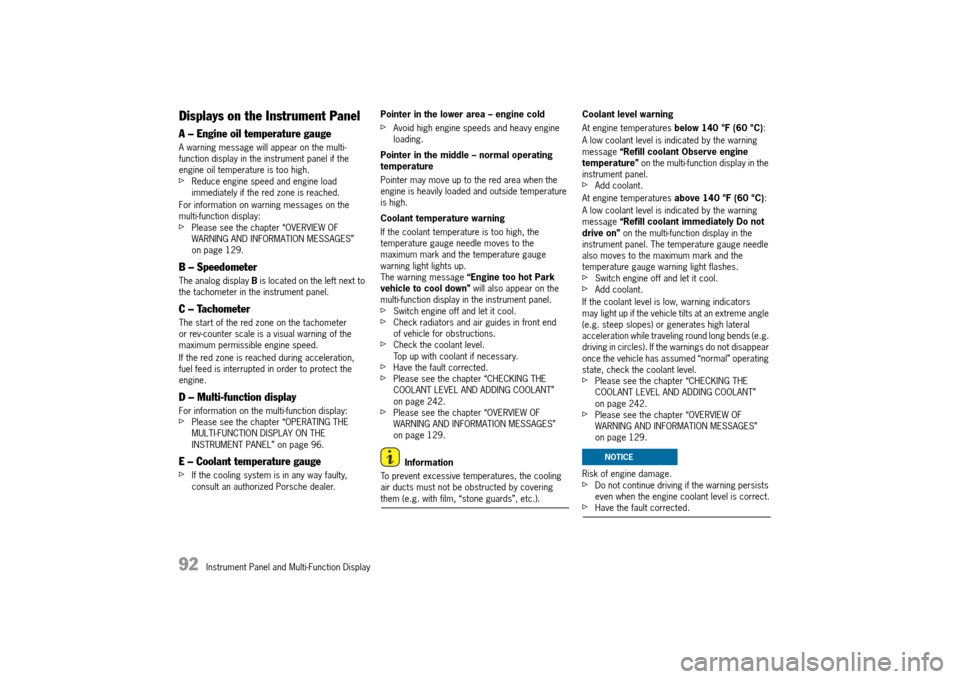
Displays on the Instrument Panel
A – Engine oil temperature gauge
A warning message will appear on the multi- function display in the instrument panel if the engine oil temperature is too high.fReduce engine speed and engine load immediately if the red zone is reached.
For information on warning messages on the multi-function display:fPlease see the chapter “OVERVIEW OF WARNING AND INFORMATION MESSAGES” on page 129.
B – Speedometer
The analog display B is located on the left next to the tachometer in the instrument panel.
C – Tachometer
The start of the red zone on the tachometer or rev-counter scale is a visual warning of the maximum permissible engine speed.
If the red zone is reached during acceleration, fuel feed is interrupted in order to protect the engine.
D – Multi-function display
For information on the multi-function display:fPlease see the chapter “OPERATING THE MULTI-FUNCTION DISPLAY ON THE INSTRUMENT PANEL” on page 96.
E – Coolant temperature gauge
fIf the cooling system is in any way faulty, consult an authorized Porsche dealer.
Pointer in the lower area – engine cold
fAvoid high engine speeds and heavy engine loading.
Pointer in the middle – normal operating temperature
Pointer may move up to the red area when the engine is heavily loaded and outside temperature is high.
Coolant temperature warning
If the coolant temperature is too high, the temperature gauge needle moves to the maximum mark and the temperature gauge warning light lights up.The warning message “Engine too hot Park vehicle to cool down” will also appear on the multi-function display in the instrument panel.fSwitch engine off and let it cool. fCheck radiators and air guides in front end of vehicle for obstructions.fCheck the coolant level.Top up with coolant if necessary.fHave the fault corrected.fPlease see the chapter “CHECKING THE COOLANT LEVEL AND ADDING COOLANT” on page 242.fPlease see the chapter “OVERVIEW OF WARNING AND INFORMATION MESSAGES” on page 129.
Information
To prevent excessive temperatures, the cooling air ducts must not be obstructed by covering them (e.g. with film, “stone guards”, etc.).
Coolant level warning
At engine temperatures below 140 °F (60 °C):
A low coolant level is indicated by the warning message “Refill coolant Observe engine temperature” on the multi-function display in the instrument panel.fAdd coolant.
At engine temperatures above 140 °F (60 °C):
A low coolant level is indicated by the warning message “Refill coolant immediately Do not drive on” on the multi-function display in the instrument panel. The temperature gauge needle also moves to the maximum mark and the temperature gauge warning light flashes.fSwitch engine off and let it cool.fAdd coolant.
If the coolant level is low, warning indicators may light up if the vehicle tilts at an extreme angle (e.g. steep slopes) or generates high lateral acceleration while traveling round long bends (e.g. driving in circles). If the warnings do not disappear once the vehicle has assumed “normal” operating state, check the coolant level.fPlease see the chapter “CHECKING THE COOLANT LEVEL AND ADDING COOLANT” on page 242.fPlease see the chapter “OVERVIEW OF WARNING AND INFORMATION MESSAGES” on page 129.
Risk of engine damage.fDo not continue driving if the warning persists even when the engine coolant level is correct.fHave the fault corrected.
NOTICE
14_991_Turbo_21.book Seite 92 Mittwoch, 9. April 2014 2:19 14
Page 95 of 300
Instrument Panel and Multi-Function Display 93
F – Engine oil pressure gauge
The oil pressure is controlled as required and should be at least 51 psi (3.5 bar) at an engine speed of 5000 rpm.
The engine oil pressure varies depending on the engine speed, oil temperature and engine load.
If oil pressure drops abruptly and a message is displayed on the multi-function display when the engine is running or while driving:fStop immediately in a suitable place.fSwitch off the engine.fCheck whether there is an obvious oil leak on or under the car.fSelect “ Oil measurement” on the multi- function display.fPlease see the chapter “DISPLAY AND MEASUREMENT OF THE ENGINE OIL LEVEL” on page 101.fAdd engine oil if necessary.
Risk of engine damage.fDo not continue driving if there is an obvious oil leak.fDo not continue driving if the warning message appears even when the oil level is correct.fHave the fault corrected at an authorized Porsche dealer.
G – Reset button for trip counter display/ brightness setting for instrument lighting
Resetting trip counter display
fPress rotary switch G for approx. 1 second. The trip counter display is reset to “0”.
Adjusting brightness of instrument lighting
For information on adjusting the brightness of the instrument lighting:fPlease see the chapter “INTERIOR/READING LIGHTS” on page 84.
H – Odometer
The displays for the total mileage and individual trips are integrated in the speedometer on the instrument panel.
The upper display counts the total mileage, the lower display shows individual trips.
After exceeding 6,213 miles or 9,999 kilometers, the trip counter returns to 0.
I – Digital speedometer
The digital speedometer I is integrated in the tachometer on the instrument panel.
J – Upshift prompt indicator
The consumption-oriented shift indicator to the right of the digital speed display on the tachometer helps you to develop a fuel-saving driving style. The upshift indicator lights up – prompting you to shift up to the next-higher gear – depending on the selected gear, engine speed and accelerator pedal position.fChange to the next-higher gear when the upshift indicator lights up.
NOTICE
14_991_Turbo_21.book Seite 93 Mittwoch, 9. April 2014 2:19 14
Page 96 of 300
94 Instrument Panel and Multi-Function Display
K – PDK indicator for selector-lever position
When the engine is running, the selector-lever position is indicated in gates D or M.
Warning messages
If the selector lever is between two positions
– Effects: The corresponding selector-lever position in the instrument panel flashes and the warning “ Engage gear selector properly” appears on the multi-function display.– Action required:Operate the footbrake and engage the selector lever properly.
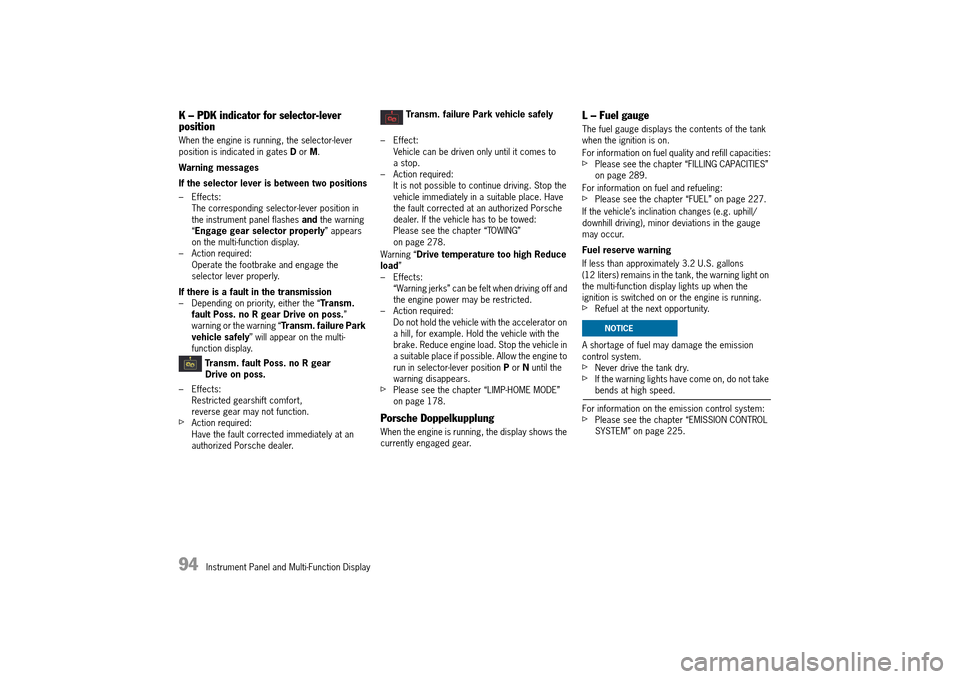
If there is a fault in the transmission – Depending on priority, either the “ Transm. fault Poss. no R gear Drive on poss. ” warning or the warning “ Transm. failure Park vehicle safely ” will appear on the multi- function display.
Transm. fault Poss. no R gear Drive on poss.
– Effects: Restricted gearshift comfort,reverse gear may not function.fAction required:Have the fault corrected immediately at an authorized Porsche dealer.
Transm. failure Park vehicle safely
– Effect: Vehicle can be driven only until it comes to a stop. – Action required:It is not possible to continue driving. Stop the vehicle immediately in a suitable place. Have the fault corrected at an authorized Porsche dealer. If the vehicle has to be towed:Please see the chapter “TOWING” on page 278.
Warning “ Drive temperature too high Reduce load ” – Effects:“Warning jerks” can be felt when driving off and the engine power may be restricted.– Action required:Do not hold the vehicle with the accelerator on a hill, for example. Hold the vehicle with the brake. Reduce engine load. Stop the vehicle in a suitable place if possible. Allow the engine to run in selector-lever position P or N until the warning disappears.fPlease see the chapter “LIMP-HOME MODE” on page 178.
Porsche Doppelkupplung
When the engine is running, the display shows the currently engaged gear.
L – Fuel gauge
The fuel gauge displays the contents of the tank when the ignition is on.
For information on fuel quality and refill capacities:fPlease see the chapter “FILLING CAPACITIES” on page 289.
For information on fuel and refueling:fPlease see the chapter “FUEL” on page 227.
If the vehicle’s inclination changes (e.g. uphill/ downhill driving), minor deviations in the gauge may occur.
Fuel reserve warning
If less than approximately 3.2 U.S. gallons (12 liters) remains in the tank, the warning light on the multi-function display lights up when the ignition is switched on or the engine is running. fRefuel at the next opportunity.
A shortage of fuel may damage the emission control system. fNever drive the tank dry.fIf the warning lights have come on, do not take bends at high speed.
For information on the emission control system:fPlease see the chapter “EMISSION CONTROL SYSTEM” on page 225.
NOTICE
14_991_Turbo_21.book Seite 94 Mittwoch, 9. April 2014 2:19 14
Page 97 of 300
Instrument Panel and Multi-Function Display 95
Battery/Alternator
The warning message “Generator fault Park vehicle safely ” will appear on the multi-function display in the instrument panel if the vehicle electrical system voltage drops significantly.fStop at a safe place and switch the engine off.
For information on warning messages on the multi-function display:fPlease see the chapter “OVERVIEW OF WARNING AND INFORMATION MESSAGES” on page 129.
Possible causes
– Defect in the battery charging system– Broken drive belt
Risk of engine damage.
The engine cooling does not function if the drive belt is torn.fDo not continue driving.fHave the fault corrected.fPlease contact an authorized Porsche dealer.
Check Engine
(Emission Control)
Warning light
The emission control system detects malfunctions that could cause increased pollutant emissions or consequential damage etc. well in advance.Faults are indicated by the warning light on the instrument panel which then either lights up continuously or flashes.The faults are recorded in the control unit’s fault memory.
The warning light on the instrument panel lights up when the ignition is switched on as a lamp check and goes out approx. 1 second after the engine starts.
The warning light on the instrument panel flashes to indicate operating states (e.g. engine misfiring) which may cause damage to certain parts of the emission control system.fIn this case, immediately reduce the engine load by easing off the accelerator pedal.
In order to avoid consequential damage to the engine or the exhaust-gas cleaning system (e.g. catalytic converter):fPlease contact an authorized Porsche dealer.
Risk of damage to the emission control system.
If the warning light on the instrument panel continues flashing even when you have eased off the accelerator pedal, the emission control system may overheat.fStop as soon as possible in a safe place.Make sure that combustible materials, such as dry grass or leaves, cannot come into contact with the hot exhaust system.fSwitch off the engine.fHave the fault corrected at an authorized Porsche dealer.
Acoustic Signals
A speaker in the instrument panel generates acoustic signals.The warning message “ Instrument cluster/ Park Assist audio fault Service required ” will appear on the multi-function display in the instrument panel if a speaker fault occurs.The speaker cannot generate acoustic signals.fPlease see the chapter “OVERVIEW OF WARNING AND INFORMATION MESSAGES” on page 129.
Warning message
NOTICE
NOTICE
14_991_Turbo_21.book Seite 95 Mittwoch, 9. April 2014 2:19 14
Page 107 of 300
Instrument Panel and Multi-Function Display 105
Trip Menu
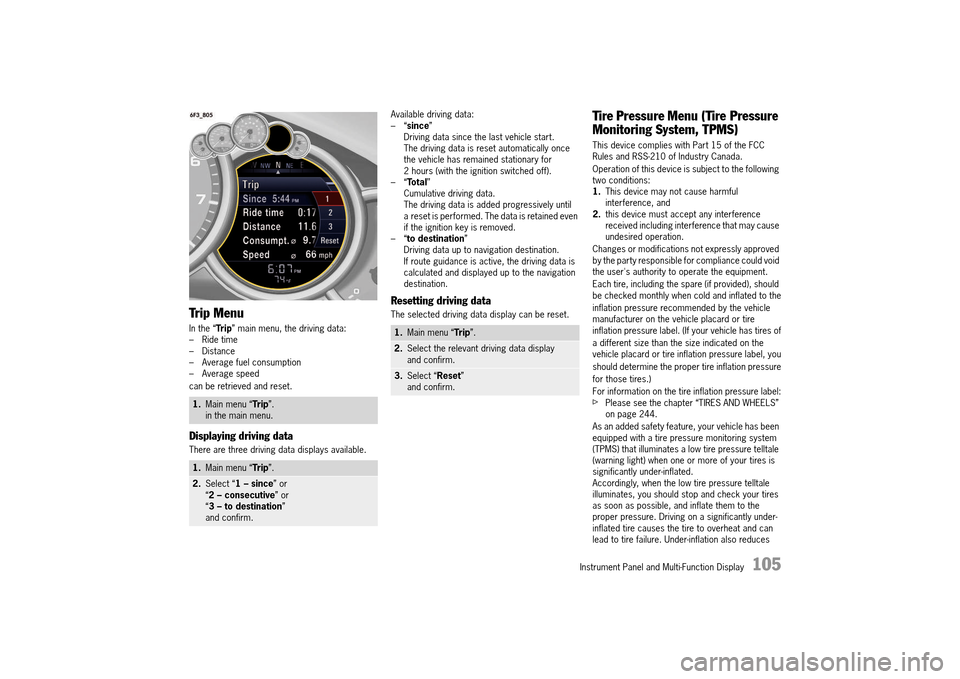
In the “Trip” main menu, the driving data: – Ride time– Distance– Average fuel consumption– Average speed
can be retrieved and reset.
Displaying driving data
There are three driving data displays available.
Available driving data: –“ since” Driving data since the last vehicle start.The driving data is reset automatically once the vehicle has remained stationary for 2 hours (with the ignition switched off).–“ Total” Cumulative driving data.The driving data is added progressively until a reset is performed. The data is retained even if the ignition key is removed.–“ to destination” Driving data up to navigation destination.If route guidance is active, the driving data is calculated and displayed up to the navigation destination.
Resetting driving data
The selected driving data display can be reset.
Tire Pressure Menu (Tire Pressure
Monitoring System, TPMS)
This device complies with Part 15 of the FCC Rules and RSS-210 of Industry Canada.
Operation of this device is subject to the following two conditions:1. This device may not cause harmful interference, and2. this device must accept any interference received including interference that may cause undesired operation.
Changes or modifications not expressly approved by the party responsible for compliance could void the user's authority to operate the equipment.
Each tire, including the spare (if provided), should be checked monthly when cold and inflated to the
inflation pressure recommended by the vehicle manufacturer on the vehicle placard or tire inflation pressure label. (If your vehicle has tires of
a different size than the size indicated on the vehicle placard or tire inflation pressure label, you
should determine the proper tire inflation pressure
for those tires.)
For information on the tire inflation pressure label:fPlease see the chapter “TIRES AND WHEELS” on page 244.
As an added safety feature, your vehicle has been equipped with a tire pressure monitoring system (TPMS) that illuminates a low tire pressure telltale (warning light) when one or more of your tires is significantly under-inflated.Accordingly, when the low tire pressure telltale illuminates, you should stop and check your tires as soon as possible, and inflate them to the proper pressure. Driving on a significantly under-inflated tire causes the tire to overheat and can lead to tire failure. Under-inflation also reduces
1. Main menu “Trip”. in the main menu.
1. Main menu “Trip”.
2.Select “1 – since” or “ 2 – consecutive” or “ 3 – to destination” and confirm.
1. Main menu “Trip”.
2.Select the relevant driving data display and confirm.
3. Select “Reset” and confirm.
14_991_Turbo_21.book Seite 105 Mittwoch, 9. April 2014 2:19 14