ignition PORSCHE CAYNNE 2010 1.G Owner's Manual
[x] Cancel search | Manufacturer: PORSCHE, Model Year: 2010, Model line: CAYENNE, Model: PORSCHE CAYENNE 2010 1.GPages: 379, PDF Size: 13.91 MB
Page 60 of 379
60
Seats, Mirrors and Steering Wheel
Multi-Functional Steering Wheel
Warning!
There is a danger of accident if you set or
operate the on-board computer, radio, navi-
gation system, telephone or other equipment
when driving.
This could distract you from the traffic and
cause you to lose control of the vehicle resul-
ting in serious personal injury or death.
fOperate the components while driving only if
the traffic situation allows you to do so safely.
fCarry out any complicated operating or setting procedures only with the vehicle stationary.
Depending on the equipment in your vehicle, you
can use these function keys to operate the
following Porsche communication systems:
–PCM
–Radio
– Telephone,
– TV tuner,
– CD audio, DVD audio, DVD video,
or an iPod or USB storage device connected via
the universal audio interface.
Readiness for operation of multi-
functional steering wheel– With ignition switched on and
– With Porsche communication systems
switched on.
fPlease read and understand the operating in-
structions supplied for the Porsche communi-
cation systems before operating the function
keys.
Note on operation
The Porsche communication systems cannot be
switched on and off using the multi-functional
steering wheel.
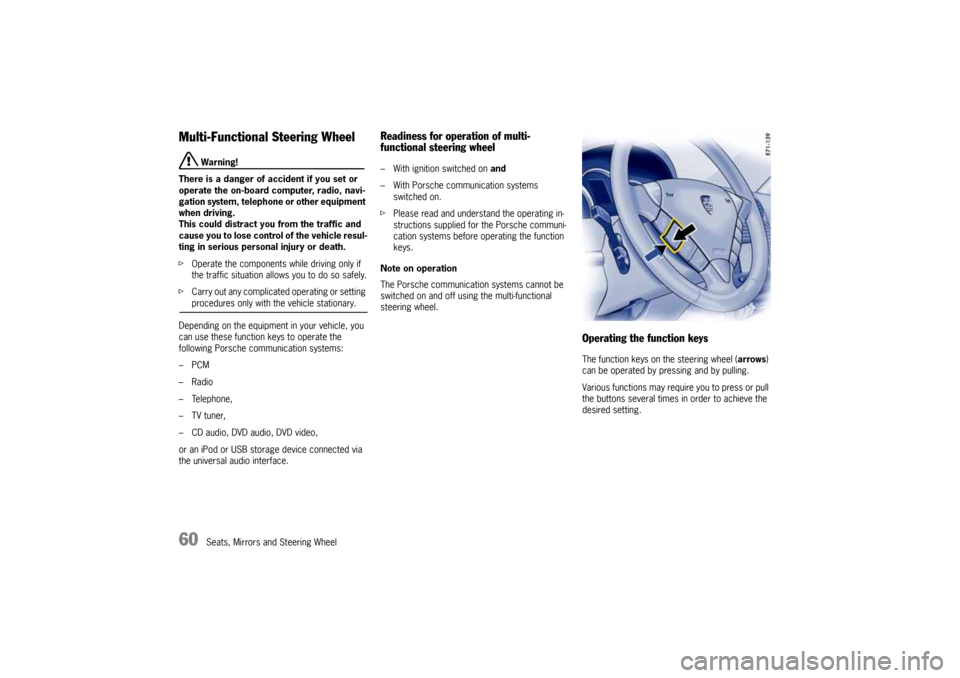
Operating the function keysThe function keys on the steering wheel (arrows)
can be operated by pressing and by pulling.
Various functions may require you to press or pull
the buttons several times in order to achieve the
desired setting.
10_Cayenne_21_KW17.book Seite 60 Donnerstag, 9. April 2009 3:33 15
Page 65 of 379
Air Conditioning, Parking Heater and Heated Rear Window
65
Valid for Every Air-Conditioning
SystemNote on operation
The air conditioner settings are stored on the
respective remote control when switching off the
ignition and locking the vehic l e . T he “A i r fl o w O F F ”
setting is stored for approx. 60 minutes and the
“Recirculated air” setting is stored for approx.
20 minutes.REST modeUsing engine residual heat
The residual heat of the engine can be used to
heat the interior up to 20 minutes after the ignition
has been switched off.
fPress button (manual and 2-zone air-
conditioning) or (4-zone air-conditio-
ning) on the front control panel.
The air-conditioning settings cannot be chan-
ged in REST mode.
Ending the function
fPress button (manual and 2-zone air-
conditioning) or (4-zone air-conditio-
ning) on the front control panel.
Note on operation
If the battery voltage is too low, REST mode is
automatically ended.
ECON mode
Warning!
Risk of accident due to impaired vision,
resulting in serious personal injury or death.
The outside air that is flowing in is not dried
in ECON mode. The windows may mist up.
fDo not switch on ECON mode in damp weather.
In ECON mode, the air-conditioning compressor is
switched off and this deactivates the cooling
function (e.g. to save fuel).
The air-conditioning compressor is always swit-
ched off at temperatures below 37.4 °F (3 °C).
Switching on ECON mode
fPress button .
The ECON logo appears on the air-conditioning
display panel.
The air-conditioning compressor is switched
off.
Switching off ECON mode
fIf the interior temperature is too high,
press button or
press button (2-zone air-conditioning)
or button (4-zone air-conditioning).
The ECON logo disappears from the air-condi-
tioning display panel.
The air-conditioning compressor is switched
on.
Information on air-conditioning
compressorThe air-conditioning compressor:
– May switch off briefly to ensure sufficient
engine cooling if the engine is operating under
extreme load.
– Switches off automatically at temperatures
below approx. 37.4 °F (3 °C) and cannot be
switched on, even manually.
– Operates most effectively with windows
closed.
If the car has been in the sun for a long time,
however, it is a good idea to ventilate the
interior briefly with the windows open.
– Depending on the outside temperature and
humidity, condensation can drip from the eva-
porator and form a pool under the car.
This is normal and not a sign of leakage.
fIf uncooled air flows out when the lowest
temperature has been set (“LO”), switch off the
air-conditioning compressor and have the fault
remedied at an authorized Porsche dealer.
10_Cayenne_21_KW17.book Seite 65 Donnerstag, 9. April 2009 3:33 15
Page 80 of 379
80
Air Conditioning, Parking Heater and Heated Rear Window
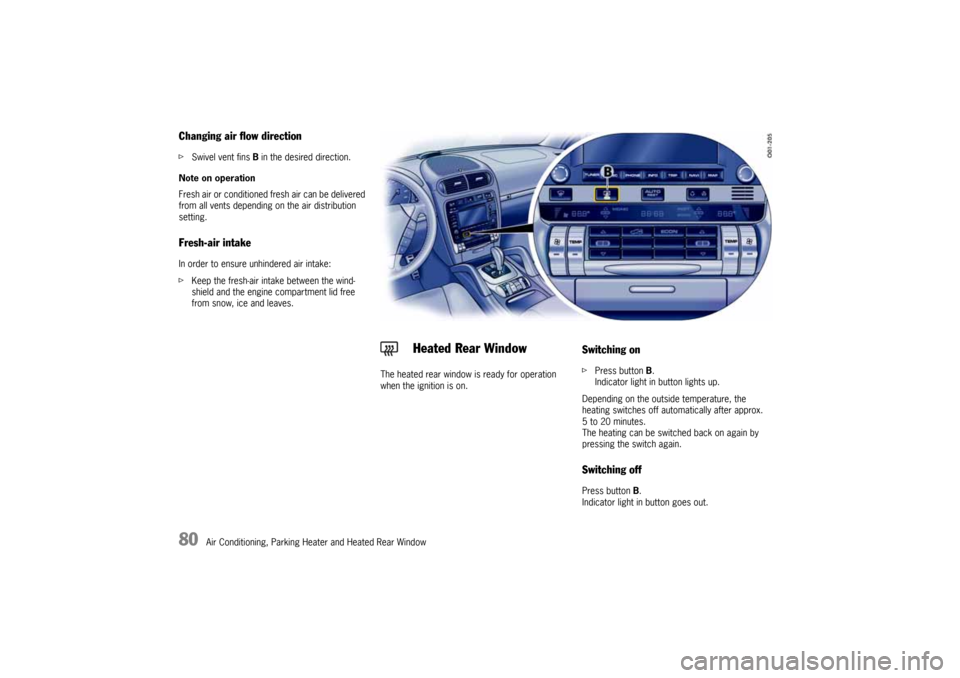
Changing air flow directionfSwivel vent fins B in the desired direction.
Note on operation
Fresh air or conditioned fresh air can be delivered
from all vents depending on the air distribution
setting.Fresh-air intakeIn order to ensure unhindered air intake:
fKeep the fresh-air intake between the wind-
shield and the engine compartment lid free
from snow, ice and leaves.
The heated rear window is ready for operation
when the ignition is on.
Switching onfPress button B.
Indicator light in button lights up.
Depending on the outside temperature, the
heating switches off automatically after approx.
5 to 20 minutes.
The heating can be switched back on again by
pressing the switch again.Switching offPress button B.
Indicator light in button goes out.
Heated Rear Window
10_Cayenne_21_KW17.book Seite 80 Donnerstag, 9. April 2009 3:33 15
Page 81 of 379
Air Conditioning, Parking Heater and Heated Rear Window
81
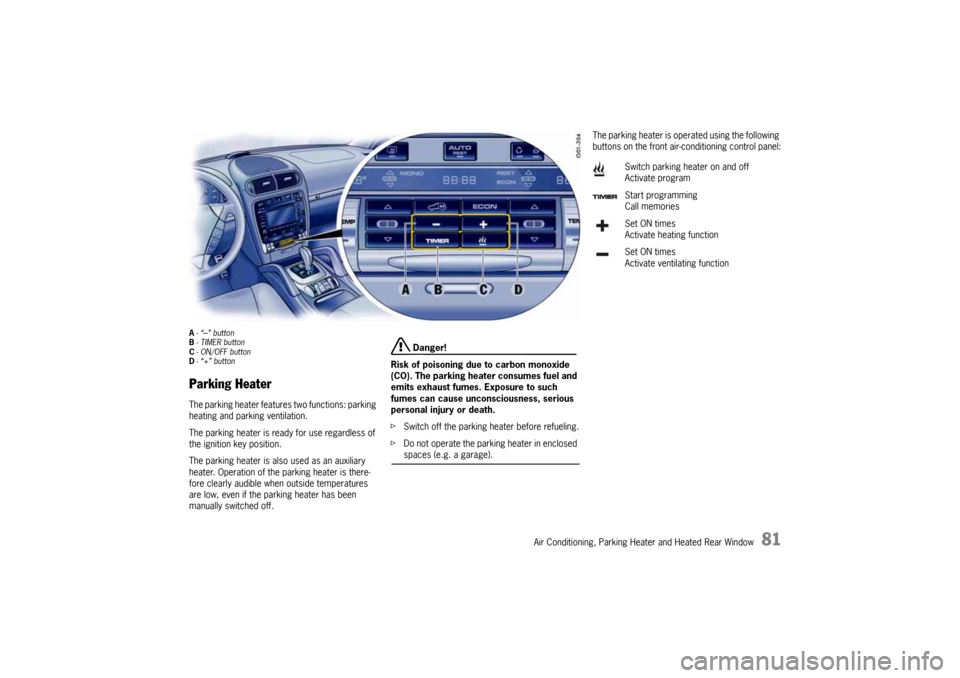
A-“
–” button
B-TIMER button
C- ON/OFF button
D-“+” button
Parking HeaterThe parking heater features two functions: parking
heating and parking ventilation.
The parking heater is ready for use regardless of
the ignition key position.
The parking heater is also used as an auxiliary
heater. Operation of the parking heater is there-
fore clearly audible when outside temperatures
are low, even if the parking heater has been
manually switched off.
Danger!
Risk of poisoning due to carbon monoxide
(CO). The parking heater consumes fuel and
emits exhaust fumes. Exposure to such
fumes can cause unconsciousness, serious
personal injury or death.
fSwitch off the parking heater before refueling.
fDo not operate the parking heater in enclosed spaces (e.g. a garage).
The parking heater is operated using the following
buttons on the front air-conditioning control panel:
Switch parking heater on and off
Activate program
Start programming
Call memories
Set ON times
Activate heating function
Set ON times
Activate ventilating function
10_Cayenne_21_KW17.book Seite 81 Donnerstag, 9. April 2009 3:33 15
Page 82 of 379
82
Air Conditioning, Parking Heater and Heated Rear Window Notes on operation
The parking heater runs on fuel, and it therefore
cannot be switched on after the reserve warning
lights up.
fFor further information on the fuel reserve
warning:
Please see the chapter “FUEL RESERVE WAR-
NING” on Page 120.
The parking heater must be operated at least
once per month with the engine cold.
Ignition off: When the parking heater is running,
the remaining running time is shown on the display
panel.
Operation of the parking heater is clearly audible
when outside temperatures are low and the engine
is cold.
In certain circumstances, exhaust gases may be
visible under the vehicle.Switching on
fPress ON/OFF button .
The most recently activated parking heating or
parking ventilation function is switched on.
Switching off
fPress ON/OFF button again.
Note on operation
fAfter switching off the parking heater using
ON/OFF button , wait for at least
2 minutes before you press the button again.
The combustion chamber is cleaned.
Switching parking heater on and
off
10_Cayenne_21_KW17.book Seite 82 Donnerstag, 9. April 2009 3:33 15
Page 83 of 379
Air Conditioning, Parking Heater and Heated Rear Window
83
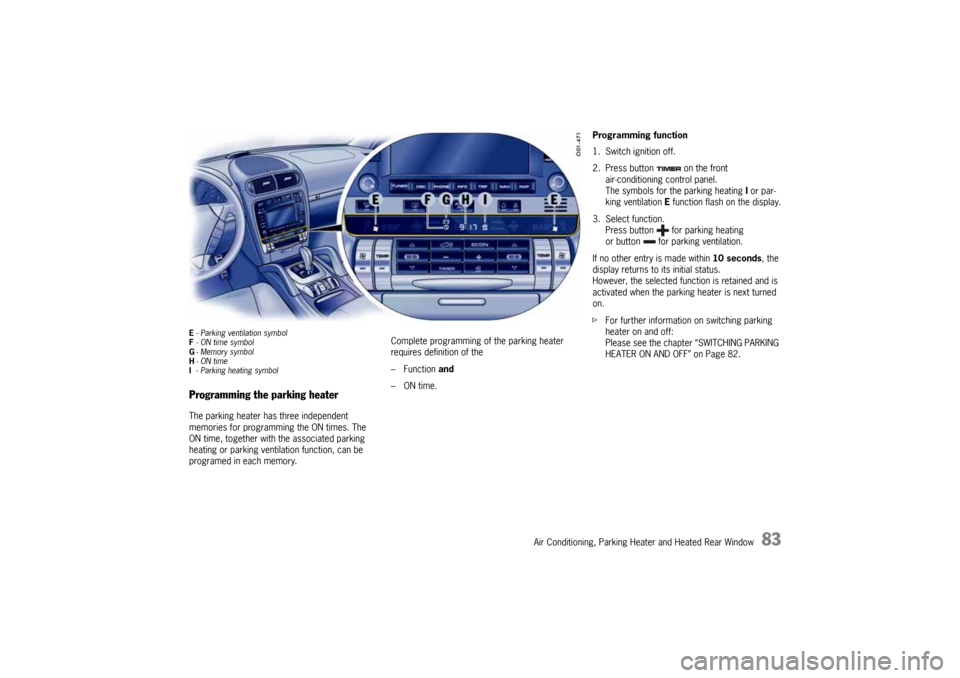
E- Parking ventilation symbol
F- ON time symbol
G-Memory symbol
H-ON time
I-Parking heating symbolProgramming the parking heaterThe parking heater has three independent
memories for programming the ON times. The
ON time, together with the associated parking
heating or parking ventilation function, can be
programed in each memory.Complete programming of the parking heater
requires definition of the
– Function and
–ON time.
Programming function
1. Switch ignition off.
2. Press button on the front
air-conditioning control panel.
The symbols for the parking heating I or par-
king ventilation E function flash on the display.
3. Select function.
Press button for parking heating
or button for parking ventilation.
If no other entry is made within 10 seconds, the
display returns to its initial status.
However, the selected function is retained and is
activated when the parking heater is next turned
on.
fFor further information on switching parking
heater on and off:
Please see the chapter “SWITCHING PARKING
HEATER ON AND OFF” on Page 82.
10_Cayenne_21_KW17.book Seite 83 Donnerstag, 9. April 2009 3:33 15
Page 84 of 379
84
Air Conditioning, Parking Heater and Heated Rear Window Programming ON times
1. Switch ignition off.
2. Press button .
3. Select function (parking heating or parking
ventilation).
4. Select the memory using button .
The desired memory can be selected by pres-
sing button several times.
5. Set ON time using the and buttons.
Pressing the buttons adjusts the time on a
minute-by-minute basis. If the button is kept
depressed, the time is adjusted faster.
ON times are only valid for 24 hours.
6. Press ON/OFF button .
Displays F and G flash for approx. 10 seconds.
Flashing of the displays can be ended before
this time has elapsed by pressing the ON/OFF
button again.
After ON/OFF button has been pressed ON
time H, clock symbol F and memory G are
displayed for 2 minutes.
The display then goes out.
The parking heater has now been programed
and the selected memory is active (symbol G
is lit).
Note on operation
Only one memory can be active at any one time.Activating the memory
The parking heater runs for 30 minutes. It then
switches itself off automatically.
The program must be reactivated for every subse-
quent run.
To do this:
1. Switch ignition off.
2. Press button .
3. Select function (parking heating or parking ven-
tilation).
4. Select the memory using button . The
ON time that was last saved is displayed.
5. Press ON/OFF button .
The program is reactivated.
Displays F and G flash for approx. 10 seconds.
The ON/OFF button can be pressed again
to switch off the displays before this time has
elapsed.
After the ON/OFF button has been
pressed, the ON time H, clock symbol F and
memory G are displayed for 2 minutes.
The display then goes out.
The parking heater has now been programed
and the selected memory is active (symbol G
is lit).
Note on operation
Only one memory can be active at any one time.Example:
The parking heater is to activate the parking
heating function at 9:48 a.m.
To do this:
1. Switch ignition off.
2. Press button on the front air-conditio-
ning control panel.
The symbols for the parking heating or parking
ventilation function flash on the display.
3. Press button .
This selects the parking heating function.
4. Select the memory using button .
5. Set ON time to 9:48 a.m. using the and
buttons.
6. Press ON/OFF button .
The parking heater has now been programed
and the selected memory is active.
Note on operation
If the parking heater is switched on manually prior
to program start of an active memory, this will
delete the programming.
The memory must be reactivated if it is needed.
If the memory is not reactivated, the parking
heater will not switch on.
10_Cayenne_21_KW17.book Seite 84 Donnerstag, 9. April 2009 3:33 15
Page 87 of 379
Windows and Sliding Roofs
87
Power windows
Warning!
Risk of injury when the door windows close.
This applies especially if the windows are
closed with the comfort function.
When this function is in operation the window
goes up automatically.
fMake sure that fingers, hands, arms or other
body parts are not in the way when the
windows close.
fRemove the ignition key or switch ignition off in
vehicles that have Porsche Entry & Drive to
shut off power to the window switches when
the vehicle is not attended by a responsible
person. Always take the ignition key with you
when leaving the vehicle. Uninformed persons
could injure themselves by operating the
power windows.
fIn case of danger, immediately release the but-
ton on the car key or the button in the door
handle in vehicles that have Porsche Entry &
Drive.
fDo not leave children in the car unattended.
Risk of an accident.
fDo not put anything on or near the windows that may interfere with the driver's vision.
Note on operation
fAlways keep the side windows closed while
driving off-road.
Readiness for operation of power windows– With ignition switched on or
– A maximum of 10 minutes with door closed
and ignition key withdrawn, but only until
driver’s or passenger door is first opened.
The one-touch operation for closing the door
windows is available only when the ignition is
switched on.Opening/closing windowsOpening window with the rocker switch
fPress rocker switch until the window has
reached the desired position.
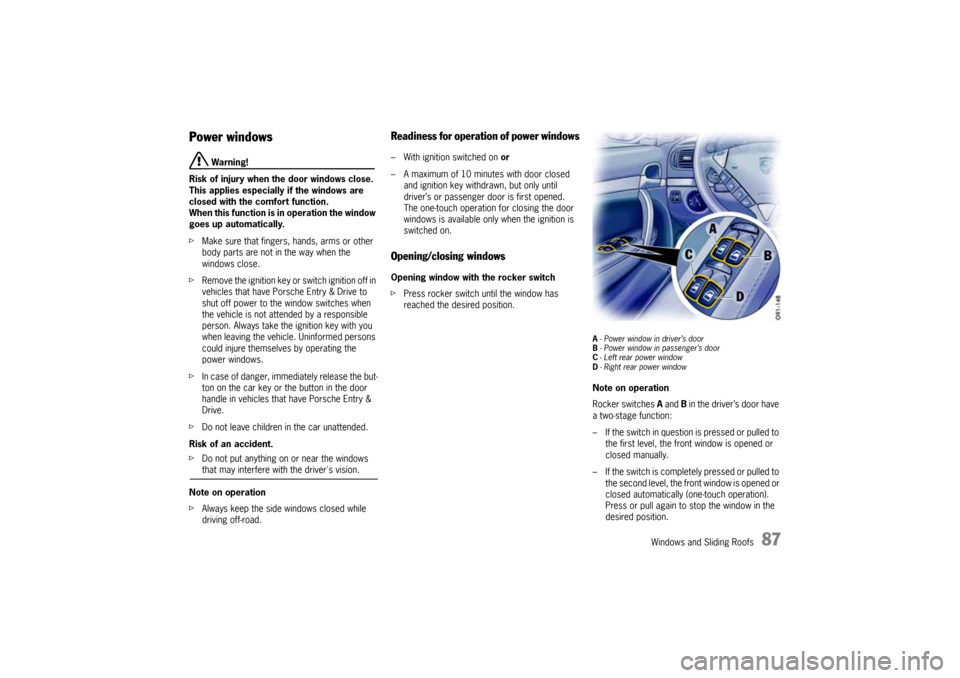
A- Power window in driver’s door
B- Power window in passenger’s door
C- Left rear power window
D- Right rear power windowNote on operation
Rocker switches A and B in the driver’s door have
a two-stage function:
– If the switch in question is pressed or pulled to
the first level, the front window is opened or
closed manually.
– If the switch is completely pressed or pulled to
the second level, the front window is opened or
closed automatically (one-touch operation).
Press or pull again to stop the window in the
desired position.
10_Cayenne_21_KW17.book Seite 87 Donnerstag, 9. April 2009 3:33 15
Page 89 of 379
Windows and Sliding Roofs
89
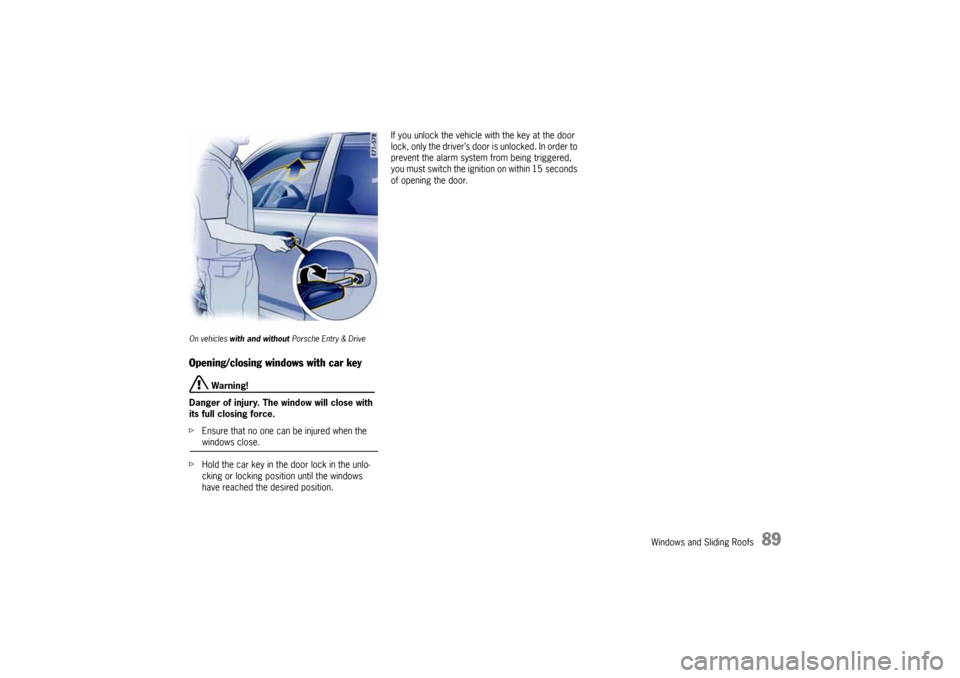
On vehicles with and without Porsche Entry & DriveOpening/closing windows with car key
Warning!
Danger of injury. The window will close with
its full closing force.
fEnsure that no one can be injured when the windows close.
fHold the car key in the door lock in the unlo-
cking or locking position until the windows
have reached the desired position.If you unlock the vehicle with the key at the door
lock, only the driver’s door is unlocked. In order to
prevent the alarm system from being triggered,
you must switch the ignition on within 15 seconds
of opening the door.
10_Cayenne_21_KW17.book Seite 89 Donnerstag, 9. April 2009 3:33 15
Page 92 of 379
92
Windows and Sliding Roofs
Sliding/Lifting RoofThe electric sliding/lifting roof is made of single-
sheet safety glass. It is equipped with a sliding-
roof cover that can be infinitely adjusted manually
to protect against the sun.
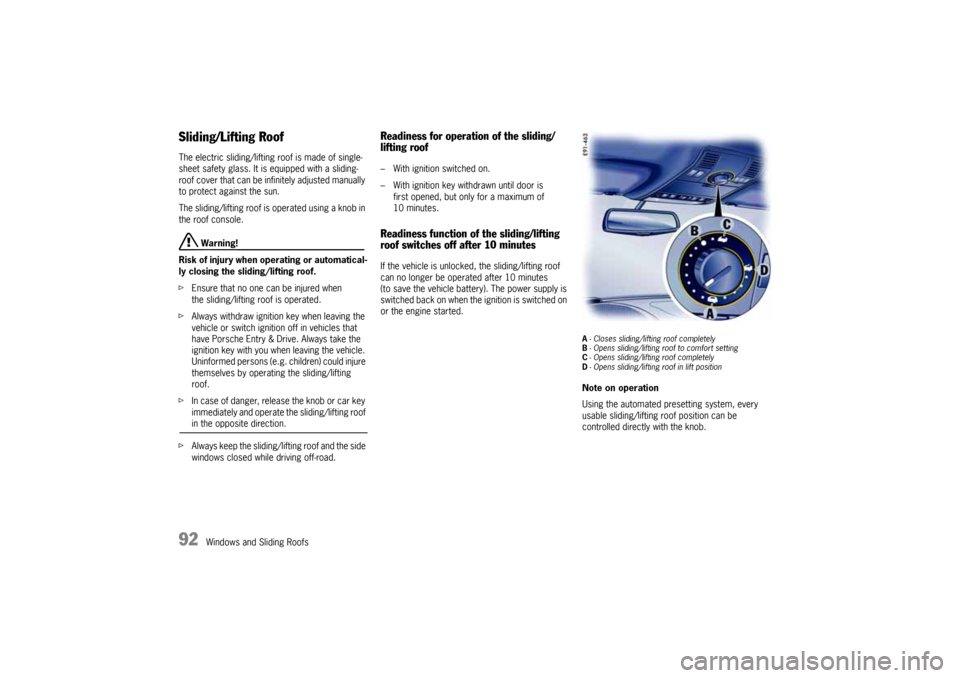
The sliding/lifting roof is operated using a knob in
the roof console.
Warning!
Risk of injury when operating or automatical-
ly closing the sliding/lifting roof.
fEnsure that no one can be injured when
the sliding/lifting roof is operated.
fAlways withdraw ignition key when leaving the
vehicle or switch ignition off in vehicles that
have Porsche Entry & Drive. Always take the
ignition key with you when leaving the vehicle.
Uninformed persons (e.g. children) could injure
themselves by operating the sliding/lifting
roof.
fIn case of danger, release the knob or car key
immediately and operate the sliding/lifting roof in the opposite direction.
fAlways keep the sliding/lifting roof and the side
windows closed while driving off-road.
Readiness for operation of the sliding/
lifting roof– With ignition switched on.
– With ignition key withdrawn until door is
first opened, but only for a maximum of
10 minutes.Readiness function of the sliding/lifting
roof switches off after 10 minutesIf the vehicle is unlocked, the sliding/lifting roof
can no longer be operated after 10 minutes
(to save the vehicle battery). The power supply is
switched back on when the ignition is switched on
or the engine started.
A- Closes sliding/lifting roof completely
B- Opens sliding/lifting roof to comfort setting
C- Opens sliding/lifting roof completely
D- Opens sliding/lifting roof in lift positionNote on operation
Using the automated presetting system, every
usable sliding/lifting roof position can be
controlled directly with the knob.
10_Cayenne_21_KW17.book Seite 92 Donnerstag, 9. April 2009 3:33 15