ignition PORSCHE CAYNNE 2010 1.G Workshop Manual
[x] Cancel search | Manufacturer: PORSCHE, Model Year: 2010, Model line: CAYENNE, Model: PORSCHE CAYENNE 2010 1.GPages: 379, PDF Size: 13.91 MB
Page 139 of 379
Multi-Purpose Display and Instruments
139
Warning!
Risk of accident, resulting in serious
personal injury or death. The spare wheel is
not equipped with a wheel transmitter and is
not monitored by Tire Pressure Monitoring.
fThe spare wheel must be used only over short
distances.
For information on handling and fitting/
removing the spare wheel: Please see the chapter “SPARE WHEEL” on Page 309.Setting collapsible spare wheel.
The collapsible spare wheel is not equipped with a
wheel transmitter and is not monitored by Tire
Pressure Monitoring. The tire pressure warning
light on the speedometer flashes about
60 seconds and lights up thereafter permanently
when the ENTER button is pressed. The value “_”
is displayed in the sub-menu TYRE PRESSURE
(filling information) at the position of the
collapsible spare wheel.
A warning appears on the multi-purpose display if
the speed limit of 50 mph (80 km/h) is exceeded.
The reminder SPARE WHEEL/SEALING SET
OPERATION? appears each time the ignition is
switched on.
For information on spare wheel/sealing set opera-
tion: Please see the chapter “NOTE ON SPARE
WHEEL/SEALING SET OPERATION” on Page 140.
Warning!
Risk of accident, resulting in serious
personal injury or death. The collapsible
spare wheel is not equipped with a wheel
transmitter and is not monitored by Tire
Pressure Monitoring.
fThe collapsible spare wheel must be used only
over short distances.
For information on handling the collapsible
spare wheel: Please see the chapter “COLLAPSIBLE SPARE WHEEL” on Page 305. Warning!
Risk of accident, resulting in serious
personal injury or death if a collapsible spare
wheel is in use.
fAvoid hard acceleration and high cornering
speeds.
fDo not exceed maximum speed of 50 mph
(80 km/h).
fPlease observe the safety and operating
instructions on the tire compressor.
fHave the collapsible spare wheel replaced by
an authorized Porsche dealer as soon as possible.
1.MAIN MENU
>TYRE PRESS.
>SETTINGS
> TYRES
> SPARE WHEEL
Select and confirm.
2.Select COLLAP. WHEEL.
3.Confirm selection.
The required pressure and speed limit for the
collapsible spare wheel are displayed.
10_Cayenne_21_KW17.book Seite 139 Donnerstag, 9. April 2009 3:33 15
Page 140 of 379
140
Multi-Purpose Display and Instruments Setting tire sealant/sealing set
fInflate tires according to the displayed
pressure differences.
A warning appears on the multi-purpose display if
the speed limit of 50 mph (80 km/h) is exceeded.
The reminder SPARE WHEEL/SEALING SET
OPERATION? appears each time the ignition is
switched on.
For information on spare wheel/sealing set opera-
tion: Please see the chapter “NOTE ON SPARE
WHEEL/SEALING SET OPERATION” on Page 140.
Warning!
Risk of accident, resulting in serious
personal injury or death if a tire repaired with
tire sealant is in use.
fAvoid hard acceleration and high cornering
speeds.
fDo not exceed maximum speed of 50 mph
(80 km/h).
fPlease observe the safety and operating
instructions on the tire compressor.
fUse tires repaired with sealant only over short
distances.
For information on handling and filling the
sealant: Please see the chapter “USING TIRE SEALANT” on Page 296.
Note on spare wheel/sealing set operationEach time the ignition is switched on,
the reminder SPARE WHEEL/SEALING SET
OPERATION? appears for approx. 10 seconds if a
spare wheel type (spare wheel, collapsible spare
wheel or sealing set) has been set.
1.MAIN MENU
>TYRE PRESS.
>SETTINGS
> TYRES
> SPARE WHEEL
Select and confirm.
2.Select SEALING SET.
3.Confirm selection.
The display automatically returns to the TYRE
PRESSURE sub-menu (filling information). 1.Select YES or NO:
- YES if a spare wheel, collapsible spare wheel
or tire sealant is still being used.
- NO if the spare wheel, collapsible spare
wheel or tire sealant has been removed.
2.Confirm selection.
The selected item is then accepted.
The current settings are displayed if NO is
selected.
10_Cayenne_21_KW17.book Seite 140 Donnerstag, 9. April 2009 3:33 15
Page 143 of 379
Multi-Purpose Display and Instruments
143
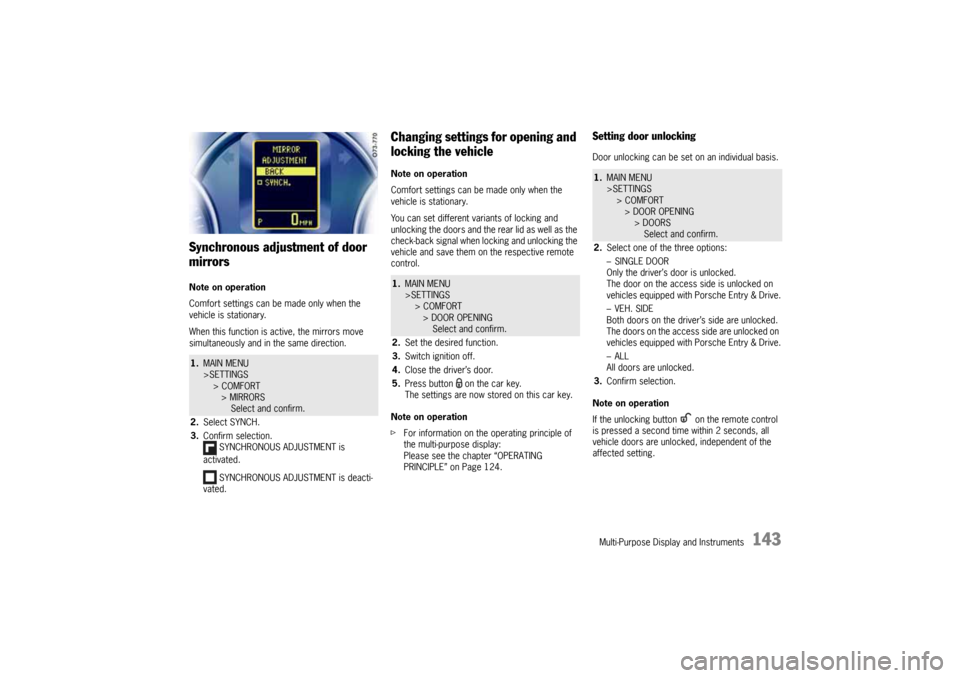
Synchronous adjustment of door
mirrorsNote on operation
Comfort settings can be made only when the
vehicle is stationary.
When this function is active, the mirrors move
simultaneously and in the same direction.
Changing settings for opening and
locking the vehicleNote on operation
Comfort settings can be made only when the
vehicle is stationary.
You can set different variants of locking and
unlocking the doors and the rear lid as well as the
check-back signal when locking and unlocking the
vehicle and save them on the respective remote
control.
Note on operation
fFor information on the operating principle of
the multi-purpose display:
Please see the chapter “OPERATING
PRINCIPLE” on Page 124.
Setting door unlockingDoor unlocking can be set on an individual basis.
Note on operation
If the unlocking button on the remote control
is pressed a second time within 2 seconds, all
vehicle doors are unlocked, independent of the
affected setting.
1.MAIN MENU
>SETTINGS
> COMFORT
> MIRRORS
Select and confirm.
2.Select SYNCH.
3.Confirm selection.
SYNCHRONOUS ADJUSTMENT is
activated.
SYNCHRONOUS ADJUSTMENT is deacti-
vated.
1.MAIN MENU
>SETTINGS
> COMFORT
> DOOR OPENING
Select and confirm.
2.Set the desired function.
3.Switch ignition off.
4.Close the driver’s door.
5.Press button on the car key.
The settings are now stored on this car key.
1.MAIN MENU
>SETTINGS
> COMFORT
> DOOR OPENING
> DOORS
Select and confirm.
2.Select one of the three options:
–SINGLE DOOR
Only the driver’s door is unlocked.
The door on the access side is unlocked on
vehicles equipped with Porsche Entry & Drive.
–VEH. SIDE
Both doors on the driver’s side are unlocked.
The doors on the access side are unlocked on
vehicles equipped with Porsche Entry & Drive.
–ALL
All doors are unlocked.
3.Confirm selection.
10_Cayenne_21_KW17.book Seite 143 Donnerstag, 9. April 2009 3:33 15
Page 144 of 379
144
Multi-Purpose Display and Instruments
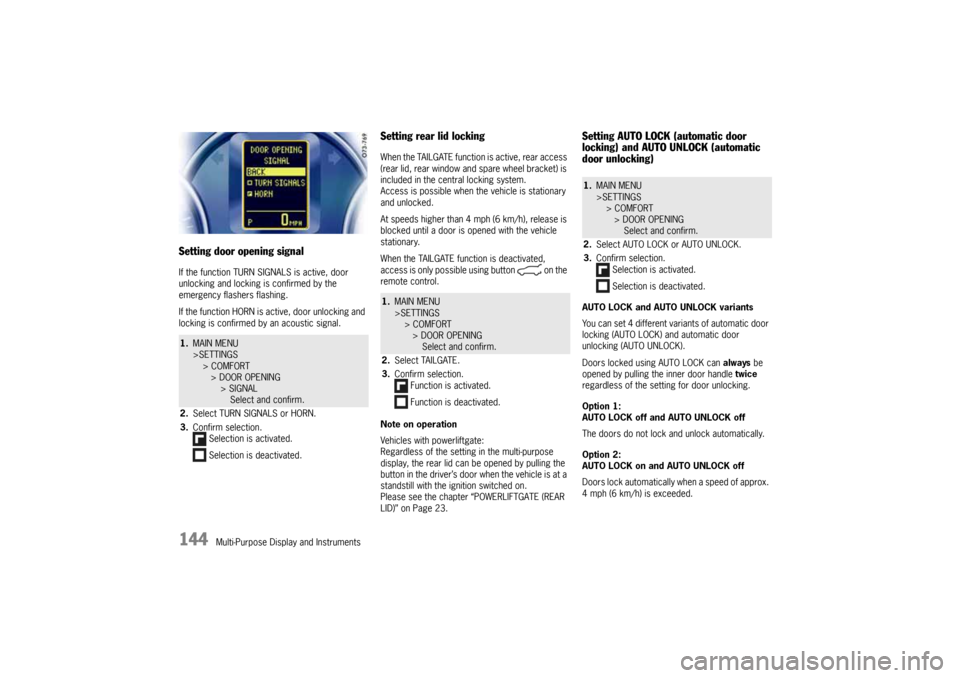
Setting door opening signalIf the function TURN SIGNALS is active, door
unlocking and locking is confirmed by the
emergency flashers flashing.
If the function HORN is active, door unlocking and
locking is confirmed by an acoustic signal.
Setting rear lid lockingWhen the TAILGATE function is active, rear access
(rear lid, rear window and spare wheel bracket) is
included in the central locking system.
Access is possible when the vehicle is stationary
and unlocked.
At speeds higher than 4 mph (6 km/h), release is
blocked until a door is opened with the vehicle
stationary.
When the TAILGATE function is deactivated,
access is only possible using button on the
remote control.
Note on operation
Vehicles with powerliftgate:
Regardless of the setting in the multi-purpose
display, the rear lid can be opened by pulling the
button in the driver’s door when the vehicle is at a
standstill with the ignition switched on.
Please see the chapter “POWERLIFTGATE (REAR
LID)” on Page 23.
Setting AUTO LOCK (automatic door
locking) and AUTO UNLOCK (automatic
door unlocking)AUTO LOCK and AUTO UNLOCK variants
You can set 4 different variants of automatic door
locking (AUTO LOCK) and automatic door
unlocking (AUTO UNLOCK).
Doors locked using AUTO LOCK can always be
opened by pulling the inner door handle twice
regardless of the setting for door unlocking.
Option 1:
AUTO LOCK off and AUTO UNLOCK off
The doors do not lock and unlock automatically.
Option 2:
AUTO LOCK on and AUTO UNLOCK off
Doors lock automatically when a speed of approx.
4 mph (6 km/h) is exceeded.
1.MAIN MENU
>SETTINGS
> COMFORT
> DOOR OPENING
> SIGNAL
Select and confirm.
2.Select TURN SIGNALS or HORN.
3.Confirm selection.
Selection is activated.
Selection is deactivated.
1.MAIN MENU
>SETTINGS
> COMFORT
> DOOR OPENING
Select and confirm.
2.Select TAILGATE.
3.Confirm selection.
Function is activated.
Function is deactivated.
1.MAIN MENU
>SETTINGS
> COMFORT
> DOOR OPENING
Select and confirm.
2.Select AUTO LOCK or AUTO UNLOCK.
3.Confirm selection.
Selection is activated.
Selection is deactivated.
10_Cayenne_21_KW17.book Seite 144 Donnerstag, 9. April 2009 3:33 15
Page 145 of 379
Multi-Purpose Display and Instruments
145
Option 3:
AUTO LOCK on and AUTO UNLOCK on
Doors lock automatically when a speed of approx.
4 mph (6 km/h) is exceeded.
On vehicles without Porsche Entry & Drive, the
doors are unlocked automatically when the
ignition key is withdrawn.
On vehicles equipped with Porsche Entry & Drive,
the doors are unlocked when the ignition is
switched off twice.
Option 4:
AUTO LOCK off and AUTO UNLOCK on
The doors do not lock automatically.
If the doors are locked with the central locking
system button:
On vehicles without Porsche Entry & Drive, the
doors are unlocked automatically when the
ignition key is withdrawn.
On vehicles equipped with Porsche Entry & Drive,
the doors are unlocked when the ignition is
switched off twice.
Switching daytime driving lights
on/offNote on operation
The options in the LIGHTS menu can only be set
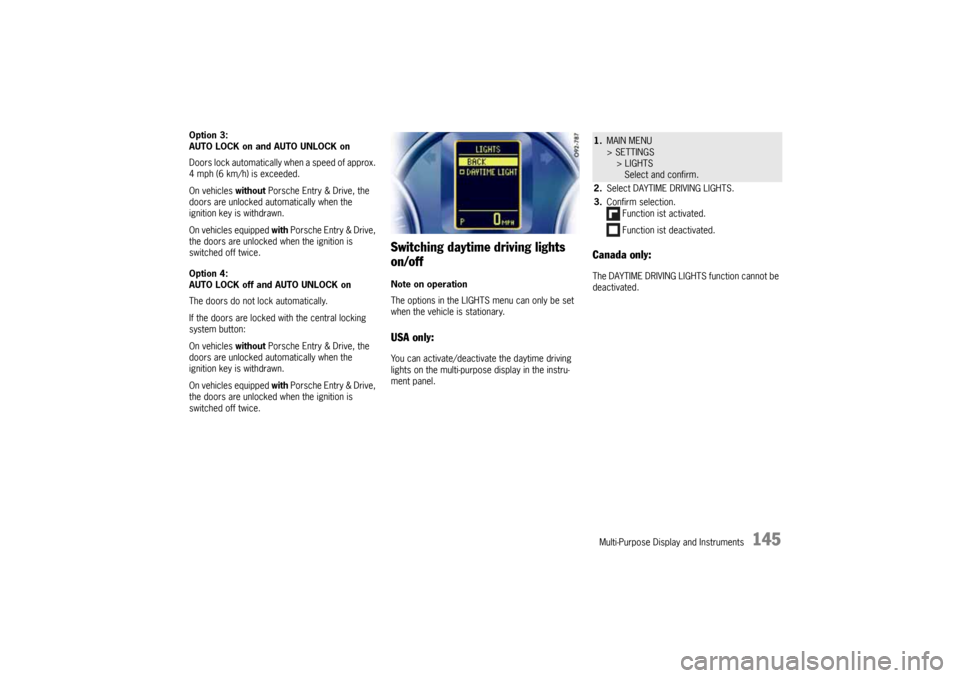
when the vehicle is stationary.USA only:You can activate/deactivate the daytime driving
lights on the multi-purpose display in the instru-
ment panel.
Canada only:The DAYTIME DRIVING LIGHTS function cannot be
deactivated.1.MAIN MENU
> SETTINGS
> LIGHTS
Select and confirm.
2.Select DAYTIME DRIVING LIGHTS.
3.Confirm selection.
Function ist activated.
Function ist deactivated.
10_Cayenne_21_KW17.book Seite 145 Donnerstag, 9. April 2009 3:33 15
Page 149 of 379
Multi-Purpose Display and Instruments
149
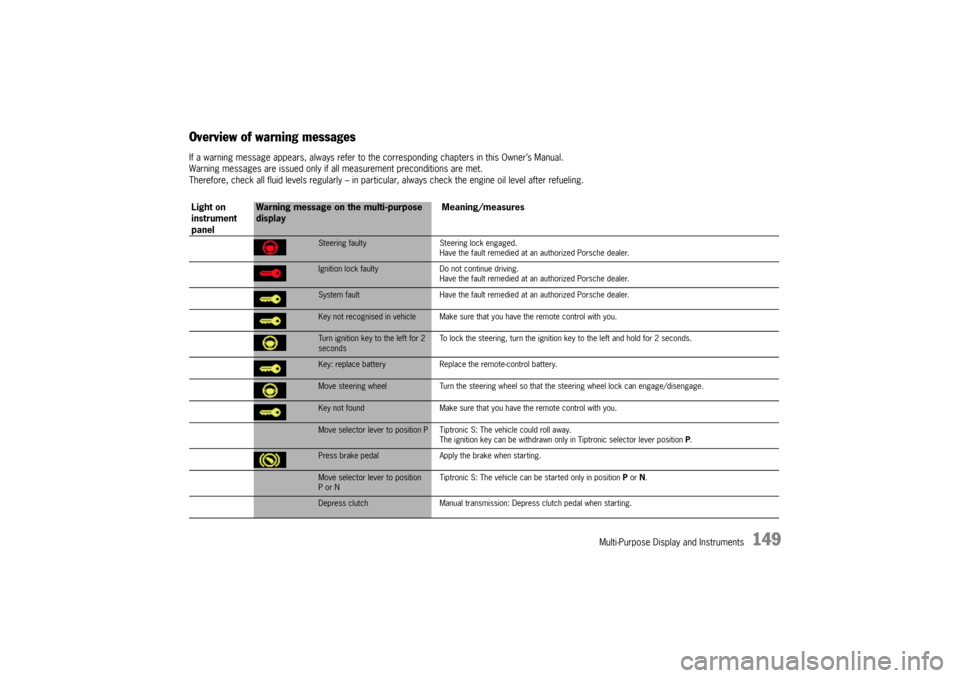
Overview of warning messagesIf a warning message appears, always refer to the corresponding chapters in this Owner’s Manual.
Warning messages are issued only if all measurement preconditions are met.
Therefore, check all fluid levels regularly – in particular, always check the engine oil level after refueling.
Light on
instrument
panel
Warning message on the multi-purpose
displayMeaning/measures
Steering faulty Steering lock engaged.
Have the fault remedied at an authorized Porsche dealer.Ignition lock faulty Do not continue driving.
Have the fault remedied at an authorized Porsche dealer.System fault Have the fault remedied at an authorized Porsche dealer.Key not recognised in vehicle Make sure that you have the remote control with you.Turn ignition key to the left for 2
secondsTo lock the steering, turn the ignition key to the left and hold for 2 seconds.Key: replace battery Replace the remote-control battery.Move steering wheel Turn the steering wheel so that the steering wheel lock can engage/disengage.Key not found Make sure that you have the remote control with you.Move selector lever to position P Tiptronic S: The vehicle could roll away.
The ignition key can be withdrawn only in Tiptronic selector lever position P.Press brake pedal Apply the brake when starting.Move selector lever to position
P or NTiptronic S: The vehicle can be started only in position P or N.Depress clutch Manual transmission: Depress clutch pedal when starting.
10_Cayenne_21_KW17.book Seite 149 Donnerstag, 9. April 2009 3:33 15
Page 150 of 379
150
Multi-Purpose Display and Instruments
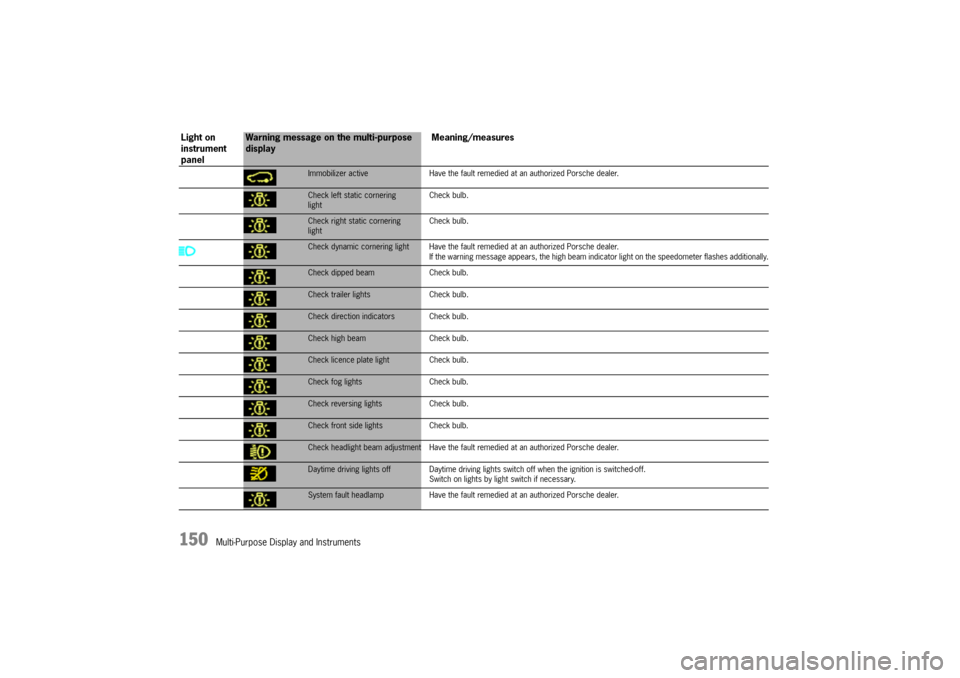
Immobilizer active Have the fault remedied at an authorized Porsche dealer.Check left static cornering
lightCheck bulb.Check right static cornering
lightCheck bulb.Check dynamic cornering light Have the fault remedied at an authorized Porsche dealer.
If the warning message appears, the high beam indicator light on the speedometer flashes additionally.Check dipped beam Check bulb.Check trailer lights Check bulb.Check direction indicators Check bulb.Check high beam Check bulb.Check licence plate light Check bulb.Check fog lights Check bulb.Check reversing lights Check bulb.Check front side lights Check bulb.Check headlight beam adjustment Have the fault remedied at an authorized Porsche dealer.Daytime driving lights off Daytime driving lights switch off when the ignition is switched-off.
Switch on lights by light switch if necessary.System fault headlamp Have the fault remedied at an authorized Porsche dealer.
Light on
instrument
panel
Warning message on the multi-purpose
displayMeaning/measures
10_Cayenne_21_KW17.book Seite 150 Donnerstag, 9. April 2009 3:33 15
Page 157 of 379
Driving and Driving Safety
157 Driving and Driving Safety
Ignition Lock/Steering Lock ........................ 158
Starting and Stopping the Engine ................ 160
Parking Brake ............................................ 162
Brakes ...................................................... 163
Cruise Control............................................ 167
Manual transmission, clutch ........................ 169
Tiptronic S ................................................. 170
Selector Lever Positions ............................. 171
Driving Programs for On-Road and
Off-Road Driving ......................................... 177
Power-Transmission and
Running-Gear Control Systems .................... 181
Air Suspension with Level Control and
Height Adjustment ...................................... 190
Porsche Active Suspension
Management (PASM) .................................. 193
Porsche Dynamic Chassis Control (PDCC) .... 194
Off-Road Driving ......................................... 195
10_Cayenne_21_KW17.book Seite 157 Donnerstag, 9. April 2009 3:33 15
Page 158 of 379
158
Driving and Driving Safety
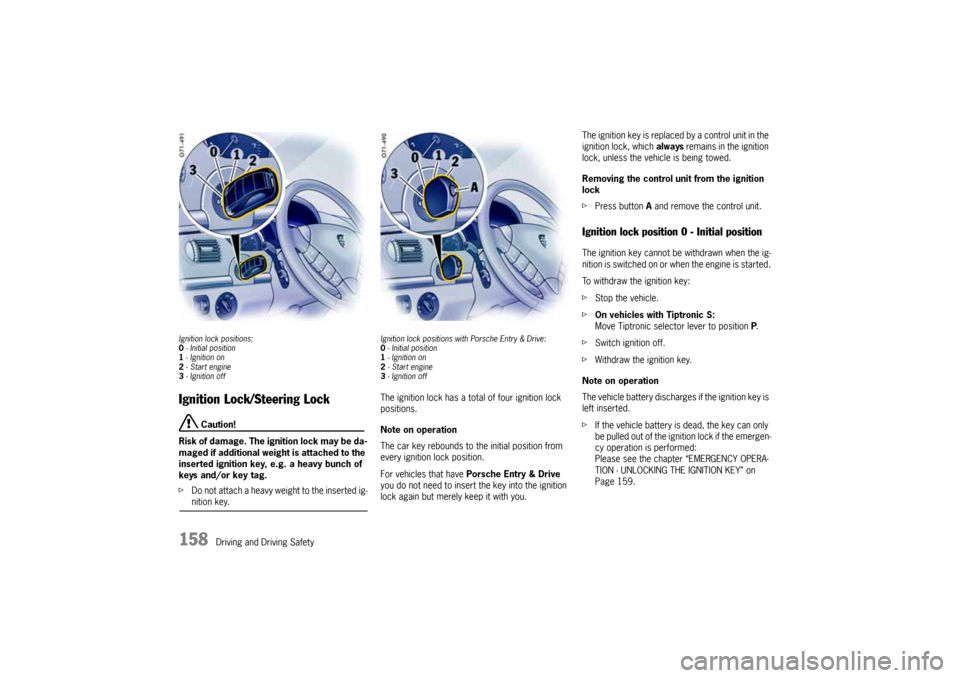
Ignition lock positions:
0- Initial position
1- Ignition on
2-Start engine
3- Ignition offIgnition Lock/Steering Lock
Caution!
Risk of damage. The ignition lock may be da-
maged if additional weight is attached to the
inserted ignition key, e.g. a heavy bunch of
keys and/or key tag.
fDo not attach a heavy weight to the inserted ig-nition key.
Ignition lock positions with Porsche Entry & Drive:
0- Initial position
1- Ignition on
2-Start engine
3- Ignition offThe ignition lock has a total of four ignition lock
positions.
Note on operation
The car key rebounds to the initial position from
every ignition lock position.
For vehicles that have Porsche Entry & Drive
you do not need to insert the key into the ignition
lock again but merely keep it with you. The ignition key is replaced by a control unit in the
ignition lock, which always remains in the ignition
lock, unless the vehicle is being towed.
Removing the control unit from the ignition
lock
fPress button A and remove the control unit.
Ignition lock position 0 - Initial positionThe ignition key cannot be withdrawn when the ig-
nition is switched on or when the engine is started.
To withdraw the ignition key:
fStop the vehicle.
fOn vehicles with Tiptronic S:
Move Tiptronic selector lever to position P.
fSwitch ignition off.
fWithdraw the ignition key.
Note on operation
The vehicle battery discharges if the ignition key is
left inserted.
fIf the vehicle battery is dead, the key can only
be pulled out of the ignition lock if the emergen-
cy operation is performed:
Please see the chapter “EMERGENCY OPERA-
TION - UNLOCKING THE IGNITION KEY” on
Page 159.
10_Cayenne_21_KW17.book Seite 158 Donnerstag, 9. April 2009 3:33 15
Page 159 of 379
Driving and Driving Safety
159
Ignition lock position 1 - Ignition onfTurn ignition key to position 1.
Note on operation
All electrical equipment can be switched on.
The warning lights light up for a lamp check.
fPlease see the chapter “INSTRUMENT PANEL
USA MODELS” on Page 117.
If a load is not switched on for 10 minutes after
switching on the ignition, the ignition must be
switched on again.
Turn the ignition key to ignition lock position 3
(ignition off) first.Ignition lock position 2 - Starting enginefTurn ignition key to ignition lock position 2.Ignition lock position 3 - Ignition offfTurn ignition key to ignition lock position 3.
fFor further information on starting and stop-
ping the engine:
Please see the chapter “STARTING AND STOP-
PING THE ENGINE” on Page 160.
Locking the steering column Vehicles without Porsche Entry & Drive
The steering column is automatically locked
when the ignition key is withdrawn from the
ignition lock and is automatically unlocked
when the ignition key is inserted into the ignition
lock.
Vehicles with Porsche Entry & Drive
The steering column is automatically locked
when the ignition is switched off and the vehicle is
locked.
Manually locking the steering column on
vehicles with Porsche Entry & Drive
fDepress the clutch on vehicles with manual
transmission.
fOnce the ignition is switched off, turn the
control unit again to ignition lock position 3
and hold it there for 2seconds.
The steering column is automatically unlocked
by turning the control unit from ignition lock
position 0.
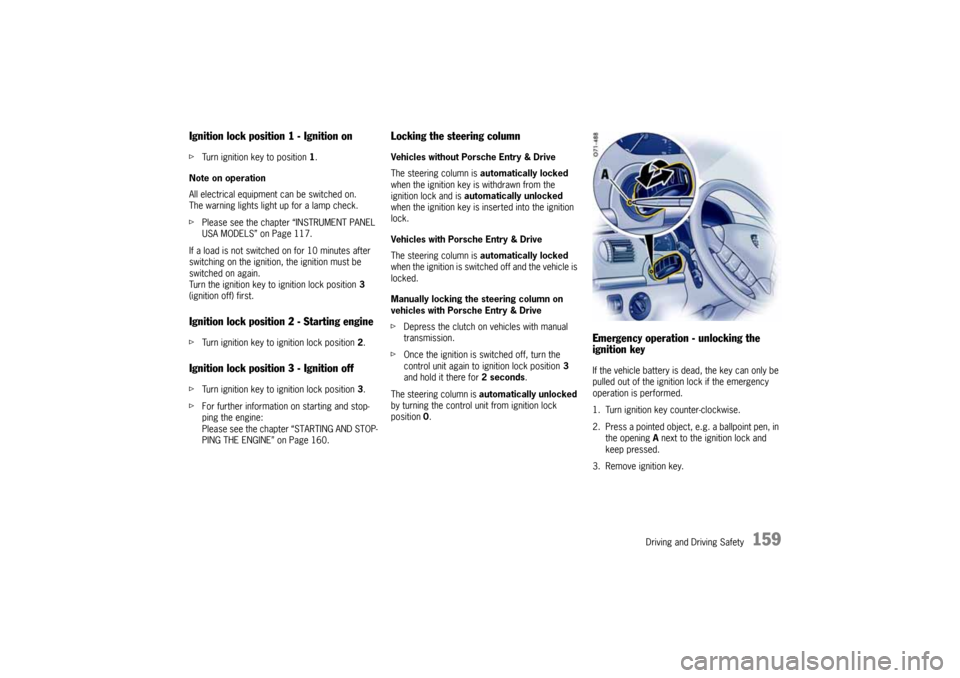
Emergency operation - unlocking the
ignition keyIf the vehicle battery is dead, the key can only be
pulled out of the ignition lock if the emergency
operation is performed.
1. Turn ignition key counter-clockwise.
2. Press a pointed object, e.g. a ballpoint pen, in
the opening A next to the ignition lock and
keep pressed.
3. Remove ignition key.
10_Cayenne_21_KW17.book Seite 159 Donnerstag, 9. April 2009 3:33 15