lock PORSCHE CAYNNE 2010 1.G Service Manual
[x] Cancel search | Manufacturer: PORSCHE, Model Year: 2010, Model line: CAYENNE, Model: PORSCHE CAYENNE 2010 1.GPages: 379, PDF Size: 13.91 MB
Page 90 of 379
90
Windows and Sliding Roofs
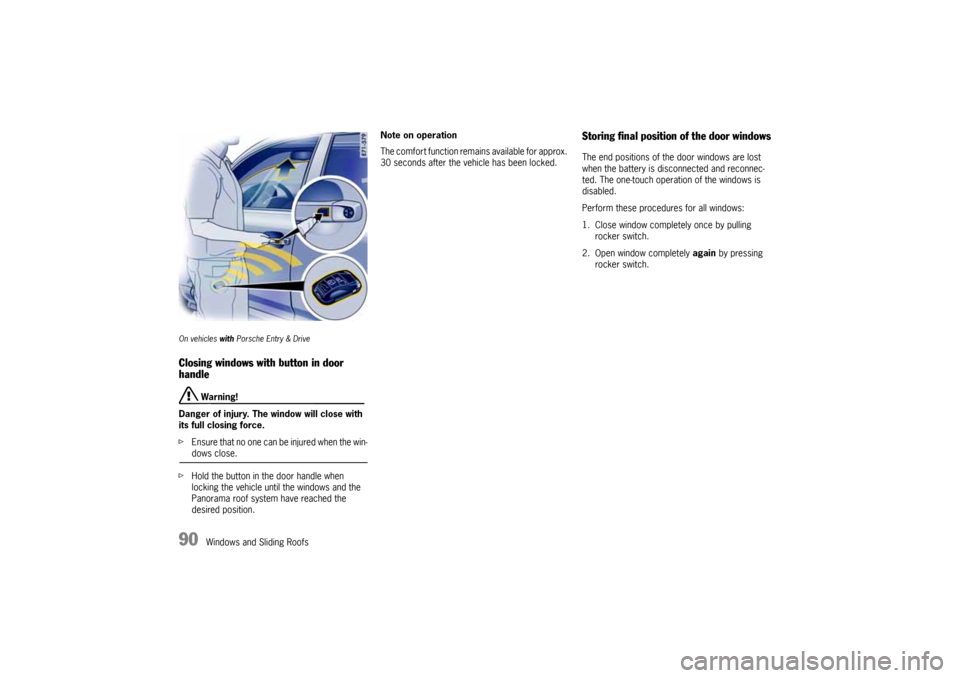
On vehicles with Porsche Entry & DriveClosing windows with button in door
handle
Warning!
Danger of injury. The window will close with
its full closing force.
fEnsure that no one can be injured when the win-dows close.
fHold the button in the door handle when
locking the vehicle until the windows and the
Panorama roof system have reached the
desired position.Note on operation
The comfort function remains available for approx.
30 seconds after the vehicle has been locked.
Storing final position of the door windowsThe end positions of the door windows are lost
when the battery is disconnected and reconnec-
ted. The one-touch operation of the windows is
disabled.
Perform these procedures for all windows:
1. Close window completely once by pulling
rocker switch.
2. Open window completely again by pressing
rocker switch.
10_Cayenne_21_KW17.book Seite 90 Donnerstag, 9. April 2009 3:33 15
Page 92 of 379
92
Windows and Sliding Roofs
Sliding/Lifting RoofThe electric sliding/lifting roof is made of single-
sheet safety glass. It is equipped with a sliding-
roof cover that can be infinitely adjusted manually
to protect against the sun.
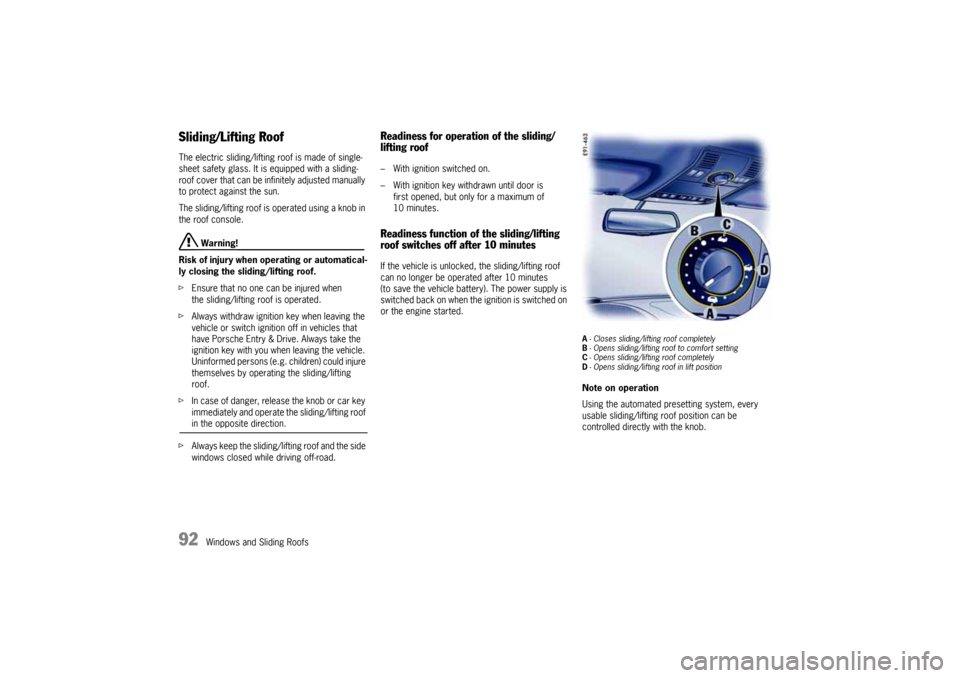
The sliding/lifting roof is operated using a knob in
the roof console.
Warning!
Risk of injury when operating or automatical-
ly closing the sliding/lifting roof.
fEnsure that no one can be injured when
the sliding/lifting roof is operated.
fAlways withdraw ignition key when leaving the
vehicle or switch ignition off in vehicles that
have Porsche Entry & Drive. Always take the
ignition key with you when leaving the vehicle.
Uninformed persons (e.g. children) could injure
themselves by operating the sliding/lifting
roof.
fIn case of danger, release the knob or car key
immediately and operate the sliding/lifting roof in the opposite direction.
fAlways keep the sliding/lifting roof and the side
windows closed while driving off-road.
Readiness for operation of the sliding/
lifting roof– With ignition switched on.
– With ignition key withdrawn until door is
first opened, but only for a maximum of
10 minutes.Readiness function of the sliding/lifting
roof switches off after 10 minutesIf the vehicle is unlocked, the sliding/lifting roof
can no longer be operated after 10 minutes
(to save the vehicle battery). The power supply is
switched back on when the ignition is switched on
or the engine started.
A- Closes sliding/lifting roof completely
B- Opens sliding/lifting roof to comfort setting
C- Opens sliding/lifting roof completely
D- Opens sliding/lifting roof in lift positionNote on operation
Using the automated presetting system, every
usable sliding/lifting roof position can be
controlled directly with the knob.
10_Cayenne_21_KW17.book Seite 92 Donnerstag, 9. April 2009 3:33 15
Page 93 of 379

Windows and Sliding Roofs
93
A - Closing sliding/lifting roof completelyfTurn knob to switch position A.
Note on operation
The sliding/lifting roof is equipped with a force
limiter. If the sliding/lifting roof is obstructed
during the closing process, the sliding/lifting roof
opens again immediately.
Closing the sliding/lifting roof after
operation of the force limiter
fRemove the obstruction.
fTurn knob to position A again.B - Opening sliding/lifting roof to comfort
settingfTurn knob to switch position B.
The sliding/lifting roof opens in switch position B
until it reaches the best position relative to noise.
It can be opened fully, however, if you continue to
turn the switch beyond the limit to position C.
C - Opening sliding/lifting roof completelyfTurn knob beyond stop position B to switch
position C.
Effort is required to turn the knob.
Once released, the knob rebounds to position
B.D - Lifting sliding/lifting rooffTurn knob between switch positions A and D
until it reaches the required position. The roof
is lifted completely in switch position D.
Comfort function on vehicles without
Porsche Entry & DriveClosing the sliding/lifting roof
fHold the car key in the door lock in the locking
position until the windows and the sliding/
lifting roof have reached the desired position.Comfort function on vehicles with
Porsche Entry & DriveClosing the sliding/lifting roof
fHold the car key in the door lock in the locking
position until the windows and the sliding/
lifting roof have reached the desired position
or
fHold the button in the door handle when
locking the vehicle until the windows and the
sliding/lifting roof have reached the desired
position.
10_Cayenne_21_KW17.book Seite 93 Donnerstag, 9. April 2009 3:33 15
Page 97 of 379
Windows and Sliding Roofs
97
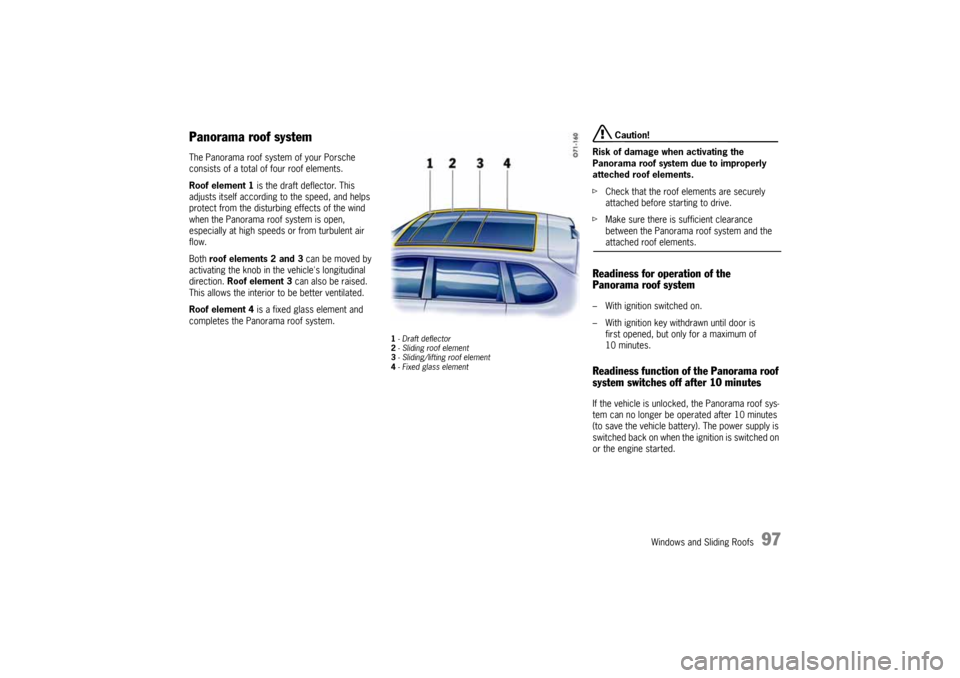
Panorama roof systemThe Panorama roof system of your Porsche
consists of a total of four roof elements.
Roof element 1 is the draft deflector. This
adjusts itself according to the speed, and helps
protect from the disturbing effects of the wind
when the Panorama roof system is open,
especially at high speeds or from turbulent air
flow.
Both roof elements 2 and 3 can be moved by
activating the knob in the vehicle's longitudinal
direction. Roof element 3 can also be raised.
This allows the interior to be better ventilated.
Roof element 4 is a fixed glass element and
completes the Panorama roof system.
1-Draft deflector
2- Sliding roof element
3- Sliding/lifting roof element
4- Fixed glass element
Caution!
Risk of damage when activating the
Panorama roof system due to improperly
atteched roof elements.
fCheck that the roof elements are securely
attached before starting to drive.
fMake sure there is sufficient clearance
between the Panorama roof system and the attached roof elements.
Readiness for operation of the
Panorama roof system– With ignition switched on.
– With ignition key withdrawn until door is
first opened, but only for a maximum of
10 minutes.Readiness function of the Panorama roof
system switches off after 10 minutesIf the vehicle is unlocked, the Panorama roof sys-
tem can no longer be operated after 10 minutes
(to save the vehicle battery). The power supply is
switched bac k o n whe n the ignition is switched on
or the engine started.
10_Cayenne_21_KW17.book Seite 97 Donnerstag, 9. April 2009 3:33 15
Page 99 of 379

Windows and Sliding Roofs
99
Comfort function on vehicles without
Porsche Entry & DriveOpening and closing the Panorama roof
system
fHold the car key in the door lock in the
unlocking or locking position until the windows
and the Panorama roof system have reached
the desired position.Comfort function on vehicles with
Porsche Entry & DriveOpening and closing the Panorama roof
system
fHold the car key in the door lock in the
unlocking or locking position until the windows
and the Panorama roof system have reached
the desired position.
Closing the Panorama roof system
fHold the button in the door handle when
locking the vehicle until the windows and the
Panorama roof system have reached the
desired position.
Force limiter for the Panorama roof
system All roof elements are equipped with a force limiter.
If the sliding roof or the sliding/lifting roof element
is obstructed during the closing or opening
process, the respective roof element opens or
closes again immediately.
Closing a roof element after triggering the
force limiter
1. Remove the obstruction.
2. Turn knob to position A again.Electric emergency closing function
Warning!
Risk of injury from the emergency closing
function for the Panorama roof system. The
force limiter is not available and the roof
elements will close with full force.
fEnsure that no one can be injured when the Panorama roof system is closing.
If the roof cannot be closed due to dirt, ice, or
similar substances:
1. Turn knob to position A.
2. Hold the knob in position A until all roof
elements are completely closed.
Save final position of the Panorama roof
systemAfter disconnecting/reconnecting the vehicle
battery or if the vehicle battery is discharged, or
after emergency starting with jumper cables, the
final positions of the Panorama roof system are
lost.
Warning!
Risk of injury when closing the Panorama
roof system. The force limiter is not available
and the roof elements will close with full
force.
fEnsure that no one can be injured when the Panorama roof system is closing.
1. Switch ignition off.
2. Turn knob to position A.
3. Switch ignition on.
4. Press knob up at its front edge in position A
and keep pressed.
The teaching process begins after around
5 seconds. Hold the knob pressed in position
until the roller blind and all roof elements have
completely stopped moving. The procedure
lasts a maximum of 20 seconds.
5. Release the knob.
The raised sliding/lifting roof element 3 clo-
ses automatically. The teaching process is
then completed.
10_Cayenne_21_KW17.book Seite 99 Donnerstag, 9. April 2009 3:33 15
Page 102 of 379
102
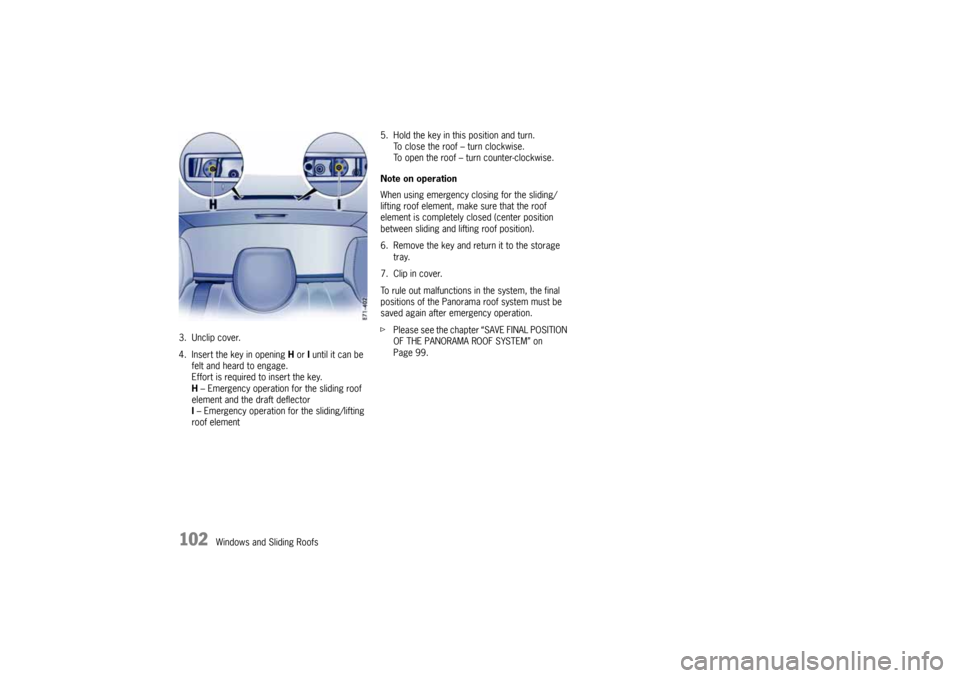
Windows and Sliding Roofs 3. Unclip cover.
4. Insert the key in opening H or I until it can be
felt and heard to engage.
Effort is required to insert the key.
H – Emergency operation for the sliding roof
element and the draft deflector
I – Emergency operation for the sliding/lifting
roof element5. Hold the key in this position and turn.
To close the roof – turn clockwise.
To open the roof – turn counter-clockwise.
Note on operation
When using emergency closing for the sliding/
lifting roof element, make sure that the roof
element is completely closed (center position
between sliding and lifting roof position).
6. Remove the key and return it to the storage
tray.
7. Clip in cover.
To rule out malfunctions in the system, the final
positions of the Panorama roof system must be
saved again after emergency operation.
fPlease see the chapter “SAVE FINAL POSITION
OF THE PANORAMA ROOF SYSTEM” on
Page 99.
10_Cayenne_21_KW17.book Seite 102 Donnerstag, 9. April 2009 3:33 15
Page 107 of 379
Lights, Turn Signals and Windshield Wipers
107
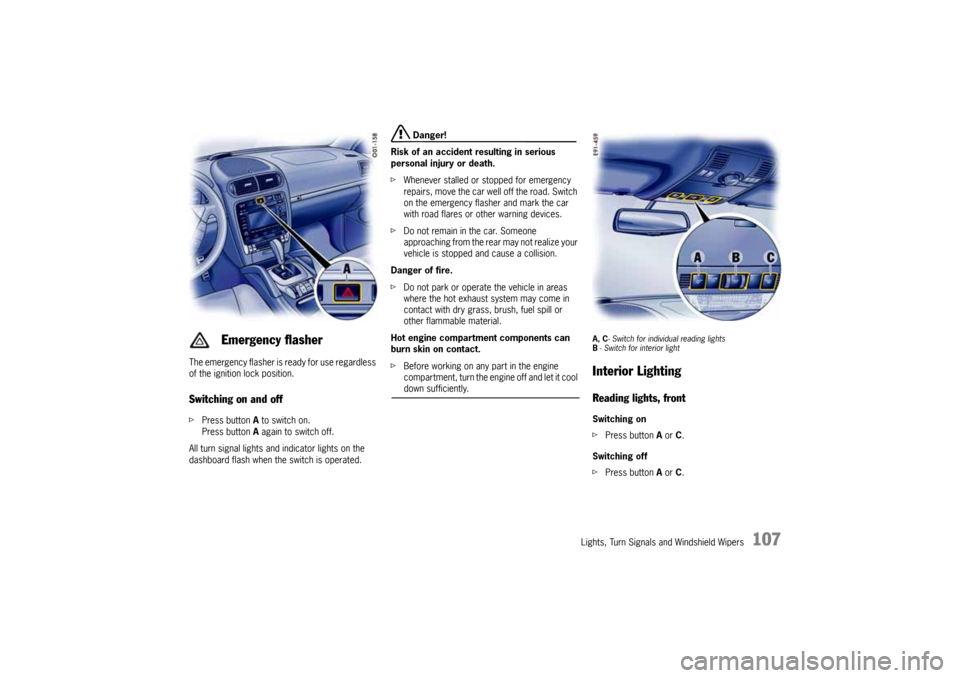
The emergency flasher is ready for use regardless
of the ignition lock position.Switching on and offfPress button A to switch on.
Press button A again to switch off.
All turn signal lights and indicator lights on the
dashboard flash when the switch is operated.
Danger!
Risk of an accident resulting in serious
personal injury or death.
fWhenever stalled or stopped for emergency
repairs, move the car well off the road. Switch
on the emergency flasher and mark the car
with road flares or other warning devices.
fDo not remain in the car. Someone
approaching from the rear may not realize your
vehicle is stopped and cause a collision.
Danger of fire.
fDo not park or operate the vehicle in areas
where the hot exhaust system may come in
contact with dry grass, brush, fuel spill or
other flammable material.
Hot engine compartment components can
burn skin on contact.
fBefore working on any part in the engine
compartment, turn the engine off and let it cool down sufficiently.
A, C- Switch for individual reading lights
B- Switch for interior lightInterior LightingReading lights, frontSwitching on
fPress button A or C.
Switching off
fPress button A or C.
Emergency flasher
10_Cayenne_21_KW17.book Seite 107 Donnerstag, 9. April 2009 3:33 15
Page 108 of 379
108
Lights, Turn Signals and Windshield Wipers
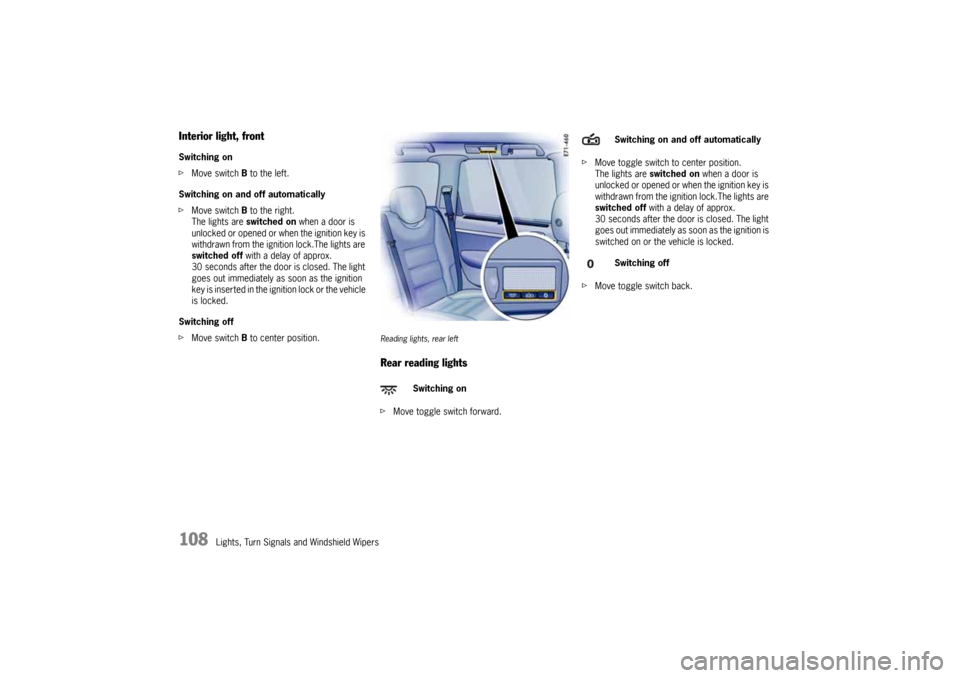
Interior light, frontSwitching on
fMove switch B to the left.
Switching on and off automatically
fMove switch B to the right.
The lights are switched on when a door is
unlocked or opened or when the ignition key is
withdrawn from the ignition lock.The lights are
switched off with a delay of approx.
30 seconds after the door is closed. The light
goes out immediately as soon as the ignition
key is inserted in the ignition lock or the vehicle
is locked.
Switching off
fMove switch B to center position.
Reading lights, rear leftRear reading lightsfMove toggle switch forward.fMove toggle switch to center position.
The lights are switched on when a door is
unlocked or opened or when the ignition key is
withdrawn from the ignition lock.The lights are
switched off with a delay of approx.
30 seconds after the door is closed. The light
goes out immediately as soon as the ignition is
switched on or the vehicle is locked.
fMove toggle switch back.
Switching on
Switching on and off automatically
Switching off
10_Cayenne_21_KW17.book Seite 108 Donnerstag, 9. April 2009 3:33 15
Page 109 of 379
Lights, Turn Signals and Windshield Wipers
109
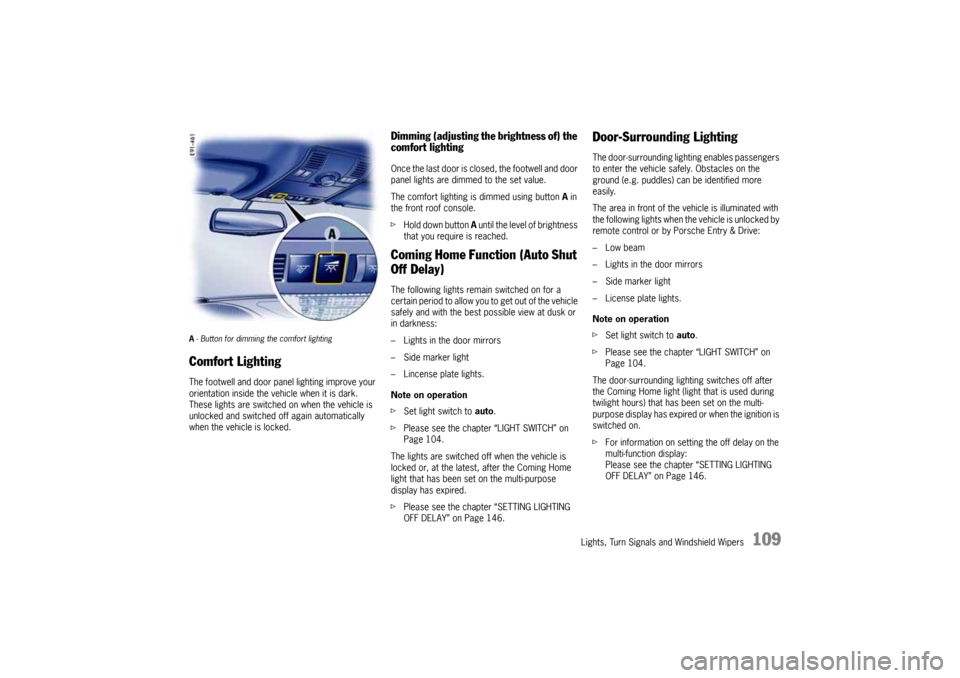
A- Button for dimming the comfort lighting Comfort LightingThe footwell and door panel lighting improve your
orientation inside the vehicle when it is dark.
These lights are switched on when the vehicle is
unlocked and switched off again automatically
when the vehicle is locked.
Dimming (adjusting the brightness of) the
comfort lightingOnce the last door is closed, the footwell and door
panel lights are dimmed to the set value.
The comfort lighting is dimmed using button A in
the front roof console.
fHold down button A until the level of brightness
that you require is reached.Coming Home Function (Auto Shut
Off Delay)The following lights remain switched on for a
certain period to allow you to get out of the vehicle
safely and with the best possible view at dusk or
in darkness:
– Lights in the door mirrors
– Side marker light
– Lincense plate lights.
Note on operation
fSet light switch to auto.
fPlease see the chapter “LIGHT SWITCH” on
Page 104.
The lights are switched off when the vehicle is
locked or, at the latest, after the Coming Home
light that has been set on the multi-purpose
display has expired.
fPlease see the chapter “SETTING LIGHTING
OFF DELAY” on Page 146.
Door-Surrounding LightingThe door-surrounding lighting enables passengers
to enter the vehicle safely. Obstacles on the
ground (e.g. puddles) can be identified more
easily.
The area in front of the vehicle is illuminated with
the following lights when the vehicle is unlocked by
remote control or by Porsche Entry & Drive:
–Low beam
– Lights in the door mirrors
– Side marker light
– License plate lights.
Note on operation
fSet light switch to auto.
fPlease see the chapter “LIGHT SWITCH” on
Page 104.
The door-surrounding lighting switches off after
the Coming Home light (light that is used during
twilight hours) that has been set on the multi-
purpose display has expired or when the ignition is
switched on.
fFor information on setting the off delay on the
multi-function display:
Please see the chapter “SETTING LIGHTING
OFF DELAY” on Page 146.
10_Cayenne_21_KW17.book Seite 109 Donnerstag, 9. April 2009 3:33 15
Page 115 of 379
Multi-Purpose Display and Instruments
115 Multi-Purpose Display and Instruments
Instrument Panel USA Models ......................117
Instrument Panel Canada Models ..................119
Oil Temperature Gage.................................120
Tachometer ................................................120
Clock .........................................................120
Fuel Gage ...................................................120
Speedometer..............................................120
Odometer ...................................................121
Voltmeter ...................................................121
Cooling System ..........................................122
Emission Control .........................................123
Operating the multi-purpose display on the
instrument panel .........................................124
Opening the main menu...............................125
Operating example: Displaying average
consumption...............................................125
Displaying/resetting average speed .............127
Displaying range on remaining fuel ...............127
Displaying tire pressure ...............................127
Displaying compass ....................................127
Displaying navigation information..................127
Operating the telephone via the
multi-purpose display...................................128
Setting speed limit on the multi-purpose
display .......................................................129
Displaying warning messages ......................130
Displaying status of level control ..................131
Displaying status of locks/reduction .............131
Displaying average consumption ..................132
Setting Tire Pressure Monitoring ..................132Switching off passenger compartment
monitoring on the multi-purpose display ....... 142
Synchronous adjustment of door mirrors ..... 143
Changing settings for opening and locking
the vehicle ................................................. 143
Switching daytime driving lights on/off ......... 145
Setting lighting off delay ............................. 146
Setting the clock ........................................ 146
Setting compass ........................................ 147
Changing language for displays ................... 148
Changing units for displays ......................... 148
Resetting display to factory settings ............ 148
Overview of warning messages.............. 149
10_Cayenne_21_KW17.book Seite 115 Donnerstag, 9. April 2009 3:33 15