warning PORSCHE CAYNNE S 2005 1.G Owner's Guide
[x] Cancel search | Manufacturer: PORSCHE, Model Year: 2005, Model line: CAYENNE S, Model: PORSCHE CAYENNE S 2005 1.GPages: 380, PDF Size: 3.17 MB
Page 68 of 380

68
Controls, Safety, Instruments
Brake wearYour car has excellent brakes, but they are still
subject to wear. The rate at which they wear de-
pends on how the brakes are used.
fHave the brake system inspected at the inter-
vals recommended in your Maintenance Book-
let.
The warning light in the instrument panel lights up.
A message will be displayed on the multi-purpose
display of the instrument panel if the brake pads
are worn, excessively.
fDo not continue to operate the vehicle.
Have your authorized Porsche dealer inspect
or replace the brake pads.
fPlease observe the chapter “WARNING LIGHTS
AND WARNING MESSAGES” on Page 108.
Brake pads and brake discsWear on the brake pads and brake discs depends
to a great extent on the driving style and the con-
ditions of use and therefore cannot be expressed
in actual miles on the road.
The high-performance brake system is designed
for optimal braking effect at all speeds and tem-
peratures.
Certain speeds, braking forces and ambient con-
ditions (such as temperature and humidity) there-
fore might cause the brakes to squeal.New brake pads or linings
New brake pads have to be “broken in“, and there-
fore only attain optimal friction when the car has
covered several hundred miles or km.
The slightly reduced braking ability must be com-
pensated for by pressing the brake pedal harder.
This also applies whenever the brake pads and
brake discs are replaced.
Brake wear warning light
USA
Brake wear warning light
Canada
Page 69 of 380

Controls, Safety, Instruments
69
Warning!
fDo not obstruct the pedal travel with floor mats
or other objects.
The brake booster is ready for operation only
while the engine is running.
If the engine is switched off or there is a defect in
the brake booster, much greater force has to be
applied to the pedal when braking.
fPlease observe the chapter “TOWING” on
Page 350.
In heavy rain, while driving through water or after
leaving a car wash, the braking action may be de-
layed and increased pressure may be required.
fFor this reason, keep further back from the ve-
hicle in front and “dry” the brakes by applying
them at intervals. Make sure that following traf-
fic is not affected.
After a long drive over salted or gritted roads, a
coating may form on the brake discs and pads
that significantly reduces friction and thus braking
action.
fTherefore, clean the brake discs and pads ap-
prox. every 2 weeks with a strong jet of water.
The cleaning effect of automatic car washes is
insufficient.
To prevent corrosion of the brake discs, “brake
them dry” before parking the car.fEven though the brake discs consist of alloyed
grey cast iron, they will unavoidably start to
corrode if your car is parked for an extended
period. The brakes will tend to “rub” as a re-
sult.
The nature, extent and effects of corrosion de-
pend on the amount of time the vehicle was
parked, whether road salt or grit was spread
and whether grease-dissolving agents were
used in car washes.
If the braking comfort is noticeably impaired,
we recommend having the brake system
checked by experts at an authorized Porsche
dealer.
fTo relieve the braking system on downhill
stretches, change down to a lower gear in
good time to obtain engine braking.
If engine braking is insufficient on steep
stretches, operate the footbrake at intervals.
Continuous braking overheats the brakes and
reduces the braking effect.
fPlease observe the chapter “BRAKE-FLUID LE-
VEL” on Page 251.
Page 70 of 380

70
Controls, Safety, Instruments
Instrument Panel USA ModelsWarning and indicator lights on the
tachometer
Indicator lights in central instrument
panelWarning and indicator lights on the
speedometer
A Oil temperature gauge
BTachometer
CClock
D Clock reset button
E Cooling system temperature gauge
F Multi-purpose display
G Fuel gauge
H Reset button for trip counter display
I Speedometer
J Mileage displays
KVoltmeter Emission Control warning light
(Check Engine)
Airbag warning light
Safety belt warning light
PSM warning light
ABS warning light
Cruise control readiness
Disengageable anti-roll bars
Indicator light
Turn signal light, left
Indicator light
Turn signal light, right
Indicator light
Trailer turn signal
Indicator light
Rear fog light indicator light
Tire pressure warning light
Differential locking indicator light
Brake warning light
Fog light indicator light
General warning
Observe warning message on the multi-
purpose display!
High beam indicator light
Page 72 of 380
72
Controls, Safety, Instruments
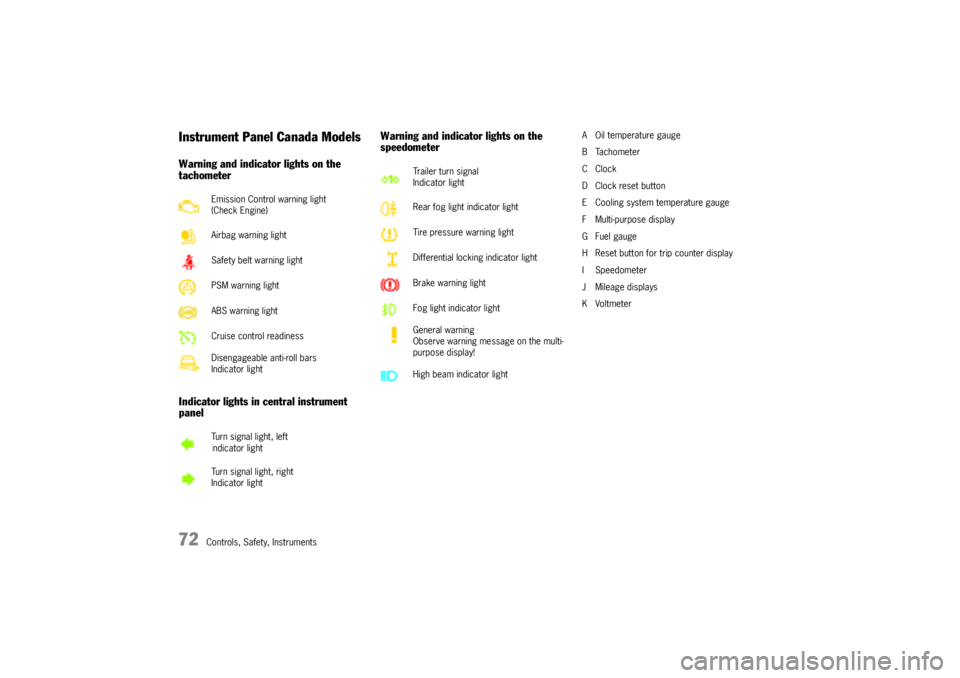
Instrument Panel Canada ModelsWarning and indicator lights on the
tachometer
Indicator lights in central instrument
panelWarning and indicator lights on the
speedometer
A Oil temperature gauge
BTachometer
CClock
D Clock reset button
E Cooling system temperature gauge
F Multi-purpose display
G Fuel gauge
H Reset button for trip counter display
I Speedometer
J Mileage displays
KVoltmeter Emission Control warning light
(Check Engine)
Airbag warning light
Safety belt warning light
PSM warning light
ABS warning light
Cruise control readiness
Disengageable anti-roll bars
Indicator light
Turn signal light, left
Indicator light
Turn signal light, right
Indicator light
Trailer turn signal
Indicator light
Rear fog light indicator light
Tire pressure warning light
Differential locking indicator light
Brake warning light
Fog light indicator light
General warning
Observe warning message on the multi-
purpose display!
High beam indicator light
Page 74 of 380
74
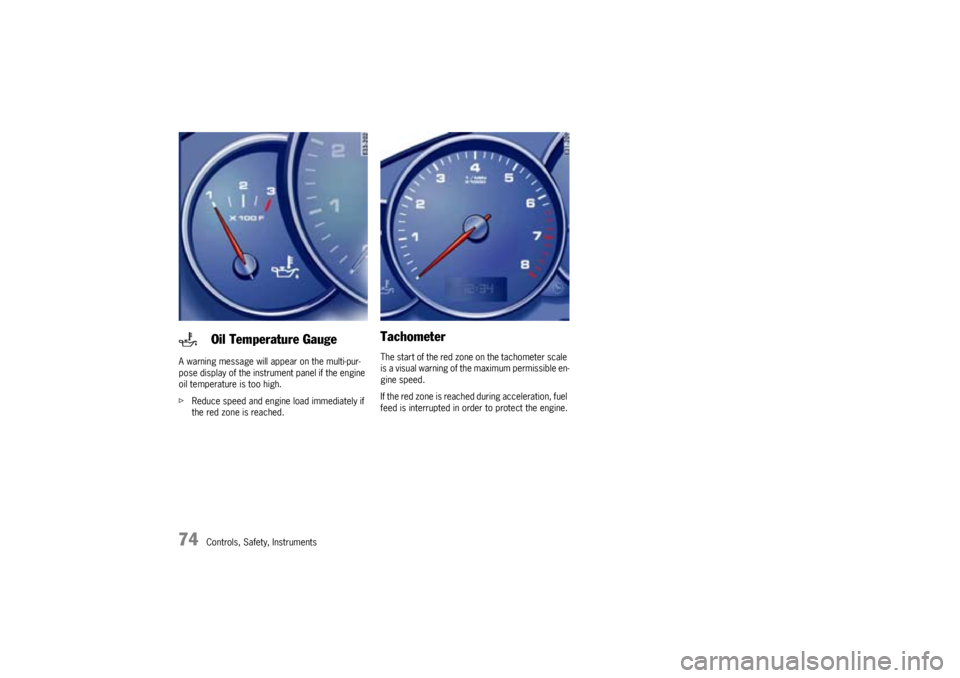
Controls, Safety, Instruments A warning message will appear on the multi-pur-
pose display of the instrument panel if the engine
oil temperature is too high.
fReduce speed and engine load immediately if
the red zone is reached.
TachometerThe start of the red zone on the tachometer scale
is a visual warning of the maximum permissible en-
gine speed.
If the red zone is reached during acceleration, fuel
feed is interrupted in order to protect the engine.
Oil Temperature Gauge
Page 75 of 380
Controls, Safety, Instruments
75
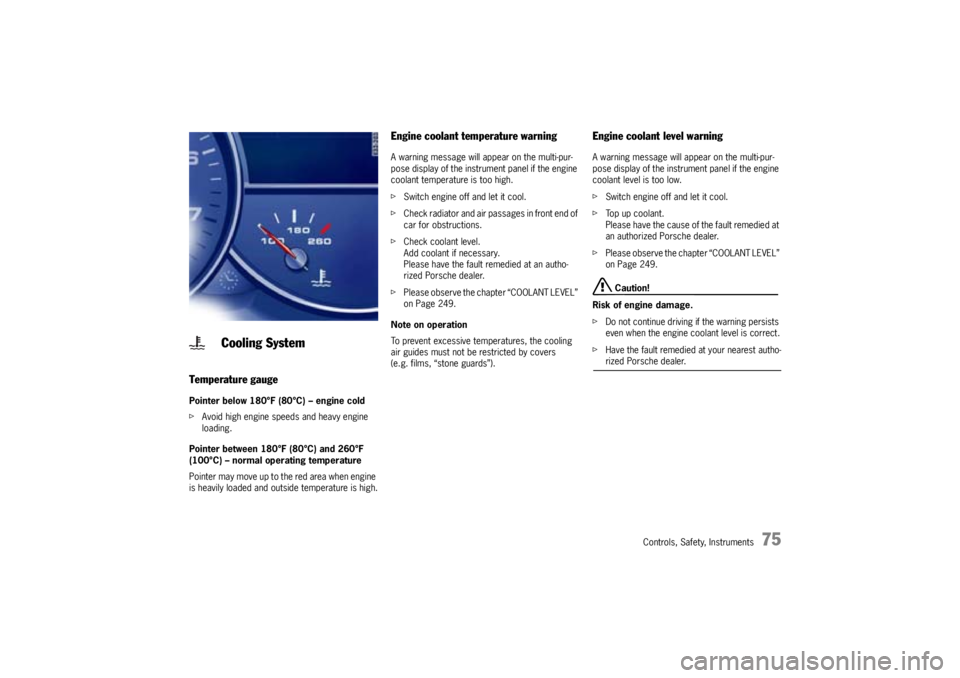
Temperature gaugePointer below 180°F (80°C) – engine cold
fAvoid high engine speeds and heavy engine
loading.
Pointer between 180°F (80°C) and 260°F
(100°C) – normal operating temperature
Pointer may move up to the red area when engine
is heavily loaded and outside temperature is high.
Engine coolant temperature warningA warning message will appear on the multi-pur-
pose display of the instrument panel if the engine
coolant temperature is too high.
fSwitch engine off and let it cool.
fCheck radiator and air passages in front end of
car for obstructions.
fCheck coolant level.
Add coolant if necessary.
Please have the fault remedied at an autho-
rized Porsche dealer.
fPlease observe the chapter “COOLANT LEVEL”
on Page 249.
Note on operation
To prevent excessive temperatures, the cooling
air guides must not be restricted by covers
(e.g. films, “stone guards”).
Engine coolant level warningA warning message will appear on the multi-pur-
pose display of the instrument panel if the engine
coolant level is too low.
fSwitch engine off and let it cool.
fTop up coolant.
Please have the cause of the fault remedied at
an authorized Porsche dealer.
fPlease observe the chapter “COOLANT LEVEL”
on Page 249.
Caution!
Risk of engine damage.
fDo not continue driving if the warning persists
even when the engine coolant level is correct.
fHave the fault remedied at your nearest autho-rized Porsche dealer.
Cooling System
Page 76 of 380
76
Controls, Safety, Instruments
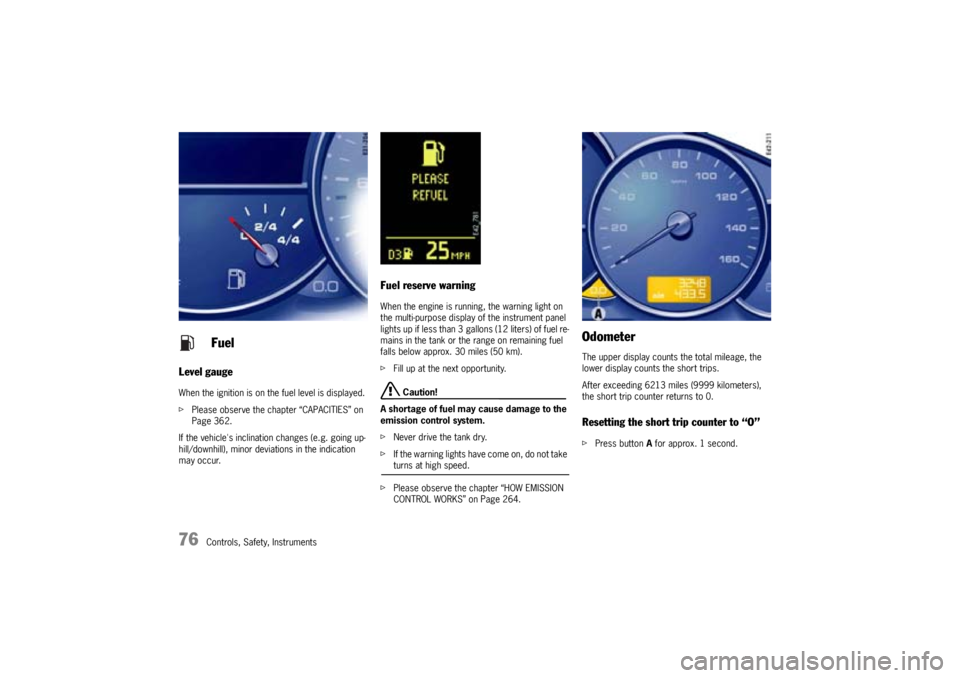
Level gaugeWhen the ignition is on the fuel level is displayed.
fPlease observe the chapter “CAPACITIES” on
Page 362.
If the vehicle's inclination changes (e.g. going up-
hill/downhill), minor deviations in the indication
may occur.
Fuel reserve warningWhen the engine is running, the warning light on
the multi-purpose display of the instrument panel
lights up if less than 3 gallons (12 liters) of fuel re-
mains in the tank or the range on remaining fuel
falls below approx. 30 miles (50 km).
fFill up at the next opportunity.
Caution!
A shortage of fuel may cause damage to the
emission control system.
fNever drive the tank dry.
fIf the warning lights have come on, do not take turns at high speed.
fPlease observe the chapter “HOW EMISSION
CONTROL WORKS” on Page 264.
OdometerThe upper display counts the total mileage, the
lower display counts the short trips.
After exceeding 6213 miles (9999 kilometers),
the short trip counter returns to 0.Resetting the short trip counter to “O”fPress button A for approx. 1 second.
Fuel
Page 78 of 380
78
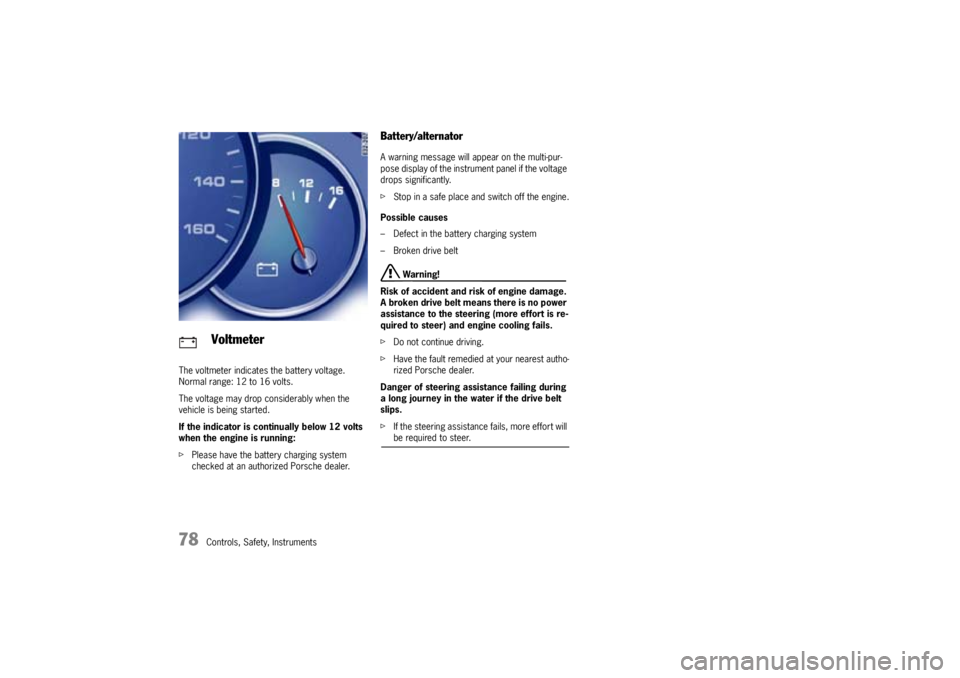
Controls, Safety, Instruments The voltmeter indicates the battery voltage.
Normal range: 12 to 16 volts.
The voltage may drop considerably when the
vehicle is being started.
If the indicator is continually below 12 volts
when the engine is running:
fPlease have the battery charging system
checked at an authorized Porsche dealer.
Battery/alternatorA warning message will appear on the multi-pur-
pose display of the instrument panel if the voltage
drops significantly.
fStop in a safe place and switch off the engine.
Possible causes
– Defect in the battery charging system
– Broken drive belt
Warning!
Risk of accident and risk of engine damage.
A broken drive belt means there is no power
assistance to the steering (more effort is re-
quired to steer) and engine cooling fails.
fDo not continue driving.
fHave the fault remedied at your nearest autho-
rized Porsche dealer.
Danger of steering assistance failing during
a long journey in the water if the drive belt
slips.
fIf the steering assistance fails, more effort will be required to steer.
Voltmeter
Page 79 of 380

Controls, Safety, Instruments
79
Emission ControlThe emission control system detects malfunctions
early that could, for example, cause increased pol-
lutant emissions or consequential damage.
Faults are indicated by the warning light in the in-
strument panel by being continuously lit or flash-
ing.
The faults are recorded in the control unit's fault
memory.
The warning light in the instrument panel lights up
when the ignition is switched on as a lamp check
and goes out approx. 4 seconds after the engine
starts.The warning light in the instrument panel flashes to
indicate operating states (e.g. engine misfiring)
which might cause damage to certain parts of the
emission control system.
fIn this case, immediately reduce the engine
load by easing off the accelerator.
The warning light in the instrument panel is lit
continuously after the critical range is left.
fIn order to avoid consequential damage to the
engine or emission control system (e.g. cata-
lytic converter) go immediately to the nearest
authorized Porsche dealer to have the fault
diagnosed and rectified.
Caution!
Risk of damage. If the warning light in the in-
strument panel continues flashing even when
you have eased off the accelerator pedal,
the emission control system may overheat.
fStop as soon as possible in a safe place.
Make sure that combustible materials, such as
dry grass or leaves, cannot come into contact
with the hot exhaust system.
fSwitch off the engine.
fContact your nearest authorized Porsche deal-er to have the fault rectified.
Check engine warning light
Page 80 of 380
80
Controls, Safety, Instruments
Multi-Purpose Display
Warning!
There is a danger of accident if you set or
operate the on-board computer, radio, navi-
gation system, telephone or other equipment
when driving.
This could distract you from the traffic and
cause you to lose control of the vehicle.
fOperate the components while driving only if
the traffic situation allows you to do so safely.
fCarry out any complicated operating or setting procedures only with the vehicle stationary.
It is not possible to describe all details of the
functions in this Owner's Manual.
The examples clearly demonstrate the functional
principle and clarify the menu structure.
As a rule, you can use the menu items:
MAIN MENU > SETTINGS > FACTORY SETTINGS
to return to the basic factory settings.
fPlease observe the chapter “FACTORY SET-
TINGS” on Page 107.
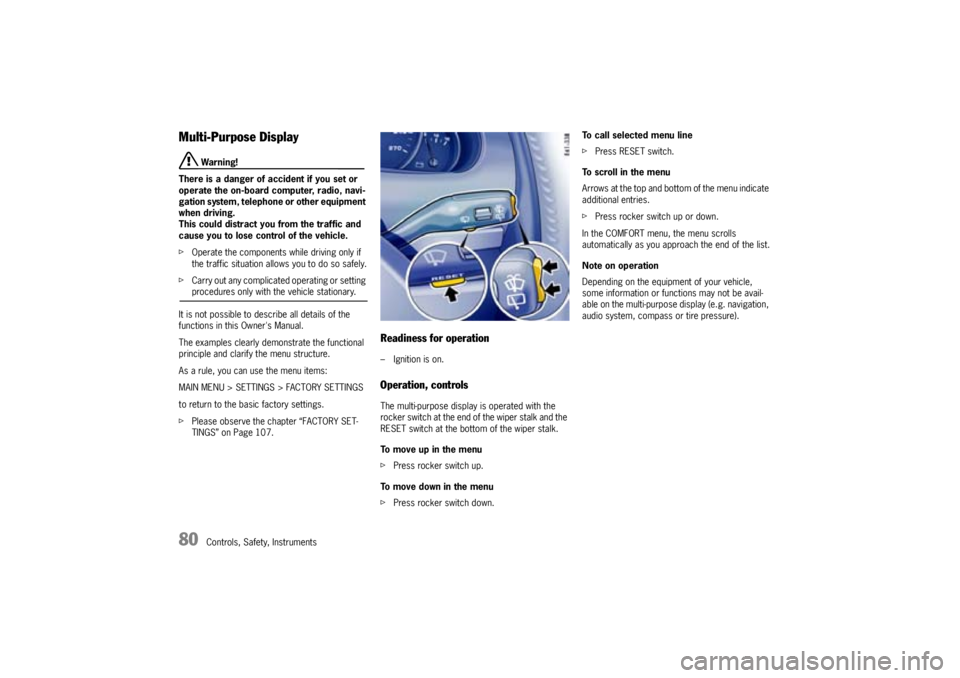
Readiness for operation– Ignition is on.Operation, controlsThe multi-purpose display is operated with the
rocker switch at the end of the wiper stalk and the
RESET switch at the bottom of the wiper stalk.
To move up in the menu
fPress rocker switch up.
To move down in the menu
fPress rocker switch down.To call selected menu line
fPress RESET switch.
To scroll in the menu
Arrows at the top and bottom of the menu indicate
additional entries.
fPress rocker switch up or down.
In the COMFORT menu, the menu scrolls
automatically as you approach the end of the list.
Note on operation
Depending on the equipment of your vehicle,
some information or functions may not be avail-
able on the multi-purpose display (e.g. navigation,
audio system, compass or tire pressure).