light PORSCHE CAYNNE S 2006 1.G Workshop Manual
[x] Cancel search | Manufacturer: PORSCHE, Model Year: 2006, Model line: CAYENNE S, Model: PORSCHE CAYENNE S 2006 1.GPages: 420, PDF Size: 3.81 MB
Page 138 of 420
138
Controls, Safety, Instruments The rain sensor remains switched off if the wiper
lever is already in position 1 when the ignition is
switched on.
To switch the rain sensor on again:
fMove wiper stalk to position 0 and then to
position 1 – switching on is confirmed by one
wipe of the windscreen – or
fOperate windscreen washer system 5 –
switching on is confirmed by three wipes of the
windscreen – or
fChange the sensitivity of the rain sensor with
four-stage switch A.Changing the sensitivity of the rain sensor
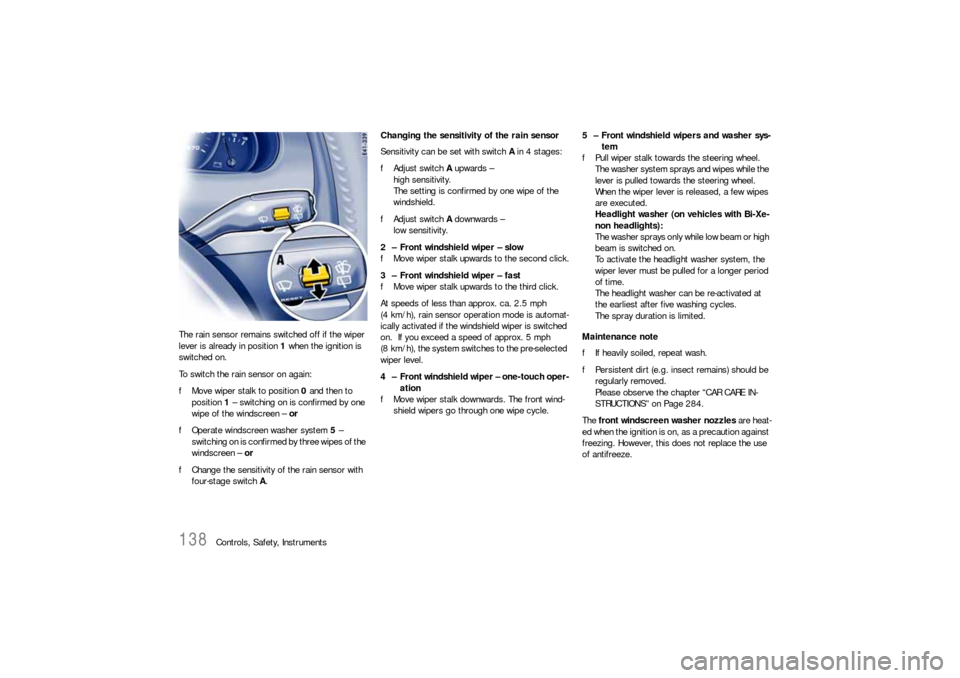
Sensitivity can be set with switch A in 4 stages:
fAdjust switch A upwards –
high sensitivity.
The setting is confirmed by one wipe of the
windshield.
fAdjust switch A downwards –
low sensitivity.
2 – Front windshield wiper – slow
fMove wiper stalk upwards to the second click.
3 – Front windshield wiper – fast
fMove wiper stalk upwards to the third click.
At speeds of less than approx. ca. 2.5 mph
(4 km/h), rain sensor operation mode is automat-
ically activated if the windshield wiper is switched
on. If you exceed a speed of approx. 5 mph
(8 km/h), the system switches to the pre-selected
wiper level.
4 – Front windshield wiper – one-touch oper-
ation
fMove wiper stalk downwards. The front wind-
shield wipers go through one wipe cycle.5 – Front windshield wipers and washer sys-
tem
fPull wiper stalk towards the steering wheel.
The washer system sprays and wipes while the
lever is pulled towards the steering wheel.
When the wiper lever is released, a few wipes
are executed.
Headlight washer (on vehicles with Bi-Xe-
non headlights):
T h e w a s h e r s p r a ys o n l y w h i l e l o w b e a m o r h i g h
beam is switched on.
To activate the headlight washer system, the
wiper lever must be pulled for a longer period
of time.
The headlight washer can be re-activated at
the earliest after five washing cycles.
The spray duration is limited.
Maintenance note
fIf heavily soiled, repeat wash.
fPersistent dirt (e.g. insect remains) should be
regularly removed.
Please observe the chapter “CAR CARE IN-
STRUCTIONS” on Page 284.
The front windscreen washer nozzles are heat-
ed when the ignition is on, as a precaution against
freezing. However, this does not replace the use
of antifreeze.
Page 140 of 420
140
Controls, Safety, Instruments
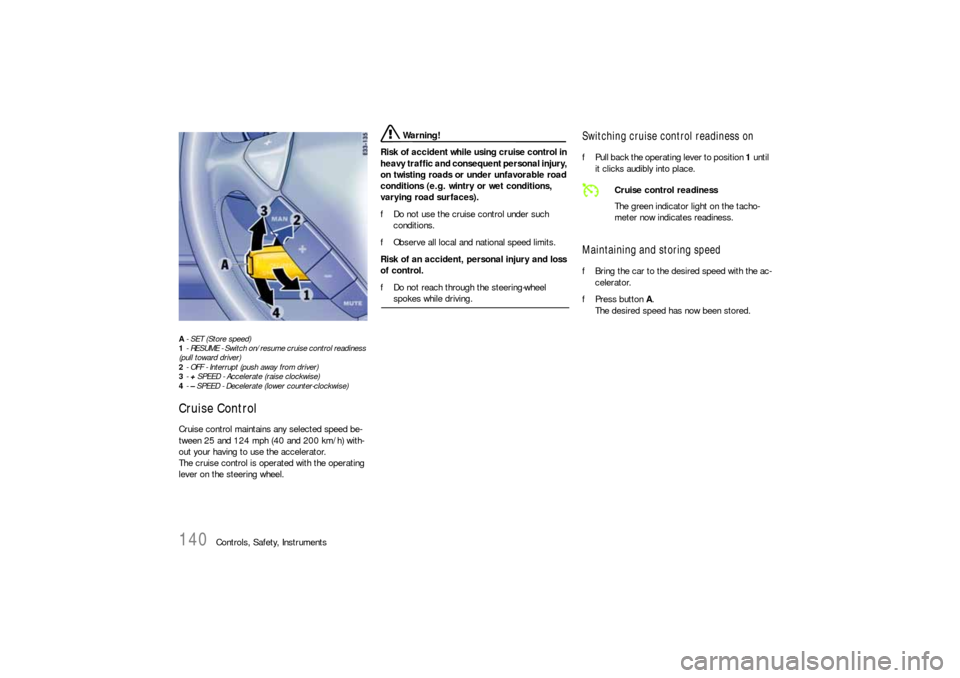
A- SET (Store speed)
1- RESUME - Switch on/resume cruise control readiness
(pull toward driver)
2- OFF - Interrupt (push away from driver)
3-+ SPEED - Accelerate (raise clockwise)
4-– SPEED - Decelerate (lower counter-clockwise)Cruise ControlCruise control maintains any selected speed be-
tween 25 and 124 mph (40 and 200 km/h) with-
out your having to use the accelerator.
The cruise control is operated with the operating
lever on the steering wheel.
Warning!
Risk of accident while using cruise control in
heavy traffic and consequent personal injury,
on twisting roads or under unfavorable road
conditions (e.g. wintry or wet conditions,
varying road surfaces).
fDo not use the cruise control under such
conditions.
fObserve all local and national speed limits.
Risk of an accident, personal injury and loss
of control.
fDo not reach through the steering-wheel spokes while driving.
Switching cruise control readiness onfPull back the operating lever to position 1 until
it clicks audibly into place.Maintaining and storing speedfBring the car to the desired speed with the ac-
celerator.
fPress button A.
The desired speed has now been stored.
Cruise control readiness
The green indicator light on the tacho-
meter now indicates readiness.
Page 141 of 420

Controls, Safety, Instruments
141
Accelerating (e.g. to overtake)Option 1
fIncrease the speed as usual with the accelera-
tor.
When you ease off the accelerator, the previ-
ously stored value is set again.
Option 2
fPush operating lever upwards into position 3
until the desired speed is reached.
The speed reached is maintained and stored
when the operating lever is released.
Option 3
fPush operating lever slightly upwards into po-
sition 3 (a maximum of 10 times).
The speed is increased by 1 mph (2 km/h).
Note on operation
Cruise control operation is automatically interrupt-
ed if the speed is increased by more than approx.
16 mph (25 km/h) for longer than 20 seconds.
DeceleratingOption 1
fPush operating lever down into position 4 until
the desired speed is reached.
The speed reached is maintained and stored
when the operating lever is released.
Option 2
fPush operating lever slightly downwards into
position 4 (a maximum of 10 times).
The speed is reduced by 1 mph (2 km/h).
Interrupting cruise control operationThe speed driven before the interruption remains
stored in the memory.
fPush the operating lever forward to position 2
(it doesn’t engage) or
fOperate brake or clutch pedal or, on vehicles
with Tiptronic S, select position N.
fPlease observe the chapter “TIPTRONIC S” on
Page 221.
Cruise control operation is interrupted
automatically:
– If the set vehicle speed is exceeded by more
than approx. 16 mph (25 km/h) for longer than
20 seconds.
– If the actual vehicle speed falls by approx.
6 mph (10 km/h) below the set vehicle speed
for longer than 5 seconds (e.g. upward
slopes).
– If Porsche Stability Management (PSM) inter-
venes for longer than 0.2 seconds.
– If Low Range is switched on.
Page 142 of 420

142
Controls, Safety, Instruments
Resuming the stored speedfPull back the operating lever to position 1.
Note on operation
The stored speed should only be recalled when
traffic conditions and the road surface so permit.Switching cruise control readiness offfPush forward the operating lever to position 2
until it clicks audibly into place.
The memory is cleared and the green
readiness light goes out.
When the vehicle is parked and the ignition
switched off, the memory is cleared.
Tip on driving
On upward or downward slopes, the set speed
cannot always be maintained by cruise control.
fTo obtain sufficient engine braking or a better
engine-speed range, therefore, you have to
change down to a lower gear.
Page 144 of 420
144
Controls, Safety, Instruments The heated rear window is ready for operation
when the ignition is on.
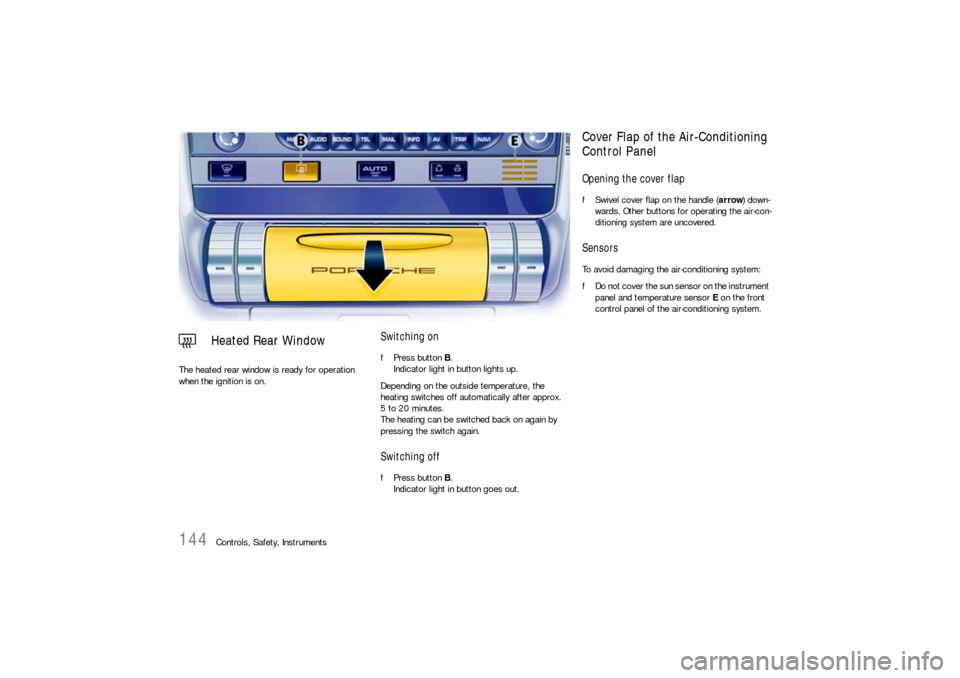
Switching onfPress button B.
Indicator light in button lights up.
Depending on the outside temperature, the
heating switches off automatically after approx.
5 to 20 minutes.
The heating can be switched back on again by
pressing the switch again.Switching offfPress button B.
Indicator light in button goes out.
Heated Rear Window
Cover Flap of the Air-Conditioning
Control PanelOpening the cover flapfSwivel cover flap on the handle (arrow) down-
wards. Other buttons for operating the air-con-
ditioning system are uncovered.SensorsTo avoid damaging the air-conditioning system:
fDo not cover the sun sensor on the instrument
panel and temperature sensor E on the front
control panel of the air-conditioning system.
Page 146 of 420

146
Controls, Safety, Instruments fUse button K to select the interior temperature
to suit personal comfort.
fPush temperature button up or down.
The selected temperature is shown in a bar
display on the display above the button.
If a bar cannot be seen, the air conditioning is
running at its maximum setting.
If all bars can be seen, the heating is running
at its maximum setting.
Note
fFor maximum cooling, activate recirculated air
(button C).fPush button E or K up or down for air quantity.
The selected air quantity is shown in a bar
display on the display above the button.
If the air quantity was reduced so much that “OFF”
appears on the display, the outside-air supply is
interrupted.
Warning!
Risk of accident due to hampered vision. If
the air quantity is “OFF”, the windows may
mist up.
fPush button E up (to increase air quantity).fPress button A.
Indicator light lights up.
The air flows to the windscreen and the front
side windows.
The windscreen is demisted or defrosted as
quickly as possible.
Ending the function
fPress button A again.
Setting temperature
Setting air quantity
Defrost windscreen
Page 147 of 420
Controls, Safety, Instruments
147
Warning!
Risk of accident due to hampered vision. In
circulating-air mode, the windows may mist
up.
fOnly select circulating-air mode for short
periods.
fIf windows mist up, end circulating-air mode by
pressing the circulating-air button again and selecting the function “Defrost windscreen”.
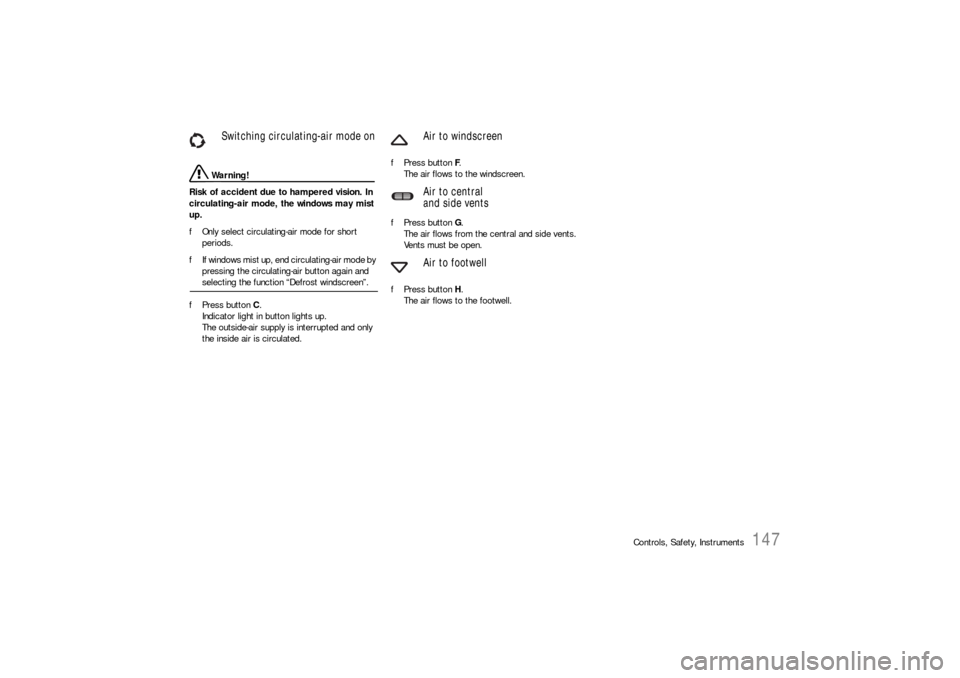
fPress button C.
Indicator light in button lights up.
The outside-air supply is interrupted and only
the inside air is circulated.fPress button F.
The air flows to the windscreen.
fPress button G.
The air flows from the central and side vents.
Vents must be open.
fPress button H.
The air flows to the footwell.
Switching circulating-air mode on
Air to windscreen
Air to central
and side vents
Air to footwell
Page 148 of 420
148
Controls, Safety, Instruments
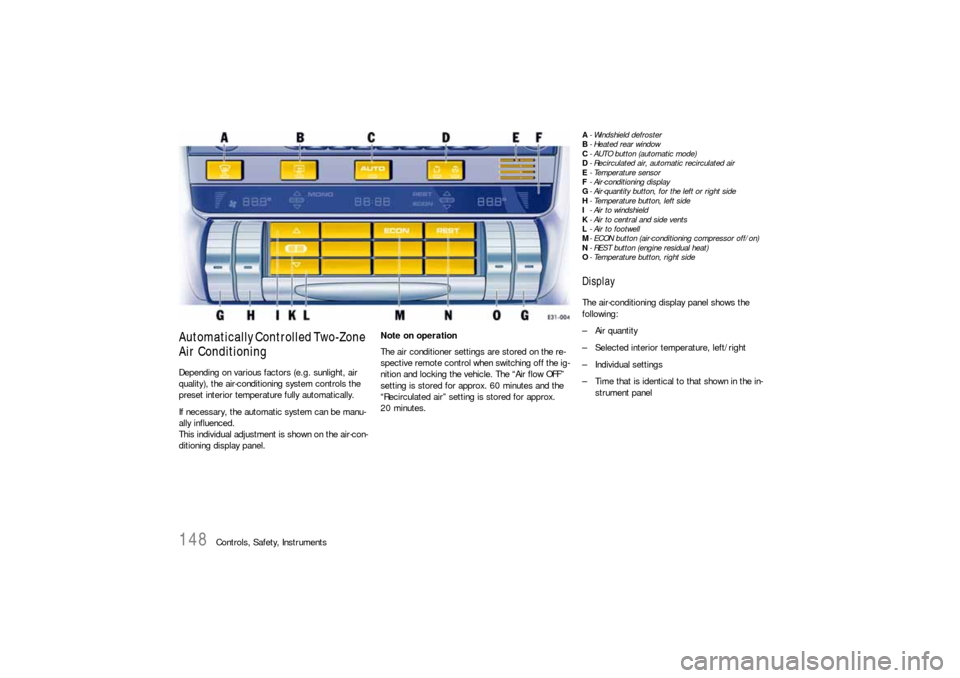
Automatically Controlled Two-Zone
Air ConditioningDepending on various factors (e.g. sunlight, air
quality), the air-conditioning system controls the
preset interior temperature fully automatically.
If necessary, the automatic system can be manu-
ally influenced.
This individual adjustment is shown on the air-con-
ditioning display panel.Note on operation
The air conditioner settings are stored on the re-
spective remote control when switching off the ig-
nition and locking the vehicle. The “Air flow OFF”
setting is stored for approx. 60 minutes and the
“Recirculated air” setting is stored for approx.
20 minutes.
A- Windshield defroster
B-Heated rear window
C- AUTO button (automatic mode)
D- Recirculated air, automatic recirculated air
E-Temperature sensor
F- Air-conditioning display
G- Air-quantity button, for the left or right side
H- Temperature button, left side
I- Air to windshield
K- Air to central and side vents
L- Air to footwell
M- ECON button (air-conditioning compressor off/on)
N- REST button (engine residual heat)
O- Temperature button, right sideDisplayThe air-conditioning display panel shows the
following:
– Air quantity
– Selected interior temperature, left/right
– Individual settings
– Time that is identical to that shown in the in-
strument panel
Page 149 of 420

Controls, Safety, Instruments
149
Automatic modefPress AUTO button C.
Indicator light in button lights up.
Air quantity and distribution are automatically
controlled and variations are compensated.
Note on operation
If necessary, the automatic system can be manu-
ally influenced.
This manual setting is retained until the appropri-
ate function button is pressed again or the AUTO
button is pressed.
Switching MONO function on
The temperature settings for the driver’s side can
be accepted for the entire vehicle.
fPress AUTO button C for 2 seconds.
The MONO logo appears on the air-condition-
ing display panel.
Ending MONO function
fPress AUTO button C for 2 seconds or
fChange the settings in the air-conditioned are-
as.
Setting temperatureTo suit personal comfort, the interior temperature
can be adjusted between 61°F and 85°F (16°C
and 29.5°C).
Recommendation: 72°F (22°C)
fPush temperature button up or down.
Button H: left side of vehicle
Button O: right side of vehicle
The selected temperature is shown on the
display above the button.
If “LO” or “HI” appears on the display, the system
is operating at maximum cooling or heating pow-
er. Automatic mode is switched off.
If the preselected temperature is changed, the air
quantity blowing out can adjust automatically in au-
tomatic mode.
The desired temperature is reached more quickly
this way.fPush button G up or down to adjust the air
quantity.
The selected air quantity is shown in a bar
display on the display above the button.
fPress AUTO button C to return to automatic
mode.
If the air quantity was reduced so much that “OFF”
appears on the display, the outside-air supply is in-
terrupted.
Warning!
Risk of accident due to impaired vision. If the
air quantity is “OFF”, the windows may mist
up.
fOnly select recirculating-air setting for short
periods.
fIf windows mist up, turn off the recirculating-air
setting by pressing the circulating-air button
briefly and select the function “Defrost wind-
shield“.
fPush button G up (to increase air quantity). Setting air quantity
Page 150 of 420
150
Controls, Safety, Instruments fPress button A.
Indicator light in button lights up.
The air flows to the windshield and the front
side windows.
The windshield is demisted or defrosted as
quickly as possible.
Ending the function
fPress button A again or
Press the AUTO button C.
fPress button A once.
Indicator light in button lights up.
Control of the outside-air supply depends on
the air quality.
Note
The recommended operating mode is automatic
circulating-air mode.
Warning!
Risk of accident due to hampered vision.
In circulating-air mode, the windows may
mist up.
fOnly select circulating-air mode for short
periods.
fIf windows mist up, end circulating-air mode by
pressing the circulating-air button again and selecting the function “Defrost windshield”.
fPress button D twice.
Indicator light in button lights up.
The outside-air supply is interrupted and only
the inside air is circulated.
Note on operation
When the air-conditioning compressor is switched
off manually or automatically, circulating-air mode
ends after approx. 3 minutes.fPress button I.
The air flows to the windshield.
fPress button K.
The air flows from the central and side vents.
Vents must be open.
fPress button L.
The air flows to the footwell.
Ending air distribution functions
fPress the relevant button again or
fPress the AUTO button C.
Defrosting the windshield
Switching automatic
circulating-air mode on
Switching circulating-air mode on
Air to windshield
Air to central and side vents
Air to footwell