key PORSCHE CAYNNE TURBO 2005 1.G User Guide
[x] Cancel search | Manufacturer: PORSCHE, Model Year: 2005, Model line: CAYENNE TURBO, Model: PORSCHE CAYENNE TURBO 2005 1.GPages: 369, PDF Size: 3.17 MB
Page 29 of 369
Controls, Safety, Instruments
29
Power Windows
Warning!
Risk of injury when the door windows close.
This applies especially if the windows are
closed with the comfort function, because
with this function the window goes up auto-
matically.
fMake sure nobody can be injured when the win-
dows close.
fAlways withdraw ignition key when leaving the
vehicle or switch ignition off in vehicles that
have Porsche Entry & Drive. Always take the ig-
nition key with you when leaving the vehicle.
Uninformed persons could injure themselves
by operating the power windows.
fIn case of danger, immediately release the car
key or the button in the door handle in vehicles
that have Porsche Entry & Drive.
fDo not leave children in the car unattended.
Risk of an accident.
fDo not put anything on or near the windows that may interfere with the driver's vision.
Readiness for operation of power windows– With ignition switched on or
– A maximum of 10 minutes with door closed
and ignition key withdrawn, but only until driv-
er’s or passenger door is first opened.
The one-touch operation for closing the door
windows is available only when the ignition is
switched on.
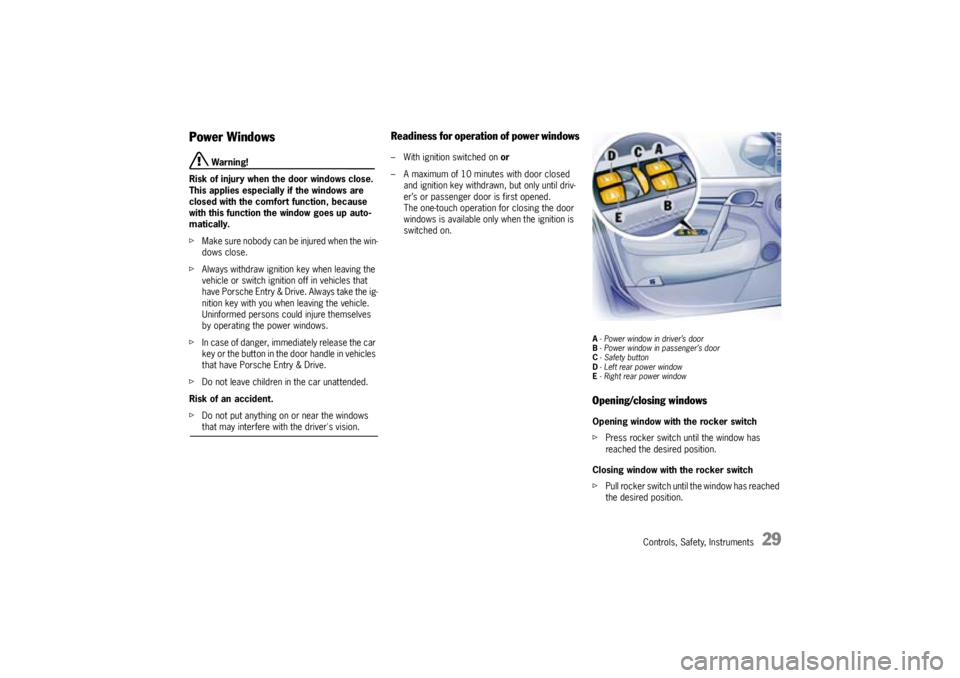
A- Power window in driver’s door
B- Power window in passenger’s door
C-Safety button
D- Left rear power window
E- Right rear power windowOpening/closing windowsOpening window with the rocker switch
fPress rocker switch until the window has
reached the desired position.
Closing window with the rocker switch
fPull rocker switch until the window has reached
the desired position.
Page 30 of 369
30
Controls, Safety, Instruments
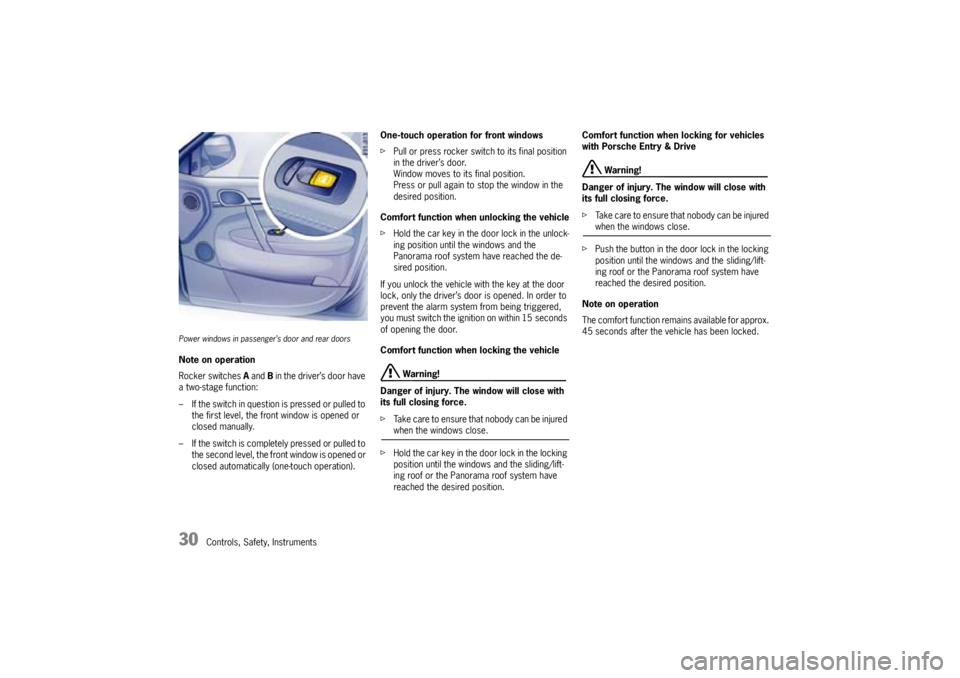
Power windows in passenger’s door and rear doorsNote on operation
Rocker switches A and B in the driver’s door have
a two-stage function:
– If the switch in question is pressed or pulled to
the first level, the front window is opened or
closed manually.
– If the switch is completely pressed or pulled to
the second level, the front window is opened or
closed automatically (one-touch operation).One-touch operation for front windows
fPull or press rocker switch to its final position
in the driver’s door.
Window moves to its final position.
Press or pull again to stop the window in the
desired position.
Comfort function when unlocking the vehicle
fHold the car key in the door lock in the unlock-
ing position until the windows and the
Panorama roof system have reached the de-
sired position.
If you unlock the vehicle with the key at the door
lock, only the driver’s door is opened. In order to
prevent the alarm system from being triggered,
you must switch the ignition on within 15 seconds
of opening the door.
Comfort function when locking the vehicle
Warning!
Danger of injury. The window will close with
its full closing force.
fTa k e c a r e t o e n s u r e t h a t n o b o d y c a n b e i n j u re d when the windows close.
fHold the car key in the door lock in the locking
position until the windows and the sliding/lift-
ing roof or the Panorama roof system have
reached the desired position.Comfort function when locking for vehicles
with Porsche Entry & Drive
Warning!
Danger of injury. The window will close with
its full closing force.
fTake care to ensure that nobody can be injured when the windows close.
fPush the button in the door lock in the locking
position until the windows and the sliding/lift-
ing roof or the Panorama roof system have
reached the desired position.
Note on operation
The comfort function remains available for approx.
45 seconds after the vehicle has been locked.
Page 31 of 369

Controls, Safety, Instruments
31
Note on operation
If a door window is blocked during closing, it will
stop and open again by several inches.
However, this is not the case if:
– The rocker switch is pressed again within
10 seconds of the window being blocked and
– The windows are closed using the car key in
the door lock (comfort function).
The windows close with their full closing force.
Warning!
Danger of injury. If the rocker switch is
pressed again within 10 seconds of the
window being blocked, the window will close
with its full closing force.
fTake care to ensure that nobody can be injured when the windows close.
One-touch operation is disabled for 10 seconds
after blockage of the door window.
Storing final position of the door windowsThe end positions of the door windows are lost
when the battery is disconnected and reconnect-
ed. The one-touch operation of the windows is dis-
abled.
Perform these procedures for all windows:
1. Close window completely onceby pulling rock-
er switch.
2. Pull rocker switch again.
The upper end position of the window is
stored.
3. Open window completely onceby pressing
rocker switch.
4. Press rocker switch again.
The lower end position of the window is stored.The power windows and the central locking but-
tons for the rear doors can be disabled using safe-
ty button C in the armrest of the driver's door.
fPress the safety button C.
The power windows and central locking
buttons on the rear doors are disabled.
The symbol in the switch lights up.
5. Press the safety C button again.
The power windows and central locking
buttons on the rear doors are operational.
Safety Button
Page 33 of 369

Controls, Safety, Instruments
33
Front seat with memoryPersonal seat, door mirror, steering wheel and
safety belt height adjustments can be stored on
the person buttons A and car keys and recalled
with these.
fPlease observe the chapter “EASY ENTRY
FUNCTION” on Page 35.
Warning!
Risk of crushing due to uncontrolled recall of
settings.
fCancel automatic adjustment by pressing any
of the seat adjustment buttons.
fDo not leave children in the car unattended.Memory options–Seat adjustment
– Door mirror adjustmentComfort memory options–Seat adjustment
– Door mirror adjustment
– Steering wheel and safety belt height adjust-
ment
Recalling the settings using the
vehicle key or in vehicles that have
Porsche Entry & DrivefOpen the driver’s door.
The stored settings of the driver's seat are re-
called automatically.
Cancelling setting
Automatic settings can be cancelled immediately
by pressing any driver’s seat setting button.Recalling the settings with person buttons
1 - 3 (driver’s and passenger’s seat)1. Unlock vehicle and open the driver’s door.
2. Press the relevant person button until the
stored positions have been reached
or
Briefly touch the person button if the ignition
key is inserted or if the ignition is switched on
(in vehicles that have Porsche Entry & Drive).
The stored positions for each seat are recalled
automatically.
Cancelling setting
Automatic settings can be cancelled immediately
by pressing any seat adjustment button.
Page 34 of 369

34
Controls, Safety, Instruments
Storing driver’s seat settingsStoring settings on a person button and a car
key
1. Apply the parking brake.
2. Switch ignition on.
3. Close doors.
4. Make the required adjustments to the seat,
mirror, steering wheel and safety belt.
5. Briefly press the SET memory button and,
within 10 seconds, hold down one of the per-
son buttons (1, 2 or 3) until an acknowledge
tone is obtained.
The settings are now stored on the desired
person button.
6. Withdraw car key or switch ignition off in vehi-
cles that have Porsche Entry & Drive.
7. Press the SET memory button within
10 seconds and keep the button depressed
until an acknowledge tone is obtained.
The settings are now assigned to the car key.
A- Mirror adjustmentStoring passenger mirror setting as a
parking aidIf the passenger’s mirror is supposed to swivel
downwards when reversing, this can also be
stored in the driver’s seat setting.
1. Apply the parking brake.
2. Switch ignition on.
3. Press the relevant person button.
4. Engage reverse gear.5. Set the control switch Afor the mirror setting
to the passenger’s side.
The passenger’s mirror swivels downwards.
6. Adjust the passenger’s mirror to the required
setting.
7. Briefly press the SET memory button and,
within 10 seconds, hold down the person but-
ton on which the setting is to be stored until an
acknowledge tone is obtained.
Storing passenger seat settings1. Apply the parking brake.
2. Switch ignition on.
3. Adjust seat position and belt height.
4. Briefly press the SET memory button and,
within 10 seconds, hold down one of the per-
son buttons (1, 2 or 3) until an acknowledge
tone is obtained.Automatic storage – driver’s seatIf settings were changed after the driver’s door
was opened, these new settings are automatically
stored when the vehicle is locked. This storage is
deleted if the vehicle is unlocked with a programed
key and the driver’s door is opened.
Page 35 of 369
Controls, Safety, Instruments
35
Easy Entry Function The Easy Entry function makes it easier for you to
get in and out of the car.
Warning!
Risk of crushing if persons are behind the
driver's seat when settings are recalled.
Risk of damage if the rear seat bench is folded for-
ward when settings are recalled.
fSwitch off the Easy Entry function if there are
persons behind the driver's seat or if the rear seat bench is folded forward.
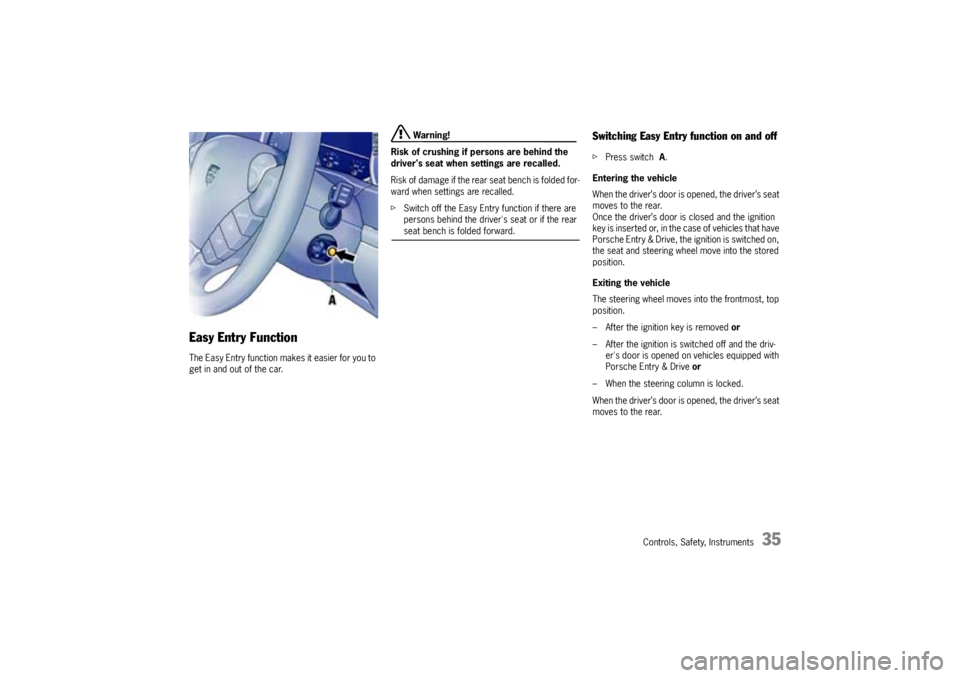
Switching Easy Entry function on and offfPress switch A.
Entering the vehicle
When the driver’s door is opened, the driver’s seat
moves to the rear.
Once the driver’s door is closed and the ignition
key is inserted or, in the case of vehicles that have
Porsche Entry & Drive, the ignition is switched on,
the seat and steering wheel move into the stored
position.
Exiting the vehicle
The steering wheel moves into the frontmost, top
position.
– After the ignition key is removed or
– After the ignition is switched off and the driv-
er's door is opened on vehicles equipped with
Porsche Entry & Drive or
– When the steering column is locked.
When the driver’s door is opened, the driver’s seat
moves to the rear.
Page 42 of 369

42
Controls, Safety, Instruments
Safety Belts
Danger!
Always make sure your and your passengers'
safety belts are properly fastened while the
vehicle is in motion.
Failure to follow safety belt warnings may re-
sult in serious personal injury or death.
fFor your and your passengers' protection, use
safety belts at all times while the vehicle is in
motion.
fUse appropriate child restraint systems for all
small children.
Proper wearing of safety belts
fSafety belts must be positioned on the body as
to restrain the upper body and lap from sliding
forward. Improperly positioned safety belts
can cause serious personal injury in case of an
accident.
fThe shoulder belt should always rest on your
upper body. The shoulder belt should never be
worn behind your back or under your arm.
fFor maximum effectiveness, the lap belt
should be worn low across the hips.
fPregnant women should position the belt as
low as possible across the pelvis. Make sure it
is not pressing against the abdomen.
fBelts should not be worn twisted.fDo not wear belts over rigid or breakable
objects in or on your clothing, such as eye
glasses, pens, keys, etc. as these may cause
injury.
fSeveral layers of heavy clothing may interfere
with proper positioning of belts.
fBelts must not rub against sharp objects or
damage may occur to the belt.
fTwo occupants should never share the same
belt at the same time.
Care and maintenance
fKeep belt buckles free of any obstruction that
may prevent a secure locking.
fBelts that have been subjected to excessive
stretch forces in an accident must be inspect-
ed or replaced to ensure their continued effec-
tiveness in restraining you.
The same applies to belt tensioner systems
which have been triggered. In addition, the an-
chor points of the belts should be checked.
fIf safety belts do not work properly, see your
authorized Porsche dealer immediately.
fI f t h e b e l t s s h o w d a m a g e t o w e b b i n g , b i n d i n g s ,
buckles or retractors, they should be replaced
to ensure safe operation.
fDo not modify or disassemble the safety belts
in your vehicle.fThe belts must be kept clean or the retractors
may not work properly.
Please observe the chapter “CAR CARE IN-
STRUCTIONS” on Page 256.
fNever bleach or dye safety belts.
fDo not allow safety belts to retract until they
are completely dry after cleaning or this may
cause damage to the belt.
Page 53 of 369
Controls, Safety, Instruments
53
Multi-Functional Steering Wheel
Warning!
There is a danger of accident if you set or
operate the on-board computer, radio, navi-
gation system, telephone or other equipment
when driving.
This could distract you from the traffic and
cause you to lose control of the vehicle.
fOperate the components while driving only if
the traffic situation allows you to do so safely.
fCarry out any complicated operating or setting procedures only with the vehicle stationary.
Depending on the equipment in your vehicle, you
can use these function keys to operate the follow-
ing Porsche communication systems:
– Radio with CD drive
–CD changer
– Satelite radio
Readiness for operation of multi-
functional steering wheel– With ignition switched on and
– With Porsche communication systems
switched on.
fPlease observe the operating instructions sup-
plied for the Porsche communication systems
before operating the function keys.
Note on operation
The Porsche communication systems cannot be
switched on and off using the multi-functional
steering wheel.
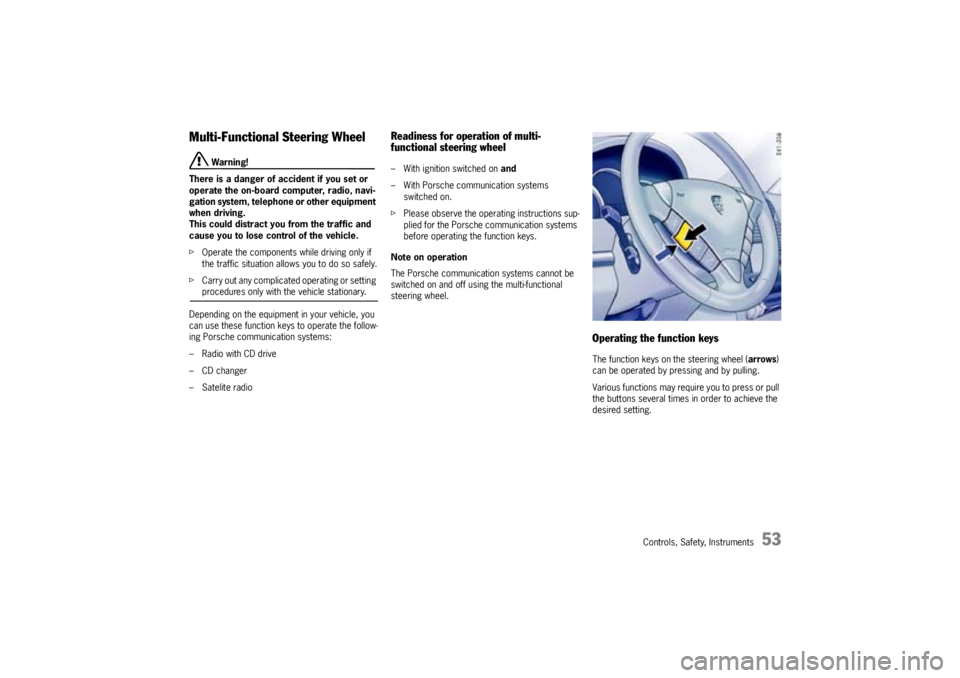
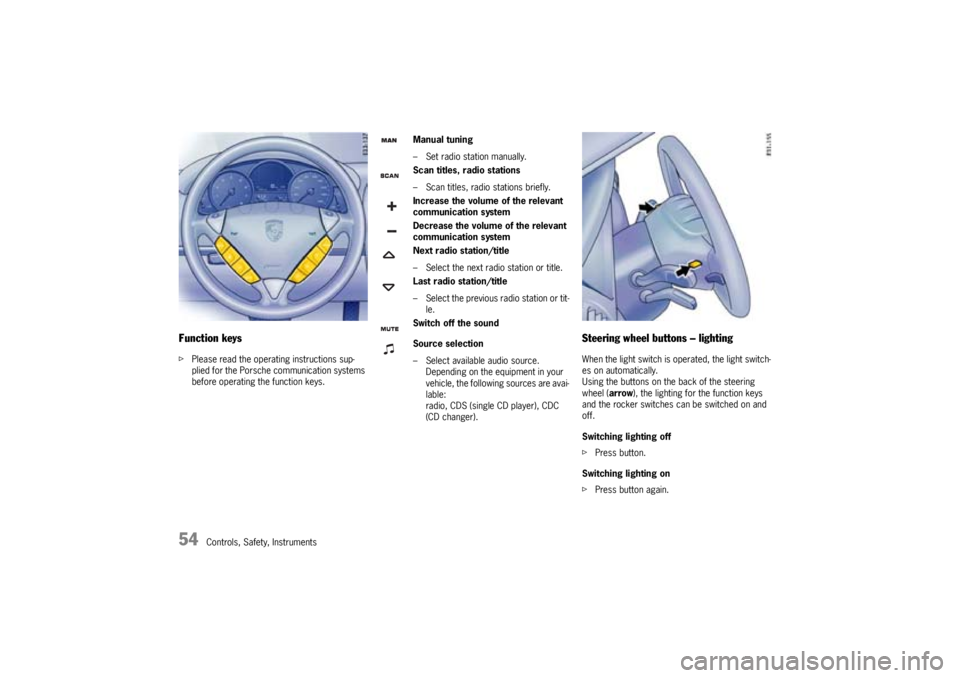
Operating the function keysThe function keys on the steering wheel (arrows)
can be operated by pressing and by pulling.
Various functions may require you to press or pull
the buttons several times in order to achieve the
desired setting.
Page 54 of 369
54
Controls, Safety, Instruments
Function keysfPlease read the operating instructions sup-
plied for the Porsche communication systems
before operating the function keys.
Steering wheel buttons – lightingWhen the light switch is operated, the light switch-
es on automatically.
Using the buttons on the back of the steering
wheel (arrow), the lighting for the function keys
and the rocker switches can be switched on and
off.
Switching lighting off
fPress button.
Switching lighting on
fPress button again.
Manual tuning
– Set radio station manually.
Scan titles, radio stations
– Scan titles, radio stations briefly.
Increase the volume of the relevant
communication system
Decrease the volume of the relevant
communication system
Next radio station/title
– Select the next radio station or title.
Last radio station/title
– Select the previous radio station or tit-
le.
Switch off the sound
Source selection
– Select available audio source.
Depending on the equipment in your
vehicle, the following sources are avai-
lable:
radio, CDS (single CD player), CDC
(CD changer).
Page 58 of 369
58
Controls, Safety, Instruments
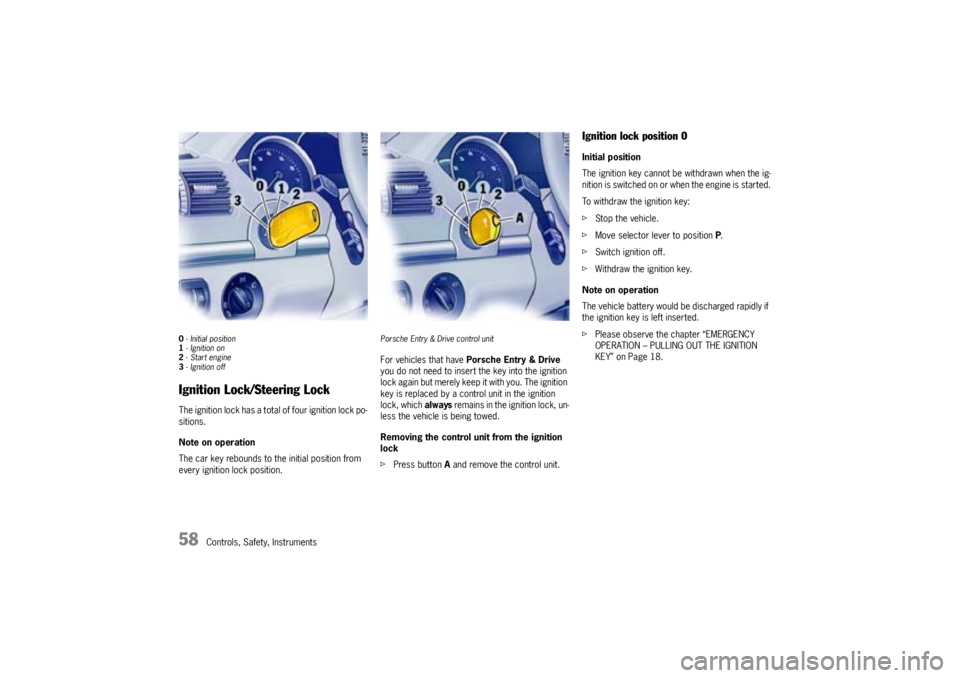
0- Initial position
1- Ignition on
2-Start engine
3- Ignition offIgnition Lock/Steering LockThe ignition lock has a total of four ignition lock po-
sitions.
Note on operation
The car key rebounds to the initial position from
every ignition lock position.
Porsche Entry & Drive control unitFor vehicles that have Porsche Entry & Drive
you do not need to insert the key into the ignition
lock again but merely keep it with you. The ignition
key is replaced by a control unit in the ignition
lock, which always remains in the ignition lock, un-
less the vehicle is being towed.
Removing the control unit from the ignition
lock
fPress button A and remove the control unit.
Ignition lock position 0Initial position
The ignition key cannot be withdrawn when the ig-
nition is switched on or when the engine is started.
To withdraw the ignition key:
fStop the vehicle.
fMove selector lever to position P.
fSwitch ignition off.
fWithdraw the ignition key.
Note on operation
The vehicle battery would be discharged rapidly if
the ignition key is left inserted.
fPlease observe the chapter “EMERGENCY
OPERATION – PULLING OUT THE IGNITION
KEY” on Page 18.