ECU PORSCHE PANAMERA 2009 1.G Information Manual
[x] Cancel search | Manufacturer: PORSCHE, Model Year: 2009, Model line: PANAMERA, Model: PORSCHE PANAMERA 2009 1.GPages: 343, PDF Size: 7.96 MB
Page 120 of 343
118
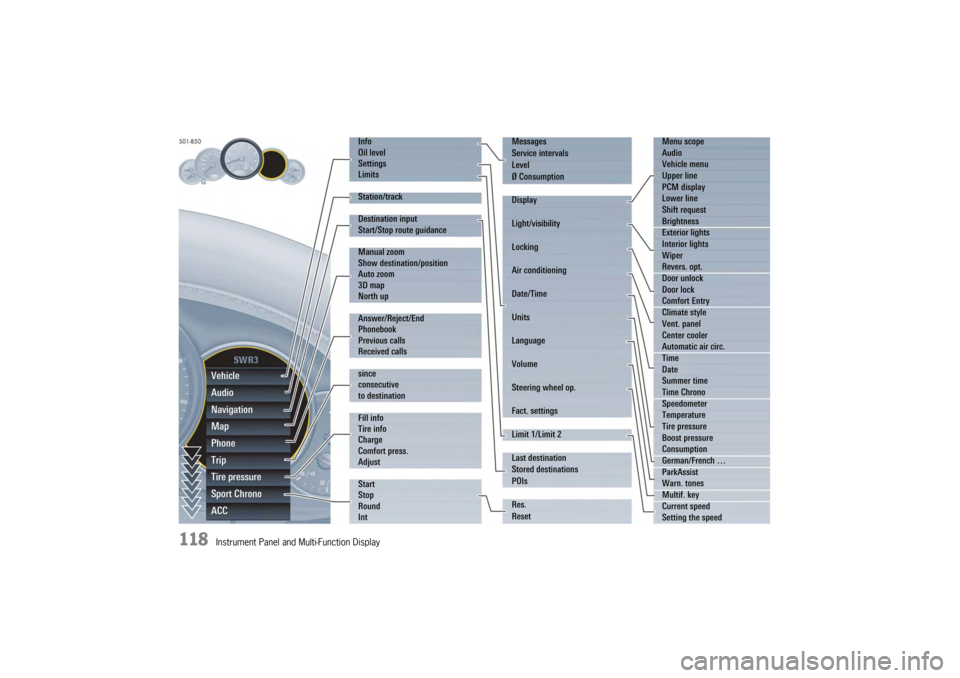
Instrument Panel and Multi-Function DisplayVehicle
Audio
Navigation
Map
Phone
Trip
Tire pressure
Sport Chrono
ACC
Info
Oil level
Settings
Limits
Station/track
Destination input
Start/Stop route guidance
Manual zoom
Show destination/position
Auto zoom
3D map
North up
Answer/Reject/End
Phonebook
Previous calls
Received calls
since
consecutive
to destination
Fill info
Tire info
Charge
Comfort press.
Adjust
Start
Stop
Round
IntMessages
Service intervals
Level
Ø Consumption
Display
Light/visibility
Locking
Air conditioning
Date/Time
Units
Language
Volume
Steering wheel op.
Fact. settings
Limit 1/Limit 2
Last destination
Stored destinations
POIs
Res.
Reset
Menu scope
Audio
Vehicle menu
Upper line
PCM display
Lower line
Shift request
Brightness
Exterior lights
Interior lights
Wiper
Revers. opt.
Door unlock
Door lock
Comfort Entry
Climate style
Vent. panel
Center cooler
Automatic air circ.
Time
Date
Summer time
Time Chrono
Speedometer
Temperature
Tire pressure
Boost pressure
Consumption
German/French …
ParkAssist
Warn. tones
Multif. key
Current speed
Setting the speed
Page 122 of 343
120
Instrument Panel and Multi-Function Display
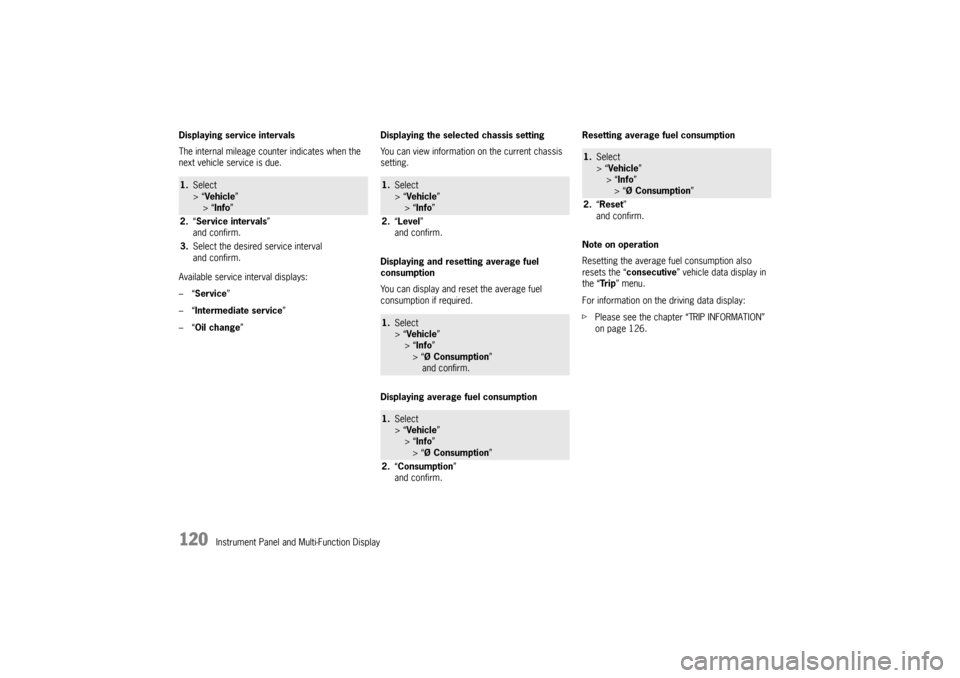
Displaying service intervals
The internal mileage count
er indicates when the
next vehicle service is due.
Available service interval displays:
–“ Service ”
–“ Intermediate service ”
–“ Oil change ” Displaying the selected chassis setting
You can view information
on the current chassis
setting.
Displaying and resetting average fuel
consumption
You can display and reset the average fuel
consumption if required.
Displaying average fuel consumption Resetting average fuel consumption
Note on operation
Resetting the average fuel consumption also
resets the “
consecutive ” vehicle data display in
the “Tr i p ” menu.
For information on the driving data display:
f Please see the chapter “TRIP INFORMATION”
on page 126.
1.Select
> “Vehicle ”
> “ Info ”
2. “Service intervals”
and confirm.
3. Select the desired service interval
and confirm.
1.Select
> “Vehicle ”
> “ Info ”
2. “Level ”
and confirm.1. Select
> “Vehicle ”
> “ Info ”
> “Ø Consumption ”
and confirm.1. Select
> “Vehicle ”
> “ Info ”
> “Ø Consumption ”
2. “Consumption”
and confirm.
1. Select
> “Vehicle ”
> “Info ”
> “Ø Consumption ”
2. “Reset ”
and confirm.
Page 128 of 343
126
Instrument Panel and Multi-Function Display
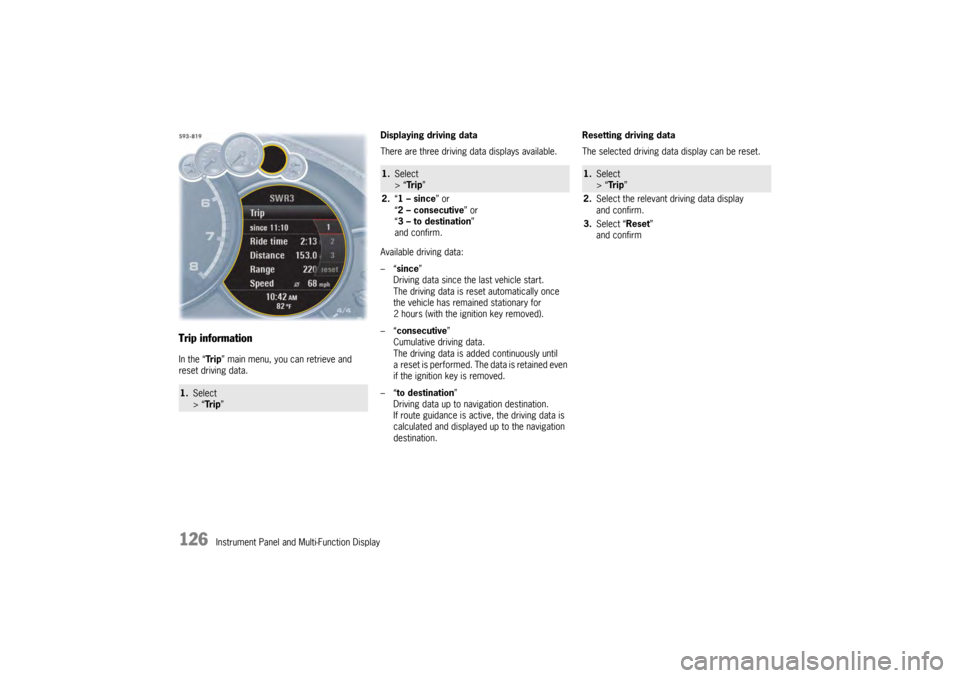
Trip informationIn the “Tr i p” main menu, you can retrieve and
reset driving data. Displaying driving data
There are three driving data displays available.
Available driving data:
–“
since ”
Driving data since the last vehicle start.
The driving data is reset automatically once
the vehicle has remained stationary for
2 hours (with the ignition key removed).
–“ consecutive ”
Cumulative driving data.
The driving data is added continuously until
a reset is performed. The data is retained even
if the ignition key is removed.
–“ to destination ”
Driving data up to navigation destination.
If route guidance is active, the driving data is
calculated and displayed up to the navigation
destination. Resetting driving data
The selected driving data display can be reset.1.
Select
> “Tr i p ”
1.Select
> “Tr i p ”
2. “1 – since ” or
“ 2 – consecutive ” or
“ 3 – to destination ”
and confirm.
1. Select
> “Tr i p ”
2. Select the relevant driving data display
and confirm.
3. Select “Reset ”
and confirm
Page 159 of 343
Instrument Panel and Multi-Function Display
157
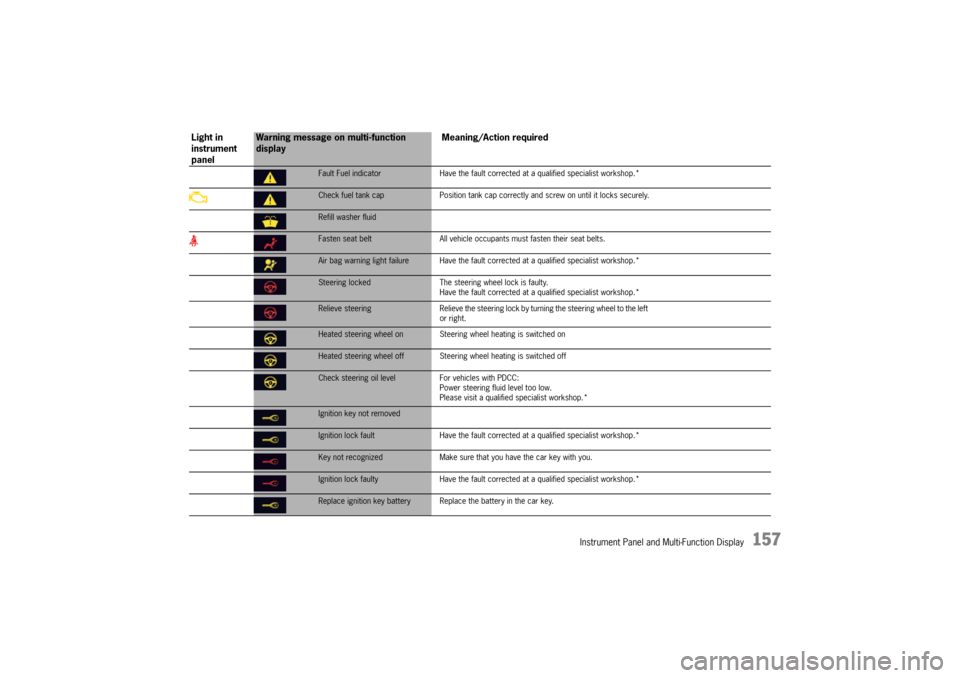
Fault Fuel indicatorHave the fault corrected at a qualified specialist workshop.*Check fuel tank cap Position tank cap correctly and screw on until it locks securely.Refill washer fluidFasten seat belt All vehicle occupants must fasten their seat belts.Air bag warning light failure Have the fault co rrected at a qualified specialist workshop.*Steering locked The steering wheel lock is faulty.
Have the fault corrected at a q ualified specialist workshop.*Relieve steering Relieve the steering lock by turning the steering wheel to the left
or right.Heated steering wheel on Steering wheel heating is switched onHeated steering wheel off Steering wheel heating is switched offCheck steering oil level For vehicles with PDCC:
Power steering fluid level too low.
Please visit a qualified specialist workshop.*Ignition key not removedIgnition lock fault Have the fault corrected at a qualified specialist workshop.*Key not recognized Make sure that you have the car key with you.Ignition lock faulty Have the fault corrected at a qua lified specialist workshop.*Replace ignition key battery Repla ce the battery in the car key.
Light in
instrument
panel
Warning message on multi-function
display Meaning/Action required
Page 173 of 343
Driving and Driving Safety
171
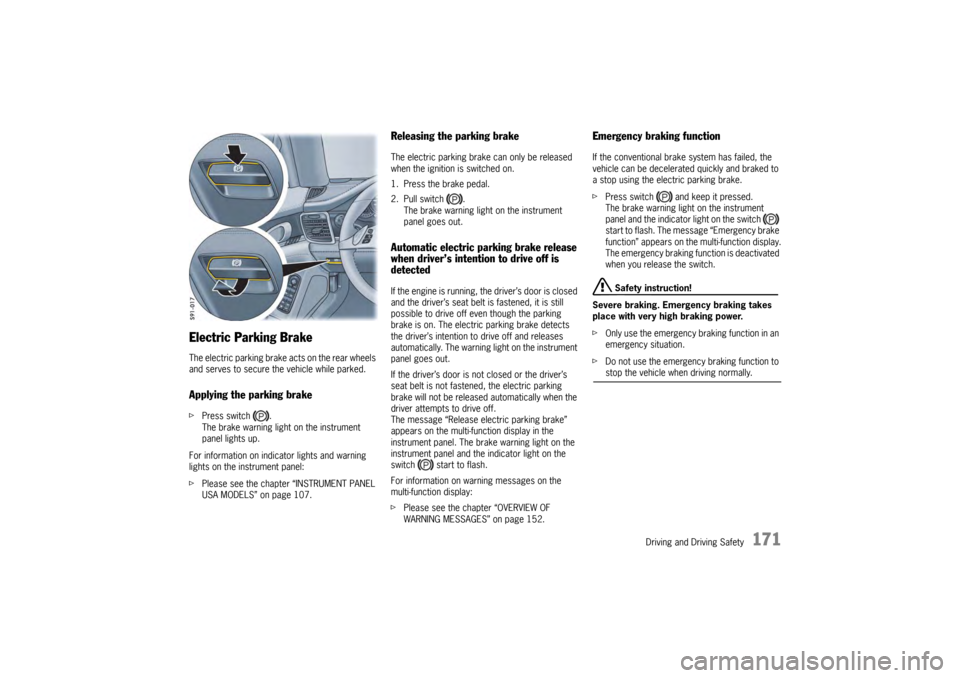
Electric Parking BrakeThe electric parking brake acts on the rear wheels
and serves to secure the vehicle while parked.Applying the parking brakefPress switch .
The brake warning light on the instrument
panel lights up.
For information on indi cator lights and warning
lights on the instrument panel:
f Please see the chapter “INSTRUMENT PANEL
USA MODELS” on page 107.
Releasing the parking brakeThe electric parking brake can only be released
when the ignition is switched on.
1. Press the brake pedal.
2. Pull switch .
The brake warning light on the instrument
panel goes out.Automatic electric parking brake release
when driver’s intention to drive off is
detectedIf the engine is running, the driver’s door is closed
and the driver’s seat belt is fastened, it is still
possible to drive off even though the parking
brake is on. The electric parking brake detects
the driver’s intention to drive off and releases
automatically. The warning light on the instrument
panel goes out.
If the driver’s door is not closed or the driver’s
seat belt is not fastened, the electric parking
brake will not be released automatically when the
driver attempts to drive off.
The message “Release electric parking brake”
appears on the multi-function display in the
instrument panel. The brake warning light on the
instrument panel and the indicator light on the
switch start to flash.
For information on warning messages on the
multi-function display:
fPlease see the chapter “OVERVIEW OF
WARNING MESSAGES” on page 152.
Emergency braking functionIf the conventional brak e system has failed, the
vehicle can be decelerated quickly and braked to
a stop using the electric parking brake.
f Press switch and keep it pressed.
The brake warning light on the instrument
panel and the indicator light on the switch
start to flash. The messa ge “Emergency brake
function” appears on the multi-function display.
The emergency braking function is deactivated
when you release the switch.
Safety instruction!
Severe braking. Emergency braking takes
place with very high braking power.
f Only use the emergency braking function in an
emergency situation.
f Do not use the emergency braking function to stop the vehicle when driving normally.
Page 175 of 343
Driving and Driving Safety
173
Brake system warning light
You can check the functionality of the brake
system warning light by switching the ignition to
the “On” position (position 1) and verifying that the
warning light illuminates.
The warning light in the instrument panel lights up.
A message will be displayed on the multi-function
display of the instrument panel if the brake fluid
level is too low, or (if the brake pedal travel has
increased) one of the two brake circuits has failed.
A greater braking pressure will be required,
stopping distances will be longer and the braking
behavior will change, particularly in curves.
With correctly adjusted brakes and a correctly
working brake system, the pedal travel to the
point of brake application should be 1-3/16 in. to
1-9/16 in. (30 to 40 mm). Whenever the brake
pedal travel exceeds this value, have the brake
system checked.
Brake pedal
Warning!
Risk of an accident, resulting in serious
personal injury or death.
Any obstruction of the brake pedal could
increase the stopping distance.
f Always check the movement of the brake pedal
before driving and make sure that it is not
obstructed by a floor mat or any other object.
f Secure the floor mat to prevent it from sliding
into positions that could interfere with the safe
operation of your vehicle.
Your Porsche dealer will be glad to offer you
floor mats of the correct size including a securing possibility.
Note
In case one of the two brake circuits fails,
increased pedal travel is required to bring your
vehicle to a full stop.
Warning!
To avoid overheating and premature wear of
the brakes:
f Before descending a steep grade, reduce
speed and shift the tran smission into a lower
gear to control speed.
f Do not “ride the brakes” by resting your foot on
the pedal when not intending to apply brake
pressure.
f Do not hold the pedal down too long or too
often. This could cause the brakes to overheat and not function properly.
Brake warning light USA
Brake warning light Canada
Page 200 of 343
198
Driving and Driving Safety
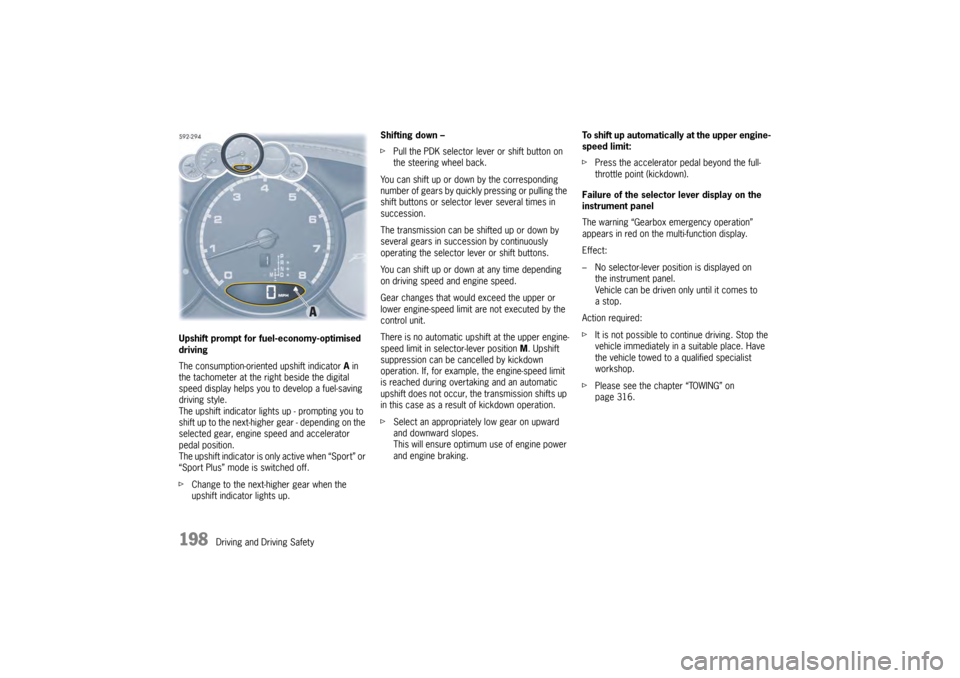
Upshift prompt for fuel-economy-optimised
driving
The consumption-oriente
d upshift indicator A in
the tachometer at the ri ght beside the digital
speed display helps you to develop a fuel-saving
driving style.
The upshift indicator lights up - prompting you to
shift up to the next-higher gear - depending on the
selected gear, engine speed and accelerator
pedal position.
The upshift indicator is only active when “Sport” or
“Sport Plus” mode is switched off.
f Change to the next-higher gear when the
upshift indicator lights up. Shifting down –
f
Pull the PDK selector lever or shift button on
the steering wheel back.
You can shift up or down by the corresponding
number of gears by quickly pressing or pulling the
shift buttons or selector lever several times in
succession.
The transmission can be shifted up or down by
several gears in succession by continuously
operating the selector lever or shift buttons.
You can shift up or down at any time depending
on driving speed and engine speed.
Gear changes that would exceed the upper or
lower engine-speed limit are not executed by the
control unit.
There is no automatic upshift at the upper engine-
speed limit in selector-lever position M. Upshift
suppression can be cancelled by kickdown
operation. If, for example, the engine-speed limit
is reached during overtaking and an automatic
upshift does not occur, the transmission shifts up
in this case as a result of kickdown operation.
f Select an appropriately low gear on upward
and downward slopes.
This will ensure optimum use of engine power
and engine braking. To shift up automatically
at the upper engine-
speed limit:
f Press the accelerator pedal beyond the full-
throttle point (kickdown).
Failure of the selector lever display on the
instrument panel
The warning “Gearbox emergency operation”
appears in red on the multi-function display.
Effect:
– No selector-lever position is displayed on the instrument panel.
Vehicle can be driven only until it comes to
astop.
Action required:
f It is not possible to continue driving. Stop the
vehicle immediately in a suitable place. Have
the vehicle towed to a qualified specialist
workshop.
f Please see the chapter “TOWING” on
page 316.
Page 202 of 343
200
Driving and Driving Safety
PDK selector lever emergency releaseIn the event of an electronics failure, the PDK
selector lever can only be moved from selector-
lever position P if an emergency release operation
has already been performed.
Note
If a selector lever emergency release was
performed, the vehicle must not be towed.
f Please see the chapter “TOWING” on
page 316.
f Secure the vehicle to prevent it from
rolling away.
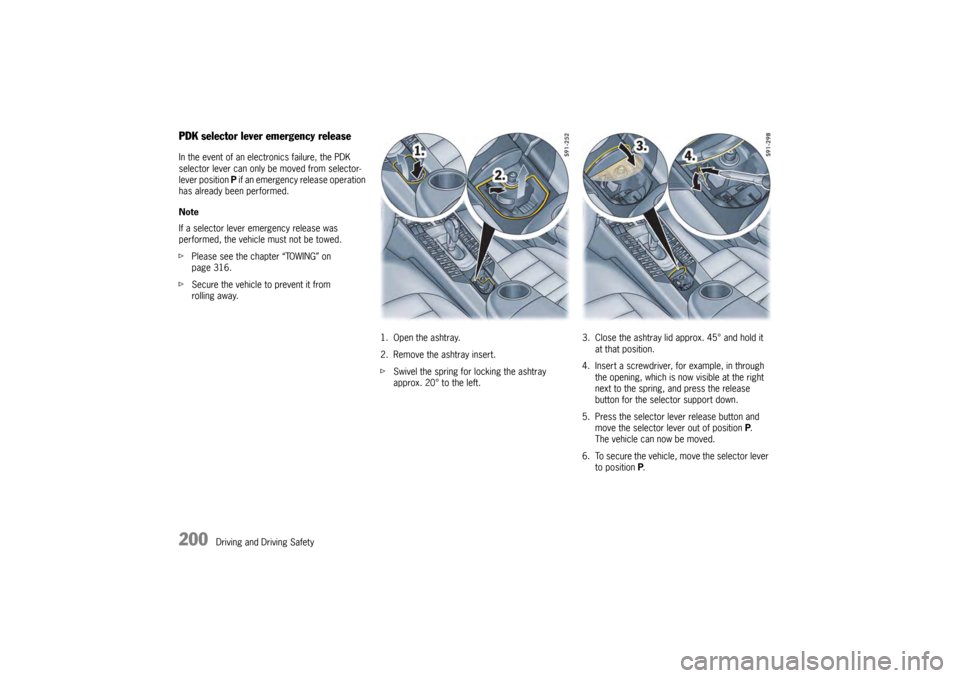
1. Open the ashtray.
2. Remove the ashtray insert.
fSwivel the spring for locking the ashtray
approx. 20° to the left. 3. Close the ashtray lid a
pprox. 45° and hold it
at that position.
4. Insert a screwdriver, for example, in through the opening, which is now visible at the right
next to the spring, and press the release
button for the selector support down.
5. Press the selector lever release button and move the selector lever out of position P.
The vehicle can now be moved.
6. To secure the vehicle, move the selector lever
to position P.
Page 220 of 343
218
Storage, Luggage Compartment and Roof Transport System
Storage
Warning!
Risk of injury during braking, rapid direction
changes or in an accident.
f Do not transport items of luggage or objects
unsecured in the passenger compartment.
f Do not transport any heavy objects in open
storage trays.
f Always keep the covers of the storage trays
closed while driving.
f Always protect the passenger compartment with a luggage compartment cover.
Note on operation
An unsecured or incorrectly positioned load can
slip out of place or endanger the vehicle
occupants during braking, direction changes or
in accidents.
For information on stowing loads and luggage:
f Please see the chapter “STOWING LOADS” on
page 228.
Storage optionsThere are various storage options available,
depending on the vehicle equipment:
– Glove box with pen and paper holder.
– In the front and rear armrests.
– In the door panels.
– In the center console, front and rear.
– On the back of the front seat backrests.
– Clothes hooks on the rear grab handles.
– Under the luggage compartment floor.
– In the front and rear cupholders.
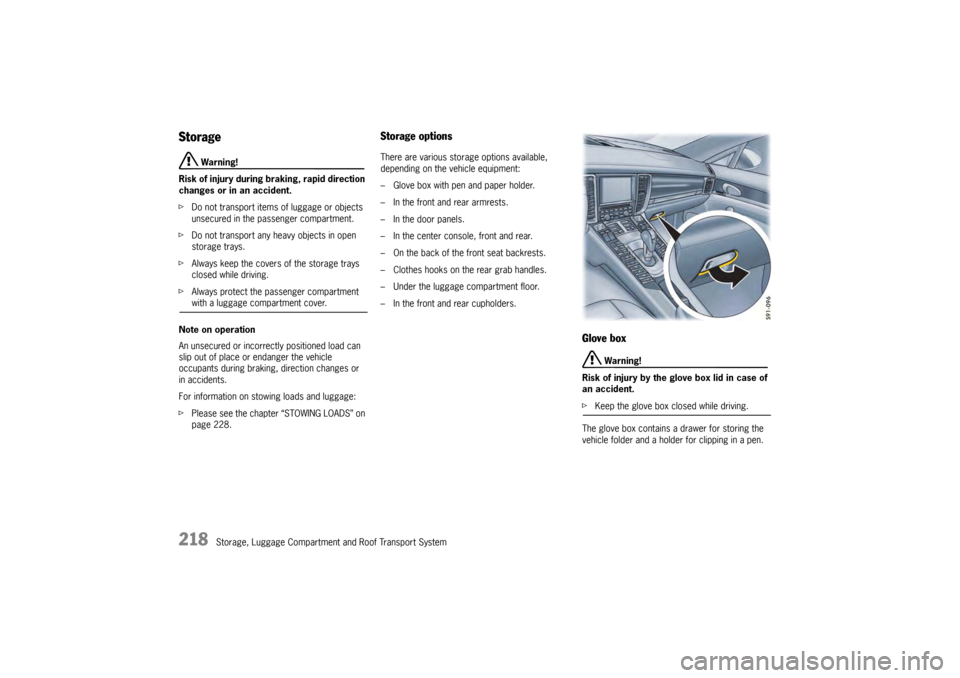
Glove box
Warning!
Risk of injury by the glove box lid in case of
an accident.
f Keep the glove box closed while driving.
The glove box contains a drawer for storing the
vehicle folder and a holder for clipping in a pen.
Page 221 of 343
Storage, Luggage Compartment and Roof Transport System
219
Opening
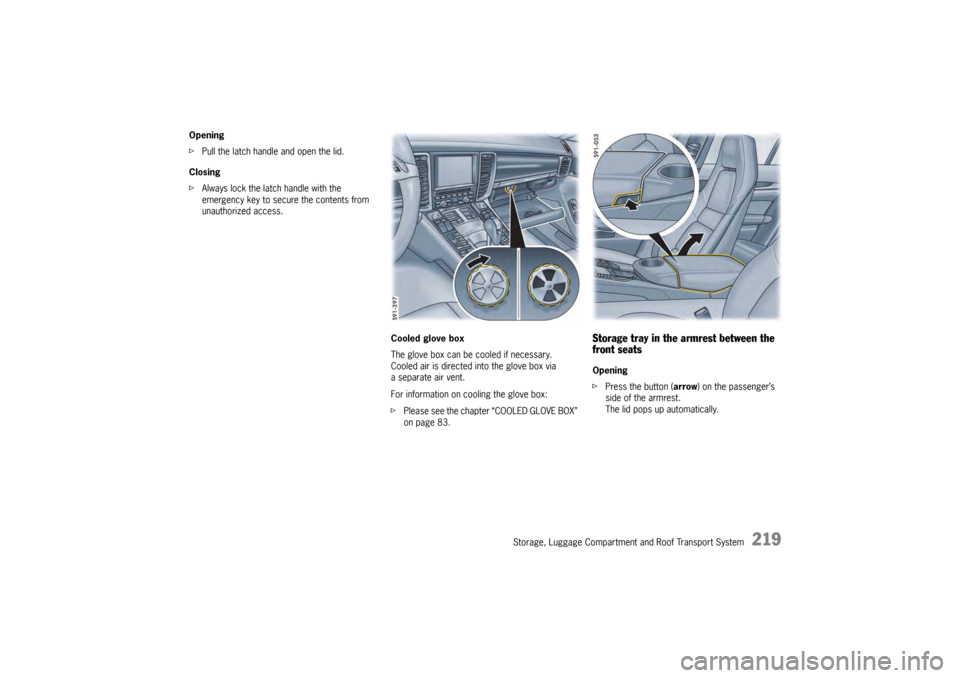
fPull the latch handle and open the lid.
Closing
f Always lock the latch handle with the
emergency key to secure the contents from
unauthorized access.
Cooled glove box
The glove box can be cooled if necessary.
Cooled air is directed into the glove box via
a separate air vent.
For information on cooling the glove box:
fPlease see the chapter “COOLED GLOVE BOX”
on page 83.
Storage tray in the armrest between the
front seatsOpening
f Press the button ( arrow) on the passenger’s
side of the armrest.
The lid pops up automatically.