ignition PORSCHE PANAMERA 2009 1.G Information Manual
[x] Cancel search | Manufacturer: PORSCHE, Model Year: 2009, Model line: PANAMERA, Model: PORSCHE PANAMERA 2009 1.GPages: 343, PDF Size: 7.96 MB
Page 64 of 343
62
Seats, Mirrors and Steering Wheel
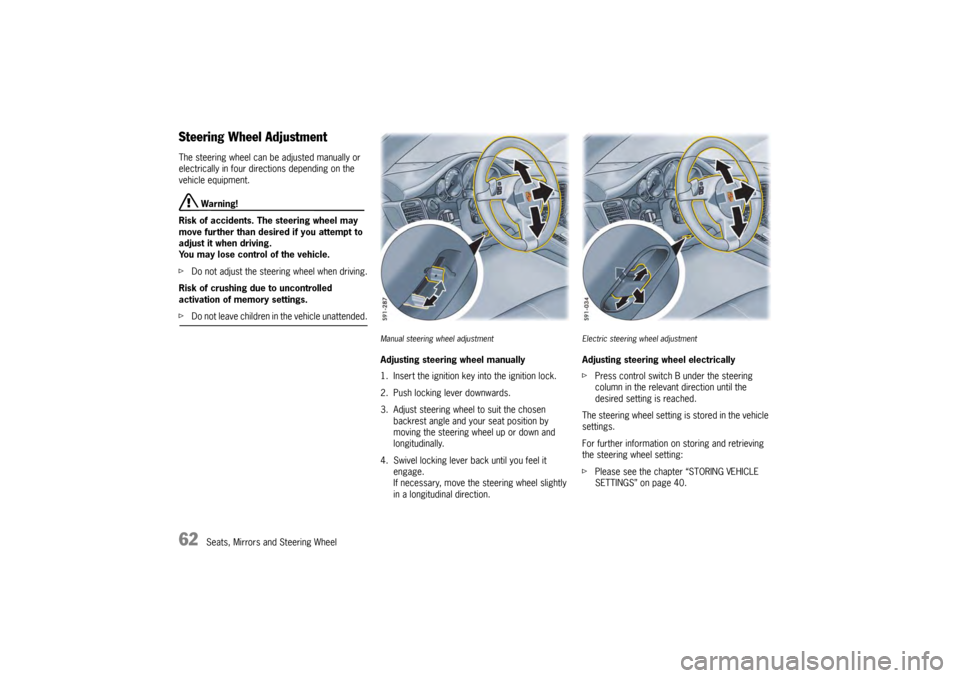
Steering Wheel AdjustmentThe steering wheel can be adjusted manually or
electrically in four directions depending on the
vehicle equipment.
Warning!
Risk of accidents. The steering wheel may
move further than desired if you attempt to
adjust it when driving.
You may lose control of the vehicle.
f Do not adjust the steeri ng wheel when driving.
Risk of crushing due to uncontrolled
activation of memory settings.
f Do not leave children in the vehicle unattended.
Manual steering wheel adjustmentAdjusting steering wheel manually
1. Insert the ignition key into the ignition lock.
2. Push locking lever downwards.
3. Adjust steering wheel to suit the chosen
backrest angle and your seat position by
moving the steering wheel up or down and
longitudinally.
4. Swivel locking lever back until you feel it engage.
If necessary, move the steering wheel slightly
in a longitudinal direction.
Electric steering wheel adjustmentAdjusting steering wheel electrically
fPress control switch B under the steering
column in the relevant direction until the
desired setting is reached.
The steering wheel setting is stored in the vehicle
settings.
For further information on storing and retrieving
the steering wheel setting:
f Please see the chapter “STORING VEHICLE
SETTINGS” on page 40.
Page 65 of 343
Seats, Mirrors and Steering Wheel
63
Multi-Function Steering Wheel
Warning!
There is a risk of accident if you set or
operate the multi-funct ion display, radio,
navigation system, telephone or other
equipment while driving.
Operating these devices while driving could
distract you from traffic and cause you to
lose control of the vehicle.
f Operate the equipment while driving only if the
traffic situation allows you to do so safely.
f Carry out any complicated operating or setting procedures only when the vehicle is stationary.
Depending on the equipment in your vehicle, you
can use the function keys of the multi-function
steering wheel to operate the following Porsche
communication systems:
– Telephone
–PCM
– Multi-function display in the instrument panel
Readiness for operation of the
multi-function steering wheel– With ignition switched on
f Please observe the operating instructions
supplied for the Porsche communication
systems before operating the function keys.
Note on operation
The Porsche communication systems cannot be
switched on and off using the multi-function
steering wheel.
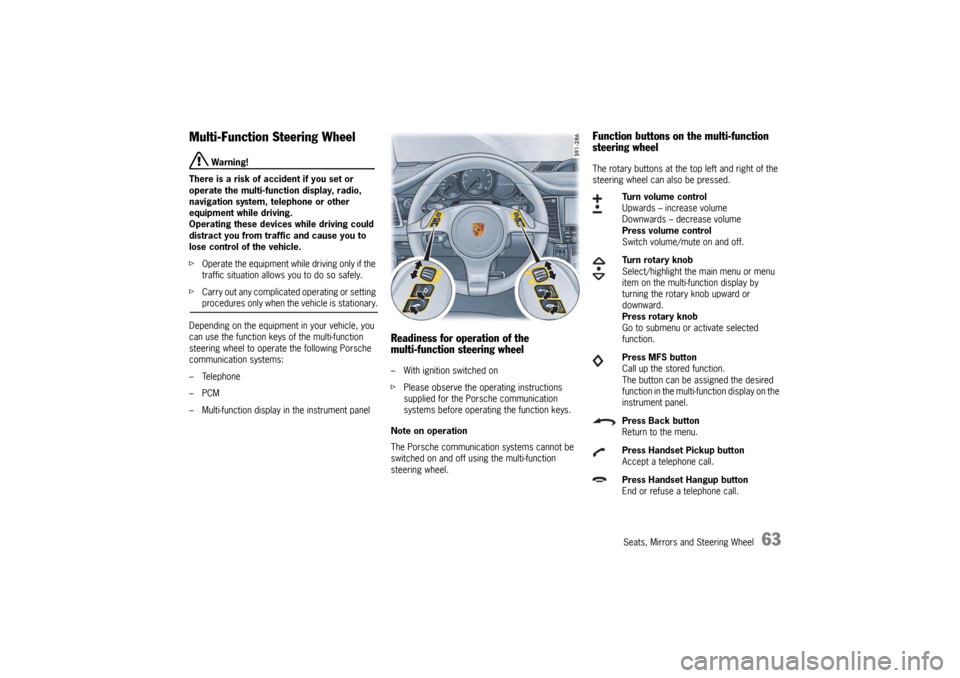
Function buttons on the multi-function
steering wheelThe rotary buttons at the top left and right of the
steering wheel can also be pressed.
Turn volume control
Upwards – increase volume
Downwards – decrease volume
Press volume control
Switch volume/mute on and off.
Turn rotary knob
Select/highlight the main menu or menu
item on the multi-function display by
turning the rotary knob upward or
downward.
Press rotary knob
Go to submenu or activate selected
function.
Press MFS button
Call up the stored function.
The button can be assigned the desired
function in the multi-fu nction display on the
instrument panel.
Press Back button
Return to the menu.
Press Handset Pickup button
Accept a telephone call.
Press Handset Hangup button
End or refuse a telephone call.
Page 68 of 343
66
Seats, Mirrors and Steering Wheel
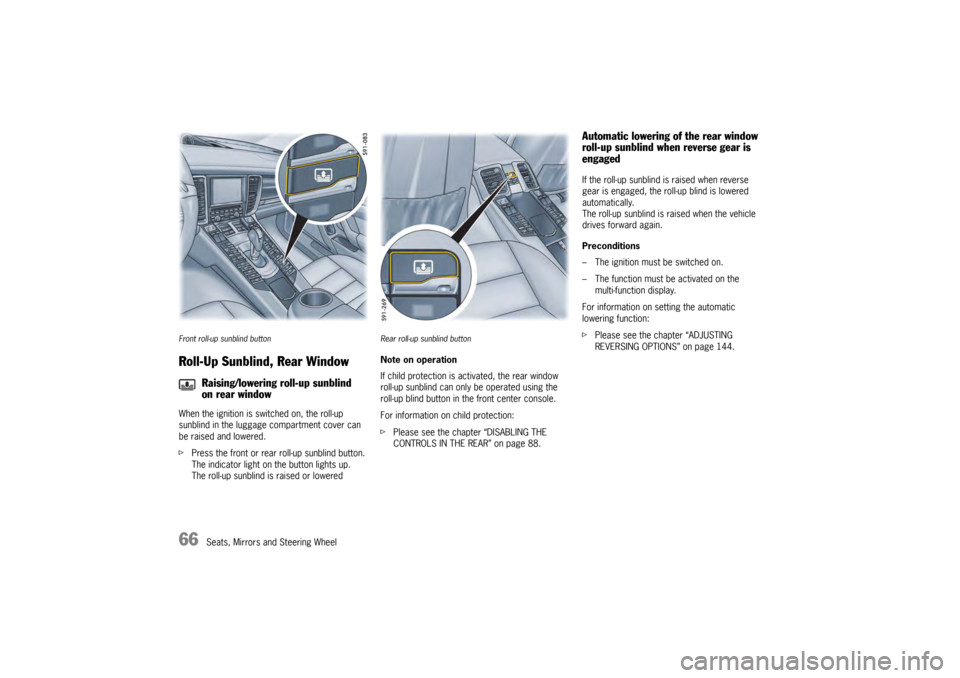
Front roll-up sunblind buttonRoll-Up Sunblind, Rear WindowWhen the ignition is switched on, the roll-up
sunblind in the luggage compartment cover can
be raised and lowered.
fPress the front or rear roll-up sunblind button.
The indicator light on the button lights up.
The roll-up sunblind is raised or lowered
Rear roll-up sunblind buttonNote on operation
If child protection is ac tivated, the rear window
roll-up sunblind can only be operated using the
roll-up blind button in the front center console.
For information on child protection:
f Please see the chapter “DISABLING THE
CONTROLS IN THE REAR” on page 88.
Automatic lowering of the rear window
roll-up sunblind when reverse gear is
engagedIf the roll-up sunblind is raised when reverse
gear is engaged, the roll-up blind is lowered
automatically.
The roll-up sunblind is raised when the vehicle
drives forward again.
Preconditions
– The ignition must be switched on.
– The function must be activated on the
multi-function display.
For information on setting the automatic
lowering function:
f Please see the chapter “ADJUSTING
REVERSING OPTIONS” on page 144.
Raising/lowering roll-up sunblind
on rear window
Page 73 of 343
Air Conditioning
71
General FunctionsNote on operation
Additional settings relating to the climate type and
extended ventilation panel can be adjusted in the
multi-function display on the instrument panel:
f Please see the chapter “AIR-CONDITIONING
SETTINGS ON THE MULTI-FUNCTION
DISPLAY” on page 83.
f Please see the chapter “SETTING AIR
CONDITIONING” on page 146.
On vehicles with comfort memory, all air-
conditioning settings are stored on the relevant
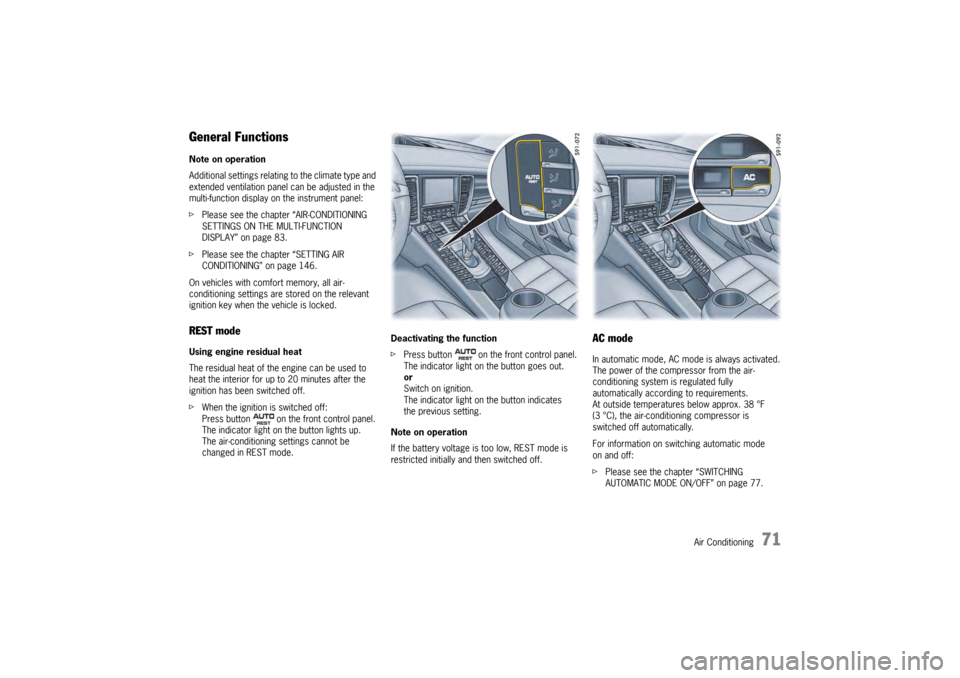
ignition key when the vehicle is locked.REST modeUsing engine residual heat
The residual heat of the engine can be used to
heat the interior for up to 20 minutes after the
ignition has been switched off.
f When the ignition is switched off:
Press button on the front control panel.
The indicator light on the button lights up.
The air-conditioning settings cannot be
changed in REST mode. Deactivating the function
f
Press button on the front control panel.
The indicator light on the button goes out.
or
Switch on ignition.
The indicator light on the button indicates
the previous setting.
Note on operation
If the battery voltage is too low, REST mode is
restricted initially and then switched off.
AC modeIn automatic mode, AC mode is always activated.
The power of the compressor from the air-
conditioning system is regulated fully
automatically according to requirements.
At outside temperatures below approx. 38 °F
(3 °C), the air-conditioning compressor is
switched off automatically.
For information on switching automatic mode
on and off:
f Please see the chapter “SWITCHING
AUTOMATIC MODE ON/OFF” on page 77.
Page 86 of 343
84
Air Conditioning
Extended ventilation panelFor information on the extended ventilation panel:
fPlease see the chapter “EXTENDED
VENTILATION PANEL” on page 81.
Automatic air-recirculation
For information on automatic air-recirculation
mode:
f Please see the chapter “AIR-RECIRCULATION
MODE” on page 74.
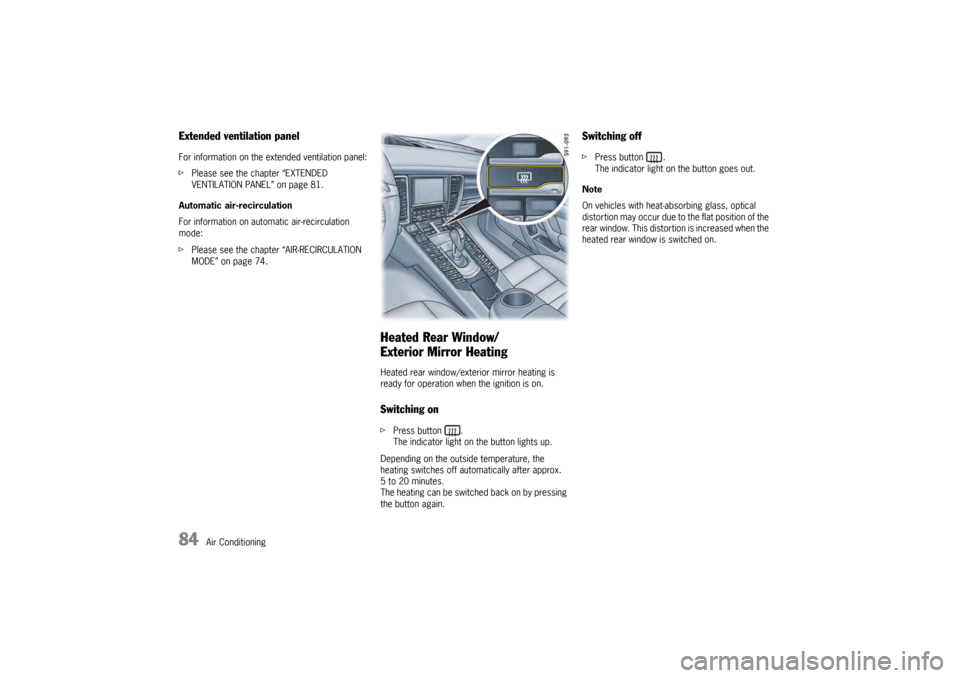
Heated Rear Window/
Exterior Mirror HeatingHeated rear window/exterior mirror heating is
ready for operation when the ignition is on.Switching onfPress button .
The indicator light on the button lights up.
Depending on the outside temperature, the
heating switches off automatically after approx.
5 to 20 minutes.
The heating can be switched back on by pressing
the button again.
Switching offf Press button .
The indicator light on the button goes out.
Note
On vehicles with heat-absorbing glass, optical
distortion may occur due to the flat position of the
rear window. This distortion is increased when the
heated rear window is switched on.
Page 88 of 343
86
Windows and Slide/Tilt Roof
Power Windows
Warning!
Risk of injury when closing the windows,
especially when windows close
automatically.
f Take care to ensure that nobody can be injured
when the windows close.
f Always remove ignition key when leaving the
vehicle or switch ignition off on vehicles with
Porsche Entry & Drive. Always take the ignition
key with you when leaving the vehicle.
Uninformed persons could injure themselves
by operating the power windows.
f In case of danger, immediately release the
button on the ignition key or the button in
the door handle on vehicles with Porsche
Entry & Drive.
f Do not leave children in the vehicle unattended.
Risk of an accident.
f Do not put anything on or near the windows that may interfere with the driver’s vision.
Readiness for operation of power windows– With ignition switched on.
– A maximum of 10 minutes after the ignition is
switched off, but only until driver’s or
passenger door is first opened.
– The one-touch operation for closing the door windows is available only when the ignition is
switched on.
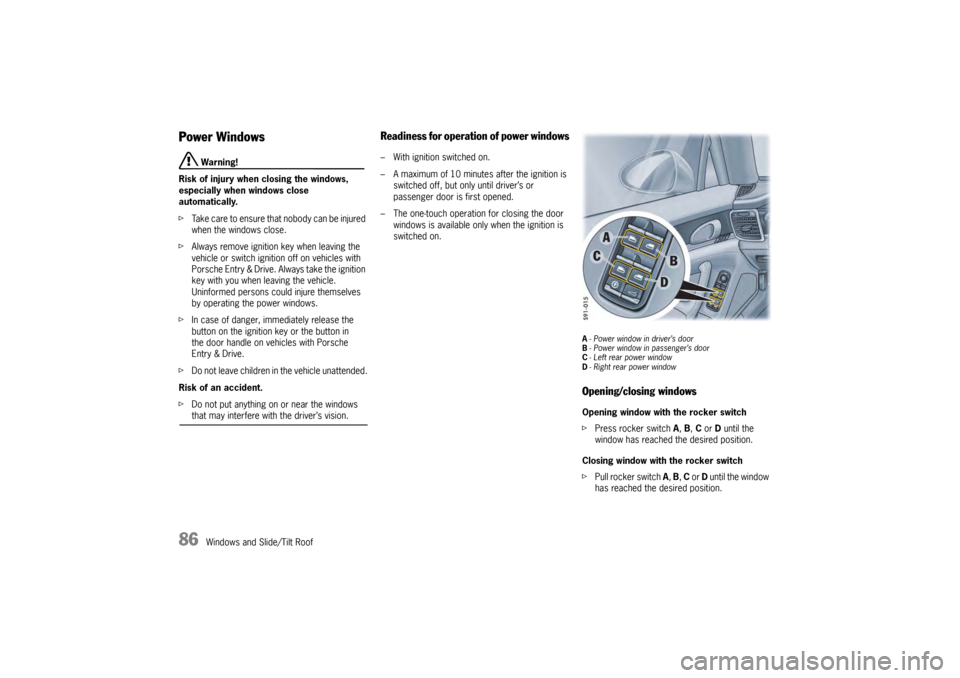
A- Power window in driver’s door
B - Power window in passenger’s door
C -Left rear power window
D - Right rear power windowOpening/closing windowsOpening window with the rocker switch
f Press rocker switch A, B, C or D until the
window has reached the desired position.
Closing window with the rocker switch
f Pull rocker switch A, B, C or D until the window
has reached the desired position.
Page 90 of 343
88
Windows and Slide/Tilt Roof
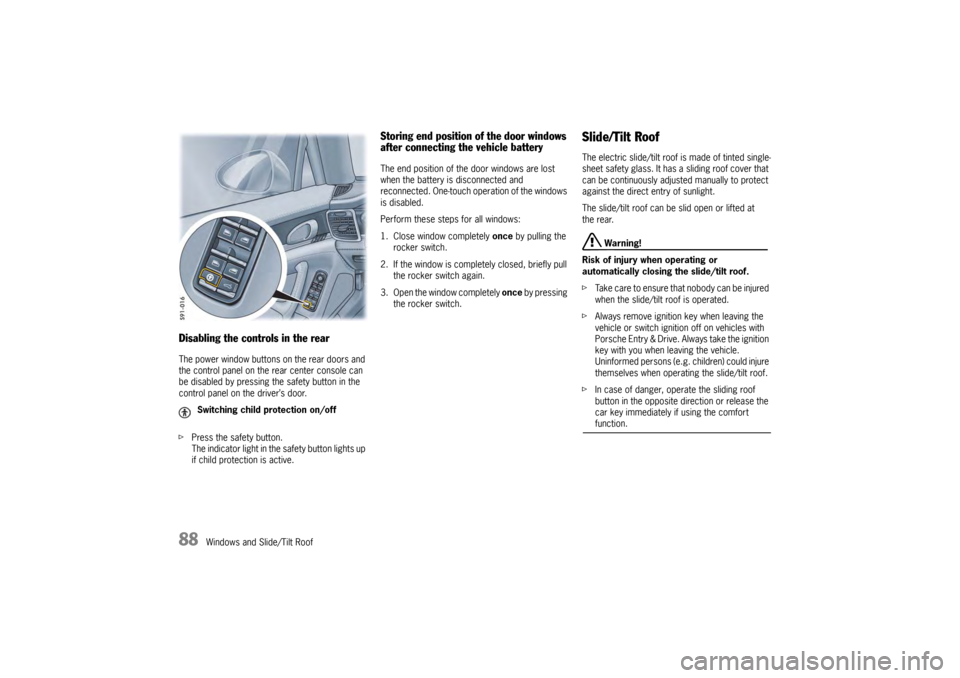
Disabling the controls in the rearThe power window buttons on the rear doors and
the control panel on the rear center console can
be disabled by pressing the safety button in the
control panel on the driver’s door.
fPress the safety button.
The indicator light in the safety button lights up
if child protection is active.
Storing end position of the door windows
after connecting the vehicle batteryThe end position of the door windows are lost
when the battery is disconnected and
reconnected. One-touch operation of the windows
is disabled.
Perform these steps for all windows:
1. Close window completely once by pulling the
rocker switch.
2. If the window is comple tely closed, briefly pull
the rocker switch again.
3. Open the window completely once by pressing
the rocker switch.
Slide/Tilt RoofThe electric slide/tilt roof is made of tinted single-
sheet safety glass. It has a sliding roof cover that
can be continuously adjusted manually to protect
against the direct entry of sunlight.
The slide/tilt roof can be slid open or lifted at
the rear.
Warning!
Risk of injury when operating or
automatically closing the slide/tilt roof.
f Take care to ensure that nobody can be injured
when the slide/tilt roof is operated.
f Always remove ignition key when leaving the
vehicle or switch ignition off on vehicles with
Porsche Entry & Drive. Always take the ignition
key with you when leaving the vehicle.
Uninformed persons (e.g. children) could injure
themselves when operating the slide/tilt roof.
f In case of danger, operate the sliding roof
button in the opposite di rection or release the
car key immediately if using the comfort function.
Switching child protection on/off
Page 91 of 343
Windows and Slide/Tilt Roof
89
Operational readiness of the slide/tilt roof– With ignition switched on.
– A maximum of 10 minutes after the ignition is switched off, but only until driver’s or
passenger door is first opened.
Note on operation
The slide/tilt roof has a force limiter. If obstructed
during the closing process, the slide/tilt roof
opens again immediately.
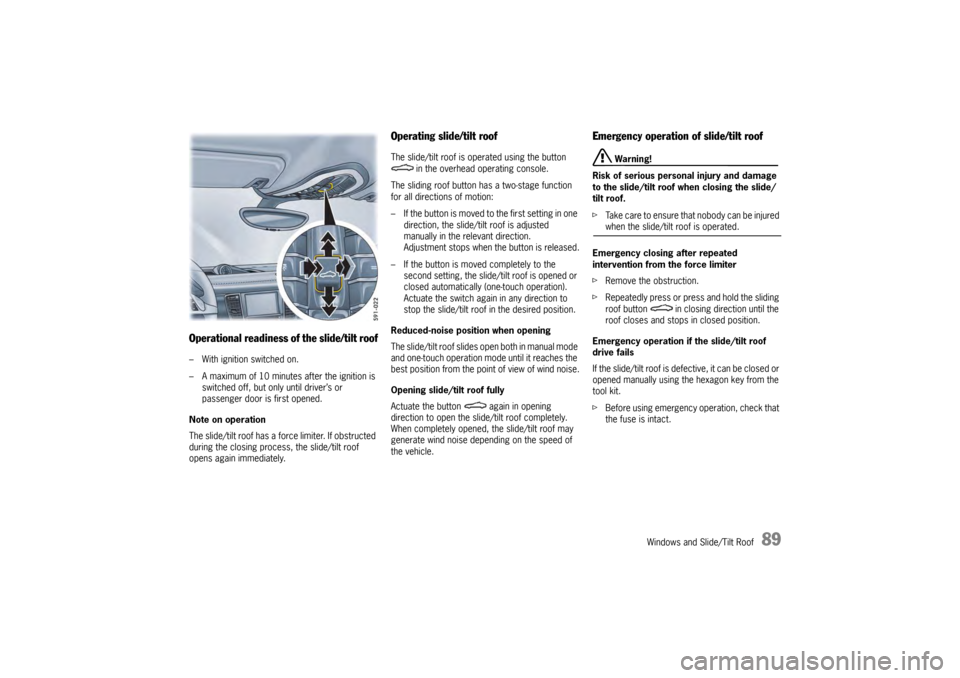
Operating slide/tilt roofThe slide/tilt roof is operated using the button in the overhead operating console.
The sliding roof button has a two-stage function
for all directions of motion:
– If the button is moved to the first setting in one
direction, the slide/tilt roof is adjusted
manually in the relevant direction.
Adjustment stops when the button is released.
– If the button is moved completely to the second setting, the slide/tilt roof is opened or
closed automatically (one-touch operation).
Actuate the switch again in any direction to
stop the slide/tilt roof in the desired position.
Reduced-noise position when opening
The slide/tilt roof slides open both in manual mode
and one-touch operation mode until it reaches the
best position from the poi nt of view of wind noise.
Opening slide/tilt roof fully
Actuate the button again in opening
direction to open the slide/tilt roof completely.
When completely opened, the slide/tilt roof may
generate wind noise depending on the speed of
the vehicle.
Emergency operation of slide/tilt roof
Warning!
Risk of serious personal injury and damage
to the slide/tilt roof when closing the slide/
tilt roof.
f Take care to ensure that nobody can be injured when the slide/tilt roof is operated.
Emergency closing after repeated
intervention from the force limiter
f Remove the obstruction.
f Repeatedly press or press and hold the sliding
roof button in clos ing direction until the
roof closes and stops in closed position.
Emergency operation if the slide/tilt roof
drive fails
If the slide/tilt roof is defective, it can be closed or
opened manually using th e hexagon key from the
tool kit.
f Before using emergency operation, check that
the fuse is intact.
Page 92 of 343
90
Windows and Slide/Tilt Roof
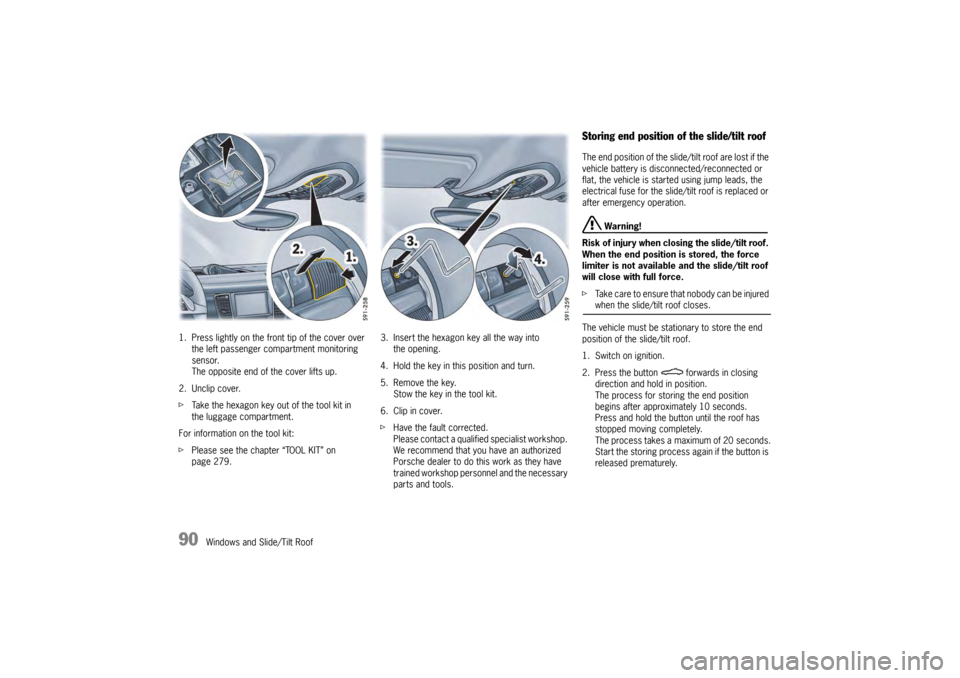
1. Press lightly on the front tip of the cover over
the left passenger compartment monitoring
sensor.
The opposite end of the cover lifts up.
2. Unclip cover.
f Take the hexagon key out of the tool kit in
the luggage compartment.
For information on the tool kit:
f Please see the chapter “TOOL KIT” on
page 279. 3. Insert the hexagon
key all the way into
the opening.
4. Hold the key in this position and turn.
5. Remove the key. Stow the key in the tool kit.
6. Clip in cover.
f Have the fault corrected.
Please contact a qualified specialist workshop.
We recommend that you have an authorized
Porsche dealer to do this work as they have
trained workshop personnel and the necessary
parts and tools.
Storing end position of the slide/tilt roofThe end position of the slide/ tilt roof are lost if the
vehicle battery is disconnected/reconnected or
flat, the vehicle is started using jump leads, the
electrical fuse for the slide/tilt roof is replaced or
after emergency operation.
Warning!
Risk of injury when closing the slide/tilt roof.
When the end position is stored, the force
limiter is not available and the slide/tilt roof
will close with full force.
f Take care to ensure that nobody can be injured when the slide/tilt roof closes.
The vehicle must be stat ionary to store the end
position of the slide/tilt roof.
1. Switch on ignition.
2. Press the button forwards in closing direction and hold in position.
The process for storing the end position
begins after approximately 10 seconds.
Press and hold the button until the roof has
stopped moving completely.
The process takes a maximum of 20 seconds.
Start the storing process again if the button is
released prematurely.
Page 94 of 343
92
Lights, Turn Signals and Windshield WipersNote on operation
If the ignition key is removed and the door is
opened while the lights are on, an audible signal
(gong) warns of possible battery discharge.
In some countries, differences are possible
due to legal requirements.
Automatic Driving Light Assistant/
Adaptive Light SystemThe automatic driving light assistant is a comfort
function. Your Porsche’s driving light (low beam) is
switched on and off automatically depending on
the ambient brightness.
The automatic driving light assistant also controls
the daytime driving lights, the Automatic Coming
Home lights and the dy
namic cornering light.
The automatic driving light assistant is activated
when the light switch is set to the position .
Despite possible support by the driving light
assistant, it is the responsibility of the driver to
switch on the driving ligh t using the conventional
light switch in accordance with the relevant
national regulations.
Activating the headlights using the driving light
assistant therefore does not absolve the driver
of responsibility for correct operation of the
driving light.
Warning!
Risk of accidents if yo u drive your vehicle
without lights.
f Always carefully monitor the automatic driving light control.
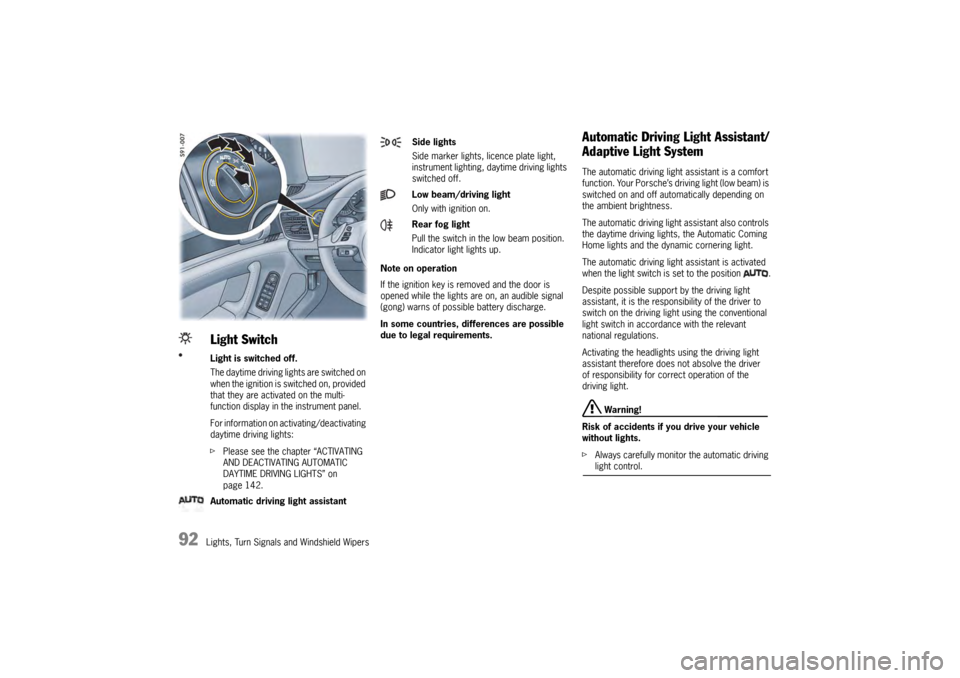
Light SwitchLight is switched off.
The daytime driving lights are switched on
when the ignition is switched on, provided
that they are activated on the multi-
function display in the instrument panel.
For information on activating/deactivating
daytime driving lights:
fPlease see the chapter “ACTIVATING
AND DEACTIVATING AUTOMATIC
DAYTIME DRIVING LIGHTS” on
page 142.
Automatic driving light assistant
Side lights
Side marker lights , licence plate light,
instrument lighting, daytime driving lights
switched off.
Low beam/driving light
Only with ignition on.
Rear fog light
Pull the switch in the low beam position.
Indicator light lights up.