warning PORSCHE PANAMERA 2009 1.G Information Manual
[x] Cancel search | Manufacturer: PORSCHE, Model Year: 2009, Model line: PANAMERA, Model: PORSCHE PANAMERA 2009 1.GPages: 343, PDF Size: 7.96 MB
Page 50 of 343

48
Seats, Mirrors and Steering Wheel Danger!
To provide optimal occupant protection, air
bags must inflate at very high speed. If you
are not wearing your safety belt or are too
close to the air bag when it is deployed,
inflating air bags can result in serious
personal injury or death.
f Make sure there are no people, animals or
objects between the driver or passenger and
the area into which the air bags inflate.
f Sit back as far from the dashboard or steering
wheel as is practical, while still maintaining full
vehicle control.
f Always hold the steering wheel by the outer
rim. Never rest your hands on the air bag
panel.
f Always fasten seat belts because triggering
of the air bag system depends on the force
and angle of impact.
f Do not transport heavy objects on or in front of
the passenger seat. These could impair the
function of the air bags, the seat belts, and
occupant sensing.
f Do not hang objects (e. g., jackets, coats,
coat hangers) over the backrest. f
Always keep the lid of the door storage
compartment closed. Objects must not
protrude out of the door storage
compartment.
f Do not add any additional coverings or stickers
to the steering wheel or in the area of the
passenger air bag, side air bags, knee air
bags, and head air bags. Doing so may
adversely affect the functioning of the air bag
system or cause harm to the occupants if the
air bag system should deploy.
f No objects should be placed over or near the
air bag on the instrument panel, because any
such objects could cause harm if the vehicle is
in a crash severe enough to cause the air bag
to inflate.
f Do not modify the seat coverings, since such
changes can block the seat-mounted side air
bag. Do not attach additional cushions,
protective coverings, or pillows to the
passenger's seat. Do not affix things to the
passenger's seat or cover it with other
materials. Do not cover the back of the
backrest. Do not make changes to the
passenger's seat, the cushion or foam, the
occupant sensor, and to the seat base frame.
f No changes must be made to the wiring or
components of the air bag system.
f Do not install any wiring for electrical
accessory equipment in the vicinity of the air
bag wiring harnesses. Doing so may disable the air bag system or cause inadvertent
inflation.
f If the warning light comes on, the air bag
system should be repaired immediately by
your authorized Porsche dealer.
f Always keep feet in the footwell while driving.
Do not put feet on the dashboard or the seat
area. Do not lean against the inside of the door
or outside the window while the vehicle is
moving.
f Using accessories not approved by Porsche
can cause the occupant sensing to be
impaired.
f Do not squeeze objects, such as the fire
extinguisher, or first aid kit under the seat.
f Only have seats removed and installed by an
authorized Porsche dealer so that occupant
sensing components will not be damaged.
f Give your passenger all of the information in
this chapter.
Note
Air bag components (e.g. steering wheel, seats)
may be disassembled only by an authorized
Porsche dealer.
f When disposing of a used air bag unit, our
safety instructions must be followed. These
instructions can be obtained at any authorized
Porsche dealer.
Page 53 of 343
Seats, Mirrors and Steering Wheel
51
Note
fAfter switching on the ignition, the
PASSENGER AIR BAG OFF warning light lights
up for a few seconds as a check.
PASSENGER AIR BAG OFF indicator lamp
lights up
The passenger’s air bags are switched off.
PASSENGER AIR BAG OFF indicator lamp
does not light up
The passenger’s air bags are active and ready for
operation.
Danger!
Risk of serious personal injury or death due
to the passenger air bag triggering
unintentionally.
When the ignition is on and the up to one-
year old child is seated in the child restraint
system on the passenger seat the indicator
lamp “PASSENGER AIR BAG OFF“ must be
on.
If the “PASSENGER AIR BAG OFF” indicator
lamp does not light up, it could indicate a
fault in the system, and the air bag could
inflate in a collision, placing the child at risk
of death or severe injury from the inflating air
bag.
In this case:
f Fasten the child restraint system on one of the
rear seats immediately.
f Have the fault remedied at your nearest authorized Porsche dealer. Faults are indicated by a warning light in the
instrument panel.
The air bag warning light illuminates when the
electronic monitoring of the air bag system
detects a malfunction of the
sensors, safety belt
system, occupant detection system, PASSENGER
AIR BAG OFF indicator lamp, related wiring, air bag
modules and control units.
f In the following cases you should
immediately consult an authorized
Porsche dealer in order to assure the air
bag system is functioning properly:
– If the warning light does not light up when the ignition is switched on or
– If the warning light does not go out once the engine is running or
– If the warning light appears while driving.
Warning light
Page 55 of 343
Seats, Mirrors and Steering Wheel
53
Danger!
Risk of serious personal injury or death to the
child.
f Follow all child restraint instructions and warnings in this manual.
– When using an infant or child restraint system, be sure to follow all manufacturer's
instructions on installation and use.
– Infants and small children should neither be held on the lap, nor should they share a safety
belt with another occupant while the vehicle is
in motion.
– Children too big for child restraint systems must use regular safety belts. A shoulder belt
can be used providing it does not cross the
face or the neck of the child.
– Choose a child restraint system according to the age and size of the child.
– Child restraint systems that are damaged or have been heavily stressed in an accident must
be replaced immediately.
– Children could be endangered in a crash if their child restraints are not properly secured in
vehicle.
– Do not affix objects to child restraint systems or cover them with other materials.
f For maximum safety and protection, do not
use a child restraint system in the front
passenger seat.
Direction of installation for child restraint
systemsAccording to accident statistics, children are safer
when properly restrained in the rear seating
positions than in the front seating positions.
Under all normal circumstances, the child seat
must be placed in the rear.
fDo not use a child restraint system in the front
passenger seat.
Group 0 and 0+: Children up to 29 lbs
(13 kg)
Children of this weight must be transported in a
restraint system which is fitted facing
backwards .
Group I: Children in between 20 lbs (9 kg)
and 40 lbs (18 kg)
Children of this weight are transported in child
restraint systems facing forward.
Group II: Children in between 33 lbs (15 kg)
and 55 lbs (25 kg)
Children of this weight are transported in child
restraint systems facing forward.
Group III: Children in between 49 lbs (22 kg)
and 80 lbs (36 kg)
Children of this weight are transported in child
restraint systems facing forward.
Using child restraint systems in the front
passenger seat
Danger!
The use of a child restraint system in the
front passenger seat can result in serious
personal injury or death to the child from an
air bag deployment.
To reduce risk of injury from an inflating air
bag in an accident, Porsche strongly
recommends:
f Under all normal circumstances, the child seat
must be placed in the rear.
Do not use a child restrai nt system in the front passenger seat.
However, there may be se rious situations where it
might be necessary to pl ace a child in the front
seat so that he/she can be kept under direct
observation to prevent an immediate risk to the
child (for example, while driving to the doctor or
hospital). The following in structions are provided
to you solely for that purpose.
f Seek appropriate advice from your authorized
Porsche dealer about the possible installation
of a Porsche child restraint system.
f If a child restraint system must be fastened to
the passenger's seat, adjust the passenger's
seat as far away from the air bag as possible.
Page 60 of 343
58
Seats, Mirrors and Steering Wheel
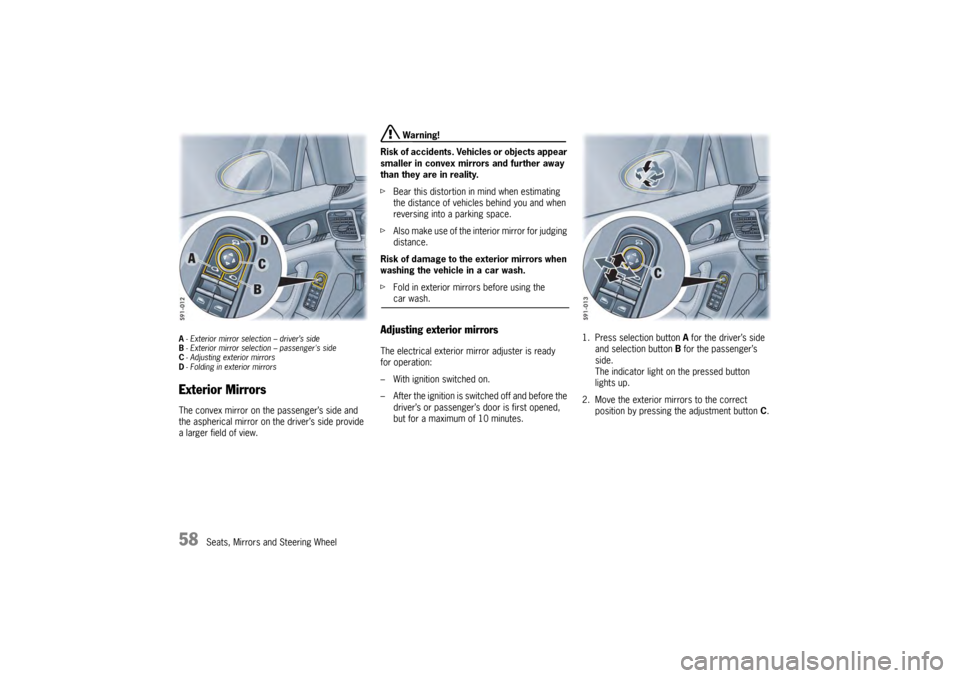
A- Exterior mirror selection – driver’s side
B - Exterior mirror selection – passenger's side
C - Adjusting exterior mirrors
D - Folding in exterior mirrorsExterior MirrorsThe convex mirror on the passenger’s side and
the aspherical mirror on the driver’s side provide
a larger field of view.
Warning!
Risk of accidents. Vehi cles or objects appear
smaller in convex mirrors and further away
than they are in reality.
f Bear this distortion in mind when estimating
the distance of vehicles behind you and when
reversing into a parking space.
f Also make use of the interior mirror for judging
distance.
Risk of damage to the exterior mirrors when
washing the vehicle in a car wash.
f Fold in exterior mirrors before using the car wash.
Adjusting exterior mirrors The electrical exterior mirror adjuster is ready
for operation:
– With ignition switched on.
– After the ignition is switched off and before the
driver’s or passenger’s door is first opened,
but for a maximum of 10 minutes. 1. Press selection button
A for the driver’s side
and selection button B for the passenger’s
side.
The indicator light on the pressed button
lights up.
2. Move the exterior mirrors to the correct position by pressing the adjustment button C.
Page 62 of 343
60
Seats, Mirrors and Steering Wheel
Automatic anti-dazzle exterior mirrorThe exterior mirrors change to anti-dazzle
position automatically in synchronisation with
the interior mirror.
For information on the automatic anti-dazzle
function of the interior mirror:
fPlease see the chapter “AUTOMATIC ANTI-
DAZZLE INTERIOR MIRROR” on page 60.Swivelling down mirror glass as
parking aid When reverse gear is engaged, the mirror on the
passenger’s side swivels down slightly to show
the curb area.
f Please see the chapter “SWIVELLING DOWN
MIRROR GLASS AS PARKING AID” on
page 242.
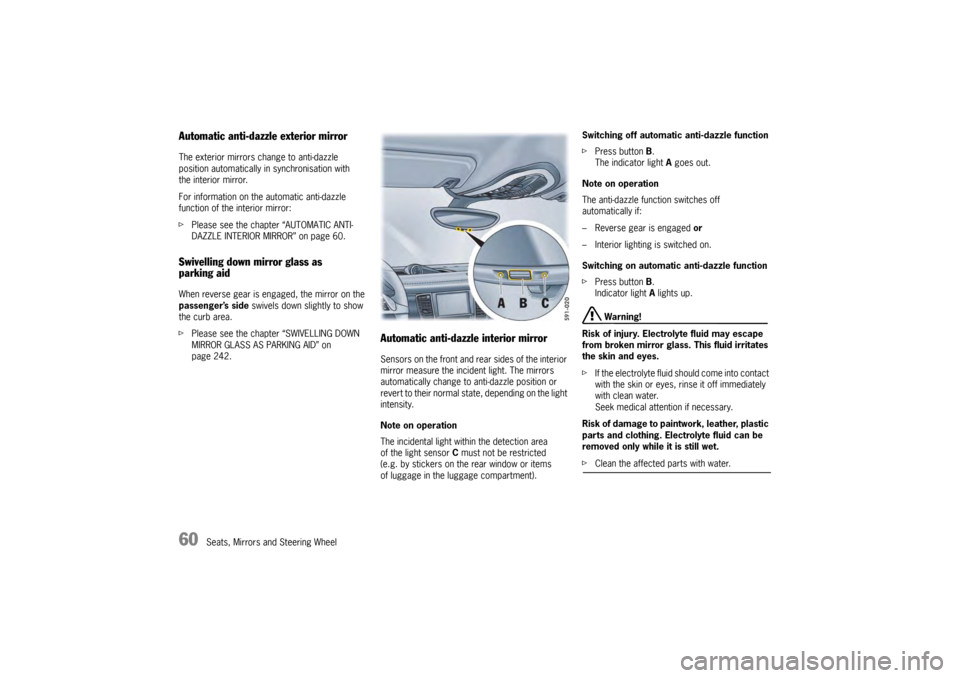
Automatic anti-dazzle interior mirrorSensors on the front and rear sides of the interior
mirror measure the incident light. The mirrors
automatically change to anti-dazzle position or
revert to their normal state, depending on the light
intensity.
Note on operation
The incidental light within the detection area
of the light sensor C must not be restricted
(e.g. by stickers on the rear window or items
of luggage in the luggage compartment). Switching off automatic anti-dazzle function
f
Press button B.
The indicator light A goes out.
Note on operation
The anti-dazzle function switches off
automatically if:
– Reverse gear is engaged or
– Interior lighting is switched on.
Switching on automatic anti-dazzle function
f Press button B.
Indicator light A lights up.
Warning!
Risk of injury. Electrolyte fluid may escape
from broken mirror glass. This fluid irritates
the skin and eyes.
f If the electrolyte fluid sh ould come into contact
with the skin or eyes, rinse it off immediately
with clean water.
Seek medical attention if necessary.
Risk of damage to paintwork, leather, plastic
parts and clothing. Electrolyte fluid can be
removed only while it is still wet.
f Clean the affected parts with water.
Page 64 of 343
62
Seats, Mirrors and Steering Wheel
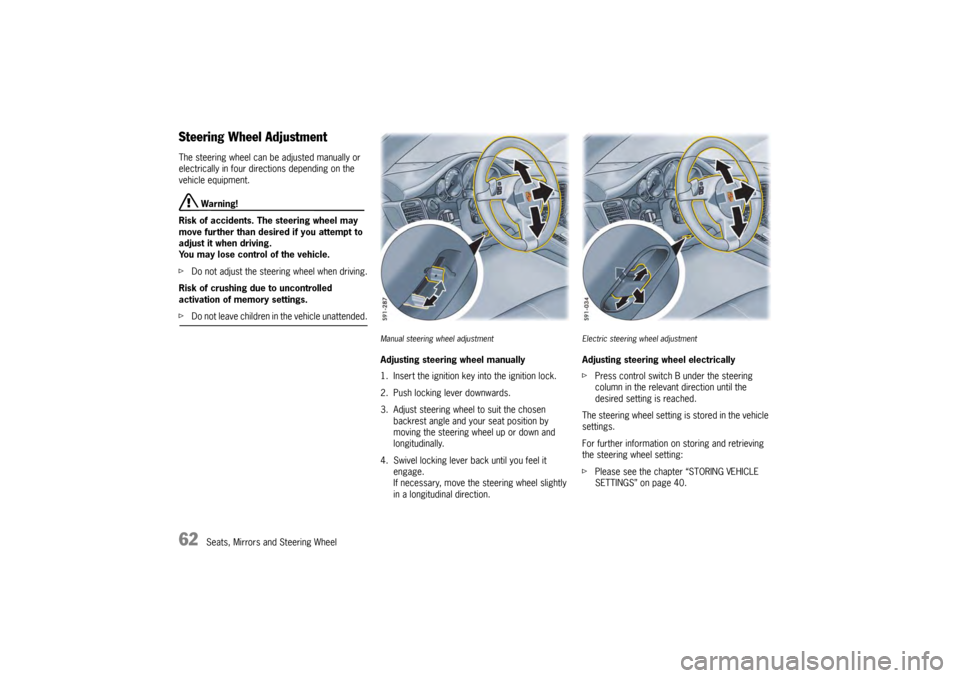
Steering Wheel AdjustmentThe steering wheel can be adjusted manually or
electrically in four directions depending on the
vehicle equipment.
Warning!
Risk of accidents. The steering wheel may
move further than desired if you attempt to
adjust it when driving.
You may lose control of the vehicle.
f Do not adjust the steeri ng wheel when driving.
Risk of crushing due to uncontrolled
activation of memory settings.
f Do not leave children in the vehicle unattended.
Manual steering wheel adjustmentAdjusting steering wheel manually
1. Insert the ignition key into the ignition lock.
2. Push locking lever downwards.
3. Adjust steering wheel to suit the chosen
backrest angle and your seat position by
moving the steering wheel up or down and
longitudinally.
4. Swivel locking lever back until you feel it engage.
If necessary, move the steering wheel slightly
in a longitudinal direction.
Electric steering wheel adjustmentAdjusting steering wheel electrically
fPress control switch B under the steering
column in the relevant direction until the
desired setting is reached.
The steering wheel setting is stored in the vehicle
settings.
For further information on storing and retrieving
the steering wheel setting:
f Please see the chapter “STORING VEHICLE
SETTINGS” on page 40.
Page 65 of 343
Seats, Mirrors and Steering Wheel
63
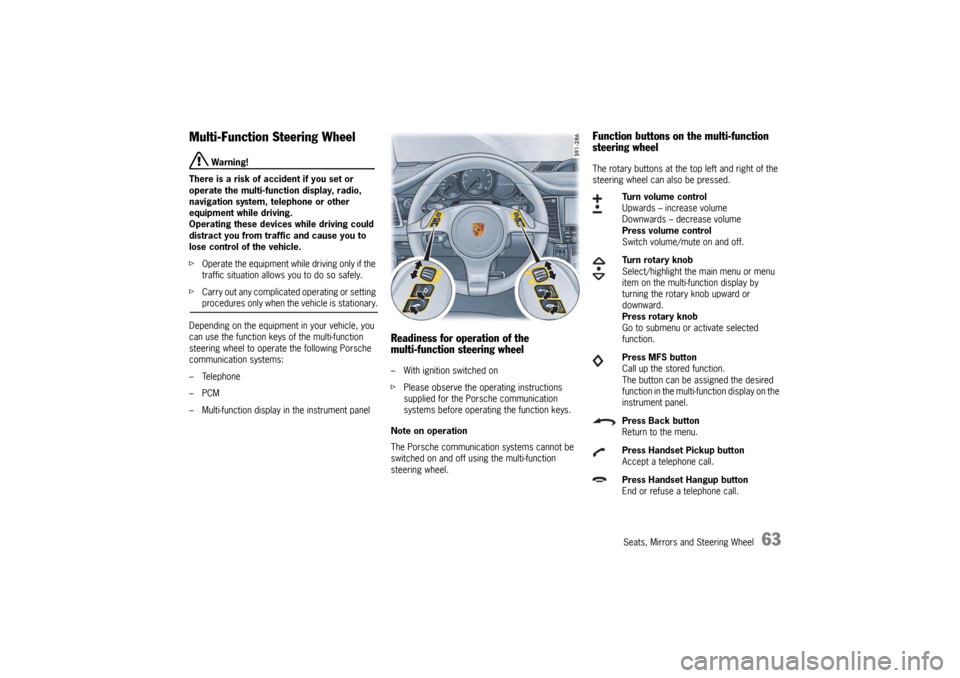
Multi-Function Steering Wheel
Warning!
There is a risk of accident if you set or
operate the multi-funct ion display, radio,
navigation system, telephone or other
equipment while driving.
Operating these devices while driving could
distract you from traffic and cause you to
lose control of the vehicle.
f Operate the equipment while driving only if the
traffic situation allows you to do so safely.
f Carry out any complicated operating or setting procedures only when the vehicle is stationary.
Depending on the equipment in your vehicle, you
can use the function keys of the multi-function
steering wheel to operate the following Porsche
communication systems:
– Telephone
–PCM
– Multi-function display in the instrument panel
Readiness for operation of the
multi-function steering wheel– With ignition switched on
f Please observe the operating instructions
supplied for the Porsche communication
systems before operating the function keys.
Note on operation
The Porsche communication systems cannot be
switched on and off using the multi-function
steering wheel.
Function buttons on the multi-function
steering wheelThe rotary buttons at the top left and right of the
steering wheel can also be pressed.
Turn volume control
Upwards – increase volume
Downwards – decrease volume
Press volume control
Switch volume/mute on and off.
Turn rotary knob
Select/highlight the main menu or menu
item on the multi-function display by
turning the rotary knob upward or
downward.
Press rotary knob
Go to submenu or activate selected
function.
Press MFS button
Call up the stored function.
The button can be assigned the desired
function in the multi-fu nction display on the
instrument panel.
Press Back button
Return to the menu.
Press Handset Pickup button
Accept a telephone call.
Press Handset Hangup button
End or refuse a telephone call.
Page 70 of 343
68
Air Conditioning
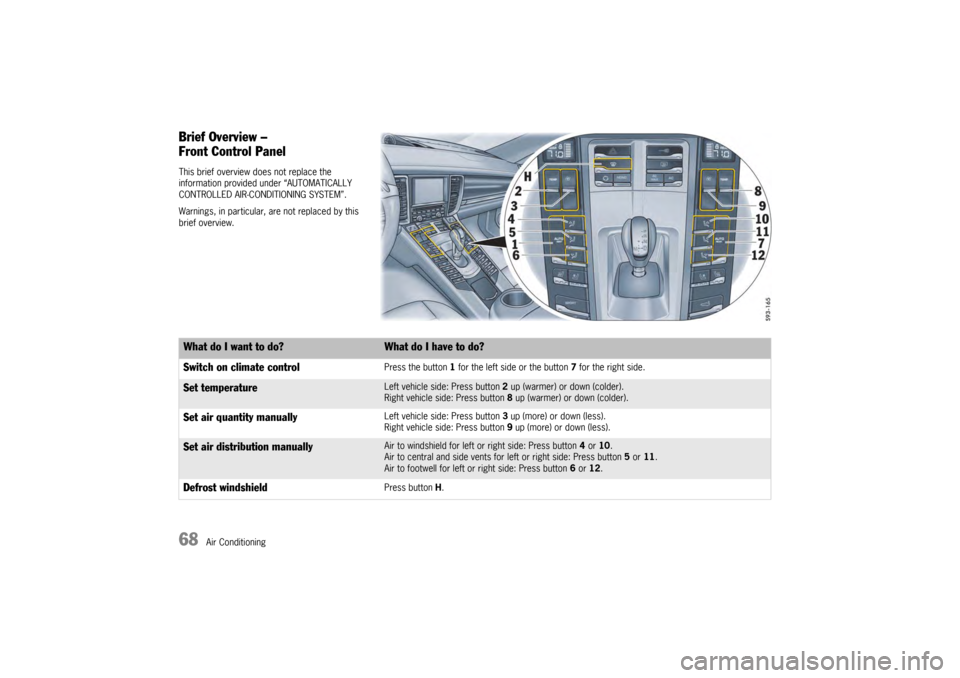
Brief Overview –
Front Control PanelThis brief overview does not replace the
information provided under “AUTOMATICALLY
CONTROLLED AIR-CONDITIONING SYSTEM”.
Warnings, in particular, are not replaced by this
brief overview.What do I want to do?
What do I have to do?
Switch on climate controlPress the button 1 for the left side or the button 7 for the right side.
Set temperature
Left vehicle side: Press button 2 up (warmer) or down (colder).
Right vehicle side: Press button 8 up (warmer) or down (colder).
Set air quantity manually
Left vehicle side: Press button 3 up (more) or down (less).
Right vehicle side: Press button 9 up (more) or down (less).
Set air distribution manually
Air to windshield for left or right side: Press button 4 or 10 .
Air to central and side vents for left or right side: Press button 5 or 11 .
Air to footwell for left or right side: Press button 6 or 12.
Defrost windshield
Press button H.
Page 71 of 343
Air Conditioning
69
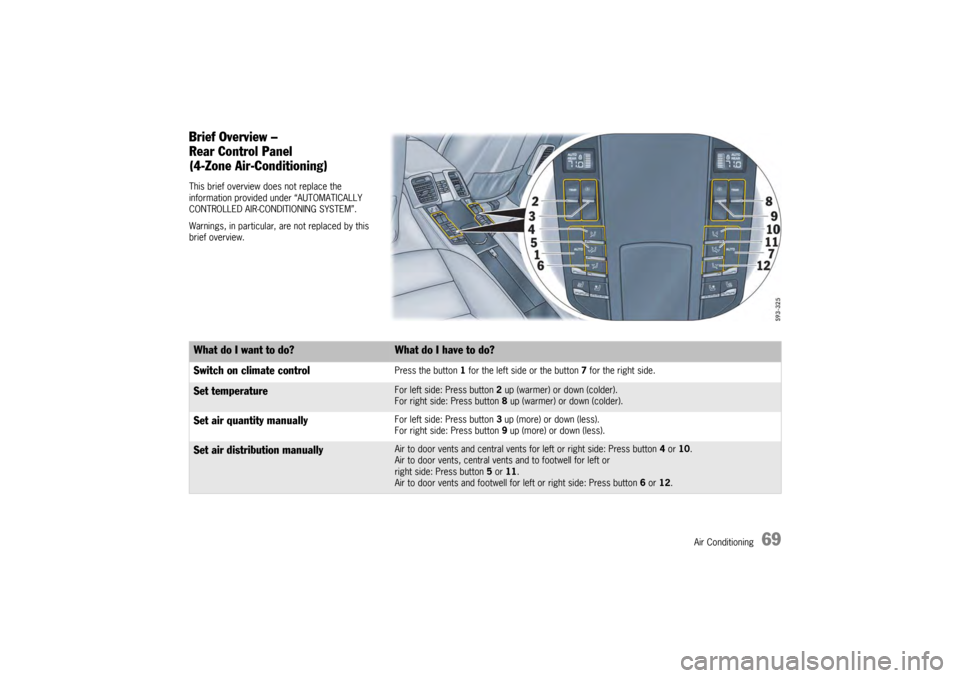
Brief Overview –
Rear Control Panel
(4-Zone Air-Conditioning)This brief overview does not replace the
information provided under “AUTOMATICALLY
CONTROLLED AIR-CONDITIONING SYSTEM”.
Warnings, in particular, are not replaced by this
brief overview.What do I want to do?
What do I have to do?
Switch on climate controlPress the button 1 for the left side or the button 7 for the right side.
Set temperature
For left side: Press button 2 up (warmer) or down (colder).
For right side: Press button 8 up (warmer) or down (colder).
Set air quantity manually
For left side: Press button 3 up (more) or down (less).
For right side: Press button 9 up (more) or down (less).
Set air distribution manually
Air to door vents and central vents for left or right side: Press button 4 or 10.
Air to door vents, central vents and to footwell for left or
right side: Press button 5 or 11.
Air to door vents and footwell for left or right side: Press button 6 or 12.
Page 81 of 343
Air Conditioning
79
Setting air quantityThe selected air quantity is shown in a bar display
above the button . The more bars that are
displayed, the more air flows into the passenger
compartment.
Increasing air quantity
fPress button for the air quantity to the
relevant air-conditioned area upwards.
Reducing air quantity
f Press button for the air quantity to the
relevant air-conditioned area downwards.
Press button for the relevant air-conditioned
area to switch back to automatic mode.
If the air quantity was reduced so much that OFF
appears on the air-conditioning system display,
the supply of air from the outside is interrupted.
Warning!
Risk of accidents due to impaired vision.
The windows can mist up if the air quantity
setting is OFF.
f Only select air quantity setting OFF for short
periods.
f If windows mist up, press for the left and
right vehicle side on the front control panel upwards (increase air quantity).
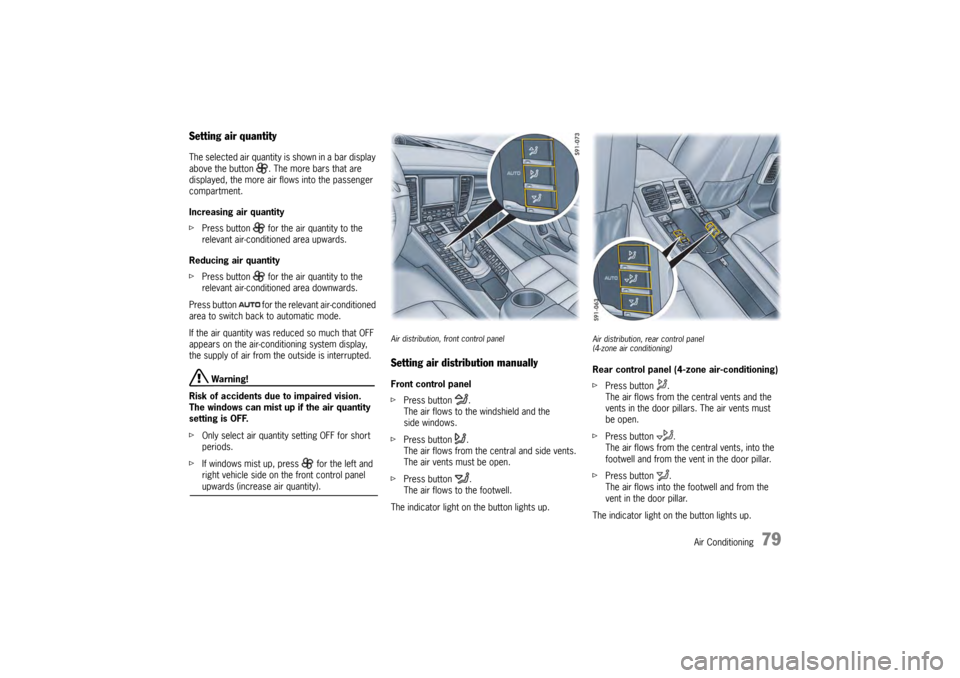
Air distribution, front control panelSetting air distribution manuallyFront control panel
f Press button .
The air flows to the windshield and the
side windows.
f Press button .
The air flows from the central and side vents.
The air vents must be open.
f Press button .
The air flows to the footwell.
The indicator light on the button lights up.
Air distribution, rear control panel
(4-zone air conditioning)Rear control panel (4-zone air-conditioning)
f Press button .
The air flows from the central vents and the
vents in the door pillars. The air vents must
be open.
f Press button .
The air flows from the ce ntral vents, into the
footwell and from the vent in the door pillar.
f Press button .
The air flows into the footwell and from the
vent in the door pillar.
The indicator light on the button lights up.