wheel PORSCHE PANAMERA 2009 1.G Information Manual
[x] Cancel search | Manufacturer: PORSCHE, Model Year: 2009, Model line: PANAMERA, Model: PORSCHE PANAMERA 2009 1.GPages: 343, PDF Size: 7.96 MB
Page 96 of 343
94
Lights, Turn Signals and Windshield Wipers
Automatic headlight levellingWhen the ignition and low beam are switched on,
the level of the headlight beam automatically
changes in accordance with the vehicle load.
The level of the headlight beam is automatically
kept constant during acceleration and braking.
Note on operation
Automatic headlight levellin g is also available
when the light switch is set to the position
(low beam/driving light).
Daytime driving lightsIf the light switch is in po sition (light switched
off), the daytime driving lights are switched on
automatically when the ignition is switched on.
If the light switch is in position , the daytime
driving lights are switched on automatically during
daylight when the ignition is switched on.
If the light switch is in position (low beam/
driving light), the daytime driving lights are not
active.
You can switch the daytime driving lights on and
off on the multi-function display in the instrument
panel (not available in Canada).
Regulations for switching daytime driving lights on
and off vary according to the legal requirements in
each country.
For information on setting the daytime driving
lights:
f Please see the chapter “ACTIVATING AND
DEACTIVATING AUTOMATIC DAYTIME DRIVING
LIGHTS” on page 142.
Static cornering lightThe static cornering light switches on if the
steering wheel is turned sharply.
Note on operation
The static cornering light is also available when
the light switch is set to the position (driving
light/low beam).Dynamic cornering lightAt speeds greater than 5 mph (8 km/h), the low
beam light is swivelled in the direction of the curve
to illuminate the road more clearly, depending on
the speed of the vehicle and the extent to which
the steering wheel is turned.
In the event of a fault in the dynamic cornering
light, the warning light for the adaptive light
system flashes in the instrument panel and
a warning message appears on the multi-function
display in the instrument panel.
For information on indicator lights and warning
lights on the instrument panel:
fPlease see the chapter “INSTRUMENT PANEL
USA MODELS” on page 107.
For information on warning messages on the
multi-function display:
f Please see the chapter “OVERVIEW OF
WARNING MESSAGES” on page 152.
Page 98 of 343
96
Lights, Turn Signals and Windshield Wipers Warning!
Risk of accident when adjusting brightness
while driving. You may lose control of the
vehicle.
f Do not reach through the steering-wheel spokes when driving.
Turn Signal/High Beam/Headlight
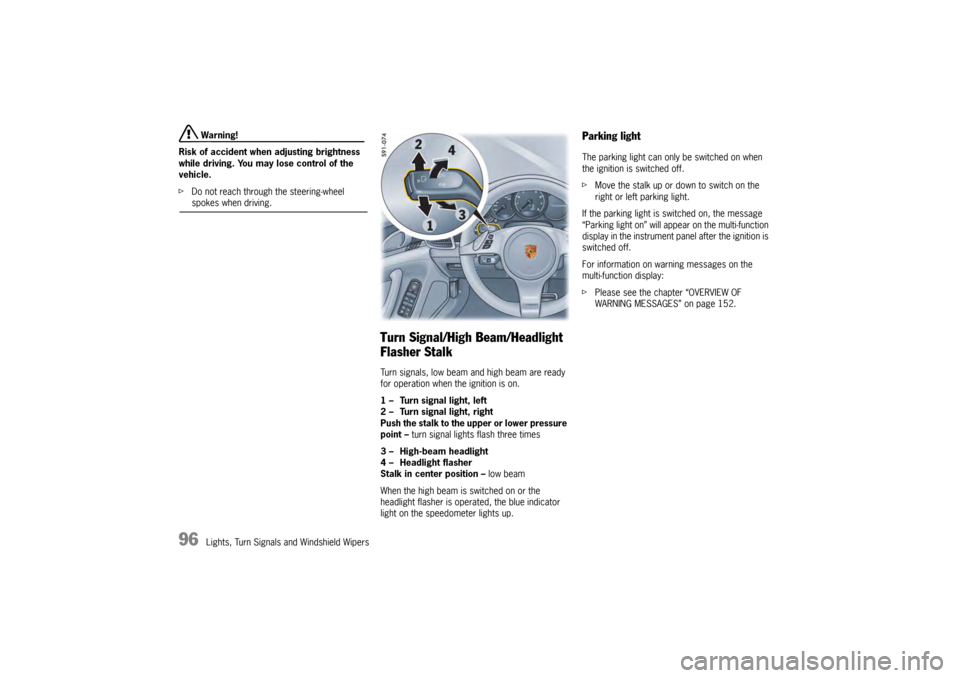
Flasher StalkTurn signals, low beam and high beam are ready
for operation when the ignition is on.
1 – Turn signal light, left
2 – Turn signal light, right
Push the stalk to the upper or lower pressure
point – turn signal lights flash three times
3 – High-beam headlight
4 – Headlight flasher
Stalk in center position – low beam
When the high beam is switched on or the
headlight flasher is operated, the blue indicator
light on the speedometer lights up.
Parking lightThe parking light can only be switched on when
the ignition is switched off.
f Move the stalk up or do wn to switch on the
right or left parking light.
If the parking light is switched on, the message
“Parking light on” will appear on the multi-function
display in the instrument panel after the ignition is
switched off.
For information on warning messages on the
multi-function display:
f Please see the chapter “OVERVIEW OF
WARNING MESSAGES” on page 152.
Page 101 of 343
Lights, Turn Signals and Windshield Wipers
99
Switching automatic interior lighting on
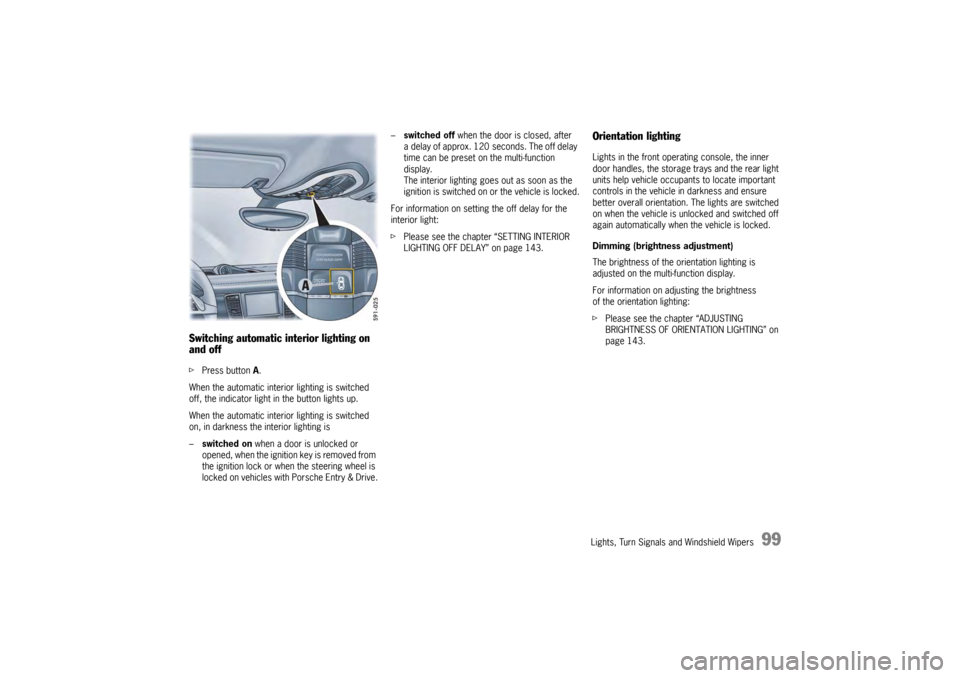
and off fPress button A.
When the automatic interior lighting is switched
off, the indicator light in the button lights up.
When the automatic interior lighting is switched
on, in darkness the interior lighting is
– switched on when a door is unlocked or
opened, when the ignition key is removed from
the ignition lock or when the steering wheel is
locked on vehicles with Porsche Entry & Drive. –
switched off when the door is closed, after
a delay of approx. 120 seconds. The off delay
time can be preset on the multi-function
display.
The interior lighting goes out as soon as the
ignition is switched on or the vehicle is locked.
For information on setting the off delay for the
interior light:
f Please see the chapter “SETTING INTERIOR
LIGHTING OFF DELAY” on page 143.
Orientation lightingLights in the front operating console, the inner
door handles, the storage trays and the rear light
units help vehicle occupa nts to locate important
controls in the vehicle in darkness and ensure
better overall orientation. The lights are switched
on when the vehicle is unlocked and switched off
again automatically when the vehicle is locked.
Dimming (brightness adjustment)
The brightness of the orientation lighting is
adjusted on the multi-function display.
For information on adjusting the brightness
of the orientation lighting:
f Please see the chapter “ADJUSTING
BRIGHTNESS OF ORIENTATION LIGHTING” on
page 143.
Page 104 of 343
102
Lights, Turn Signals and Windshield Wipers
Windshield Wiper/Washer Stalk
Caution!
Danger of injury if the windshield wipers
operate unintentionally.
Risk of damage to the engine compartment
lid, windshield and wiper system.
f Only wipe the windshield when sufficiently wet,
otherwise it could become scratched.
f Loosen frozen wiper blades before starting
to drive.
f Do not operate a frozen headlight washer
system.
f Always switch off windshield wipers in car
washes to prevent them wiping unintentionally
(rain sensor operation).
f Do not operate headlight washer system in
car washes.
f Always switch off windshield wipers before
cleaning the windshield to avoid unintentional
operation (rain sensor operation).
f Always hold the wiper arm securely when
replacing the wiper blade.
f Always switch off windshield wipers before
opening the engine compartment lid (wiper switch in position 0).
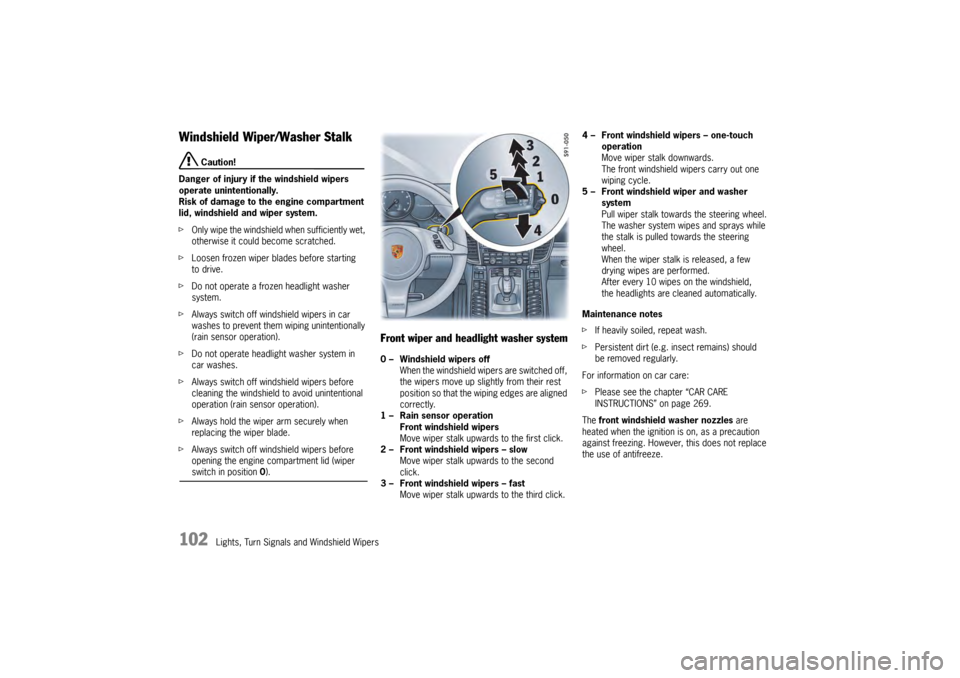
Front wiper and headlight washer system0 – Windshield wipers off
When the windshield wipers are switched off,
the wipers move up slightly from their rest
position so that the wiping edges are aligned
correctly.
1 – Rain sensor operation Front windshield wipers
Move wiper stalk upwards to the first click.
2 – Front windshield wipers – slow Move wiper stalk upwards to the second
click.
3 – Front windshield wipers – fast Move wiper stalk upwards to the third click. 4 – Front windshield wipers – one-touch
operation
Move wiper stalk downwards.
The front windshield wipers carry out one
wiping cycle.
5 – Front windshield wiper and washer system
Pull wiper stalk toward s the steering wheel.
The washer system wipes and sprays while
the stalk is pulled towards the steering
wheel.
When the wiper stalk is released, a few
drying wipes are performed.
After every 10 wipes on the windshield,
the headlights are cleaned automatically.
Maintenance notes
f If heavily soiled, repeat wash.
f Persistent dirt (e.g. insect remains) should
be removed regularly.
For information on car care:
f Please see the chapter “CAR CARE
INSTRUCTIONS” on page 269.
The front windshield washer nozzles are
heated when the ignition is on, as a precaution
against freezing. However, this does not replace
the use of antifreeze.
Page 117 of 343
Instrument Panel and Multi-Function Display
115
Operating the Multi-Function
Display in the Instrument PanelOn the multi-function display, you can view
information relating to the relevant vehicle
equipment, operate the audio source (radio, CD,
iPod, etc.), check the oil level, check the tire
pressure, use the stopwatch or operate the
navigation system.
You can also modify different vehicle settings in
the Vehicle menu.
It is not possible to desc ribe all details of the
functions in this Owner’s Manual. The examples
clearly demonstrate the functional principle and
clarify the menu structure.
Warning!
There is a risk of accident if you set or
operate the multi-funct ion display, radio,
navigation system, telephone or other
equipment while driving. Operating these
devices while driving could distract you from
traffic and cause you to lose control of the
vehicle.
f Operate the equipment while driving only if the
traffic situation allows you to do so safely.
f Carry out any complicated operating or setting procedures only when the vehicle is stationary.
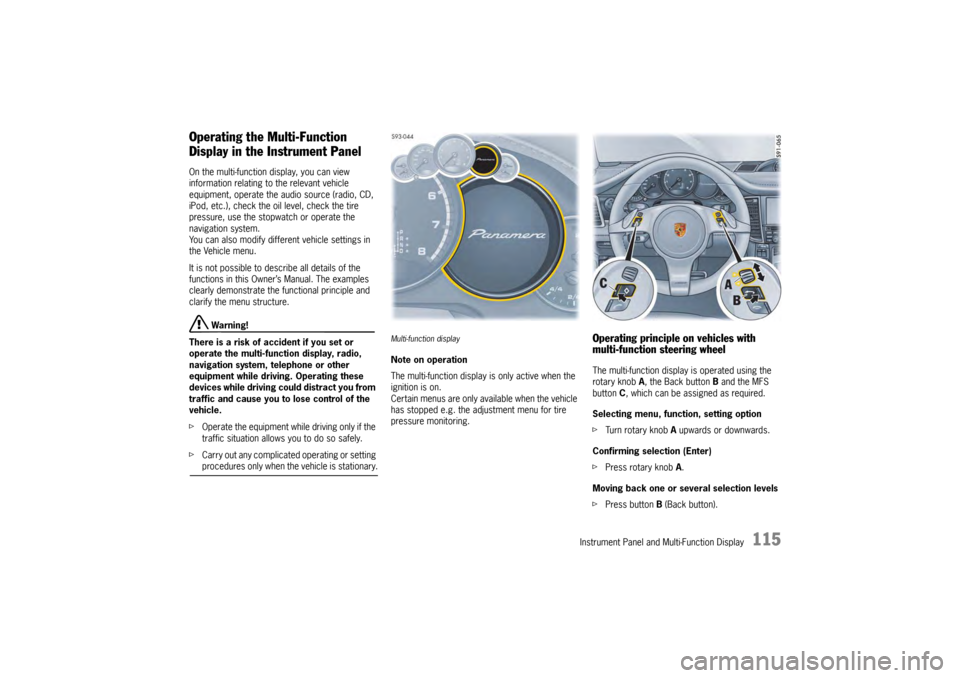
Multi-function displayNote on operation
The multi-function display is only active when the
ignition is on.
Certain menus are only available when the vehicle
has stopped e.g. the adjustment menu for tire
pressure monitoring.
Operating principle on vehicles with
multi-function steering wheelThe multi-function display is operated using the
rotary knob A , the Back button B and the MFS
button C, which can be assigned as required.
Selecting menu, function, setting option
f Turn rotary knob A upwards or downwards.
Confirming selection (Enter)
f Press rotary knob A .
Moving back one or several selection levels
f Press button B (Back button).
Page 118 of 343
116
Instrument Panel and Multi-Function Display
Porsche Communication Management (PCM)
functions or multi-function display functions can be
assigned to the MFS button in the multi-function
display on the instrument panel. Audio source
selection is preset by default.
For information on individual assignment of the
MFS button:
f
Please see the chapter “CHANGING BUTTON
ASSIGNMENT ON MULTI-FUNCTION STEERING
WHEEL” on page 151.
For information on Porsche Communication
Management:
f Please refer to the separate PCM operating
instructions.
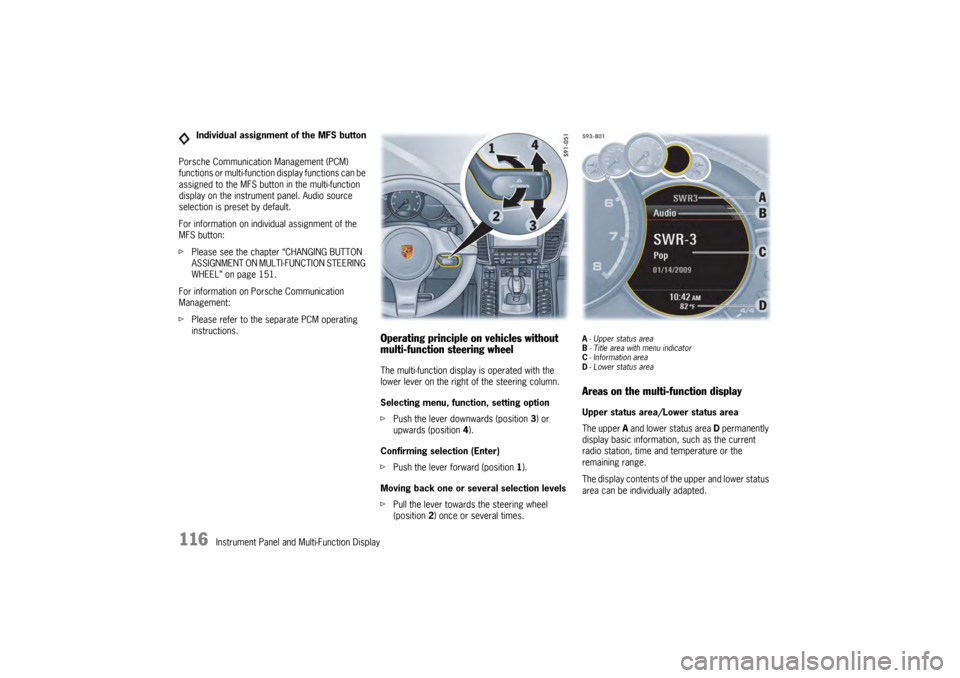
Operating principle on vehicles without
multi-function steering wheelThe multi-function display is operated with the
lower lever on the right of the steering column.
Selecting menu, function, setting option
fPush the lever downwards (position 3) or
upwards (position 4).
Confirming selection (Enter)
f Push the lever forward (position 1).
Moving back one or several selection levels
f Pull the lever towards the steering wheel
(position 2 ) once or several times.
A-Upper status area
B - Title area with menu indicator
C - Information area
D - Lower status areaAreas on the multi-function displayUpper status area/Lower status area
The upper A and lower status area D permanently
display basic information, such as the current
radio station, time and temperature or the
remaining range.
The display contents of th e upper and lower status
area can be individually adapted.
Individual assignment of the MFS button
Page 119 of 343
Instrument Panel and Multi-Function Display
117
For information on adapting the multi-function
display:
fPlease see the chapter “ADAPTING
APPEARANCE OF MULTI-FUNCTION DISPLAY”
on page 139.
Title area with menu indicator
The menu item currently selected is displayed in
the title area.
The menu indicator on the right shows the position
of the current menu item in the overall menu and
displays the number of other menu items on this
menu level.
The wider the menu indicator, the fewer menu
items the current menu contains.
Information area
The information area C displays the menu items
currently available for selection or after a menu
item is selected, information relating to this menu
item or other selection options.
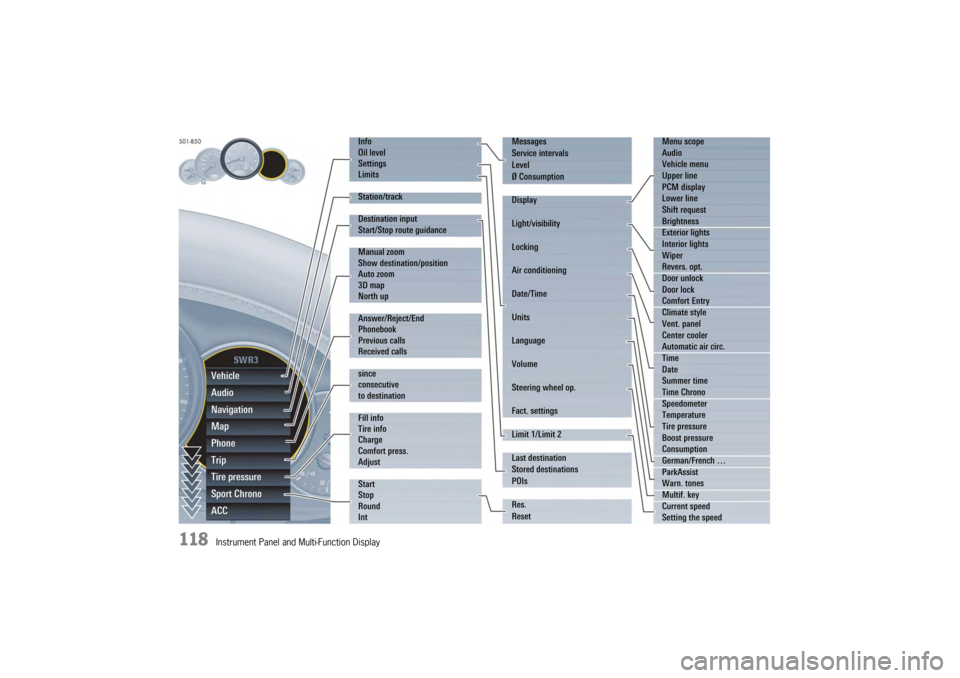
Overview of menus in the multi-function
displayThe following main menu areas are available
depending on the vehicle equipment.
–“ Vehicle ”
Retrieve vehicle inform ation, check oil level,
adjust settings, adapt speed limits,
see page 119.
–“ Audio”
Display/select radio station or track,
see page 123.
–“ Navigation ”
Retrieve navigation information, enter
navigation destination, start/finish navigation,
see page 123.
–“ Map ”
Show/adapt the map display for navigation,
see page 124.
–“ Phone ”
Make telephone calls, see page 125.
–“ Tr i p”
Retrieve/reset trip information, see page 126.
–“ Tire pressure ”
Retrieve tire pressure information, modify Tire
Pressure Monitoring settings, see page 127.
–“ Sport Chrono”
Start/stop/reset stopwatch, see page 135. –“
ACC ”
Retrieve adaptive cruise control information,
seepage178.
Activating functions, opening submenus
and accessing setting options from the
main menu areasPress the rotary knob A or push the right lower
lever on the steering wheel forwards (position 1)
to access menus, other functions and setting
options regardless of the main menu area.Browsing through long listsWhen searching for an entry in long telephone and
audio lists on vehicles with PCM, you can skip
directly to other entries with the same first letter.
f Briefly press the rotary knob A or hold the
operating lever in position 3 or 4.
A letter selection screen appears.
Select the desired first letters and confirm.
The marking skips to the first list entry beginning
with the letters selected.1. Select main menu
and confirm.
2. Select function, submenu or setting option
and confirm.
Page 120 of 343
118
Instrument Panel and Multi-Function DisplayVehicle
Audio
Navigation
Map
Phone
Trip
Tire pressure
Sport Chrono
ACC
Info
Oil level
Settings
Limits
Station/track
Destination input
Start/Stop route guidance
Manual zoom
Show destination/position
Auto zoom
3D map
North up
Answer/Reject/End
Phonebook
Previous calls
Received calls
since
consecutive
to destination
Fill info
Tire info
Charge
Comfort press.
Adjust
Start
Stop
Round
IntMessages
Service intervals
Level
Ø Consumption
Display
Light/visibility
Locking
Air conditioning
Date/Time
Units
Language
Volume
Steering wheel op.
Fact. settings
Limit 1/Limit 2
Last destination
Stored destinations
POIs
Res.
Reset
Menu scope
Audio
Vehicle menu
Upper line
PCM display
Lower line
Shift request
Brightness
Exterior lights
Interior lights
Wiper
Revers. opt.
Door unlock
Door lock
Comfort Entry
Climate style
Vent. panel
Center cooler
Automatic air circ.
Time
Date
Summer time
Time Chrono
Speedometer
Temperature
Tire pressure
Boost pressure
Consumption
German/French …
ParkAssist
Warn. tones
Multif. key
Current speed
Setting the speed
Page 129 of 343

Instrument Panel and Multi-Function Display
127
Tire Pressure Monitoring (TPM)Each tire should be checked monthly when cold
and inflated to the inflation pressure
recommended by Porsche on the tire inflation
pressure label.
For information on the tire inflation pressure label:
fPlease see the chapter “TIRES AND WHEELS”
on page 280.
As an added safety feature, your vehicle has been
equipped with a tire pressure monitoring system
(TPM) that illuminates a low tire pressure telltale
(warning light) when one or more of your tires is
significantly under-inflated.
Accordingly, when the low tire pressure telltale
illuminates, you should stop and check your tires
as soon as possible, an d inflate them to the
proper pressure. Driving on a significantly under-
inflated tire causes the tire to overheat and can
lead to tire failure. Under-inflation also reduces
fuel efficiency and tire tread life, and may affect
the vehicle’s handling and stopping ability.
However, the tire pressure must still be set
manually on the wheel.
f Please see the chapter “TIRE PRESSURE FOR
COLD TIRES (68 °F/20 °C)” on page 326.
Danger!
Risk of serious personal injury or death.
Driving the vehicle with low tire pressure
increases the risk of a tire failure and
resulting loss of control. Furthermore, low
tire pressure increases rate of wear of the
affected tires.
Please note that the Tire Pressure Monitoring
is not a substitute for proper tire
maintenance, and it is the driver's
responsibility to maintain correct tire
pressure, even if under-inflation has not
reached the level to trigger illumination of
Tire Pressure Monitoring low tire pressure
telltale. Low tire pressure reduces the road
safety of the vehicle and destroys the tire and
wheel.
Tire Pressure Monitoring gives a warning
about tire damage caused by a natural loss
in pressure as well as about a gradual loss of
pressure caused by foreign objects.
Tire Pressure Monitoring cannot warn you
about tire damage that occurs suddenly (e.g.
flat tire due to abrupt external effects).
f When a red tire pressure warning appears,
stop immediately in a suitable place and check
the tires for damage. If necessary, remedy the
damage with a tire sealant.
f Do not by any means continue to drive with
defective tires. f
Sealing the tire with tire sealant is only an
emergency repair so you can drive to the
nearest specialist workshop.
The permitted top speed is 50 mph
(80 km/h) .
f Do not drive with tires in which the tire
pressure drops again very quickly. In case of
doubt, have tires checked by a specialist
workshop.
f Defective tires must be replaced immediately
at an authorized Porsche dealer.
Tires must never be repaired under any
circumstances.
f If Tire Pressure Monitoring is defective
(e.g. defective wheel transmitter), contact an
authorized Porsche dealer immediately and
have the damage repaired.
The tire pressure will not be monitored at all
or will be monitored only partially when Tire
Pressure Monitoring is defective.
For information on warning messages on the multi-
function display:
f Please see the chapter “OVERVIEW OF
WARNING MESSAGES” on page 152.
f Incomplete entries or selection of the wrong
tires on the multi-function display affect the
accuracy of warnings and messages.
The settings in the tire pressure menu must be
updated following a wheel change or changes
in vehicle loading.
Page 130 of 343

128
Instrument Panel and Multi-Function Display
f
Use only the pressure differences shown in the
“Fill info” display in the tire pressure menu or
from the corresponding tire pressure warning
when correcting the tire pressure.
f Tires can lose air over time without a tire
defect being present. A tire pressure warning
will then appear on the multi-function display.
Check the tire pressure at the next opportunity.
Warning!
Your vehicle has also been equipped with a TPM
malfunction indicator to in dicate when the system
is not operating properly.
The TPM malfunction indicator is combined with
the low tire pressure telltale.
When the system detects a malfunction, the
telltale will flash for approximately one minute and
then remain continuously illuminated. This
sequence will continue upon subsequent vehicle
start-ups as long as the malfunction exists.
When the malfunction indicator is illuminated, the
system may not be able to detect or signal low tire
pressure as intended.
TPM malfunctions may occur for a variety of
reasons, including the installation of replacement
or alternate tires or wheels on the vehicle that
prevent the TPM from functioning properly.
f Always check the TPM malfunction telltale after
replacing one or more tires or wheels on your
vehicle to ensure that the replacement or
alternate tires and wheels allow the TPM to continue to function properly. The warning light in the instrument panel lights up:
– When a loss in pressure has been detected.
– In the event of a defect in Tire Pressure
Monitoring or a temporary fault.
– When learning new fitted wheels/wheel transmitters, as long as the vehicle’s own
wheels have not ye t been recognized.
The tire pressure warning light on the instrument
panel goes out only when the cause of the fault
has been rectified.Warning light