wheel PORSCHE PANAMERA 2009 1.G Information Manual
[x] Cancel search | Manufacturer: PORSCHE, Model Year: 2009, Model line: PANAMERA, Model: PORSCHE PANAMERA 2009 1.GPages: 343, PDF Size: 7.96 MB
Page 131 of 343
Instrument Panel and Multi-Function Display
129
Functional description of Tire Pressure
Monitoring
Tire Pressure Monitoring offers the following
functions:
– Display of the actual tire pressure while the vehicle is in motion.
–“ Fill info ” display:
Display of the deviation from the required
pressure (refilling pressure) at standstill.
–“ Tire info ” display:
Display of current settings (when the vehicle is
stationary).
– Tire pressure warnings in two stages (yellow and red warning).
Selecting the Tire pressure function on the
multi-function display The “
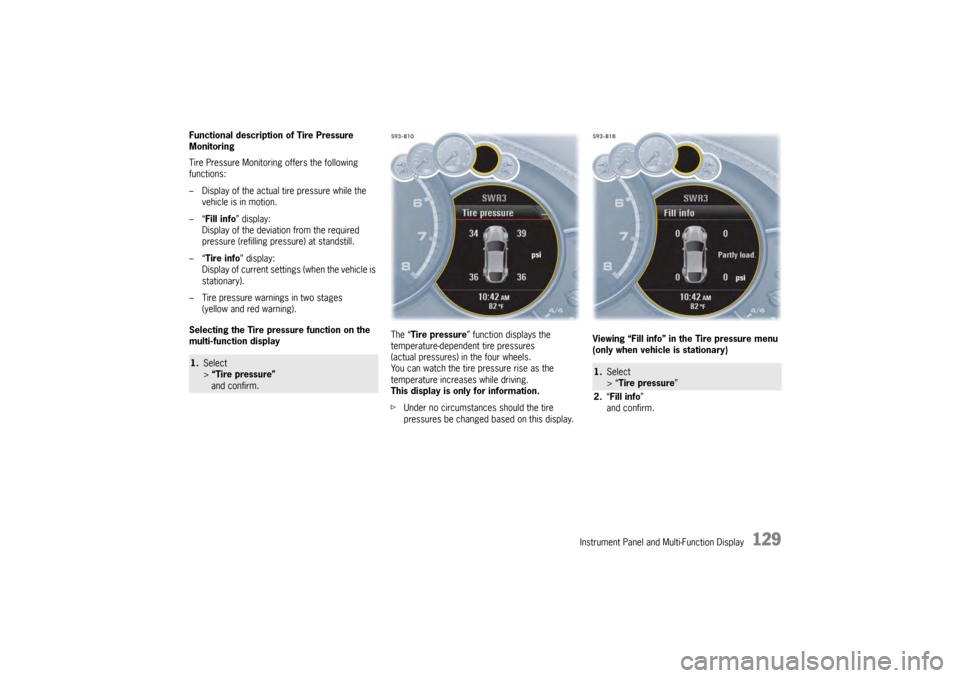
Tire pressure ” function displays the
temperature-dependent tire pressures
(actual pressures) in the four wheels.
You can watch the tire pressure rise as the
temperature increases while driving.
This display is only for information.
f Under no circumstances should the tire
pressures be changed based on this display. Viewing “Fill info” in the Tire pressure menu
(only when vehicle is stationary)1.
Select
> “Tire pressure”
and confirm.
1. Select
> “Tire pressure ”
2. “Fill info ”
and confirm.
Page 132 of 343
130
Instrument Panel and Multi-Function Display
You can read the tire pressures to be
corrected on this display.
The tire pressure to be corrected (refill pressure)
is indicated on the displayed wheel.
Example: If “–1.5 psi (–0.
1 bar)" is displayed for
the rear right tire, 1.5 psi (0.1 bar) must be added
to this tire.
The displayed pressures take into account the tire
temperature.
f Only use the pressure specifications from the
“Fill info” display in the tire pressure menu or
from the respective tire pressure warning to
correct the tire pressure.
Note
Each time the ignition is switched on, it make take
approx. 1 minute until all tire pressures are
displayed. Dashes (-.-) appear instead of the tire
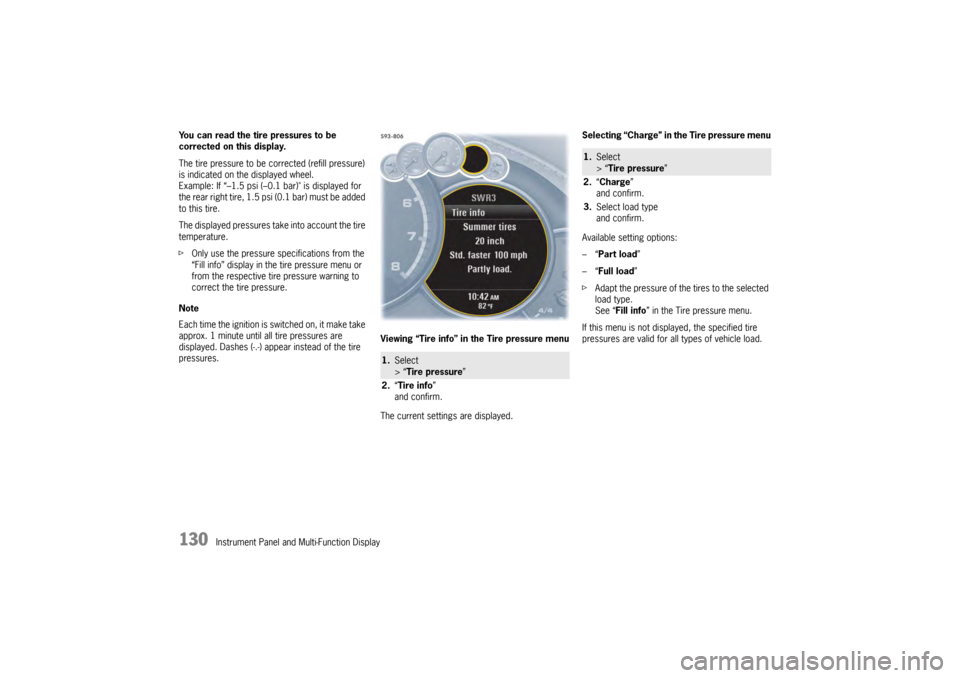
pressures. Viewing “Tire info” in the Tire pressure menu
The current settings are displayed.Selecting “Charge” in the Tire pressure menu
Available setting options:
–“
Part load ”
–“ Full load ”
f Adapt the pressure of the tires to the selected
load type.
See “ Fill info ” in the Tire pressure menu.
If this menu is not displayed, the specified tire
pressures are valid for al l types of vehicle load.
1.Select
> “Tire pressure ”
2. “Tire info ”
and confirm.
1. Select
> “Tire pressure ”
2. “Charge”
and confirm.
3. Select load type
and confirm.
Page 134 of 343
132
Instrument Panel and Multi-Function Display
Selecting settings in the Tire pressure menu
(type and size of fitted tire)
Warning!
Risk of accident due to excessive speed. This
could lead to serious personal injury or
death.
f Always observe the permissible maximum
speed of the respective tire.
f Exceeding maximum tire speed could result in
a tire burst, causing loss of control of the
vehicle. This could lead to serious personal
injury or death.
Moreover, Porsche recommends obeying all
traffic laws at all times to maintain the safety of yourself and all vehicle occupants. Warning!
Incomplete entries or selection of the wrong
tires on the multi-function display affect
correct indication of warnings and
messages.
f The settings must be updated in the “Tire
pressure ” menu after changing a wheel, filling
with tire sealant or adding air (after previous
warning “ Tire pressure!”).
f Please see the chapter “RED WARNING – TIRE PRESSURE!” on page 133. The new tire type and tire
size must be selected
even if the settings for the new set of wheels are
the same as for the old wheels.
Available setting options:
–“ 18 inch ”
–“ 19 inch ”
–“ 20 inch ”
Tire selection has only been successfully
completed when the following message appears
on the multi-function display (example).
“Summer tires 19-inch was set. No monitoring,
system is learning”.
f Please see the chapter “SYSTEM LEARNING”
on page 134. Notes
The message “Action cancelled” appears if the
setting process is interrupted. All entries made up
to this point are lost, and the original settings
remain in effect.
Before fitting tires with dimensions that are not
already stored in the mult
i-function display, the
missing information should be added to the
multi-function display.
f Please contact a qualified specialist workshop.
We recommend that you have an authorized
Porsche dealer to do this work as they have
trained workshop personnel and the necessary
parts and tools.
f Use only tires approved by Porsche.
The available items in the tire pressure menu
depend on the model type. For this reason it is
possible that some of the selection options shown
here are not available on your multi-function
display.
1. Select
> “Tire pressure ”
2. “Adjust ”
and confirm.
3. Select “ Summer tires ” or
“ Winter tires ” or
“ All-season ”
and confirm.
4. Select the tire size
and confirm.
Page 136 of 343

134
Instrument Panel and Multi-Function Display
If necessary, fill in ti
re sealant and set the
correct tire pressure.
This tire pressure warning also appears when
driving and can be acknowledged.
The tire pressure warning light on the instrument
panel goes out only when the tire pressure has
been corrected.
System learningTire Pressure Monitoring begins to “learn” the
wheels after a wheel change, wheel transmitter
replacement or update of the tire settings . During
this process, Tire Pressu re Monitoring recognizes
the wheels and their locations.
The following message appears on the multi-
function display (example):
“No monitoring, system is learning”.
The wheel learning process takes place
exclusively when the vehicle is being driven
(vehicle speed above 16 mph (25 km/h)).
Tire Pressure Monitoring requires a certain
amount of time to learn the wheels. During this
time, the current tire pressures are not available
on the multi-function display:
– The tire pressure warning light remains lit until all wheels have been learned.
– Lines (-.-) appear on the display of the “Tire pressure” function. – The required pressures for cold tires (68 °F
(20 °C)) are indicated under “Fill info” in the tire
pressure menu.
Position and pressure information is displayed as
soon as Tire Pressure Monitoring has assigned
the wheels recognized as belonging to the vehicle
to the correct wheel positions.
f Check the tire pressure for all wheels under
“Fill info ”.
f Correct the tire pressure to the required
pressure if necessary.
Changing a wheel and replacing tiresfNew wheels must be fitted with radio
transmitters for Tire Pressure Monitoring.
Before tires are changed, the battery charge
condition of the wheel transmitters should be
checked.
Please contact a qualified specialist workshop.
We recommend that you have an authorized
Porsche dealer to do this work as they have
trained workshop personnel and the necessary
parts and tools.
f Switch off the ignition when changing a wheel.
The tire settings on the mu lti-function display must
be updated after changing a wheel.
If the tire settings are not updated, the message
“Tire change? Update settings!” is displayed on the
multi-function display.
f Update the multi-function display settings the
next time the vehicle is stationary.
Pressure increase as the result of
temperature increaseIn accordance with physical principles, the tire
pressure changes as the temperature
changes.The tire pressure increases or decreases
by 0.1 bar (1.5 psi) for
every 18 °F (10 °C) change in temperature.Partial monitoringMonitoring of the other wheels is continued if there
is a fault in one or two wheel transmitters.
– The tire pressure warning light lights up.
– The message “Restricted monitoring” appears
on the multi-function display.
– No tire pressures are displayed on the multi-function display for wheels with faulty
wheel transmitters.
Page 137 of 343
Instrument Panel and Multi-Function Display
135
No monitoringIn the event of faults, Tire Pressure Monitoring
cannot monitor the tire pressure.
The warning light on the instrument panel lights up
and a corresponding message appears on the
multi-function display.
Monitoring is not active:
– if Tire Pressure Monitoring is faulty,
– if wheel transmitters for Tire Pressure Monitoring are missing,
– during the learning phase after the tire settings have been updated,
– after a wheel change without updating the tire settings,
– if more than four wheel transmitters are recognized,
– if there is external interference by other radio sources, e.g. wireless headphones,
– if tire temperatures are too high.
f Please see the chapter “OVERVIEW OF
WARNING MESSAGES” on page 152.
Sport Chrono/StopwatchYou can use the stopwatch to measure any times,
e.g. on race circuits or on work-related journeys.
Measured lap times can be stored and evaluated
if the vehicle is equipped with Porsche
Communication Management (PCM).
fPlease observe the chapter “SPORT DISPLAY”
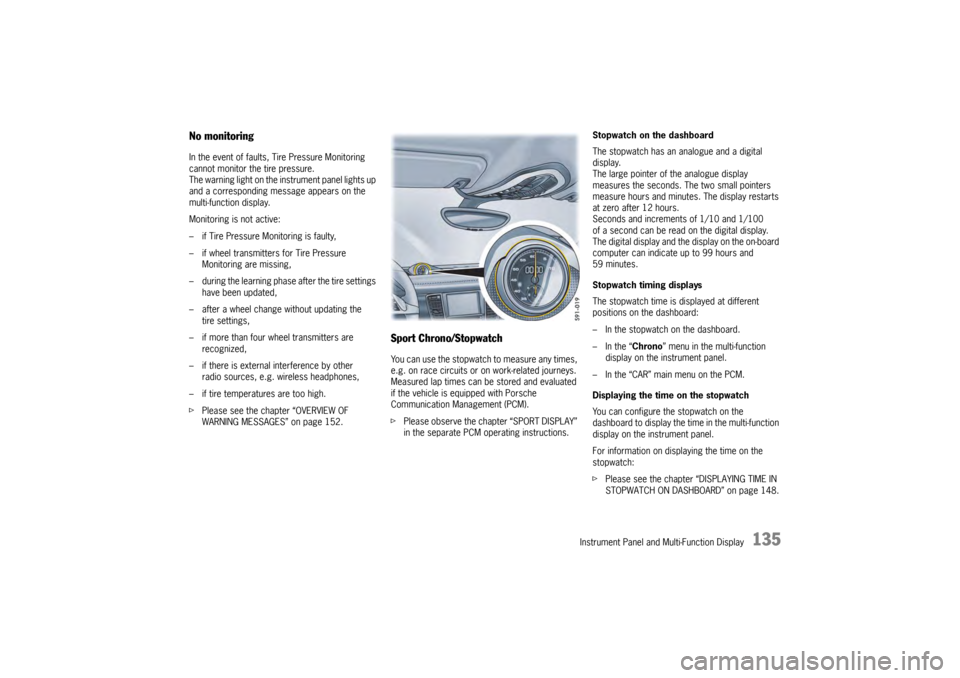
in the separate PCM operating instructions. Stopwatch on the dashboard
The stopwatch has an analogue and a digital
display.
The large pointer of the analogue display
measures the seconds. The two small pointers
measure hours and minutes. The display restarts
at zero after 12 hours.
Seconds and increments of 1/10 and 1/100
of a second can be read on the digital display.
The digital display and the
display on the on-board
computer can indicate up to 99 hours and
59 minutes.
Stopwatch timing displays
The stopwatch time is displayed at different
positions on the dashboard:
– In the stopwatch on the dashboard.
– In the “ Chrono” menu in the multi-function
display on the instrument panel.
– In the “CAR” main menu on the PCM.
Displaying the time on the stopwatch
You can configure the stopwatch on the
dashboard to display the ti me in the multi-function
display on the instrument panel.
For information on displaying the time on the
stopwatch:
f Please see the chapter “DISPLAYING TIME IN
STOPWATCH ON DASHBOARD” on page 148.
Page 140 of 343
138
Instrument Panel and Multi-Function Display
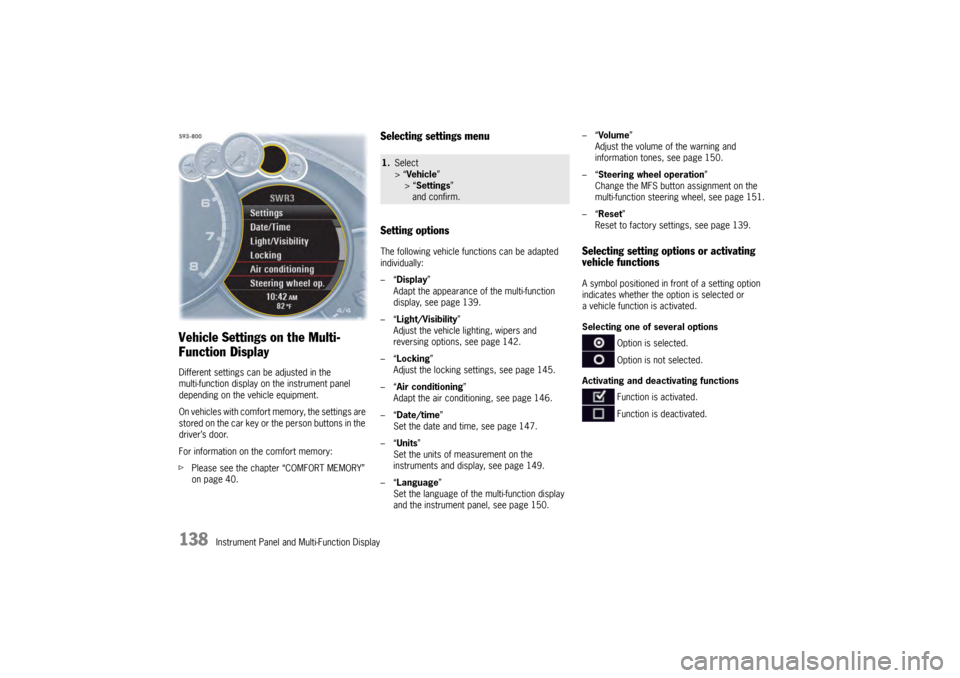
Vehicle Settings on the Multi-
Function DisplayDifferent settings can be adjusted in the
multi-function display on the instrument panel
depending on the vehicle equipment.
On vehicles with comfort memory, the settings are
stored on the car key or the person buttons in the
driver’s door.
For information on the comfort memory:
fPlease see the chapter “COMFORT MEMORY”
on page 40.
Selecting settings menu
Setting optionsThe following vehicle functions can be adapted
individually:
–“ Display ”
Adapt the appearance of the multi-function
display, see page 139.
–“ Light/Visibility ”
Adjust the vehicle lighting, wipers and
reversing options, see page 142.
–“ Locking ”
Adjust the locking settings, see page 145.
–“ Air conditioning ”
Adapt the air conditioning, see page 146.
–“ Date/time ”
Set the date and time, see page 147.
–“ Units ”
Set the units of measurement on the
instruments and display, see page 149.
–“ Language”
Set the language of the multi-function display
and the instrument panel, see page 150. –“
Volume ”
Adjust the volume of the warning and
information tones, see page 150.
–“ Steering wheel operation”
Change the MFS button assignment on the
multi-function steering wheel, see page 151.
–“ Reset ”
Reset to factory settings, see page 139.
Selecting setting options or activating
vehicle functionsA symbol positioned in front of a setting option
indicates whether the option is selected or
a vehicle function is activated.
Selecting one of several options
Option is selected.
Option is not selected.
Activating and deactivating functions Function is activated.
Function is deactivated.
1.Select
> “Vehicle ”
> “ Settings ”
and confirm.
Page 147 of 343
Instrument Panel and Multi-Function Display
145
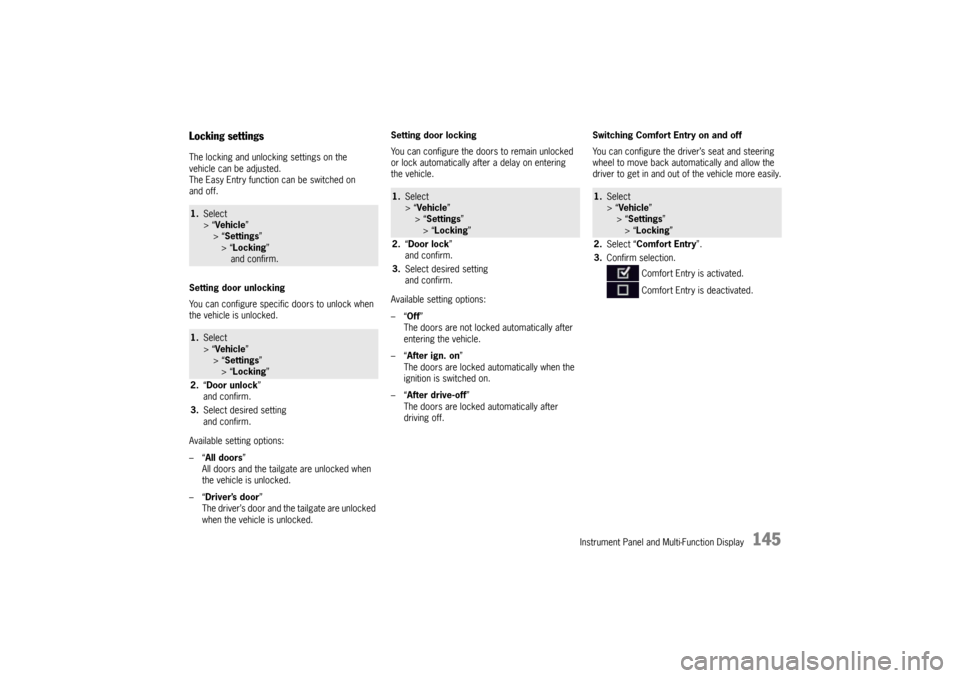
Locking settingsThe locking and unlocking settings on the
vehicle can be adjusted.
The Easy Entry function can be switched on
and off.
Setting door unlocking
You can configure specific doors to unlock when
the vehicle is unlocked.
Available setting options:
–“All doors”
All doors and the tailgate are unlocked when
the vehicle is unlocked.
–“ Driver’s door ”
The driver’s door and the tailgate are unlocked
when the vehicle is unlocked. Setting door locking
You can configure the doors to remain unlocked
or lock automatically after a delay on entering
the vehicle.
Available setting options:
–“
Off”
The doors are not locked automatically after
entering the vehicle.
–“ After ign. on ”
The doors are locked automatically when the
ignition is switched on.
–“ After drive-off ”
The doors are locked automatically after
driving off. Switching Comfort Entry on and off
You can configure the driver’s seat and steering
wheel to move back auto
matically and allow the
driver to get in and out of the vehicle more easily.1. Select
> “Vehicle ”
> “ Settings ”
> “Locking ”
and confirm.1. Select
> “Vehicle ”
> “ Settings ”
> “Locking ”
2. “Door unlock ”
and confirm.
3. Select desired setting
and confirm.
1.Select
> “Vehicle ”
> “Settings ”
> “ Locking ”
2. “Door lock ”
and confirm.
3. Select desired setting
and confirm.
1.Select
> “Vehicle ”
> “ Settings ”
> “Locking ”
2. Select “Comfort Entry ”.
3. Confirm selection.
Comfort Entry is activated.
Comfort Entry is deactivated.
Page 153 of 343
Instrument Panel and Multi-Function Display
151
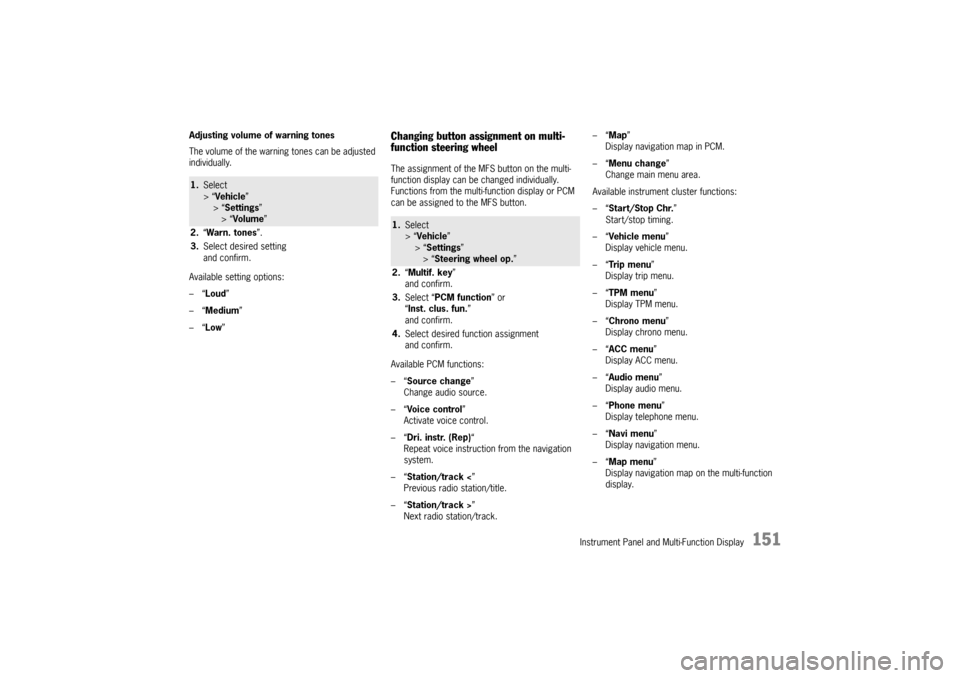
Adjusting volume of warning tones
The volume of the warning tones can be adjusted
individually.
Available setting options:
–“Loud ”
–“ Medium”
–“ Low ”
Changing button assignment on multi-
function steering wheelThe assignment of the MFS button on the multi-
function display can be changed individually.
Functions from the multi-function display or PCM
can be assigned to the MFS button.
Available PCM functions:
–“Source change ”
Change audio source.
–“ Voice control ”
Activate voice control.
–“ Dri. instr. (Rep) “
Repeat voice instruction from the navigation
system.
–“ Station/track < ”
Previous radio station/title.
–“ Station/track > ”
Next radio station/track. –“
Map ”
Display navigation map in PCM.
–“ Menu change ”
Change main menu area.
Available instrument cluster functions:
–“ Start/Stop Chr. ”
Start/stop timing.
–“ Vehicle menu ”
Display vehicle menu.
–“ Tr i p m e n u ”
Display trip menu.
–“ TPM menu ”
Display TPM menu.
–“ Chrono menu”
Display chrono menu.
–“ ACC menu ”
Display ACC menu.
–“ Audio menu ”
Display audio menu.
–“ Phone menu ”
Display telephone menu.
–“ Navi menu ”
Display navigation menu.
–“ Map menu ”
Display navigation map on the multi-function
display.
1. Select
> “Vehicle ”
> “ Settings ”
> “Volume ”
2. “Warn. tones ”.
3. Select desired setting
and confirm.
1.Select
> “Vehicle ”
> “Settings ”
> “ Steering wheel op. ”
2. “Multif. key ”
and confirm.
3. Select “PCM function” or
“ Inst. clus. fun. ”
and confirm.
4. Select desired function assignment
and confirm.
Page 158 of 343
156
Instrument Panel and Multi-Function Display
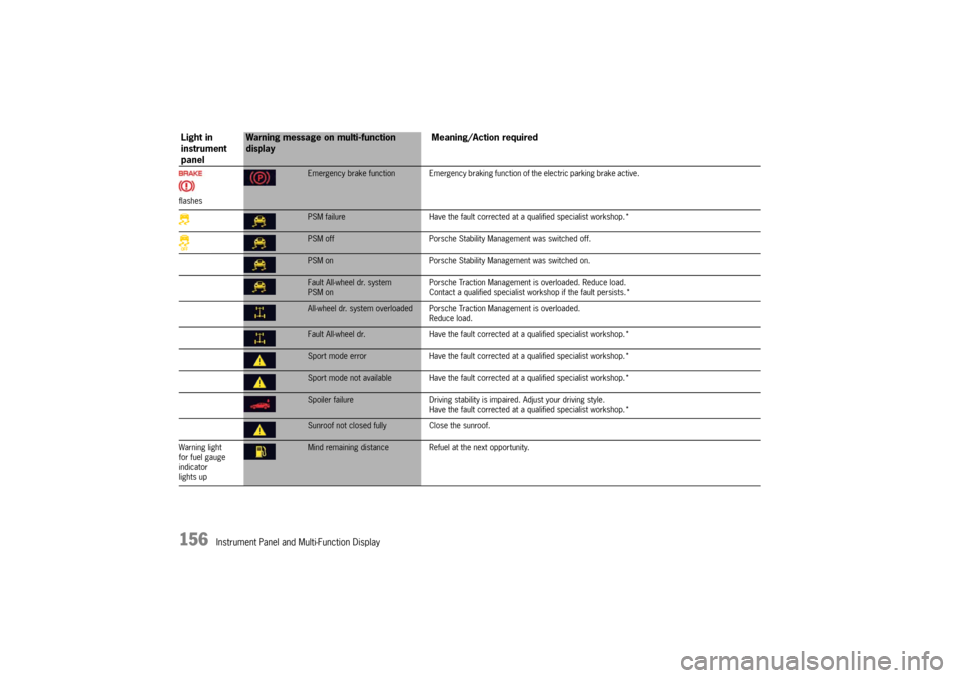
flashes
Emergency brake function Emergency braking function of the electric parking brake active.PSM failureHave the fault corrected at a qualified specialist workshop.*PSM off Porsche Stability Management was switched off.PSM on Porsche Stability Management was switched on.Fault All-wheel dr. system
PSM on Porsche Traction Management is overloaded. Reduce load.
Contact a qualified specialist workshop if the fault persists.*All-wheel dr. system overloaded Porsche
Traction Management is overloaded.
Reduce load.Fault All-wheel dr. Have the fault corrected at a qualified specialist workshop.*Sport mode error Have the fault corrected at a qualified specialist workshop.*Sport mode not available Have the fault co rrected at a qualified specialist workshop.*Spoiler failureDriving stability is impaired. Adjust your driving style.
Have the fault corrected at a qualified specialist workshop.*Sunroof not closed fully Close the sunroof.
Warning light
for fuel gauge
indicator
lights upMind remaining distance Refuel at the next opportunity.
Light in
instrument
panel
Warning message on multi-function
display Meaning/Action required
Page 159 of 343
Instrument Panel and Multi-Function Display
157
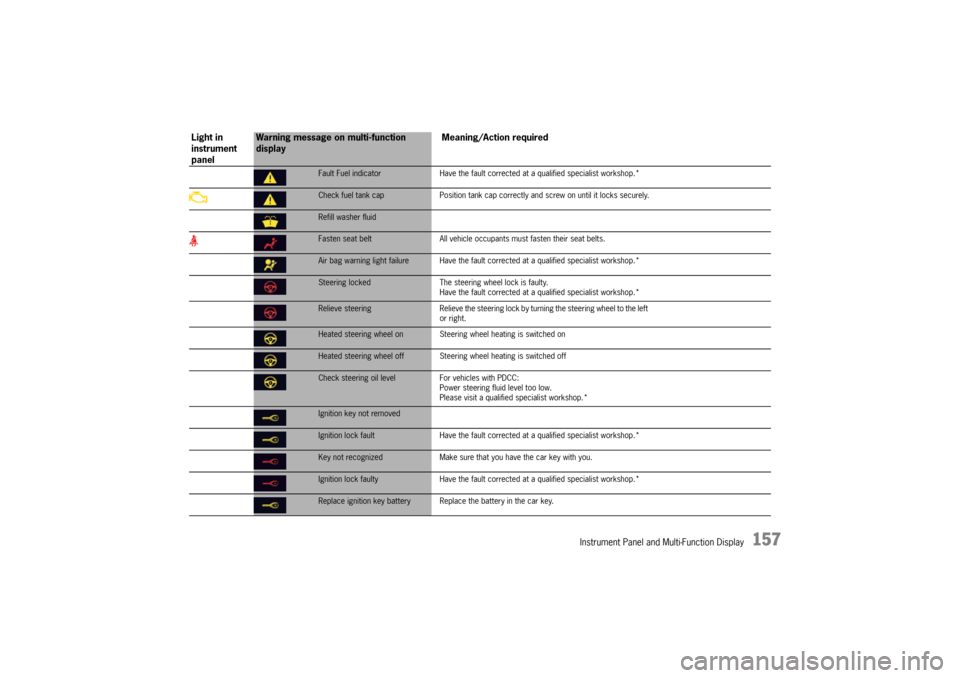
Fault Fuel indicatorHave the fault corrected at a qualified specialist workshop.*Check fuel tank cap Position tank cap correctly and screw on until it locks securely.Refill washer fluidFasten seat belt All vehicle occupants must fasten their seat belts.Air bag warning light failure Have the fault co rrected at a qualified specialist workshop.*Steering locked The steering wheel lock is faulty.
Have the fault corrected at a q ualified specialist workshop.*Relieve steering Relieve the steering lock by turning the steering wheel to the left
or right.Heated steering wheel on Steering wheel heating is switched onHeated steering wheel off Steering wheel heating is switched offCheck steering oil level For vehicles with PDCC:
Power steering fluid level too low.
Please visit a qualified specialist workshop.*Ignition key not removedIgnition lock fault Have the fault corrected at a qualified specialist workshop.*Key not recognized Make sure that you have the car key with you.Ignition lock faulty Have the fault corrected at a qua lified specialist workshop.*Replace ignition key battery Repla ce the battery in the car key.
Light in
instrument
panel
Warning message on multi-function
display Meaning/Action required