wheel PORSCHE PANAMERA 2009 1.G Information Manual
[x] Cancel search | Manufacturer: PORSCHE, Model Year: 2009, Model line: PANAMERA, Model: PORSCHE PANAMERA 2009 1.GPages: 343, PDF Size: 7.96 MB
Page 160 of 343
158
Instrument Panel and Multi-Function Display
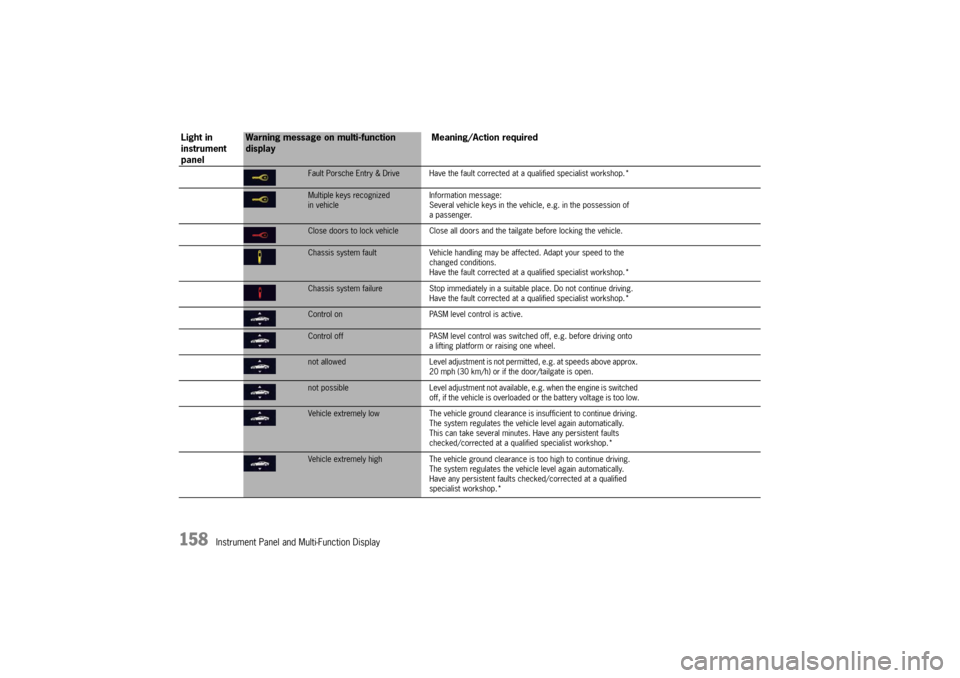
Fault Porsche Entry & Drive Have the fault corrected at a qualified specialist workshop.*Multiple keys recognized
in vehicleInformation message:
Several vehicle keys in the vehicle, e.g. in the possession of
a passenger.Close doors to lock vehicle Close all doors
and the tailgate before locking the vehicle.Chassis system faultVehicle handling may be affected. Adapt your speed to the
changed conditions.
Have the fault corrected at a qualified specialist workshop.*Chassis system failure Stop immediately in a suitable place. Do not continue driving.
Have the fault corrected at a qualified specialist workshop.*Control on PASM level control is active.Control offPASM level control was switched off, e.g. before driving onto
a lifting platform or raising one wheel. not allowed Level adjustment is not permitted, e.g. at speeds above approx.
20 mph (30 km/h) or if the door/tailgate is open.not possible Level adjustment not available, e.g. when the engine is switched
off, if the vehicle is overloaded or the battery voltage is too low.Vehicle extremely low The vehicle ground clearance is insufficient to continue driving.
The system regulates the vehi cle level again automatically.
This can take several minutes. Have any persistent faults
checked/corrected at a qualif ied specialist workshop.*Vehicle extremely high The vehicle ground clearance is too high to continue driving.
The system regulates the vehicl e level again automatically.
Have any persistent faults ch ecked/corrected at a qualified
specialist workshop.*
Light in
instrument
panel
Warning message on multi-function
display Meaning/Action required
Page 161 of 343
Instrument Panel and Multi-Function Display
159
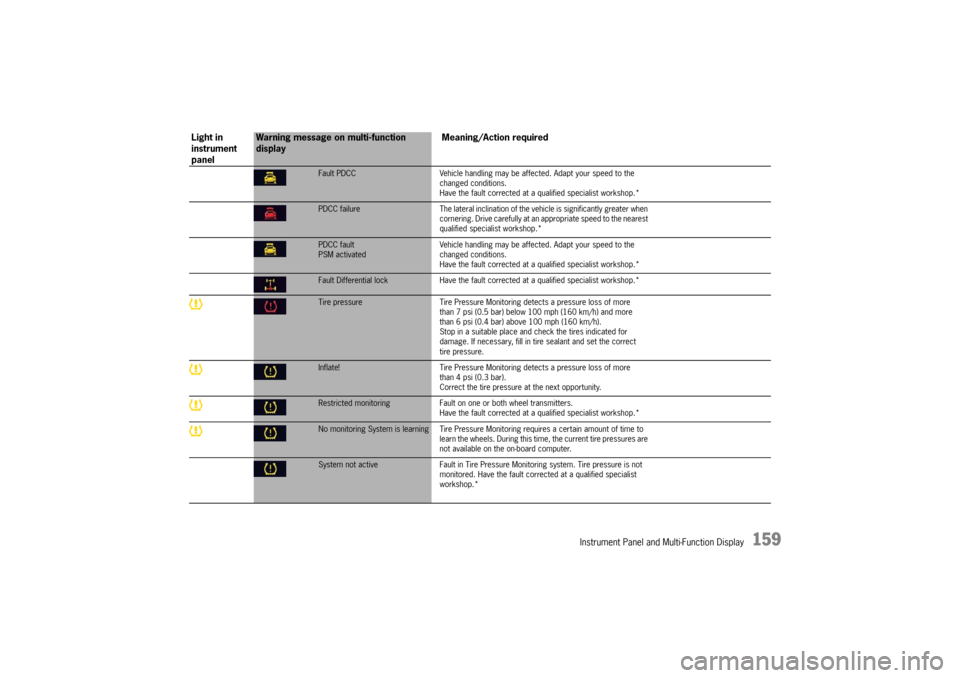
Fault PDCCVehicle handling may be affected. Adapt your speed to the
changed conditions.
Have the fault corrected at a q ualified specialist workshop.*PDCC failure The lateral inclination of the vehicle is significantly greater when
cornering. Drive carefully at an appropriate speed to the nearest
qualified specialist workshop.*PDCC fault
PSM activated Vehicle handling may be affect
ed. Adapt your speed to the
changed conditions.
Have the fault corrected at a q ualified specialist workshop.*Fault Differential lock Have the fault corrected at a qualified sp ecialist workshop.*Tire pressure Tire Pressure Monitoring detects a pressure loss of more
than 7 psi (0.5 bar) below 100 mph (160 km/h) and more
than 6 psi (0.4 bar) above 100 mph (160 km/h).
Stop in a suitable place and check the tires indicated for
damage. If necessary, fill in ti re sealant and set the correct
tire pressure.Inflate! Tire Pressure Monitoring detects a pressure loss of more
than 4 psi (0.3 bar).
Correct the tire pressure at the next opportunity.Restricted monitoring Fault on one or both wheel transmitters.
Have the fault corrected at a q ualified specialist workshop.*No monitoring System is learning Tire Pressure Mo nitoring requires a certain amount of time to
learn the wheels. During this time , the current tire pressures are
not available on the on-board computer.System not active Fault in Tire Pressure Monitoring system. Tire pressure is not
monitored. Have the fault corrected at a qualified specialist
workshop.*
Light in
instrument
panel
Warning message on multi-function
display Meaning/Action required
Page 162 of 343
160
Instrument Panel and Multi-Function Display
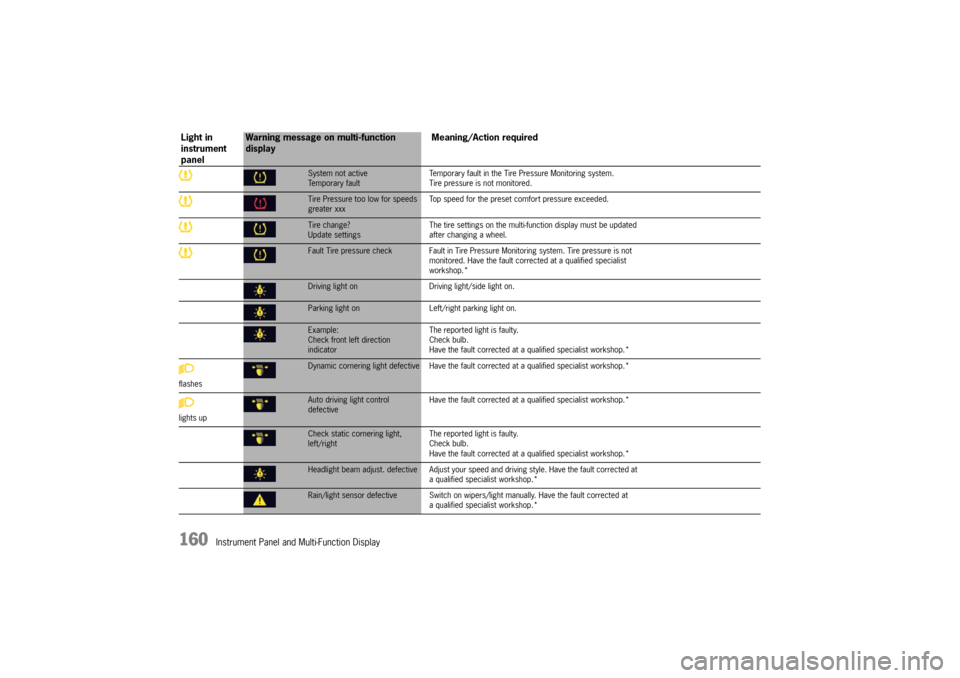
System not active
Temporary faultTemporary fault in the Tire Pressure Monitoring system.
Tire pressure is not monitored.Tire Pressure too low for speeds
greater xxx
Top speed for the preset co
mfort pressure exceeded.Tire change?
Update settings The tire settings on the multi-f
unction display must be updated
after changing a wheel.Fault Tire pressure check Fault in Tire Pressu re Monitoring system. Tire pressure is not
monitored. Have the fault corrected at a qualified specialist
workshop.*Driving light on Driving light/side light on.Parking light on Left/right parking light on.Example:
Check front left direction
indicator The reported light is faulty.
Check bulb.
Have the fault corrected at
a qualified specialist workshop.*
flashesDynamic cornering light defective Have the faul t corrected at a qualified specialist workshop.*
lights upAuto driving light control
defective Have the fault corrected at
a qualified specialist workshop.*Check static cornering light,
left/right The reported light is faulty.
Check bulb.
Have the fault corrected at
a qualified specialist workshop.*Headlight beam adjust. defective Adjust your speed and driving style. Have the fault corrected at
a qualified specialist workshop.*Rain/light sensor defective Switch on wipers/ light manually. Have the fault corrected at
a qualified specialist workshop.*
Light in
instrument
panel
Warning message on multi-function
display Meaning/Action required
Page 166 of 343
164
Driving and Driving Safety
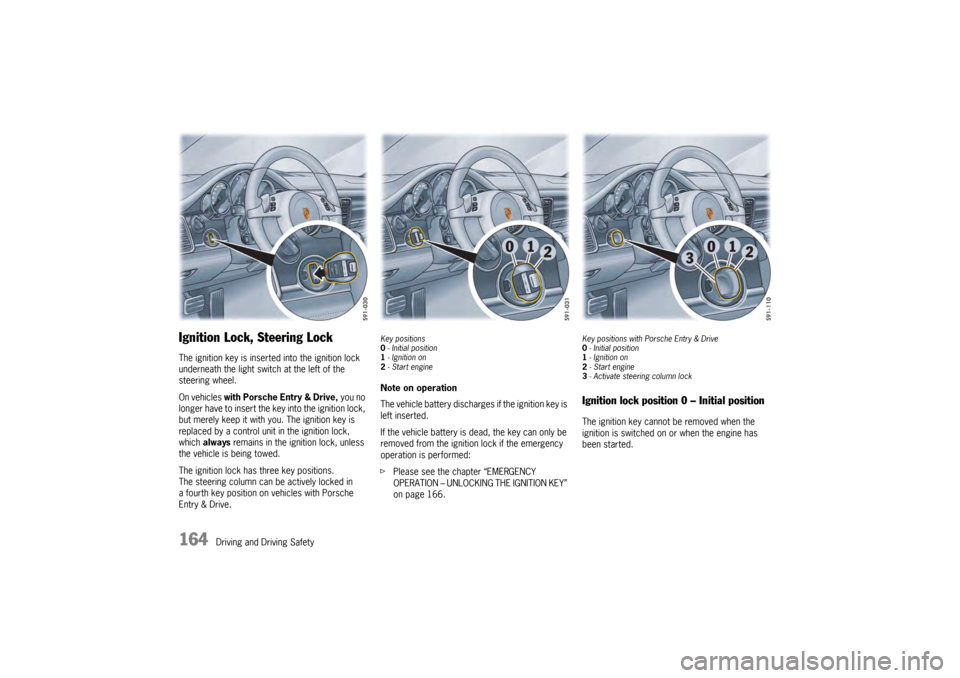
Ignition Lock, Steering LockThe ignition key is inserted into the ignition lock
underneath the light swit ch at the left of the
steering wheel.
On vehicles with Porsche Entry & Drive, you no
longer have to insert the key into the ignition lock,
but merely keep it with yo u. The ignition key is
replaced by a control unit in the ignition lock,
which always remains in the ignition lock, unless
the vehicle is being towed.
The ignition lock has three key positions.
The steering column can be actively locked in
a fourth key position on vehicles with Porsche
Entry & Drive.
Key positions
0 - Initial position
1 - Ignition on
2 -Start engineNote on operation
The vehicle battery discharges if the ignition key is
left inserted.
If the vehicle battery is dead, the key can only be
removed from the ignition lock if the emergency
operation is performed:
f Please see the chapter “EMERGENCY
OPERATION – UNLOCKING THE IGNITION KEY”
on page 166.
Key positions with Porsche Entry & Drive
0-Initial position
1 - Ignition on
2 -Start engine
3 -Activate steeri ng column lockIgnition lock position 0 – Initial positionThe ignition key cannot be removed when the
ignition is switched on or when the engine has
been started.
Page 173 of 343
Driving and Driving Safety
171
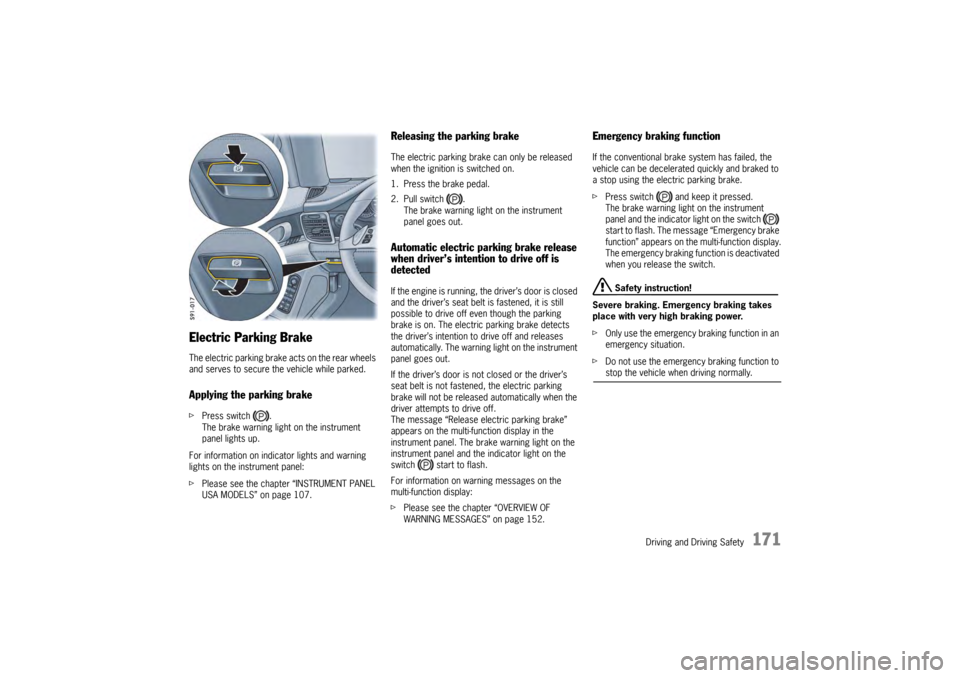
Electric Parking BrakeThe electric parking brake acts on the rear wheels
and serves to secure the vehicle while parked.Applying the parking brakefPress switch .
The brake warning light on the instrument
panel lights up.
For information on indi cator lights and warning
lights on the instrument panel:
f Please see the chapter “INSTRUMENT PANEL
USA MODELS” on page 107.
Releasing the parking brakeThe electric parking brake can only be released
when the ignition is switched on.
1. Press the brake pedal.
2. Pull switch .
The brake warning light on the instrument
panel goes out.Automatic electric parking brake release
when driver’s intention to drive off is
detectedIf the engine is running, the driver’s door is closed
and the driver’s seat belt is fastened, it is still
possible to drive off even though the parking
brake is on. The electric parking brake detects
the driver’s intention to drive off and releases
automatically. The warning light on the instrument
panel goes out.
If the driver’s door is not closed or the driver’s
seat belt is not fastened, the electric parking
brake will not be released automatically when the
driver attempts to drive off.
The message “Release electric parking brake”
appears on the multi-function display in the
instrument panel. The brake warning light on the
instrument panel and the indicator light on the
switch start to flash.
For information on warning messages on the
multi-function display:
fPlease see the chapter “OVERVIEW OF
WARNING MESSAGES” on page 152.
Emergency braking functionIf the conventional brak e system has failed, the
vehicle can be decelerated quickly and braked to
a stop using the electric parking brake.
f Press switch and keep it pressed.
The brake warning light on the instrument
panel and the indicator light on the switch
start to flash. The messa ge “Emergency brake
function” appears on the multi-function display.
The emergency braking function is deactivated
when you release the switch.
Safety instruction!
Severe braking. Emergency braking takes
place with very high braking power.
f Only use the emergency braking function in an
emergency situation.
f Do not use the emergency braking function to stop the vehicle when driving normally.
Page 174 of 343

172
Driving and Driving Safety
If the electric parking brake could not be applied
fully when the vehicle is stopped, the brake
warning light on the instrument panel starts to
flash.
For information on warning messages on the
multi-function display:
f
Please see the chapter “OVERVIEW OF
WARNING MESSAGES” on page 152.
BrakesfMake it a habit to chec k the operation of your
brakes before driving.
Keep in mind that the braking distance increases
very rapidly as the speed increases. At 60 mph
(100 km/h), for example, it is not twice but four
times longer than 30 mph (50 km/h). Tire traction
is also less effective when the roads are wet or
slippery.
f Therefore, always maintain a safe distance
from the car in front of you.Vehicles without Porsche Ceramic
Composite Brake (PCCB)Even though the brake discs consist of alloyed
grey cast iron, they will unavoidably start to
corrode if your car is parked for an extended
period. The brakes will tend to “rub” as a result.
The nature, extent and effects of corrosion
depend on the amount of time the vehicle was
parked, whether road salt or grit was spread and
whether grease-dissolving agents were used in
car washes.
If the braking comfort is noticeably impaired, we
recommend having the brake system checked by
experts at an authorized Porsche dealer.
Brake system functionYour Porsche is equipped with a power assisted
hydraulic dual circuit brake system with disc
brakes at the front and rear.
Both circuits function independently. One brake
circuit operates the front left and rear right wheel
and the other operates the front right and rear left
wheel.
If one brake circuit has failed, the other will still
operate. However, you will notice an increased
pedal travel when you apply the brakes. Failure of
one brake circuit will cause the stopping distance
to increase.
Warning!
Risk of an accident, resulting in serious
personal injury or death.
In the unlikely event of hydraulic failure of
one brake circuit:
f Push the brake pedal down firmly and hold it in
that position. A mechanical linkage activates
the second circuit, and you will be able to bring
the vehicle to a stop.
f After bringing your vehicle to a complete stop,
avoid driving the vehicle and instead have it
towed to the nearest authorized Porsche dealer for repair.
Brake warning light USA
Brake warning light Canada
Page 178 of 343
176
Driving and Driving Safety
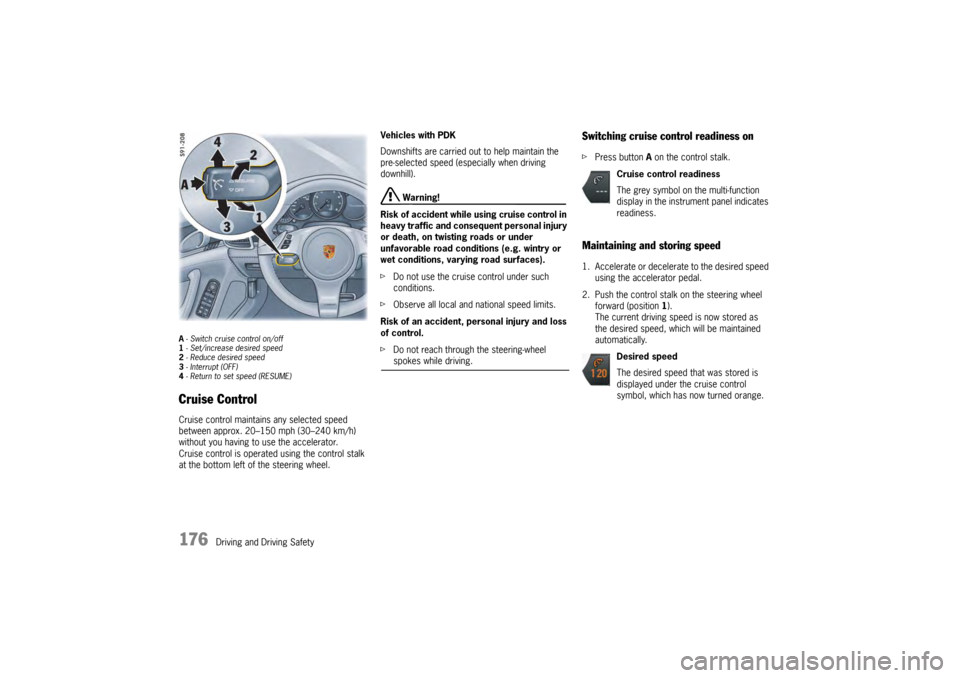
A- Switch cruise control on/off
1 - Set/increase desired speed
2 - Reduce desired speed
3 - Interrupt (OFF)
4 - Return to set speed (RESUME)Cruise ControlCruise control maintains any selected speed
between approx. 20–150 mph (30–240 km/h)
without you having to use the accelerator.
Cruise control is operated using the control stalk
at the bottom left of the steering wheel. Vehicles with PDK
Downshifts are carried out to help maintain the
pre-selected speed (especially when driving
downhill).
Warning!
Risk of accident while using cruise control in
heavy traffic and consequent personal injury
or death, on twisting roads or under
unfavorable road conditions (e.g. wintry or
wet conditions, varying road surfaces).
f Do not use the cruise control under such
conditions.
f Observe all local and national speed limits.
Risk of an accident, personal injury and loss
of control.
f Do not reach through the steering-wheel spokes while driving.
Switching cruise control readiness onfPress button A on the control stalk.Maintaining and storing speed1. Accelerate or decelera te to the desired speed
using the accelerator pedal.
2. Push the control stalk on the steering wheel forward (position 1).
The current driving speed is now stored as
the desired speed, which will be maintained
automatically.
Cruise control readiness
The grey symbol on the multi-function
display in the instrument panel indicates
readiness.
Desired speed
The desired speed that was stored is
displayed under the cruise control
symbol, which has now turned orange.
Page 179 of 343

Driving and Driving Safety
177
Accelerating (e.g. to overtake)Variant 1
fIncrease the speed as usual with the
accelerator pedal.
When you ease off the accelerator, the
previously stored value is set again.
Variant 2
f Push the control stalk on the steering wheel
forward (position 1).
The desired speed is increased in steps of
1mph (1km/h).
or
Press the control stalk on the steering wheel
forward and keep it pressed (position 1).
The desired speed is increased in steps of
5 mph (10 km/h).
The new desired speed is displayed on the
multi-function display in the instrument panel.
Deceleratingf Briefly pull the control stalk on the steering
wheel towards the steering wheel (position 2).
The desired speed is decreased in steps of
1 mph (1 km/h).
or
Pull the control stalk on the steering wheel
towards the steering whee l and keep it pulled
(position 2).
The desired speed is decreased in steps of
5 mph (10 km/h).
The new desired speed is displayed on the
multi-function display in the instrument panel.
Vehicles with PDK
Downshifts are carried out to help maintain the
pre-selected speed (especially when driving
downhill).
Interrupting cruise control
operation–OFFThe speed driven before the interruption remains
stored in the memory and can be reactivated by
pressing the control stalk.
f Please see the chapter “RESUMING THE
STORED SPEED – RESUME” on page 178.
f Press the control stalk down (position 3).
or
Press the brake or clutch pedal or move
the PDK selector lever to position N.
For more information on driving with Porsche
Doppelkupplung:
f Please see the chapter “PORSCHE
DOPPELKUPPLUNG (PDK)” on page 193.
Cruise control operation is interrupted
automatically:
– If the set vehicle speed is exceeded by more than approx. 16 mph (25 km/h) for longer
than 20 seconds.
– If the actual vehicle speed falls below the set vehicle speed by approx. 37 mph (60 km/h)
for longer than 60 seconds (e.g. gradients).
– If Porsche Stability Management (PSM) intervenes for longer than 0.5 seconds.
Page 182 of 343
180
Driving and Driving Safety
Override
The speed of the vehicle can be increased at any
time by pressing the accelerator.
If the set ACC speed is exceeded, the ACC is
deactivated.
The message “ACC passive” will appear on the
multi-function display in the instrument panel.
The desired speed that was stored is retained.
After releasing the accelerator pedal, the ACC
accelerates to the desired speed if there is no
vehicle in front and controls the distance if a
vehicle in front is present.
For information on the “ACC passive” status:
f
Please see the chapter “OPERATING STATES
WHEN ADAPTIVE CRUISE CONTROL IS
SWITCHED ON” on page 182.
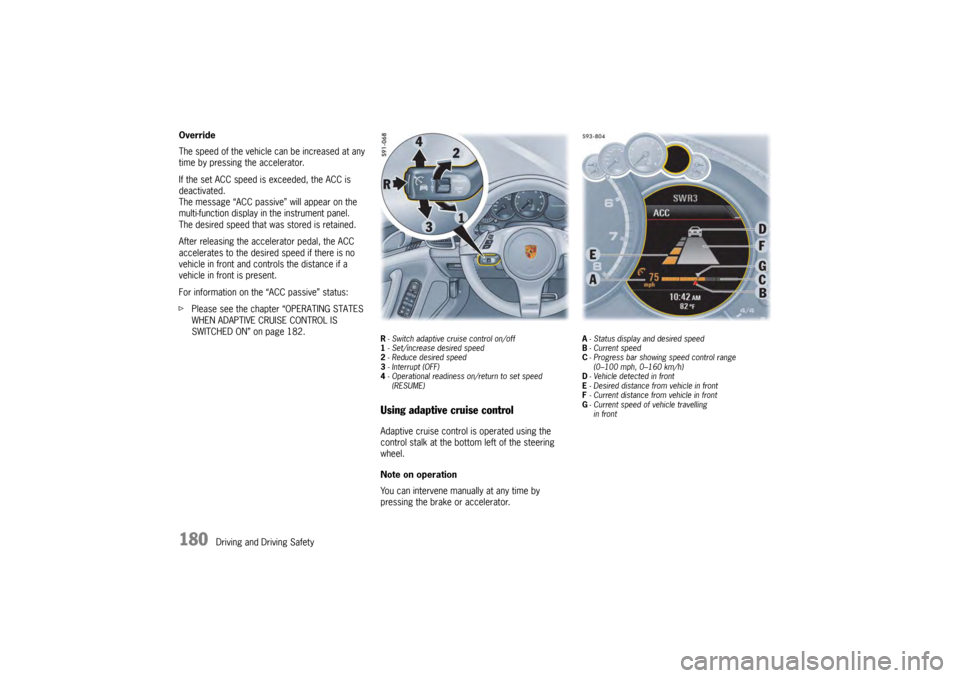
R- Switch adaptive cruise control on/off
1 - Set/increase desired speed
2 - Reduce desired speed
3 - Interrupt (OFF)
4 - Operational readiness on/return to set speed
(RESUME)Using adaptive cruise controlAdaptive cruise control is operated using the
control stalk at the bottom left of the steering
wheel.
Note on operation
You can intervene manually at any time by
pressing the brake or accelerator.
A - Status display and desired speed
B - Current speed
C - Progress bar showing speed control range
(0–100 mph, 0–160 km/h)
D - Vehicle detected in front
E - Desired distance from vehicle in front
F - Current distance from vehicle in front
G - Current speed of vehicle travelling
in front
Page 183 of 343
Driving and Driving Safety
181
Adaptive cruise control displayAll important information, messages and warnings
are displayed on the multi-function display in the
instrument panel.
“ACC” main menu
The adaptive cruise control display on the multi-
function display can be selected permanently
using the buttons on the multifunction steering
wheel or the control stalk at the bottom right of
the steering wheel.
For information on using the multi-function display:
f Please see the chapter “OPERATING THE
MULTI-FUNCTION DISPLAY IN THE
INSTRUMENT PANEL” on page 115. Status display
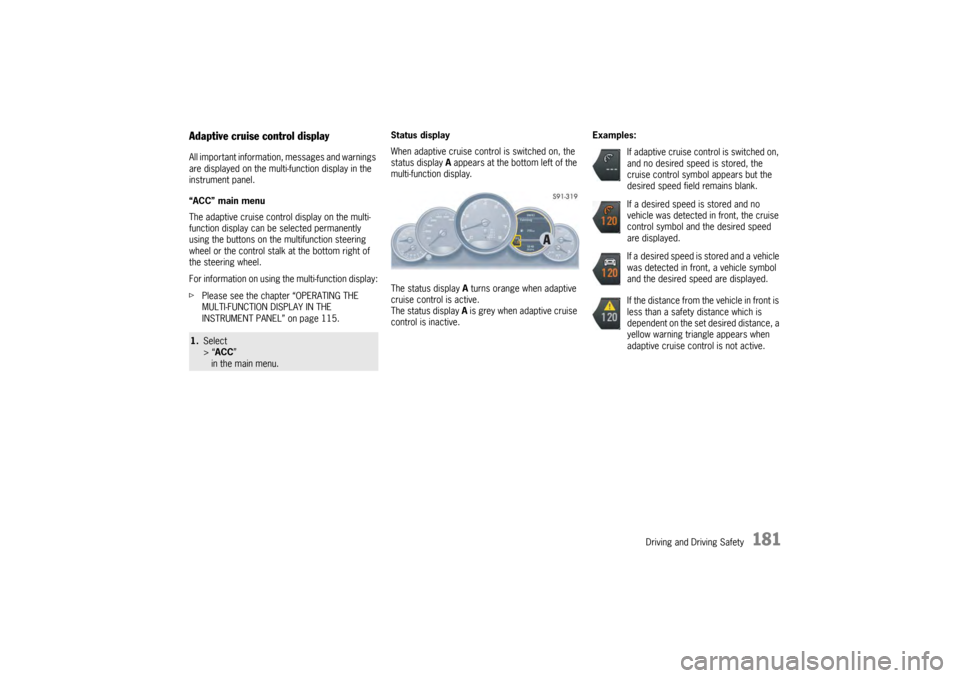
When adaptive cruise control is switched on, the
status display
A appears at the bottom left of the
multi-function display.
The status display A turns orange when adaptive
cruise control is active.
The status display A is grey when adaptive cruise
control is inactive. Examples:1.
Select
> “ACC ”
in the main menu.
If adaptive cruise control is switched on,
and no desired speed is stored, the
cruise control symbol appears but the
desired speed field remains blank.
If a desired speed is stored and no
vehicle was detected in front, the cruise
control symbol and the desired speed
are displayed.
If a desired speed is stored and a vehicle
was detected in front, a vehicle symbol
and the desired speed are displayed.
If the distance from the vehicle in front is
less than a safety distance which is
dependent on the set desired distance, a
yellow warning triangle appears when
adaptive cruise control is not active.