instrument panel Ram 1500 2013 Workshop Manual
[x] Cancel search | Manufacturer: RAM, Model Year: 2013, Model line: 1500, Model: Ram 1500 2013Pages: 734, PDF Size: 5.47 MB
Page 269 of 734
WARNING!
A hot engine cooling system is dangerous. You or
others could be badly burned by steam or boiling
coolant. You may want to call an authorized dealer
for service if your vehicle overheats. If you decide to
look under the hood yourself, see “Maintaining Your
Vehicle.” Follow the warnings under the “Cooling
System Pressure Cap” paragraph.
ELECTRONIC VEHICLE INFORMATION CENTER
(EVIC)
The Electronic Vehicle Information Center (EVIC) fea-
tures a driver-interactive display that is located in the
instrument cluster.
4
UNDERSTANDING YOUR INSTRUMENT PANEL 267
Page 270 of 734
This system allows the driver to select a variety of useful
information by pressing the switches mounted on the
steering wheel. The EVIC consists of the following:
•Digital Speedometer
• Vehicle Info
• Fuel Economy Info
• Trip A
• Trip B
• Stop/Start Info (If Equipped)
• Trailer Tow
• Audio
• Stored Messages
• Screen Setup •
Vehicle Settings (Not Equipped with a Uconnect®
Access 5.0 & 8.4 radio)
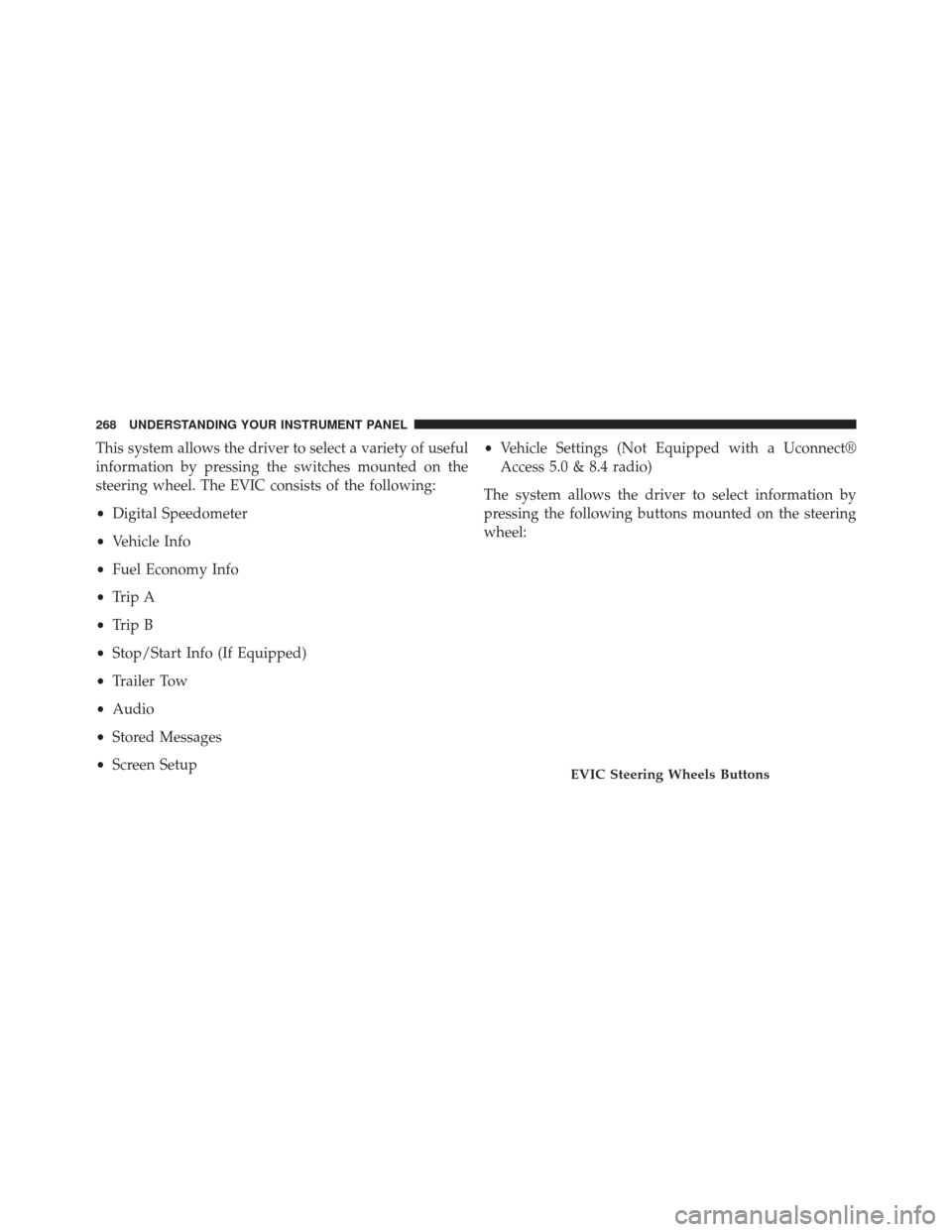
The system allows the driver to select information by
pressing the following buttons mounted on the steering
wheel:
EVIC Steering Wheels Buttons
268 UNDERSTANDING YOUR INSTRUMENT PANEL
Page 271 of 734
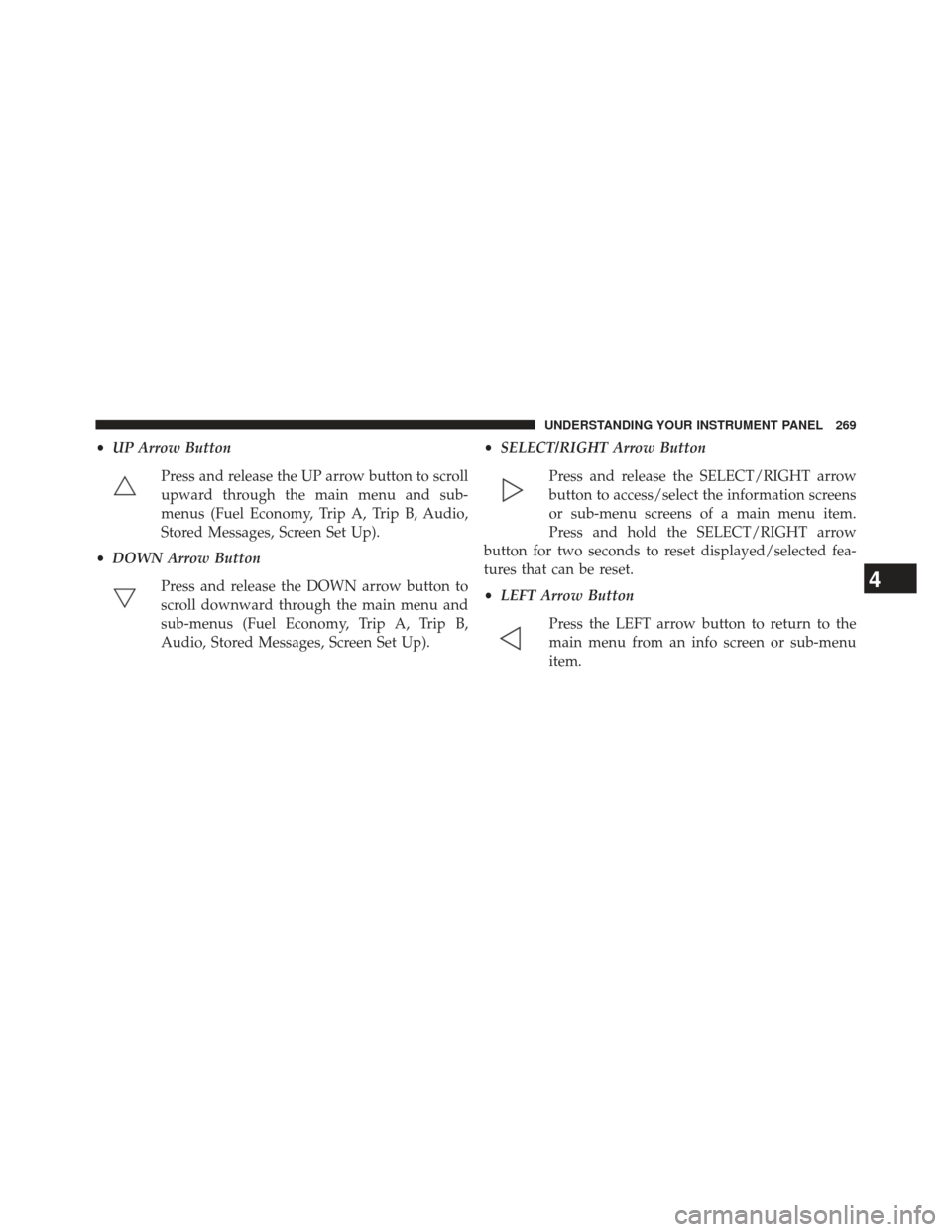
•UP Arrow Button
Press and release the UP arrow button to scroll
upward through the main menu and sub-
menus (Fuel Economy, Trip A, Trip B, Audio,
Stored Messages, Screen Set Up).
• DOWN Arrow Button
Press and release the DOWN arrow button to
scroll downward through the main menu and
sub-menus (Fuel Economy, Trip A, Trip B,
Audio, Stored Messages, Screen Set Up). •
SELECT/RIGHT Arrow Button
Press and release the SELECT/RIGHT arrow
button to access/select the information screens
or sub-menu screens of a main menu item.
Press and hold the SELECT/RIGHT arrow
button for two seconds to reset displayed/selected fea-
tures that can be reset.
• LEFT Arrow Button
Press the LEFT arrow button to return to the
main menu from an info screen or sub-menu
item.
4
UNDERSTANDING YOUR INSTRUMENT PANEL 269
Page 272 of 734
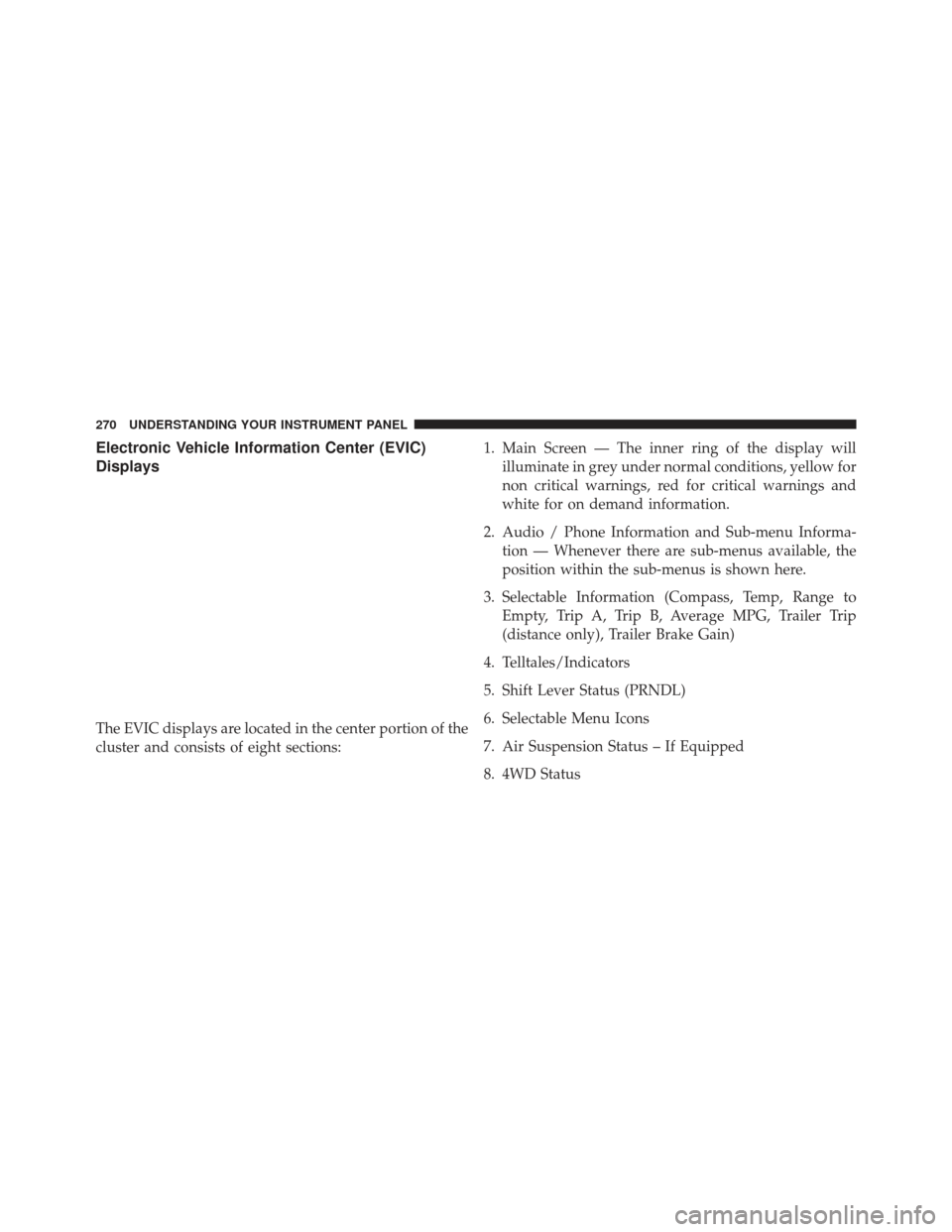
Electronic Vehicle Information Center (EVIC)
Displays
The EVIC displays are located in the center portion of the
cluster and consists of eight sections:1. Main Screen — The inner ring of the display will
illuminate in grey under normal conditions, yellow for
non critical warnings, red for critical warnings and
white for on demand information.
2. Audio / Phone Information and Sub-menu Informa- tion — Whenever there are sub-menus available, the
position within the sub-menus is shown here.
3. Selectable Information (Compass, Temp, Range to Empty, Trip A, Trip B, Average MPG, Trailer Trip
(distance only), Trailer Brake Gain)
4. Telltales/Indicators
5. Shift Lever Status (PRNDL)
6. Selectable Menu Icons
7. Air Suspension Status – If Equipped
8. 4WD Status
270 UNDERSTANDING YOUR INSTRUMENT PANEL
Page 273 of 734
9. Selectable Gauge 2
10. Selectable Gauge 1
The main display area will normally display the main
menu or the screens of a selected feature of the main
menu. The main display area also displays “pop up”
messages that consist of approximately 60 possible warn-
ing or information messages. These pop up messages fall
into several categories:
•Five Second Stored Messages
When the appropriate conditions occur, this type of
message takes control of the main display area for five
seconds and then returns to the previous screen. Most of
the messages of this type are then stored (as long as the
condition that activated it remains active) and can be
reviewed from the “Messages” main menu item. As long
as there is a stored message, an “i” will be displayed in the EVIC’s compass/outside temp line. Examples of this
message type are “Right Front Turn Signal Lamp Out”
and “Low Tire Pressure”.
•
Unstored Messages
This message type is displayed indefinitely or until the
condition that activated the message is cleared. Examples
of this message type are “Turn Signal On” (if a turn signal
is left on) and “Lights On” (if driver leaves the vehicle).
• Unstored Messages Until RUN
These messages deal primarily with the Remote Start
feature. This message type is displayed until the ignition
is in the RUN state. Examples of this message type are
“Remote Start Aborted - Door Ajar” and “Press Brake
Pedal and Push Button to Start”.
• Five Second Unstored Messages
When the appropriate conditions occur, this type of
message takes control of the main display area for five
4
UNDERSTANDING YOUR INSTRUMENT PANEL 271
Page 274 of 734
seconds and then returns to the previous screen. An
example of this message type is “Automatic High Beams
On”.
Engine Oil Change Indicator System
Oil Change Required
Your vehicle is equipped with an engine oil change
indicator system. The “Oil Change Required” message
will flash in the EVIC display for approximately 10
seconds after a single chime has sounded, to indicate the
next scheduled oil change interval. The engine oil change
indicator system is duty cycle based, which means the
engine oil change interval may fluctuate, dependent
upon your personal driving style.
Unless reset, this message will continue to display each
time you turn the ignition switch to the ON/RUN
position or cycle the ignition to the ON/RUN position if
equipped with Keyless Enter-N-Go™. To turn off themessage temporarily, press and release the MENU but-
ton. To reset the oil change indicator system (after
performing the scheduled maintenance) refer to the fol-
lowing procedure.
Vehicles Equipped With Keyless Enter-N-Go™
1. Without pressing the brake pedal, press the ENGINE
START/STOP button and cycle the ignition to the
ON/ RUN position (Do not start the engine.)
2. Fully depress the accelerator pedal, slowly, three times within 10 seconds.
3. Without pressing the brake pedal, press the ENGINE START/STOP button once to return the ignition to the
OFF/LOCK position.
Vehicles Not Equipped With Keyless Enter-N-Go™
1. Turn the ignition switch to the ON/RUN position (Do not start the engine.)
272 UNDERSTANDING YOUR INSTRUMENT PANEL
Page 275 of 734
2. Fully depress the accelerator pedal, slowly, three timeswithin 10 seconds.
3. Turn the ignition switch to the OFF/LOCK position.
NOTE: If the indicator message illuminates when you
start the vehicle, the oil change indicator system did not
reset. If necessary, repeat this procedure.
Electronic Vehicle Information Center (EVIC)
Messages
• Front Seatbelts Unbuckled
• Driver Seatbelt Unbuckled
• Passenger Seatbelt Unbuckled
• Service Airbag System
• Traction Control Off
• Washer Fluid Low •
Oil Pressure Low
• Oil Change Due
• Fuel Low
• Service Antilock Brake System
• Service Electronic Throttle Control
• Service Power Steering
• Cruise Off
• Cruise Ready
• Cruise Set To XXX MPH
• Tire Pressure Screen With Low Tire(s) “Inflate Tire to
XX”
• Service Tire Pressure System
• Parking Brake Engaged
4
UNDERSTANDING YOUR INSTRUMENT PANEL 273
Page 276 of 734
•Brake Fluid Low
• Service Electronic Braking System
• Engine Temperature Hot
• Battery Voltage Low
• Service Electronic Throttle Control
• Lights On
• Right Turn Signal Light Out
• Left Turn Signal Light Out
• Turn Signal On
• Vehicle Not in Park
• Key in Ignition
• Key in Ignition Lights On
• Remote Start Active Key to Run •
Remote Start Active Push Start Button
• Remote Start Aborted Fuel Low
• Remote Start Aborted Too Cold
• Remote Start Aborted Door Open
• Remote Start Aborted Hood Open
• Remote Start Aborted Trunk Open
• Remote Start Aborted Time Expired
• Remote Start Disabled Start to Reset
• Service Airbag System
• Service Airbag Warning Light
• Driver Seatbelt Unbuckled
• Passenger Seatbelt Unbuckled
• Front Seatbelts Unbuckled
274 UNDERSTANDING YOUR INSTRUMENT PANEL
Page 277 of 734
•Door Open
• Doors Open
• Gear Not Available
• Shift Not Allowed
• Shift to Neutral then Drive or Reverse
• Autostick Unavailable Service Required
• Automatic Unavailable Use Autostick Service Req.
• Transmission Getting Hot Press Brake
• Trans. Hot Stop Safely Shift to Park Wait to Cool
• Transmission Cool Ready to Drive
• Trailer Brake Disconnected
• Service Transmission
• Service Shifter •
Engage Park Brake to Prevent Rolling
• Transmission Too cold Idle with Engine On
• Washer Fluid Low
• Service Air Suspension System
• Normal Ride Height Achieved
• Aerodynamic Ride Height Achieved
• Off Road 1 Ride Height Achieved
• Off Road 2 Ride Height Achieved
• Entry/Exit Ride Height Achieved
• Selected Ride Height Not Permitted
• Service Air Suspension System Immediately
• Reduce Speed To Maintain Selected Ride Height
• Air Suspension System Cooling Down Please Wait
4
UNDERSTANDING YOUR INSTRUMENT PANEL 275
Page 278 of 734
•Vehicle Cannot Be Lowered Door Open
• Off Road 2 Watch For Clearance
• Entry/Exit Watch For Clearance
• Air Suspension Temporarily Disabled For jacking And
Tire Change
• Battery Low Start Engine To Change Ride Height
• Stop/Start Ready – If Equipped
• Stop/Start Not Ready – If Equipped
• Stop/Start Not Ready Hood Open – If Equipped
• Stop/Start Not Ready Battery Charging – If Equipped
• Stop/Start Not Ready Trailer Tow/Haul Selected – If
Equipped
• Stop/Start Not Ready 4WD/Low Range Selected – If
Equipped •
Stop/Start Not Ready Fuel Level Low – If Equipped
• Stop/Start Not Ready Steep Incline – If Equipped
• Stop/Start Not Ready Extreme Outside Temperature –
If Equipped
• Stop/Start Not Ready Engine Temperature Too High –
If Equipped
• Stop/Start Not Ready Engine Temperature Too Low –
If Equipped
• Stop/Start Not Ready Driver Seatbelt Unbuckled – If
Equipped
• Stop/Start Not Ready Driver Door Open – If Equipped
• Stop/Start Not Ready Cabin Cooling Or Heating – If
Equipped
• Stop/Start Not Ready Not Ready Max Cooling Or
Heating – If Equipped
276 UNDERSTANDING YOUR INSTRUMENT PANEL