back Ram 1500 2015 Owner's Manual
[x] Cancel search | Manufacturer: RAM, Model Year: 2015, Model line: 1500, Model: Ram 1500 2015Pages: 871, PDF Size: 24.83 MB
Page 502 of 871
NOTE:Before retrying a selection, make certain that all
the necessary requirements for selecting a new transfer
case position have been met. To retry the selection, turn
the control knob back to the current position, wait five
seconds, and retry selection. To find the shift require-
ments, refer to the#Shifting Procedure#for your transfer
case, located in this section.
The “SVC 4WD Warning Light” monitors the electronic
shift four-wheel drive system. If this light remains on
after engine start up or illuminates during driving, it
means that the four-wheel drive system is not function-
ing properly and that service is required.
WARNING!
Always engage the parking brake when powering down
the vehicle if the “SVC 4WD Warning Light” is illumi-
nated. Not engaging the parking brake may allow the
vehicle to roll, which may cause personal injury.
NOTE:Do not attempt to make a shift while only the
front or rear wheels are spinning, as this can cause
damage to driveline components.
When operating your vehicle in 4WD LOW, the engine
speed is approximately three times that of the 2WD or
4WD LOCK positions at a given road speed. Take care
not to overspeed the engine and do not exceed 25 mph
(40 km/h).
Proper operation of four-wheel drive vehicles depends
on tires of equal size, type and circumference on each
wheel. Any difference in tire size can cause damage to the
drivetrain.
Because four-wheel drive provides improved traction,
there is a tendency to exceed safe turning and stopping
speeds. Do not go faster than road conditions permit.
500 STARTING AND OPERATING
Page 504 of 871
Shifting Procedure
NOTE:
•If any of the requirements to select a new transfer case
position have not been met, the transfer case will not
shift. The position indicator light for the previous posi-
tion will remain ON and the newly selected position
indicator light will continue to flash until all the require-
ments for the selected position have been met. To retry a
shift: return the control knob back to the original posi-
tion, make certain all shift requirements have been met,
wait five seconds and try the shift again.
•If all the requirements to select a new transfer case
position have been met, the current position indicator
light will turn OFF, the selected position indicator light
will flash until the transfer case completes the shift.
When the shift is complete, the position indicator light
for the selected position will stop flashing and remain
ON.
2WD To 4WD LOCK
Rotate the 4WD control switch to the desired position.
Shifts between 2WD and 4WD LOCK can be done with
the vehicle stopped or in motion. With the vehicle in
motion, the transfer case will engage/disengage faster if
you momentarily release the accelerator pedal after turn-
ing the control switch. If the vehicle is stopped, the
ignition switch must be in the ON position with the
engine either running or off. This shift cannot be com-
pleted if the ignition switch is in the ACC position.
NOTE:The four-wheel drive system will not allow shifts
between 2WD/4WD LOCK if the front and/or rear
wheels are spinning (no traction). In this situation, the
selected position indicator light will flash and the origi-
nal position indicator light will remain ON. At this time,
reduce speed and stop spinning the wheels to complete
the shift.
502 STARTING AND OPERATING
Page 505 of 871
2WD Or 4WD LOCK To 4WD LOW
NOTE:When shifting into or out of 4WD LOW some
gear noise may be heard. This noise is normal and is not
detrimental to the vehicle or occupants.
Shifting can be performed with the vehicle rolling 2 to
3 mph (3 to 5 km/h) or completely stopped. You can use
either of the following procedures:
Preferred Procedure
1. With the engine running, slow the vehicle to 2 to
3 mph (3 to 5 km/h).
2. Shift the transmission into NEUTRAL.
3. While still rolling, rotate the transfer case control
switch to the desired position.
4. After the desired position indicator light is ON (not
flashing), shift the transmission back into gear.
Alternate Procedure
1. Bring the vehicle to a complete stop.
2. With the ignition switch in the ON position and the
engine running, shift the transmission into NEUTRAL.
3. Rotate the transfer case control switch to the desired
position.
4. After the desired position indicator light is ON (not
flashing), shift the transmission back into gear.
NOTE:
•If Steps 1 or 2 of either the Preferred or Alternate
Procedure are not satisfied prior to attempting the
shift, then the desired position indicator light will flash
continuously while the original position indicator light
is ON, until all requirements have been met.
5
STARTING AND OPERATING 503
Page 508 of 871

Transfer Case Position Indicator Lights
The Transfer Case Position Indicator Lights (4WD,
4LOW, and 4WD AUTO) are located in the instrument
cluster and indicate the current and desired transfer case
selection. When you select a different transfer case posi-
tion, the indicator lights will do the following:
If All Shift Conditions Are Met:
1. The current position indicator light will turn OFF.
2. The selected position indicator light will flash until the
transfer case completes the shift.
3. When the shift is complete, the indicator light for the
selected position will stop flashing and remain ON.
If One Or More Shift Conditions Are Not Met:
1. The indicator light for the current position will remain
ON.
2. The newly selected position indicator light will con-
tinue to flash.
3. The transfer casewill notshift.
NOTE:Before retrying a selection, make certain that all
the necessary requirements for selecting a new transfer
case position have been met. To retry the selection, turn
the control knob back to the current position, wait five
seconds, and retry selection. To find the shift require-
ments, refer to the#Shifting Procedure#for your transfer
case, located in this section.
The “SVC 4WD Warning Light” monitors the electronic
shift four-wheel drive system. If this light remains on
after engine start up or illuminates during driving, it
means that the four-wheel drive system is not function-
ing properly and that service is required.
506 STARTING AND OPERATING
Page 511 of 871
Shifting Procedure
NOTE:
•If any of the requirements to select a new transfer case
position have not been met, the transfer case will not
shift. The position indicator light for the previous posi-
tion will remain ON and the newly selected position
indicator light will continue to flash until all the require-
ments for the selected position have been met. To retry a
shift: return the control knob back to the original posi-
tion, make certain all shift requirements have been met,
wait five seconds and try the shift again.
•If all the requirements to select a new transfer case
position have been met, the current position indicator
light will turn OFF, the selected position indicator light
will flash until the transfer case completes the shift.
When the shift is complete, the position indicator light
for the selected position will stop flashing and remain
ON.
Electronically Shifted Transfer Case
(Five-Position Switch) — If Equipped
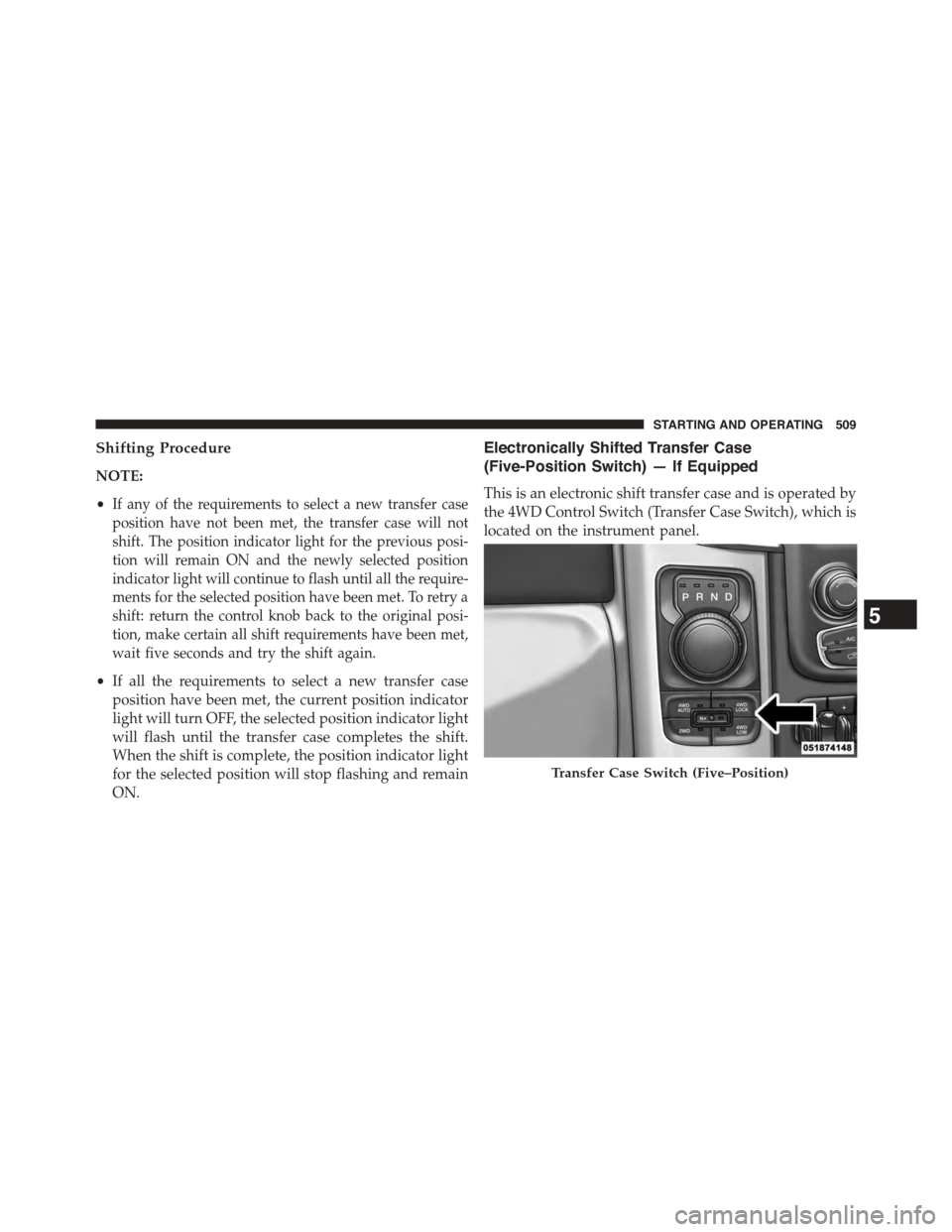
This is an electronic shift transfer case and is operated by
the 4WD Control Switch (Transfer Case Switch), which is
located on the instrument panel.
Transfer Case Switch (Five–Position)
5
STARTING AND OPERATING 509
Page 513 of 871

NOTE:The transfer case NEUTRAL position is selected
by depressing the recessed button (with a ballpoint pen
or similar object) located in the center of the 4WD Control
Switch. The transfer case NEUTRAL position is to be
used for recreational towing only. Refer to “Recreational
Towing” in “Starting and Operating” for further infor-
mation.
Transfer Case Position Indicator Lights
The Transfer Case Position Indicator Lights (4WD,
4LOW, and 4WD AUTO) are located in the instrument
cluster and indicate the current and desired transfer case
selection. When you select a different transfer case posi-
tion, the indicator lights will do the following:
If All Shift Conditions Are Met:
1. The current position indicator light will turn OFF.
2. The selected position indicator light will flash until the
transfer case completes the shift.
3. When the shift is complete, the indicator light for the
selected position will stop flashing and remain ON.
If One Or More Shift Conditions Are Not Met:
1. The indicator light for the current position will remain
ON.
2. The newly selected position indicator light will con-
tinue to flash.
3. The transfer casewill notshift.
NOTE:Before retrying a selection, make certain that all
the necessary requirements for selecting a new transfer
case position have been met. To retry the selection, turn
the control knob back to the current position, wait five
seconds, and retry selection. To find the shift require-
ments, refer to the#Shifting Procedure#for your transfer
case, located in this section.
The “SVC 4WD Warning Light” monitors the electronic
shift four-wheel drive system. If this light remains on
5
STARTING AND OPERATING 511
Page 517 of 871
Preferred Procedure
1. With the engine running, slow the vehicle to 2 to
3 mph (3 to 5 km/h).
2. Shift the transmission into NEUTRAL.
3. While still rolling, press the desired position on the
transfer case control switch.
4. After the desired position indicator light is ON (not
flashing), shift the transmission back into gear.
Alternate Procedure
1. Bring the vehicle to complete stop.
2. With the ignition switch in the ON position and the
engine running, shift the transmission into NEUTRAL.
3. Press the desired position on the transfer case control
switch.
4. After the desired position indicator light is ON (not
flashing), shift the transmission back into gear.
NOTE:
•If Steps 1 or 2 of either the Preferred or Alternate
Procedure are not satisfied prior to attempting the shift
or if they no longer are being met while the shift
attempt is in process, the desired position indicator
light will flash continuously while the original position
indicator light is ON, until all requirements have been
met.
•The ignition switch must be in the ON position for a
shift to take place and for the position indicator lights
to be operable. If the ignition switch is not in the ON
position, then the shift will not take place and no
position indicator lights will be on or flashing.
5
STARTING AND OPERATING 515
Page 538 of 871
•Snow– In heavy snow or for additional control and
traction at slower speeds, shift the transmission to a
low gear and shift the transfer case to 4L (Low Range)
if necessary. Do not shift to a lower gear than necessary
to maintain headway. Over-revving the engine can
spin the wheels and traction will be lost. If you start to
slow to a stop, try turning your steering wheel no more
than a¼turn quickly back and forth, while still
applying throttle. This will allow the tires to get a fresh
#bite#and help maintain your momentum.
CAUTION!
On icy or slippery roads, do not downshift at high
engine RPMs or vehicle speeds because engine brak-
ing may cause skidding and loss of control.
•Mud– Deep mud creates a great deal of suction
around the tires and is very difficult to get through.
You should use 4L (Low Range) with a gear low
enough to maintain your momentum without shifting.
If you start to slow to a stop, try turning your steering
wheel no more than a¼turn quickly back and forth
for additional traction. Mud holes pose an increased
threat of vehicle damage and getting stuck. They are
normally full of debris from previous vehicles getting
stuck. As a good practice before entering any mud
hole, get out and determine how deep it is, if there are
any hidden obstacles and if the vehicle can be safely
recovered if stuck.
•Sand– Soft sand is very difficult to travel through with
full tire pressure. When crossing soft sandy spots in a
trail maintain your vehicle’s momentum and do not
stop. The key to driving in soft sand using the appro-
priate tire pressure, accelerating slowly, avoiding
abrupt maneuvers and maintaining the vehicle’s mo-
mentum. If you are going to be driving on large soft
sandy areas or dunes, reduce your tire pressure to a
minimum of 15 psi (103 kPa) to allow for a greater tire
536 STARTING AND OPERATING
Page 539 of 871
surface area. Reduced tire pressure will drastically
improve your traction and handling, while driving on
the soft sand, but you must return the tires to normal
air pressure before driving on pavement or other hard
surfaces. Be sure you have a way to air the tires back
up prior to reducing the pressure.
CAUTION!
Reduced tire pressures may cause tire unseating and
total loss of air pressure. To reduce the risk of tire
unseating, while at a reduced tire pressure, reduce
your speed and avoid sharp turns or abrupt maneu-
vers.
Crossing Obstacles (Rocks And Other High
Points)
While driving off road, you will encounter many types of
terrain. These varying types of terrain bring different
types of obstacles. Before proceeding review the path
ahead to determine the correct approach and your ability
to safely recover the vehicle if something goes wrong.
Keeping a firm grip on the steering wheel, bring the
vehicle to a complete stop and then inch the vehicle
forward until it makes contact with the object. Apply the
throttle lightly while holding a light brake pressure and
ease the vehicle up and over the object.
WARNING!
Crossing obstacles can cause abrupt steering system
loading which could cause you to loose control of
your vehicle.
5
STARTING AND OPERATING 537
Page 542 of 871
CAUTION!
Winching or rocking the vehicle off hard objects
increases the risk of underbody damage.
Hill Climbing
Hill climbing requires good judgment and a good under-
standing of your abilities and your vehicle’s limitations.
Hills can cause serious problems. Some are just too steep
to climb and should not be attempted. You should always
feel confident with the vehicle and your abilities. You
should always climb hills straight up and down. Never
attempt to climb a hill on an angle.
•Before Climbing A Steep Hill– As you approach a
hill consider its grade or steepness. Determine if it is
too steep. Look to see what the traction is on the hill
side trail. Is the trail straight up and down? What is on
top and the other side? Are there ruts, rocks, branches
or other obstacles on the path? Can you safely recover
the vehicle if something goes wrong? If everything
looks good and you feel confident, then change trans-
mission into a lower gear, shift the transfer case into 4L
(Low) and proceed with caution. You should use first
gear and 4L (Low Range) for very steep hills.
•Driving Up Hill– Once you have determined your
ability to proceed and have shifted into the appropri-
ate gear, line your vehicle up for the straightest pos-
sible run. Accelerate with an easy constant throttle and
apply more power as you start up the hill. Do not race
forward into a steep grade, the abrupt change of grade
could cause you to lose control. If the front end begins
to bounce, ease off the throttle slightly to bring all four
tires back on the ground. As you approach the crest of
the hill ease off the throttle and slowly proceed over
the top. If the wheels start to slip as you approach the
crest of a hill, ease off the accelerator and maintain
headway by turning the steering wheel no more than
a¼turn quickly back and forth. This will provide a
540 STARTING AND OPERATING